



7 Best Keyboards for Fortnite in 2026 for God-Tier Speed and Precision

Eneba Hub contains affiliate links, which means we may earn a small commission if you make a purchase through them—at no extra cost to you. Learn more

One does not simply: find the best keyboard for Fortnite without spiraling into Reddit rabbit holes, YouTube reviews, and questionable tier lists made by 12-year-olds.
If you’d rather skip all that and get straight to the good stuff, you’re in the right place. I’ve compiled a list of the best keyboards that can actually keep up with all the chaos Fortnite throws at you.
This list is based on thorough research into pro player setups and community discussions. These keyboards consistently stand out for their speed, precision, responsiveness, and overall reliability.
If you’re ready to find out, let’s dive into it!
Jump to:
Our Top Picks for Fortnite Keyboard
The market for Fortnite-worthy gaming keyboards is stacked, and a little overwhelming. But that didn’t stop me from putting together this list.
To decide on the best of the best, I focused on these essentials: low latency, fast response time, switch type and feel, and overall gaming performance. These are the three that came out on top:
- SteelSeries Apex Pro TKL – Ultra-low adjustable actuation point and pure performance across the board.
- Razer Huntsman V2 TKL – Nearly lightning-fast optical switches with near-zero input latency, designed for smooth, precise, and competitive gameplay.
- Logitech G Pro X – A hot-swappable keyboard trusted by esports pros, offering customizable switches and top-tier responsiveness.
All three of these keyboards prioritize performance, with actuation points starting at just 1.0 mm, and the Apex Pro TKL dips even lower. But I didn’t just look at numbers. I also factored in layout preferences, because what feels right matters just as much as what reads fast.
Keep scrolling for the full breakdowns and find out which one fits your playstyle best.
7 Best Keyboards for Fortnite: Top Choices for Competitive Play
You’re probably itching to see the full list. Don’t worry, you’re almost there. Each keyboard below comes with a full breakdown of specs, standout features, and pros and cons, so you can skip the guesswork. Here are the best keyboards for Fortnite to help you rack up more Victory Royales.
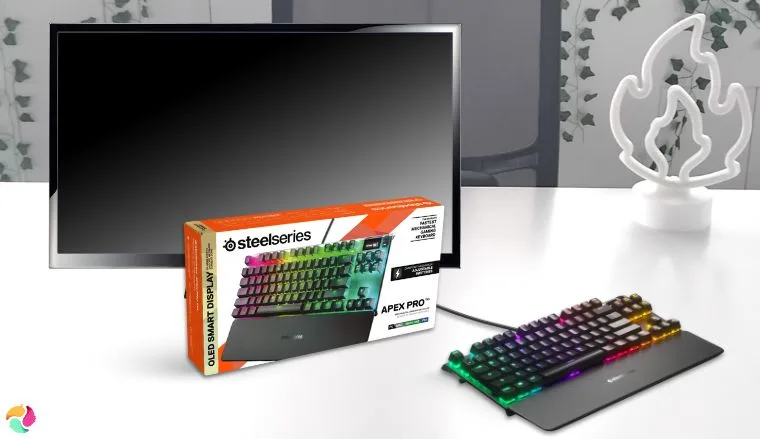
1. SteelSeries Apex Pro TKL [Best Adjustable Actuation Keyboard for Fortnite]
| Specs | Details |
|---|---|
| Switch Type | OmniPoint 3.0 |
| Form Factor | Tenkeyless (TKL) |
| Actuation Range | 0.1mm – 4.0mm (adjustable actuation) |
| Connectivity | USB-C (Wired) |
| Keycaps | Double-shot PBT |
| Lighting | Per-Key RGB |
| Dimensions | 13.98 x 13.98 x 1.7 inches |
The SteelSeries Apex Pro TKL stands out as my top pick, and two things make it stand out. Its OmniPoint 3.0 switches and per-key actuation tuning.
OmniPoint 3.0 is SteelSeries’ way of bringing Hall Effect tech into the gaming keyboard space. If you know Hall Effect, you know it never disappoints.
Use SteelSeries GG software to assign different actuation depths to movement vs. build keys – higher for movement (1.5 mm) to avoid accidental strafes, ultra-low for building (0.4 mm) to fire off instant walls and ramps.
These magnetic switches make the Apex Pro TKL one of the world’s fastest keyboards today. However, speed is just the beginning. With a bold jargon of “World’s fastest keyboard just got smarter,” the Apex Pro TKL lets you fine-tune different trigger depths across the board.
In Fortnite specifically, that means you can set your movement keys (WASD) to around 1.5 mm to avoid stray moves, then crank your build keys down to 0.4 mm for instant walls and ramps.
If you play Fortnite competitively or just want every millisecond to count, this feature alone is a massive game-changer. You react faster, not just because the switch is physically quicker, but because the keyboard adapts to your play style.
And then there’s Rapid Trigger and Rapid Tap. This feature eliminates the latency from deactivating a key the moment you lift your finger. It’s so fast, double-taps and rapid repeats feel effortless.
| Pros | Cons |
|---|---|
| ✅ Fully adjustable actuation per key ✅ Rapid Trigger boosts speed and fluidity ✅ Magnetic switches rated for 100 million keystrokes ✅ Durable aluminum frame ✅ Onboard OLED screen for quick tweaks ✅ Protection Mode prevents accidental presses ✅ Tournament Switch locks your settings | ❌Magnetic wrist rest isn’t premium, but it’s surprisingly comfy |
Final Verdict: If input precision is your priority in Fortnite, this is hands down the best gaming keyboard for the job. Pair it with the best gaming PC you got, and you’ll have a setup that can keep up with your reflexes. No hardware holding you back from those clutch plays.
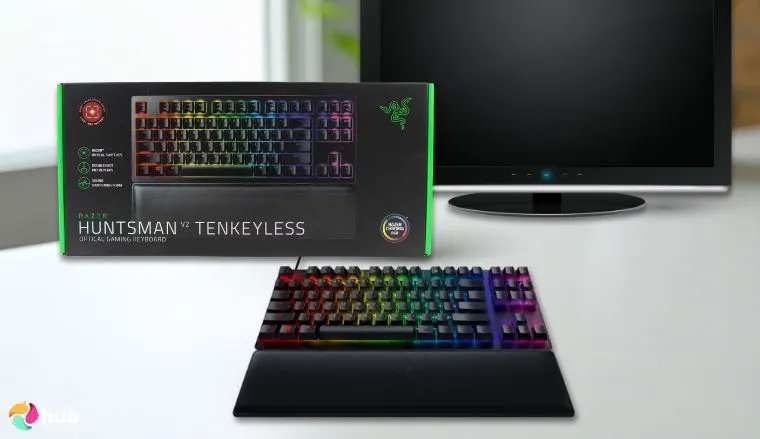
2. Razer Huntsman V2 TKL [Best Optical Switch Keyboard for Fast Reaction in Fortnite]
| Specs | Details |
|---|---|
| Switch Type | Razer Optical (Analog, Clicky, Linear) |
| Form Factor | Tenkeyless (TKL) |
| Actuation Range | 1.5mm (Clicky) / 1.2mm (Linear) |
| Connectivity | USB-C (Wired) |
| Keycaps | Double-shot PBT |
| Lighting | Per-key RGB |
| Dimensions | 14.27 x 5.54 x 1.36 inches |
As someone who chases every millisecond in-game, I favor optical over mechanical. Instead of waiting for metal contacts, light beams detect your keystrokes instantly.
The Razer Huntsman V2 TKL leverages this in their proprietary Razer Optical Switches. And with a true 8,000 Hz polling rate, input latency is virtually nonexistent.
Pair the linear optical switches with an 8,000 Hz polling rate in Synapse, and disable unnecessary RGB effects during competitive matches to squeeze out every millisecond of input speed.
You can pick linear or clicky switches. Personally, I love linear’s sound dampeners for its quieter gaming and typing experience in general. If you crave tactile feedback, the clicky option delivers satisfying snaps.
Either way, zero debounce delay helps make your builds and edits fire off the exact moment you press.
Beyond switches, the Huntsman V2 TKL sports a premium aluminum frame and magnetic rest adds a layer of comfort for your gaming experience. All these features will help you one step closer to become Fortnite pros.
| Pros | Cons |
|---|---|
| ✅ Lightning-fast Razer Optical switches ✅ Linear switches with sound dampeners for near-silent play ✅ Zero debounce delay for instant responsiveness ✅ Sturdy aluminum chassis and doubleshot PBT keycaps ✅ Per-key RGB syncs with Razer Chroma ecosystem ✅ Magnetic wrist rest for extended comfort | ❌Better wire organization would be awesome, but it’s not a deal breaker |
Final Verdict: For Fortnite players who demand the fastest reactions possible, the Huntsman V2 TKL is the clear choice.
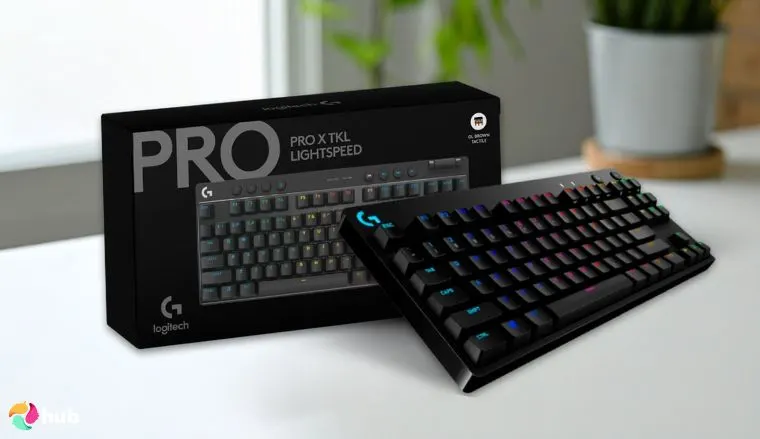
3. Logitech G Pro X [Best Hot-Swappable Mechanical Keyboard for Fortnite]
| Specs | Details |
|---|---|
| Switch Type | GX Red Linear |
| Form Factor | Tenkeyless (TKL) |
| Actuation Range | 1.9mm |
| Connectivity | Lightspeed Wireless Adapter, Bluetooth, USB-C |
| Keycaps | Double-shot PBT |
| Lighting | Per-key RGB |
| Dimensions | 13.86 x 5.91 x 1.34 inches |
If you’re a tinkerer type of Fortnite player, Logitech G Pro X will be your wet dream.
It’s one of the best Logitech keyboards for players who love customization, letting you swap from cherry mx red to tactile or clicky switches without buying new gear. That freedom keeps your gaming experience fresh every session.
While Logitech doesn’t shout about speed as loudly as other brands, don’t let that fool you. These are still a beast of keyboards.
Victory royales become incredibly easy with extra features like Game Mode and fully programmable keys.
Experiment with hot-swappable switches: use linear for rapid builds, tactile for precise edits. Keep a few spares in the included carry case so you can swap mid-season without downtime.
As for speed and connection, you don’t have to worry either. Lightspeed wireless delivers zero lag and zero drops just like wired.
Battery life stretches for weeks, and you can always go wired with the USB-C cable during competitive gaming sessions.
The compact TKL form factor gives you massive mouse space for those sweeping sniper shots. Lastly, media controls and volume roller lets you easily adjust your audio without needing to tab out or fumble through Fortnite settings mid-game.
| Pros | Cons |
|---|---|
| ✅ Hot-swappable switches let you customize your typing feel on the fly ✅ Wireless freedom with tournament-level reliability ✅ Multiple connectivity options ready for any setup ✅ Game Mode locks out accidental key presses ✅ Battery lasts for a while ✅ RGB lighting is full of customization options for a signature look ✅ Quality carry case | ❌No wrist rest included, though it still feels surprisingly natural during long sessions. |
Final Verdict: If unlimited customization and wireless freedom are what you need for your Fortnite journey the G Pro X is the ultimate go-to choice.
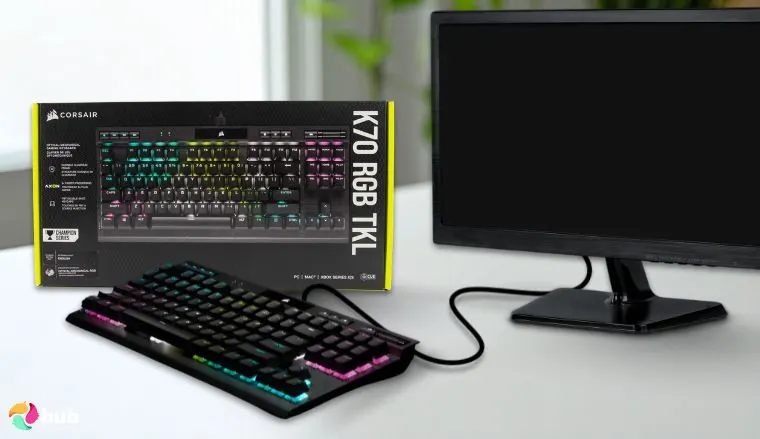
4. Corsair K70 RGB TKL Champion Series [Best Tournament-Grade Fortnite Keyboard with Rapid Response]
| Specs | Details |
|---|---|
| Switch Type | CORSAIR OPX RGB |
| Form Factor | Tenkeyless (TKL) |
| Actuation Range | 1.0mm |
| Connectivity | USB-C (Wired) |
| Keycaps | Double-shot PBT |
| Lighting | Per-key RGB |
| Dimensions | 14.17 x 6.46 x 1.57 inches |
Talking about specialized gaming keyboards for tournaments, let me tell you why I can’t stop talking about Corsair K70 RGB TKL Champion Series.
As a competition-grade keyboard, K70 RGB TKL Champion Series offers multiple layers of advantage to your competitive gaming sessions.
Its OPX switches and 8,000 Hz hyper-polling help you react faster in any battle royal games, especially Fortnite. And when you hit that single key for tournament switch mode, lights go static, macros lock out, and your building lands exactly where you want.
Activate Tournament Mode before a ranked match to lock your macros and prevent RGB distractions – it ensures consistent, distraction-free performance under pressure.
When it comes to build quality, we’re talking about Corsair here. It has the expected premium feel thanks to the aluminum chassis under your hands. The detachable USB-C cable makes setup at LAN events a breeze.
And let’s not skip the dedicated media control. Those controls come in clutch without cluttering your layout.
| Pros | Cons |
|---|---|
| ✅ 8,000Hz hyper-polling captures every single input with ridiculous accuracy ✅ Tournament switch mode stops accidental presses mid-match with a single key ✅ OPX switches provide 1 mm actuation for butter-smooth builds ✅ Premium feel aluminum chassis stands up to intense sessions ✅ Customization options via iCUE let you tailor macros and lighting ✅ Detachable USB Type-C cable for fast tournament setup | ❌Sensitivity of OPX switches takes a bit of getting used to, but it’s worth it |
Final Verdict: If you’re a Fortnite player chasing rapid response and tournament-grade reliability, the K70 RGB TKL Champion Series stands out as one of the best Corsair keyboards for the job.
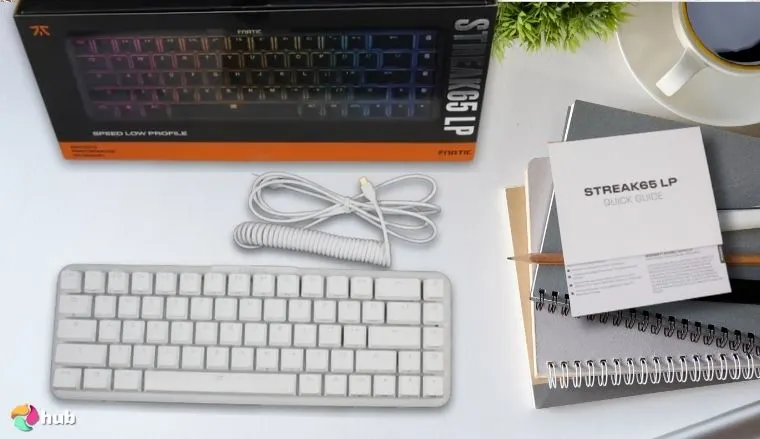
5. Fnatic STREAK65 LP [Best Low-Profile Mechanical Keyboard for Fortnite]
| Specs | Details |
|---|---|
| Switch Type | FNATIC SPEED |
| Form Factor | 65% |
| Actuation Range | 1.0mm |
| Connectivity | USB-C (Wired) |
| Keycaps | Double-shot PBT |
| Lighting | Per-key RGB |
| Dimensions | 12.5 x 4.27 x 0.87 inches |
I struggled with tall keys on other mechanical keyboards. My “raccoon fingers” kept slipping. Then I found the STREAK65 LP, and it fixed everything.
STREAK65 LP is a low-profile speed machine that cuts finger travel time in half. At under an inch tall and with a 1.00 mm actuation point, your fingers barely have to move to register keypresses.
Your typing experience stays smooth, even during marathon ranked sessions in games like Fortnite. Just less fatigue, faster building, and more wins.
The low profile design works magic for players with smaller hands or anyone who hates that steep typing angle. Many Fortnite pros drop their desk height slightly to optimize their wrist position with this quiet keyboard style.
The 65% form factor keeps your arrow keys and essential function keys while giving you tons of mouse space. And under the hood, a solid aluminium chassis gives the STREAK65 LP a premium, yet durable build.
The doubleshot PBT keycaps stay textured, and the per-key RGB adds flair without blinding your gaming setup.
This becomes even more valuable when paired with a gaming laptop, where you’re already dealing with fixed screen angles and limited ergonomic adjustments.
| Pros | Cons |
|---|---|
| ✅ Ultra-low profile means faster keystrokes with less effort ✅ 1.0mm actuation = near-instant response ✅ 65% layout saves space, keeps essentials ✅ Quiet keys ✅ Premium aluminum build feels high-end ✅ Hot swappable switches let you customize the feel ✅ Subtle RGB adds flair without overkill | ❌Low-profile switches feel different from traditional mechanical gaming keyboards, but most players adapt quickly once they experience the speed boost |
Final Verdict: If you need a keyboard that frees up desk space, sharpens your responses, and levels up your entire typing experience, the STREAK65 LP checks every box.
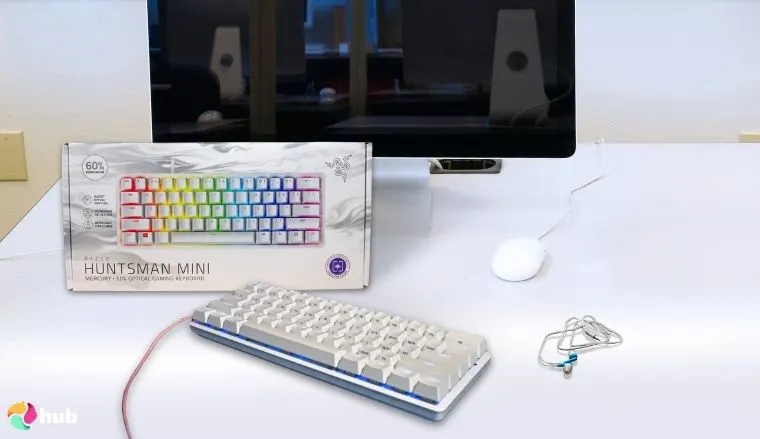
6. Razer Huntsman Mini [Best Fortnite Keyboard for Compact Design]
| Specs | Details |
|---|---|
| Switch Type | Razer Optical (Clicky or Linear) |
| Form Factor | 60% |
| Actuation Range | 1.0mm (Clicky) / 1.2mm (Linear) |
| Connectivity | USB-C (Wired) |
| Keycaps | Double-shot PBT |
| Lighting | Per-key RGB |
| Dimensions | 11.6 x 4.1 x 1.5 inches |
If you want to go even more compact and minimalist without compromising on performance, look no further than Razer Huntsman Mini.
This keyboard crams tournament-grade speed into an ultra-portable frame. It uses the same optical switch tech found in the full size version of Razer keyboards, so you’re getting identical performance in a much smaller footprint.
Master the FN-layer shortcuts early so you can access function keys, media controls, and macros without slowing down mid-match – muscle memory here is key for a 60% layout.
Optical switches operate at literal light speed, with zero debounce delay. Combine that with the 60% layout, and you’ve got more room for sweeping mouse flicks.
Despite its size, the Huntsman Mini doesn’t skimp on features. I, for one,love the fully customizable RGB lighting and macro support. It gives me the freedom to tweak my setup exactly how I like it.
| Pros | Cons |
|---|---|
| ✅ 60% layout frees up max mouse space for aggressive mouse movements ✅ Optical switches provide lightning-fast inputs ✅ Lightweight and travel-ready for LANs ✅ Aluminum top plate adds durability and a premium feel ✅ Customizable RGB lighting enhances any setup ✅ Surprisingly quiet out of the box (linear) | ❌Missing function keys require using secondary FN layer, but it’s rarely an issue for Fortnite players |
Final Verdict: If you’re after a compact powerhouse with blazing-fast switches, the Huntsman Mini is a top-tier pick for serious Fortnite players. The extra desk space pairs perfectly with some of the best monitors for Fortnite, giving you room to position your screen exactly where you need it.
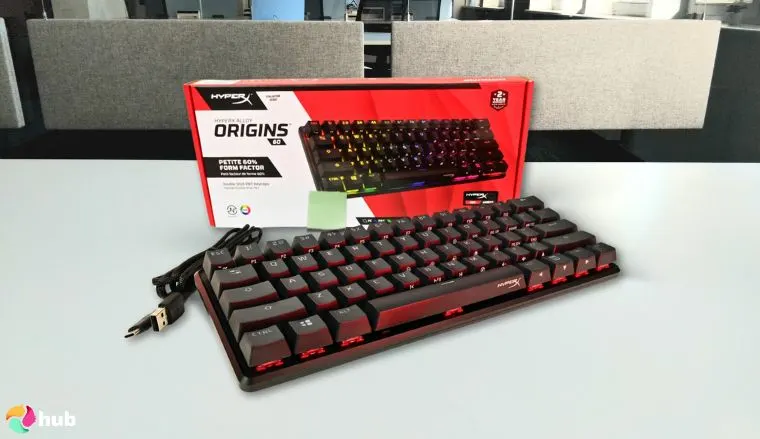
7. HyperX Alloy Origins 60 [Best Value Compact Gaming Keyboard for Fortnite]
| Specs | Details |
|---|---|
| Switch Type | HyperX Red/Aqua (Linear or Tactile) |
| Form Factor | 60% |
| Actuation Range | 1.8 mm |
| Connectivity | USB-C (Wired) |
| Keycaps | Double-shot PBT |
| Lighting | Per-key RGB |
| Dimensions | 11.7 x 1.5 x 4.2 inches |
The two previous compact mechanical keyboards might check all the boxes, except the price tag. If you’re like me and want a premium, compact mechanical gaming keyboard that doesn’t nuke your wallet, the HyperX Alloy Origins 60 hits that sweet spot.
60% layout clears up precious space on your desk for aggressive mouse swipes during clutch moments. Personally, my desk isn’t huge, so every inch counts.
Use HyperX NGENUITY software to create a custom lighting profile that highlights your Fortnite keybinds – it speeds up learning new layouts and reduces missed inputs in fast build fights.
The HyperX switches pull their weight too, with a solid 1.8 mm actuation point and short travel distance. For the price, you’re getting one of the better performance-to-cost ratios out there.
Build quality punches way above its weight class. A sturdy aluminum chassis stands up to intense play and accidental knocks.
And of course, there’s customizable per-key RGB lighting that syncs beautifully with your setup.
| Pros | Cons |
|---|---|
| ✅ Exceptional value with at an affordable price ✅ Responsive and clicky mechanical switches ✅ 60% layout maximizes mouse space ✅ Durable aluminum frame withstands heavy use ✅ Perfect for minimalist setups ✅ Fully customizable RGB lighting and onboard profiles | ❌Standard polling rate, not ultra-high frequency, but still bang for a buck |
Final Verdict: The Alloy Origins 60 proves you don’t need to spend a fortune to get professional-grade gaming performance and build quality that rivals the expensive stuff.
What Makes a Keyboard Good for Fortnite?
The right gaming keyboard can turn you from someone who gets out-built constantly into someone who dominates build battles. Seriously, the difference between a good Fortnite player and a great one often comes down to how fast their keyboard responds. Here’s what separates the wheat from the chaff.
1. Low Input Lag
Every millisecond counts when you’re trying to place that clutch wall. Mechanical keyboards with high polling rates cut the delay between your brain and the screen. Your building blocks appear instantly instead of stuttering behind your thoughts.
Consistent Actuation
Your movement keys and building blocks need to register every single time, no exceptions. Quality switches maintain the same feel throughout millions of keypresses, so that crucial edit never fails you.
2. Rapid Key Reset
Fast double-tapping for those lightning edits requires keys that bounce back instantly. Advanced keyboards feature rapid trigger technology that resets the moment you lift your finger. No waiting around.
3. Customizable Switch Types
Different actions benefit from different feels. Hot swappable switches let you fine tune your setup without buying multiple keyboards. Pair this level of customization with your best mouse for Fortnite, and you’ll have a setup that responds exactly how your playstyle demands. Achieving a perfect response relies entirely on the mechanism underneath the keycap. Exploring the nuances of tactile vs linear vs clicky switches helps you with the exact feedback style necessary.
4. Compact Form Factor
TKL and 60% keyboards free up massive mouse space for those sweeping sniper shots and quick 180s. This becomes even more crucial if you’re gaming on a laptop for Fortnite, where desk space is already at a premium. Full size version keyboards just eat up valuable desk space that competitive players need for their mouse settings.
5. Anti-Ghosting
Complex Fortnite keybinds during intense building sequences need every keypress to register simultaneously. No missed inputs when you’re hitting six keys at once.
6. Tournament-Grade Build
Intense gaming sessions demand keyboards that handle millions of keypresses while maintaining consistent gaming performance. Cheap keyboards break down right when you need them most.
FAQs
What is the best keyboard for Fortnite?
The best keyboard for Fortnite is SteelSeries Apex Pro TKL thanks to its adjustable actuation technology, rapid trigger feature, and premium build quality. These features give competitive gamers a genuine performance advantage in build battles.
Does a keyboard matter for Fortnite pros?
Yes, and it makes all the difference. A quality gaming keyboard slashes input lag, provides consistent keypresses, and can dramatically improve your building speed and editing precision compared to basic keyboards.
Is a 75% keyboard good for Fortnite?
Yes, 75% keyboards hit the sweet spot for Fortnite players. They keep function keys and arrow keys while still providing way more mouse space than full-size keyboards that cramp your gaming setup.
What is the best keyboard size for Fortnite gaming?
The best keyboard size for Fortnite gaming is TKL (tenkeyless). They offer the ideal balance of functionality and desk space. 60% keyboards work great for players who prioritize maximum mouse movement area for those sweeping shots.
What are good keyboard settings for Fortnite?
Good keyboard settings for Fortnite start with reducing input lag. Use wired connections when possible, crank polling rate to maximum (usually 1000Hz, but some offer up to 8,000 Hz), enable game mode if your keyboard has it, and dial down RGB lighting to avoid distractions during clutch moments.











