ROG Ally vs Steam Deck: A Complete Breakdown Before You Buy

Eneba Hub contains affiliate links, which means we may earn a small commission if you make a purchase through them—at no extra cost to you. Learn more


The ROG Ally vs Steam Deck battle is the closest thing to a handheld gaming heavyweight match. Both promise desktop-grade performance in a portable shell. One built by ASUS, the other by Valve.
The ROG Ally runs on Windows 11, and it actually turns into a mini PC that plays everything from Steam and Xbox Game Pass to Epic Games Launcher. The Steam Deck, meanwhile, sticks to SteamOS 3, a Linux-based system tuned for instant gaming without the usual PC fuss.
So, let’s see the difference in design, performance, battery life, game libraries, and storage options. No matter if you want all-access freedom or smooth, optimized gaming on the go, this face-off has a clear winner for every type of player.
Jump to:
ROG Ally vs Steam Deck: Product Ranges
When it comes to the ROG Ally vs Steam Deck showdown, both lineups have grown fast to fit different kinds of gamers.
The ASUS ROG Ally range, including the Z1, Z1 Extreme, and Ally X, is best for players who want PC-level power anywhere.
Meanwhile, the Steam Deck lineup, with the LCD and Steam Deck OLED models, targets gamers who prefer plug-and-play performance and longer sessions without fuss.
Let’s break down the options from both sides.
ROG Ally Product Range
The ASUS ROG Ally lineup is ASUS’s way of proving that handheld PCs can feel like mini desktops. It’s part of the Republic of Gamers family, so you already know the focus is on performance, customization, and Windows freedom.
You’ve got three versions to pick from: the ROG Ally (Z1), Z1 Extreme, and Ally X.
- ROG Ally (Z1) – the most affordable entry point. It’s not a powerhouse, but it handles modern games well enough for casual to mid-range gaming.
- ROG Ally Z1 Extreme – the performance jump. With a stronger AMD APU, higher FPS, and smoother refresh rates, this one is built for gamers who want more graphical muscle.
- ROG Ally X – the refined 2024 upgrade. It improves on the original with better battery life, more storage, and lower temps, making longer play sessions far more comfortable. Naturally, it comes at a higher price than the 2023 versions.
All of them run Windows 11, meaning you can jump between Steam, Xbox Game Pass, and even non-Steam games without modding or weird workarounds. The ROG Ally lineup is for players who want a real PC in their hands. It’s powerful, flexible, and ready to play anything you throw at it.
Steam Deck Product Range
The Steam Deck is Valve’s answer to the best handheld gaming PC. This one is built around the Steam ecosystem from the ground up. Instead of Windows, it runs SteamOS 3.0, a Linux-based system fine-tuned for gaming through Valve’s Proton layer. This means that your favorite PC games just work, no setup drama.
There are two main models right now:
- Steam Deck (LCD) – The original 2022 release. It delivered strong performance for its price and handled most games well.
- Steam Deck OLED – An upgraded model with a brighter OLED display, better battery life, improved thermals, and an overall more polished experience.
Valve already confirmed a next-gen Deck 2 is in the works. The main aim is for better efficiency and visuals. You can even install Windows if you want, though most players stick with the smooth, plug-and-play SteamOS setup. In the end, the Steam Deck lineup nails what it’s meant to do. It offers powerful, no-fuss gaming anywhere, perfect for anyone who wants to just tap play and get going.
ROG Ally vs Steam Deck: Full Specs

The ASUS ROG Ally vs Steam Deck specs showdown highlights two unique approaches to portable PC gaming. While both are AMD-driven, the ROG Ally emphasizes raw power under Windows, and the Steam Deck focuses on streamlined performance through SteamOS.
Here’s how they stack up side-by-side:
| Specs | ROG Ally (2023) | Steam Deck (OLED/LCD) |
|---|---|---|
| Processor / APU | AMD Ryzen Z1 Extreme (8-core/16-thread, up to ~5.1 GHz) | Custom AMD APU (Zen 2, 4c/8t, 2.4-3.5 GHz) |
| CPU / GPU cores | CPU 8c/16t; GPU 12 CUs (RDNA 3) up to ~8.6 TFLOPS | CPU 4c/8t; GPU 8 CUs (RDNA 2) ~1.6 TFLOPS |
| Memory (RAM) | 16 GB LPDDR5 (6400 MT/s, dual-channel) | 16 GB LPDDR5 (6400 MT/s quad‐channel) |
| Internal Storage Options | 512 GB PCIe 4.0 NVMe M.2 (2230) | NVMe SSD: 512 GB / 1 TB (OLED) |
| Expandable Storage | microSD (UHS-II) slot | microSD (UHS-I) slot |
| Display | 7-inch FHD (1920 × 1080) IPS, 120 Hz, 500 nits | OLED: 7.4-inch HDR OLED, 1280 × 800, up to 90 Hz, ~1000 nits |
| Battery / Power | 40 Wh battery (4-cell Li-ion) | 50 Wh battery (OLED) |
| Estimated Battery Life | Varies, but shorter due to higher power draw | 3-12 hours (varies by use) |
| Connectivity | Wi-Fi 6E (802.11ax), Bluetooth 5.2, USB-C DisplayPort 1.4 alt mode | Wi-Fi 6E (OLED version) + Bluetooth 5.3, USB-C DisplayPort alt mode |
| Operating System / Ecosystem | Windows 11 Home, full PC game launcher support (Steam, Epic, Xbox, GOG, etc.) | SteamOS 3.0 (Arch-based) with Proton compatibility; can install Windows if desired |
ROG Ally vs Steam Deck: Performance
When it comes down to it, the ROG Ally vs Steam Deck matchup is power versus efficiency.
The ASUS ROG Ally hits harder. It’s got a stronger APU, a faster 120 Hz refresh rate, and the freedom of Windows, so you can play games, stream, edit, or just mess around with desktop apps. It basically feels like a mini gaming rig that happens to fit in your hands.
Now, the Steam Deck is more about that smooth, plug-and-play vibe. SteamOS keeps things simple, so no random Windows updates, no fiddling, just games that launch fast and run steady.
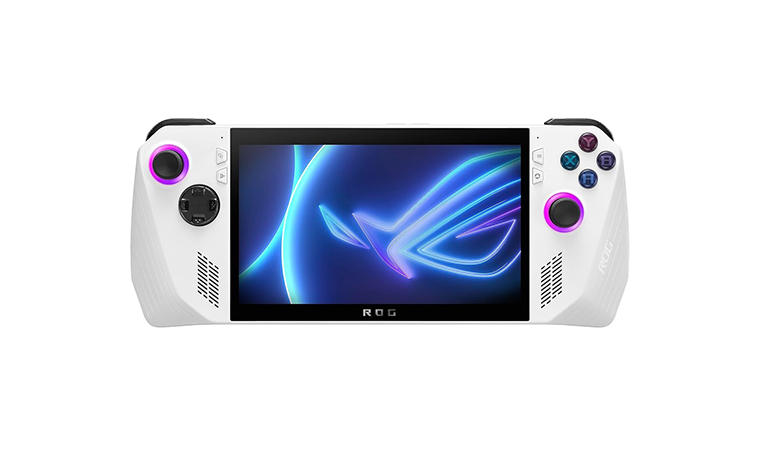
ASUS ROG Ally
| Specs | Details |
|---|---|
| Chipset | AMD Ryzen Z1 Extreme (8 cores / 16 threads, Zen 4) – up to 8.6 TFLOPS |
| GPU | AMD Radeon RDNA 3 (12 Compute Units, 4 GB VRAM) |
| Display | 7-inch FHD (1080p) touch screen, 120 Hz refresh rate, FreeSync Premium |
| RAM | 16 GB LPDDR5 6400 MHz dual-channel memory |
| Storage | 512 GB PCIe 4.0 NVMe M.2 SSD + microSD (UHS-II) expansion |
| Battery | 40 Wh 4-cell Li-ion battery |
| OS | Windows 11 Home |
| Connectivity | Wi-Fi 6E, Bluetooth 5.2, USB-C DisplayPort 1.4 alt mode + ROG XG Mobile port |
The ASUS ROG Ally is a high-performance Windows-based handheld built for players who want a real PC gaming experience on the go. The power comes from the Ryzen Z1 Extreme and RDNA 3 graphics. This delivers serious horsepower that outpaces most handheld rivals. Its 7-inch 120 Hz Full HD screen makes every game look sharp and buttery smooth. So, no tearing, no stutter.
Because it runs Windows 11, you get access to literally everything, like Steam, Xbox Game Pass, Epic, Battle.net, and even non-Steam games. You can plug in any of the best gaming controllers for PC, connect it to a monitor through USB-C, or use the ROG XG Mobile dock to turn it into a desktop. It’s light, fast, and feels like a proper console that doubles as a PC.
| Pros | Cons |
|---|---|
| ✅ 120 Hz display delivers ultra-smooth visuals and responsive gameplay ✅ Windows 11 lets you play from any launcher, with total flexibility. ✅ Powerful Z1 Extreme APU handles AAA titles effortlessly. ✅ Expandable storage via microSD and replaceable SSD. ✅ Ergonomic design and lightweight build for long sessions. ✅ Full Xbox controller and peripheral support through USB-C. | ❌ Battery life takes a hit when running high-end games at full performance |
My Verdict:
If you want top-tier performance, freedom, and customization, the ROG Ally is as close as it gets to a gaming laptop in your hands.
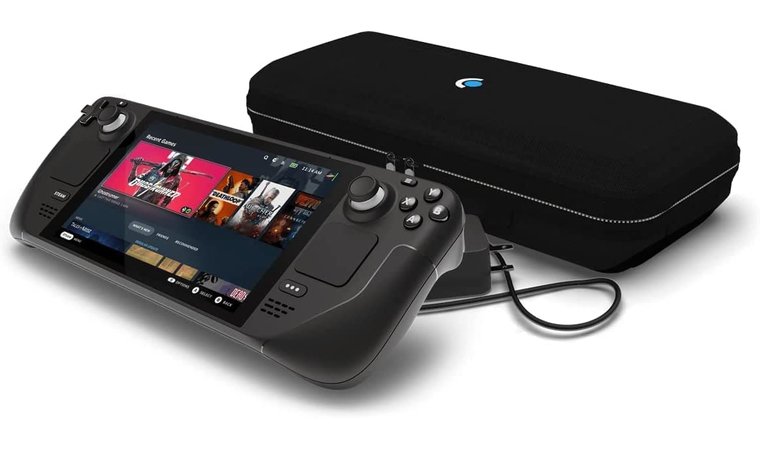
Valve Steam Deck
| Specs | Details |
|---|---|
| Chipset | Custom AMD APU (Zen 2 + RDNA 2, 4 cores / 8 threads) |
| GPU | 8 CUs RDNA 2, up to 1.6 TFLOPS |
| Display | 7-inch touchscreen (1280 × 800 LCD or OLED version up to 90 Hz, 1000 nits HDR) |
| RAM | 16 GB LPDDR5 6400 MHz |
| Storage | 64 GB eMMC / 256 GB / 512 GB / 1 TB SSD (OLED models) |
| Expandable Storage | microSD (UHS-I) slot |
| Battery | 40–50 Wh (depending on model) |
| OS | SteamOS 3.0 (Linux-based) with Proton compatibility layer |
| Connectivity | Wi-Fi 6 (OLED), Bluetooth 5.3, USB-C DisplayPort 1.4 alt mode |
The Steam Deck is basically Valve’s way of saying, “yeah, you can take your PC gaming anywhere.” It runs on a custom AMD chip and uses SteamOS, so once you log in, your games, saves, and mods are just there. So, no setup, no nonsense.
The newer Steam Deck OLED takes it up a notch with a way better screen, brighter colors, and longer battery life, which makes it perfect for gaming on the couch, on the train, or at 2 AM when you should probably be sleeping.
What’s cool about it is how effortless it feels. You boot it up, tap play, and the game just runs. No Windows updates, no weird settings to fix. Everything’s smooth, optimized, and ready out of the box. And if you ever get curious, you can still slap Windows on it and play non-Steam games too.
| Pros | Cons |
|---|---|
| ✅ OLED screen looks amazing with richer colors and better contrast. ✅ Deck-Verified library ensures smooth gameplay right out of the box. ✅ Excellent battery life and thermal control for longer sessions. ✅ Strong community and continuous Valve support through updates. ✅ Easy docking and USB-C connectivity for desktop or TV play. ✅ Affordable compared to other handheld PCs like the ROG Ally or the Lenovo Legion Go. | ❌ Limited Windows support unless manually installed, not a deal-breaker, but less flexible. |
My Verdict:
The Steam Deck nails the “just play” experience, simple, stable, and seriously fun. If you want effortless PC gaming that works every time you tap play, this is it.
ROG Ally vs Steam Deck: Game Library

Now, let’s take a closer look at the game library and how these two fare here. The ASUS ROG Ally runs full Windows 11, so it’s basically a pocket-sized gaming PC. You can jump between Steam, Epic Games, Battle.net, GOG, or Xbox Game Pass without limits.
Want to play Halo, Baldur’s Gate 3, or even non-Steam games? Go for it. If it runs on Windows, it runs on the Ally. This means no compatibility layers required – install and play from any launcher.
The Steam Deck, meanwhile, keeps things clean and simple. It’s built around SteamOS, and your Steam library is right there from the start. Every Deck-Verified game just works. Controls, menus, everything fits perfectly.
Sure, you can install Windows or use an SD card to run other launchers like Epic or Game Pass, but that takes a bit more effort. And if you want a proper setup for your desk or TV, pairing it with the best Steam Deck dock makes the whole experience even better.
My Verdict:
The ROG Ally wins if you want freedom to play anything from anywhere. It’s a full-blown PC in your hands. But if you’d rather skip the setup and just hit “Play,” the Steam Deck still nails that plug-and-play magic better than anything else.
ROG Ally vs Steam Deck: Design
The Steam Deck vs ROG Ally design debate really comes down to what kind of gamer you are. Sleek and modern, or solid and practical, your pick.
The ASUS ROG Ally looks and feels like a high-end handheld PC. It’s lighter, more compact, and has that clean ROG aesthetic, white shell, sharp lines, RGB lighting, the works. The Ally X version even improves the grip shape and cooling system, making it easier to hold during longer sessions.
The 120 Hz screen and crisp 1080p display make every game pop, especially when paired with AMD’s RDNA 3 graphics. It feels like a true gaming laptop in your hands, just smaller and way easier to carry.
The Steam Deck leans the other way, bulkier but built for comfort. It’s got those big grips that fit naturally in your hands, and the button layout is surprisingly ergonomic for long gaming sessions.
The new Steam Deck OLED keeps that same shape but adds a better screen, richer colors, and improved thermals that help with heat during marathon gaming. It’s less flashy, more “grab-and-go”, perfect if you just want to play games without worrying about tweaks.
My Verdict:
If you love sleek design, sharp visuals, and that high refresh rate feel, the ROG Ally is the one to beat. But if comfort, durability, and an OLED screen that looks amazing in any lighting matter more, the Steam Deck OLED easily wins for everyday gaming.
ROG Ally vs Steam Deck: Storage
Storage might not be the flashiest feature, but it’s a big deal when your favorite games eat up over 100 GB each.
The ASUS ROG Ally keeps things fast and flexible. It comes with a super-quick NVMe PCIe 4.0 SSD, and you can actually swap it out pretty easily if you want more space, just a few screws, and you’re done.
Load times are lightning fast, and with the UHS-II microSD slot, you can carry a ton of extra games without slowing the system down. You can even plug in the best external SSD for gaming if you need more space or want to keep your library portable. It’s basically built for gamers who like to tweak, upgrade, and expand as they go.
The Steam Deck takes a simpler approach. The base model uses eMMC storage, while the higher-end and OLED versions get faster NVMe SSDs. You also get a microSD slot, but it’s UHS-I, so speeds aren’t quite as quick as the Ally’s. Still, most players won’t notice a huge difference unless they’re constantly swapping between massive titles.
My Verdict:
The ROG Ally wins here. It’s faster, easier to upgrade, and just feels more future-proof. But if you’d rather not mess with your hardware and just keep your library ready to play, the Steam Deck still gets the job done.
ROG Ally vs Steam Deck: Battery Life & Connectivity
Battery life is where the battle gets real. That’s because all that power doesn’t mean much if you’re hunting for an outlet every hour.
The ASUS ROG Ally goes all-in on performance, and that comes at a cost. Its AMD Z1 Extreme chip and 120 Hz display draw more power, so you’ll usually get around 1.5 to 3 hours of heavy gaming, maybe a bit more for lighter titles. The newer Ally X improves this with a bigger battery and better cooling, but it’s still a trade-off, raw power versus runtime.
On the bright side, it charges fast through USB-C with DisplayPort support, and its Wi-Fi 6E and Bluetooth 5.2 give it a solid edge for faster connections and accessories like an Xbox controller or wireless headset.
The Steam Deck, especially the OLED version, plays the long game. Thanks to SteamOS optimization and a more efficient power draw, you can expect anywhere from 3 to 12 hours, depending on the game. It’s not flashy, but it’s reliable. Connectivity is still solid, USB-C, Bluetooth, and Wi-Fi 6 (on newer models), though not quite as cutting-edge as the Ally’s setup.
My Verdict:
If you’re chasing battery life and efficiency, the Steam Deck OLED holds the crown. But if you want stronger connections, faster charging, and better port flexibility for docking or streaming, the ROG Ally easily takes the lead.
ROG Ally vs Steam Deck: Compatibility & Optimization
Performance is much more than just raw power. Actually, it’s about how well a handheld actually runs your favorite games day to day. Here, the battle between ROG Ally and Steam Deck splits into two very different styles of gaming.
The ASUS ROG Ally goes for full Windows freedom, which means it can handle pretty much any PC title out there. This includes Starfield and Fortnite, or any other non-Steam games and mods. Because it’s running Windows, it supports all the usual launchers and services like Game Pass, Epic, or Battle.net.
The downside? Windows overhead. You’ll get higher FPS and better resolution scaling, but it can eat more power and sometimes needs a bit of tweaking to get things perfectly smooth. Some users also note that Windows updates or background tasks can slightly affect performance or battery life during longer sessions.
The Steam Deck, on the other hand, focuses on polish over flexibility. It runs SteamOS with Valve’s Proton compatibility layer, which lets most Windows-based games run surprisingly well. Thanks to Valve’s Deck Verified system, you’ll know exactly which titles work flawlessly right out of the box.
The experience feels smooth, stable, and optimized, though games with strict anti-cheat systems (like Fortnite or Valorant) are still hit-or-miss without installing Windows manually.
My Verdict:
The Steam Deck is the better pick if you want a reliable, optimized experience where everything “just works.” But if you’d rather fine-tune settings, install mods, and push your hardware to its limits, the ROG Ally offers that extra layer of freedom and control, as long as you don’t mind doing a little setup work.
ROG Ally vs Steam Deck: Operating System & Ecosystem
Here’s where this comparison really shows what kind of gamer you are. It’s either the one who loves to tinker or the one who just wants to hit play.
The ASUS ROG Ally runs full Windows 11. You can install whatever you want: Steam, Epic Games, Xbox Game Pass, Battle.net, emulators, or even stuff like OBS and Discord. It’s pure freedom.
You can mod, multitask, and customize to your liking. But yeah, it also comes with the usual Windows stuff, updates popping up at the worst time, tiny menus not built for touch, and a few background apps that love eating power when you least expect it.
The Steam Deck, on the other hand, keeps things chill. It runs SteamOS 3, made by Valve just for gaming, and it nails that console feel. Everything is tied to your Steam account, your library shows up instantly, and every Deck Verified game is ready to roll.
You don’t need to adjust settings or worry about drivers. Still, if you want to experiment, you can switch to Desktop Mode or install Windows, though most players don’t bother because SteamOS already does the job perfectly.
My Verdict:
If you like full control and the ability to run whatever you want, the ROG Ally is your pick. But if you’d rather keep things simple and play without all the setup drama, the Steam Deck is hands down the smoother ride.
ROG Ally vs Steam Deck: Chipset & Thermals

When it comes to raw power, the matchup isn’t even close. But that doesn’t mean the winner is that simple.
The ASUS ROG Ally runs on AMD’s Ryzen Z1 or Z1 Extreme chip, built on the newer Zen 4 + RDNA 3 architecture. The Z1 Extreme especially is a beast, 8 cores, 16 threads, and up to 8.6 teraflops of power in your hands. You can easily push Cyberpunk 2077 or Elden Ring past 60 FPS at 1080p, and the 120 Hz display makes everything look buttery smooth.
Of course, that kind of power means more heat. The Ally’s dual-fan setup does a solid job keeping temps under control, but you’ll definitely hear it working during longer sessions.
The Steam Deck takes the opposite route. It uses a custom AMD chip based on Zen 2 + RDNA 2, tuned for balance and efficiency. It’s not as powerful, but it’s incredibly consistent. Most of the best Steam games run great, and the Steam Deck OLED improves thermals, power draw, and fan noise even more. You’ll still get solid 30-40 FPS in big titles and hours of quiet, stable gameplay.
My Verdict:
If you’re chasing raw performance and those high FPS numbers, the ROG Ally Z1 Extreme wins easily. But if you’d rather have a cooler, quieter handheld that’s built for longer sessions, the Steam Deck OLED is the one that’ll keep you playing comfortably.
Other Considerations
Specs don’t tell the whole story. The real experience goes way beyond numbers. So, the ROG Ally feels more like a portable PC than something like a Nintendo Switch. It simply lets you connect accessories, install non-Steam games, and even use it for other stuff like streaming or work. It’s for players who love to tinker, customize, and push their setup further.
The Steam Deck is made for comfort and consistency. You just pick it up, hit play, and you’re gaming within a few seconds. The new OLED model has a better screen, stays cooler, and lasts longer. In plain words, it’s perfect for those longer sessions where you don’t want to worry about tweaking settings or battery. Both are great, but they definitely fit different play styles.
Docking & Desktop Usage
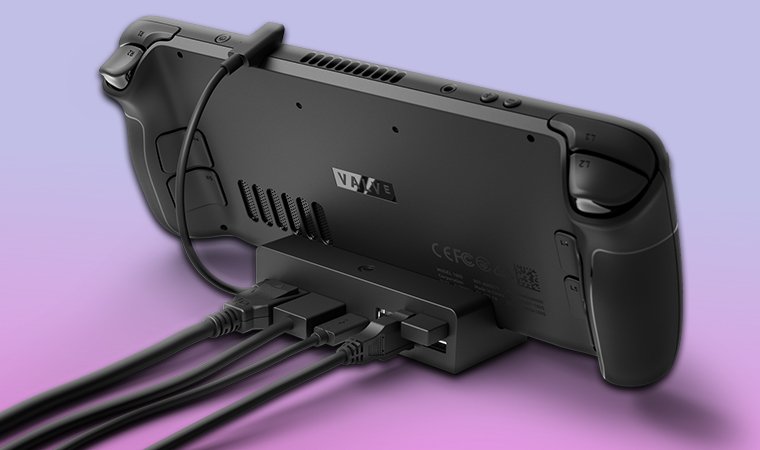
Both devices can plug into bigger screens, but they go about it differently. The ROG Ally works great with the ROG XG Mobile Dock, giving you access to an external GPU, extra ports, and even a full desktop setup with a mouse and keyboard.
You can use its USB-C port to connect to the best gaming monitor, charge, or play on a TV; it’s surprisingly flexible. The Steam Deck keeps it simple with the official Valve Dock, offering HDMI, USB, and Ethernet ports. It’s not as powerful for eGPU setups, but it still turns your Deck into a mini PC in a few seconds.
Upgrade & Repairability
The Steam Deck wins here; it’s designed for players who don’t mind getting their hands dirty. You can swap out the SSD, replace buttons, or even fix the joysticks with parts available directly from iFixit. It’s one of the most DIY-friendly devices around.
The ROG Ally isn’t quite as open, you can upgrade the SSD and clean it out, but its tighter internals make full repairs trickier. Basically, the Deck’s easier to fix; the Ally’s built sleeker but less serviceable.
Price & Value
Price-wise, both cover a wide range. The Steam Deck starts cheaper, making it a great deal for anyone who just wants to play games without breaking the bank. The ROG Ally, especially the Z1 Extreme or Ally X, costs more but gives you way more power and flexibility.
So, if you’re a casual gamer, the Deck’s the better value. But if you want performance, Windows freedom, and better hardware, the Ally’s worth the extra cash. Especially, with the latest ASUS and Xbox partnership bringing new ROG Xbox Ally handhelds.
Conclusion

So, which one should you go for – Steam Deck or ROG Ally? The best pick totally comes down to your gaming style.
If you want power and flexibility, the ASUS ROG Ally is the stronger fit.
It runs Windows 11, supports non-Steam games, and works much like a full PC. You can tweak performance settings, install mods, run launchers like Game Pass or Epic, and even use it for productivity if needed. It’s ideal for gamers who value freedom, customization, and raw performance.
If you want simplicity and comfort, the Steam Deck OLED delivers a polished, console-like experience.
With its stunning OLED display, cooler temperatures, and longer battery life, it’s built for easy, on-the-go gaming. Turn it on, pick a game, and play – no settings, no troubleshooting, no extra steps.
In short:
- Pick ROG Ally if you enjoy customizing, optimizing, and pushing your hardware.
- Pick the Steam Deck OLED if you just want to relax and play without thinking about updates, drivers, or settings.
Both are great – just in different ways.
FAQs
The better handheld depends on what you want. ROG Ally is stronger and more flexible, while the Steam Deck is easier to use and lasts longer. If you want plug-and-play gaming, go Deck; if you want full PC control, go Ally.
Yes, the ROG Ally is stronger thanks to its Ryzen Z1 Extreme chip and newer RDNA 3 graphics. It delivers higher FPS and better visuals, though it drains the battery faster.
Most AAA games like Cyberpunk 2077 and Starfield run better on the ROG Ally due to its higher specs and Windows 11 support. It also handles non-Steam games and mods without issues.
Yes, the ROG Ally can run almost any PC game that works on Windows. Just keep in mind that battery life may vary depending on the game’s performance demands.
Yes, the ROG Ally can play Steam games just like any PC. You simply install the Steam app on Windows 11 and log into your account.
Yes, the Steam Deck can run non-Steam games, but it takes some setup. You can install Windows or use Desktop Mode to access other launchers.
Yes, the Steam Deck is technically a full PC running SteamOS. You can browse, install software, and even switch to Windows if you want the full desktop experience.
Yes, the Steam Deck is absolutely worth it if you want affordable, portable PC gaming without the setup hassle. It’s reliable, fun to use, and keeps getting better with updates.