How to Connect Subwoofer to Soundbar: Wireless & Wired Setup


Learning how to connect a subwoofer to a soundbar confuses people when they unbox their new system and see flashing lights, pairing buttons, and no obvious cables. No visible connection between the soundbar and this big subwoofer box. A button on the back labeled “Pair.” LED indicators that could mean literally anything. Now what?
Most modern soundbar subwoofers connect wirelessly and pair automatically when you plug them in. But when automatic pairing fails, or you’re dealing with a wired subwoofer, you need to know the manual connection process. The exact steps depend on whether you bought a wireless soundbar system or a wired setup.
This guide covers both wireless pairing (the most common method) and wired RCA connections, with specific instructions for Samsung, LG, Sony, and other major brands. Plus, troubleshooting fixes when your subwoofer won’t connect or produces zero bass despite being powered on.
Jump to:
Wireless vs Wired: Which Connection Do You Have?
Wireless subwoofers only need power – no audio cable to the soundbar. They use proprietary wireless signals (not Bluetooth). Most soundbars after 2020 are wireless. Wired subwoofers need an RCA cable from the soundbar’s “Sub Out” port to the subwoofer input. Less common but found in setups with good budget soundbars.
Check your soundbar’s back panel for “Sub Out,” “LFE,” or “Subwoofer” ports. If present, you have wired. No ports? Wireless.
Method 1: Wireless Subwoofer Setup (Automatic Pairing)
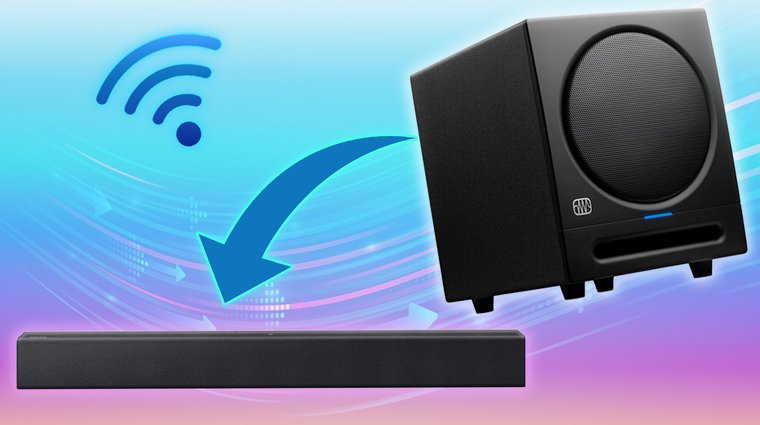
Most wireless soundbar systems pair automatically without any button pressing. This works about 90% of the time with brand-new equipment.
Automatic Connection Steps
- Position the subwoofer. Place your subwoofer within 15 feet of the soundbar. Closer is better for initial pairing. Solid walls and metal furniture between devices can interfere with the wireless signal.
- Plug in the soundbar. Connect the soundbar to power and turn it on. Let it fully boot up (usually takes 30 seconds).
- Plug in the subwoofer. Connect the subwoofer’s power cord to a wall outlet. The subwoofer powers on automatically when plugged in. Most don’t have a power button.
- Wait for automatic pairing. Give it 30-60 seconds. Watch the LED light on the back of the subwoofer. It should change from blinking to solid (usually green or amber, depending on brand). Solid light = successful pairing.
- Test the connection. Play something with heavy bass (action movie trailer, hip-hop music). If you feel rumbling from the subwoofer, you’re done. If not, move to manual pairing.
Method 2: Manual Wireless Pairing
When automatic pairing fails, you’ll need to manually put both devices into pairing mode. The exact process varies by brand, but the concept is the same: press buttons to make them discover each other.
Samsung Soundbar Manual Pairing
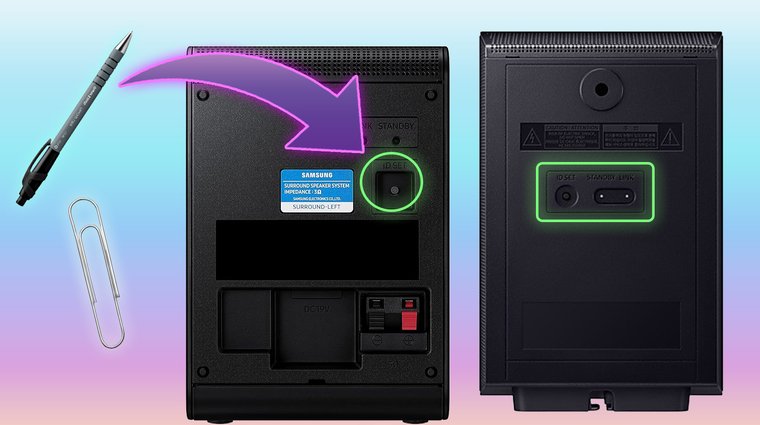
- Put the subwoofer in pairing mode. Use a small pointed object (paperclip, pen tip) to press the ID SET button on the back of the subwoofer. Hold for 5 seconds until the blue LINK LED blinks rapidly.
- Activate soundbar pairing. With the soundbar turned off, press and hold the Mute button on your remote. Keep holding until you see pairing confirmation on the soundbar display (about 5 seconds). I’ve tried some solid Samsung soundbars that use the ID SET button on the soundbar itself instead of the remote. If Mute doesn’t work, try holding the Volume Up button.
- Confirm connection. The subwoofer LED stops blinking and stays solid blue. The soundbar display shows “SUB CONNECTED” or a similar message.
LG Soundbar Manual Pairing
- Turn off the soundbar. Press the Power button to turn off your LG soundbar completely. A quick note: here’s our list of the best soundbars for LG TVs; they perform best when you pair the brand.
- Press the subwoofer pairing button. Find the Pairing button on the back of the wireless subwoofer. Press and hold it until the LED starts blinking green (about 3-5 seconds). If the LED stays red instead of turning green, press and hold the Pairing button again for 5 seconds.
- Turn on the soundbar. Press Power on the soundbar. It will automatically search for and connect to the blinking subwoofer.
- Verify green light. Connection is successful when the subwoofer LED turns solid green. Red LED means connection failed – repeat the process.
Sony & TCL Soundbar Manual Pairing
Sony: Hold Power + Input buttons on the soundbar while pressing Pair on the subwoofer. Follow on-screen instructions until “Pairing Complete” appears.
TCL: Press and hold the Pair button on the subwoofer until the LED blinks. Press the right arrow button on the soundbar to power it on. Wait for a solid LED.
Universal Brand Wireless Pairing
For other brands without specific instructions above:
- Turn on the soundbar
- Press and hold any button labeled “Pair,” “Connect,” or “Link” on the subwoofer for 3-5 seconds
- Press the same type of button on the soundbar or remote if available
- Wait 30 seconds for devices to find each other
Method 3: Wired RCA Subwoofer Connection
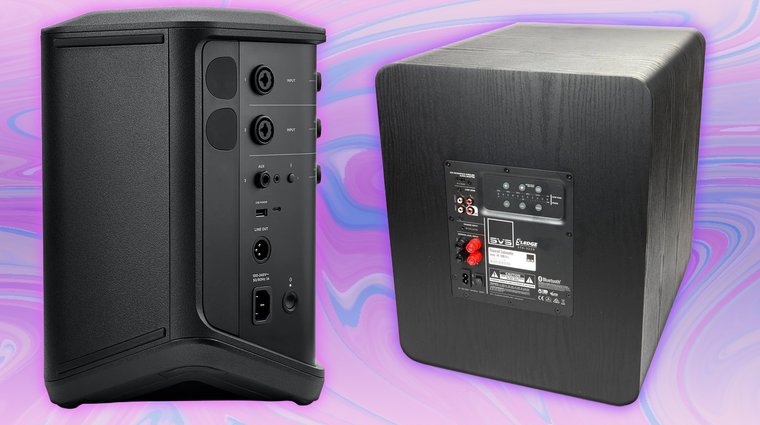
Wired connections are straightforward but require the right cable and proper port identification. All top-tier soundbars are clearly labeled, but it still might prove a bit daunting if this is your first time. Here’s how to do it.
Identifying the Correct Ports
- On the soundbar: Look for ports labeled “Sub Out,” “LFE Out,” or “Subwoofer Output.” This is usually a single RCA port (red or white).
- On the subwoofer: Find ports labeled “LFE In,” “Line In,” or you’ll see dual RCA inputs (red and white). If you see both LFE and red/white inputs, use the LFE input.
Step-by-Step Wired Connection
- Power everything off. Unplug both the soundbar and subwoofer from power outlets. Prevents electrical pops that can damage speakers. This setup is also valid if you have one of the models from our list of the best soundbars with subwoofers.
- Get the right cable. You need an RCA subwoofer cable (also called LFE cable). It looks like a standard RCA cable with connectors on both ends. Most subwoofers include this cable in the box.
- Connect to the soundbar. Plug one end of the RCA cable into the soundbar’s “Sub Out” or “LFE” port. Push firmly until it clicks into place.
- Connect to the subwoofer. Plug the other end into the subwoofer’s “LFE In” port. If your subwoofer only has red/white inputs with no LFE label, use the white (left) input.
- Adjust subwoofer crossover. On the back of the subwoofer, find the crossover dial. Turn it to maximum (usually 150-200 Hz) when connecting to a soundbar. The soundbar handles bass management, so you want the subwoofer to accept all frequencies it receives.
- Power on and test. Plug both devices back into power outlets. Turn them on. Play bass-heavy content to verify the subwoofer is producing sound.
Adjusting Bass Levels After Connection
- Soundbar remote: Press bass +/- buttons while audio plays. Start at the middle level.
- Subwoofer volume dial: On the back, turn clockwise to increase. Start at 50%.
- Soundbar app: Samsung, Sonos, and LG have apps with bass sliders in audio settings.
- Optimal setting: You should feel bass, not just hear it. Dial back if items rattle or neighbors complain.
Troubleshooting Common Connection Problems
Subwoofer Won’t Pair (Wireless)
Fixes: Move the subwoofer within 3 feet of the soundbar during pairing. Remove wireless interference (WiFi routers, microwaves). Power cycle both devices for 10 seconds. Factory reset subwoofer (hold reset button 10 seconds). Verify compatibility between the soundbar and the sub.
Subwoofer Produces No Sound
Fixes: Check soundbar input mode (sub might not work on Bluetooth/AUX, switch to HDMI). Enable the subwoofer in the soundbar settings menu. Turn the subwoofer volume dial to maximum as a test. Try bass-heavy content. Verify the RCA cable is fully inserted (wired setups).
Subwoofer Cuts In and Out
Fixes: Reduce wireless interference – move away from WiFi routers. Keep the subwoofer within 10 feet of the soundbar. Check that the power connection is secure. Update firmware from the manufacturer’s website. Replace remote batteries.
LED Flashing Red
Fixes: Red = not connected. Repeat the pairing process. Hold the pairing button for 5-10 seconds, not just 3. Fully power on the soundbar (not standby). Persistent red after multiple attempts indicates defective hardware.
Distorted or Boomy Bass
Fixes: Lower subwoofer volume to 50-70%. Adjust crossover to 80-100 Hz (wired subs). Move the subwoofer away from the corners. Enable bass limiter in soundbar settings. Check for loose RCA connections.
Optimal Subwoofer Placement Tips
- Corner placement: Amplifies bass but can sound boomy. Good for large rooms needing maximum output.
- Front wall center: Most balanced option for 80% of setups. Place on the floor between the left and right of your TV.
- Side wall: Distributes bass more evenly. Try if the front placement sounds uneven.
- Behind the couch: Creates immersive bass you feel. Excellent for movies.
- Avoid: Inside cabinets or behind curtains – this muffles bass and causes rattling.
How to Connect Your Subwoofer to Your Soundbar
Connecting a subwoofer to your soundbar usually happens automatically with wireless systems – just plug both devices in and wait 30 seconds for pairing. When the automatic connection fails, manual pairing involves pressing buttons on both devices to force them into discovery mode. Wired subwoofers need an RCA cable running from the soundbar to the subwoofer, which provides a reliable connection without wireless interference.
The LED indicator on your subwoofer tells the story: blinking means searching for a connection, solid green or amber means successfully paired, and red means connection failed. Most connection problems come from wireless interference, excessive distance between devices, or forgetting to enable the subwoofer in soundbar settings.
Once connected and positioned properly, your subwoofer transforms flat TV audio into room-shaking cinematic sound. Action scenes hit harder, music feels fuller, and gaming becomes more immersive. Just remember to dial in the bass level so you’re enhancing the experience, not annoying neighbors or rattling windows.
Looking to boost your gaming sound to the next level? Check our list of the best soundbars for gaming and enjoy the immersion as you’ve never felt before.
FAQs
To connect a subwoofer to a soundbar, check the connection type first. Wireless subwoofers must match the same brand and pairing protocol. For wired setups, your soundbar needs a Sub Out/LFE port, and the subwoofer needs an RCA input, connected with an RCA (LFE) cable.
No, you can’t connect any random subwoofer to any soundbar. Wireless subwoofers use proprietary wireless protocols specific to each manufacturer – a Samsung wireless sub won’t connect to an LG soundbar. For wired connections, compatibility is broader but not universal. Your soundbar needs a “Sub Out” or “LFE” output port, and the subwoofer needs a compatible input.
Wireless subwoofers fail to connect for several reasons: distance between devices exceeds 15 feet, wireless interference from WiFi routers or other electronics, power cord not fully inserted, wrong pairing sequence, or devices need a factory reset to clear previous pairings. Try moving the subwoofer within 3 feet of the soundbar during initial pairing, turn off nearby wireless devices, and follow the brand-specific manual pairing process outlined in your soundbar’s user manual.
Check the LED indicator light on the back of your wireless subwoofer. A solid light (usually green or amber) means a successful connection, while a blinking light means still searching for a connection. Red LED indicates connection failure. For wired subwoofers, play bass-heavy content (action movie, hip-hop music) – if you feel rumbling from the subwoofer, it’s connected and working.
You need an RCA subwoofer cable (also called LFE cable or mono RCA cable). This cable has RCA connectors on both ends and carries the low-frequency audio signal from the soundbar to the subwoofer. Most wired subwoofers include this cable in the box.
Weak bass usually means the subwoofer volume is too low – turn up the volume dial on the back of the subwoofer or increase the bass level in your soundbar settings. Distorted bass happens when the subwoofer volume is too high, causing the speaker to overdrive. Also, check that the crossover frequency on wired subwoofers is set to maximum (150-200 Hz) so the soundbar properly manages bass frequencies.