



Lenovo vs HP: What Laptop Buyers Should Know in 2026

Eneba Hub contains affiliate links, which means we may earn a small commission if you make a purchase through them—at no extra cost to you. Learn more

The Lenovo vs HP debate has intensified in recent years as these two manufacturers dominate laptop shelves worldwide. Choosing between Lenovo and HP isn’t just about specifications anymore, and that is simply because brands take different approaches to build quality and the overall user experience.
This guide cuts through the marketing noise to help you make the right choice in 2025. Here’s how the two brands stack up when it comes to durability, performance, and value. From campus to the office or studio, I’ll guide you to the brand that matches your workload and wallet.
Jump to:
Lenovo vs HP: Productivity
Business users need laptops that work as hard as they do, which makes the Lenovo vs HP laptop choice crucial for productivity. Raw specs don’t matter if the keyboard hurts your wrists or you’re constantly hunting for dongles.
Lenovo pulls ahead when it comes to keyboard quality. Most of their keyboards offer deeper key travel and better tactile feedback than HP alternatives. The TrackPoint nub might look weird, but pros love it for a reason. Lenovo’s wide port selection for peripherals and external devices is another bonus from the brand.
HP takes a different approach to productivity. EliteBook laptops deliver desktop-like performance for users on the go, with docking stations that connect laptops to monitors for gaming when you’re off the clock and productivity. The company’s business laptops also integrate better with corporate IT systems thanks to a broad set of management tools.
Processing power varies by price point, not brand. Both HP and Lenovo offer everything from basic productivity chips to workstation-grade processors from Intel and AMD. RAM configurations start at 8GB and scale to 64GB or more on high-end models across business and consumer lines.
Brand differences become clearer when we look at the Enterprise class. Lenovo integrates AI-driven computing, flexible form factors, and enterprise security solutions into its business lineup. HP also uses AI, but puts more of an emphasis on comprehensive security suites and remote management.
Key Productivity Features
- Lenovo: Superior keyboard comfort with deep key travel, TrackPoint navigation, and an extensive port selection with simple docking solutions
- HP: Desktop-like performance with advanced docking, proximity-activated peripherals, and comprehensive IT management tools
My verdict: With productivity between HP vs Lenovo, both brands get the job done, but in different ways. Lenovo leans into comfort and usability, which makes it a great choice for travelers and professionals constantly on the move. HP goes big on infrastructure and integration, ideal for users who need a laptop that fits into larger, managed environments.
Lenovo ThinkPad X1 Carbon Gen 12 [Best Lenovo Laptop for Productivity]
| Specs | Details |
|---|---|
| CPU | Intel Core Ultra 7 165U vPro |
| GPU | Intel Integrated |
| RAM | 32GB |
| Display | 14” 1920 x 1200 |
| Storage | 1 TB SSD |
| Battery | 57 Wh |
| Weight | 2.41 lbs. |
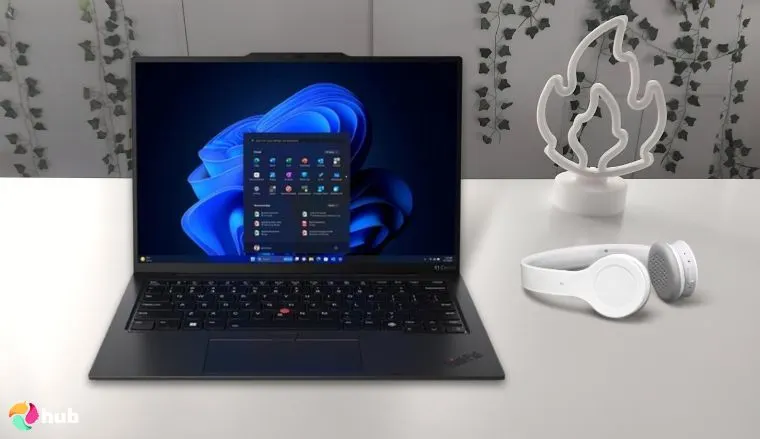
The Lenovo ThinkPad Carbon X1 Gen 12 is a laptop that can help you take productivity to new heights. It’s an attractive, reliable machine and one of the best Lenovo laptops for professionals on the move.
At just 2.41 pounds without the charger, this laptop won’t weigh you down. It carries the same design language that the ThinkPad Carbon line is known for, but is slightly smaller and lighter than previous models. That’s impressive, considering it has a 1TB solid-state drive, 32GB of RAM, and a 12th-generation Intel Core Ultra 7 processor under the hood.
Battery life is solid on this variant, with many reviews indicating 8 to 12 hours of usage per charge under normal conditions. It’s much better than the OLED models and looks fantastic, although still a bit slow if you plan to tackle any of the best FPS games during breaks from work. Other noteworthy features include an FHD IR webcam, dual-array mics, and the beloved keyboard and Trackpoint nub.
When you need a Lenovo laptop for business or productivity, you can’t go wrong with the ThinkPad line. The company improved or refined the design on the 2014 edition ThinkPad, and it’s just as durable as ever with MIL-STD 810H certification.
| Pros | Cons |
|---|---|
| ✅ Premium build quality ✅ 14” IPS display with 100% RGB coverage ✅ MIL-STD 810H certification ✅ Responsive keyboard & trackpad ✅ Only weighs 2.41 lbs. | ❌ Battery life is sound, but better on earlier models |
The ThinkPad X1 Carbon Gen 12 stands out for its portability and enterprise‑grade durability. With MIL‑STD 810H certification, long battery life, and powerful performance, it keeps professionals productive wherever they go.
| User testimonials |
Albert
This is a great laptop at an attractive price. This is my seventh ThinkPad, and each one is better than the previous.
|
HP Spectre x360 14 [Best HP Laptop for Productivity]
| Specs | Details |
|---|---|
| CPU | Intel Core Ultra 7 155H |
| GPU | Intel Arc |
| RAM | 32GB |
| Display | 14” 2880 x 1440 |
| Storage | 2TB SSD |
| Battery | 68 Wh |
| Weight | 3.15 lbs. |
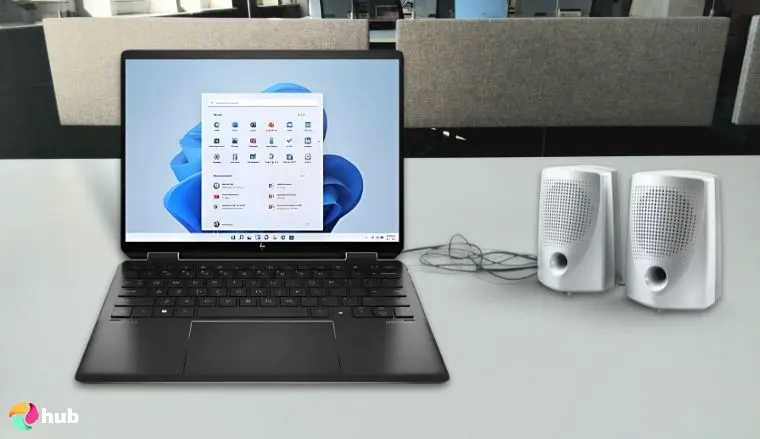
The HP Spectre x360 14 is a premium 2-in-1 HP laptop built for professionals who want performance and flexibility from an AI-powered laptop. With a 360-degree hinge, it shifts easily between laptop and tablet modes, providing convenience without sacrificing productivity.
Inside this laptop, you’ll find an Intel Core Ultra 7 155H processor with integrated AI support. That chip is backed by 32GB RAM and a 2TB SSD. That’s plenty of headroom for demanding apps and creative workloads. Creatives will love the included active pen along with tablet mode. You can expect 8-12 hours with general use, depending on your settings, which is excellent given the display.
The display is a highlight of this system, and something users love. It’s a 120Hz OLED touchscreen panel with a resolution of 2880 x 1800. The blacks are deep, and the colors are vibrant on the stunning display. It’s well-built with a design worthy of a flagship and feels solid whether you’re typing a document or watching Netflix in tablet mode. Oddly enough, there’s no place to store the digital pen, and it’s light on ports because of the razor-thin design.
HP took a different approach to productivity with the Spectre x360 14. This premium convertible excels when you need performance and portability in one package. The slim design combines a modern design with powerful hardware, making it ideal for professionals who want flexibility and strong performance.
| Pros | Cons |
|---|---|
| ✅ Flexible 2-in-1 design ✅ 120Hz OLED display ✅ Powerful hardware ✅ Excellent webcam and audio ✅ Strong battery life | ❌Practical selection is practical, although somewhat limited |
The Spectre x360 14 stands out by pairing AI‑accelerated performance with a vibrant 120 Hz OLED touchscreen and versatile tablet mode, making it ideal for professionals and creatives.
| User testimonials |
gg
It’s sleek, specs are top notch, good for business, entertainment, gaming, and also portable. Good battery life, I can go a full working day with a single charge.
|
Lenovo vs HP: Gaming Performance
If you’re considering a new Lenovo gaming laptop or a portable rig from HP, the choice usually comes down to Legion or Omen. These are the flagship lines built for high performance, while LOQ, Victus, and other specific models target gamers on a budget who still want solid specs.
Lenovo Legion laptops are known for their consistent power and thermal design. Most models come with high-end NVIDIA GeForce RTX GPUs, ranging from the 4050 up to the 4090 in premium configs. Their laptops sport AMD Ryzen and Intel Core CPUs. Many also feature dual-fan cooling with vapor chambers to keep heat under control during long gaming sessions.
Lenovo Gaming Laptops
- RTX 40-series GPUs and Intel/AMD performance CPUs
- QHD+ displays with up to 240Hz refresh and Dolby Vision
- Lenovo Vantage software for system tuning and macros
HP Omen laptops are in the same league and offer RTX 40-series graphics and high-end Intel or AMD processors. Some models, like the Omen Transcend or Omen 16 Max, feature OLED displays with 240Hz refresh rates and sharp 16:10 aspect ratios. Cooling is aggressive on HP gaming laptops, with multiple heat pipes and auto-cleaning fans. Omen Gaming Hub is the brand’s control center for overclocking, lighting customization, and other tools.
HP Gaming Laptops
- OLED display options with 240Hz refresh
- HyperX audio tuning and Tempest cooling on select models
- Performance control via Omen Gaming Hub
My verdict: Both brands offer solid choices for hardcore and casual gamers, although neither is known for producing budget-friendly gaming laptops. Lenovo gaming laptops are known for strong performance and great thermals compared to HP’s flashier designs. You can find Intel or AMD-based GPUs from either company, along with a wide variety of processors.
Lenovo Legion 5i [Best Lenovo Laptop for Gaming]
| Specs | Details |
|---|---|
| CPU | Intel-Core i7-14700HX |
| GPU | NVIDIA GeForce RTX 5070 |
| RAM | 16GB |
| Display | 15.1” 2560 x 1600 |
| Storage | 1TB SSD |
| Battery | 80Wh |
| Weight | 5.3 lbs. |
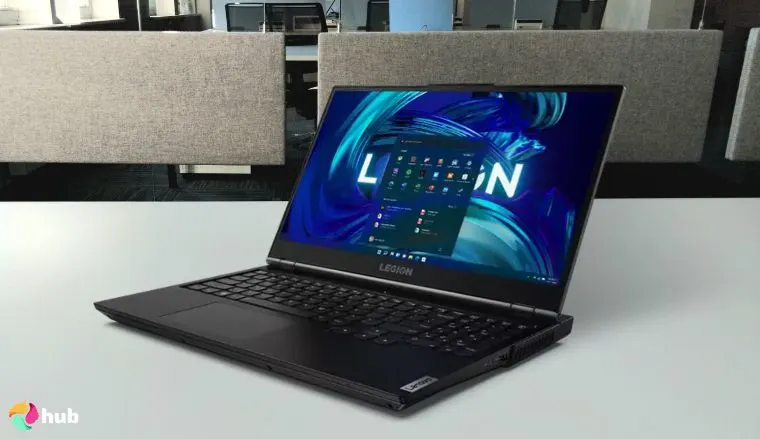
The Lenovo Legion 5i packs desktop‑like power into a portable frame. Weighing around 5.3 pounds and measuring under an inch thick, it can slip into a backpack without feeling like extra baggage.
Games are responsive on the Lenovo Legion 5i’s 15.1-inch OLED display, which has a resolution of 2560 x 1600. It has a refresh rate of 165Hz and provides lag-free gameplay with a 1ms response time. The power comes from the Intel Core i7-14700HX and 16GB of RAM. Storage feels a little light with a 1TB SSD, but the GPU makes up for that.
This Lenovo gaming laptop has the NVIDIA GeForce RTX 5070 and excellent cooling. The company’s revamped Coldfront system keeps the system running smoothly and quietly. The keyboard has 24-zone RGB lighting, and there are plenty of ports. Lenovo’s thoughtful design shows on the Legion 5i with features like Q-Control, the Lenovo AI Engine+, and a service hatch for easy upgrades.
The Lenovo Legion 5i gaming laptop is a beast, and a system that should be high on your list, thanks to a balance of muscle and mobility. It’s a portable system with power that will play anything you throw its way, and one of the best gaming laptops for the price.
| Pros | Cons |
|---|---|
| ✅ PureSight OLED 2K display ✅ GeForce RTX 5070 ✅ 100% DCI-P3 color gamut ✅ 1ms response time ✅ AI-enhanced gaming features | ❌ Highly upgradable, just light on RAM and storage out of the box. |
The Legion 5i delivers desktop-class gaming performance without the usual portable compromises. It’s powerful, well-built, and reasonably priced for what’s under the hood.
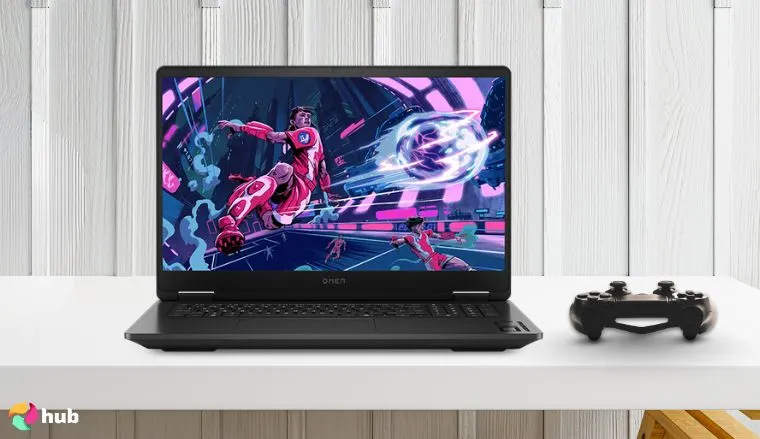
HP OMEN 17.3″ RTX 5060 AI Gaming Laptop [Best HP Laptop for Gaming]
| Specs | Details |
|---|---|
| CPU | AMD Ryzen AI 9 365 |
| GPU | NVIDIA GeForce RTX 5060 |
| RAM | 32GB |
| Display | 17.3-inch 1920 x 1080 |
| Storage | 1 TB SSD |
| Battery | 83Wh |
| Weight | 6.51 lbs. |
The HP OMEN AI gaming laptop combines high‑end graphics and AI acceleration into a single powerful package. That blend makes it a top choice for gamers and content creators who want serious power without a tower.
Inside this gaming laptop, you’ll find an AMD Ryzen AI 9 365 processor paired with 32 GB of RAM and a 1 TB solid‑state drive. Graphics are driven by NVIDIA’s GeForce RTX 5060, which enables ray‑tracing and DLSS support in the latest AAA titles. You can play your favorites with the settings cranked up, and this system will still stay cool.
HP’s Tempest cooling system helps keep heat in check under heavy loads while Bang & Olufsen-tuned speakers pound out the sound. It’s a premium system from top to bottom, and laptop battery life is better than expected. It has a massive 17.3-inch 144Hz FHD display with anti-glare and blue light filtering tech, although the 7ms response time isn’t as on par with comparable systems in this class.
The HP OMEN AI gaming laptop is designed for gamers and creators who want one machine that can do it all. AI‑driven performance and advanced cooling combine to keep gaming sessions smooth and immersive. From competitive play to creative workflows, the OMEN delivers performance that can turn any session into a win and is one of the best HP gaming laptops around.
| Pros | Cons |
|---|---|
| ✅ RTX 5060 and 32GB of RAM ✅ Spacious 17.3 FHD display ✅ RGB backlighting ✅ AI-enhanced features ✅ TruVision webcam | ❌ Response time not ideal for fast-paced games, but still fine for casual play |
The HP OMEN AI dominates both gaming and creative work with its AI-enhanced processor and delivers the performance to handle everything you need in one machine.
Lenovo vs HP: Design and User Experience
Design philosophies at Lenovo and HP take distinctly different paths. The Lenovo ThinkPad line embraces a utilitarian style geared towards durability and ergonomics, while Lenovo models from the Yoga line are known for versatile designs and slim profiles. HP leans into elegance with its Spectre family but takes a broader approach towards the average consumer with systems from the Pavilion and ENVY lineups.
Lenovo’s business machines focus on rugged materials, comfort, and an excellent typing experience. ThinkPads use carbon fiber and recycled magnesium for strength without additional weight. Users can look forward to features like spill resistance and the famous TrackPoint nub, depending on the model. Yoga laptops add 360° hinges and pen support on narrow‑bezel touchscreens, blending flexibility with a lightweight aluminum chassis.
HP Spectre laptops use CNC‑machined aluminum unibodies, gem‑cut edges, and Gorilla Glass for a refined look. ENVY and Pavilion laptops lean on two‑tone finishes and designs that appeal to mainstream users. Their keyboards tend to have shallower travel compared to Lenovo’s, but are still considered responsive.
Key Design Features
- Lenovo: Recycled carbon fiber and magnesium alloy builds, spill‑resistant deep‑travel keyboards, TrackPoint navigation, wide Precision touchpads
- HP: CNC‑machined aluminum shells, micro‑edge Gorilla Glass displays, gem‑cut accents, haptic or glass‑surface touchpads, webcam privacy shutters
My verdict: Both brands prioritize user comfort but take different approaches with a range of styles and consumer‑friendly features. If you value a workhorse with tactile typing, ThinkPads lead the pack, while the HP Spectre collection from HP makes a stylish statement.
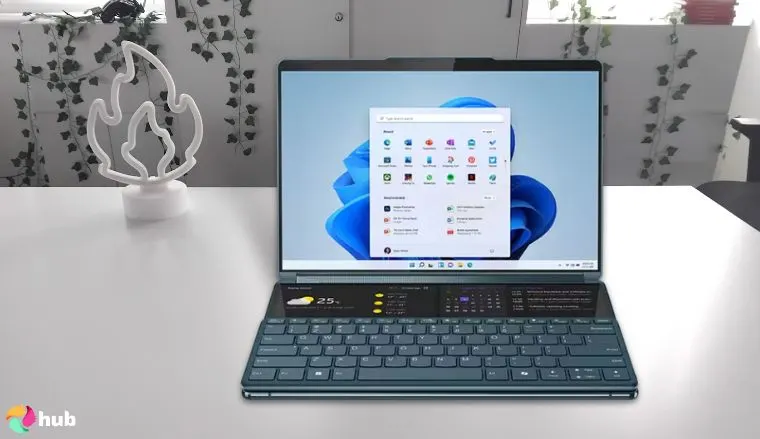
Lenovo Yoga 9i Gen 9 [Best Design]
| Specs | Details |
|---|---|
| CPU | Intel Ultra 7 155H |
| GPU | Intel Arc |
| RAM | 16GB |
| Display | 14” 2880 x 1800 |
| Storage | 2TB SSD |
| Battery | 75Wh |
| Weight | 2.91 lbs. |
Lenovo put a lot of thought into the design of the original Yoga, and they’ve improved on the lineup ever since. The Lenovo Yoga 9i is one of the newest laptops from the collection, and a prime example of the company’s versatile design.
This is another slim system under 3 pounds, and a bit over half an inch thick. The cosmic blue colorway gives it a classy look and fits perfectly alongside the 14-inch display. Lenovo used a 2880 x 1800 OLED panel on the Lenovo Yoga 9i. It’s listed at 120Hz with HDR 500 and 100% DCI-P3. It’s an accurate display for designers, and works in traditional, tablet, tent, or stand modes.
Beneath the backlit keyboard is a 16-core Intel Ultra 7 155H processor, paired with 16 gigabytes of RAM. A spacious 2-terabyte solid-state drive gives you room for creative tools, media, and programs. The Yoga 9i also features a fingerprint reader, a 1080p webcam with a privacy shutter, and a quad-speaker setup tuned by Bowers and Wilkins. Despite its power, it runs quietly and cool with battery life that can stretch through a day with general use.
The Lenovo Yoga 9i is a premium 2-in-1 laptop that delivers sharp visuals and responsive performance in a flexible package. You switch from typing to sketching in seconds with enough power to handle almost anything, including some of the best PC games. It’s one of the best Lenovo laptops in any class, and highly configurable depending on your needs.
| Pros | Cons |
|---|---|
| ✅ Sharp OLED 2K touchscreen ✅ Powerful hardware ✅ Lightweight, premium design ✅ Solid battery life ✅ Tuned audio from Bowers and Wilkins | ❌ Fantastic image quality, though the display is glossy |
The Yoga 9i isn’t just another convertible with flashy specs. It delivers a sharp display, clean audio, and seamless mode switching without feeling bulky or fragile. Lenovo didn’t overload it with gimmicks, but focused on useful upgrades that improve daily use.
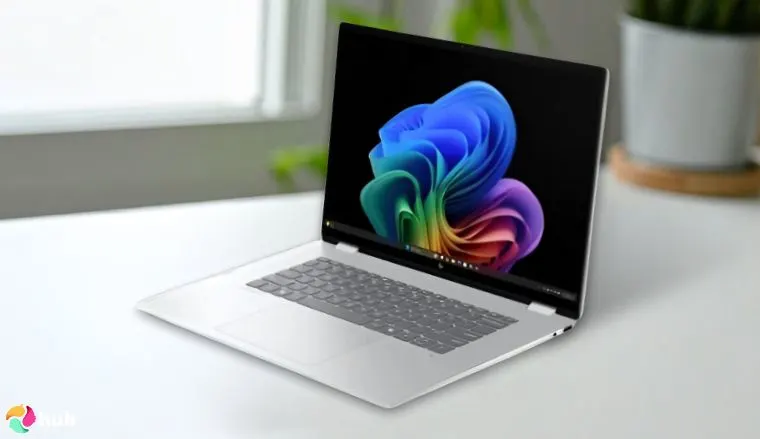
HP OmniBook 7 Flip [Best Design]
| Specs | Details |
|---|---|
| CPU | Intel Ultra 7 Series 2 258V |
| GPU | Intel Arc |
| RAM | 32GB |
| Display | 16” 2880 x 1880 |
| Storage | 2TB SSD |
| Battery | 68Wh |
| Weight | 3.94 lbs. |
HP produces a number of PCs geared towards performance, and the HP OmniBook 7 Flip 16 is the best laptop when you want a powerful hybrid machine from the company. It’s a high-powered system with a massive display, and enhanced with AI through Copilot+.
This laptop shares a lot of similarities with the Lenovo Yoga 9i from a design standpoint. You can use the laptop in multiple modes, and it has a slim profile that slides into bags with ease. It also has a large 16-inch 2880 x 1880 touchscreen display with a 120Hz refresh rate. Colors are bold and accurate on this system, and the specifications ensure it will be a strong performer for years to come.
The popular Intel Ultra 7 powers this laptop with a Series 2 258V chip. It comes with 2TB of storage out of the box, which is expandable up to 4TB. There’s also 32GB of RAM, a 5MP IR camera for video calls, and the HP Rechargeable Pen. Intel Arc Graphics means it’s not ideal for playing open world games on high settings, but it has more than enough horsepower for most apps and games.
The HP OmniBook 7 Flip 16 delivers everything HP does well in one package. You get premium build quality, a gorgeous display, and more than enough power for demanding work. It’s expensive, but it’s well worth the price with top-tier specs and a versatile design that works for business and creative tasks.
| Pros | Cons |
|---|---|
| ✅ Powerful hardware ✅ Large 16” OLED touchscreen ✅ 2TB of storage space ✅ 2-in-1 design with multiple modes ✅ Copilot+ AI | ❌ The battery life is great for daily use, but tops out at 8-10 hours |
The HP OmniBook 7 Flip 16 offers the best of both worlds with its large display, flexible form factor, and AI-enhanced performance in a premium package.
Lenovo vs HP Laptops: Durability and Build Quality
I’ve used around a dozen laptops from these companies over the years, and build quality often determines how long your new laptop will last. Here’s what I’ve learned about how these companies approach durability.
Some Lenovo laptops are built like tanks. The keyboard deck rarely flexes under pressure, and you can pick up most Lenovo laptops by a corner without worry. ThinkPads undergo MIL-STD-810H testing for temperature, humidity, vibration, and shock resistance. This military standard pushes laptops beyond normal use conditions.
HP also has select laptops with MIL-STD certification, like the Dragonfly G2 and HP Elite x360. They produce some sturdy systems in the business class, but Lenovo laptops have held up better in my experience. I also feel like they provide better wear resistance against daily life, whether it’s the keyboard, aluminum deck, or hinge.
Both companies know hinges are critical failure points in laptop design. Lenovo engineers reinforced mechanisms, and ThinkPads can maintain consistent tension even after several years. HP designs its hinges for smooth operation, although many experience play with frequent daily use.
Lenovo uses reinforced plastic and carbon fiber strategically across its lineup. ThinkPads feature magnesium alloy frames, and the company loves to over-engineer connection points. This prevents the gradual loosening commonly seen in other brands or with cheap laptops. HP focuses on aluminum construction across consumer and business lines, and its laptop build quality has improved significantly in recent years.
Key Durability Features
- Lenovo: MIL-STD-810H testing on ThinkPads, magnesium alloy and carbon fiber construction, reinforced hinges, and finishes that hide wear
- HP: Select MIL-STD certification on business models, aluminum unibody construction with corner reinforcement for impact distribution
My verdict: Both companies produce laptops that can handle years of abuse, but there is a difference in build quality, which gives Lenovo an edge. Most of the midrange and budget-friendly HP laptops don’t age as gracefully as Lenovo laptops.
The most durable laptop from the company is also their most productive machine. The Lenovo ThinkPad X1 Carbon has MIL-STD 810H certification, and the tank-like construction means you’ll have a reliable workhorse for years to come.
Lenovo vs HP: Support and Service
Support quality can make or break your laptop ownership experience. These companies take that seriously and offer comprehensive service options, from community help and ticket systems to on-site service plans.
Lenovo and HP maintain active community forums where users collaborate to solve common problems. Both forums follow a similar structure with strong user participation, and peer-to-peer troubleshooting often resolves issues faster than traditional customer support. Phone support quality varies between the companies depending on your region, the device, and a variety of other factors.
Each company provides standard one-year warranties on most consumer laptops. Extended coverage options include accidental damage protection and on-site service for business customers. User reviews are a mixed bag, but give Lenovo a slight edge with responsiveness.
HP has Care Packs, which provide 24/7 remote technical assistance and guaranteed seven-day repair turnaround. Lenovo counters with Premier Support and dedicated account management with priority service for enterprise clients. On-site service availability largely depends on your location.
The companies partner with local repair networks, but coverage quality varies. As you would expect, urban areas typically receive better service than rural locations, and business customers get priority scheduling.
Key Support Features
- Lenovo: Active community forums, consistent phone support quality, Premier Support for business, repair-focused warranty claims, strong social media responsiveness
- HP: Dedicated community forums, 24/7 remote assistance through Care Packs, seven-day repair guarantee, next-business-day replacement options
My verdict: Both brands offer solid support options that serve different users. Some will prefer Lenovo’s repair-focused approach, while business customers may value HP’s structured support and quick replacement policies.
Lenovo vs HP: Innovation and Special Features
Innovation drives laptop evolution, and these manufacturers pursue distinct technological paths that set their products apart from other models. Over the past few years, many of the best new features from both companies have involved AI.
Lenovo focuses on AI integration across ThinkPad, ThinkBook, Yoga, Idea, and Legion lines, creating personalized experiences that adapt to your habits. The company’s X Power technology adapts to user-specific needs while delivering smooth performance and reliability. HP Sure Sense utilizes AI to provide real-time detection and prevention of zero-day threats.
Display technology also showcases each company’s priorities. Lenovo invests heavily in OLED tech across multiple product lines while HP concentrates on privacy-enhanced displays and anti-glare coatings for business environments.
The company pioneered Sure View privacy screen technology, which darkens displays at side angles to prevent visual hacking. As for Lenovo, they recently unveiled the ThinkBook Plus Gen 6, which has a rollable display that expands from 14 to 16.7 inches.
Cooling solutions differ between brands, with Lenovo providing quiet operation through thermal management. HP focuses on sustained performance cooling that maintains consistent temperatures during high-performance tasks.
Key Innovation Features
- Lenovo: AI-powered X Power adaptive performance, rollable display concepts, PureSight Pro OLED technology, quiet adaptive cooling systems, lightweight utility software
- HP: Sure View integrated privacy screens, Sure Sense AI threat detection, sustained performance cooling, anti-glare display coatings, comprehensive security software suites
My verdict: Each company innovates where they feel their customers need it most. Lenovo pushes boundaries with new display tech, and HP works on keeping your data safe and your work private. You’ll find genuine innovation from both, just aimed at different problems.
Lenovo vs HP: Value and Price Range
Any Lenovo vs HP laptop comparison has to address pricing, where both companies stay aggressive. I feel that both companies have a price point for everyone, although HP has a significant edge in one area.
Lenovo’s pricing remains steady throughout its lineups. Their entry-level laptops usually start around $300, while the midrange tends to be cheaper than HP’s with similar specs, especially once you factor in regular promotions and student pricing. You’ll usually get more RAM, better displays, or stronger processors for the price.
HP has comparable pricing with systems ranging from $250 to more than $5,000. You can also find their laptops on sale throughout the year, but they have more options to choose from. At any given time, they have more than 500 laptops ready to ship compared to a few hundred with Lenovo.
This selection advantage matters when you’re shopping for specific configurations. HP offers more customization options and faster shipping on popular models. Their business laptop pricing tends to be competitive, especially with volume discounts for corporate buyers.
Gaming laptops show some clear differences in value. Legion systems from Lenovo pack strong performance without the markup you’d expect from Dell and bigger gaming brands. HP OMEN laptops can cost more upfront, but both offer systems with serious specs for hardcore gamers who need a portable gaming station.
Premium laptops from Lenovo’s ThinkPad line cost more than most people want to spend. They will keep working when other laptops give up, which is where value comes into play with that series. Long-term costs depend on how you use your laptop. Lenovo machines often outlast their HP counterparts, which saves money if you keep laptops for years.
Key Value Propositions
- Lenovo: Consistent midrange pricing advantage, aggressive student discounts, better performance per dollar in many lineups, and longer laptop lifecycles
- HP: Massive selection with 500+ options, extensive customization choices, competitive business volume pricing, and fast shipping on popular configurations
The best value depends on whether you prioritize upfront savings or long-term durability. Either company can deliver an excellent new laptop at a fair price.
My verdict: Lenovo works better if you want predictable pricing and solid performance. HP makes sense when you need specific configurations or don’t mind waiting for sales on premium systems.
Final Verdict
Lenovo excels at building laptops that last. Their focus on durability and practical design makes them ideal for heavy users who hang on to their laptops. ThinkPads are still the gold standard for many business users who prioritize reliability and performance that is consistent across their gaming lines.
HP produces a staggering range of laptops with a lineup that has something for every user, at any price point. That massive selection means you can find what you need, from tight business integration to lightweight hybrid systems. Battery life varies more by specific model than brand, though both HP and Lenovo offer all-day options in their premium lines.
These companies have an excellent selection of laptops, but Lenovo is a better choice if you’re looking for long-term value from a comfortable system. HP is a great option for users who want specific configurations or comprehensive business support.
The Lenovo Yoga 9i Gen 9 we featured earlier is the best example of why Lenovo’s laptops stand out. It strikes the perfect balance of power for the price while combining Lenovo’s reliable construction with the flexibility of a premium 2-in-1 design.
FAQs
Lenovo builds more durable laptops with better keyboards, while HP offers more variety and premium designs. Choose Lenovo for long-term use, HP for specific needs.
No, Lenovo is typically more durable and reliable. The ThinkPad line meets military-grade standards, while HP puts more of a focus on design than long-term build quality. For heavy use and daily abuse, Lenovo is the better choice.
Lenovo laptops typically last longer due to superior build quality and over-engineered components. ThinkPads especially outlast most HP models by several years.
Lenovo offers better value for students with aggressive student discounts, durable build quality, and superior keyboards for long typing sessions.











