9 Best Computer Speakers 2026 for Gaming, Music & Work

Eneba Hub contains affiliate links, which means we may earn a small commission if you make a purchase through them—at no extra cost to you. Learn more

Finding the best computer speakers can completely change how your desk setup feels, especially if you are still relying on built-in laptop or monitor speakers. I noticed this firsthand after upgrading my home office setup.
What started as a simple speaker swap quickly improved video calls, late-night gaming, and casual music listening. Dialogue became clearer, bass felt more controlled, and I no longer needed headphones for everyday use.
This guide reviews nine computer speakers, covering budget, mid-range, and premium options. Each model is evaluated based on sound quality, speaker configuration (2.0 vs 2.1), power output, connectivity, and overall value, with clear recommendations for gaming, work, streaming, and everyday PC use.
Jump to:
Our Top Picks for Computer Speakers
If you want computer speakers that feel like a clear upgrade the moment you hit play, these three picks cover the most important use cases: premium desktop audio, strong budget value, and immersive gaming sound.
- Audioengine A2+ – The best pick for most people because it delivers clean, detailed sound in a compact, well-built speaker set that fits almost any desk setup.
- Redragon GS520 – The best budget option because it offers solid volume and enjoyable everyday sound with a simple plug-and-play setup at a low price.
- Razer Nommo V2 – The best gaming-focused pick because it produces powerful, room-filling audio with punchy bass and a wide soundstage that makes games and movies feel more immersive.
Keep scrolling to see the full list, detailed breakdowns, and which computer speakers make the most sense for your space, budget, and listening habits.
9 Best Computer Speakers for Every Setup and Budget
This section breaks down the top computer speakers across different price ranges, desk sizes, and use cases, from casual listening to immersive gaming and focused work setups.
Each pick is evaluated for sound quality, features, and real-world usability to help you confidently choose the best computer speakers.
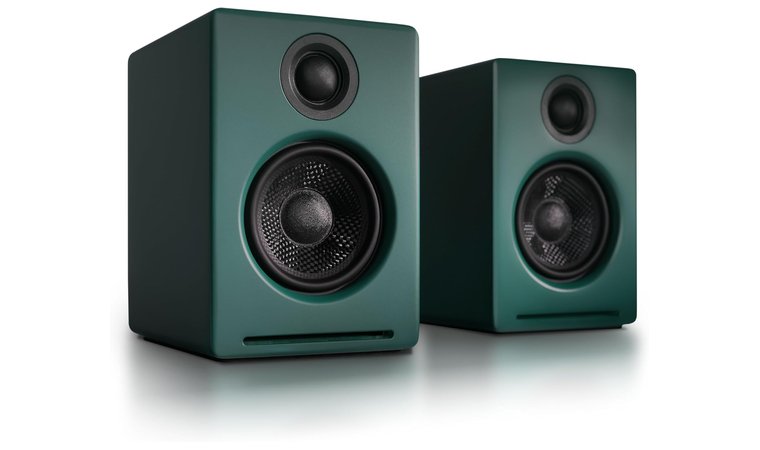
1. Audioengine A2+ [Best Overall Computer Speakers]
| Specs | Details |
|---|---|
| Speaker Configuration | 2.0 Stereo |
| Total Power Output | 30W RMS total (15W RMS/ch), 60W peak total |
| Frequency Response | 65 Hz – 22 kHz |
| Connectivity Options | Bluetooth, USB, RCA, 3.5 mm AUX |
| Subwoofer Included | No |
| Driver Size | 2.75″ Kevlar woofers, 0.75″ silk dome tweeters |
| Special Features | 24-bit DAC, hand-built cabinets, Bluetooth aptX HD |
The Audioengine A2+ takes the top spot because it delivers exceptional sound fidelity in a compact desktop form, making it suitable for music, gaming, and everyday computer use without compromise.
Its biggest strength is excellent clarity, with clean mids, smooth highs, and controlled bass that avoids artificial boosting. For its size, the 60W output provides more than enough power for near-field listening while maintaining balance and detail.
If you want deeper bass later, pair the A2+ with a compact subwoofer using the RCA output for a clean 2.1 desktop setup without replacing your speakers.
What truly justifies its “best overall” status is its consistent performance across use cases. Bluetooth enables quick wireless playback, while USB, RCA, and AUX connectivity ensure compatibility with PCs, Macs, consoles, and audio interfaces.
Build quality is another standout, with solid cabinets and quality drivers that reduce resonance and listening fatigue during long sessions. For users looking for the best gaming speakers that also perform well for music and media, the A2+ strikes a strong balance between accuracy, power, and long-term reliability.
| Pros | Cons |
|---|---|
| ✅ Exceptional clarity with a balanced sound signature ✅ Strong power output for compact speakers ✅ High-quality 24-bit DAC improves detail ✅ Multiple wired and wireless connections ✅ Premium build quality and materials ✅ Compact size fits most desk setups | ❌ Higher price than entry-level speakers, but justified |
Final Verdict: The Audioengine A2+ is ideal for buyers who want premium desktop sound, versatile connectivity, and build quality designed to last.
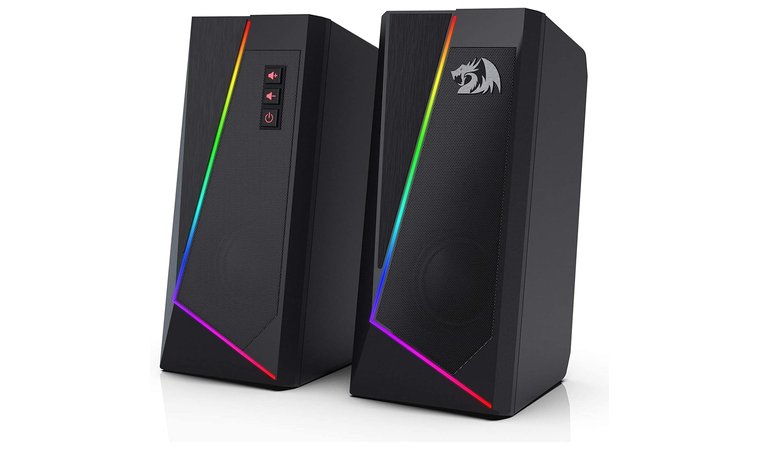
2. Redragon GS520 [Best Budget Computer Speakers]
| Specs | Details |
|---|---|
| Speaker Configuration | 2.0 Stereo |
| Total Power Output | 6W RMS total (3W RMS/ch), 10W peak total |
| Frequency Response | Up to 20 kHz |
| Connectivity Options | USB (power), 3.5 mm AUX |
| Subwoofer Included | No |
| Driver Size | Full-range drivers |
| Special Features | RGB lighting modes, easy-access volume control |
The Redragon GS520 earns its spot as the best budget pick because it offers strong value for the price in a category where many cheap speakers sound thin or harsh.
It delivers clear stereo audio for YouTube, casual gaming, and day-to-day desktop use, and it stays listenable at normal volumes without the scratchy distortion you often get at this cost. In a near-field setup, it feels surprisingly controlled and consistent.
Place the speakers at ear level and keep them close to your monitor to maximize clarity, since the GS520 is designed for short-range desktop listening.
What helps the GS520 punch above its price class is its simple, practical feature set. USB power keeps setup clean, while the 3.5 mm AUX connection makes it broadly compatible with PCs, laptops, and many TVs.
The built-in RGB lighting adds a nicer desk aesthetic without getting in the way, and the easy-access controls make quick adjustments simple. As expected for low-cost speakers, bass is modest, and the tuning leans more toward clear mids than deep low end, but that trade-off is reasonable for the money and easy to work around with positioning.
For buyers looking for the best budget computer speakers that still feel well put together, the GS520 delivers more than you would expect.
| Pros | Cons |
|---|---|
| ✅ Excellent value for the price ✅ Clear stereo sound for everyday use ✅ Simple USB-powered setup ✅ Compact footprint for small desks ✅ RGB lighting modes add style | ❌ Limited bass depth, but expected at this price |
Final Verdict: The Redragon GS520 is a smart buy if you want affordable desktop speakers that sound clean, look good, and stay easy to live with.
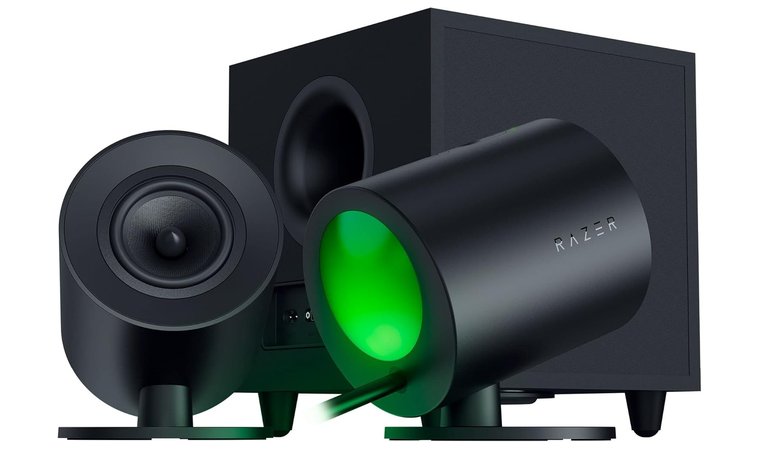
3. Razer Nommo V2 [Best Computer Speakers for Gaming]
| Specs | Details |
|---|---|
| Speaker Configuration | 2.1 Gaming Speaker System |
| Total Power Output | 65W RMS, 300W peak total |
| Frequency Response | Up to 20 kHz |
| Connectivity Options | Bluetooth, USB |
| Subwoofer Included | Yes (5.5″ down-firing) |
| Driver Size | 3″ full-range drivers |
| Special Features | THX Spatial Audio, Chroma RGB, wireless control pod |
The Razer Nommo V2 is built specifically for gamers who want scale, immersion, and positional accuracy from their desktop audio.
Its biggest strength is a wide, cinematic soundstage that makes in-game movement, dialogue, and environmental effects feel spatially separated rather than compressed into a narrow stereo image. THX Spatial Audio plays a major role here, delivering clearer directional cues that help games feel more responsive and immersive.
Enable THX Spatial Audio in Razer Synapse and fine-tune EQ presets per game to get the most accurate positional audio for shooters and open-world titles.
Gaming-focused tuning is where the Nommo V2 pulls ahead of more general-purpose speakers. Explosions carry real weight thanks to the down-firing 5.5″ subwoofer, while mids remain clean enough for voice chat and in-game dialogue.
Integration with Razer Synapse allows deeper control over audio profiles, RGB lighting behavior, and system-wide settings, letting you sync sound and visuals with your setup. The Chroma RGB rear projection lighting adds atmosphere without distracting from the screen, reinforcing the sense of immersion rather than overpowering it.
For players who want powerful sound without giving up clarity, this system hits a nice middle ground between desktop speakers and full home-theater setups, making it a great fit for a gaming space.
| Pros | Cons |
|---|---|
| ✅ Wide soundstage with strong positional audio ✅ Powerful bass from dedicated subwoofer ✅ THX Spatial Audio enhances immersion ✅ Razer Synapse integration for deep tuning ✅ Chroma RGB lighting elevates desk aesthetics ✅ Wireless control pod improves usability | ❌ Large footprint, but justified by output |
Final Verdict: The Razer Nommo V2 is ideal for gamers who want room-filling sound, deep bass, and immersive spatial audio that enhances both competitive and cinematic gaming.
4. Klipsch ProMedia Lumina [Best High-Quality Computer Speakers]
| Specs | Details |
|---|---|
| Speaker Configuration | 2.1 Speaker System |
| Total Power Output | 100W RMS, 200W peak total |
| Frequency Response | 40Hz-20kHz |
| Connectivity Options | USB-C, 3.5 mm AUX, Bluetooth (v5.3) |
| Subwoofer Included | Yes |
| Driver Size | Klipsch-tuned drivers |
| Special Features | RGB lighting, Klipsch Control App |
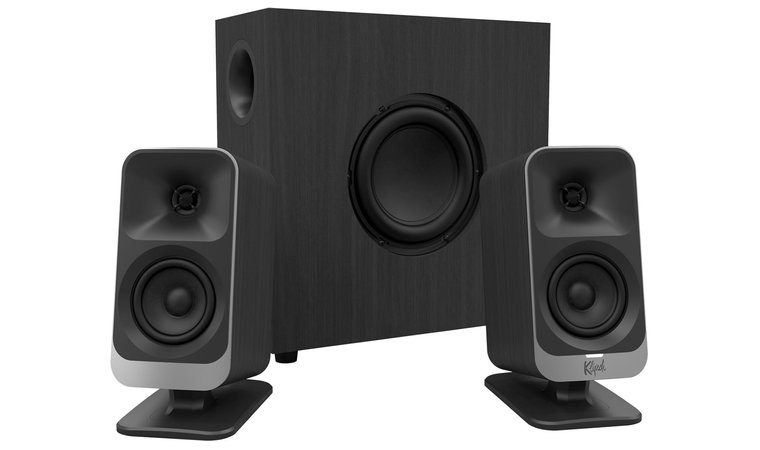
The Klipsch ProMedia Lumina is designed for users who want a noticeable upgrade from mid-tier computer speakers, focusing on richer sound, deeper bass, and refined detail. Klipsch’s long-standing reputation in premium audio is clear here, with carefully tuned drivers that prioritize clarity and balance rather than artificial loudness.
The inclusion of a dedicated subwoofer allows the system to reach lower frequencies with confidence, adding depth that smaller 2.0 setups simply cannot reproduce.
Use the Klipsch Control App to fine-tune bass and EQ settings, especially if you listen to both music and movies on the same setup.
What makes the Lumina stand out as a high-quality option is how controlled and spacious the sound feels. Mids remain clean and articulate, highs stay crisp without becoming sharp, and bass feels full without overwhelming the mix.
Bluetooth connectivity keeps the setup flexible, while the overall build quality reflects Klipsch’s premium design approach. Compared to typical desktop speakers, this model feels more like a compact home audio system – great for anyone who wants richer everyday sound.
| Pros | Cons |
|---|---|
| ✅ Richer, more detailed sound than mid-tier speakers ✅ Dedicated subwoofer adds depth and impact ✅ Trusted Klipsch audio tuning ✅ Bluetooth support for easy playback ✅ Premium look and build quality | ❌ Larger footprint, but expected for a 2.1 system |
Final Verdict: The Klipsch ProMedia Lumina is ideal for listeners who want high-quality desktop audio that clearly steps beyond standard computer speakers in depth and refinement.
5. Onkyo Creator Series GX-30ARC [Best Stylish Computer Speakers]
| Specs | Details |
|---|---|
| Speaker Configuration | 2.0 Powered Stereo |
| Total Power Output | 25W per channel, 50W peak total |
| Frequency Response | Wide-range tuning |
| Connectivity Options | Inputs: HDMI ARC, USB-C, Line/Phono, Optical, Bluetooth 5.3, 3.5mm AUX; Outputs: RCA sub out |
| Subwoofer Included | No |
| Driver Size | 4″ woofer with dedicated tweeter |
| Special Features | Bi-amplification, DSP tuning, premium finishes |
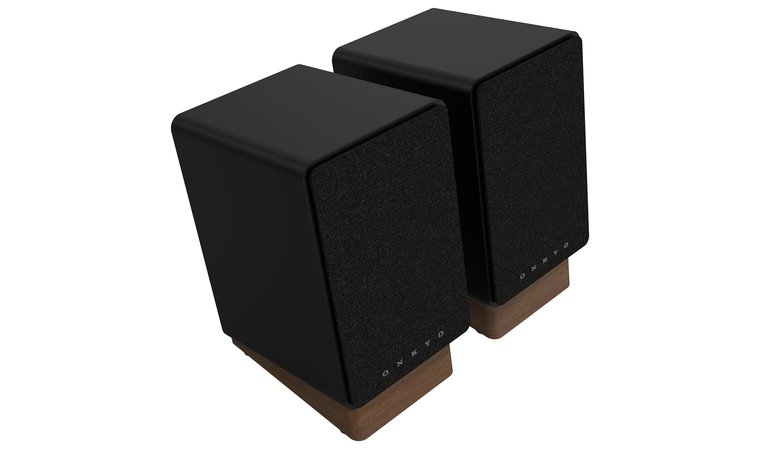
The Onkyo Creator Series GX-30ARC is designed for users who want speakers that look as refined as they sound. Its clean lines, compact proportions, and premium finishes fit naturally into modern desks, studios, and living spaces without drawing unnecessary attention.
Unlike many “design-first” speakers, the GX-30ARC backs up its appearance with serious audio engineering, including bi-amplification and DSP tuning that keep sound clear and controlled.
Use the USB-C connection for the cleanest signal from a desktop or laptop, especially if you work with audio or spend long hours listening.
What makes these speakers unique is their balance of aesthetics and performance. The 4″ woofer delivers tight, articulate bass for a 2.0 system, while the dedicated tweeter preserves detail in vocals and instruments.
Build quality feels deliberate, with solid materials that reduce vibration and help maintain clarity at higher volumes. Connectivity is also a strength, offering USB-C, optical, line, and Bluetooth inputs, which makes the GX-30ARC easy to integrate into mixed-use setups. It’s excellent for PC use, but pairing it with a quality turntable can be a fun upgrade toward an audiophile experience.
| Pros | Cons |
|---|---|
| ✅ Elegant, modern design suited to stylish desks ✅ Premium build quality and finishes ✅ Clean, detailed sound with DSP tuning ✅ Wide connectivity options ✅ Compact footprint without feeling underpowered | ❌ No included subwoofer, but bass remains well controlled |
Final Verdict: The Onkyo GX-30ARC is ideal for buyers who want stylish desktop speakers that deliver refined sound without compromising on design or build quality.
6. SteelSeries Arena 9 [Best Surround Sound Computer Speakers]
| Specs | Details |
|---|---|
| Speaker Configuration | 5.1 Surround Sound System |
| Total Power Output | 300W total RMS, 500W peak total |
| Frequency Response | Up to 20 kHz |
| Connectivity Options | USB, Bluetooth, Optical, 3.5mm AUX |
| Subwoofer Included | Yes |
| Driver Size | Dedicated tweeters and organic-fiber woofers |
| Special Features | Wireless rear speakers, RGB lighting, control pod |
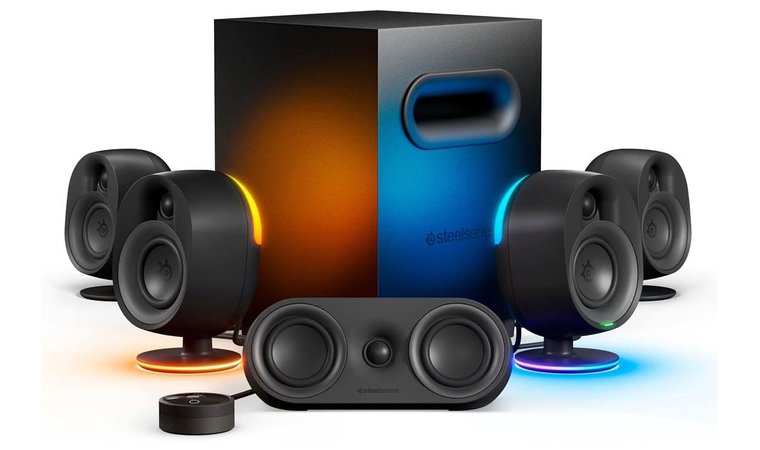
The SteelSeries Arena 9 is built for users who want true surround sound at their desk rather than simulated spatial effects. Its real 5.1 channel layout, with front, rear, center speakers, and a subwoofer, creates a wide and accurate soundstage that makes positional audio feel natural and easy to track.
This is especially valuable in games where directional cues matter, such as shooters and open-world titles, but it also enhances movies and series with more depth and separation.
Position the wireless rear speakers slightly behind and above ear level to get the most convincing surround effect without cluttering your desk.
What sets the Arena 9 apart is how immersive it feels without becoming complicated to use. The wireless rear speakers reduce cable mess, while the dedicated subwoofer delivers deep, controlled bass that adds weight to explosions and sound effects.
SteelSeries’ tuning keeps dialogue clear and centered, preventing the common issue of voices getting lost in surround-heavy scenes. RGB lighting adds atmosphere to gaming setups, but it can be toned down or disabled if you prefer a cleaner look.
If you prefer cinematic audio and the kind of detail you get from the best headphones, the Arena 9 offers a speaker-based alternative that fills the room rather than isolating sound.
| Pros | Cons |
|---|---|
| ✅ True 5.1 surround sound with real channel separation ✅ Wireless rear speakers reduce cable clutter ✅ Powerful subwoofer adds depth and impact ✅ Excellent positional audio for gaming and movies ✅ Flexible connectivity options | ❌ Requires more space, but delivers unmatched immersion |
Final Verdict: The SteelSeries Arena 9 is ideal for users who want full surround sound immersion from computer speakers and have the space to let a 5.1 system shine.
7. Logitech Z207 [Best Value Computer Speakers]
| Specs | Details |
|---|---|
| Speaker Configuration | 2.0 Stereo |
| Total Power Output | 5W RMS, 10W peak total |
| Frequency Response | Up to 20 kHz |
| Connectivity Options | Bluetooth, 3.5 mm AUX |
| Subwoofer Included | No |
| Driver Size | Active driver with passive radiator |
| Special Features | Easy-Switch Bluetooth, front controls |
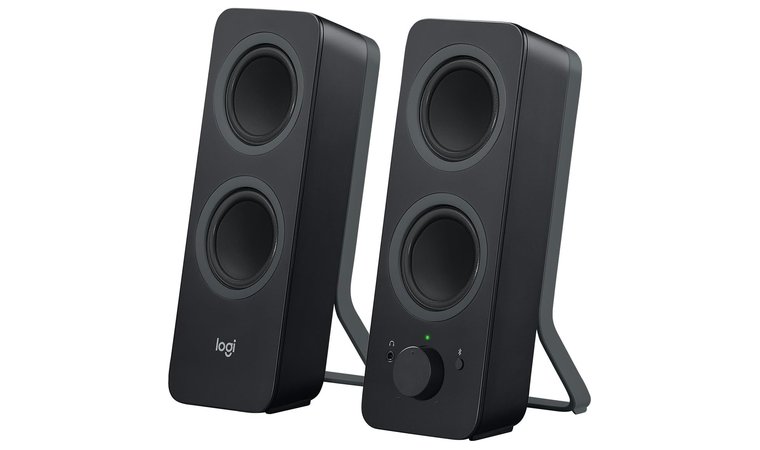
The Logitech Z207 is a strong value pick because it delivers a balanced mix of features, sound quality, and price that suits most everyday users.
It does not try to overpower your desk with bass or flashy design, but instead focuses on clean, reliable audio for work, videos, music, and casual gaming. For its size and cost, the sound feels full enough for near-field listening, with clear mids and smooth highs that remain comfortable over long sessions.
Use Bluetooth for your phone and the 3.5 mm AUX for your PC to take full advantage of Easy-Switch and avoid reconnecting devices constantly.
What makes the Z207 especially appealing is its flexibility. Bluetooth lets you stream wirelessly from phones and tablets, while the wired input keeps latency low for computer use. Logitech’s Easy-Switch technology allows seamless transitions between devices, which is ideal for mixed work and entertainment setups. Enhancing the low-end frequencies is also possible by adding a top subwoofer to the configuration.
Bass is modest, as expected from a compact 2.0 system, but the passive radiator adds a bit of warmth that prevents the sound from feeling flat. If you want more low-end, pairing the Z207 with a quality subwoofer is a smart move. Overall, for users who want dependable audio without spending much, this is the type of speaker that quietly does everything right.
| Pros | Cons |
|---|---|
| ✅ Excellent value for the price ✅ Bluetooth and wired connectivity ✅ Easy-Switch for multiple devices ✅ Clean, comfortable sound for long sessions ✅ Compact and desk-friendly design | ❌ Limited bass depth, but balanced for daily use |
Final Verdict: The Logitech Z207 is ideal for users who want affordable, flexible PC speakers that handle daily tasks well without unnecessary complexity.
8. Edifier G2000 [Best Multipurpose Computer Speakers]
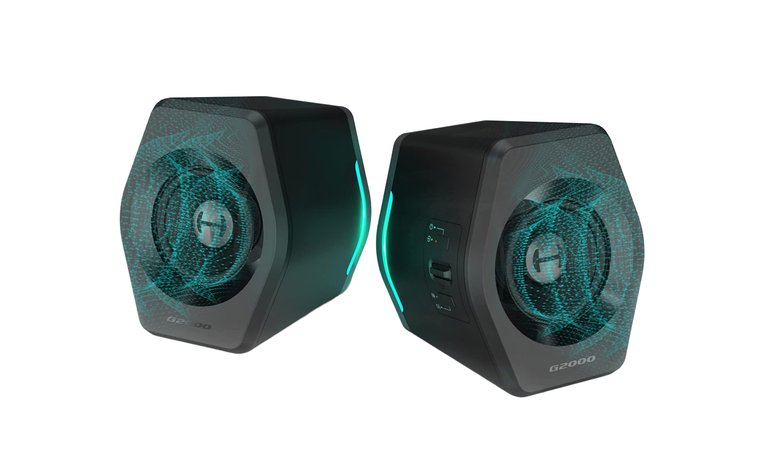
| Specs | Details |
|---|---|
| Speaker Configuration | 2.0 Stereo |
| Total Power Output | 16W RMS, 32W peak total |
| Frequency Response | 98Hz-20kHz |
| Connectivity Options | Bluetooth, USB, 3.5 mm AUX |
| Subwoofer Included | No |
| Driver Size | 2.75″ full-range drivers |
| Special Features | RGB lighting, multiple sound modes |
The Edifier G2000 stands out as a true multipurpose option because it adapts easily to gaming, movies, and music without locking you into one use case.
Its sound tuning leans balanced, delivering clear dialogue for videos, enough punch for casual gaming, and a lively profile for music playback. With 32W of output, it fills a desk area comfortably without sounding strained at normal listening levels.
Switch between the Music, Game, and Movie modes depending on what you’re doing to get the most balanced sound for each activity.
What really sells the G2000 is how easy it is to live with. Bluetooth, USB, and AUX inputs make switching between a PC, console, phone, or laptop quick and painless, while the front-facing controls keep adjustments simple.
The RGB lighting adds a gamer-friendly touch without overwhelming the setup, and it can be turned off if you prefer a cleaner look. Bass is naturally limited compared to systems with a subwoofer, but Edifier’s tuning keeps it tight and controlled rather than muddy.
If you want one set of speakers that can do a bit of everything – roughly on par with a decent soundbar – the G2000 gives you that versatility without the hassle.
| Pros | Cons |
|---|---|
| ✅ Versatile sound tuning for games, movies, and music ✅ Multiple connectivity options ✅ RGB lighting adds visual appeal ✅ Compact and desk-friendly design ✅ Easy controls and setup | ❌ Bass depth is limited, as expected from a 2.0 system |
Final Verdict: The Edifier G2000 is a smart choice for users who want one set of speakers that can comfortably handle gaming, media, and music without specialization.
9. Creative Pebble 2.0 [Best Computer Speakers for Students]
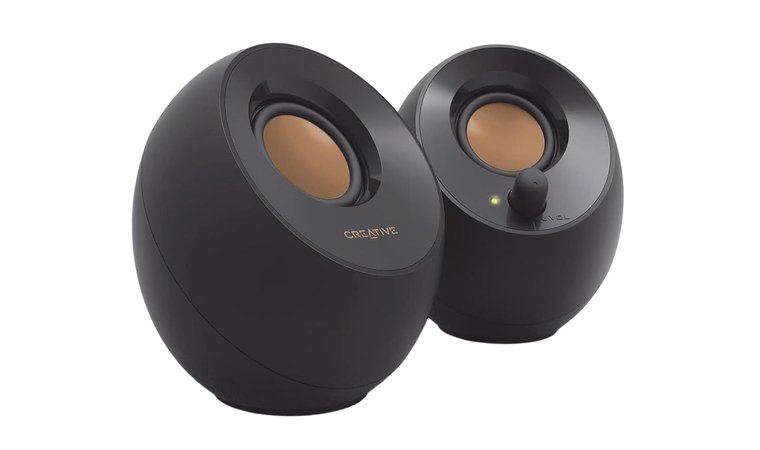
| Specs | Details |
|---|---|
| Speaker Configuration | 2.0 Stereo |
| Total Power Output | 4.4W RMS, 8.8W peak total |
| Frequency Response | 100 Hz – 17 kHz |
| Connectivity Options | USB (power + audio) |
| Subwoofer Included | No |
| Driver Size | Far-field drivers with passive radiators |
| Special Features | 45° elevated drivers, ultra-compact design |
The Creative Pebble 2.0 is an easy recommendation for students because it focuses on simplicity, size, and affordability without cutting corners where it matters most.
Its compact footprint fits effortlessly on crowded dorm desks, library tables, or shared workspaces, and the clean, modern design blends well with laptops and monitors. Setup could not be easier, as a USB-A cable and a 3.5 mm auxiliary input cable handle power and audio, which eliminates the need for bulky adapters or extra cables.
Angle the speakers directly toward your seating position to take full advantage of the 45° elevated drivers for clearer dialogue and vocals.
Sound quality is tuned for casual, everyday use rather than high-volume listening. The Pebble 2.0 delivers clear mids and highs for online classes, YouTube, music streaming, and light gaming, while the passive radiators add a touch of warmth that prevents the sound from feeling flat. Bass is limited, as expected at this size, but it remains controlled and clean for low-volume environments like dorms or shared apartments.
Front-facing volume controls make quick adjustments easy during study sessions or video calls. For students who need dependable audio without spending much or taking up space, this speaker set strikes the right balance.
| Pros | Cons |
|---|---|
| ✅ Ultra-compact and desk-friendly ✅ Single USB cable for power and audio ✅ Clean sound for classes and media ✅ Easy front volume control ✅ Very affordable price point | ❌ Limited bass depth, but appropriate for dorm use |
Final Verdict: The Creative Pebble 2.0 is ideal for students who want simple, space-saving computer speakers that handle everyday audio needs without hassle or clutter.
What to Consider While Shopping for PC Speakers
PC speakers are built for close-range, desk-based listening, which sets them apart from traditional home audio speakers designed to fill larger rooms.
Because they sit near your monitor and are used for long sessions, the right features matter more than raw power.
- Speaker configuration and channels:
A 2.0 setup works well for compact desks and everyday use, while 2.1 systems add a subwoofer for deeper bass. Full surround systems introduce multiple channels that improve spatial audio for gaming and movies, but require more space and careful placement. - Sound quality and tuning:
Good PC speakers prioritize clarity and balance over loudness. Well-tuned mids make dialogue clear, controlled highs prevent fatigue, and clean bass adds depth without overpowering the sound. - Power output and room size:
Smaller rooms and dorms do not need high wattage, while larger spaces benefit from more headroom to avoid distortion at normal listening levels. - Connectivity options:
USB offers simple plug-and-play setup, Bluetooth adds wireless flexibility, and 3.5 mm or optical inputs ensure compatibility with consoles and older devices. - Gaming and media-specific features:
Surround processing, EQ presets, control pods, or RGB lighting can enhance immersion, but they should support usability and audio performance rather than distract from it.
Choosing speakers with these factors in mind helps ensure your PC audio setup feels balanced, practical, and enjoyable for daily use.
My Overall Verdict
Choosing the right computer speakers today comes down to how you actually use your setup, not just specs on a box.
Different users benefit from different strengths, and the best option is the one that fits your space, habits, and expectations from day one.
- If you are a general desktop user who wants the safest all-around choice, start with the Audioengine A2+ because it delivers excellent clarity, strong power for its size, and broad connectivity that works equally well for work, music, and casual gaming.
- If you are a budget-focused buyer or student building a first setup, the Redragon GS520 is the best starting point since it offers clean everyday sound, simple USB power, and useful features at a price that makes sense.
- If you are a gamer who values immersion and positional audio, the Razer Nommo V2 stands out thanks to its wide soundstage, dedicated subwoofer, and gaming-focused tuning that enhances spatial cues.
- If you care most about design and a modern desk aesthetic, the Onkyo Creator Series GX-30ARC is a smart pick because it combines premium materials with refined sound that looks as good as it performs.
- For users who want cinematic audio and real surround sound, the SteelSeries Arena 9 is worth considering due to its true 5.1 channel layout and room-filling performance.
Each of these options excels for a specific type of listener, which is why matching the speaker to your needs matters more than chasing a single “best” label.
FAQs
The best computer speakers depend on your needs, but top choices balance sound quality, size, and connectivity. For most users, models like the Audioengine A2+ offer excellent clarity and build quality, while gaming-focused systems prioritize immersion and positional audio.
Yes, desktop speakers are worth it because they provide better sound quality, comfort, and presence than built-in monitor or laptop speakers, especially for long sessions. They improve clarity for work, media, and gaming without the need to wear headphones all day.
The highest quality speaker brand is Audioengine, which is widely respected for its tuning, materials, and consistency. The best brand ultimately depends on whether you prioritize accuracy, power, or design.
You can add speakers to your PC using USB, Bluetooth, or a 3.5 mm audio jack. Most speakers are plug-and-play, requiring no extra software, while some gaming models offer optional apps for tuning and features.