



ASUS vs Acer Laptops: The Ultimate 2026 Face-Off

Eneba Hub contains affiliate links, which means we may earn a small commission if you make a purchase through them—at no extra cost to you. Learn more


The ASUS vs Acer debate is more relevant than ever in 2025, with both brands making serious waves in the laptop market. From lightweight ultrabooks to budget-friendly gaming rigs, they’ve carved out a reputation by balancing performance, price, and innovation.
In this guide, I’ll break down where each brand shines and where they come up short across productivity, gaming, and design.
Whether you’re a competitive gamer, a remote-working professional, or simply need a reliable everyday laptop, this face-off will help you choose the right brand for your needs in 2025.
Jump to:
ASUS vs Acer: Productivity
In 2025, ASUS and Acer continue to compete closely in the productivity space.
Whether you’re balancing spreadsheets, video calls, or endless Chrome tabs, the differences come down to performance, comfort, and screen quality.
CPU & RAM
- ASUS Zenbook lineup (e.g., Zenbook A14, Zenbook Duo):
- Powered by Snapdragon X Elite or Intel Core Ultra 5–7.
- Paired with 16–32 GB LPDDR5X RAM.
- Designed for fluid multitasking across office apps, cloud services, and browser sessions.
- Powered by Snapdragon X Elite or Intel Core Ultra 5–7.
- Acer Swift Go 14 / Swift 16 AI:
- Equipped with Intel Core Ultra 7 or 9.
- It also supports 16–32 GB RAM configurations.
- Smooth for video calls, light editing, and document workflows.
- Equipped with Intel Core Ultra 7 or 9.
Display Quality
- ASUS offers:
- 2K or 3K OLED touchscreens with vibrant contrast.
- DCI‑P3 color accuracy is ideal for professionals who care about visuals.
- 2K or 3K OLED touchscreens with vibrant contrast.
- Acer screens:
- Features FHD+ IPS and 2.8K OLED displays.
- OLED looks richer, but IPS may be gentler on the eyes for longer tasks.
- Features FHD+ IPS and 2.8K OLED displays.
Keyboard & Ports
- ASUS advantages:
- Backlit keyboard with a crisp feel.
- Thunderbolt 4, HDMI 2.1, and even a NumberPad in some models.
- Backlit keyboard with a crisp feel.
- Acer layout:
- Includes USB-C, USB-A, HDMI, and a headphone jack.
- Keyboards are functional, though feedback may feel softer.
- Includes USB-C, USB-A, HDMI, and a headphone jack.
If productivity is your focus, both brands offer reliable tools. ASUS leans toward premium displays and refined input/output, while Acer emphasizes value and a balance of performance.
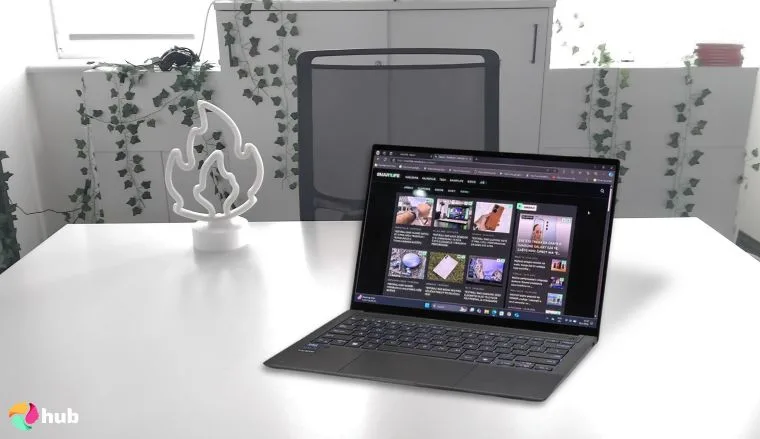
ASUS ZenBook S 14 [Best ASUS Laptop for Productivity]
| Specs | Details |
|---|---|
| CPU | Intel Core Ultra 7 (Series 2), up to 4.8 GHz |
| GPU | Integrated Intel Arc 140V graphics |
| RAM | 16 GB or 32 GB LPDDR5X |
| Storage | Up to 1 TB PCIe 4.0 SSD |
| Display | 14″ 3K (2880×1800) OLED touchscreen, 100% DCI–P3, TÜV–certified |
| Refresh Rate | 120 Hz |
| Battery | 72 Wh – up to 13 hours |
| Weight | ~1.18 kg (2.6 lbs) |
| Connectivity | 2× Thunderbolt 4, 1× USB–A–3.2, HDMI 2.1, Wi‑Fi 7, Bluetooth 5.4 |
Looking for an ASUS model that balances style and practicality? This is one of the top ASUS laptops for work-focused users who still value screen quality and design.
It’s ultralight, impeccably crafted, and features a stunning 3K OLED touchscreen, long battery life, and Intel Core Ultra 7 with AI-enhanced performance.
The ASUS ZenBook S 14 is built for users who prioritize premium portability and efficient multitasking across productivity tools, content apps, and cloud workflows.
Configure with 32 GB RAM and 1 TB SSD if you multitask heavily and plan to keep this laptop for several years.
If you’re someone who jumps between tasks, meetings, and travel, the ASUS ZenBook S 14 is a sleek solution that keeps pace.
The 3K OLED screen makes long hours easier on the eyes, and the Intel Core Ultra chip handles multitasking without a hitch. It’s stylish, capable, and future-ready.
| Pros | Cons |
|---|---|
| ✅ Featherlight and slim – perfect for hybrid work or commuting. ✅ Vivid 3K OLED display with 100% DCI–P3 and TÜV Eye Care certification. ✅ Long battery life – up to 13 hours of use. ✅ Intel Core Ultra with built–in AI copilot tools and integrated GPU support. ✅ Full I/O with Thunderbolt 4, HDMI 2.1, and USB–A, no dongle needed. ✅ Wi‑Fi 7 and Bluetooth 5.4 for next–gen connectivity. | ❌ Keyboard travel is shallow for heavy typists. |
Final Verdict: Its ultralight build, 3K OLED screen, and AI-ready chipset make ASUS ZenBook S 14 ideal for hybrid work setups.
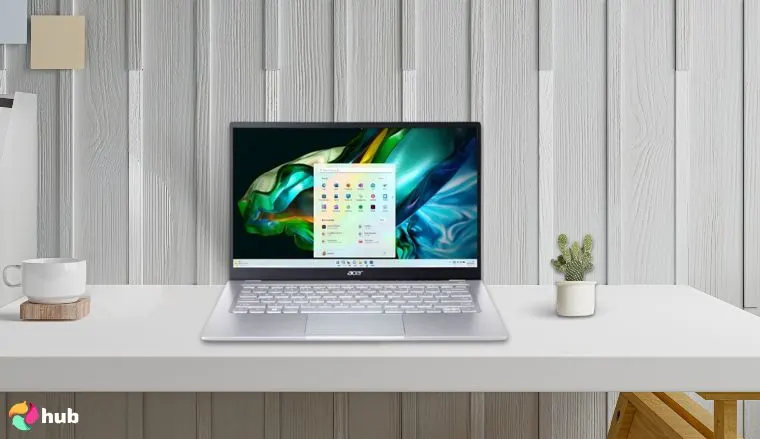
Acer Swift 14 [Best Acer Laptop for Productivity]
| Specs | Details |
|---|---|
| CPU | Qualcomm Snapdragon X Elite (Snapdragon X Plus / X1P‑64‑100), up to 12‑core |
| GPU | Integrated Adreno X1‑85 graphics |
| RAM | 16 GB or 32 GB LPDDR5X |
| Storage | Up to 1 TB PCIe Gen 4 SSD |
| Display | 14.5″ 2.5K (2560×1600), 120 Hz IPS touchscreen or OLED option |
| Battery | 75 Wh – up to ~17 hours of productivity use |
| Weight | ~1.32 kg (2.9 lbs), dimensions ~322.6 × 226 × 14.9 mm |
| Connectivity | 2× USB‑A 3.2, 2× USB‑C (USB4/Thunderbolt‑compatible), HDMI 2.1, audio jack, Wi‑Fi 7, Bluetooth 5.4 |
The Copilot+ PC brings game-changing AI performance thanks to its Snapdragon X Elite chip, boasts multi-day battery life, and stays ultra-light, perfect for users who demand relentless efficiency in a portable form.
The Swift 14 stands out for its intelligent features, premium design, and all-day efficiency.
Prioritize models with Snapdragon X Elite and 32 GB RAM if you plan to run AI features, multitask, or use high-res external monitors regularly.
If AI interactivity, long unplugged usage, and a broad port layout matter to you more than minimal weight, the Acer Swift 14 delivers smart, reliable productivity.
It handles heavy multitasking, video calls, and cloud workflows with ease and stays powered through long workdays.
| Pros | Cons |
|---|---|
| ✅ Excellent 14.5″ 2.5K display and high–res 1440p webcam. ✅ Exceptional battery life–up to 17 h of real use. ✅ Quiet thermal design–even under pressure. ✅ Rich port selection (2× USB‑A, 2× USB‑C, HDMI 2.1). ✅ Responsive Snapdragon X Elite chip with efficient LPDDR5X RAM. ✅ Compact build with Wi‑Fi 7 for next–gen connectivity. | ❌ LCD color vibrancy isn’t as rich (on the IPS variant). |
Final Verdict: Acer Swift 14 is one of the first Copilot+ laptops with multi-day battery life and next-gen AI processing, perfect for remote workers.
Productivity Winner: ASUS
Both brands deliver strong productivity tools, but ASUS edges ahead with its vivid OLED display, lighter chassis, and full port layout.
The ZenBook S 14 offers a more refined experience for multitaskers who care about screen quality and premium build.
ASUS vs Acer: Gaming Performance
In 2025, gaming laptops from ASUS and Acer offer serious firepower, but the differences lie in how they handle heat, frame rates, and display responsiveness.
GPU Power & In-Game Performance
- The ASUS ROG Strix and TUF series feature NVIDIA GeForce RTX 4060–5080 and AMD Radeon RX 7700M–7900M GPUs. Paired with Intel Core Ultra 9 or Ryzen 9 CPUs, they can handle games like Cyberpunk 2077 or Starfield at high settings, pushing 120–200 FPS on high-refresh displays.
- Acer matches closely with its Predator Helios and Nitro series. The Helios Neo 16 AI offers up to an RTX 5070 Ti, delivering comparable or better FPS in titles like Warzone and Horizon Forbidden West, especially in thermally optimized chassis.
Many of these models now appear in rankings for top gaming laptops thanks to their performance-per-dollar balance.
Cooling Design & Thermal Stability
- ASUS maintains frame stability even during extended sessions with its high-end ROG builds, which use triple–fan configurations, vapor chambers, and liquid metal cooling.
- Acer highlights airflow in the Predator series, though Nitro laptops might get hotter, especially under prolonged GPU use.
Display Quality & Gaming Features
- Both brands offer WQXGA 240 Hz displays with G-SYNC, but ASUS often leads in color accuracy.
- Software like Armoury Crate (ASUS) and NitroSense (Acer) provides fan and power controls tailored for gamers.
For players focused on screen fluidity, both brands support features seen in top gaming monitors, like adaptive sync and 1 ms response times.
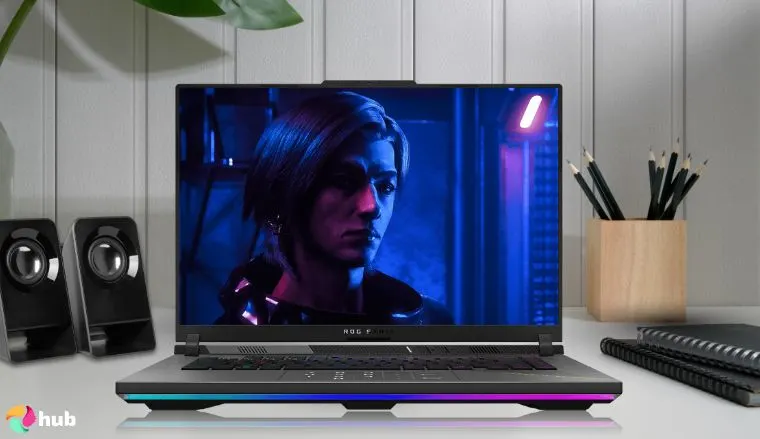
ASUS ROG Strix G16 [Best ASUS Laptop for Gaming]
| Specs | Details |
|---|---|
| CPU | AMD Ryzen 9 9955HX3D (16-core, up to 5.4 GHz, 128 MB L3 cache) |
| GPU | NVIDIA GeForce RTX 5070 Ti (140 W TGP, DLSS 4, Dynamic Boost) |
| RAM | 32 GB DDR5‑5600 MHz (dual‑channel, upgradeable to 64 GB) |
| Storage | 1 TB PCIe Gen 4 NVMe SSD + extra slot for expansion |
| Display | 16″ WQXGA (2560×1600) ROG Nebula IPS, 240 Hz, 100% DCI‑P3, Dolby Vision HDR |
| Battery | 90 Wh – around 4 hrs gaming, longer with light use |
| Weight | ~2.4 kg (5.3 lbs) |
| Connectivity | 2× USB‑C/USB‑4, 3× USB‑A Gen 2, HDMI 2.1, Ethernet, Wi‑Fi 6E, Bluetooth 5.4 |
This machine is built for competitive gamers who demand high frame rates and robust thermal stability. The combination of Ryzen 9 9955HX3D and RTX 5070 Ti ensures excellent performance in AAA titles and esports benchmarks.
Graphics are handled by the NVIDIA GeForce RTX 5070 Ti (up to 140 W TGP with Dynamic Boost, DLSS 4 support), which, in benchmarking tests, rivals RTX 4080-level performance in ray-traced workloads like Metro Exodus and Shadow of the Tomb Raider, especially at 1080p and 1200p resolutions.
Pair this machine with a high refresh rate gaming monitor to fully use its 240 Hz display and get the most from fast-paced, competitive titles.
For enthusiasts weighing laptops in this tier, this ROG Strix G16 stands among the best gaming laptops thanks to its sustained performance and future upgrade options.
| Pros | Cons |
|---|---|
| ✅ Desktop-class performance from RTX 5070 Ti + DLSS 4. ✅ Stunning 240 Hz WQXGA Nebula display with accurate colors. ✅ Tri‑Fan cooling with vapor chamber and liquid metal maintains stable thermals. ✅ Future–proof with expandable RAM and dual SSD support. ✅ Full I/O: USB‑4, HDMI 2.1, Gigabit Ethernet, Wi‑Fi 6E for high‑speed connectivity. | ❌ Chassis weight (~2.4 kg) reduces portability. |
Final Verdict: ASUS ROG Strix G16 blends cutting-edge specs like the Ryzen 9 9955HX3D and RTX 5070 Ti with superior thermals and a 240 Hz Nebula display to deliver an immersive, high-refresh experience.
Acer Predator Helios Neo 18 [Best Acer Laptop for Gaming]
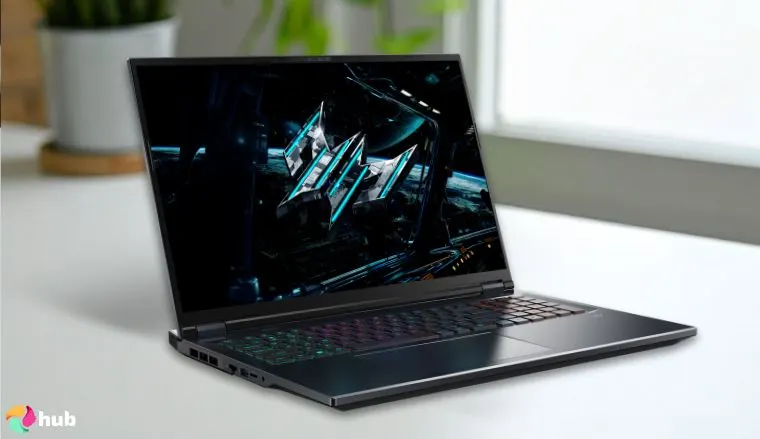
The Predator Helios Neo 18 AI blends desktop-level firepower with portability via a top-tier Intel Ultra 9 CPU, RTX® 5070 Ti GPU, and Mini-LED display. It’s engineered to deliver immersive visuals and consistent gaming performance, not just raw stats.
Beyond specs, it shines in real-world use thanks to its gorgeously bright 18‑inch QHD+ Mini‑LED panel, boasting vivid colors, deep contrast, and up to 1000 nits brightness, offering a visual punch that rivals a high-end gaming TV for HDR content and detailed environments.
Choose a configuration with Core Ultra 9 + 64 GB RAM and the 250 Hz Mini LED panel to unlock elite FPS potential and unbeatable brightness for competitive play.
For serious gamers wanting an 18-inch powerhouse without compromise, this model stands among the best gaming laptops in its class.
| Pros | Cons |
|---|---|
| ✅ Massive 18″ Mini LED display with 250 Hz and 1000 nits brightness enhances clarity and visibility. ✅ RTX 5070 Ti + DLSS 4 and Ultra 9 CPU deliver serious benchmarks in AAA titles. ✅ 5th‑Gen AeroBlade 3D fans plus liquid metal cooling for sustained thermals under load. ✅ Reliable upgradeability: dual SSD slots, up to 64 GB RAM. ✅ Extensive port options including HDMI 2.1, Thunderbolt 4, Ethernet, and Wi‑Fi 6E. | ❌ Heavy and bulky, best suited for desktop setups rather than frequent travel. |
Final Verdict: With its 1440p Mini LED display, RTX 5070 Ti, and Intel Ultra 9 performance, the Helios Neo 18 offers one of the most immersive and technically advanced gaming experiences.
Gaming Winner: ASUS
It’s a tight race, but ASUS pulls ahead with better thermals, a lighter build, and a more competitive edge for esports-level play. The ROG Strix G16’s Tri-Fan cooling, Ryzen 9 9955HX3D, and 240 Hz Nebula display offer smoother frame pacing and better mobility.
Acer’s Mini LED panel and large-screen immersion are impressive, but if you’re chasing consistent high-FPS performance on the go, ASUS wins this round.
ASUS vs Acer: Design and User Experience
When it comes to design and day-to-day usability, ASUS leans towards premium, while Acer focuses on functionality.
Building Materials & Aesthetics
- The ASUS ZenBook and ROG models often feature CNC-machined aluminum or ceramic-finished magnesium alloy, giving them a high-end, sleek appeal. Laptops like the ZenBook S 14 are some of the best ASUS laptops for their elegant chassis and compact design.
- The Acer Swift and Predator series strike a balance between metal and durable plastic, often favoring airflow and sturdiness over premium looks.
Keyboard & Touchpad Feel
- ASUS keyboards usually have deeper travel and satisfying tactile feedback, especially on ROG and ZenBook lines. Touchpads are precise, with a NumberPad overlay.
- Acer offers well-spaced keyboards and smooth trackpads, particularly on the Swift series. Though lighter on feedback, they’re comfortable for typing-heavy tasks.
Display & Audio Quality
- ASUS frequently includes OLED or Mini LED displays with 100% DCI–P3, giving creators vibrant visuals, similar to what you’d find in a premium ASUS monitor.
- Acer counters with bright IPS and 2.5K OLEDs on Swift models and high-refresh screens on Predators.
- Audio-wise, ASUS partners with Harman/Kardon, while Acer uses DTS and TrueHarmony speakers – less rich, but solid.
Innovation Highlights
- ASUS: ScreenPad, dual-screen ZenBook Duo, anti-fingerprint coatings.
- Acer: 360° hinges, airflow-optimized Predator design, and light-reactive trackpad borders on select models.
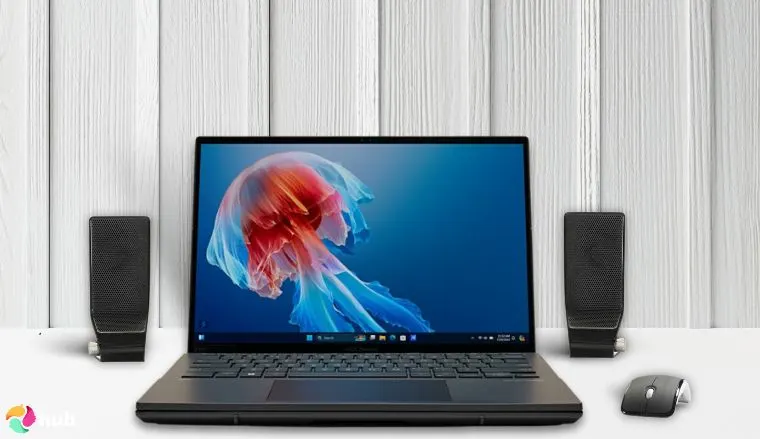
ASUS ZenBook Duo [Best Design]
| Specs | Details |
|---|---|
| CPU | Intel Core Ultra 9‑285H (16 cores, up to 5.4 GHz) |
| GPU | Intel Arc 140T integrated graphics |
| RAM | 32 GB LPDDR5X (soldered) |
| Storage | 1 TB PCIe Gen 4 SSD |
| Display | Dual 14″ 3K OLED (2880×1800), 120 Hz, 100% DCI‑P3, HDR |
| Battery | 75 Wh – ~8–9 hrs (one screen), ~6 hrs (both screens active) |
| Weight | 1.72 kg (3.8 lbs) |
| Connectivity | 2× Thunderbolt 4, USB‑A 3.2, HDMI 2.1, audio jack, Wi‑Fi 7, Bluetooth 5.4 |
A groundbreaking dual-screen laptop built for multitasking and creativity, with two full-size 3K 120 Hz OLED touchscreens, a detachable ErgoSense keyboard, and a built-in kickstand for flexible setup.
This laptop gives you a spacious, intuitive workspace in a sleek, travel–friendly design that’s surprisingly lightweight considering the dual-screen setup. It’s purpose–built for creators and power users who want desktop–level productivity in a mobile form.
To maximize portability, use just one screen during travel, battery life jumps from ~6 to 9+ hours while still keeping OLED clarity.
This laptop is ideal for anyone juggling creative apps, docs, or timelines. Its dual-screen layout eliminates the need for a second monitor, perfect for streamlining your workflow.
| Pros | Cons |
|---|---|
| ✅ Dual OLED touchscreens enhance multitasking and creativity. ✅ 120 Hz refresh rate provides smooth interaction for visual tasks. ✅ Detachable keyboard with magnetic dock improves flexibility. ✅ Compact yet professional–grade build with sturdy kickstand. ✅ Intel Ultra 9 CPU + 32 GB RAM handles intensive multitasking. ✅ Vivid color–accurate display ideal for design, photo, and video work. | ❌ Shorter battery life with both screens active. |
Final Verdict: ZenBook’s dual 3K OLEDs and detachable keyboard bring rare versatility without sacrificing portability.
Acer Swift X 14 [Best Design]

| Specs | Details |
|---|---|
| CPU | Intel Core Ultra 7 155H or AMD Ryzen AI 9 365 |
| GPU | NVIDIA GeForce RTX 5070 Laptop GPU |
| RAM | Up to 32 GB LPDDR5X (soldered) |
| Storage | Up to 2 TB PCIe Gen 4 SSD |
| Display | 14.5″ 2.8K OLED, 120 Hz, 100% DCI‑P3, VESA DisplayHDR True Black 500 |
| Battery | ~7–8 hrs (light use), ~5 hrs under GPU load |
| Weight | 1.57 kg (3.46 lbs) |
| Connectivity | 2× Thunderbolt 4, 2× USB‑A, HDMI 2.1, microSD, Wi‑Fi 6E, Bluetooth 5.4 |
A compact and premium aluminum laptop, the Acer Swift X 14 is built for users who want power, elegance, and creative capability in one machine. The stunning 2.8K OLED panel delivers deep contrast, ultra-wide color accuracy, and smooth 120 Hz refresh–ideal for video editors, designers, and photographers.
Backed by NVIDIA’s RTX 5070 GPU and up to 32 GB LPDDR5X RAM, it handles everything from content creation to 3D modeling. And while it’s designed for productivity, it can also run many of the best open world games on medium-to-high settings thanks to DLSS support and GPU efficiency.
Go for the 32 GB RAM variant if you work in Adobe Creative Cloud, DaVinci Resolve, or Unreal Engine, less thermal throttling and smoother performance.
This machine is ideal for creatives and professionals who value screen fidelity, GPU performance, and an elegant, portable form. It’s a smart fit for design-focused users who still want a little gaming on the side.
| Pros | Cons |
|---|---|
| ✅ Stunning 2.8K OLED with 100% DCI‑P3 and 120 Hz. ✅ Lightweight aluminum design with high build quality. ✅ Discrete RTX GPU handles creative and gaming apps. ✅ Wide port selection with Thunderbolt 4 + HDMI 2.1. ✅ Excellent input precision and bright keyboard. | ❌ RAM is soldered and can’t be upgraded. ❌ Warm under GPU-heavy tasks. |
Final Verdict: Acer Swift X 14 strikes the perfect balance between OLED visuals, RTX performance, and lightweight design.
Design Winner: ASUS
ASUS takes the win with the ZenBook Duo’s dual 3K OLED displays, detachable keyboard, and kickstand, pushing laptop design far beyond the norm. It’s a rare blend of innovation, premium build, and real usability that’s ideal for creators and multitaskers who want a mobile dual-screen setup without extra gear.
Acer’s Swift X 14 is sleek, capable, and color–accurate with RTX power under the hood, but ASUS simply delivers more design innovation and flexibility in a compact form.
ASUS vs Acer: Durability and Build Quality
Durability goes beyond materials – it’s about how a laptop holds up under daily stress, travel, and time. In this area, ASUS and Acer differ in their approach, though both offer dependable models in 2025.
Building Materials & Construction
- ASUS often uses metal unibody designs in its Zenbook, ROG, and ExpertBook lines, giving them a premium, rigid feel.
- Acer tends to mix aluminum lids with plastic chassis, especially in Swift and Nitro models. They’re sturdy but can feel less solid under pressure compared to full-metal builds.
Military–Grade Certifications
- Many ASUS laptops are MIL–STD–810H certified, meaning they’ve passed military-level testing for drops, shock, temperature, and vibration. Models like the ExpertBook and ROG Strix consistently meet these standards.
- Only a few Acer laptops-mostly from the TravelMate series carry similar certifications. Predator and Nitro units focus more on thermal and GPU performance than ruggedness.
Warranty & Support
- ASUS offers a 2-year international warranty on many mid-range and premium models, plus on-site repair in select countries.
- Acer provides a 1–year limited warranty by default, but you can extend it with Acer Care Plus. Repair turnaround and regional support vary more than ASUS.
If you’re buying a machine for work, travel, or long-term use, features like MIL-STD testing, strong hinge design, and support coverage matter.
Some gamers also prioritize structural quality when investing in a high-end rig for top PC games, and both brands offer models that can hold their own.
ASUS TUF Gaming A15 [Best Durable]

| Specs | Details |
|---|---|
| CPU | AMD Ryzen 9 8945HS or Ryzen 7 8845HS |
| GPU | NVIDIA GeForce RTX 4060 or RTX 4070 Laptop GPU |
| RAM | Up to 32 GB DDR5 (upgradeable) |
| Storage | 1 TB PCIe Gen 4 SSD |
| Display | 15.6″ FHD IPS, 144 Hz or QHD 165 Hz, 100% sRGB |
| Battery | 90 Wh – ~6–8 hrs with hybrid GPU mode |
| Weight | 2.2 kg (4.85 lbs) |
| Connectivity | USB‑C, USB‑A, HDMI 2.1, Ethernet, audio jack, Wi‑Fi 6E, Bluetooth 5.3 |
Designed with resilience in mind, the ASUS TUF Gaming A15 is one of the few laptops that truly lives up to its name. Its MIL-STD-810H certification covers drops, vibration, humidity, and temperature extremes, making it ideal for students, travelers, or gamers who don’t want to baby their devices.
Performance is just as strong – thanks to AMD Ryzen 7000-series CPUs and NVIDIA RTX graphics, it can handle some of the top FPS games without throttling. It also includes dual-fan cooling and dust-resistant internals that improve thermal longevity.
Use “Performance Mode” in Armoury Crate when gaming on battery, this balances FPS and temps better than Turbo mode when unplugged.
This model is ideal for gamers and professionals who value reliability, upgradability, and raw power in a rugged package. It’s built to handle stress, whether from intense gaming or life on the move.
| Pros | Cons |
|---|---|
| ✅ Tested to military-grade MIL-STD-810H standards. ✅ Upgradeable RAM and dual SSD slots. ✅ Fast 165 Hz display with full sRGB coverage. ✅ Solid battery life with MUX switch enabled. ✅ Multiple cooling profiles for better thermal control. | ❌ Heavier than most 15-inch laptops. |
Final Verdict: ASUS TUF Gaming A15 offers battle-tested durability and desktop-grade power in a straightforward chassis.
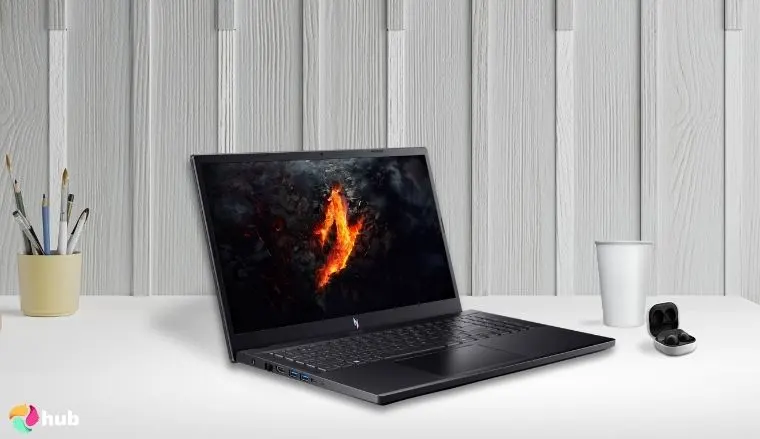
Acer Nitro V 15 [Best Durable]
| Specs | Details |
|---|---|
| CPU | Intel Core i7‑13620H or i9‑13900H |
| GPU | NVIDIA GeForce RTX 4050 Laptop GPU |
| RAM | 16 GB DDR5 (upgradeable to 32 GB) |
| Storage | 512 GB–1 TB PCIe Gen 4 SSD |
| Display | 15.6″ FHD IPS, 144 Hz |
| Battery | 57 Wh – ~4–6 hrs mixed use |
| Weight | 2.1 kg (4.63 lbs) |
| Connectivity | USB‑C, USB‑A, HDMI 2.1, Ethernet, audio jack, Wi‑Fi 6, Bluetooth 5.1 |
For gamers looking for a sturdy, no-frills machine, the Acer Nitro V 15 punches above its weight. Its reinforced plastic chassis resists flex and holds up well to daily use, making it a strong pick for students, commuters, or entry-level gamers.
Despite its budget price, it features NVIDIA RTX 4050 graphics and Intel Core H-series processors, making it capable of running many of the best PC games at 1080p with respectable frame rates.
Install a second M.2 SSD for expanded game storage and faster load times, especially useful if you play large, open-world games.
This model is a solid entry point for gamers who want durability and performance without overspending. It’s a great everyday machine that can handle both work and play reliably.
| Pros | Cons |
|---|---|
| ✅ Great value for 1080p gaming. ✅ RTX 4050 GPU handles modern titles smoothly. ✅ Upgradeable RAM and storage slots. ✅ Comfortable keyboard with backlight. ✅ Stable thermals with dual-fan cooling. | ❌ Plastic chassis, though solid. |
Final Verdict: Affordable, upgradeable, and tough, Acer Nitro V 15 is perfect for gamers who want a dependable starter rig.
Durability Winner: ASUS
While both brands build reliable machines, ASUS clearly leads in long-term durability. The TUF Gaming A15’s MIL‑STD‑810H certification, metal-reinforced design, and dust-resistant cooling give it real-world resilience that Acer’s mostly plastic builds can’t quite match.
Acer’s Nitro V 15 holds its own as a sturdy, budget-friendly option, but if you’re after a machine that can take hits and keep running, ASUS is the stronger choice.
ASUS vs Acer: Innovation
When it comes to innovation, ASUS and Acer have taken noticeably different paths, but both continue to push boundaries in 2025.
Design & Form Factor
- ASUS has become a leader in dual-screen form factors, most notably with the ZenBook Duo and ROG Zephyrus Duo lines. These laptops allow for extended multitasking, creative workflows, and touchscreen flexibility in a portable design.
- Acer has experimented with devices like the ConceptD 7 Ezel, using convertible hinges and stylus integration to support digital creators. While less mainstream, these designs reflect a bold take on visual productivity.
Cooling & Thermals
- ASUS implements liquid metal cooling, Tri-Fan systems, and intelligent airflow shaping in many ROG and TUF series laptops, resulting in better thermals under gaming loads.
- Acer relies on its PredatorSense software and dual-fan setups with vector heat pipes, which work well in high-performance laptops like the Predator Helios.
AI, Displays & Ecosystem
- ASUS has integrated AI-enhanced noise cancellation, Copilot+ support, and 3K+ OLED displays with high refresh rates across both productivity and gaming lines. Their ecosystem also extends to networking gear, so pairing your laptop with an ASUS router can ensure stable, high-speed connections during online gaming or remote work.
- Acer incorporates AI tools like Acer PurifiedVoice, OLED panels with DisplayHDR support, and onboard AI features in its Swift and Predator series.
Whether you’re looking at next-gen visuals or exploring the latest in AI tools, both brands continue to shape the future of portable computing. That edge matters especially for creators, gamers, and early adopters who need laptops built for demanding performance.
Innovation Winner: ASUS
ASUS wins for pushing more innovation into everyday laptops, from dual-screen designs to AI features and advanced cooling systems. These upgrades aren’t just flashy, they improve real-world use across productivity and gaming lines.
Acer brings smart ideas too, like convertible hinges and AI tools, but they’re less widely implemented. ASUS simply innovates more often.
ASUS vs Acer: Value and Price Range
Understanding the value of a laptop means looking beyond specs; ASUS and Acer both target different users across the pricing spectrum in 2025.
Entry-Level Tier (~$400–$800)
- ASUS covers this tier with models like the Vivobook Go and Chromebook CX14, offering slim OLED screens, Copilot+ integration, and fanless operation – all for under $500.
- Acer competes with the Aspire 5 and Chromebook Plus 514, often priced slightly lower and offering upgradeable RAM, great for students or everyday users.
Verdict: Acer has the edge in affordability and basic productivity performance.
Mid-Range Tier (~$800–$1,500)
- ASUS Zenbook A14 and TUF Gaming A15 dominate this range with OLED displays, Ryzen or Intel Ultra CPUs, and high-grade materials – all around the $999 mark.
- Acer counters with the Swift X 14 and Nitro V 15, which are strong contenders for best budget gaming laptops, delivering RTX 4050 graphics and high-refresh panels under $1,200.
Verdict: Acer brings gaming performance, while ASUS delivers more premium design and battery life.
High-End Tier ($1,500+)
- ASUS ROG Strix and Zephyrus laptops push into premium territory with RTX 50–series GPUs, 240 Hz displays, and liquid metal cooling – often featured among the best ASUS gaming laptops.
- Acer’s Predator Helios 18 and Triton series offer similar GPUs and display specs, but often at slightly lower prices, giving desktop-level performance close to a dedicated gaming PC.
Verdict: Acer offers raw power for less, while ASUS leans into refinement and long-term features.
Bottom Line
- Acer is the go-to brand for gamers on a budget, especially in the mid-range.
- ASUS wins with premium features, display tech, and material quality, justifying a higher price tag for some users.
Value Winner: Acer
When it comes to performance per dollar, Acer takes the lead, especially in the entry-level and mid-range tiers. From budget-friendly Chromebooks to gaming laptops with RTX graphics under $1,200, Acer consistently offers more hardware for less.
ASUS justifies its higher pricing with premium designs, OLED displays, and longer-lasting build quality. But if your goal is to maximize specs within a budget, Acer wins the value category.
Summary
Both ASUS and Acer offer standout laptops in 2025, but the better choice depends entirely on your needs, budget, and expectations.
Where ASUS Wins
- Premium design and build quality across most tiers
- Leading in display technology (OLED, 3K+ touchscreens)
- More consistent in creative and productivity laptops
- Innovations like dual-screen ZenBooks and AI-first hardware
Where Acer Wins
- More affordable gaming options with good thermals
- Competitive GPU power for less – perfect if you’re shopping for a top budget gaming laptop.
- Lightweight mid-range laptops with solid upgradeability
- Often better value in entry-level and mid-range categories
Best for…
- Gamers: Go Acer if you’re after raw specs for less; go ASUS if you want premium features like better screens or advanced cooling
- Creative professionals & business users: ASUS wins with sharper displays and portable power
- Students: Acer offers excellent value laptops under $800
Final Thought
No matter your budget, both brands have proven they can compete – just prioritize what matters most: performance, portability, display, or price.
ASUS Wins the 2025 Face-Off
ASUS takes the win in this 2025 showdown by delivering stronger performance across more categories, especially in design, productivity, and long-term durability.
Acer remains an excellent choice, especially for users prioritizing affordable gaming performance and long battery life. But if you’re after premium build quality, advanced features, and better display tech, ASUS earns the overall crown.
Category Breakdown:
- Productivity: ASUS – Better display, lighter chassis, refined I/O
- Gaming: ASUS – Stable thermals, esports-ready performance
- Design & User Experience: ASUS – Dual screens, premium build quality
- Durability: ASUS – MIL-STD certification, rugged cooling
- Innovation: ASUS – Broader, more usable features across product lines
- Value & Pricing: Acer – More powerful specs in mid-range and entry-level tiers
FAQs
Which laptop is better: ASUS vs Acer?
It depends on your priorities. ASUS focuses more on premium design and screen, while Acer focuses on lower price and entry-level gaming specs. Both ASUS and Acer are good brands with reliable laptops in every single category.
Is Acer Aspire or ASUS VivoBook better?
For basic tasks, both are solid. Acer Aspire usually costs less, while ASUS VivoBook offers better build quality and more vibrant displays. Choose based on your screen and performance needs.
Are ASUS and Acer the same company?
No. ASUS and Acer are separate Taiwanese companies. Each has its own laptop lines, R&D, and design strategies. They are fierce competitors in the global PC market.











