



How To Learn Unity: A Beginner’s Roadmap for 2026

Eneba Hub contains affiliate links, which means we may earn a small commission if you make a purchase through them—at no extra cost to you. Learn more


START WITH A SMALL GAME
Start with Unity Personal and a small playable project before paying for advanced instruction. Learn the interface and basic C# together.
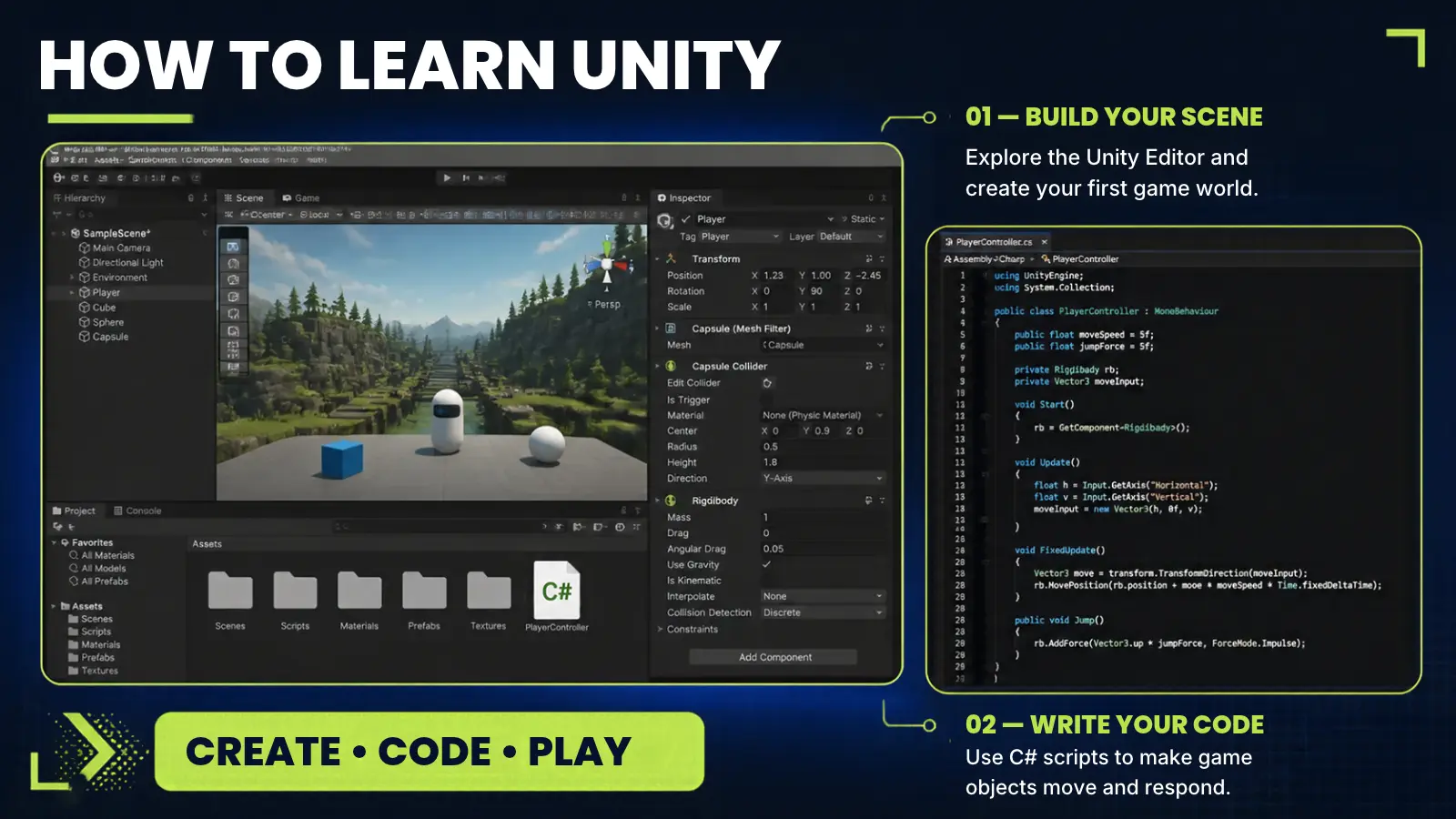
Here is how to learn Unity as a beginner: download the free Unity Personal editor, study basic C# programming, and finish one small game before attempting anything larger.
This roadmap takes you through setup, essential skills, course choices, and practice projects for your first finished game. A finished mini-game is a better learning target than a sprawling design document.
You can begin learning Unity without a coding background, but you’ll need to study programming alongside the interface. There is no fixed deadline for mastering the basics, so use a playable project as your milestone. Paid licensing becomes relevant as a business grows, not simply because you finish a game.
Jump to:
Unity at a Glance
Figuring out how to learn Unity works best when you plan around a finished project rather than a strict deadline. The facts below set the scope before you open the engine.
|
Cost to start |
Free Personal plan; optional paid instruction |
|---|---|
|
Time to learn the basics |
No fixed deadline; one Coursera specialization lists two months (at 10 hours a week) |
|
What you need |
A compatible computer, Unity, a C# code editor, and basic programming study |
|
Main hurdles |
Understanding scripts, organizing reusable objects, and moving beyond copied tutorials |
|
Beginner suitability |
High – a small game lets you practice the interface and programming together |
The Unity engine supports much larger projects, but your first goal should remain small enough to finish and explain.
What Unity Is Used For
The Unity engine is a real-time game engine: software that combines code, visuals, sound, and player input into an interactive application. Beginners should focus on a small playable loop, which is the sequence of actions a player repeats during a game.
Unity reports that more than 70% of the top 1,000 mobile games were made with its engine (Apptopia data as of Q4 2022).
Here is how to learn Unity through several game formats:
- 2D games: Build a platformer level or an obstacle-dodging game. These projects let you practice movement, collisions, and scoring without also designing a complex 3D environment.
- 3D games: Create a compact arena or top-down combat scene. You’ll work with objects in space, camera placement, and interactions between the player and the environment.
- Mobile-style games: Prototype a simple game with large interface buttons and short play sessions. Keep the initial controls simple before adapting the project for a particular device.
- Combat and card prototypes: Build a turn-based encounter or a card-battle scene. These emphasize rules, game states, and interface feedback rather than a large explorable world.
- Design experiments: Test a mechanic before investing in finished artwork. A plain scene can answer a useful design question, like how a jump should behave or when an enemy should attack.
These uses share the same foundation: objects, components, and scripts working together. A component is a piece of behavior or data attached to an object, while a script supplies instructions written in code.
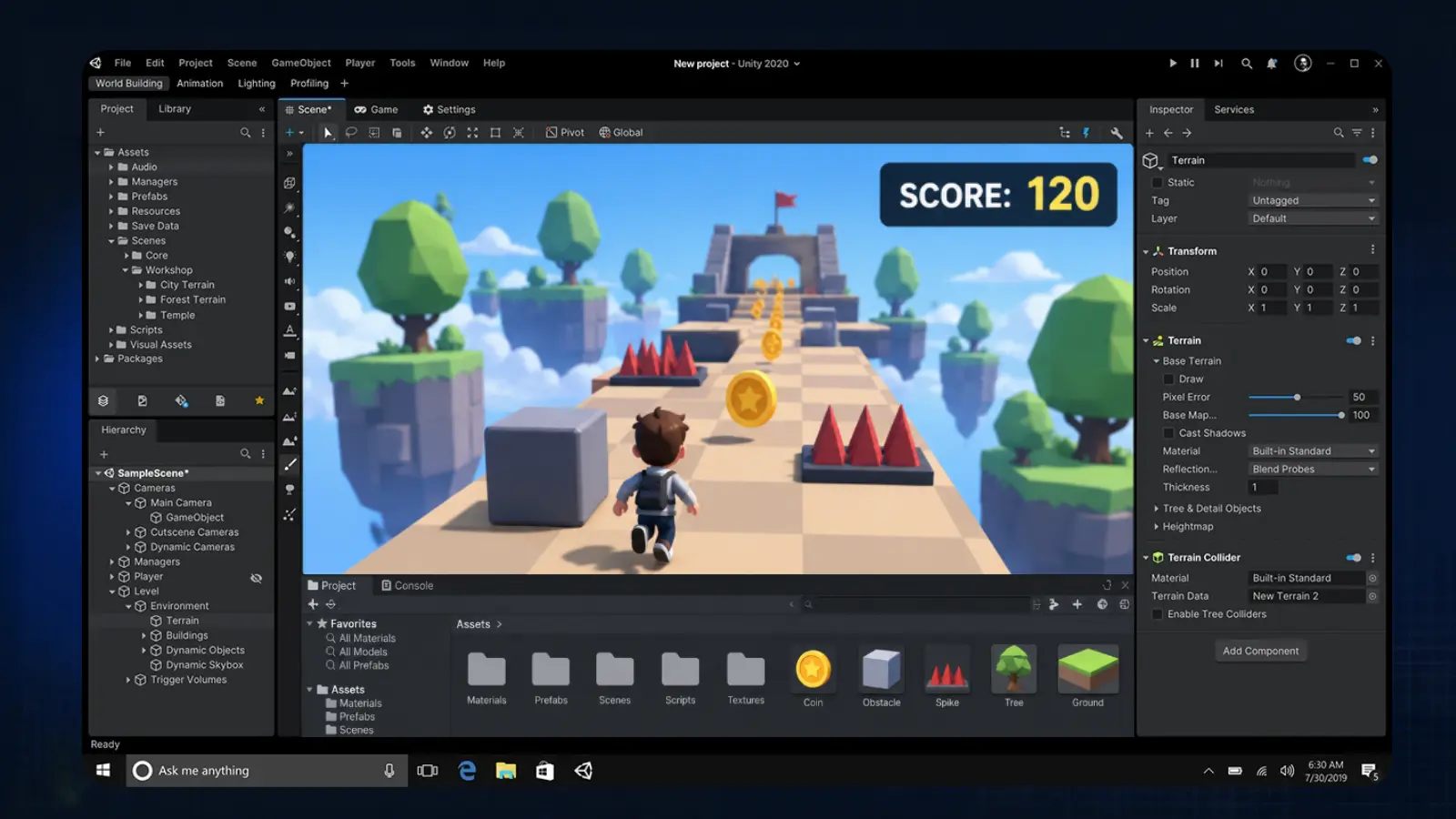
The Unity Editor is the workspace where you assemble and inspect those parts. Learning Unity becomes less abstract when each new feature serves something the player can do, see, or change.
What You Need To Start Learning Unity
Anyone figuring out how to learn Unity needs a computer that can run the engine, a code editor, and basic C# literacy. Start with those essentials instead of buying art packs or advanced instruction before you’ve identified a specific need.
Organize your setup around these categories:s
- Game engine: Use Unity to assemble scenes, run the game, and prepare builds.
- Code editor: Use Visual Studio to write and debug C# scripts.
- Learning reference: Use Unity Learn alongside your project when you need official instruction.
The tools serve different jobs within the same workflow.
|
Tool |
Best for |
Price |
|---|---|---|
 |
Building and testing playable scenes |
Free Personal plan; Pro from $2,310.00/yr |
 |
Writing and debugging C# scripts |
Free Community edition |
 |
Official tutorials alongside project work |
Free |
Unity lists Pro from $2,310.00/yr and a $200K revenue or funding threshold for moving beyond Personal, subject to its current eligibility terms. Check current per-seat pricing for your region and the applicable plan requirements before purchasing. Check its current pricing and eligibility terms before choosing a plan, as prices can change and regional terms may differ. That threshold concerns revenue or funding, not simply profit from your first game.
Learn Unity with the entry-level setup first. Paid licensing and optional instruction are separate decisions. If earning money is your goal at the moment, compare this route against some of the most profitable side hustles before you decide to spend on instruction.
How To Learn Unity: A Step-by-Step Path
The practical answer to how to learn Unity is to finish a small game loop, then rebuild part of it independently. Follow the sequence below without attaching an unsupported deadline to it.
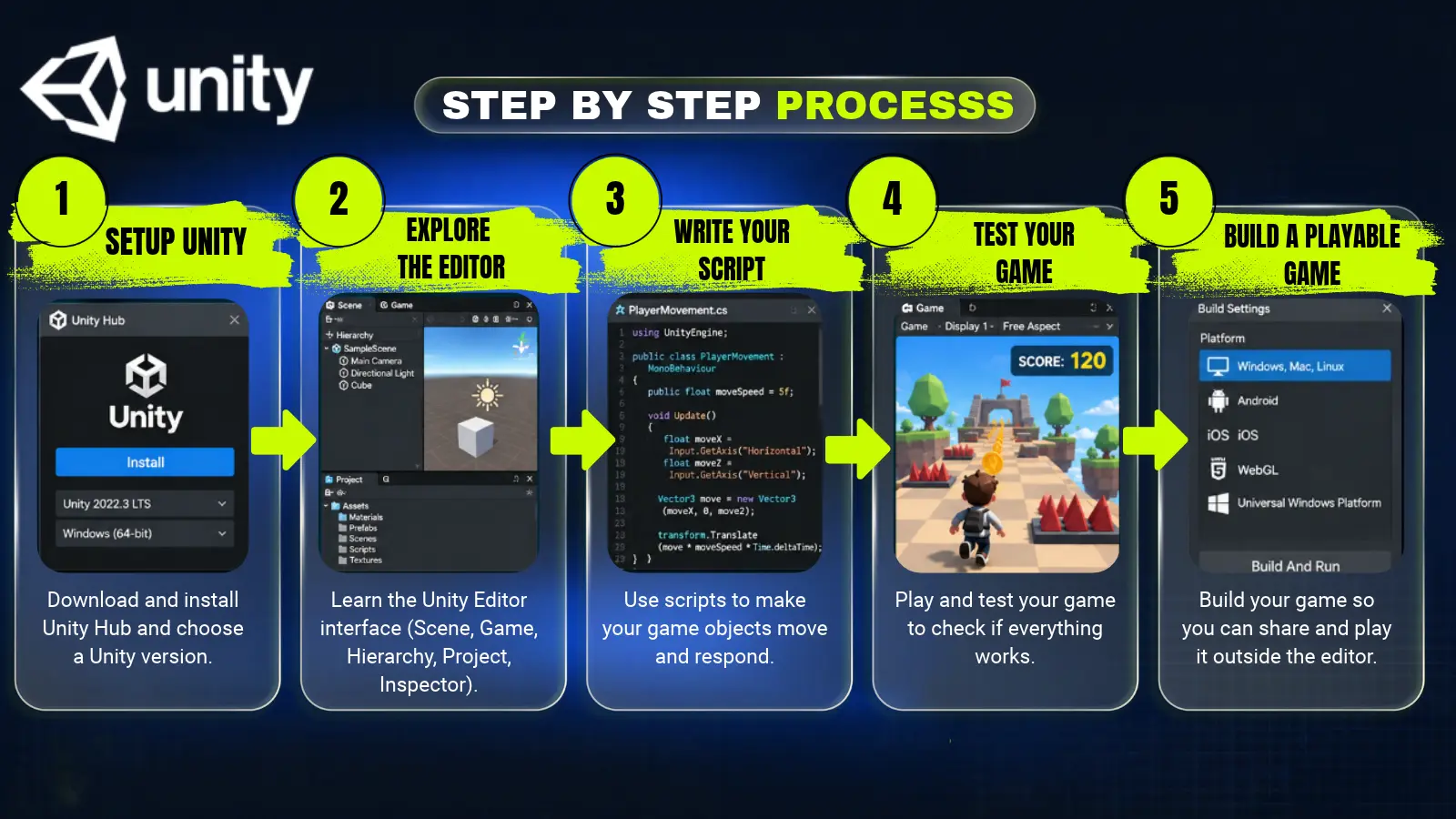
Step 1: Install the Engine and Prepare Your Workspace
Install Unity and set up Visual Studio for C# scripting. Choose a basic project suited to your first exercise, and save it somewhere you can find again easily. Keep the initial project separate from experiments that require extra packages or unfamiliar features.
Open the project, save a scene, and run it before adding anything complicated. Your first milestone is a working setup: the Unity engine opens the project, and your code editor can open a script. Resolve setup problems before following a gameplay lesson.
Step 2: Learn the Unity Editor Layout
Explore the Unity Editor by selecting objects and observing how the surrounding panels change. Find the scene view, the game view, the list of scene objects, and the panel that displays a selected object’s properties. Learn the difference between editing a scene and running it.
Create a plain object, move it, and change an obvious property. Then explain what changed in your own words. This is how you learn Unity as a workspace rather than memorize a sequence of clicks from a video.
Step 3: Write Scripts You Can Explain
Write a small C# script that changes something visible, like an object’s position or a displayed value. Study variables, conditions, and methods as they appear in that task. A variable stores a value, a condition selects an action, and a method groups instructions.
Read each line before running the scene in the Unity Editor. Predict the result, then compare it with what happens. If programming syntax is unfamiliar, pause for a basic coding lesson instead of pasting larger scripts you cannot explain.
Step 4: Build and Test a Complete Game Loop
Build a small scene with a player action, an obstacle or challenge, and a clear ending. Add enough feedback for someone else to understand success and failure. Use simple shapes while you work out the rules.
Test the project in the Unity Editor after each meaningful change. Try the obvious failure cases: missing a target, losing, restarting, or pressing a control at the wrong moment. Learning Unity includes debugging, so treat an error as a specific problem to isolate rather than a reason to replace the whole project.
Step 5: Prepare a Build and Watch Someone Play
Prepare a playable build for your intended desktop target, then test it outside the editing workspace. Treat packaging as part of finishing the project, not an optional task after the interesting work. Follow the build instructions appropriate to the version you’re using.
Give the game to someone who has not watched you make it. Observe where instructions are unclear or controls fail to communicate their purpose. Fix the most disruptive problem, then save a clean copy of the project. You’ve completed a useful learning cycle when another person can play without your explanation. You can also become a game tester yourself if this kind of feedback loops is something you’re interested in.
How to Learn Unity: Best Beginner Courses
A course helps you learn Unity when it provides a project you can follow and explain. Instruction on how to learn Unity should match your programming level; a longer syllabus is not automatically a better starting point.
Create Your First Game with Unity Engine and C# on Udemy is a compact option covering turn-based combat, animation, controller setup, and interface work. Its stated prerequisite is basic programming knowledge, so complete beginners should study C# foundations alongside it.
A course’s scope should match the gap in your current project as you learn Unity. Udemy, Teachable, and Coursera list the following time needed in terms of content length. They measure how much material a course holds, not the time needed to master it.
|
Course |
Provider |
What It Covers |
Course hours |
|---|---|---|---|
|
Create Your First Game with Unity Engine and C# |
 |
Turn-based combat, animation, controller setup, and UI |
1 hour |
|
The Ultimate Guide to Game Development with Unity (Official) |
|
A broader game-development walkthrough |
36.5 hours |
|
Unity C# Scripting: Complete C# For Unity Game Development |
|
C# scripting for game development |
31 hours |
|
Learn Unity from Beginner to Advanced from a Professional Indie Game |
 |
Advanced indie game development techniques and workflow |
15 to 30 hours |
|
Game Design and Development with Unity Specialization |
 |
Multi-course specialization covering game design, mathematics, and engine mechanics |
78 hours (2 months to complete at 10 hours a week) |
Consider these hours as reference points for how to learn Unity; they’re not a schedule.
For later study, Learn Unity from Beginner to Advanced from a Professional Indie Game on Teachable requires an intermediate level despite its title, costing $199.99, while the Game Design and Development with Unity Specialization on Coursera offers a broader multi-course curriculum. The providers also offer separate free tutorials on YouTube; review each offering’s contents before purchasing. Save them until the foundations are comfortable.
It’s important to check each course page to see which Unity version it teaches; e.g., the Coursera specialization uses Unity 2020, and the current engine line is Unity 6, so some menus and workflows will look different.
Practice Projects for Learning Unity
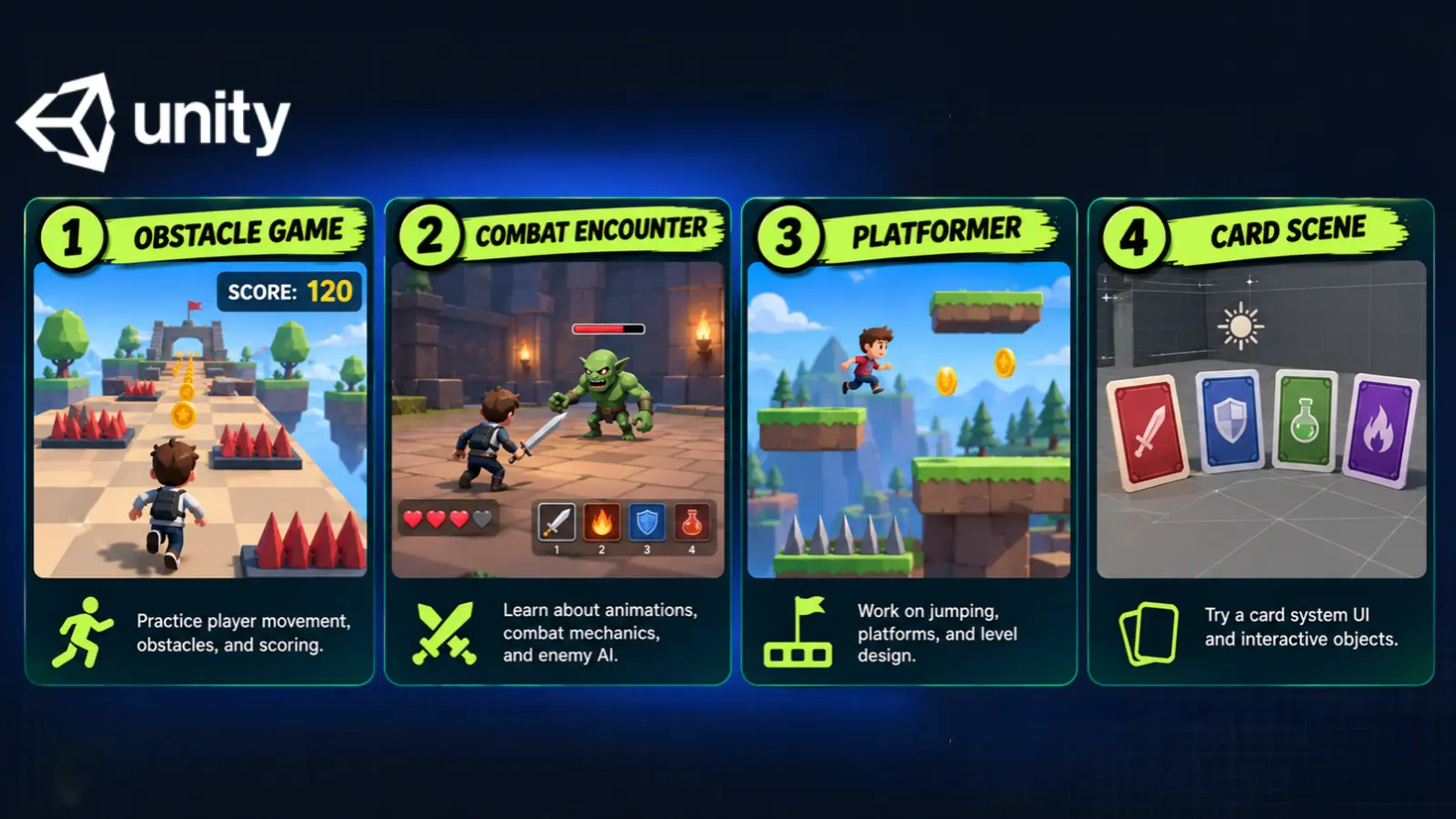
Practice makes learning Unity stick when each project adds a specific problem to solve. Use these projects in increasing order of difficulty, and finish the core interaction before adding decorative features.
- Obstacle-dodging mini-game: Move a player, spawn hazards, display a score, and add a game-over state. This teaches how input, physics, and interface feedback form a complete loop. Keep the play area small enough to inspect easily.
- Turn-based combat encounter: Give the player and an opponent clear actions and a visible result. Practice game states, animation cues, and controller logic. Make each turn work correctly before adding more attacks.
- 2D platformer level: Build a short route with jumps, hazards, and a finish point. Use the Unity Editor to adjust spacing and test how movement affects level design. Favor readable obstacles over a large map.
- Card-battle scene: Display a hand of cards and let the player select an action. This teaches interface organization and rules that depend on the current state. Start with a small fixed card set.
- Multiplayer test scene: Attempt a shared interaction only after the local version works. Treat it as a stretch exercise in keeping players’ views of the game consistent, rather than the foundation of your first project.
You do not need to complete every format to learn Unity effectively. Choose the next project because it teaches something your previous project did not. And then with each finished project, your portfolio will grow. That gives you something concrete to show when you start applying, including to companies hiring with no experience.
Move Beyond Copied Scripts and Unfinished Unity Scenes
Copying instructions without understanding their purpose can leave you unable to change your own project. Independent changes are the test of understanding, not the number of tutorials you’ve watched.
Use these fixes to make how to learn Unity a practical routine rather than an endless search for another course:
- Copying without checking understanding: Finish a guided section, close the lesson, and change a small behavior independently. Explain which object owns the behavior and which script controls it. Reopen the lesson only when you can name the part you don’t understand.
- Duplicating objects without a reuse plan: Learn to use Prefabs, reusable object templates, when several objects should share the same setup. Practice on a simple obstacle before applying the approach across a larger scene.
- Postponing lighting checks: Test the scene’s appearance early, especially in 3D work. Inspect it through the game view as well as the Unity Editor scene view. Simple, readable lighting is enough while you’re learning.
- Treating the interface as decoration: Plan where instructions, scores, and end states appear. Learn how a Canvas organizes interface elements, and test the display while playing. A working mechanic still needs understandable feedback.
- Expanding the project before it works: Finish the guided core before adding unrelated systems. Keep extra ideas in a separate note, then choose an extension after the playable loop is stable.
The Unity engine offers more features than a beginner project needs. Reduce the scene to the smallest version that shows the problem, fix that version, and bring the solution back into your game.
Final Verdict on How To Learn Unity
Unity is worth considering if you want to build games and are willing to study code alongside a visual workspace. The best-fit starting path is a small Personal-plan project, followed by instruction chosen to address a specific gap. You can learn Unity without buying an advanced course at the outset.
It is a less suitable choice if your only goal is to publish immediately without touching code. A simpler tool may suit that priority better. The breadth of the Unity engine becomes useful once you have a reason to use its features; it can distract you before then.
The deciding factor in how to learn Unity is your willingness to finish, test, and revise a modest game. Start with the engine itself, add basic C# study, and choose the guided course below once its programming prerequisite fits your level.
FAQs
Start with Personal, learn the interface and basic C#, and finish a small game. Use independent movement, scoring, failure, and restart behavior as milestones rather than a fixed number of weeks. As one reference point, the beginner specialization on Coursera lists 2 months at 10 hours a week.
Yes, you can start with Unity Personal and use free learning materials. Practice by rebuilding a small mechanic without following the instructions line by line before purchasing additional instruction.
No, you don’t need prior experience to begin. Study basic C# alongside the editor, then add math as your project requires it. The recommended Udemy course assumes basic programming knowledge.
Yes, if you want to build games and are willing to practice programming. Its broad scope suits learners who want room to progress, while a simpler tool may suit someone who wants to avoid code.
Use Unity, a C# code editor like Visual Studio, and a compatible computer. Unity Learn provides official instruction. Begin with this setup before adding paid assets or advanced tools.
Build a small obstacle game with movement, scoring, and a game-over state. Test it outside the Unity Editor, then change a mechanic without the tutorial. That cycle gives you a practical answer to how to learn Unity.