



How To Learn Lua for Roblox: A Beginner’s Roadmap for 2026



Recent update
Start with Roblox Studio and use a beginner guide to turn short scripts into working game interactions. Free community resources support the learning path below.
Here’s how to learn Lua for Roblox: write small scripts in Roblox Studio, test them, and follow a beginner guide in order. Learning is free to start, and the basics take a few weeks of regular practice. It suits players who already play Roblox and want to build their own game interactions, even without coding experience.
Free community material can be the best place to learn Lua for Roblox, so you don’t need to buy a course immediately. Free resources can take longer than a paid course, but they cost nothing. Use working scripts as milestones in place of a fixed deadline, and aim to finish a small interaction before attempting an entire game.

This guide covers the learning path, tools, structured courses, and practice projects for learning Lua for Roblox.
Jump to:
Learning Lua for Roblox at a Glance
Start with small, testable scripts and use a Roblox Lua learning website to support your practice. This table gives the fast answer to how to learn Lua for Roblox.
|
Cost to start |
Free: Roblox Studio and the community resources in this guide cost nothing |
|---|---|
|
Time to learn the basics |
A few weeks of regular practice with print, variables, and functions |
|
What you need |
A computer that runs Roblox Studio, patience with error messages, and no prior coding experience |
|
Main hurdles |
Reading errors, understanding script placement, and limiting project scope |
|
Beginner suitability |
High for learners willing to practice basic concepts before larger systems |
Discovering how to learn Lua for Roblox becomes easier to organize once you understand what each script controls.
What Lua Scripts Actually Do in Roblox
Lua scripts tell a Roblox experience how to respond to players. The Roblox Developer Forum calls Lua the platform’s official language, and the practical goal is connecting code to game behavior. The Roblox documentation names the language Luau, which is derived from Lua 5.1, so the beginner concepts below apply.
A useful Roblox Lua course should explain the relationship between a script and the objects it affects. Reading syntax alone won’t show you why a door stays closed or why an interface appears for the wrong player.
Common applications include:
- Interactive objects: Make doors open, buttons respond, and pickups disappear after collection. These projects connect an event, an action the game detects, to a visible change.
- Game logic: Track scores, run timers, and decide when a round ends. Variables hold the information that these rules use.
- Local Scripts: Handle player-side behavior, like interface changes and camera control. A Local Script runs on the player’s device, also called the client.
- Full game systems: Combine smaller behaviors into shops, inventories, or multiplayer rounds. These systems require attention to which code runs on the client and which runs on the server.
Choose the best place to learn Lua by looking for explanations that connect code to actions you can test. A language reference helps with syntax, and a platform-specific guide helps with game objects.
When figuring out how to learn Lua for Roblox, keep larger systems as future goals. First, prepare a workspace where you can change a script and observe the result immediately.
What You Need Before You Start Scripting
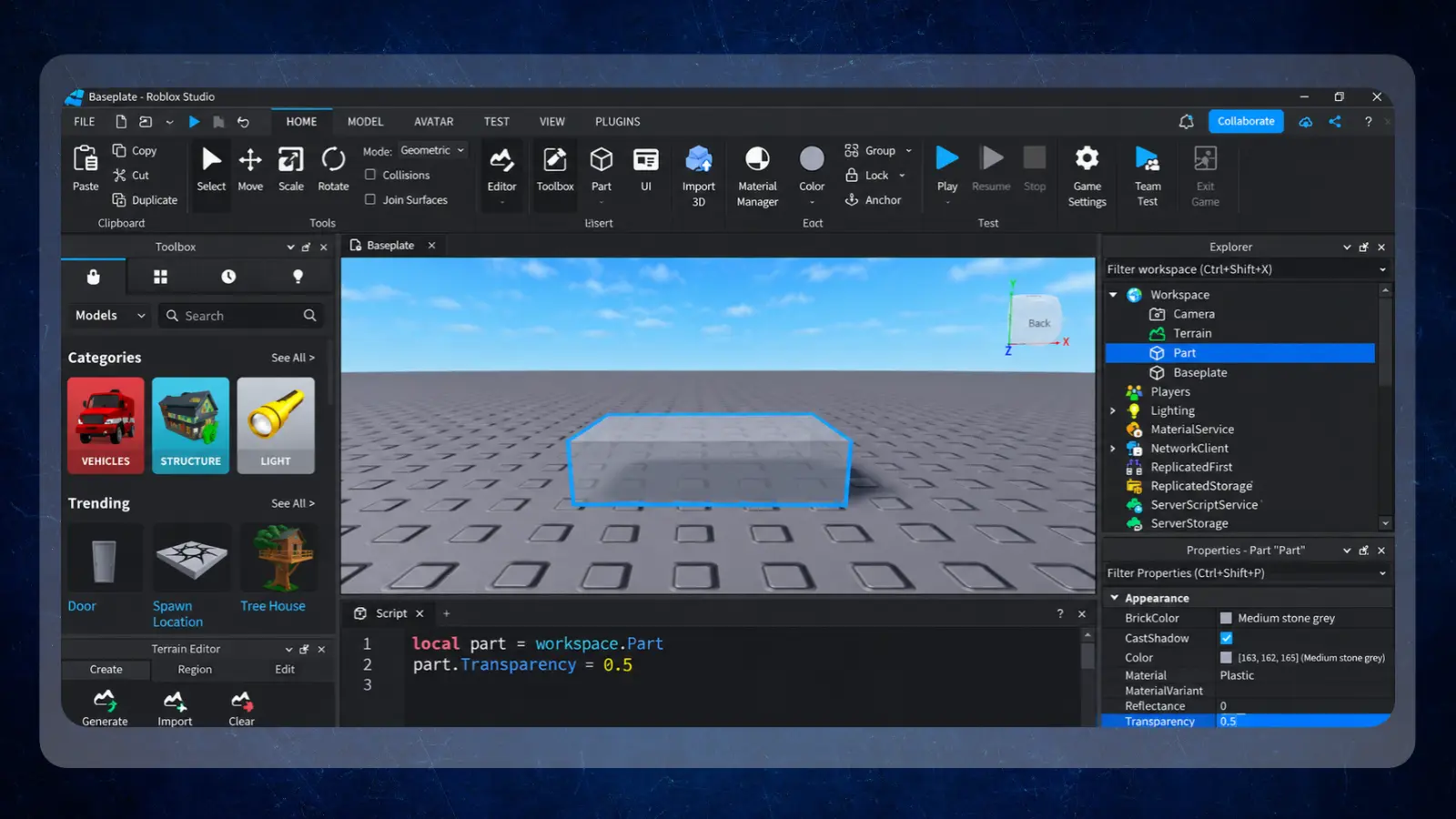
You need a compatible computer and a focused practice setup. No previous programming experience is required. Start with Roblox Studio and a beginner resource that explains unfamiliar terms.
Prepare these basics before opening a tutorial:
- A device that runs the editor: Use a computer capable of running Roblox Studio so you can follow examples directly. Roblox lists Windows 10 or macOS 10.14 as the minimum and recommends 8 GB of RAM.
- A willingness to learn basic logic: Begin with arithmetic, comparisons, and simple instructions. Advanced math isn’t necessary for the starter projects below.
- Protected practice time: Leave room to test changes and read errors instead of rushing through videos.
Keep your resources simple when figuring out how to learn Lua for Roblox. Any website you use should serve as a quick reference while you do the real, hands-on work inside the Studio editor.
These tools serve different roles in that setup:
|
Tool |
Best for |
Price |
|---|---|---|
|
[FILENAME: roblox-logo] |
Writing and testing scripts in a game scene |
Free |
|
[FILENAME: sololearn-logo] |
Supporting programming concepts with learning resources |
Free lessons, with a paid Pro tier |
|
[FILENAME: roblox-logo] |
Community guides and troubleshooting |
Free |
|
[FILENAME: lua-logo] |
Core language explanations and reference material |
Free |
Most beginners pick one or two of these tools and add more only when a task calls for them. Apply each resource to your current task before adding another tutorial.
How To Learn Lua for Roblox: A Step-by-Step Path
Learn Lua for Roblox by moving through output, variables, properties, and player-side behavior. Complete a working example at each stage before adding complexity.
This sequence explains how to learn Lua for Roblox through changes you can observe. Keep your chosen Roblox Lua learning website open beside the editor, and record what each example teaches. Setup takes minutes because Roblox Studio is free to open, and a first working script typically takes about a week of short sessions.
Step 1: Install Roblox Studio and Open the Command Bar
Download and open Roblox Studio, then create a simple workspace. Find the Command Bar for short experiments and the Output window for messages and errors. Use the Command Bar to try a short instruction before moving into a saved script.
Locate the objects in your scene and notice how their names relate to what you see in the editor. Resist adding a large collection of models. A simple workspace makes it easier to identify which object your code changed.
Step 2: Practice Print, Operators, and Text
Run a basic statement like print(“Hello”) and find its message in Output. Keep print lowercase and leave no space before the opening parenthesis, as the starter guide shows.
Try arithmetic inside print, then join text with Lua’s concatenation operator, two dots (..). Concatenation means combining text into a longer string. Predict the result before running each example. A useful Roblox Lua course explains why an expression produces its result instead of asking you to copy it silently.
Step 3: Define Variables and Use Clear Names
Create a local variable with a statement like local score = 0, then print it. A variable is a name associated with a value. Lua reads a script from top to bottom, so define the variable before the code that uses it.
Choose descriptive names without spaces, avoid starting names with a number, and don’t use reserved language keywords. Change the value and run the script again. The secret to how to learn Lua for Roblox is being able to explain where every value came from and exactly where your script uses it.
Step 4: Change Properties and Write Functions
Select a simple object and identify a property you can change, like transparency. A property describes part of an object’s state or appearance. Follow your guide’s example for referencing the object, then change the property and observe the result.
Move repeated instructions into a function, a named block of reusable code. Call it deliberately so you can see when it runs. Check that your guide explains both the object reference and the function call.
Step 5: Write and Test a Local Script
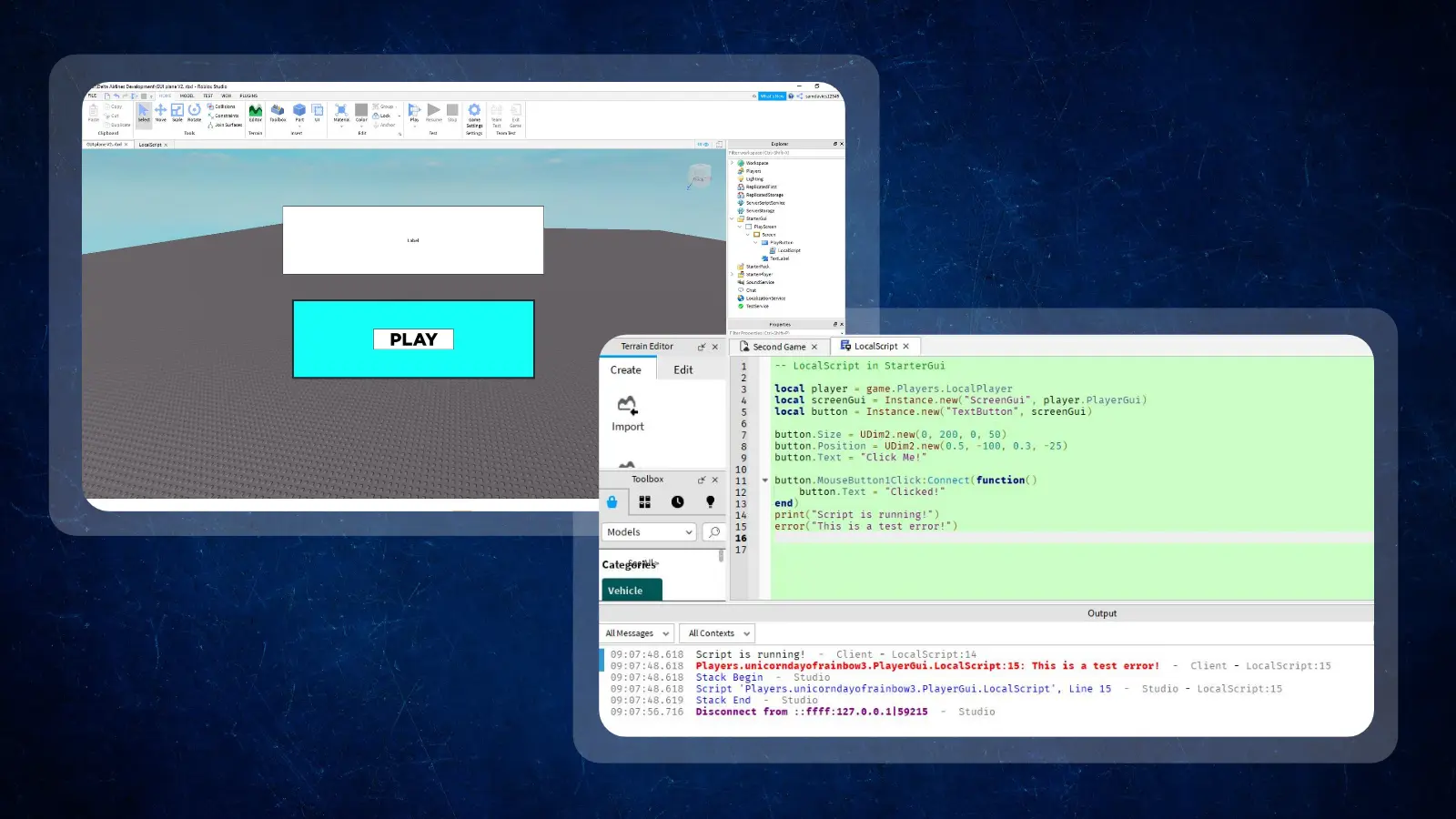
Create a Local Script for a small interface behavior and place it where your guide instructs. Script type and location affect execution, so copying code into an arbitrary object can prevent it from running. According to Roblox documentation, a Local Script runs from StarterGui and StarterPlayerScripts but not from ReplicatedStorage.
Keep the exercise focused on a visible interface change for the current player. Local Scripts handle player-side behavior only, and shared rewards need server-side handling. Before continuing, explain what triggered your code and where it ran. That explanation is your checkpoint for guided practice.
Use this foundation to build small projects before switching tutorials. Lessons from a Roblox Lua course can help clarify concepts that remain confusing.

Finding the Best Place To Learn Lua Through Structured Courses
This guide gives the overview, and a structured guide or course shortens the trial and error of debugging alone. Start with a named beginner guide before paying for instruction.
The Roblox Developer Forum‘s Lua Scripting Starter Guide is the best fit for the sequence above. It covers print, variables, properties, functions, and Local Scripts, then moves on to booleans, loops, and tables.
A Roblox Lua course should explain errors and provide exercises. A course label alone doesn’t tell you how much independent practice it includes.
These free guides, references, and tutorials offer different kinds of support:
|
Resource |
Provider |
What It Supports |
|---|---|---|
|
Lua Scripting Starter Guide |
[FILENAME: roblox-logo] |
Beginner scripting practice in Roblox |
|
Programming in Lua |
[FILENAME: lua-logo] |
Core language syntax and concepts |
|
Advanced Roblox Scripting Tutorial #3 – Local Scripts |
 |
Local Scripts, linked from the starter guide |
Treat the free first edition of Programming in Lua, which covers Lua 5.0, as a syntax reference. Your question determines the best place to learn Lua: use a language reference for syntax and a Roblox Lua learning website for platform behavior. Free guides suit learners with time to practice, while a paid Roblox Lua course can add speed when a specific obstacle slows you down.
A tutorial about how to learn Lua for Roblox is useful only when it leads you back into the editor.
Roblox Projects That Turn Lua Into Practical Skills
Finish small projects with clear success conditions before starting a full game. Finishing projects matters more than reading more tutorials, because learning Lua for Roblox requires recalling concepts without following every line.
Work through these projects in order of difficulty:
- A print-based calculator: Print arithmetic results and join them to explanatory text. This practices operators and concatenation. Change the inputs, predict the output, and compare your prediction with the result.
- A door that opens on touch: Connect a touch event to a property change. Decide what should happen when the event fires repeatedly so the interaction remains understandable during testing.
- A scoring system with a leaderboard: Track a score and display it through a shared game system. It practices variables across scripts. This introduces the need to organize state, the information your game holds, in one place.
- A simple shop interface: Use a Local Script to show or hide a menu. Keep purchases out of this initial exercise: first learn how interface controls trigger visible feedback.
- A small obby with checkpoints: Build a short obstacle course that combines interactions with progress tracking. Test what happens after a player fails and returns to a checkpoint.
A structured course offers great direction for how to learn Lua for Roblox, but always finish a modified version independently. Return to your Roblox Lua learning website for a specific explanation without restarting the entire tutorial.
When a project stops working, isolate the failing interaction before changing the rest of the game.
Where New Roblox Scripters Get Stuck
Keep your first project small enough to understand what each script does. Attempting a complete game too early creates several unfamiliar problems at once.
MikoLikesHat‘s video on five common scripting mistakes on YouTube has more than 30,000 views and offers fixes you can check when a tutorial leaves you stuck.
Watch for these obstacles as you find out how to learn Lua for Roblox:
- Copying scripts without understanding variables: Retype a short example, change a value, and predict the result. If you can’t explain a line, isolate it before adding more code.
- Ignoring error messages: Read the reported message and line reference before editing. Find the earliest relevant problem before changing unrelated lines until the warning disappears.
- Mixing up Scripts and Local Scripts: Identify where the behavior belongs before writing it. Check script placement and execution context when code runs differently from the example.
- Jumping into advanced forum threads: Finish the beginner concepts first, then search for the specific behavior you need. An advanced solution may assume knowledge your current Roblox Lua course hasn’t introduced.
- Switching resources whenever something breaks: Keep a note of the error and what you tried. Ask a focused question or consult a targeted explanation before abandoning your learning path.
A concrete problem helps you judge how to learn Lua for Roblox and which tutorial site actually fits your needs. Search for the specific error or behavior you want explained rather than starting another broad course.
Reduce the failing example, test a single change, and restore the working version before moving forward. Debugging is part of learning Lua for Roblox, and most of these fixes take only minutes.
Final Verdict on Learning Lua for Roblox
Start with Roblox Studio and free community-guided practice if you want to build your own game interactions. A focused starter guide provides enough direction to begin, and a paid Roblox Lua course becomes more useful once you can identify the support you need.
This path won’t suit someone who only wants to play Roblox. It requires patience with errors and repeated testing. More structured teaching may be the best place to learn Lua if self-directed reading stalls your progress. Judge any course by its explanations and feedback.
The next step in deciding how to learn Lua for Roblox is to open the editor and finish a small script you can explain. Choose a Roblox Lua learning website to support that task, then keep the project small until its behavior makes sense. Independent understanding is a stronger milestone than another completed video.
FAQs
Start with Roblox Studio and the free Lua Scripting Starter Guide. Change every example yourself, then build a small interaction. That habit is the core of how to learn Lua for Roblox.
Most beginners need a few weeks of regular practice for the basics, though pace depends on practice and project scope. Track milestones: print a message, change a property, write a function, and finish a small interaction.
Yes. Understanding how to learn Lua for Roblox as a complete beginner just means starting with values, variables, and simple instructions before attempting larger game systems. Practice each concept directly inside Roblox Studio.
Yes, if your goal is to build original games and tinker with code. Figure out how to learn Lua for Roblox when you enjoy the problem-solving side of development, but keep in mind that courses won’t guarantee a hit game or immediate income.
Use Roblox Studio to write and test scripts, plus a beginner guide for explanations. Studio is free on Windows and Mac. Lua.org supports language questions, while the Roblox Developer Forum offers platform-specific community material.
Yes, the Roblox Developer Forum has a free Lua Scripting Starter Guide. It dates from 2019, so check current Roblox documentation if an example behaves differently. Use its examples alongside editor practice to understand how to learn Lua for Roblox.