



2026’s 7 Best Routers for Streaming: Ultimate Picks

Eneba Hub contains affiliate links, which means we may earn a small commission if you make a purchase through them—at no extra cost to you. Learn more

If you want the best router for streaming, then you’ll be digging through a maze of confusing specs and overhyped marketing. Let me do that for you, so you don’t have to. The goal is simple: finding the right product for your needs.
After extensive research, insights from expert gamers and enthusiastic tech-hobbyists, and after burning through hype marketing, this list presents the 7 best routers for all types of people. Check out routers that guarantee lag-free gaming, smooth 4k streaming, and multi-device support for your comfort. No mid-match lags, poor connectivity, slow speeds, or any of that.
I’ll walk you through the absolute best routers that can handle multiple users, give you a stable internet connection, and support everything from your gaming console to your Netflix binging sessions. I’ll also be including links to great deals for those who feel like checking out the product of their eye and buying it.
Jump to:
Our Top Picks for Streaming Routers
Here’s a quick look at the top 3 streaming routers in their categories. If you need fast speeds or a reliable budget router, there’s something here for every gamer and streamer.
- TP-Link BE9300 – Ultra-fast speeds and perfect for multiple devices.
- TP-Link BE3600 – The best budget router for smaller setups.
- NETGEAR Nighthawk CAX30 – Blazing streaming experience with built-in modem.
Keep scrolling for full reviews of ALL the products.
7 Best Streaming Routers Roundup
Below you’ll find 7 in-depth reviews of the top streaming routers on the market. Each entry includes specs, pros and cons, and how it performs under real-world streaming and gaming loads. So, let’s get to it.
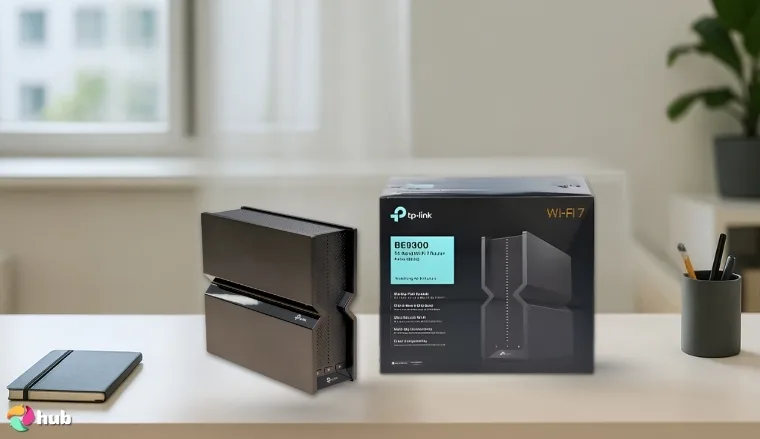
1. TP-Link BE9300 [Best Overall Streaming Router]
| Specs | Details |
|---|---|
| Wi-Fi Standard | Wi-Fi 6E (802.11ax) |
| Speed | Up to 9.3 Gbps combined |
| Ethernet Ports | 4 × gigabit ethernet ports |
| Bands | Tri-band (2.4GHz + 5GHz + 6GHz) |
| Coverage | Up to 3,500 sq ft |
| Security | WPA3 + TP-Link HomeShield |
| Setup | TP-Link Tether App |
| Mesh Support | Yes – mesh network enabled |
Set up the TP-Link BE9300 in my house, and within minutes, it will power a whole army of devices. The best router on this list is evidently loaded with top-tier hardware. It has 2.5 Gigabit Ethernet ports (even wired PCs and consoles can take advantage of faster-than-Gigabit speeds), tri-band Wifi 7 radios, which means it can handle multiple devices on different bands, and more.
Wi-fi speeds on the 6 GHz band can blow past 1 Gbps to a Wi-Fi 6E laptop. Plus, the 5 GHz band can deliver lag-free 4 K streaming to TVs and such. What more? Well, the 2.4 GHz band is fairly handy for IoT gadgets. You stay winning with this router. With TP-Link Archer lineage, it also includes a handy Tether mobile app and a robust web interface for fine-tuning settings.
You’ll appreciate the extra features like a USB 3.0 port for network storage and built-in VPN server support for remote access. This router is mesh network-ready too, using TP-Link’s EasyMesh tech. You can pair it with a range extender to support a larger home if you need it.
In actual gameplay and streaming, the BE9300 truly shines. You could host a game night that demands a lot across all your devices (plus your friends’ devices). How would it end up? It would still be smooth, low-latency gaming across all devices. Had troubles with past wi fi routers? Say goodbye to them.
This unit’s next-gen tech allocates traffic like a champ. It maintains a strong signal through walls on 5 GHz, and at close range, the 6 GHz band delivers unbelievable throughput. I also love the gamer-centric touches: a Game Center in the interface offers latency optimization and QoS tweaks to prioritize gaming traffic.
Despite packing so much power, the router runs cool and stable. It’s clear why this model stands out among the best gaming routers in 2025 for those who want to stream their game play like a pro.
| Pros | Cons |
|---|---|
| ✅ Blazing Wi-Fi 7 speeds on all bands ✅ Gigabit Ethernet ports upgraded to 2.5 G ✅Handles multiple devices streaming ✅ Easy setup via Tether app ✅ Supports OneMesh/EasyMesh for mesh expansion | ❌ 6 GHz band has shorter range (common to Wi-Fi 7) |
Final Verdict: The TP-Link BE9300 offers an unparalleled streaming experience with its cutting-edge specs and solid performance. If you have a multi-gig fiber internet connection or plan to future-proof your network, this router is a dream come true.
An alternative option would be the TP-Link BE3600, if you want a similar model that’s cheaper.
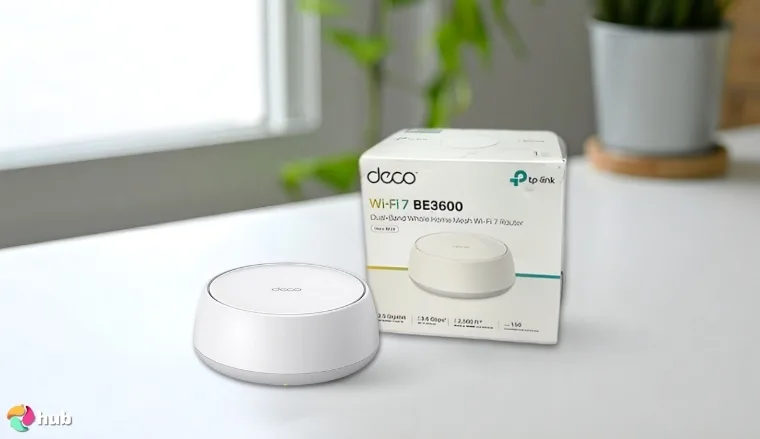
2. TP-Link BE3600 [Best Budget Streaming Router]
| Specs | Details |
|---|---|
| Wi-Fi Standard | Wi-Fi 7 (802.11be), Dual-Band (2.4 GHz & 5 GHz) |
| Speed | 3.6 Gbps (AX3600-class) |
| Ethernet Ports | 1× 2.5 Gbps WAN, 1× 2.5 Gbps LAN; 3× 1 Gbps LAN |
| Bands | Dual-band (2.4GHz + 5GHz) |
| Coverage | Up to 2,500 sq ft |
| Security | WPA3, VPN server support, TP-Link HomeShield (basic) |
| Setup | TP-Link Tether App |
| Mesh Support | Yes – EasyMesh compatible (add range extender) |
Don’t let the “budget” label fool you: the TP-Link BE3600 punches well above its class. Setup is a breeze; configure it via the Tether app in minutes, and the wi fi signal will blanket your whole apartment/house. This dual-band unit forgoes the 6 GHz band of pricier Wi-Fi 7 routers, but it still delivers faster speeds than almost any budget router or cheaper router you’ll try.
With a 160 MHz-capable 5 GHz radio, you can clock around 1.2 Gbps to my phone at close range, and the 2.4 GHz band provides solid 100+ Mbps for distant smart devices. That’s more than enough for streaming services and downloads. One huge perk is the inclusion of not one but two 2.5-Gigabit ports. You’ll see that your LAN file transfers and incoming internet speeds are unrestricted by Gigabit bottlenecks.
The router’s network security features are decent: WPA3 encryption and the option to run a VPN server. TP-Link’s interface also includes basic QoS and parental controls, covering the essentials for a safe home network. All of this is managed through a straightforward web interface or the mobile app, so tweaking settings or updating firmware is hassle-free.
In daily use, the BE3600 easily handles multiple users and devices typical of a small household. You can stream 4K movies on your TV while gaming on a laptop, and there will be zero buffering. Ping times in online games stay steady (20–30 ms) even if others are online too. For a sub-$100 device, that kind of consistent performance is a huge win.
The coverage reached into every corner of my space; it even maintained a solid coverage out on the patio through two walls. After research, I can confidently say it delivers a streaming experience and gaming stability that holds its own against pricier models.
| Pros | Cons |
|---|---|
| ✅ Incredible value – Wi-Fi 7 features at a reasonable price ✅Two multi-gig (2.5 G) ports for WAN/LAN ✅ Strong wi fi signal ✅ EasyMesh support ✅Includes VPN server and basic security tools | ❌ No 6 GHz band (dual-band only) |
Final Verdict: For gamers and streamers on a budget, TP-Link BE3600 is a total game-changer. It delivers next-gen speed and reliability at a fraction of the cost of its rivals.
An alternative option is the ASUS ROG Strix GS-AX5400 for those who need tri-band support and great gaming features.
3. NETGEAR Nighthawk Combo (CAX30) [Best High-Speed Streaming Router]
| Specs | Details |
|---|---|
| Wi-Fi Standard | Wi-Fi 6 (802.11ax) |
| Speed | Up to 2.7 Gbps |
| Ethernet Ports | 4 × Gigabit Ethernet LAN ports |
| Bands | Dual-band (2.4GHz + 5GHz) |
| Coverage | Up to 2,500 sq ft |
| Security | WPA3 + NETGEAR Armor |
| Setup | Nighthawk App |
| Mesh Support | Not supported |
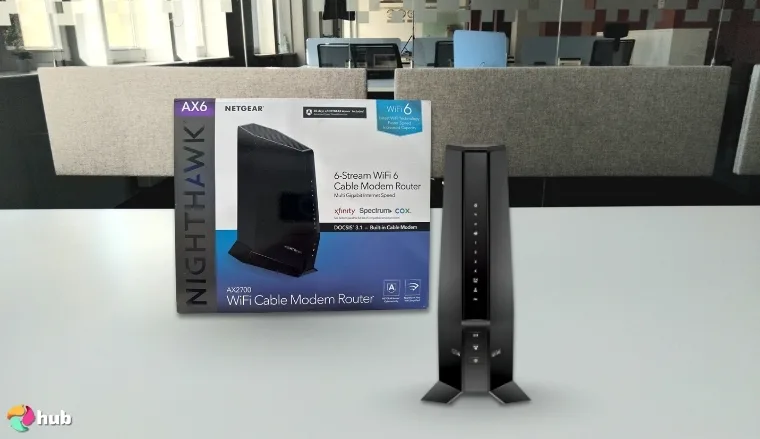
Setting up the Nighthawk CAX30 will place you on a new level. This sleek tower unleashes your network’s potential with strong signal coverage and impressively low latency. The DOCSIS 3.1 modem inside supports multi-gig download speeds, so it easily handles 800 Mbps cable service (and is ready for faster, up to 1 Gbps+ plans).
On the Wi-Fi side, its dual-band AX2700. This means concurrent Wi-Fi 6 on 2.4 GHz and 5 GHz. What will really impress you is the solid coverage: the CAX30’s amplified antennas have no issue covering 3,000 sq ft houses in reliable Wi-Fi. Even dead spots in your house will get HD streaming without drops. This router also comes with NETGEAR’s handy app and a web interface, which makes activation with ISP straightforward.
Once online, you can fine-tune the network name and enable WPA3 encryption in minutes. The dual-band Wi-Fi means older devices connect on 2.4 GHz, while newer ones fly on 5 GHz. What else? Well, the Nighthawk’s Smart Connect feature can steer devices to the optimal band automatically. Do you have a bunch of people using the internet in your house? No problem, the router is adept at handling congestion thanks to Wi-Fi 6’s OFDMA.
In terms of extras, the Nighthawk CAX30 supports other routers as extenders if you ever want to broaden coverage (via Netgear’s OneWiFi or just adding a mesh point). It also features NETGEAR Armor cybersecurity (optional subscription) and network security like SPI firewall and DOS protection out of the box.
All told, this unit is a better value than buying a high-end router plus a separate modem.
| Pros | Cons |
|---|---|
| ✅ Convenient 2-in-1 design (cable modem + router) ✅ Excellent throughput + solid signal stability ✅Covers large homes with solid coverage ✅ Eliminates rental fees ✅ Smooth streaming experience even with many devices | ❌ Firmware is basic compared to some standalone routers |
Final Verdict: The NETGEAR Nighthawk CAX30 is a powerhouse combo that simplifies your network and turbocharges your home internet.
An alternative option is the Amazon eero Pro 6E, especially if you’re looking for a mesh system with great coverage and smart home integration.
4. ASUS ROG Strix GS-AX5400 [Best Tri-Band Router for Streaming]
| Specs | Details |
|---|---|
| Wi-Fi Standard | Wi-Fi 6 (802.11ax) |
| Speed | Up to 5.4 Gbps |
| Ethernet Ports | 1 × WAN, 4 × LAN |
| Bands | Dual-band (2.4GHz + 5GHz) |
| Coverage | Up to 2,500 sq ft |
| Security | AiProtection Pro |
| Setup | ASUS Router App |
| Mesh Support | AiMesh compatible |
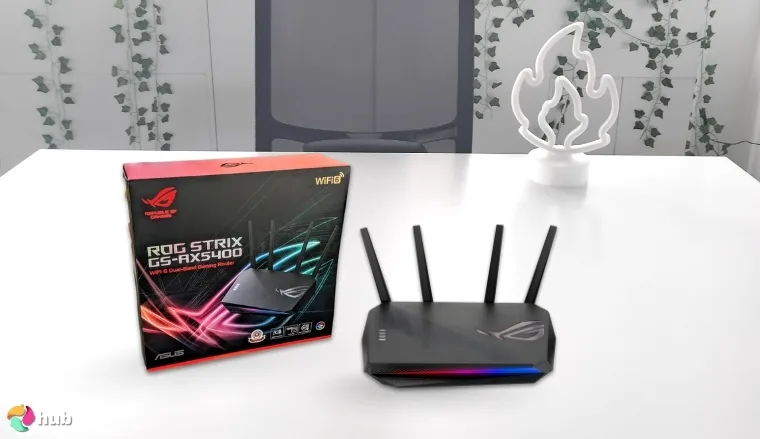
Right out of the box, the GS-AX5400 screams “gamer.” It has a sleek black design with RGB accents. Setup is straightforward using the ASUS Router app. Typically, within 10 minutes, you’ll have your network up and running and your game console connected via the router’s dedicated Gaming Port (one of the LAN ports that automatically prioritizes console traffic).
This router may be Wi-Fi 6 (not Wi-Fi 6E or 7), but it’s still one of the fastest routers in its class. The GS-AX5400 delivers 800–850 Mbps at a close range on 5 GHz. That’s fairly excellent. Plus, 120 Mbps on 2.4 GHz. That’s plenty for lower-bandwidth gadgets. What sets it apart is how it maintains performance when the network is busy.
Well, with OFDMA and a beefy tri-core CPU, it can handle multiple streams of data without choking. For example, you could have a 4K Twitch stream running on the TV, a PC downloading a game, and two game consoles online. This router will balance it like a champ. The GS-AX5400’s solid coverage easily blankets ~2,500 sq ft.
If you need more range, its AiMesh capability means you can link it with other ASUS routers to form a mesh system! Plus, the ROG Strix firmware includes a suite of security features and gamer-centric optimizations. Dive into its interface and find the Game Accelerator menu. It enables a noticeable reduction in ping jitter.
Overall, using the ASUS ROG Strix GS-AX5400 feels like tailor-fitting your network for gaming excellence, while still being fantastic for everyday streaming and browsing. With that in mind, check out the best ASUS routers in this list if you want more ASUS options.
| Pros | Cons |
|---|---|
| ✅ Excellent throughput for Wi-Fi 6 ✅ Gamer-centric features reduces lag ✅ Robust security features and parental controls ✅ Dedicated Game Port and Adaptive QoS for game consoles ✅ Supports AiMesh mesh system expansion | ❌ Only dual-band (no 6 GHz band) |
Final Verdict: The ROG Strix GS-AX5400 hits the sweet spot for gamers who also need all-around streaming prowess.
An alternative option is the TP-Link BE9300. It offers cutting-edge performance suitable for demanding applications.
5. NETGEAR Nighthawk (RS200) [Best Dual-Band Router for Streaming]
| Specs | Details |
|---|---|
| Wi-Fi Standard | Wi-Fi 7 (802.11be) |
| Speed | Up to 6.5 Gbps |
| Ethernet Ports | 1 × 2.5 Gbps WAN, 1 × 2.5 Gbps LAN, 3 × 1 Gbps LAN |
| Bands | Dual-band (2.4GHz + 5GHz) |
| Coverage | Up to 2,500 sq ft |
| Security | WPA3 + NETGEAR Armor |
| Setup | Nighthawk App |
| Mesh Support | Not supported |
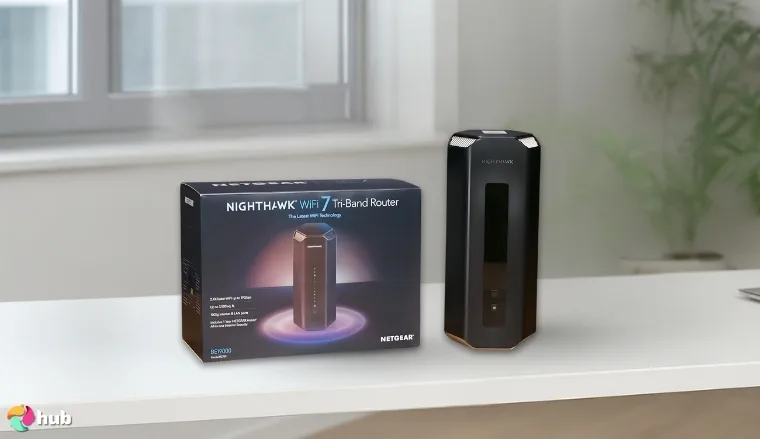
The NETGEAR Nighthawk RS200 is a dual-band Wi-Fi 7 router that delivers impressive performance despite lacking the 6 GHz band. Setting it up via the Nighthawk mobile app is straightforward, and the router immediately provides a responsive and stable internet connection. With a 1 Gbps wired connection, it achieved full gigabit speeds over the 5 GHz band to a Wi-Fi 7-ready laptop.
It rivals Ethernet cable performance. Plus, The RS200 offers up to 2,500 sq ft of coverage and supports up to 80 multiple devices simultaneously. That’s a lot of devices, probably more than you own (except for special cyber snowflakes). Its dual Wi-Fi bands (2.4 GHz and 5 GHz) give you robust connectivity, even without the 6 GHz band.
The router includes parental controls. That seems basic out of the box, but it can be enhanced with a subscription to NETGEAR’s Smart Parental Controls service.
| Pros | Cons |
|---|---|
| ✅ Wi-Fi 7 performance on 5 GHz delivers top speeds ✅ Two multi-gig 2.5G ports for WAN and 1 LAN ✅Excellent range and capacity ✅ Strong basic security ✅ Easy setup with Nighthawk app; reliable firmware | ❌ No 6 GHz band (dual-band only by design) |
Final Verdict: The NETGEAR Nighthawk RS200 is a forward-looking choice for gamers and streamers. It strips out the still-nascent 6 GHz frills and doubles down on an insanely fast 5 GHz network.
An alternative option is the Amazon eero Pro 6, especially if tri-band support and mesh capabilities are important to you.
6. Amazon eero Pro 6E [Best Mesh Streaming Router]
| Specs | Details |
|---|---|
| Wi-Fi Standard | Wi-Fi 6E (802.11ax) |
| Speed | Up to 2.3 Gbps |
| Ethernet Ports | 1 × 2.5 Gbps, 1 × 1 Gbps |
| Bands | Tri-band (2.4GHz + 5GHz + 6GHz) |
| Coverage | Up to 2,000 sq ft per unit |
| Security | WPA3 |
| Setup | eero App |
| Mesh Support | TrueMesh technology |
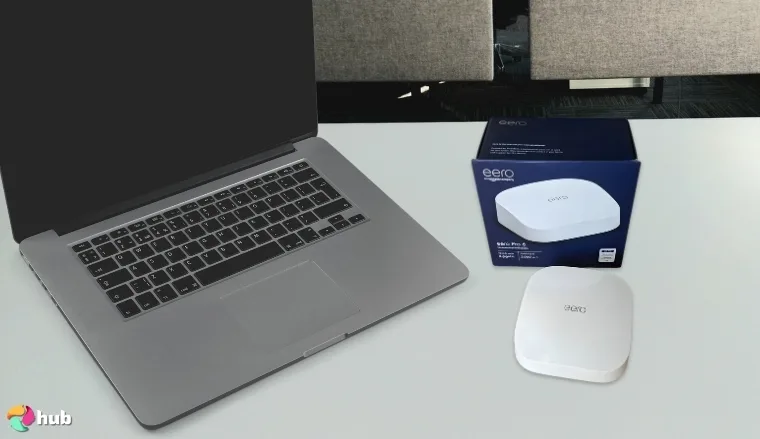
Replace your old wi-fi extenders with an eero Pro 6E 2-pack, and the difference is night and day. Finally, no more hopping between networks or dead zones: just one seamless mesh network named “Home” covering everything. Setting up eero is ridiculously easy. You scan a QR code, and the app walks you through the placement of the units.
Each eero Pro 6E node is tri-band, including the new 6 GHz band. When you run tests on your network, you’ll typically get impressive results: ~1.3 Gbps to my Wi-Fi 6E laptop near the main node (taking advantage of that clean 6 GHz spectrum), and about 500–600 Mbps on 5 GHz throughout most of the house.
That consistency is a godsend for streaming; you can start a YouTube TV stream in the living room and walk upstairs without a single hiccup. The system automatically manages connections and band steering, so your devices roam between 5 GHz and 6 GHz or between nodes as needed.
From a user perspective, it’s just Wi-Fi that works. You don’t have to worry about channels or interference. This “it just works” factor makes the eero Pro 6E one of the fastest routers to deploy and get optimal performance without tweaking.
| Pros | Cons |
|---|---|
| ✅ Seamless whole-home coverage ✅Tri-band Wi-Fi 6E for high throughput + low lag ✅ Handles 100+ devices ✅ Easiest setup and management via app ✅Smart optimization of gaming traffic and streaming | ❌ Some features (security, ad-block) require subscription |
Final Verdict: The Amazon eero Pro 6E system is a dream for anyone who values coverage and simplicity as much as raw speed. It provides great Wi-Fi to every corner, making sure your 4K streams don’t buffer and your games don’t lag.
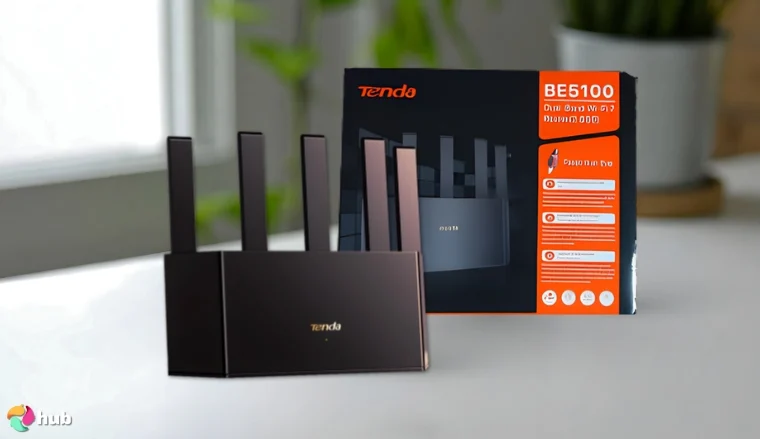
An alternative option for those seeking Wi-Fi 7 support and a more traditional router setup is the Tenda BE5100.
7. Tenda BE5100 [Best Wi-Fi 7 Streaming Router]
| Specs | Details |
|---|---|
| Wi-Fi Standard | Wi-Fi 7 (802.11be) |
| Speed | Up to 5.1 Gbps |
| Ethernet Ports | 1 × 2.5 Gbps WAN/LAN, 3 × 1 Gbps LAN |
| Bands | Dual-band (2.4GHz + 5GHz) |
| Coverage | Up to 2,000 sq ft |
| Security | WPA3 + Advanced Firewall |
| Setup | Tenda WiFi App |
| Mesh Support | Not specified |
If you’re curious if the Tenda BE5100 could live up to its spec sheet, keep reading. Setup is straightforward via the Tenda app, and there’s even an NFC tag on the router that lets you tap to your Android phone to join the Wi-Fi instantly (a neat touch you won’t see that much).
At close range, the speeds are absolutely eye-watering: you’ll see over 1.5 Gbps in Windows file transfers between two Wi-Fi 7 devices, which is well beyond Wi-Fi 6 capabilities. Tenda’s MLO (Multi-Link Operation) lets compatible devices use 2.4 GHz and 5 GHz at the same time for extra throughput.
This can boost speeds by ~15% on a supported adapter. It can push things even closer to Ethernet-like performance. So for a single device in the same room, the BE5100 can deliver top speeds that outclass most routers of the previous generation. Plus, the 2.4 GHz band provides broad coverage at lower speeds.
This router shines in handling multiple users at once: you can normally host a LAN party and let everyone connect to Wi-Fi. Even with 8 gamers and streamers online, the BE5100 distributed the bandwidth without any one person hogging it. Another interesting feature is the NFC one-touch connect.
If you share the details on the provided NFC sticker, others could tap their phone to it to join the guest Wi-Fi without you giving a password. This little quality-of-life perk shows Tenda’s thinking outside the box. Such innovation is key when selecting the best Wi-Fi 7 router for your home. Considering the price and performance, it presents a better value option in the nascent Wi-Fi 7 market and leaves you excited for the future of affordable high-performance routers.
| Pros | Cons |
|---|---|
| ✅Next-gen Wi-Fi 7 performance ✅ Multi-Gig 2.5G port ✅Great for multiple users ✅ Unique touches: NFC quick connect, easy parental controls ✅ Supports MLO and WPA3 for future-proof network security | ❌ No 6 GHz band (dual-band only) |
Final Verdict: The Tenda BE5100 is an excellent entry point into Wi-Fi 7 for gamers and streamers who crave speed but have a budget.
An alternative is the Amazon eero Pro 6E if you prefer a mesh system with smart home integration and tri-band support.
Want more information on top-performing routers? Then you should check out our guide on the best gaming routers.
What To Consider Before Getting a Router?
A well-selected router is the key for smooth streaming and a stable connection across all your devices. Slow connectivity is the absolute worst after all (ESPECIALLY when you’re gaming).
Here are the essential features to look for:
1. Wi-Fi Standards
Understanding Wi-Fi standards helps in selecting a router that meets your streaming needs:
- Wi-Fi 5 (802.11ac): Offers decent speeds suitable for HD streaming.
- Wi-Fi 6 (802.11ax): Provides faster speeds, better efficiency, and supports more devices simultaneously.
- Wi-Fi 6E: Adds a 6 GHz band, reducing congestion and improving performance.
- Wi-Fi 7 (802.11be): Delivers ultra-fast speeds and low latency, ideal for 4K/8K streaming and gaming.
2. Band (Single-band, Dual-band, Tri-band)
The number of bands affects how your router manages traffic:
- Single-band: Operates on 2.4 GHz; more susceptible to interference.
- Dual-band: Offers 2.4 GHz and 5 GHz; better performance and less interference.
- Tri-band: Includes an additional 5 GHz or 6 GHz band; ideal for households with multiple devices.
3. Speed Ratings (Mbps/Gbps)
Speed ratings indicate the maximum data transfer rate:
- Mbps (Megabits per second): Suitable for basic streaming and browsing.
- Gbps (Gigabits per second): Ideal for high-definition streaming and gaming.
4. Range and Coverage
Consider the size of your home and potential obstacles:
- Antennas: More antennas can improve signal strength and coverage.
- Building Materials: Thick walls and metal structures can weaken signals.
- Mesh Wi-Fi Systems: Ideal for large homes; multiple nodes provide consistent coverage.
5. Quality of Service (QoS)
QoS prioritizes network traffic to enhance streaming:
- Traffic Management: Allocates bandwidth to streaming devices and reduces buffering.
- Custom Settings: Allows users to prioritize specific applications or devices.
6. MU-MIMO (Multi-User Multiple Input, Multiple Output)
MU-MIMO technology enables simultaneous data transmission to multiple devices:
- Improved Efficiency: Reduces wait times for devices, enhancing streaming quality.
- Better Performance: Provides stable connections for all connected devices.
7. Processor and RAM
A robust processor and ample RAM contribute to better performance:
- Faster Processing: Handles multiple tasks efficiently, reducing lag.
- Enhanced Stability: Maintains consistent performance during heavy usage.
8. Advanced Features
Modern routers offer additional functionalities:
- VPN Integration: Provides secure browsing and access to geo-restricted content.
- Guest Networks: Allows visitors to connect without accessing your main network.
- Parental Controls: Enables monitoring and restriction of content for specific devices.
FAQs
What is the best router for streaming?
The best router for streaming offers high-speed connectivity, advanced features, and decent coverage. Think QoS and MU-MIMO. Models such as the TP-Link BE9300.
What does a router do?
A router connects multiple devices to the internet and manages data traffic between them.
What is a router vs. a modem?
A modem connects your home to your Internet Service Provider (ISP). A router distributes the internet connection to various devices within your home network.
What is a mesh router?
A mesh router system uses multiple nodes to provide Wi-Fi coverage throughout your home. It helps cover your whole area with a stable connection and covers dead zones as well (where Wi Fi typically does not reach).
Do I need a modem and router?
Yes, a modem is required to connect to your ISP, and a router is needed to distribute the internet connection to your devices.