9 Best Dual Monitor Setup 2025: Top Picks & Tips

Eneba Hub contains affiliate links, which means we may earn a small commission if you make a purchase through them—at no extra cost to you. Learn more

The best dual monitor setup can completely transform how you work, play, or create when chosen thoughtfully. When I upgraded my own desk from a single screen to two displays, the jump-in speed, focus, and workflow clarity felt immediate because I finally had room to think and organize my tasks properly.
A great dual-monitor layout is not just about placing two screens side by side. It’s about pairing the right sizes, resolutions, mounts, and ergonomics so everything works smoothly. In this guide, you will learn how to build a setup that boosts productivity, sharpens gaming performance, and makes multitasking feel natural.
Jump to:
Our Top Picks for Dual Monitor Setups
Finding the right combination of monitors can make a noticeable difference in comfort, productivity, and overall desk flow. After comparing performance, value, and real-world usability, these three options stood out as the strongest choices for a dual-monitor layout.
- Gigastone 27-Inch IPS LED Backlight Monitor (2024) – This model offers excellent clarity, wide viewing angles, and a balanced price that makes it ideal for home offices, students, and anyone building a clean and reliable dual-screen setup.
- Generic 2X Pack (2024) – The pair offers unmatched value, because you get two monitors designed to work perfectly together, creating a consistent, seamless dual display without calibration issues.
- SAMSUNG 49″ Odyssey G9 G95C Series (2024) – This ultrawide powerhouse gives you the equivalent of two monitors in one curved panel that wraps your field of view, making it perfect for immersive gaming and heavy multitasking.
These three options cover different needs and budgets, from everyday work to high-end creative or gaming setups. Each one brings strong design, performance, and versatility that fit well in a modern dual-monitor layout.
If you want to explore all nine recommendations in detail, keep scrolling to see the full list and find the combination that fits your workspace perfectly.
9 Best Dual Monitor Setup Picks for Every Workspace 2025
These nine monitors represent the strongest options across productivity, gaming, creative work, and everyday multitasking. Each one was selected for its clarity, performance, and overall value, giving you the flexibility to build a layout that fits your goals and budget. This list will help you choose the best dual monitor setup for your needs.
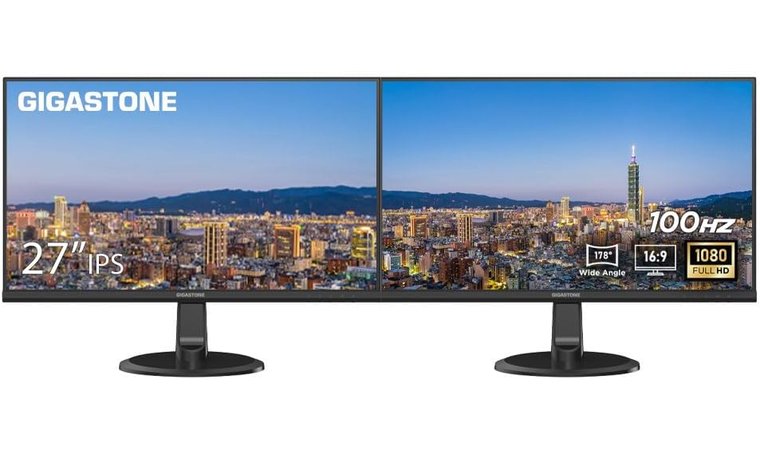
1. Gigastone 27-Inch IPS LED Backlight Monitor (2-Pack) [Best Overall Dual Monitor]
| Specs | Details |
|---|---|
| Screen Size | 27 inches |
| Resolution | Full HD 1080p |
| Panel Type | IPS |
| Color Coverage | Wide 178° viewing |
| Brightness | Standard FHD range |
| Connectivity | HDMI, VGA |
| Refresh Rate | 75Hz |
The Gigastone 27-Inch IPS LED Backlight Monitor (2-Pack) offers one of the most reliable foundations for a clean and efficient dual-screen workflow.
Because the monitors are sold together as a matched pair, you never have to worry about color variation, brightness inconsistencies, or alignment issues that happen when mixing different models.
Matched 27″ IPS panels with wide viewing angles and a clean dual setup make this ideal for home offices and multitaskers.
The 27-inch size feels spacious without overcrowding a desk, and the IPS panel offers consistent color and clarity even when viewed from an angle. This is especially useful for shared workspaces or setups where one screen sits vertically beside the other.
| Pros | Cons |
|---|---|
| ✅ Matched 2-pack guarantees perfect color consistency ✅ 27-inch size balances workspace and screen real estate ✅ IPS panel with 178° viewing for stable colors ✅ 75Hz refresh rate feels smoother than 60Hz for everyday work ✅ Frameless design works well for side-by-side mounting | ❌ Not ideal for high-end gaming, though performance stays excellent for productivity |
Beyond the strong visuals, Gigastone includes built-in speakers, which keeps cable clutter low and adds convenience for calls or background audio. The monitors also support VESA mounting, making them compatible with most stands and even the best monitor arm options for a cleaner and more ergonomic desk layout.
Dual HDMI and VGA ports make installation easy on both modern PCs and older devices, ensuring flexibility if you move between systems.
Final Verdict: This 2-pack is the simplest and most reliable way to build a clean, color-matched dual display. If you want value, consistency, and smooth everyday performance, it is one of the strongest choices for the best dual monitors setups.
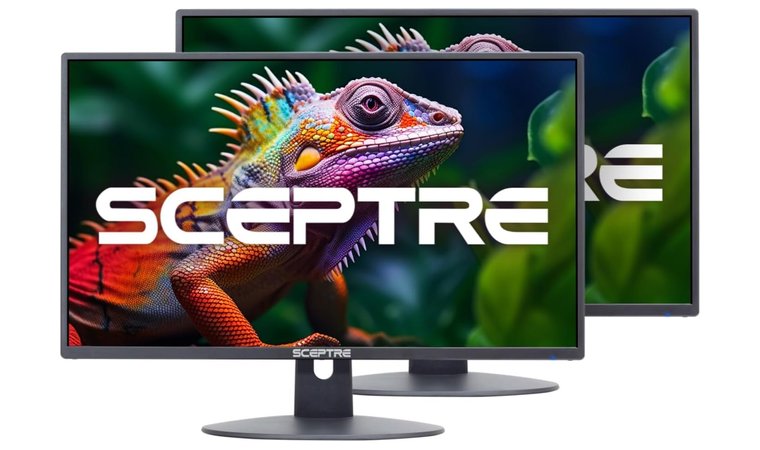
2. Generic 2X Pack [Best Budget Monitor for Dual Setup]
| Specs | Details |
|---|---|
| Screen Size | 24 inches |
| Resolution | Full HD 1080p |
| Panel Type | IPS or VA (varies by pack) |
| Color Coverage | Standard FHD range |
| Brightness | Typical office brightness level |
| Connectivity | HDMI, VGA |
| Refresh Rate | 100Hz (varies slightly by model) |
The Generic 2X Pack stands out as the most affordable way to build a clean and reliable dual monitor setup. Because both displays come in one SKU, you get guaranteed matching panels, identical brightness, and consistent color profiles without worrying about pairing two different manufacturers.
Two identical budget monitors in one bundle simplify setup and provide smooth, color-matched performance for daily use.
Most packs include 24-inch Full HD screens with 100Hz refresh rates, making them ideal for smooth everyday work, studying, streaming, and even light gaming. This category often overlaps with the models featured in the best portable gaming monitor guides because value is such a priority in budget-friendly picks.
| Pros | Cons |
|---|---|
| ✅ Two identical monitors for perfect pairing ✅ Affordable per-unit pricing compared to single monitor purchases ✅ 100Hz refresh rate feels smooth for everyday tasks ✅ Thin bezels improve side-by-side viewing ✅ Built-in speakers simplify desk setup | ❌ Materials feel basic, though durability remains reliable for long-term daily use |
The inclusion of VESA mounting across almost all Generic 2X Packs makes them compatible with wall mounts and monitor arms, allowing users to build ergonomic setups at a very low cost.
Thin bezels help the two screens blend together more cleanly, and the combination of HDMI and VGA ports guarantees compatibility with both new and older systems. School labs, offices, and shared workspaces often choose this exact type of bundle because it offers predictable performance without inflating the budget.
Final Verdict: If you want a dependable and low-cost dual-monitor layout without sacrificing usability, the Generic 2X Pack offers the best value. It is the ideal choice for bulk purchases and budget builds where matched screens matter most.
3. SAMSUNG 49″ Odyssey G9 (G95C) Series [Best Ultra-Wide Alternative to Dual Monitors]

| Specs | Details |
|---|---|
| Screen Size | 49 inches |
| Resolution | Dual QHD 5120×1440 (DQHD) |
| Panel Type | VA |
| Color Coverage | DisplayHDR1000 certified |
| Brightness | Up to 1000 nits peak |
| Connectivity | HDMI, DisplayPort, USB |
| Refresh Rate | 240Hz |
The SAMSUNG 49″ Odyssey G9 (G95C) Series is the strongest single-panel replacement for traditional dual monitors, thanks to its massive 49-inch DQHD resolution, which equals two 27-inch QHD screens side by side. The aggressive 1000R curvature wraps the entire display into your peripheral vision and creates an immersive, bezel-free workspace.
A massive curved ultrawide replaces two monitors with one immersive display for gaming, multitasking, or deep focus work.
With its speed and sweeping canvas, this monitor also appeals to buyers who search for alternatives to the best gaming monitor category but want something far wider and more immersive.
| Pros | Cons |
|---|---|
| ✅ Replaces dual monitors with one seamless 49-inch ultrawide ✅ 240Hz refresh rate with 1ms response for elite gaming ✅ DisplayHDR1000 enhances highlights and deep contrast ✅ FreeSync Premium Pro for smooth, tear-free motion ✅ PBP, PIP, and Auto Source Switch+ simulate multi-monitor workflows | ❌ Requires a wide desk, although the immersive experience makes the space worthwhile |
Advanced multi-source features like PBP and PIP allow users to connect multiple devices and view them at once, making the G9 behave like a dual-monitor layout without visual seams.
Its stand supports height, tilt, and swivel adjustments for ergonomics, and the panel’s color accuracy and brightness create a high-end environment for productivity, gaming, or editing.
Final Verdict: Its clarity, size, and speed make it perfect for users seeking the best dual monitor setup for a seamless home office experience.
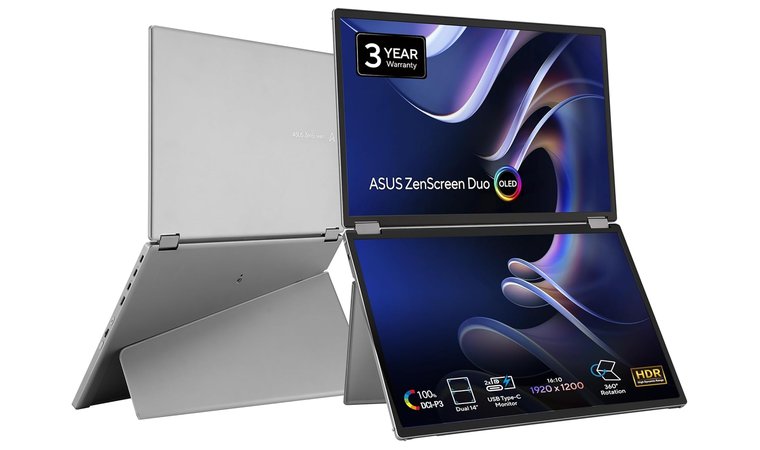
4. ASUS ZenScreen Duo OLED MQ149CD [Best Dual Monitor for Productivity and Home Office Setup]
| Specs | Details |
|---|---|
| Screen Size | Dual 14-inch |
| Resolution | 1920×1200 |
| Panel Type | OLED |
| Color Coverage | 100% DCI-P3 |
| Brightness | DisplayHDR 400 True Black |
| Connectivity | Dual USB-C, Mini-HDMI |
| Refresh Rate | 60Hz |
The ASUS ZenScreen Duo OLED MQ149CD offers a unique dual-screen workflow in a portable form factor. Its two 14-inch OLED panels offer excellent clarity and color accuracy, making it ideal for productivity, creative tasks, and on-the-go multitasking.
Dual OLED panels in a foldable design offer premium color and flexibility for portable productivity and creative tasks.
The flexible hinge and lightweight build make it a practical choice for users who appreciate the design philosophy found in the best ASUS monitor lineup.
| Pros | Cons |
|---|---|
| ✅ Dual OLED panels for sharp, vivid multitasking ✅ 100% DCI-P3 color accuracy for editing work ✅ 360° hinge supports multiple orientations ✅ Lightweight and portable for mobile workflows ✅ Easy connectivity with USB-C and HDMI | ❌ Smaller screens reduce immersion, but portability offsets the tradeoff |
Its fold-out kickstand provides reliable ergonomic support, and the HDR-grade OLED quality guarantees deep blacks and rich color. With USB-C and HDMI options, it integrates smoothly into home desks, offices, or travel setups, making it one of the most flexible portable dual-display solutions.
Final Verdict: The ZenScreen Duo is a lightweight, color-accurate dual display that transforms productivity on the go. Its flexibility and OLED quality make it a smart choice for hybrid workers who want more screen space without committing to a full desktop setup.
5. Dell P2425H 24″ Monitor Dual Pack [Best Dual Monitor for Light Gaming]

| Specs | Details |
|---|---|
| Screen Size | 23.8 inches |
| Resolution | Full HD 1080p |
| Panel Type | IPS |
| Color Coverage | Wide 178° viewing |
| Brightness | Standard office brightness |
| Connectivity | USB-C hub, HDMI, DP, VGA |
| Refresh Rate | 100Hz |
The Dell P2425H Dual Pack brings smooth performance and strong productivity features together in a clean, ready-to-use bundle. Its 100Hz IPS panel offers noticeably better motion clarity than 60Hz displays, making everyday tasks, scrolling, and light gaming feel more fluid.
This 100Hz dual pack blends smooth motion, full ergonomics, and USB-C convenience for work, study, and light gaming.
ComfortView Plus reduces blue light while preserving accurate color, which is perfect for long work sessions. Many users choose it as an upgrade from models commonly found in the best Dell monitor category because it offers better value in a dual pack.
| Pros | Cons |
|---|---|
| ✅ Smooth 100Hz IPS motion for work and light gaming ✅ ComfortView Plus reduces eye strain ✅ USB-C hub with power delivery simplifies connections ✅ Fully adjustable ergonomic stands ✅ Excellent all-in-one productivity bundle | ❌ FHD resolution is basic, though still sharp at 24 inches |
The ergonomic stands support height, tilt, swivel, and pivot adjustments, allowing precise alignment in any dual-monitor layout. The integrated USB-C hub also helps reduce cable clutter and makes laptop docking effortless, which is ideal for hybrid workers. Combined with Dell’s reliable panel quality, this dual pack is well-suited for spreadsheets, coding, meetings, and casual gaming.
Final Verdict: A balanced and ergonomic dual-monitor bundle that offers smooth performance and strong everyday usability. It is a great mid-range choice for the best dual monitor setup for gaming and productivity.
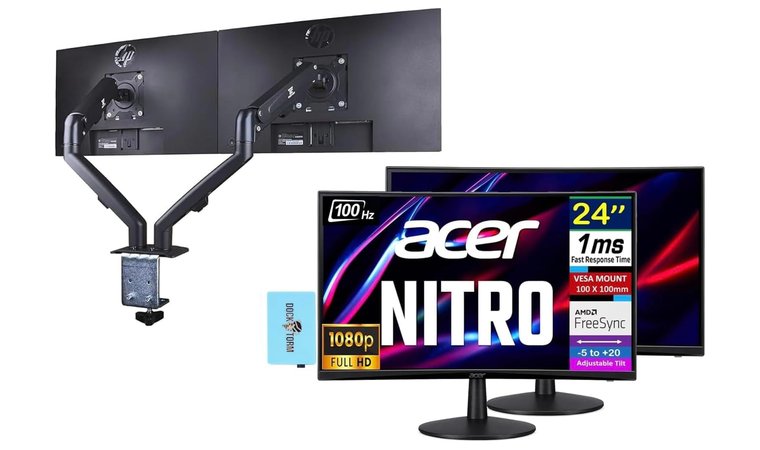
6. Acer Nitro ED240Q [Best Curved Dual Monitor Gaming Setup]
| Specs | Details |
|---|---|
| Screen Size | 24 inches |
| Resolution | Full HD 1080p |
| Panel Type | VA |
| Color Coverage | Standard FHD color range |
| Brightness | 250 nits |
| Connectivity | HDMI, VGA |
| Refresh Rate | 100Hz |
The Acer Nitro ED240Q is designed for gamers who want a more immersive and fluid dual-monitor experience. Its 1500R curved FHD panel pulls the edges of each screen closer to your field of view, creating a more natural panoramic layout during gameplay or multitasking.
Curved 24″ panels with 1ms response and FreeSync create a fluid, panoramic setup for gamers and focused workflows.
The 1ms response time paired with AMD FreeSync minimizes blur and eliminates screen tearing, which is especially useful for fast-paced titles. This model feels right at home in setups often compared to the best gaming PC category due to its focus on smooth visuals and responsiveness. It’s also an excellent mid-range option for users exploring the best monitors for dual setup without overspending.
| Pros | Cons |
|---|---|
| ✅ Curved 1500R panel adds immersion in dual-screen layouts ✅ 1ms response time for crisp gaming performance ✅ 100Hz refresh rate keeps motion smooth ✅ ZeroFrame design enhances dual-monitor continuity ✅ Includes ErgoFlexy dual mount for full ergonomic control | ❌ Brightness is modest, though still suitable for most indoor setups |
The ZeroFrame design creates a seamless visual line between the two monitors, reducing distractions during competitive gameplay or productivity work. The included ErgoFlexy dual monitor mount is a major advantage because it supports tilt, height, and rotation adjustments, allowing the monitors to be positioned precisely without extra accessories. This makes it easier to maintain a clean desk layout while improving ergonomics for long sessions.
Final Verdict: A smooth, curved, and highly adjustable dual gaming option that balances performance and ergonomics for an immersive desk setup.
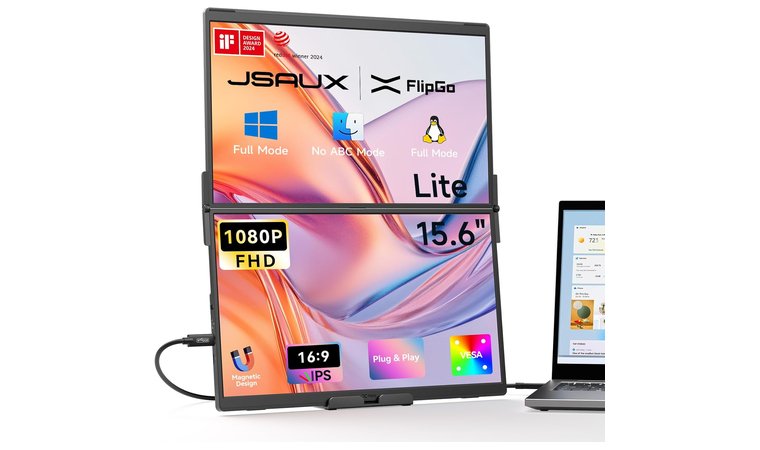
7. JSAUX FlipGo Lite [Best Plug-and-Play Dual Monitor]
| Specs | Details |
|---|---|
| Screen Size | 15.6 inches (stacked dual-display system) |
| Resolution | Full HD 1080p |
| Panel Type | IPS |
| Color Coverage | Standard FHD |
| Brightness | Typical portable brightness |
| Connectivity | USB-C, HDMI (varies by mode) |
| Refresh Rate | 60Hz |
The JSAUX FlipGo Lite stands out with its purpose-built dual-stacked portable design, transforming any laptop into a full three-screen workstation. Instead of spreading two displays horizontally, the stacked layout offers a vertical workflow similar to what users seek in the best vertical monitor category, but in a portable, compact form.
Its vertical stacked layout turns any laptop into a triple-screen system that’s lightweight, plug-and-play, and travel-friendly.
Its award-winning build, recognized by iF Design and Red Dot, gives it a premium and thoughtfully engineered feel. Each 15.6-inch FHD IPS panel offers crisp clarity, making it ideal for coding, writing, note-taking, and multitasking in tight spaces.
| Pros | Cons |
|---|---|
| ✅ Unique dual-stacked portable monitor design ✅ Award-winning industrial design (iF, Red Dot) ✅ Magnetic modular system for fast mounting ✅ Plug-and-play for Windows and Linux ✅ Includes bag and stand accessories for portability | ❌ Requires sufficient laptop hinge strength, though most modern models support it well |
The magnetic attachment system guarantees quick setup and stable mounting, even while traveling or working in public spaces. Its plug-and-play support eliminates the need for drivers, allowing instant productivity boosts across multiple apps and workflows. The lightweight build and included accessories reinforce its role as a truly mobile dual-display solution, perfect for remote workers and digital nomads.
Final Verdict: A compact, award-winning dual-stacked monitor that instantly expands any laptop into a powerful triple-screen workstation.
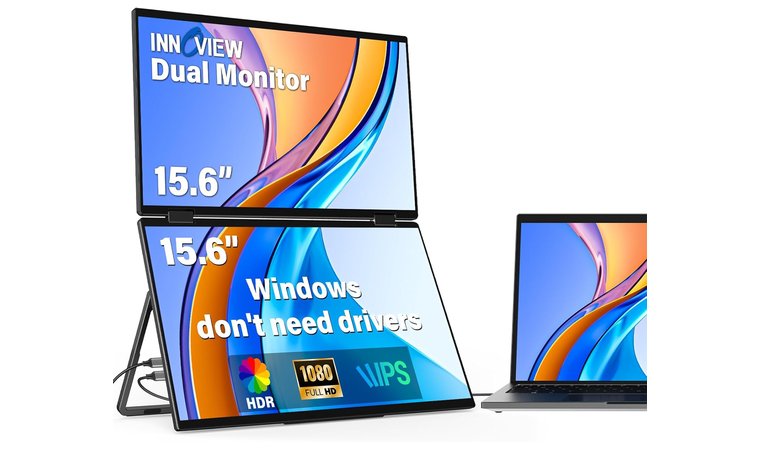
8. InnoView 15.6″ FHD [Best Stackable Dual Monitor]
| Specs | Details |
|---|---|
| Screen Size | 15.6 inches (dual-screen system) |
| Resolution | Full HD 1080p |
| Panel Type | IPS |
| Color Coverage | Standard FHD |
| Brightness | Typical portable brightness |
| Connectivity | USB-C, HDMI |
| Refresh Rate | 60Hz |
The InnoView 15.6″ FHD Dual Portable Monitor is designed for users who want an all-in-one foldable dual-screen system without relying on extra stands, clamps, or bulky cables. Its unique foldable chassis opens into a dual-display layout that instantly doubles your workspace, making it ideal for editing, multitasking, or research-heavy workflows.
The foldable dual-screen chassis opens into a flexible two-display setup for multitasking, editing, or research anywhere.
With 315° screen rotation and a 180° stand, the InnoView can shift between stacked, side-by-side, tent, or presentation mode layouts. Users who work on the go often view it as a portable alternative to setups mentioned in the best laptops for working from home lists because it significantly expands a laptop’s usable space.
| Pros | Cons |
|---|---|
| ✅ Foldable dual-screen design for instant two-display setup ✅ 315° rotation supports multiple layout styles ✅ Works with Mac, Windows, phones, and Steam Deck ✅ Lightweight and compact for travel ✅ Simple USB-C/HDMI plug-and-play | ❌ Requires a stable surface for stacked mode, though the built-in stand handles most setups well |
Its ultra-portable build makes it perfect for travelers, hybrid workers, and students who frequently move between locations. The IPS panels offer solid clarity for documents, research, and creative work, while the plug-and-play connectivity eliminates setup hassle. Because everything folds neatly into a single compact unit, the InnoView offers a practical dual-monitor expansion without the bulk of traditional displays.
Final Verdict: A versatile foldable dual-screen solution that adds instant productivity and layout flexibility wherever you work.
9. Upperizon Portable Monitor [Best Dual Monitor for Mobile Workstation]
| Specs | Details |
|---|---|
| Screen Size | 15.6 inches |
| Resolution | Full HD 1080p |
| Panel Type | IPS |
| Color Coverage | 107% sRGB (varies by model) |
| Brightness | Standard portable brightness |
| Connectivity | USB-C, HDMI |
| Refresh Rate | 60Hz |
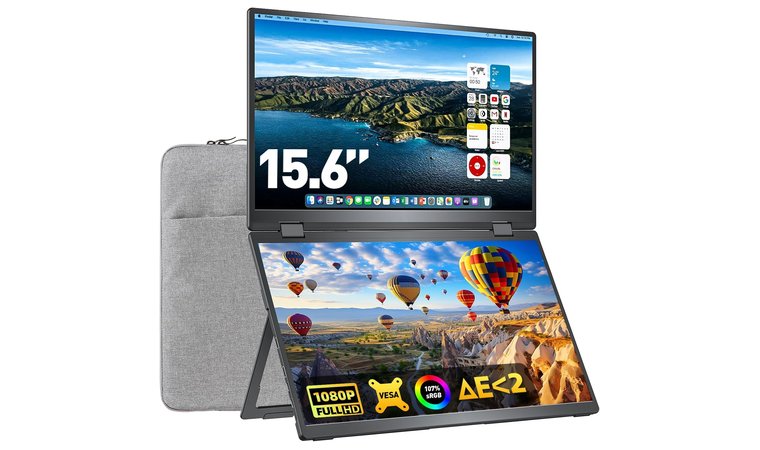
The Upperizon Portable Monitor is designed for professionals who need a foldable and travel-friendly dual-screen setup that packs safely into a protective metal frame. The bundle includes a sleeve, carrying case, and required cables, so you get everything you need without buying extra accessories separately.
A metal-framed, travel-ready dual screen kit with all accessories included, perfect for remote workers on the move.
The 15.6-inch FHD IPS panels offer solid clarity for spreadsheets, research, coding, and workspace multitasking. It also works well in hybrid setups, especially for users who already invest in ergonomic accessories like adjustable desks or quality gaming chairs.
| Pros | Cons |
|---|---|
| ✅ Foldable dual screen design with protective metal frame ✅ Includes sleeve, case, and all required cables ✅ 15.6-inch FHD IPS panels for clear visuals ✅ Kickstand and VESA compatibility on select models ✅ Lightweight with a 360-degree folding hinge | ❌ Portable brightness is lower than desktop monitors, yet still suitable for travel environments |
The adjustable kickstand supports both portrait and landscape layouts. Select models with VESA compatibility allow easy mounting in office, hotel, or co-working setups.
The 360-degree folding hinge makes it easy to unfold the screens and create a clean mobile workstation within seconds. Upperizon also provides a 24-month warranty, which adds peace of mind for users who travel frequently.
Final Verdict: A reliable and portable dual-screen kit that offers protection, flexibility, and strong on-the-go productivity for remote workers and frequent travelers.
What You Need For The Best Dual Monitor Setup
Building the best dual monitor setup starts with choosing monitors that match in size and resolution, a stable stand or VESA arm, and the right cables for your system.
You also need enough desk space, a compatible graphics output, and accessories like ergonomic mounts or lighting to keep your workspace efficient and comfortable.
Dual Monitors or Two Compatible Monitors
The foundation of any dual monitor setup is having two displays that work well together, either as two separate monitors or as a dual-screen portable system. Many users choose a traditional side-by-side layout with matching sizes and resolutions because it keeps color consistency, sharpness, and workflow alignment simple.
Others prefer a compact solution like the ASUS ZenScreen Duo OLED or the InnoView Dual Portable Monitor, which combines both screens into one foldable device for easier travel and faster setup.
Whichever approach you choose, the key is compatibility. Both monitors should support the same resolution class, refresh rate range, and connection types so your system can output to them without scaling issues.
Matching brightness and panel type also helps keep your workspace visually seamless. When the displays complement each other, your dual-monitor layout becomes smoother to work with and much more comfortable for long sessions.
A Laptop or Desktop That Supports Two Displays
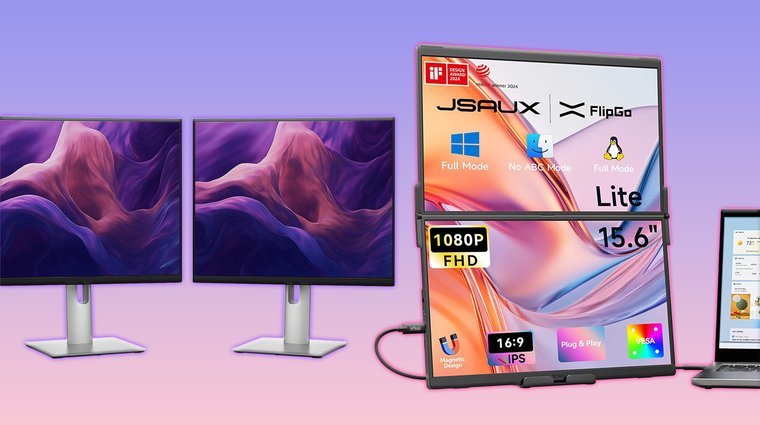
Your system needs to support two simultaneous video outputs in order to run a dual monitor setup reliably. Many modern desktops already include dual HDMI or DisplayPort outputs, which makes connecting two screens straightforward.
Laptop users should look for USB-C ports with DisplayPort Alt-Mode, since this allows a single cable to carry power and video to an external monitor. If your device has limited ports, a docking station can instantly add multiple video outputs and simplify cable management.
These requirements apply whether you work on a high-end workstation or something more compact like the models often recommended in the best laptop lists. As long as your system can provide two stable outputs, your dual-monitor layout will run smoothly without flicker, scaling issues, or display dropouts.
Proper Cables
A reliable dual monitor setup depends on having the correct cables for your devices and resolution needs. The most commonly used options include HDMI, DisplayPort, USB-C to USB-C, and USB-C to HDMI, each supporting different bandwidth levels and features.
HDMI is widely compatible and works well for 1080p or 1440p displays, while DisplayPort offers better support for higher refresh rates and advanced features on gaming or professional monitors.
USB-C to USB-C cables are ideal for newer laptops and monitors that support DisplayPort Alt-Mode, since they can transmit both video and power through a single connection. If your monitor lacks USB-C input, a USB-C to HDMI cable provides a straightforward alternative.
No matter which type you choose, it is important to use high-quality, version-compatible cables to secure smooth performance with 1080p, 1440p, 4K, or high-refresh setups.
A Dual Monitor Stand or Mount
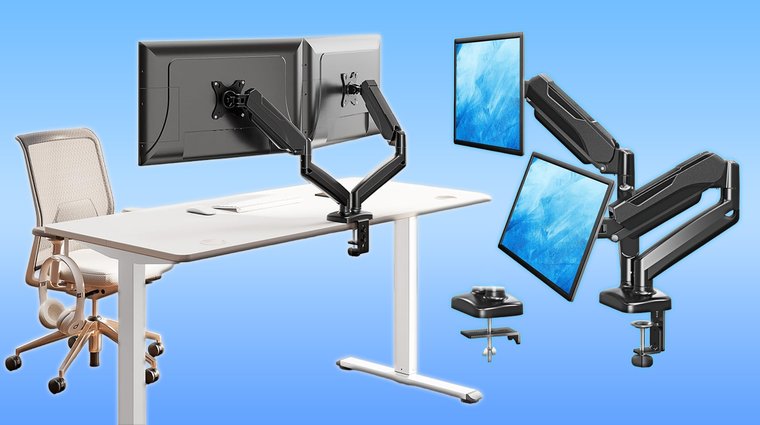
A strong and stable stand is essential for keeping your dual monitor setup comfortable and well-organized. Many users choose a dual arm mount for the flexibility to adjust height, tilt, and rotation on both screens independently.
These mounts help line up different monitor models and improve ergonomics for long work or gaming sessions. If you prefer a vertical layout, a stacked monitor mount creates a clean, space-saving arrangement with one display above the other.
Portable dual-screen systems benefit from a different style. A foldable portable stand supports lightweight monitors and keeps them steady during travel or hybrid work.
Whether you use a traditional desk mount or a mobile stand, choosing the right support guarantees that your monitors stay aligned, comfortable to view, and easy to adjust throughout the day.
Docking Station (For Laptop Users)
Some dual monitor setups require a docking station to supply the right combination of ports and power. Many docks include external power bricks that keep your laptop charged while also driving two external displays.
A USB-C docking station with Power Delivery is especially helpful because it can send video, data, and power through one cable, which keeps your desk cleaner and reduces wear on your laptop’s ports.
If your device has limited connections, multi-port hubs offer additional HDMI or DisplayPort outputs so you can connect both monitors without adapters.
These docking solutions greatly simplify cable management for home office setups by keeping everything routed through one device. A good dock guarantees your system stays organized, stable, and ready for dual-screen productivity.
Ergonomic Desk And Chair
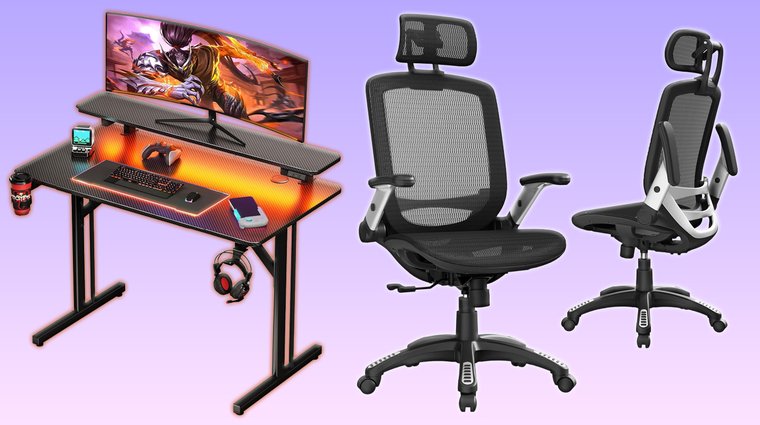
A dual monitor setup is only as comfortable as the workspace that supports it, which is why a proper ergonomic desk and chair are essential for long hours of productivity.
An adjustable desk height helps you position your monitors at eye level, reducing neck strain and improving posture throughout the day. A chair with solid lumbar support keeps your spine aligned and prevents fatigue during extended work sessions.
For gaming or creative workflows, choosing a setup that pairs well with options similar to those recommended in the best gaming desk category can make a noticeable difference in comfort and efficiency. A stable desk guarantees your monitors stay aligned, while a supportive chair allows you to stay focused without constant adjustments.
When your workstation is built with ergonomics in mind, your dual-monitor layout becomes easier to use and far more comfortable over time.
My Overall Verdict
If you are a remote worker, gamer, or multitasker trying to build the best dual monitor setup today, the right starting point depends on your space, workflow, and hardware.
The Gigastone 27 Inch 2 Pack is the most balanced choice for everyday productivity, gaming, and home office work because it provides matched panels, strong clarity, and a seamless side-by-side experience.
If you want the simplest plug-and-play mobile solution, the JSAUX FlipGo Lite is the fastest way to turn any laptop into a three-screen workstation. If you need the cleanest premium alternative to dual monitors, the Samsung Odyssey G9 covers both gaming and professional tasks with zero bezel interruption.
If you care about value above all else, the Generic 2X Pack offers matched screens at the lowest cost.
These options cover almost every user type and workflow, helping you build a setup that is fast, ergonomic, and comfortable for daily use.
FAQs
The best dual monitor setup is the Gigastone 27-inch IPS because it offers strong clarity, wide viewing angles, and enough screen space for multitasking, gaming, or office work.
The best layout for dual monitors is a side-by-side arrangement with both screens aligned at eye level. Some users prefer a vertical and horizontal combination for coding or reading, while others choose a stacked layout when desk space is limited or when they want a more focused top screen.
The best site monitor for a dual setup is 24 to 27 inches because these sizes offer a comfortable balance between workspace and visibility. Larger screens like 32 inches can work well, but require more desk depth and careful alignment to avoid neck strain during long sessions.
Curved monitors provide a more immersive feel and reduce the angle of your peripheral vision, which can help in gaming or wide workspace setups. Flat monitors are easier to align, especially when using two identical models, and they are often better for tasks that require precise straight-line viewing.
No, it is not difficult to set up two monitors. You only need two displays, the correct cables, and a system that supports multiple outputs. With modern laptops and desktops, setup usually takes a few minutes, especially when using USB-C or docking stations for clean cable management.
No, you can’t run two monitors from one HDMI port. One HDMI port can only output one display at a time. To run two monitors, you need a device with two video outputs, a docking station that provides extra ports, or a USB-C connection that supports DisplayPort Alt Mode for multi-display output.