



11 Best Gaming Desks in 2026 – Top Picks for Gamers

Eneba Hub contains affiliate links, which means we may earn a small commission if you make a purchase through them—at no extra cost to you. Learn more

Finding the best gaming desk can be surprisingly difficult. As gaming setups grow more advanced – with multi-monitor rigs, high-performance PCs, and countless peripherals – a reliable, spacious, and ergonomic desk has become a crucial part of any serious gaming environment.
That’s why I’ve done the heavy lifting for you, spending hours researching and comparing the best gaming desks available today. These picks combine form, function, and durability to support everything from minimalist setups to expansive battle stations.
Whether you’re a casual player, a dedicated streamer, or someone upgrading to a full-blown gaming workspace, this list offers something that fits your needs and space.
I’ve considered real-world usability, materials, stability, ergonomics, and overall value, narrowing the field down to the desks that offer the best combinations of space, comfort, build quality, and features for gamers in 2025.
Jump to:
Our Top Picks for Gaming Desks
There are many options when it comes to gaming desks, which can make it tricky to figure out which is best for your needs. Whether you’re looking for flashy desks with LED lights, more understated desks for professionals, or a motorized standing desk, I’ve got you covered. I’ve gone ahead and done all the leg work, so you don’t have to and found the best desks across 11 categories to fit your personal needs.
- Klobel FEL-1880-X – Offers an exceptional balance of features, quality, and design for a top-tier gaming experience.
- BestOffice 47 Inch – A reliable and functional option that provides essential gaming space without breaking the bank.
- DEZCTOP Bifrost – This high-end desk boasts superior materials, build quality, and advanced features.
So, which of these top contenders will ultimately claim the title of your perfect gaming desk? Keep reading to explore the detailed reviews and discover the ideal setup to level up your gaming experience!
11 Best Gaming Desks for Every Type of Gamer
I’ve scoured the internet to find the best gaming desks and broken them down into 11 categories to help you make the best decision. Everyone has different needs, available space, and budgets. This list exists to help streamline your search for the best desk that suits your personal needs and ensure you have everything you need to game in comfort.
Whether you like to use your desk for work and play, have only a few gaming hours to spare, or like to lock in for long sessions, this list will cover every option available. Below I’ve provided all the specifications you’ll need to make the best decision as simple as possible and reviewed each product so you know exactly which gaming desk is best for you.
1. Klobel FEL-1880-X [Best Overall Gaming Desk]
| Specs | Details |
|---|---|
| Dimensions | 29.5″D x 71″W x 28.35″H |
| Weight | 82.67 lbs |
| Weight Capacity | 220 lbs |
| Frame Material | Metal, wooden panel, plastic |
Key Features:
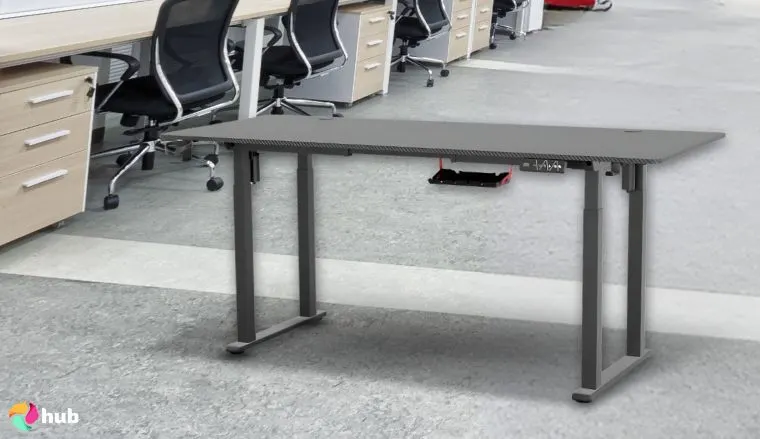
- 63-inch spacious surface for dual monitors and peripherals
- Sturdy and durable construction
- Built-in cable management
- Adjustable feet for leveling
- Sleek and modern design
The Klobel FEL-1880-X stands out amongst many gaming desks as a premier choice for gamers seeking a blend of style, durability, and functionality. Constructed with high-quality materials, this desk offers a robust build designed to support extensive gaming setups. Its expansive 63-inch surface provides ample room for dual monitors, gaming peripherals, and keyboards, ensuring a clutter-free environment.
During my tests, it felt completely stable with two 32” monitors, a full-sized mechanical keyboard, and a 4K streaming rig. It also had enough room for my wild mouse maneuvering during crazy FPS sessions.
A notable feature of the Klobel FEL-1880-X is its ergonomic design, aimed at enhancing comfort during those long gaming sessions. The gaming desk includes built-in cable management solutions, allowing for organized and concealed wiring, so no more excuses for messy cables. I actually discovered that the cable channels are deeper than I expected, making it easy to hide even my thicker power cords.
Additionally, adjustable feet facilitate leveling on uneven floors, which is a godsend for someone like me who lives in an old house with uneven floorboards. Providing stability and preventing any wobbling during intense gameplay is actually a big deal. The desk’s sleek, modern aesthetic complements various setups, meaning it won’t be out of place wherever you put it and will give you a professional look if you plan to stream.
While the Klobel FEL-1880-X offers mostly advantages, it is important to take stock of some of the drawbacks. Personally, I found I wanted a small drawer or some other storage option for extra cables and controllers, but it didn’t truly interfere with my setup. Furthermore, the assembly can be a bit more time-consuming than other desks. These are by no means deal-breakers but they should be accounted for.
| Pros | Cons |
|---|---|
| ✅Great value for the price ✅High-quality materials for durability ✅Comfortable, ergonomic design ✅Excellent size for multiple monitors | ❌No built-in storage options, but plenty of desk space. |
Final Verdict: the Klobel FEL-1880-X is an excellent choice for gamers seeking a reliable, high-performance desk that balances quality, comfort, and design. Its spacious surface and ergonomic features make it ideal for long gaming sessions, while the sturdy construction ensures stability and durability. Despite some minor drawbacks, such as the absence of built-in storage, the desk’s overall benefits make it a worthwhile investment for any hardcore gamer.
2. BestOffice 47 Inch [Best Budget Gaming Desk]
| Specs | Details |
|---|---|
| Dimensions | 47″D x 23.45″W x 29.55″H |
| Weight | 33 lbs |
| Weight Capacity | 150 lbs |
| Frame Material | Alloy Steel, Engineered Wood |
Key Features:
- 47-inch surface ideal for smaller setups
- Sturdy steel frame construction
- Easy assembly process
- Space-saving design
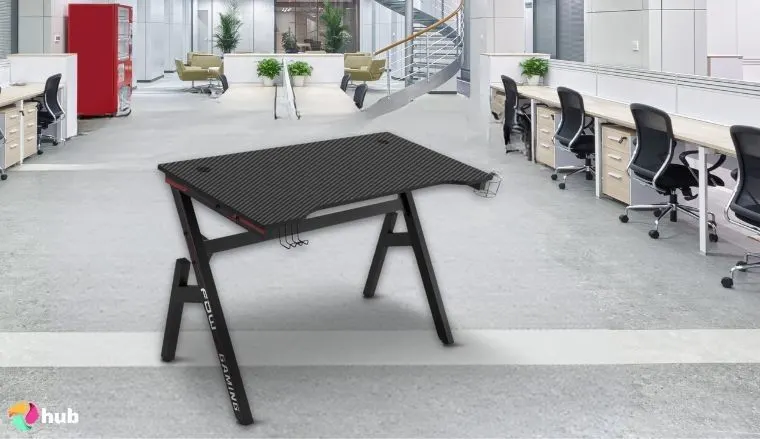
The BestOffice 47 Inch Gaming Desk offers an affordable solution for gamers seeking functionality without a hefty price tag. Its compact 47-inch surface can comfortably handle all the essential gaming equipment, including a monitor, keyboard, and mouse, making it ideal for smaller spaces or minimalist setups.
I tested it with a single 24” monitor, a mechanical keyboard, and my mouse, and was pleasantly surprised at how stable it remained during rapid mouse movements and key presses. Even with a headset and a small desk lamp on it, the desk didn’t wobble, which is great for anyone like me who has a small gaming space in a shared living area.
Constructed with a sturdy steel frame, this desk ensures stability and durability during intense gaming sessions. The inclusion of a cup holder and headphone hook is a nice touch that adds convenience, allowing you to keep your accessories within reach and avoid annoying clutter. I was happy to discover that the cup holder can also accommodate larger coffee mugs.
The desk’s space-saving design is particularly beneficial for those with limited room, offering a functional workspace without occupying excessive floor area. This works well if you only have a small room or if, like me, your gaming space is in a shared living area. Its sleek, modern aesthetic isn’t too gaudy and doesn’t come with any unnecessary lights, making it a versatile addition to any room, particularly if you’re sharing that space with others.
Assembly is straightforward, with clear instructions that enable users to set up the gaming desk quickly and efficiently. This ease of assembly is a notable advantage for individuals who prefer a hassle-free setup process, and let’s be honest, we would rather all just get the setup out of the way so we can get to gaming.
| Pros | Cons |
|---|---|
| ✅Great value for the price ✅Compact and space-efficient ✅Sturdy build quality ✅Quick and simple assembly | ❌Limited surface area for larger setups, but perfect for smaller spaces. |
Final Verdict: The BestOffice 47 Inch Gaming Desk is a strong choice for gamers seeking a budget-friendly, functional workspace. Its sturdy construction, compact design, and added conveniences like the cup holder and headphone hook make it a practical addition to smaller gaming environments. While it may not offer extensive surface area or advanced features found in higher-end models, it effectively covers the essentials, providing a reliable platform for an enjoyable gaming experience.
3. DEZCTOP Bifrost [Best Premium Gaming Desk]
| Specs | Details |
|---|---|
| Dimensions | 28.7″D x 63″W x 42″H |
| Weight | 156.6 lbs |
| Weight Capacity | 264.6 lbs |
| Frame Material | High Density Fiberboard, Steel, Alloy Steel |
Key Features:
- 63-inch carbon fiber surface
- Customizable LED lighting system
- Durable construction
- Ergonomic design with elevated edge
- Cable management solutions
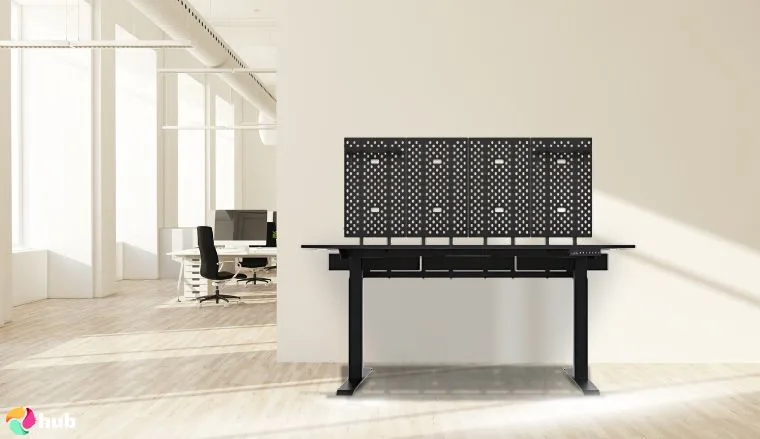
The DEZCTOP Bifrost stands out as a great gaming desk that seamlessly combines style, innovation, and functionality. Designed for gamers who demand top-tier performance and aesthetics, this desk offers a massive 63-inch carbon fiber surface space, providing plenty of room for dual monitors, gaming peripherals, and integrated cable management.
I tested it with two 27” monitors, a mechanical keyboard, and my mouse, and the desk handled the setup effortlessly. Even when leaning on the desk during intense gameplay, there was zero wobble, which is impressive for a desk of this size. I especially appreciated the elevated edge for wrist comfort. My arms didn’t get fatigued during marathon gaming sessions, which is a huge plus for someone like me who prefers ergonomic setups.
I also found one unexpected bonus: the customizable multi-color LED lighting system. This lets gamers personalize their setup, creating an immersive atmosphere that enhances the gaming experience and looks great for those planning to stream.
Beyond its visual appeal, the desk is engineered with an ergonomic elevated-edge design, promoting comfort during extended gaming sessions by reducing strain on the wrists and forearms, which is a nice touch not included with most gaming desks.
Durability is a key aspect of the DEZCTOP Bifrost’s construction. The gaming desk boasts a sturdy stainless steel frame paired with a high-quality carbon fiber surface, ensuring it can withstand the rigors of intense gaming. I even tested it with a 40-pound monitor stand on top, and it remained rock solid. Additionally, the desk incorporates an integrated cable management system, featuring built-in trays and channels that keep wires organized and out of sight, contributing to a clean and clutter-free workspace.
| Pros | Cons |
|---|---|
| ✅Premium materials and design ✅Multi-color LED lights for customization ✅Large surface for dual-monitor setups ✅Comfortable, ergonomic design | ❌Price is higher than most other gaming desks, but the features make up for it. |
Final Verdict: The DEZCTOP Bifrost is tailored for gamers who prioritize both style and functionality in their gaming environment. Its combination of a spacious and durable surface space, customizable lighting, and ergonomic design makes it a standout choice for those seeking a premium gaming desk. While the investment is higher than some other gaming desks, the more substantial size, and quality of life features, justify the commitment for hardcore gaming enthusiasts.
4. JWX Dual Motor ES-ZBD72 [Best Standing Gaming Desk]
| Specs | Details |
|---|---|
| Dimensions | 27.5″D x 72″W x 28.75″H |
| Weight | 96 lbs |
| Weight Capacity | 150 lbs |
| Frame Material | Steel, Carbon Fiber Textured Panel |
Key Features
- Electric height adjustment
- Sturdy steel frame
- Spacious surface for multiple monitors
- Smooth and quiet transitions
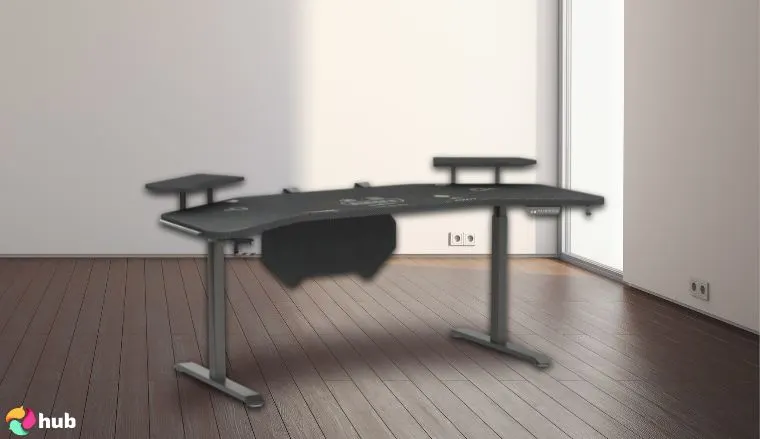
The JWX Dual Motor ES-ZBD72 is a top choice for gamers who want the flexibility of a sturdy standing desk without sacrificing performance. This desk features an electric height-adjustable frame, giving you the sit-to-stand functionality that has recently grown in popularity. Thanks to the dual motor system, the transition is smooth and quiet, ensuring minimal disruption and ease of use.
I tested the desk with two 27” monitors, a mechanical keyboard, and a mouse pad spread across the wing-shaped surface, and it handled the full setup like a champ. Even when leaning on the desk to stretch, there was minimal wobble, which really impressed me given its size. I prefer gaming while seated, but the standing option has been surprisingly useful for longer streaming sessions where I wanted to stay active.
It’s ideal for users with larger setups that like to keep some space between their various gaming hardware. Its steel frame construction gives the desk excellent durability and support, providing a stable base for heavy equipment, whether that be a dual monitor or an additional console.
What also sets the ES-ZBD72 apart is its emphasis on ergonomics. The stand functionality lets you switch positions throughout the day, helping you reduce strain on the body. This makes it a good option for those long gaming or streaming sessions, especially when paired with the best over-ear headphones for immersive audio and comfort. It’s also nice to have the ability to switch between the two modes depending on the task at hand. I like to game while seated but work while standing, which helps my brain switch gears too.
The desk is easy to assemble, with clear instructions included, and the motorized system is user-friendly, requiring only the push of a button to adjust the height.
Despite its many features, the desk does come with a few minor trade-offs. I was surprised by how much heavier it is compared to other standing computer desks I’ve used, which might be a concern for users who need to move it frequently. Additionally, its price is higher than many standard gaming desks, but the added sit-to-stand functionality and build quality should justify the investment for most users.
| Pros | Cons |
|---|---|
| ✅Adjustable height for sitting/standing ✅Spacious desk area ✅Silent motor for smooth movement ✅Strong steel frame for stability ✅Simple assembly | ❌Heavier than some competitors but is balanced by its incredible stability. |
Final Verdict: The JWX Dual Motor ES-ZBD72 is an excellent standing desk, offering a sturdy frame and excellent stand functionality, making it a great choice for gamers who want the option to stand while playing or working. Its smooth electric height adjustment, strong build quality, and spacious surface make it both practical and comfortable for extended use. While the higher weight and cost may not suit every setup, those looking for a long-term ergonomic solution will find this high-end standing desk a reliable and worthwhile investment.
5. EUREKA Aero-63 [Best Multi-Level Gaming Desk]
| Specs | Details |
|---|---|
| Dimensions | 30″D x 72″W x 35″H |
| Weight | 93 lbs |
| Weight Capacity | 220 lbs |
| Frame Material | Steel, Engineered Wood, Alloy Steel |
Key Features
- Multi-level design with upper shelf
- Ergonomic height adjustability
- Built-in LED lighting
- Modern and sleek design
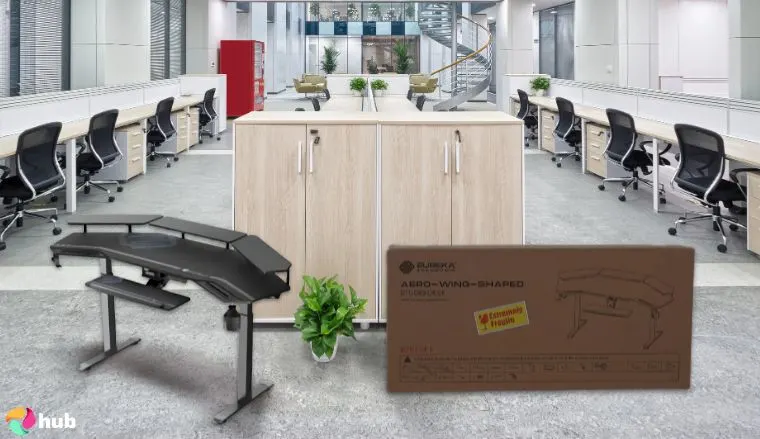
The EUREKA Aero-63 is a strong contender for gamers who want a multi-level setup that doesn’t sacrifice style or practicality. Its raised upper shelf provides additional space for multiple gaming monitors or decorative items, freeing up the main surface for essential gear like a keyboard, mouse, and other peripherals.
I like it when every piece of my gaming gear has its own space, and this setup allows for that while still offering some great flexibility. For example, you can remove the central raised shelf if having a monitor arm is preferable while freeing up some more surface space. With a wide and functional layout, it’s well-suited for gamers who need extra room to keep their setup clean and organized.
It honestly surprised me how stable it felt with my usual gaming setup on top. I also tested it with different items, reaching 40 pounds, and it didn’t even flinch. The biggest test was me leaning on the upper shelf to adjust the monitor. Some other multi-level desks I tested noticeably wobbled , but I got nothing but stability from The EUREKA Aero-63.
This desk is designed with ergonomics in mind. The stand functionality allows for a more personalized fit, reducing strain during long gaming sessions or if you need to switch modes to do work. Built-in LED lighting adds a nice touch, offering visual flair that enhances the atmosphere of the gaming space and makes it look great while streaming. The modern design makes it a natural fit for gaming rooms that lean toward a sleek, high-tech aesthetic.
The EUREKA Aero-63 does have some very minor drawbacks that are worth mentioning. Setup may take some time, particularly for those less familiar with furniture assembly. Additionally, color options are a bit limited, which may be a consideration for those looking to match a specific room theme. However, the gaming desk’s solid construction and thoughtful layout outweigh these minor concerns, especially for users who value both space and a clean, organized layout.
| Pros | Cons |
|---|---|
| ✅Spacious with extra storage options ✅Adjustable height for comfort ✅LED lighting for added flair ✅Modern, sleek design ✅Durable steel frame | ❌Setup requires time, but only because it has many great storage options. |
Final Verdict: The EUREKA Aero-63 combines functionality and style with its multi-level design and adjustable features, making it a top choice for gamers who need ample, customizable space. Its raised shelf, stand functionality, and LED accents make it stand out, while the durable frame ensures long-term reliability. Though setup may require some effort, the result is a high-quality desk that elevates any gaming environment.
6. DurayLoly 48 Inch [Best Call of Duty Gaming Desk]
| Specs | Details |
|---|---|
| Dimensions | 22″D x 48″W x 35″H |
| Weight | Not Specified |
| Weight Capacity | Not Specified |
| Frame Material | Matte, Metal, Carbon Fiber |
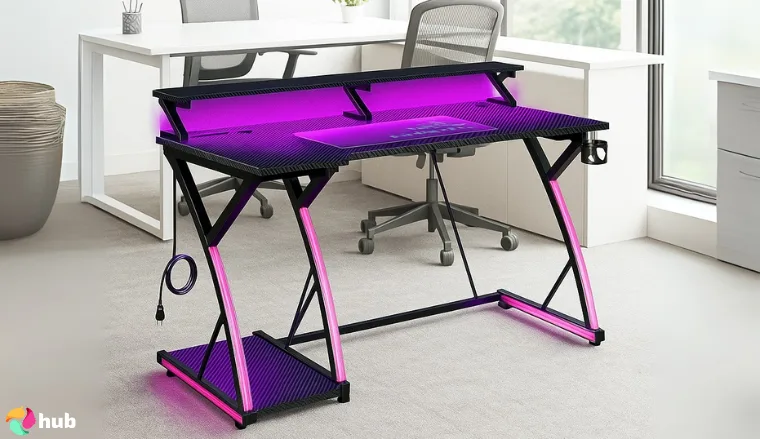
Looking to dominate Black Ops 6? The DurayLoly Gaming Desk has you covered! This 48-inch carbon fiber beast blends style and function for Xbox or PC Call of Duty fans. Its RGB LEDs with 10 modes create an epic vibe, while a charging hub (3 AC, 2 USB) powers gear without clutter. The Z-shaped steel frame supports 200 lbs, ensuring no wobble during intense matches.
I tested this desk with a single 27” 240Hz monitor, a full-size keyboard, and a large mouse pad, and the Z-shaped frame handled the load perfectly without any flex.
A spill-proof cup holder and magnetic headphone hook were designed to keep drinks and your headset secure, perfect for quick Warzone reloads. The cup holder felt a bit wobbly during my testing, so I don’t recommend putting too much weight on it. The full-coverage mouse pad ensures smooth tracking for fast aim, and cable grommets tidy wires. The adjustable monitor shelf aligns your screen to reduce neck strain, with a lower shelf for your Xbox or collectibles. The 48” x 22” desktop fits tight spaces, offering ample room for keyboard and mouse.
Assembly takes 30 minutes with clear instructions, and the scratch-resistant tabletop cleans easily. Compared to pricier desks, it’s a steal for Call of Duty players needing a reliable, stylish setup.
| Pros | Cons |
|---|---|
| ✅Carbon fiber surface ✅Integrated RGB lighting ✅Power outlet for multiple devices ✅Sturdy and durable frame ✅Headphone hook and cup holder | ❌The height is not adjustable, so you won’t be able to game standing up |
Final Verdict: The DurayLoly Gaming Desk is the ultimate Call of Duty setup, combining LED flair, ergonomic comfort, and rock-solid stability for epic Xbox or PC battles.
Get the DurayLoly 48 Inch on Amazon >
7. Flycity 55” x 24″ [Best RGB Gaming Desk]
| Specs | Details |
|---|---|
| Dimensions | 7.87″D x 56.7″W x 13.4″H |
| Weight | 64 lbs |
| Weight Capacity | 330 lbs |
| Frame Material | Steel, Carbon Fiber |
Key Features
- Built-in customizable RGB lighting
- Spacious desk surface for multiple monitors
- Modern, sleek design
- Easy assembly
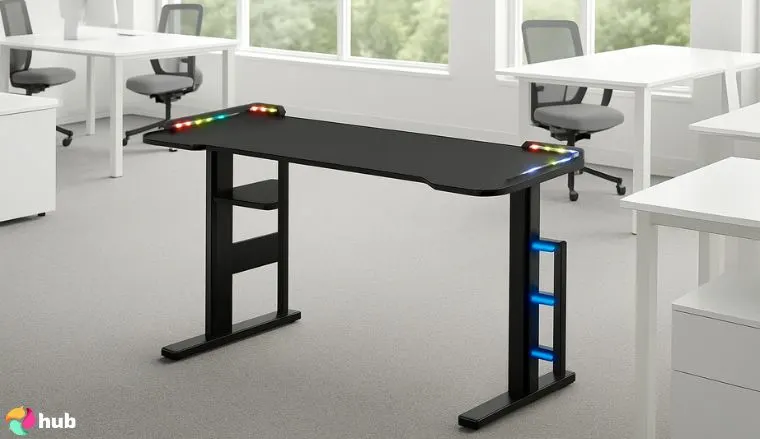
I was blown away by the sheer visual flair the Flycity 55″ x 24″ added to my gaming space. Featuring a raised lip around the edges that feature built-in customizable RGB lighting, this gaming desk allows users to set the mood with a wide range of colors and effects. It’s a unique feature compared to other desks with built-in lights, with the raised lip creating a natural border that makes the desk feel more contained, which helps it stand apart from its counterparts. Whether you’re going for a cool blue glow or a vibrant multicolor pulse, the lighting enhances the gaming experience and makes the desk stand out in any room.
In terms of layout, the Flycity offers a 55-inch surface that gave me enough space for dual 27” monitors, a keyboard and mouse, andr other gaming gear. Its modern, futuristic design makes it suitable for a variety of setups, blending well with both casual and more high-end gaming environments. The surface is smooth and durable, and the frame is built to handle regular use, even if the weight capacity is slightly lower than some more robust models. This is aided by the built-in PC rack which has an innovative cable management system that traces along the back of the desk, keeping your cables tidy and out of sight.
Assembly took me about 30 minutes, which is within my preferred range. It’s also competitively priced, making it one of the more accessible RGB desk options on the market. While the RGB lighting won’t appeal to everyone, its unique design is a solid bonus for gamers who like their space to reflect their personal style.
| Pros | Cons |
|---|---|
| ✅Vibrant RGB lighting for ambiance ✅Spacious desk area ✅Sleek, modern look ✅Easy assembly process ✅Affordable price | ❌RGB lighting may not be for everyone, but it is high-quality for those who need it. |
Final Verdict: The Flycity 55″ x 24″ is an excellent choice for gamers who want a unique stylish desk with customizable RGB lighting to match their gaming environment, all while maintaining a spacious contained work surface for gear and accessories. Its combination of visual impact and practical storage solutions makes it a strong contender for gamers looking to enhance their setup.
Get the Flycity 55″ x 24″ on Amazon >
8. Rolanstar Carbon Fiber Black [Best L-Shaped Gaming Desk]
| Specs | Details |
|---|---|
| Dimensions | 46.1″D x 61.2″W x 30.3″H |
| Weight | 97 lbs |
| Weight Capacity | 200 lbs |
| Frame Material | Steel, Engineered Wood |
Key Features
- L-shaped design for more workspace
- Carbon fiber finish for a sleek, modern look
- Sturdy and durable frame
- Ample storage options
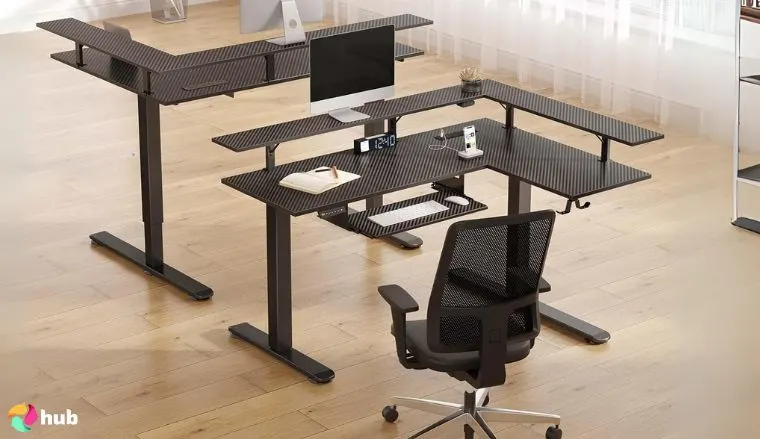
The Rolanstar Carbon Fiber Black is a standout option for gamers in need of a large, well-designed workspace. Its L-shaped layout provides extensive surface area, perfect for multiple monitors, gaming peripherals, and additional accessories. The layered design also helps optimize your setup, making it practical for those who like their peripherals to have their own space, while still having everything within easy reach.
I tested it in two setups: a dual-monitor (27″ + 32″ ultrawide) workstation with a Ryzen 7/RTX 4070 Ti rig, and a triple-monitor streaming setup (2×27″ 1440p + 34″ ultrawide) powered by an Intel i9/RTX 4090 build. The L-shape easily handled both, with room left over for a full-sized keyboard, large mousepad, external DAC/amp, and two studio speakers (each ~15 lbs).
I was pleasantly surprised by the carbon fiber finish, which adds a sleek, high-tech look that complements modern gaming setups. The built-in lights are hidden under the top shelf, giving a unique downlighting that colors the surface top, giving you light where you need it, instead of lighting up your feet – a feature I really appreciated. None of this compromises the build quality, meaning it is durable enough to support every device you could need.
Ample storage options are another highlight, making it easier to keep your setup clean and clutter-free. There’s room for everything from gamepads to external drives, making it a good fit for streamers and multitaskers alike. An embedded power strip with four power outlets and two USB-C ports serves all of those devices, letting you charge your phone, laptop, and whatever else you need, all within arms’ reach.
While assembly may take a bit of effort, and the size could be overwhelming in smaller spaces, the overall quality and versatility make the Rolanstar Carbon Fiber Black a great investment for gamers who need plentiful space and utility for all of their devices. My only gripe? It took me 74 minutes to assemble it solo, and it’s definitely not ideal from smaller rooms.
| Pros | Cons |
|---|---|
| ✅Large L-shaped design for expansive workspace ✅Carbon fiber finish adds a premium touch ✅Durable and sturdy frame ✅Great for multi-monitor setups ✅Ample storage space | ❌Can be large for smaller rooms, but perfect for small spaces. |
Final Verdict: The Rolanstar Carbon Fiber Black L-shaped desk is perfect for gamers who need extensive space and utility for their gaming setup. The carbon fiber finish adds a sleek, professional aesthetic to any room, making it an excellent option for serious gamers. Its downlighting is unique, and its roomy layout and durable build make it ideal for players who want comfort, style, and utility in one setup.
9. AODK 59 Inch [Best Ergonomic Gaming Desk]
| Specs | Details |
|---|---|
| Dimensions | 19.69″D x 59.44″W x 45.2″H |
| Weight | N/A |
| Weight Capacity | N/A |
| Frame Material | Steel, Engineered Wood |
Key Features
- Ergonomic design for improved posture
- Adjustable height settings
- Large surface area for multiple monitors
- Sturdy and durable frame
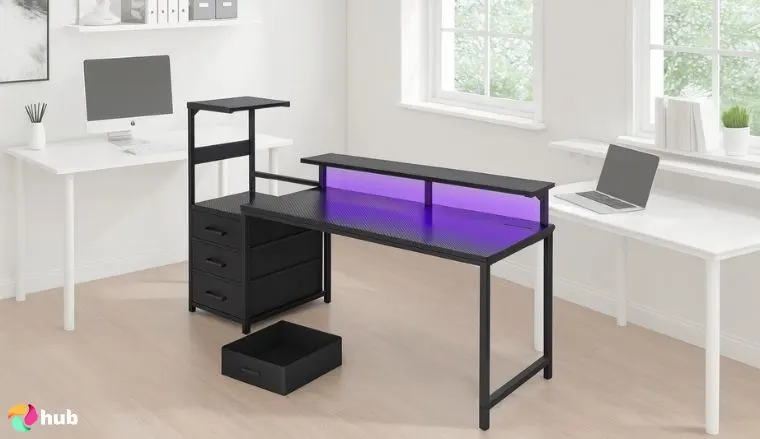
The AODK 59 Inch gaming desk is an excellent pick for gamers who put comfort and posture first. Its ergonomic design is built to reduce strain during extended sessions, by creating an elevated position for your monitors. This allows you to maintain a neutral neck position, instead of arching forward, preventing issues that might cut your gaming session short. As an added bonus, this raised shelf has an LED strip to give you some nice downlighting on the surface top.
With a spacious 59-inch surface, this desk can easily accommodate dual monitors, a mouse and keyboard, as well as all the usual gaming accessories. I was pleasantly surprised by the side rack and three drawers: I stored an Xbox Elite Series 2 controller, spare cables, and two external SSDs with room left over. The dedicated PC space fits a Corsair 5000D mid-tower (18.9″ height) with about 2″ of clearance on the side for airflow.
This coupled with the power strip built into the desktop, helps create an organized and distraction-free environment, ideal for both focused gaming and multitasking. The sturdy frame ensures reliable performance even when loaded with heavier hardware, making it a dependable option for everyday use.
I prefer minimalistic design, and that’s one of the main reasons I liked this gaming desk. I really enjoyed the clean lines and a sleek finish that fits into most room aesthetics. While the color options may be limited and the assembly process may take some time, these are small trade-offs for a desk that offers strong ergonomic benefits and a generous working area. For gamers looking to balance style, storage, and comfort, the AODK 59 Inch is a solid all-around performer.
| Pros | Cons |
|---|---|
| ✅Ergonomic design for better posture ✅Adjustable height for comfort ✅Spacious desk surface ✅Sturdy frame for durability ✅Sleek, minimalist design | ❌Limited color options, but plenty of space for customization. |
Final Verdict: The AODK 59 Inch ergonomic gaming desk does a good job providing maximum comfort and support during long gaming sessions. Its built-in storage options and spacious surface make it a great option for gamers who prioritize ergonomics and comfort. The sturdy construction and sleek design add to its appeal, making it a dependable choice for long-term use.
10. MOTPK 31 Inch [Best Small Gaming Desk]
| Specs | Details |
|---|---|
| Dimensions | 19.68″D x 31.49″W x 34.69″H |
| Weight | 23.5 lbs |
| Weight Capacity | 110 lbs |
| Frame Material | Alloy Steel, Engineered Wood |
Key Features
- Compact design for small spaces
- Sturdy construction
- Easy to assemble
- Ideal for minimalist setups
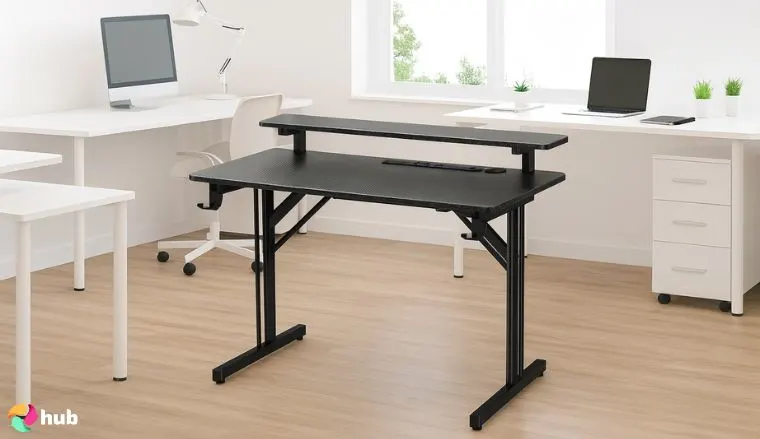
The MOTPK 31 Inch is an excellent solution for gamers working with limited room but still looking for a reliable and functional desk. Its compact build makes it ideal for small rooms, apartments, or dorm setups while still offering enough surface area to support all of your gaming PC essentials, thanks to its full-length upper shelf. The desk is designed with efficiency in mind, giving users a practical layout without the bulk of larger models while still offering comfort.
I tested the MOTPK 31 Inch in a tight office nook – a space where larger desks just don’t work. My setup included a single 27″ monitor, a compact 75% keyboard, and a small audio interface. Space was tight but manageable for everyday gaming and light work.
Despite its size, the MOTPK 31 Inch doesn’t cut corners on build quality. The frame is sturdy and stable, offering solid performance for everyday gaming needs. It doesn’t skimp on style either, with an adjustable lighting setup built into the upper shelf, giving you the classic gamer lighting you’d expect from a premium product.
It’s easy to assemble, making it an accessible option for users who want to set up quickly without hassle. The simple design also works well with minimalist or modern room styles, helping it blend into a variety of environments.
The main downside for me was the 110-pound weight capacity. I wouldn’t trust it to handle particularly heavy hardware, but it still has enough space for multiple monitors while delivering solid value for those with smaller-scale requirements. For budget-conscious gamers or anyone looking to optimize space, it’s a great balance of size, function, and style.
| Pros | Cons |
|---|---|
| ✅Space-saving design ✅Sturdy and durable construction ✅Easy to assemble ✅Affordable price point ✅Ideal for minimalist setups | ❌Limited space for larger setups, but great for small rooms. |
Final Verdict: The MOTPK 31 Inch is the perfect gaming desk for small rooms or apartments, or for those just starting to dip their toes into PC gaming. It offers a compact design while providing a great lighting system, and enough space for essential gaming equipment, making it a great choice for gamers on a budget or with limited space.
11. SMUG Standing Desk 63×24 Inch [Best White Gaming Desk]
| Specs | Details |
|---|---|
| Dimensions | 23.62″D x 63″W x 46.5″H |
| Weight | 43.8 lbs |
| Weight Capacity | 176 lbs |
| Frame Material | Alloy Steel, Wood |
Key Features
- Adjustable height for sitting and standing positions
- Sleek white finish for modern aesthetics
- Spacious desk surface for multiple monitors
- Sturdy construction
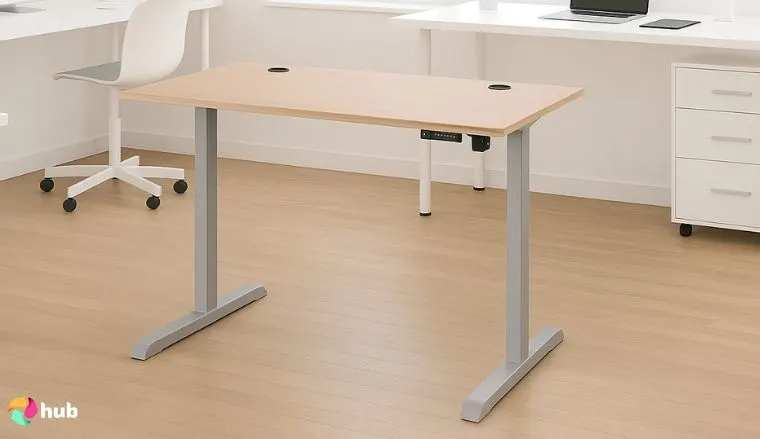
Not all gaming desks need to have LED lights and a quirky design, and the SMUG Standing Desk 63×24 Inch proves this. With its sleek white finish, this desk stands out visually while still delivering the practical features needed for long sessions, whether that be for gaming or work. The large surface comfortably fits multiple monitors, a keyboard and mouse, and other gaming accessories, making it suitable for a range of setups.
I love solid gaming desks with adjustable height, so this was an easy pick for me. One of the standout features of this desk is its adjustable height, which allows users to easily shift between sitting and standing positions. This is especially useful for improving posture and reducing fatigue during extended gameplay and work sessions. The motorized adjustment is smooth and reliable, offering ergonomic benefits without complicating the setup process.
This desk is perfect for those who are looking for something slick and understated. Without the multiple tiers and flashy LED lights, this desk doesn’t immediately scream “I’m a hardcore gamer”. That’s perfect for those who share the desk with someone else, use it for professional purposes as much as gaming, or simply for those who want to place it in a shared living space.
Its sturdy construction ensures long-term durability, supporting heavier gear without wobbling or instability. The main thing I didn’t like? The white surface can be prone to showing dirt or wear over time. Still, it offers a sleek and minimalist appearance that fits well in any living space. Assembly may take a little time, but the result is a dependable desk that combines function with style.
| Pros | Cons |
|---|---|
| ✅Adjustable height for comfort ✅Modern white finish ✅Spacious desk area for dual-monitor setups ✅Sturdy and durable frame ✅Helps improve posture | ❌White finish may show dirt and stains easily, but is suited for a professional setting. |
Final Verdict: The SMUG Standing Desk 63×24 Inch is ideal for gamers who want a professional, understated desk that doesn’t compromise on utility. With its adjustable height feature and clean white design, it allows users to switch between sitting and standing with ease. Its modern look and reliable build make it the perfect addition to any contemporary gaming environment.
How To Choose the Right Gaming Desk?
Choosing the right gaming desk can transform your entire setup, improving not just your performance but also letting you focus on what’s truly important–getting completely immersed in your games. With so many options available in 2025, there really is a desk for every kind of gamer.
From cable management and LED lighting to standing desks and multi-monitor support, the best gaming desks combine functionality and style to best suit your needs.
Creating the best gaming environment requires considering your available space, budget, and ergonomic needs. With everything laid out in the list above, you should now have a great idea of what desk will transform your room into a gaming temple. Here’s a guide on what to consider when choosing your ideal desk.
1. Determine Your Needs and Space
Before choosing a gaming desk, assess your setup. Do you use one monitor or multiple? Are you gaming on a PC or a console? Think about the number of peripherals you use—like your gaming keyboard, gaming mouse, or headset—and how much space they’ll require.
Measure your room to ensure the desk fits comfortably. Consider different shapes such as rectangular, L-shaped, or multi-level, depending on your layout. For those with very specific requirements, a custom gaming desk might be the best solution to ensure a perfect fit and the desired features. Whether you’re looking into gaming desk ideas, diy gaming desk plans, or a custom build, tailoring the desk to your space can greatly improve your gaming experience.
2. Consider Desk Size and Shape
The size and shape of your desk directly affect comfort and performance. Make sure it has enough space for your monitors, a gaming keyboard, a gaming mouse, and other gear. Standard gaming desks range from 47 to 63 inches wide, but larger or smaller options are available based on your needs.
L-shaped desks are ideal for multi-monitor setups or corner placement, while compact desks work better in tight spaces. If you prefer a flexible setup, consider a standing desk to alternate between sitting and standing while gaming.
3. Evaluate Desk Materials and Durability
Gaming desks come in materials like MDF, steel, and carbon fiber, each with benefits:
- MDF offers a smooth surface and affordability, though it may lack a premium feel.
- Steel provides superior strength, perfect for heavy setups.
- Carbon fiber delivers a lightweight, durable surface with a sleek, modern look.
Choose based on durability needs and aesthetic preferences.
4. Ergonomics and Comfort
Ergonomics are essential for long gaming sessions. Look for height-adjustable desks to support proper posture whether sitting or standing. Rounded edges and optional monitor stands can also reduce strain and improve comfort.
Some desks are even compatible with ergonomic chairs or other accessories, making them ideal for building a complete gaming setup.
5. Cable Management Solutions
Clean cable management keeps your space tidy and distraction-free. Look for desks with grommets, cable trays, or hidden channels to manage wires efficiently. A clutter-free desk not only looks better but also improves focus during gameplay.
6. Additional Features and Accessories
Extra features can elevate your gaming experience:
- LED lighting creates ambiance and enhances immersion.
- The monitor stands free up desktop space and improves viewing angles.
- Headphone hooks and cupholders keep essentials within reach.
While optional, these accessories make your setup more functional and enjoyable.
FAQs
Which is the best gaming desk?
That depends on your specific needs, including size, features, and budget. Look for desks that offer a comfortable layout, solid build quality, and features like cable management and adjustability to enhance your gaming experience.
How much does a gaming desk cost?
Gaming desk prices vary based on size, material, and features. You can find budget options starting at around $100, while premium models can range from $300 to $600 or more, depending on added features like motorized adjustments or custom designs.
How deep should a gaming desk be?
A gaming desk should ideally be at least 24 inches deep to comfortably fit a monitor, keyboard, and mouse with room to spare for other peripherals. If you have a dual-monitor setup or need more space for accessories, look for desks with deeper surfaces (30 inches or more).
How tall should a gaming desk be?
The ideal height for the best gaming desk is typically around 28-30 inches, which suits most people. However, adjustable-height desks, like standing desks, offer flexibility for those who prefer to switch between sitting and standing during gaming sessions.
How big should a gaming desk be?
The size of your gaming desk depends on the space available and the gaming setup you want. For a single-monitor setup, desks in the 47-55 inch range are usually sufficient. Larger desks, 63 inches and beyond, are better suited for dual or triple-monitor setups and extra gaming accessories.
How wide should a gaming desk be?
A gaming desk should ideally be 48-60 inches wide to accommodate a monitor, keyboard, and other peripherals like speakers or a mouse pad. If you plan to add multiple monitors, a wider desk (at least 60 inches) will give you the space you need to comfortably arrange your setup.
What is the difference between an office desk and a gaming desk?
The main difference between an office desk and a gaming desk is the design and features. Gaming desks are typically designed for comfort and performance, offering features like cable management, extra space for gaming gear, and customizable aesthetics. Office desks, on the other hand, are usually more straightforward and less focused on gaming-specific needs.
Can a gaming desk be used for work?
Yes, a gaming desk can be used for work. Many of the best gaming desks are versatile and can accommodate office equipment like a computer, monitor, and office supplies. They also offer additional space and ergonomic features that can enhance your productivity during work hours.











