



13 Best CPU Coolers in 2026: Top Performance Picks Guide

Eneba Hub contains affiliate links, which means we may earn a small commission if you make a purchase through them—at no extra cost to you. Learn more

When you want to find the best CPU cooler, it comes down to balancing temperature control, noise levels, and long-term reliability. I learned this firsthand after upgrading my own setup and seeing how much smoother my system ran once I paired the right cooler with my CPU and case airflow.
You will see which models have the strongest thermal results for gaming, which ones stay quiet enough for creators, and which options offer the most value for everyday upgrades. The list includes premium liquid coolers, powerful air coolers, compact SFF solutions, and high-performance units built for overclocking. Here is what truly stands out.
Jump to:
Our Top Picks for CPU Coolers
Before going through all thirteen models, here are the three coolers that stand out the most for overall performance, build quality, and reliability.
- Noctua NH-D15 (2014) – This flagship air cooler combines a dual-tower heatsink with two NF-A15 fans to achieve excellent temperature control for gaming and overclocking while maintaining a reputation for long-term reliability.
- Thermalright Peerless Assassin 120 SE (2024) – This value leader provides impressive thermals through its six heat pipes and dual 120 mm fans, making it one of the strongest air coolers in its price range without adding extra noise.
- ASUS ROG Ryujin II 360 ARGB (2020) – This premium AIO provides powerful cooling with its seventh-gen Asetek pump, ARGB fans, and a 3.5-inch LCD panel that enhances real-time monitoring while keeping high-end CPUs stable under heavy loads.
These top picks give you a quick overview of the strongest performers. Keep scrolling to see the full list of all thirteen coolers and compare them based on your needs.
13 Best CPU Coolers for Power, Silence, and Efficiency
Each product offers something different for gamers, creators, and everyday PC builders, and the detailed breakdowns below will help you match the right cooler to your exact setup. By the end of this list, you will know which model truly stands out as the best CPU cooler.
1. Noctua NH-D15 [Best Overall CPU Cooler]
| Specs | Details |
|---|---|
| Cooler type | Dual-tower air cooler |
| Socket compatibility | Intel LGA1700, LGA1200, LGA115x; AMD AM5, AM4 |
| TDP rating (Thermal Design Power) | 220W+ real-world cooling capacity |
| Fan/Radiator size | 2 × 140 mm fans (NF-A15) |
| Noise Level (dBA) | 19.2–24.6 dBA |
| Dimensions/height | 165 mm height |
| Best for | High-end air cooling, silent builds, overclocked CPUs |
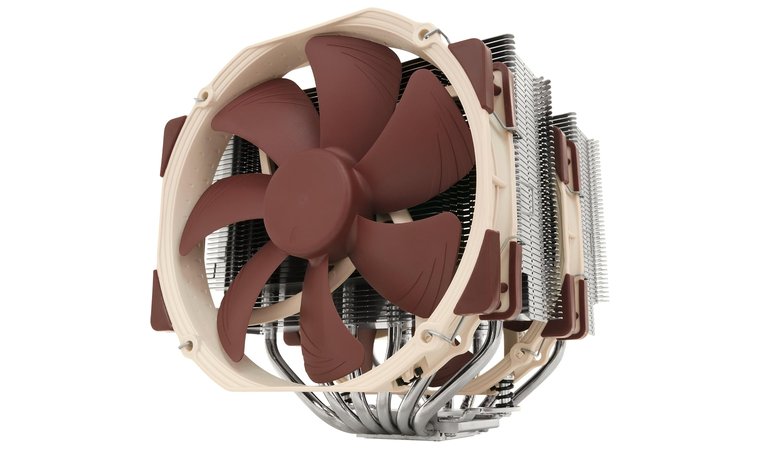
The Noctua NH-D15 earns its place as the best CPU air cooler because it combines raw cooling power with industry-leading acoustics, reliability, and build quality. Its flagship dual-tower heatsink uses an extremely dense fin array that maximizes surface area, allowing it to compete with mid-range AIO liquid coolers while maintaining the long-term reliability only air cooling can offer.
Two high-static-pressure 140 mm Noctua fans provide exceptional push/pull airflow, keeping even high-end processors cool during sustained workloads such as rendering, streaming, and running the best CPU for gaming at full load.
We chose the NH-D15 for its unmatched air cooling performance, near-silent operation, and long-term reliability across multiple CPU generations.
A major strength of the NH-D15 is its near-silent operation. Even under heavy thermal stress, the PWM fan curve is tuned for whisper-quiet performance. Noctua’s superior bearing design, flawless build quality, and premium materials guarantee long lifespan and consistent performance year after year.
| Pros | Cons |
|---|---|
| ✅ Exceptional dual-tower thermal performance rivaling AIOs ✅ Two premium 140 mm fans provide strong push/pull airflow ✅ Whisper-quiet operation even at high RPMs ✅ Premium build quality with a long, 6-year warranty ✅ Rock-solid SecuFirm2 mounting system ✅ Wide Intel/AMD socket compatibility | ❌ Large size may limit RAM clearance, though most setups have compatible height options |
Wide socket compatibility also means this cooler can move with you across multiple PC builds, including modern Intel and AMD platforms. The SecuFirm2 mounting system makes installation firm, secure, and beginner-friendly. Overall, the NH-D15 provides elite cooling, quiet acoustics, and unmatched reliability, making it the top choice for buyers who want premium performance without liquid cooling maintenance
Final Verdict: The NH-D15 is ideal for users who want top-tier cooling, quiet performance, and long-term reliability in one flagship air cooler.
2. Thermalright Peerless Assassin 120 SE [Best Budget CPU Cooler]
| Specs | Details |
|---|---|
| Cooler type | Dual-tower air cooler |
| Socket compatibility | Intel LGA1700, LGA1200, LGA115x; AMD AM5, AM4 |
| TDP rating (Thermal Design Power) | 200W class cooling |
| Fan/Radiator size | 2 × 120 mm TL-C12 fans |
| Noise Level (dBA) | 25.6 dBA |
| Dimensions/height | 157 mm height |
| Best for | Budget gaming builds, cost-effective cooling |
The Thermalright Peerless Assassin 120 SE provides built a massive reputation for having high-end thermal performance at a surprisingly low price, making it one of the best CPU coolers for budget-focused builders.
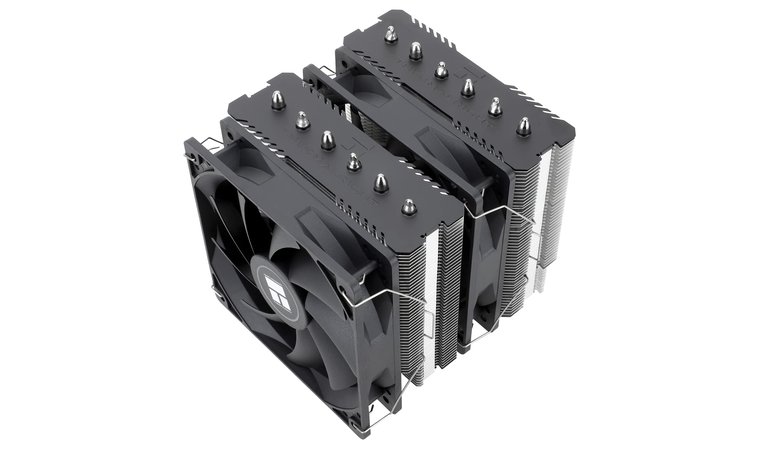
It features a dual-tower heatsink design paired with two efficient 120 mm PWM fans, giving users cooling power similar to mid-range coolers at nearly half the cost. Its ability to handle powerful processors while staying impressively quiet is why it consistently appears in best budget CPU discussions among enthusiasts.
This cooler provides premium-level thermals at a budget price, making it the best value air cooler for gamers and upgraders alike.
What sets the Peerless Assassin apart is its outstanding price-to-performance ratio. The dual heatsink towers offer strong heat dissipation, while the six high-quality heat pipes provide reliable thermal transfer.
The included TL-C12 fans maintain stable airflow without producing overwhelming noise, having smooth thermal control during gaming, productivity, and light workstation tasks. Despite its affordable price, the cooler feels well-built and performs at a level that rivals more expensive models.
| Pros | Cons |
|---|---|
| ✅ Outstanding performance for its price class ✅ Dual-tower layout provides strong thermal efficiency ✅ Quiet 120 mm fans with smooth PWM tuning ✅ Excellent value for gaming and everyday work ✅ Good RAM and motherboard compatibility ✅ Easy installation with secure mounting | ❌ Slightly taller design may limit compatibility in smaller cases |
Its compatibility is another major advantage. With support for modern Intel and AMD sockets, this cooler works seamlessly with most current platforms. The compact dual-tower design also offers good RAM clearance, making it an excellent fit for a wide range of mid-tower and full-tower cases.
Final Verdict: The Peerless Assassin 120 SE is a rare budget cooler that performs like a premium one, making it ideal for cost-conscious builders who still want excellent thermals.
3. ASUS ROG Ryujin II 360 [Best Low-Profile CPU Cooler]
| Specs | Details |
|---|---|
| Cooler type | 360 mm AIO liquid cooler |
| Socket compatibility | Intel LGA1700, LGA1200, LGA115x; AMD AM5, AM4 |
| TDP rating (Thermal Design Power) | 250W+ high-performance cooling |
| Fan/Radiator size | 360 mm radiator + 3 × 120 mm fans |
| Noise Level (dBA) | 29.7 dBA |
| Dimensions/height | Radiator length 394 mm |
| Best for | Enthusiast builds, ROG systems, showcase PCs |
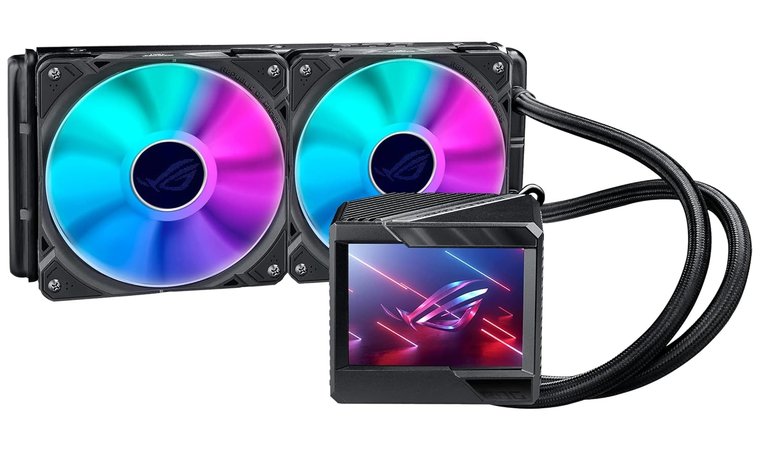
The ASUS ROG Ryujin II 360 is a flagship AIO cooler designed for enthusiasts who want cutting-edge performance and premium aesthetics. With its large 360 mm radiator and high-performance 120 mm fans, it provides exceptional cooling headroom, making it a strong option for users building around the best CPU cooler for gaming setups or high-demand workstations.
We picked this AIO for its powerful cooling, LCD display, and built-in VRM fan that enhances motherboard stability in high-load setups.
One of its most defining features is the pump housing, which includes an embedded fan to provide targeted airflow to VRMs and surrounding motherboard components. This added cooling improves system stability under sustained loads, something many traditional AIOs ignore.
| Pros | Cons |
|---|---|
| ✅ Extreme cooling performance for high-end CPUs ✅ Embedded VRM fan improves motherboard temps ✅ LiveDash LCD adds functional, customizable visuals ✅ High-performance radiator fans with strong pressure ✅ Seamless integration with ROG software ✅ Ideal for showcase and enthusiast builds | ❌ Premium price may not suit budget builders |
The Ryujin II also comes with a large LiveDash LCD capable of showing system stats, performance metrics, or custom visuals, turning the cooler into a stylish centerpiece for tempered-glass builds. ROG Armoury Crate allows for full control of fan curves, RGB lighting, and display customization, making this cooler especially appealing for ASUS ecosystem users.
Final Verdict: The Ryujin II 360 is perfect for builders who want elite cooling, stunning visuals, and advanced system monitoring packed into a high-end AIO.
4. NZXT Kraken Z73 [Best Premium AIO CPU Cooler]
| Specs | Details |
|---|---|
| Cooler type | 360 mm AIO liquid cooler |
| Socket compatibility | Intel LGA1700, LGA1200, LGA115x; AMD AM5, AM4 |
| TDP rating (Thermal Design Power) | 250W+ high-performance cooling |
| Fan/Radiator size | 360 mm radiator + 3 × 120 mm fans |
| Noise Level (dBA) | 29.7 dBA |
| Dimensions/height | Radiator length 394 mm |
| Best for | Enthusiast builds, ROG systems, showcase PCs |
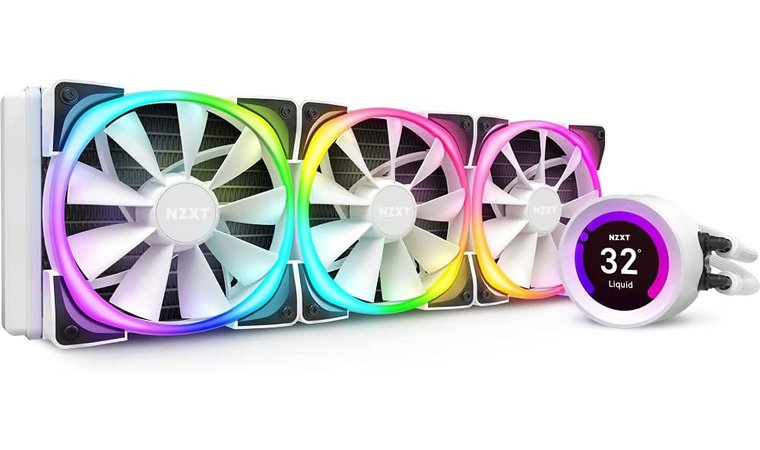
The NZXT Kraken Z73 is one of the finest premium AIO liquid coolers available, built for high-end gaming PCs and workstation systems that demand strong thermal control.
The Z73 stands out for its excellent thermal capacity and a customizable LCD that transforms the pump into a showcase centerpiece.
Its long 360 mm radiator provides exceptional heat dissipation, providing stable CPU temperatures even during intensive workloads such as rendering, content creation, or long gaming sessions.
| Pros | Cons |
|---|---|
| ✅ Powerful cooling from a long 360 mm radiator ✅ Fully customizable LCD for stats or images ✅ Strong airflow performance from radiator fans ✅ Premium aesthetics for showcase builds ✅ Excellent CAM software control | ❌ Higher price than most standard AIOs |
The Z73’s signature feature is its fully customizable 2.36-inch LCD display on the pump. This vibrant screen can show real-time system metrics, CPU or GPU temperatures, animated GIFs, or personalized images, making it a highlight for showcase builds. With NZXT’s CAM software, users gain full control over fan curves, pump behavior, RGB effects, and display customization through a polished, intuitive interface.
Final Verdict: The Kraken Z73 is ideal for builders who want premium cooling performance combined with industry-leading customization and elegant visual design.
5. Corsair H100i RGB Platinum [Best 240mm AIO Cooler for Balanced Performance]
| Specs | Details |
|---|---|
| Cooler type | 240 mm AIO liquid cooler |
| Socket compatibility | Intel LGA1700, LGA1200, LGA115x; AMD AM5, AM4 |
| TDP rating (Thermal Design Power) | 200W+ class cooling |
| Fan/Radiator size | 240 mm radiator + 2 × 120 mm ML120 PRO fans |
| Noise Level (dBA) | 25–37 dBA |
| Dimensions/height | Radiator length 277 mm |
| Best for | Mid/high-end CPUs, balanced noise–performance builds |
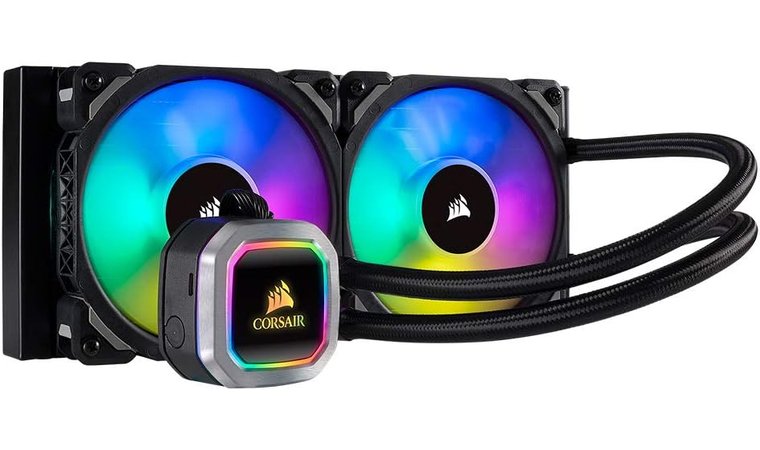
The Corsair H100i RGB Platinum is one of the most reliable 240 mm AIO coolers available, designed for builders who want strong thermal performance without the space requirements of a 360 mm unit.
This 240 mm AIO made our list for its perfect balance of compact fit, strong cooling, and deep RGB/iCUE integration.
Its compact radiator makes it compatible with nearly any modern mid-tower case while still having cooling power suitable for processors like the best AM4 CPU options or newer Intel/AMD chips. The dual ML120 PRO fans strike a great balance between airflow, static pressure, and acoustics, making the cooler versatile for gaming and productivity.
| Pros | Cons |
|---|---|
| ✅ Compact 240 mm size fits most cases ✅ ML120 PRO fans balance cooling and noise ✅ Excellent RGB and control via iCUE ✅ Easy installation with pre-applied thermal paste ✅ Strong cooling for mid/high-end CPUs | ❌ Louder at maximum fan RPM compared to larger radiators |
One of its strongest advantages is Corsair’s iCUE software ecosystem. Through iCUE, you can adjust fan curves, pump speed, and fully customize the RGB lighting on both the pump head and fans. This integration makes the H100i a natural fit for users who want synchronized lighting across RAM, cases, keyboards, and other Corsair components.
Installation is straightforward thanks to the pre-applied thermal paste and simplified mounting system. The Hydro Series name also comes with years of proven reliability, strong aftermarket support, and widely available replacement parts.
Final Verdict: The H100i RGB Platinum is ideal for users who want balanced cooling, great aesthetics, and reliable performance without stepping up to a larger radiator size.
6. Thermaltake Floe DX 360 [Best RGB AIO Cooler for Aesthetic Builds]
| Specs | Details |
|---|---|
| Cooler type | 360 mm AIO liquid cooler |
| Socket compatibility | Intel LGA1700, LGA1200, LGA115x; AMD AM5, AM4 |
| TDP rating (Thermal Design Power) | 250W+ cooling capacity |
| Fan/Radiator size | 360 mm radiator + 3 × 120 mm Riing Duo RGB fans |
| Noise Level (dBA) | 20–34 dBA |
| Dimensions/height | Radiator length 394 mm |
| Best for | RGB-heavy builds, showcase PCs, high-end CPUs |
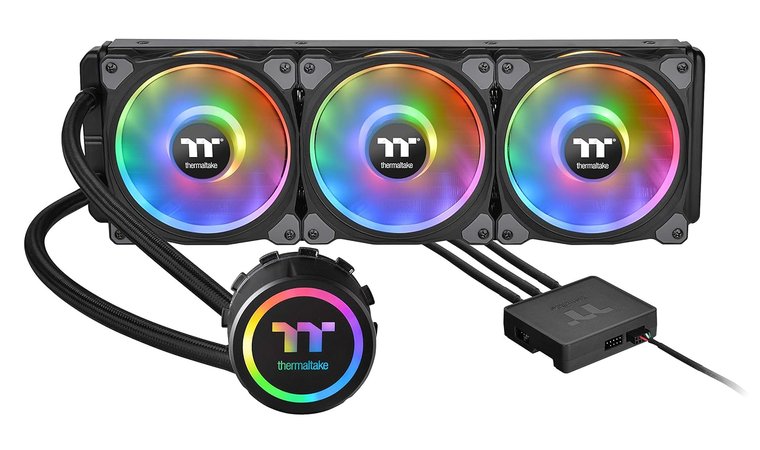
The Thermaltake Floe DX 360 is built for PC builders who want powerful cooling paired with striking, fully addressable RGB lighting. With its large 360 mm radiator and triple Riing Duo RGB fans, this AIO cooler instantly becomes the visual centerpiece of any system.
Each fan features dual-zone lighting with vivid color transitions, making the Floe DX a standout choice for creators building around the best AM5 CPU cooler setup or high-end gaming hardware.
Chosen for its high-performance thermal output and vibrant dual-zone RGB, it’s ideal for style-focused gamers who still want serious cooling.
Beyond the lighting, the cooler offers strong thermal performance thanks to a thick radiator and well-tuned fans that provide balanced airflow and static pressure. Thermaltake’s software suite provides full control over fan curves, pump speeds, and lighting animations, allowing users to fine-tune both performance and aesthetics. The durable sleeved tubing and reinforced radiator design add longevity, while the pump’s consistent flow rate provides reliable cooling under heavy CPU loads.
| Pros | Cons |
|---|---|
| ✅ Stunning dual-zone RGB lighting on fans ✅ 360 mm radiator provides strong thermal headroom ✅ Good balance of airflow and quiet performance ✅ Durable tubing and solid radiator construction ✅ Excellent for aesthetic-focused, showcase systems | ❌ Software can feel heavier than simpler RGB ecosystems |
Its focus on RGB does not compromise its cooling ability. The Floe DX 360 handles modern multi-core processors with ease, making it a strong fit for gaming PCs, workstation builds, or streaming setups.
While someone searching for the best laptop for gaming would prioritize portability and thermal management inside a compact chassis, desktop builders who want both power and style will find this cooler ideal.
Final Verdict: The Floe DX 360 is perfect for builders who want both strong cooling and brilliant RGB effects, making it a top choice for stylish, high-performance desktop setups.
7. Corsair iCUE Link Titan 360 RX [Best Liquid CPU Cooler]
| Specs | Details |
|---|---|
| Cooler type | 360 mm AIO liquid cooler |
| Socket compatibility | Intel LGA1851, LGA1700; AMD AM5, AM4 |
| TDP rating (Thermal Design Power) | 250W+ enthusiast-grade cooling |
| Fan/Radiator size | 360 mm radiator + 3 × RX120 RGB fans |
| Noise Level (dBA) | 36 dBA |
| Dimensions/height | Radiator length 397 mm |
| Best for | High-end gaming, overclocked CPUs, RGB builds |
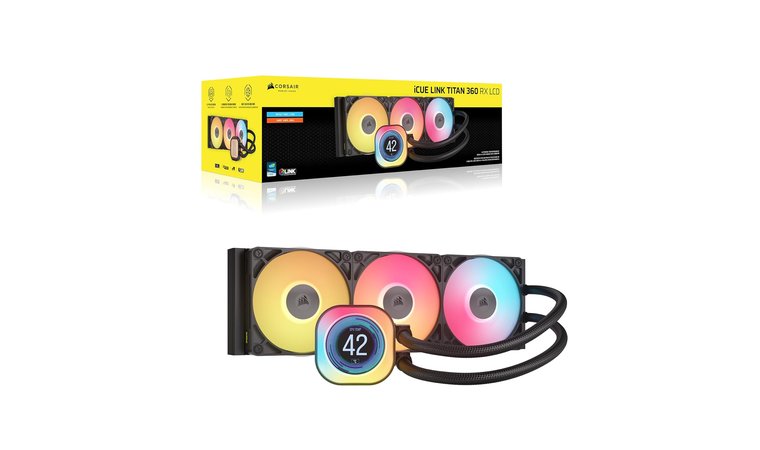
The Corsair iCUE Link Titan 360 RX is built for users who want one of the strongest and most advanced liquid CPU coolers available today.
We included the Titan 360 RX for its elite cooling engine, smart iCUE Link cable management, and immersive LCD display.
Its 360 mm radiator and triple RX120 RGB fans provide exceptional thermal performance, keeping even power-hungry CPUs stable under long gaming, streaming, or rendering sessions. The FlowDrive cooling engine uses a powerful three-phase motor and a precision-engineered cold plate to maximize heat transfer efficiency, making this cooler ideal for high-end processors where temperatures matter most.
| Pros | Cons |
|---|---|
| ✅ Excellent thermal performance for high-end CPUs ✅ Sharp 2.1″ LCD screen with 60 FPS display ✅ iCUE Link simplifies cable routing ✅ Strong RGB and aesthetic appeal ✅ Efficient FlowDrive pump with great stability | ❌ Premium price places it in the enthusiast tier |
A standout feature is the 2.1-inch IPS LCD panel on the pump, offering sharp system stats, animated GIFs, or custom visuals at 60 FPS. Combined with vivid RGB lighting on each fan, the Titan 360 RX is a perfect match for tempered-glass showcase builds.
The iCUE Link ecosystem simplifies cable management by allowing all components to connect in a unified chain, reducing clutter and making installation cleaner compared to traditional setups. While performance-focused builders often compare liquid coolers to options like the best air cooler for CPU, the Titan 360 RX offers superior thermal headroom, quieter overall operation, and a level of customization that air coolers can’t match.
Final Verdict: The Titan 360 RX is ideal for users building a high-performance, visually impressive system who want top-tier cooling power and seamless iCUE integration.
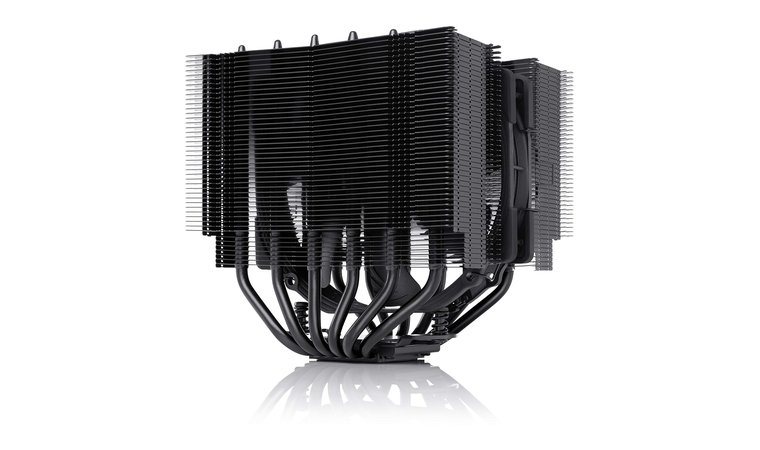
8. Noctua NH-D15S chromax.Black [Best Dual-Tower CPU Cooler]
| Specs | Details |
|---|---|
| Cooler type | Dual-tower air cooler (single-fan configuration) |
| Socket compatibility | Intel LGA1700, LGA1200, LGA115x; AMD AM5, AM4 |
| TDP rating (Thermal Design Power) | 220W+ class cooling |
| Fan/Radiator size | 1 × 140 mm NF-A15 PWM fan (supports second fan upgrade) |
| Noise Level (dBA) | 19.2–24.6 dBA |
| Dimensions/height | 160 mm height (fits more cases than NH-D15) |
| Best for | Quiet high-end air cooling, RAM/GPU clearance, compact performance builds |
The Noctua NH-D15S chromax.Black is a refined, compatibility-focused version of the legendary NH-D15, offering the same high-end cooling performance while improving clearance for RAM and PCIe slots.
The D15S earns its spot for offering NH-D15 performance in a more RAM-friendly and visually stealthier format.
Its asymmetrical dual-tower design provides excellent thermal headroom for powerful CPUs, making it well-suited for gaming, productivity, or overclocked workloads. Noctua’s premium all-black chromax finish also blends seamlessly into modern RGB and minimalist builds.
| Pros | Cons |
|---|---|
| ✅ Excellent thermal performance for a single-fan design ✅ Premium chromax.Black aesthetics ✅ Whisper-quiet NF-A15 fan ✅ Great RAM and PCIe clearance ✅ Upgradeable with optional second fan ✅ Easy installation with SecuFirm2 | ❌ Slightly lower performance than the dual-fan NH-D15 in extreme workloads |
With one NF-A15 140 mm PWM fan included, the NH-D15S provides strong airflow while keeping noise levels exceptionally low. The optimized fan curve and aerodynamic fin design allow the cooler to stay whisper-quiet even under heavy load. Users who want additional cooling can install a second 140 mm fan, turning the D15S into a fully boosted dual-fan powerhouse comparable to larger coolers.
One major advantage of the NH-D15S is its superior compatibility. The 160 mm height fits more mid-tower cases than the original NH-D15, and the asymmetrical heatsink avoids blocking RAM slots or oversized GPU backplates. Combined with Noctua’s SecuFirm2 mounting system, installation is secure, simple, and incredibly reliable.
Final Verdict: The NH-D15S chromax.Black is ideal for builders who want top-tier air cooling in a more compatibility-friendly form, offering quiet performance and premium design in a versatile package.
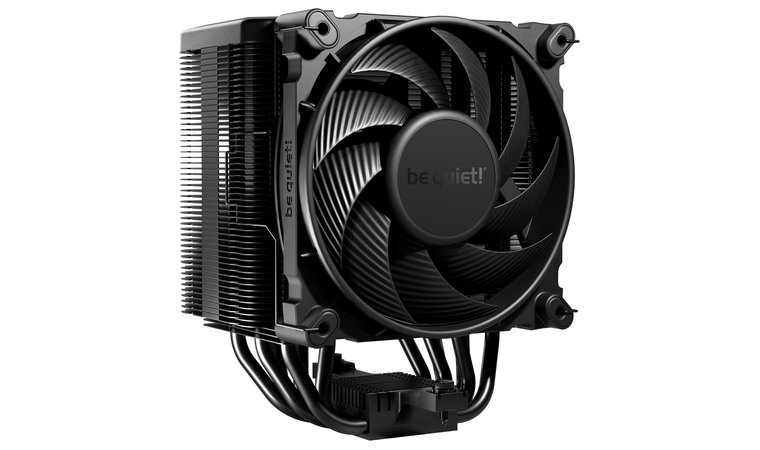
9. be quiet! Dark Rock 5 [Best Quiet CPU Cooler]
| Specs | Details |
|---|---|
| Cooler type | Dual-tower air cooler |
| Socket compatibility | Intel LGA1851, LGA1700, LGA1200, LGA115x; AMD AM5, AM4 |
| TDP rating (Thermal Design Power) | 210W high-performance cooling |
| Fan/Radiator size | 1 × 120 mm Silent Wings PWM fan (supports second fan) |
| Noise Level (dBA) | 29.8 dBA |
| Dimensions/height | 163 mm height |
| Best for | Silent builds, overclocked systems, high-RAM clearance setups |
The be quiet! Dark Rock 5 is engineered for builders who want strong cooling performance while keeping system noise almost nonexistent.
Designed around a dense dual-tower layout and six high-performance copper heatpipes, this cooler provides excellent heat transfer even when paired with high-power CPUs. Its large surface area and optimized fin design allow it to compete with some AIO coolers, while maintaining the reliability and simplicity of a premium air solution.
This cooler was selected for its ultra-low noise levels and high-end cooling in builds where silence is a top priority.
The included Silent Wings PWM fan is the centerpiece of the Dark Rock 5’s acoustic performance. With a fluid-dynamic bearing, vibration-optimized frame, and finely tuned blade geometry, it maintains a whisper-quiet profile even during heavy gaming or productivity workloads. Users seeking even stronger thermals can install a second fan, turning the Dark Rock 5 into an even more capable performer without sacrificing quiet operation.
| Pros | Cons |
|---|---|
| ✅ Extremely quiet even under heavy load ✅ Strong dual-tower thermal performance ✅ Excellent RAM and VRM clearance ✅ Premium matte black aesthetics ✅ Upgradeable with a second fan ✅ High-quality Silent Wings fan included | ❌ Slightly larger height may limit compatibility in smaller cases |
A key advantage of this cooler is its excellent RAM and VRM clearance. The asymmetric heatsink design prevents interference with taller memory modules, making the Dark Rock 5 easier to integrate into a wide range of mid-tower and full-tower builds. The matte black finish adds a sleek, understated style ideal for stealth-themed rigs.
Although many users consider a liquid cooler for PC when building high-performance setups, the Dark Rock 5 offers near-silent operation, strong TDP handling, and long-term reliability that makes air cooling an attractive alternative.
Final Verdict: The Dark Rock 5 is perfect for builders who want powerful cooling performance with virtually silent operation, all wrapped in a sleek, stealth-friendly design.
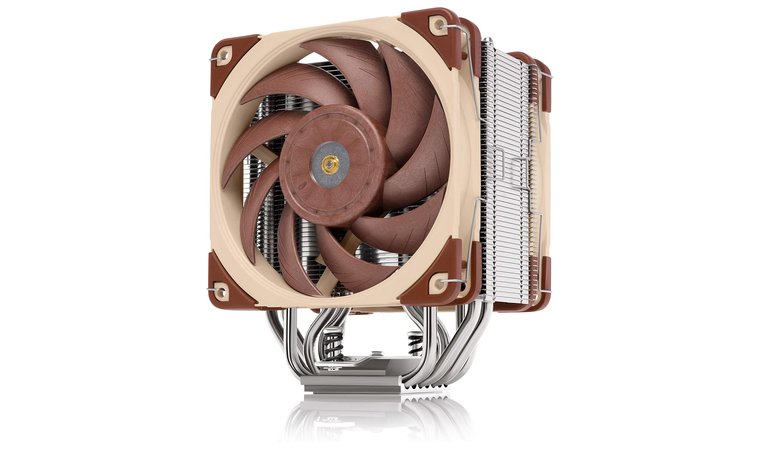
10. Noctua NH-U12A Chromax Black [Best AM4 CPU Cooler]
| Specs | Details |
|---|---|
| Cooler type | Single-tower air cooler (120 mm class) |
| Socket compatibility | Intel LGA1851, LGA1700, LGA1200; AMD AM5, AM4 |
| TDP rating (Thermal Design Power) | 200W+ class cooling |
| Fan/Radiator size | 2 × 120 mm Noctua NF-A12x25 fans |
| Noise Level (dBA) | 22.6 dBA |
| Dimensions/height | 158 mm height |
| Best for | AM4/AM5 builds, compact cases, high static-pressure airflow |
The Noctua NH-U12A Chromax Black is widely regarded as the best AM4 CPU cooler thanks to its exceptional performance in a compact 120 mm footprint.
We chose the NH-U12A because it brings flagship cooling to compact cases without compromising on noise or performance.
Unlike many coolers in its size class, the NH-U12A uses seven heatpipes and a densely optimized fin stack, allowing it to rival, and sometimes outperform, some 140 mm coolers. This makes it ideal for users who want top-tier cooling but are limited by case height or RAM clearance.
| Pros | Cons |
|---|---|
| ✅ 120 mm cooler that performs like a 140 mm model ✅ Dual NF-A12x25 fans provide elite static pressure ✅ Great RAM and PCIe clearance ✅ Quiet operation even at higher RPMs ✅ Ideal for compact cases with height limits | ❌ Price is higher than many single-tower coolers |
The real magic comes from the dual NF-A12x25 fans, considered some of the best 120 mm fans ever engineered. Their ultra-high static pressure, precision blade design, and incredibly low resonance give the cooler silent yet powerful airflow. Even under sustained CPU loads such as gaming, editing, or workstation multitasking, the U12A maintains stable temperatures while keeping noise impressively low.
Compatibility is another major advantage. With a carefully offset heatsink design, the NH-U12A avoids RAM interference and fits comfortably in tighter mid-tower cases where bulkier dual-tower coolers cannot fit.
Final Verdict: The NH-U12A Chromax Black is perfect for builders who want top-tier cooling performance, excellent compatibility, and quiet operation without stepping up to a larger dual-tower design.
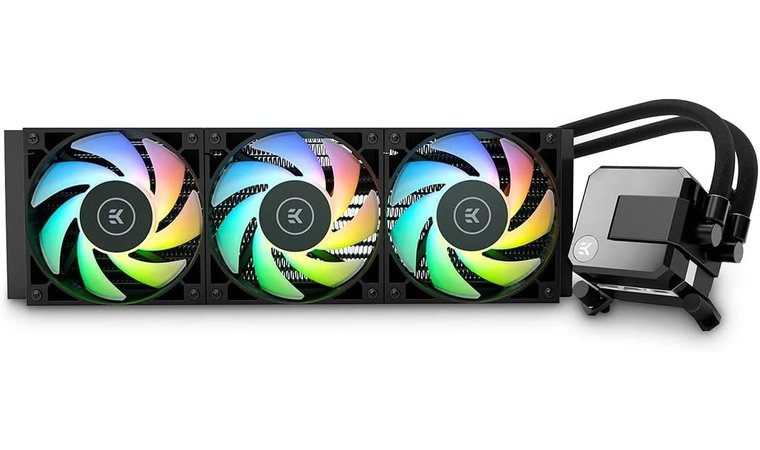
11. EK AIO Elite 360mm [Best AIO CPU Cooler for Durability]
| Specs | Details |
|---|---|
| Cooler type | 360 mm AIO liquid cooler |
| Socket compatibility | Intel LGA115x, LGA1200, LGA1700; AMD AM4, AM5 |
| TDP rating (Thermal Design Power) | 250W+ class cooling |
| Fan/Radiator size | 360 mm radiator + 3 × 120 mm EK-Vardar fans |
| Noise Level (dBA) | 34 dBA |
| Dimensions/height | Radiator length 394 mm |
| Best for | Long-term durability, high-TDP CPUs, RGB builds |
The EK AIO Elite 360mm is engineered for users who want premium cooling performance backed by exceptional durability. Built by EK, a company known for its custom water-cooling heritage, this AIO incorporates many of the design principles found in high-end loop systems.
Built for durability and thermal strength, the EK Elite was selected for users who want premium AIO cooling with custom-loop quality.
The Elite’s 360 mm radiator provides excellent thermal capacity, making it ideal for sustained workloads such as rendering, streaming, or gaming on high-core-count CPUs.
| Pros | Cons |
|---|---|
| ✅ High-performance EK-Vardar fans with strong static pressure ✅ Reinforced, durable tubing for long-term reliability ✅ Excellent cooling headroom for high-TDP processors ✅ D-RGB lighting on pump and fans ✅ Built by EK – trusted water-cooling expertise | ❌ Pump noise may be noticeable at max RPM |
A major standout feature is the EK-designed pump and cold plate, which prioritize consistent coolant flow and efficient heat transfer. The SPC-style pump provides stable performance at higher RPMs, offering strong cooling even under intense loads. Paired with three high-performance EK-Vardar fans, the cooler achieves strong static pressure and optimal radiator airflow, giving it an edge in thermal efficiency compared to many competing AIOs.
Durability is a core focus of this model. The reinforced sleeved rubber tubing prevents leaks and reduces wear over time, while the robust radiator construction offers longevity. Fully addressable D-RGB lighting on both the pump and fans adds a layer of visual customization that fits modern showcase builds without compromising performance.
Final Verdict: The EK AIO Elite 360mm is ideal for users who want reliable long-term cooling, high thermal performance, and premium build quality from a respected water-cooling brand.
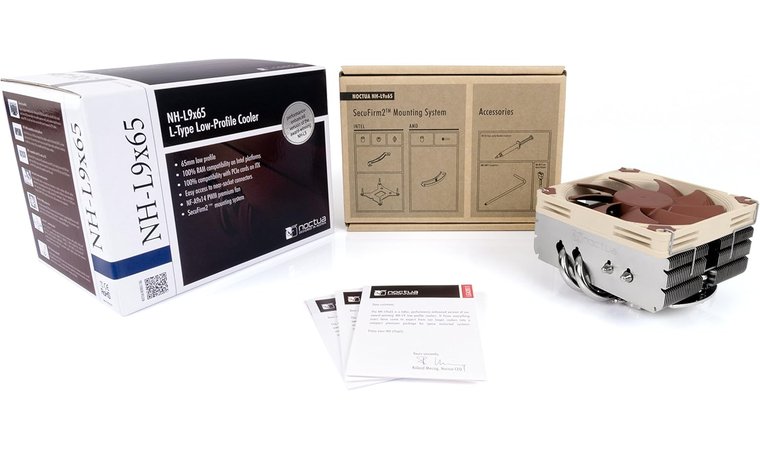
12. Noctua NH-L9x65 [Best Low-Profile CPU Cooler]
| Specs | Details |
|---|---|
| Cooler type | Low-profile air cooler |
| Socket compatibility | Intel LGA1851, LGA1700, LGA1200, LGA115x; AMD AM5, AM4 |
| TDP rating (Thermal Design Power) | Up to 95W recommended (low–mid TDP CPUs) |
| Fan/Radiator size | 1 × 92 mm NF-A9x14 PWM fan |
| Noise Level (dBA) | 23.6 dBA |
| Dimensions/height | 65 mm total height |
| Best for | ITX builds, HTPCs, small form-factor gaming systems |
The Noctua NH-L9x65 is a premium low-profile CPU cooler engineered for compact cases where height clearance is extremely limited. Standing only 65 mm tall, it fits effortlessly into ITX enclosures, HTPC setups, and slim form-factor builds, all while having performance that surpasses many coolers in its size class.
This low-profile unit made the list for providing quiet, efficient cooling in ultra-compact ITX and HTPC builds.
Its design features a dense fin stack and four high-quality heatpipes, giving it excellent heat transfer capabilities for small systems. The included NF-A9x14 PWM fan is one of Noctua’s best low-profile fans, offering quiet, smooth airflow with exceptional static pressure relative to its size.
| Pros | Cons |
|---|---|
| ✅ Only 65 mm tall – perfect for ITX and SFF builds ✅ Excellent build quality with quiet operation ✅ Zero RAM or PCIe interference ✅ Easy installation, ideal for tight spaces ✅ Reliable NF-A9x14 PWM fan included | ❌ Not suitable for high-TDP or heavily overclocked CPUs |
One of the NH-L9x65’s standout strengths is its flawless compatibility. It doesn’t obstruct RAM or PCIe slots, making it ideal for compact motherboards where clearances are tight. Noctua’s SecuFirm2 mounting system provides a secure and straightforward installation, even in cramped cases, and the chromax line provides aesthetic flexibility for themed builds.
Although it’s not designed for high-TDP processors or heavy overclocking, it is an outstanding choice for small gaming rigs, budget-friendly systems, and compact performance PCs where space is at a premium.
Final Verdict: The NH-L9x65 is ideal for SFF builders who need strong cooling in a compact form, offering silent operation and excellent compatibility without sacrificing Noctua’s signature quality.
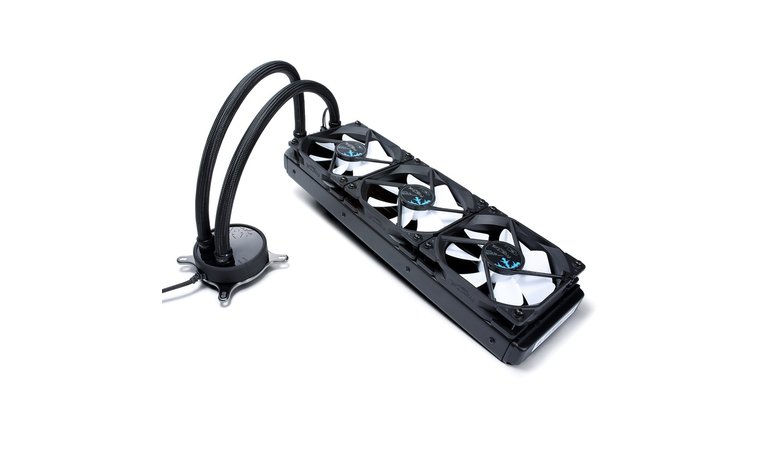
13. Fractal Design Celsius [Best Minimalist AIO Cooler for Quiet Operation]
| Specs | Details |
|---|---|
| Cooler type | 360 mm AIO liquid cooler |
| Socket compatibility | Intel LGA115x, LGA1200, LGA1700; AMD AM4, AM5 |
| TDP rating (Thermal Design Power) | 250W+ cooling capability |
| Fan/Radiator size | 360 mm radiator + 3 × 120 mm Fractal Dynamic X2 fans |
| Noise Level (dBA) | 20 dBA (low-noise tuned) |
| Dimensions/height | Radiator length 397 mm |
| Best for | Quiet minimalist builds, overclocked CPUs, airflow-optimized systems |
The Fractal Design Celsius S36 is built for users who want a clean, minimalist AIO that provide powerful cooling while keeping noise to an absolute minimum.
We picked the Celsius S36 for its minimalist design, smart noise-control system, and quiet thermal performance in stealth builds.
Its 360 mm radiator provides substantial heat-dissipation capacity, making it a strong performer for high-TDP CPUs, multitasking workloads, and light to moderate overclocking. Despite this thermal capability, the cooler maintains a quiet acoustic footprint thanks to its Fractal Dynamic X2 fans, which are tuned specifically for silent operation.
| Pros | Cons |
|---|---|
| ✅ Exceptionally quiet Dynamic X2 fans ✅ Intelligent fan/pump control for stable acoustics ✅ Strong thermal performance from 360 mm radiator ✅ Minimalist, premium Fractal styling ✅ Reliable build quality with reinforced tubing | ❌ No RGB lighting may disappoint aesthetic-focused builders |
One of the S36’s standout features is its intelligent cooling mode. The pump and fans can automatically balance performance and acoustics, reducing noise when workloads are light and ramping up smoothly as temperatures increase.
The aesthetic design is another major advantage. The all-black, understated look pairs well with Fractal’s cases and fits seamlessly into stealth or workstation-focused builds. Reinforced tubing and a robust radiator design offer reliability, while the easy installation process makes the cooler accessible even for first-time builders.
Final Verdict: The Celsius S36 is perfect for builders who want powerful cooling wrapped in a quiet, minimalist package, offering excellent performance without the visual clutter.
Buying Basics: How Do I Select a CPU Cooler for Gaming?
Choosing the right CPU cooler depends on a few core factors: your case size, CPU power draw, noise tolerance, and budget. Gamers should focus on strong thermal performance, stable acoustics, and compatibility with their motherboard and RAM.
The sections below break everything down clearly.
1. Match the Cooler to Your CPU and Case
Choosing the right cooler begins with understanding how much heat your gaming CPU produces. Processors such as Intel i7 and i9 or Ryzen 7 and 9 run hotter during long sessions, which is why it helps to know how to check CPU temperature before selecting a cooler. High-performance chips often need strong air coolers or larger AIO liquid coolers to stay stable during demanding gameplay.
Next, verify socket compatibility. Modern systems typically use AM5, AM4, LGA1700, or LGA1200, and every cooler lists the sockets it supports. This offers proper mounting and full contact with the CPU.
Case clearance is the final key factor. Air coolers must physically fit inside the case, and smaller cases may not support tall dual-tower designs. AIO coolers also require space for their radiators, so confirm whether your case can mount a 240 mm or 360 mm unit.
2. Prioritize Thermal Performance and Noise
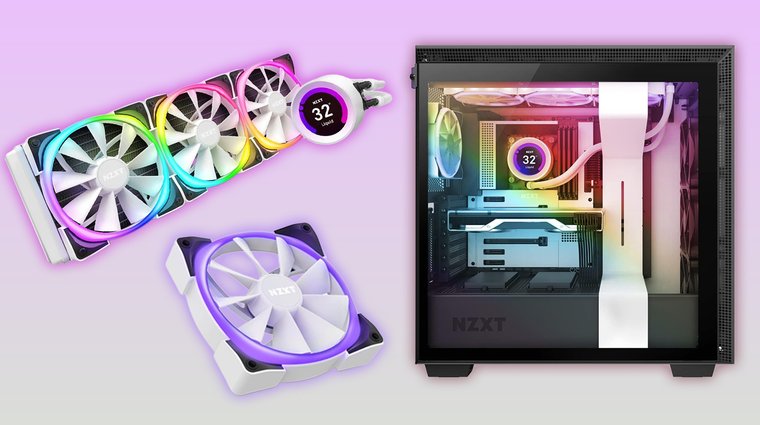
Thermal performance is one of the most important factors when choosing a gaming CPU cooler. Every cooler lists a TDP rating, which indicates how much heat it can dissipate. A cooler with a higher TDP rating provides better temperature control, especially for powerful CPUs that generate more heat during demanding gameplay.
Strong thermal performance also helps maintain consistent FPS by preventing thermal throttling that can occur when temperatures rise too high.
Noise levels matter just as much as cooling power. Fans that operate around 25 to 30 dB are ideal for gaming rooms, shared spaces, or streaming setups where microphone clarity is important. Quieter fans reduce distraction and help keep your environment comfortable during long sessions.
3. Consider Aesthetics and Build Quality
A CPU cooler is not only a functional part of your system but also a visual centerpiece for many gaming setups. Some players want vibrant RGB lighting, while others prefer a clean black stealth look that blends seamlessly with their case and components.
Matching your cooler’s style to the rest of your build helps create a unified, polished appearance, whether you are using a glass-panel case or a compact layout.
Build quality is another key consideration. Premium coolers use sturdy materials, reinforced tubing, reliable bearings, and well-machined heatsinks, all of which contribute to long-term durability. A well-built cooler maintains consistent performance, handles daily gaming stress, and avoids issues like fan wobble or premature wear.
4. TDP (Thermal Design Power)
TDP, or Thermal Design Power, refers to the amount of heat a CPU is expected to generate under standard workloads. This number helps determine how powerful your cooler needs to be.
A cooler with a TDP rating equal to or higher than your processor’s heat output will keep temperatures stable during gaming, streaming, or multitasking. If the cooler’s TDP rating is too low, the CPU can overheat, which leads to thermal throttling and reduced performance.
TDP does not directly reflect a CPU’s total power draw, but it gives a useful guideline for selecting the right cooling solution. High-performance processors, especially those used for intense gaming or productivity tasks, often benefit from coolers with higher TDP capacity.
When choosing a cooler, always check both the CPU’s rated TDP and the cooler’s supported rating to have a proper match that maintains consistent thermal performance.
5. Evaluate Value and Upgrade Potential
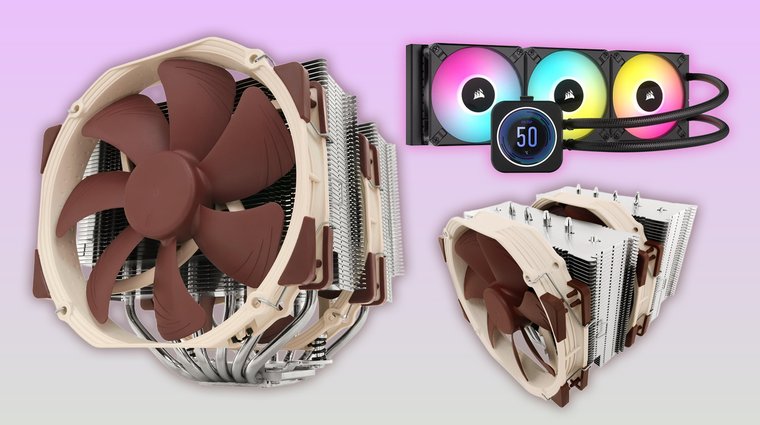
A good CPU cooler should be viewed as a long-term investment rather than a part you replace with every new build. High-quality coolers, such as the Noctua NH-D15 for air cooling or the Corsair H150i for liquid cooling, often provide strong performance for many years.
These coolers can outlast several CPU upgrades, especially when paired with updated mounting kits that support new sockets. For anyone learning how to overclock CPU, a reliable cooler with long-term durability becomes even more important, since stable temperatures directly affect overclocking success.
When considering value, look beyond the initial price. A well-built cooler provides consistent thermal performance, quieter operation, and better reliability compared to cheaper alternatives.
Investing in quality now means you will have a cooler that continues performing well as you upgrade your processor, graphics card, or overall system. This long-term approach helps your gaming rig to stay stable, quiet, and efficient through multiple hardware generations.
My Overall Verdict
Choosing the right CPU cooler for gaming depends on your hardware, your case, and how quiet or powerful you want your system to be. Each cooler on this list serves a different type of gamer, and here are the best starting points depending on your needs.
- For performance-focused gamers who want maximum cooling power → Noctua NH-D15.
It provides top-tier air cooling with quiet operation and long-term reliability. - For RGB enthusiasts building a showcase PC → Thermaltake Floe DX 360.
Its stunning lighting and strong thermal performance make it ideal for stylish rigs. - For small form-factor builders → Noctua NH-L9x65.
Its compact height and excellent compatibility make it perfect for ITX cases. - For silent PC lovers → be quiet! Dark Rock 5.
It maintains strong thermals while keeping noise nearly inaudible. - For liquid cooling enthusiasts who want advanced control and premium features → Corsair iCUE Link Titan 360 RX.
Its LCD display, powerful pump, and unified cable system make it strong and easy to manage. - For a balanced choice that fits most mid-tower gaming builds → Corsair H100i RGB Platinum.
It offers dependable cooling, RGB customization, and easy installation.
No matter your build style or performance goals, there is a cooler here designed to elevate your gaming experience and keep your CPU running smoothly for years.
FAQs
The best CPU cooler is the Noctua NH-D15 thanks to its exceptional air-cooling performance, quiet operation, and long-term reliability. It handles high-end gaming CPUs easily and remains a top choice for both beginners and enthusiasts.
A CPU cooler is for removing the heat from your processor to keep temperatures stable during gaming, multitasking, or heavy workloads. It prevents overheating, reduces noise, and helps maintain smooth performance by avoiding thermal throttling.
Yes, you actually do need a CPU cooler. Without a cooler, your system will overheat, throttle performance, or shut down to prevent damage. Even basic PCs need a cooler, and gaming systems need stronger solutions.
The best type of cooler depends on your needs. Air coolers are affordable, reliable, and quiet, while AIO liquid coolers offer stronger thermal performance and better aesthetics. Consider your case size, noise preference, and CPU requirements when choosing.
Air cooling is great for long-term reliability and lower cost, while liquid cooling offers better temperatures for high-end CPUs and visually impressive builds. Choose air for simplicity or liquid for maximum performance and aesthetics.











