

Discover 2026’s Best Mobile Controllers: Elite Pocket Gaming

Eneba Hub contains affiliate links, which means we may earn a small commission if you make a purchase through them—at no extra cost to you. Learn more

The mobile gaming market is booming with even AAA titles, but to truly enjoy the experience, you need the best mobile controller. While touch controls can be intuitive, for more intricate games, you simply don’t have enough space for controls.
Or maybe you’re an FPS-heavy mobile gamer; a solid gaming controller can elevate your experience to another level.
But the downside is that since the mobile controller market is so niche, there are plenty of seemingly ‘impressive’ controllers, but in fact, they feel cheap, have unsatisfying button clicks, might stop working quickly, and are not worth the money.
So today, I’ve detailed 9 fantastic mobile controllers for both iOS and Android. I’ve also included some options that support tablets, the Nintendo Switch, and PC. After extensive market research, these are undoubtedly the best options you can get in 2025.
Jump to:
Our Top Picks for Mobile Controllers
Before getting to the reviews, here’s a quick summary of the best mobile controllers. This includes the best overall option, the best money-saver pick, and the most premium phone controller:
- Razer Kishi Ultra – The Razer Kishi Ultra is simply the best mobile gaming experience you can have; eSports-optimized ergonomics & comfort, tactile buttons, haptic feedback support, and impressive analog sticks & hall-effect triggers.
- Bcofo Bluetooth Wireless – If you’re on a tight budget, the Bcofo Bluetooth wireless is a great option to play mobile games with a familiar form factor similar to Xbox’s traditional controller, vibration support, button customization, & RGB lighting without breaking the bank.
- Abxylute S9 Full Size – The abxylute S9 full-size mobile game controller has impressive customizability and premium hardware like hall-effect joysticks & triggers and an ergonomic grip that feels comfortable.
Whether you’re gaming on Android phones or for iPhone users, there are plenty of options to elevate the mobile gaming experience. Check out my breakdown and review of each mobile game controller for a better idea of what to look for!
9 Best Mobile Controllers: Console-Like Portable Gaming
Each of the listed phone controllers has something special about it, but some perform better in certain areas.
Consider the types of games you want to play (like cloud gaming via Steam Link or Xbox Remote Play or solely mobile titles), the genre of those games, and if you need a controller for other devices besides your smartphone.
Ready to upgrade your mobile gaming setup? Here are some fantastic mobile controllers to check out!
1. Razer Kishi Ultra [Best Overall Mobile Controller]
| Specs | Details |
|---|---|
| Connection Type | (Wired) USB-C |
| Includes Programmable Buttons? | Yes – R4 & L4 trigger buttons |
| RGB Lighting Included? | Yes (Chroma RGB) |
| Joystick Type | Analog thumb sticks w/ anti-friction rings |
| Weight | 266g / 0.6lbs |
| Device Compatibility | iPhone 15 series & aboveiPad Mini 6th/7th GenWindowsAndroid phones USB-C devices up to 8” |
| Software Available? | Yes (Razer Nexus App) |
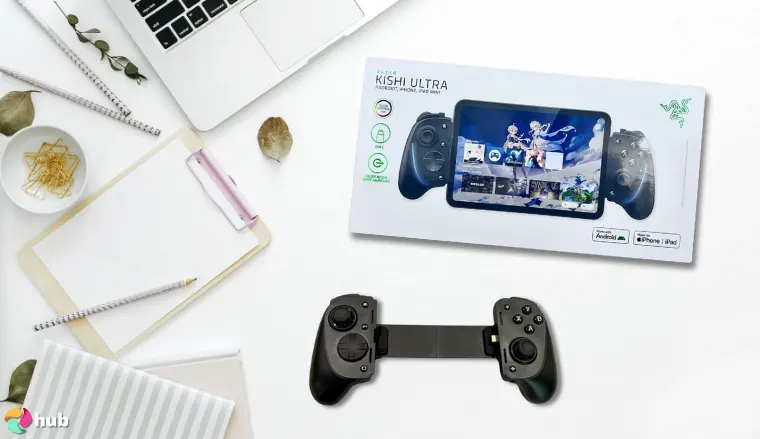
Ranking as the best overall mobile game controller is the Razer Kishi Ultra. What I loved about the Kishi Ultra was the ergonomics and responsive controls. I didn’t expect a mobile controller to feel this premium from the moment I gripped it.
You get mecha-tactile face buttons and an 8-way D-pad, clicky & accurate hall-effect triggers, durable TPSiV joysticks with anti-friction rings, and programmable L4/R4 multifunction buttons next to the bumper buttons.
It feels comfortable in hand and the buttons feel satisfying to press which isn’t the case for all phone controllers.
These are premium, eSports-grade hardware; perfect for PC gaming via Steam Link, PlayStation games through PS Remote Play, Xbox Cloud Gaming, and other game streaming services.
Another unique feature of Kishi Ultra is the Razer PC Remote Play app.
You can access your PC library from Steam, the Epic Games Store, Xbox Game Pass, etc. It has noticeably higher-quality streaming, making it a great option for remote play.
If you want the tightest, most responsive input, stick to games that fully support physical controllers. Mobile-only titles with touch overrides can feel slightly laggy even with the Kishi Ultra.
There’s also the Razer Nexus app for a game launcher or to adjust controller settings like sensitivity, button remapping, macro functions, etc. You can adjust the controller’s haptic vibrations and Chroma RGB lighting for a near-console experience.
You need to use a USB-C connector to plug in your phone to the telescopic controller. The Kishi Ultra supports most USB-C devices like an Android smartphone, the iPhone 15/16 series, the iPad Mini, and 8” Android tablets.
| Pros | Cons |
|---|---|
| ✅eSports Grade Hardware; Tactile Buttons & Durable Sticks ✅ Comfortable Ergonomics ✅ Impressive Software Support; PC Remote Play & Razer Nexus ✅ Supports PC/iPad Connections w/ USB-C ✅ Gamer-centric Chroma RGB Lighting & Haptic Feedback | ❌ Pricey, but worth it for a premium mobile controller |
Final Verdict – For a premium mobile gaming experience, the Razer Kishi Ultra excels with eSports-grade buttons, comfortable ergonomics, and impressive software support other controllers can’t match up to.
2. Bcofo Bluetooth Wireless [Best Budget Mobile Controller]
| Specs | Details |
|---|---|
| Connection Type | (Wireless) Bluetooth 5.0 |
| Includes Programmable Buttons? | Yes (Full customizability & M1/M2 paddles) |
| RGB Lighting Included? | Yes (9 RGB lighting colors) |
| Joystick Type | Hall-effect Joystick |
| Weight | 0.675 lbs |
| Device Compatibility | Android phonesiPhonesiPads/Android tabletsPCNintendo Switch |
| Software Available? | No |
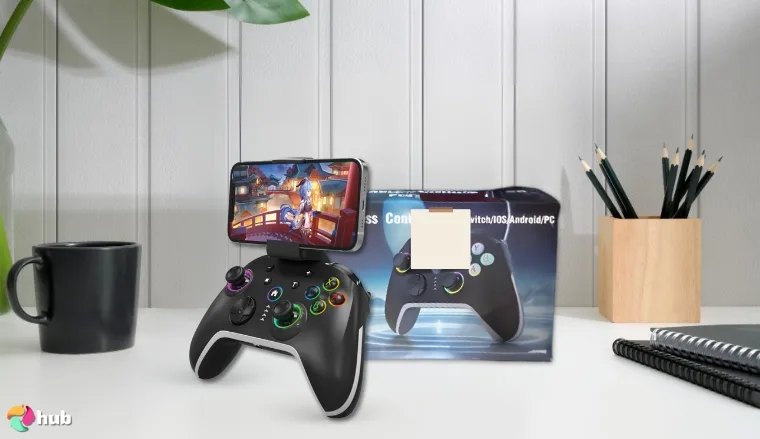
For gamers on a budget, the Bcofo Bluetooth Wireless controller is a great option to play games on a mobile device. It’s not a ‘telescopic’ controller and has a familiar form factor, like the Xbox game controller.
Instead, you can conveniently attach your Android smartphone or iPhone with the phone clip.
And since it uses Bluetooth, you can connect it to other devices such as a PC controller, Nintendo Switch, and larger phones/tablets. If you have multiple gaming devices, this saves you cash from buying controllers for each.
If you want the smoothest Bluetooth connection, pair the controller with one device at a time and make sure your phone is close. You’ll get some lag if multiple Bluetooth devices are active nearby.
Even at a budget price, the Bcofo Bluetooth Wireless controller doesn’t compromise on performance. I was genuinely impressed by how responsive the hall-effect triggers and sticks feel. It doesn’t scream “budget” at all. There’s also a 6-axis gyroscope for motion controls, with dual-motors for immersive haptic vibrations.
On the back, you’ll find two programmable M1 & M2 buttons.
These features make the Bcofo controller a fully-fledged gaming beast for mobile games and cloud gaming like on Xbox Game Pass Ultimate and PlayStation Remote Play.
Since it’s wireless, you will need to charge it which is a slight downside. But at least it features a plentiful 1200mAh battery that can last up to 16 hours on a single charge.
To round off the package, you also have RGB lighting. Around the sticks, face buttons, and home button, you can set 4 different lighting modes and up to 9 different RGB lighting colors.
| Pros | Cons |
|---|---|
| ✅ Accurate & durable Hall-effect triggers & joysticks ✅ Gamer aesthetics; Customizable RGB lighting ✅ Immersive dual-motor vibrations ✅ Works on most Bluetooth-capable devices ✅ Includes 2 programmable back buttons | ❌ Long 3-hour charge time, but the long-lasting capacity counters that limitation |
Final Verdict – The Bcofo Bluetooth wireless controller is affordable but doesn’t compromise functionality; with uber-cool RGB lighting, impressive hardware, durable and responsive hall-effect sticks & triggers, and versatile Bluetooth connectivity.
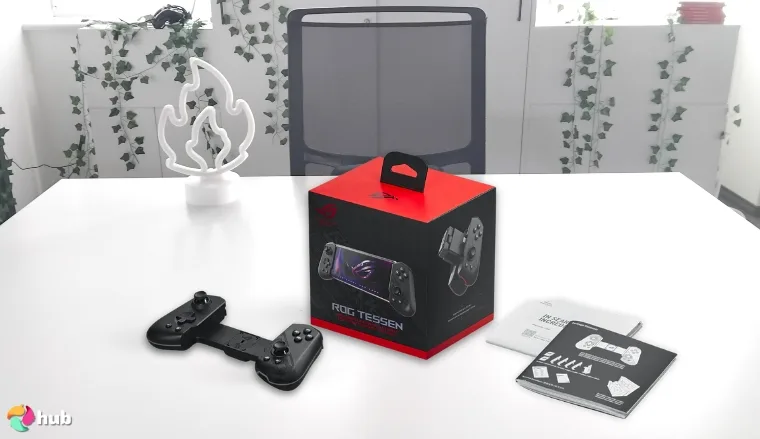
3. ASUS ROG Tessen [Best Mobile Controller for Android]
| Specs | Details |
|---|---|
| Connection Type | (Wired) USB-C |
| Includes Programmable Buttons? | Yes (Aluminum rear paddles, ROG button) |
| RGB Lighting Included? | Yes (Aura RGB) |
| Joystick Type | 18mm ALPS joysticks |
| Weight | 136g / 0.3lbs |
| Device Compatibility | Android phones |
| Software Available? | Yes (Armory Crate App) |
For dedicated Android gamers, the ASUS ROG Tessen is a phenomenal controller. After extensive research, I’ve found that the ROG Tessen has one simple unique feature; a foldable design. I couldn’t believe how natural it felt. I then expected it to get flimsy with use, but it never did.
This makes a super portable mobile controller for on-the-go gaming whether you’re cloud gaming or playing gachas like Genshin Impact. Slip it into your pocket or bag and you’re good to go.
Plus, with the included 7mm – 14.55mm rubber pads, you can use the controller even with phone cases, making it a convenient controller that works with most devices.
The ROG Tessen has the same features as the Razer Kishi Ultra in terms of ergonomics; an outward-extended grip shape for comfortable hours-long gaming sessions.
For best results, always pair the Tessen with Armoury Crate. Remap the rear paddles for high-priority actions, like ultimates or quick item swaps, to maximize gameplay efficiency
On the face buttons and d-pad, you have clicky mechanical switch buttons with shorter actuation, which means near-instant responses in games for accurate, tactile feedback and satisfying presses.
Plus, it also has impressive 18mm-tall joysticks with 22° movement, similar to console controllers so you’re not compromising on accuracy and movement with cloud gaming on Xbox Game Pass Ultimate.
The triggers are analog triggers, which give you multiple inputs depending on how much pressure you pull the trigger, perfect for racing games or controlling your shots in FPS titles.
On the back, you’ll find 2 aluminum rear paddles that you can customize with macros, using ASUS’s Armoury Crate app. The app lets you manage gameplay recordings and screenshots, remap buttons, set up custom commands, and adjust the Aura RGB lighting on the grips.
| Pros | Cons |
|---|---|
| ✅ Ultra portable; unique foldable design ✅ Impressive console-level hardware ✅ Added utility; 2 extra paddles on the rear ✅ Durable aluminum bridge build quality ✅ Highly customizable w/ Armoury Crate app | ❌ Limited compatibility; only supports Android smartphones |
Final Verdict – For dedicated Android gamers, the ASUS ROG Tessen is the perfect choice. It’s got console-quality hardware, clicky & responsive mechanical face buttons, and convenient-to-use rear paddles with impressive customizability.
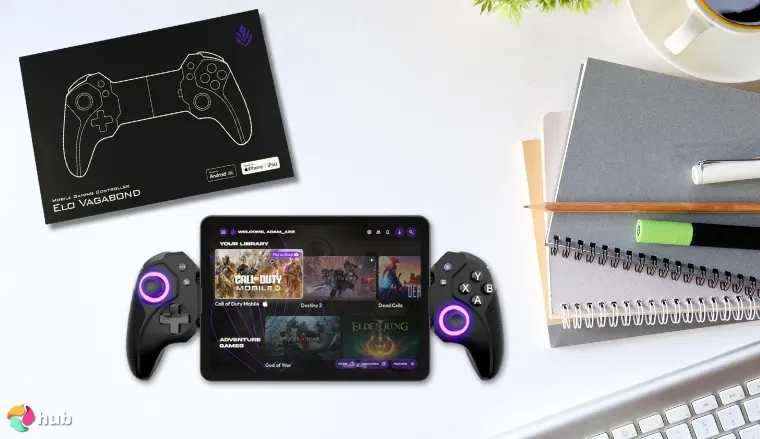
4. ELO Vagabond [Best Call of Duty Mobile Controller]
| Specs | Details |
|---|---|
| Connection Type | (Wired) USB-C |
| Includes Programmable Buttons? | Yes (2 programmable back buttons) |
| RGB Lighting Included? | Yes (Joystick RGB lights) |
| Joystick Type | Full-sized Hall-effect joysticks |
| Weight | 198g / 0.43 lbs |
| Device Compatibility | iPhone 15 series and neweriPad Mini 6th/7th GenMost Android phonesUp to 8.2” tablets |
| Software Available? | Yes (ELO Unleashed App) |
If you need a mobile controller specifically for Call of Duty Mobile, the ELO Vagabond is your best bet.
The ELO Vagabond has the most unique grip with a narrower profile and a non-slip rubberized finish, which in my experience, is one of the most comfortable for a handheld controller.
You can get your fingers all around the grip while the rubber finish keeps it steady and doesn’t let it slip out even with sweaty palms. And if you’re playing ranked CoD Mobile, you better believe there’ll be some sweat.
But what makes this a phenomenal controller for CoD Mobile are the joysticks and analog triggers, both of which are hall-effect and have speedy 1ms latency response time. On the back, you’ll find 2 programmable buttons for extra inputs that other phone controllers often lack. I actually smiled when I mapped my favorite tactical commands to the back paddles. Suddenly, my mobile loadouts felt fully under control.
Use the ELO Unleashed app to assign your most-used skills or perks to the programmable buttons. For CoD Mobile, mapping a crouch or grenade toss here can shave off precious milliseconds and give you an edge in close fights
The ELO Vagabond works with most devices, even with a phone case, and supports up to 8.2” tablets. And to round it off, you can customize almost every aspect of the controller using the ELO Unleashed app.
It’s got a built-in game launcher to turn your phone into a gaming console, button mapping, Xbox Remote Play & Xbox Game Pass library browsing, and more.
Oh, and on the joysticks, you’ll have LED lights in their signature ELO purple just to add to the ‘gamer feel’.
| Pros | Cons |
|---|---|
| ✅ Comfortable non-slip rubberized grip ✅ Super responsive; hall-effect analog triggers & joysticks ✅ Quiet mechanical switches for tactile presses ✅ Includes USB-C charging port & headphone jack ✅ Lightweight; perfect for long gaming sessions | ❌ D-pad feels a bit too small, but you get used to it |
Final Verdict – The ELO Vagabond is a top performer in Call of Duty Mobile with a super ergonomic and comfortable in-hand feel and responsive, accurate triggers & joysticks clocking in a quick 1ms response time.
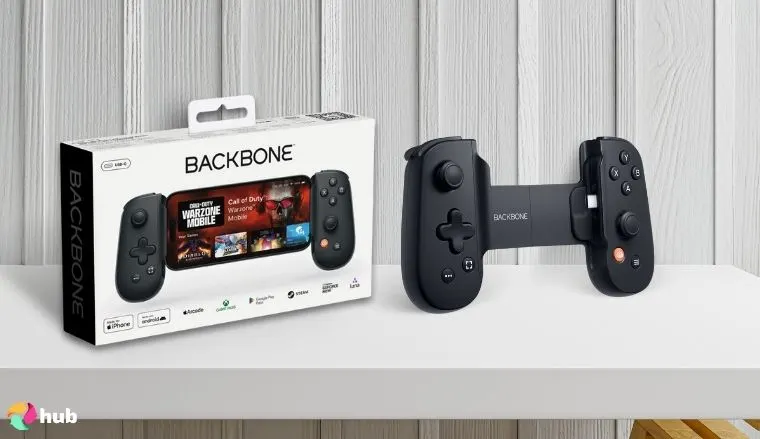
5. Backbone One (USB-C) [Best Mobile Controller for iPhone]
| Specs | Details |
|---|---|
| Connection Type | (Wired) USB-C |
| Includes Programmable Buttons? | No |
| RGB Lighting Included? | No |
| Joystick Type | Standard thumbsticks |
| Weight | 138g / 0.28 lbs |
| Device Compatibility | iPhone 15 series and neweriPhone 6s plus and newer (Lighting port version)Most Android phonesiPads/Android tabletsPCs |
| Software Available? | Yes (Backbone App) |
For iPhone users, the Backbone One ranks as one of the best controllers available. The Backbone One prioritizes simplicity for lightweight, casual gamers. This is the perfect companion for the extensive Apple Arcade collection that doesn’t need as many complicated controls.
I still thoroughly enjoyed its responsive analog triggers with clicky face and directional buttons. With the compact thumbsticks, the controller feels very familiar for Switch gamers and feels like Joycons with a slightly wider base for better grip.
With the included magnetic adapters, you can keep your phone cases on and accommodate a wide range of larger Android smartphones. Another great feature I truly appreciated was the connectivity.
For games that allow on-screen touch gestures, use the Backbone One’s rigid grip to anchor your thumbs near the edge of the screen while mapping less-used actions to the shoulder triggers. It minimizes accidental swipes and gives you micro-precision you usually only see with larger consoles.
You get a 3.5mm headphone jack and a USB-C port which you can use for pass-through charging. I felt confident knowing my phone won’t die in the middle of a boss fight. But connecting a cable to the USB port also allows you to connect to larger devices like iPads and PCs.
Once you plug in the controller, you’ll be directed to the Backbone App. The Backbone app works as a game launcher on mobile so all your games are conveniently accessible.
That said, the Backbone One has noticeably fewer features than other phone controllers, but it’s perfect if you just need a simple, lightweight option for casual games, or as a solid Xbox controller replacement for Game Pass Ultimate, PS Remote Play, or Steam Link.
| Pros | Cons |
|---|---|
| ✅ Responsive & clicky buttons w/ analog triggers ✅ Lightweight & comfortable to use ✅ Wide compatibility: Can connect to PC/tablets via USB-C port ✅ USB-C & Lightning port versions available ✅ Xbox / PlayStation-inspired designs | ❌ Comparatively ‘simple’, but works flawlessly with plug-and-play for iPhones/Androids |
Final Verdict – The Backbone One is a simple but robust iPhone controller to play mobile games. It doesn’t have the intricacies of other controllers but makes up for it with a lightweight build, clicky & accurate buttons, and a refined companion app.
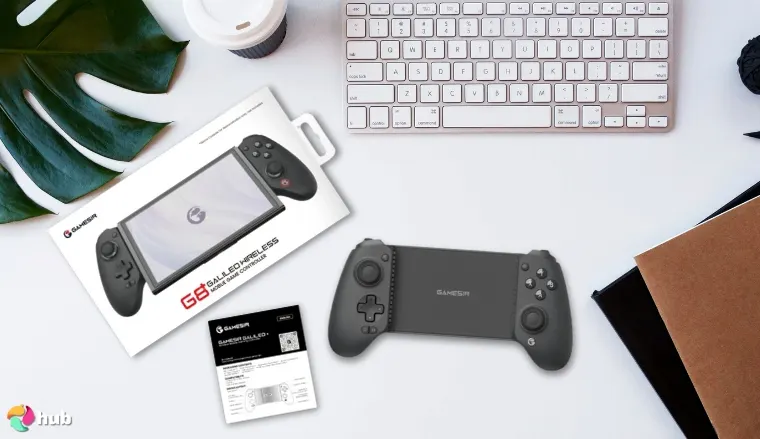
6. GameSir G8 Plus [Best Mobile Controller for Switch]
| Specs | Details |
|---|---|
| Connection Type | (Wireless) Bluetooth |
| Includes Programmable Buttons? | Yes (2 customizable back buttons) |
| RGB Lighting Included? | No |
| Joystick Type | Hall-effect sensing thumbsticks |
| Weight | 314g / 0.69 lbs |
| Device Compatibility | iPhonesAndroid devicesTablets (iOS/Android)Nintendo SwitchPC |
| Software Available? | Yes (GameSir App) |
If you need a reliable mobile controller for your smartphone and Nintendo Switch, it’s hard to beat the GameSir G8 Plus. While it’s a Bluetooth wireless controller, it has the same extendable frame as other phone controllers and fits a variety of devices, including the Switch.
What makes the GameSir G8 Plus unique is the customizable design. I was genuinely impressed handling the magnetic faceplates. It’s satisfying to physically rearrange the buttons and joysticks exactly how I want. You can even change the anti-drift hall-effect joysticks to other grip styles.
Aside from hardware customization, you can also control a lot of the controller’s features with the GameSir app. You can change between an analog trigger for precise control in racing games or a hair trigger for speedy shots in FPS titles.
If you frequently switch between FPS and racing games, set up two separate trigger profiles in the GameSir app and save them to the controller. Then, use the back programmable buttons as a quick “profile toggle.” This keeps your hair triggers and analog triggers optimized for the genre without manually swapping settings every time.
You can remap buttons, set up presets for different games, and much more.
And to ensure you’re not missing out on any of the Joycons features, you still have dual motors that support HD rumble on the Switch and a 6-axis gyroscope for precise motion controls.
You also get a sizable 1000mAh battery in total, so it’ll last quite a while before needing a charge. With its sturdy construction and quality build materials, the GameSir G8 Plus is built to last, making it a great option as one of the best Switch controllers.
| Pros | Cons |
|---|---|
| ✅ Affordable price for everything it has to offer ✅ Impressive customizability; ABXY layout & stick cap customization ✅ Switchable Triggers; Hair Trigger for FPS & Analog Trigger for Racing Games ✅ Impressive software customization ✅ Long-lasting battery life | ❌ Heaviest controller on the list, but still comfortable for prolonged use |
Final Verdict – The GameSir G8 Plus is an impressive wireless controller for Switch and mobile devices especially in terms of customization, in-hand feel, and retaining most of the Switch’s Joycon capability.
7. abxylute S9 Full-Size [Best High-Quality Mobile Controller]
| Specs | Details |
|---|---|
| Connection Type | (Wired) USB-C(Wireless) Bluetooth |
| Includes Programmable Buttons? | Yes (2 customizable back buttons) |
| RGB Lighting Included? | No |
| Joystick Type | Hall-effect thumbsticks |
| Weight | 250g / 0.55 lbs |
| Device Compatibility | iPhone 15 series and neweriPad Mini 6th/7th GenMost Android devicesUp to 8.8” tablets |
| Software Available? | Yes (Abxy Game App) |
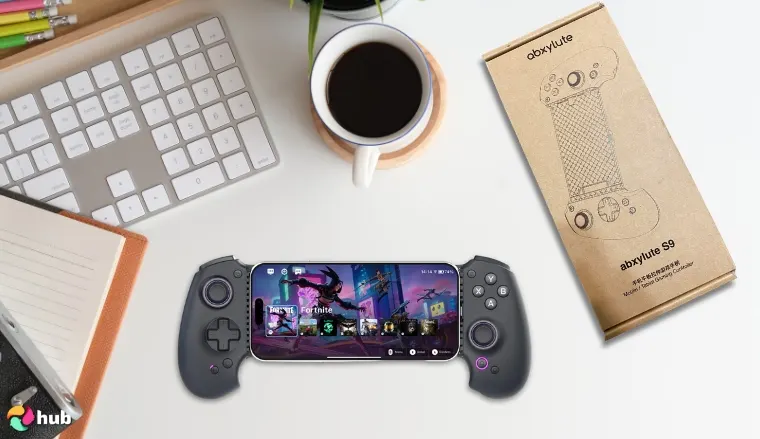
The abxylute S9 full-size controller ranks as the most high-quality controller on the list for a few key reasons. Unlike other telescopic mobile controllers, the abxylute S9 supports both USB-C connections and Bluetooth connectivity.
You still need to connect a USB-C cable for power even in Bluetooth mode, but the versatility lets you use it on bigger tablets and PCs.
On the hardware side, the abxylute S9 has the most premium components you could think of; full-sized hall-effect joysticks, linear hall-effect triggers, 2 programmable back buttons, dual-rotor motors, 6-axis gyroscope, and more.
For competitive shooters or games with heavy combo inputs, set one of the back buttons to a “macro toggle” that lets you swap between preset configurations mid-game. This reduces the need to pause and remap manually.
Essentially, combine every controller featured so far, and you get the abxylute S9, which in my observations, makes it a formidable contender for the best controller on mobile. Frankly, I was blown away by how solid and premium it feels in-hand. Every button press and joystick movement has a satisfying weight and responsiveness.
In-hand, the controller feels premium, with its wide curved grip and anti-slip texture. Pressing the buttons feels responsive, and it’s super lightweight, weighing in at just 250g so it’s comfortable for longer sessions.
And if you appreciate customizability, you can switch out the directional pad with two other options depending on the game you’re playing as well as 2 extra joystick heights for your comfort.
Not to mention the companion app, abxy game, gives you full control with key mapping, joystick sensitivity & trigger adjustments, in-app game launcher, and more.
| Pros | Cons |
|---|---|
| ✅ Versatile; USB-C & Bluetooth connectivity ✅ Fully customizable; exchangeable joysticks, face plate, d-pads, face buttons ✅ Premium hardware, affordable price ✅ Comprehensive companion app for full control ✅ Accurate & durable hall-effect joysticks & triggers | ❌ Uses membrane face buttons, but is still responsive & satisfying to use |
Final Verdict – The abxylute S9 full-size controller is the complete package. It’s got all the best hardware, USB-C & Bluetooth connectivity, and a comfortable in-hand feel, at a price that can’t be beat.
8. Black Shark BIGBIG WON [Best PUBG Mobile Controller]
| Specs | Details |
|---|---|
| Connection Type | No connection (plug-and-play) |
| Includes Programmable Buttons? | No |
| RGB Lighting Included? | No |
| Joystick Type | None |
| Weight | 0.067 lbs |
| Device Compatibility | Android devicesiPhones |
| Software Available? | No |
For dedicated PUBG Mobile fanatics, the Black Shark BIGBIG WON controller is a top-tier option.
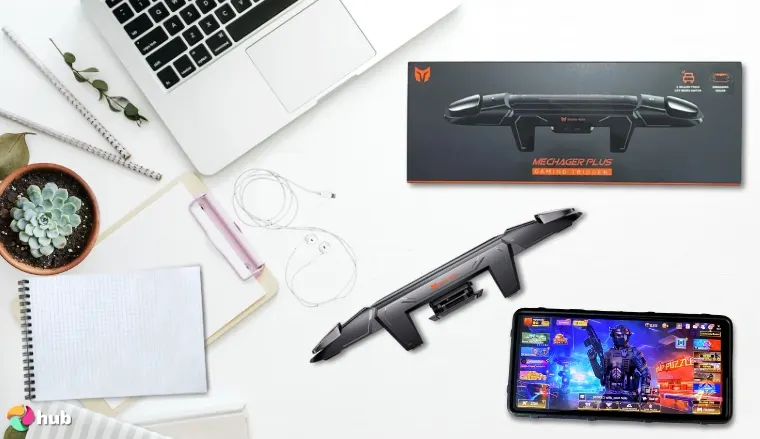
As you know, PUBG Mobile doesn’t support controllers, but phone trigger controllers like the BIGBIG WON circumvent these limitations by giving you physical trigger buttons for aiming and shooting. I loved having actual responsive triggers as they made aiming and shooting way less frustrating on mobile.
It doesn’t require any power or a connection; simply clip it onto the side of your phone and you’re good to go. Adjust your aim/shoot buttons to the two silicon pad input positions, and you’ve got two reliable zinc-alloy triggers to streamline the PUBG Mobile experience.
Fine-tune the trigger positions slightly toward your strongest fingers and adjust in-game touch sensitivity accordingly. This can shave off milliseconds per shot, which adds up in tense ranked matches
The BIGBIG WON uses zinc alloy connected with a copper-silver alloy wire to translate trigger presses to physical screen touches. With the mechanical micro-switch build, you can rest assured of its durability and it won’t break down on you.
The grip itself is comfortable to use and the spacing keeps the ergonomics optimized even for hours-long sessions.
Considering PUBG Mobile itself doesn’t allow controllers, the BIGBIG WON controller is the next best thing.
| Pros | Cons |
|---|---|
| ✅ Simple to use; plug-and-play ✅ Durable mechanical switch build ✅ Clicky & responsive triggers ✅ Recess design to prevent scratches/damage ✅ Supports phone cases for convenience | ❌ Only has trigger buttons, but perfect for PUBG mobile |
Final Verdict – The Black Shark BIGBIG WON trigger controller will revolutionize your PUBG Mobile gameplay with tactile & durable triggers in a super compact form factor.
9. SteelSeries Stratus+ [Best Mobile Controller for PC Gamers]
| Specs | Details |
|---|---|
| Connection Type | (Wireless) Bluetooth for Android/Chromebook(Wired) USB-C for Windows |
| Includes Programmable Buttons? | No |
| RGB Lighting Included? | No |
| Joystick Type | ALPS analog thumbsticks |
| Weight | 244g / 0.54 lbs |
| Device Compatibility | Android devicesChromebooksPCs |
| Software Available? | No |
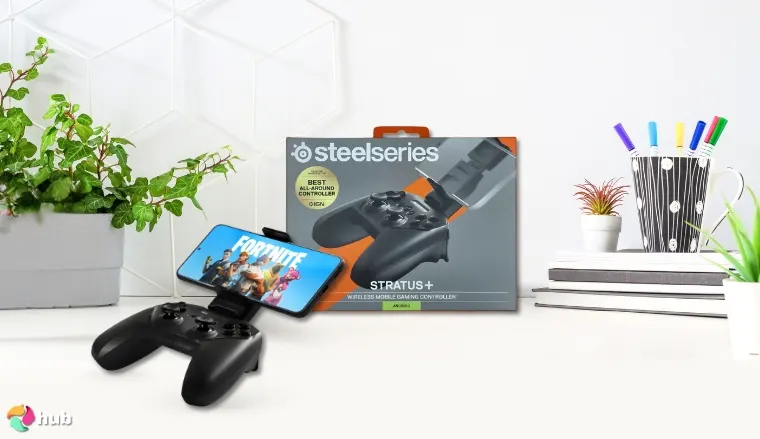
Lastly, we have the best controller for both mobile and PCs, the SteelSeries Stratus+. As far as phone controllers go, the Stratus+ has a familiar console controller form factor that feels just right in hand.
Holding this thing, I actually felt like I could go full marathon mode – no awkward angles, no hand cramps, just pure gaming focus.
For PC gaming, try using the wired USB-C mode with high-sensitivity in-game settings. This removes any possible Bluetooth latency, making the Stratus+ feel almost indistinguishable from a console-quality wired controller.
With the included phone mount, you can attach your Android device and connect via Bluetooth. The Stratus+ supports Bluetooth connectivity for Android and Chromebooks natively and can connect for PC use with a wired USB-C connection.
The most impressive part about the controller is battery life; on a single charge, it’ll last you a staggering 90 hours, and charging for just 15 minutes nets you 12 hours of use. This solves the biggest problem with wireless controllers, battery drain, which the Stratus+ handles incredibly well.
The triggers on the controller use hall-effect magnetic sensors so they’re responsive, precise, and durable.
But the slight downside is the thumbsticks are standard ALPS thumbsticks which aren’t as durable as hall-effect sticks, but in my experience, should still hold up well long-term.
| Pros | Cons |
|---|---|
| ✅ Long-lasting battery life; up to 90 hours ✅ Durable & responsive hall-effect triggers ✅ Versatile; Bluetooth/wired connectivity support ✅ Very affordable compared to other phone controllers ✅ Comfortable ergonomic design | ❌ Uses less durable ALPS thumbsticks, but still very durable for long-term use |
Final Verdict – The SteelSeries Stratus+’s familiar & ergonomic form and staggering battery life make it a fantastic controller for mobile and PC gamers alike.
Key Features for the Best Mobile Controller
Getting a mobile game controller is a nuanced decision; you need to consider the type of games you want to play. Are you going all in on mobile games? Need a dedicated controller for cloud gaming services like Xbox cloud gaming or PlayStation Remote Play?
Depending on these factors, the ‘best’ mobile game controller might be different for you:
1. Connectivity
Bluetooth:
- Phone controllers that utilize a Bluetooth connection are incredibly convenient and provide wireless freedom.
- A wireless controller can be used on other devices like bigger tablets, and PCs, and as a console controller like the Nintendo Switch.
- Since it’s a wireless Bluetooth connection, it is possible to experience latency. You also have to charge it separately and have to deal with battery management.
Wired (USB-C):
- Wired phone controllers use a USB-C connector for a direct connection to your device, minimizing input lag and latency issues.
- They also don’t have a separate battery and are powered by your mobile phone so it’s more convenient to bring around.
2. Controls and Input
| Category | Key Points |
|---|---|
| Analog Sticks | Responsive and accurate analog sticks ensure smooth camera control and movement.Aside from accuracy, keep in mind thumbstick dead zones and sensitivity. Dead zones influence how much you have to move the sticks to register an input. Sensitivity relates to how much stick movement produces in-game movement.For improved longevity, find anti-stick drift controllers with hall-effect thumbsticks. Stick drift results in the controller making movements by itself, ruining the gaming experience. |
| Buttons | Button layout, size, and spacing are crucial for a comfortable gaming experience. Properly positioned and sized buttons also prevent missed presses.Responsive shoulder and trigger buttons are crucial for many games, but especially FPS games. Look for controllers that have mechanical buttons vs. membrane buttons.Mechanical buttons like the ASUS ROG Tessen feel more tactile when pressed, are clickier, and have shorter actuation for instant responses. |
| D-Pad | D-Pads are crucial for 2D games like platformer games, fighting games, and retro game emulation. A good D-pad can be a game changer for accuracy and responsiveness.Floating D-pads offer bigger range and flexibility at the cost of precision and cross-style D-pads have solid feedback but can feel harder to input diagonal directions.Find a mobile game controller with a D-Pad suitable for the games you like playing. |
| Triggers | Your mobile game controller triggers play a big role in your performance. Having a reliable trigger layout allows for more accurate and satisfying gameplay.There are two types of triggers, analog triggers and digital triggers.Digital triggers only register one input; whether you’ve pressed it or not. Suited to ‘simpler’ mobile games that don’t need fine control, like FPS games.Analog triggers have a range of inputs that vary depending on how much pressure you exert. Ideal for games that require fine control, like racing games to control acceleration/braking.Lower trigger travel means inputs register faster, while higher trigger travel gives you more control. Higher sensitivity means you produce max output at slight pulls, while lower sensitivity requires full pulls for max output. |
| Additional Buttons | Consider controllers with additional buttons like the GameSir G8 Plus for added customizability.You can program extra buttons to your liking, so you have extra ways to pull up your map, throw a grenade, check in-game stats, etc.Extra buttons are great for games, like Diablo Immortal, that require a lot of inputs which may be lacking on other mobile controllers and touchscreen controls. |
3. Phone Compatibility and Size
- Consider the size of your phone and compatibility with the controller.
- Most telescopic game controllers extend freely that fit most compatible devices (Android/iOS) and even some tablets, with most maxing out around 8.2” devices.
- If you prefer a console controller style, a clip-on controller like the Bcofo Bluetooth Wireless.
4. Battery Life
- If you’re getting a wireless Bluetooth controller, battery life is an important factor to consider.
- How much battery life it supports equates to how much you can play without needing to charge. If you’re planning on long sessions, consider controllers with long battery life like the SteelSeries Startus+.
- Get a wired controller if you don’t mind using your phone’s battery to power the controller.
5. Ergonomics and Comfort
- The style of the grip determines how comfortable it is to use during long gaming sessions.
- Mobile gaming controllers can feel cramped in larger hands. For a more comfortable in-hand feel, consider controllers with wider grips like the abxylute S9.
- Weight is another consideration; if it’s too heavy, it feels tiring to hold, too light and it feels ‘cheap’. Y
- For better grip, controllers like the GameSir G8 Plus with an anti-slid textured surface are great for comfort so it doesn’t slip out of your hands.
6. Software and Customization
- Most of the phone controllers on the list also have a companion app/software to allow customization like the Razer Kishi Ultra, and ELO Vagabond.
- These apps work as game launchers or provide customization like button remapping/programming, adjustments to trigger/thumbstick sensitivity, and creating custom profiles for your favorite mobile games.
FAQs
What is the best mobile controller?
For its premium feel, impressive hardware, and overall look with RGB Chroma lighting, the Razer Kishi Ultra is one of the best mobile controllers in the market today. It’s got a fantastic in-hand feel and ergonomics, and even works with PC or larger tablets via USB-C port connection.
How to connect controller to CoD Mobile
To connect a controller for CoD Mobile, you need to connect the controller via the USB-C connector on the controller or pair it with Bluetooth for wireless controllers. Then open CoD Mobile > tap the ‘Gear’ icon > select the ‘Controller’ tab > tap ‘Settings’ > activate the ‘Enable Controller Support’ toggle.
Can you play PUBG with a controller?
No, PUBG Mobile does not officially support controllers. However, you can look at controllers like the Black Shark BIGBIG WON which is a clip that acts as triggers for on-screen controls to streamline aiming and shooting.
What mobile games support controllers?
Many mobile games support controllers like Genshin Impact, Diablo Immortal, Zenless Zone Zero, Dead Cells, CoD Mobile, Stardew Valley, etc. But not all do, like PUBG Mobile. In the App Store, there is an icon that says ‘Controller Supported’.Otherwise, check the app store description or online for mention of controller support.
How to connect PS5 controller to phone?
To connect a PS5 controller to your mobile phone, press and hold the ‘Create’ and ‘PlayStation’ buttons until it blinks. Go to your phone’s Bluetooth settings, and select the controller to pair it and connect.
How to connect Xbox controller to phone?
To connect an Xbox control to a mobile phone, turn on the controller and press and hold the ‘Pair’ button for 3 seconds, then release. Check your phone’s Bluetooth settings and select the controller to pair it and connect.