



10 Best External SSD for 2026: Speedy, Reliable & Affordable

Eneba Hub contains affiliate links, which means we may earn a small commission if you make a purchase through them—at no extra cost to you. Learn more

The best external SSD combines speed, reliability, and portability that internal SSDs lack. However, it’s easy to get lost in so many options and manufacturers. All promise blazing-fast transfers, wide compatibility, and long-lasting durability, but very few actually deliver.
I did all the heavy lifting for you to separate the men from the boys. In other words, I rounded up the 10 best external SSD options for speed, reliability, and ample storage options for every budget. From cheap to flagship external SSDs, this list covers all the best picks in depth.
Jump to:
Our Top Picks for External SSD
Today’s comprehensive list holds the 10 most reliable external SSD options. But before I get there and catch that train, let me quickly present my 3 favorite portable SSDs. These offer the best performance, speed, and storage options for your money:
- Crucial X9 Pro – My #1 portable SSD with up to 2 TB capacity and impressive USB 3.2 connectivity for lightning-fast NVMe speeds, brief loading times for games, and a tank-like chassis for impeccable durability.
- Lexar ES3 – The best external SSD for a low price, and an entry-level solution for upgrading from an HDD, with respectable read/write speeds, up to 2 TB of storage, and support for computers, phones, gaming consoles, and laptops.
- Samsung T9 Portable – Samsung’s workhorse, with up to 4 TB of speedy SSD storage, specifically designed for heavy file loads, consistent reading/writing performance, and support for all platforms.
The best external SSD is just a click away, or you might have already picked one from above. In any case, I promised 10 fast and reliable options, and I hate breaking my promises. Read on and meet your new portable file carrier.
10 Best External SSD: Work, Game, and Travel Worry-Free
These portable SSDs provide speed, portability, and generous storage for gamers, content creators, photographers, students, and everyday users. As promised, the 10 best external SSD picks are below, with their features, pros, and cons to make your choice fuss-free.
1. Crucial X9 Pro [Best Overall External SSD]
| Specs | Details |
|---|---|
| Storage capacity | Up to 4 TB |
| Connectivity | USB-C (USB 3.2 Gen 2) |
| Read/Write speed | 1,050 MB/s |
| Security | 256-bit AES hardware encryption, password protection |
| Special features | Bonus software (Mylio Photos+ and Acronis True Image) |
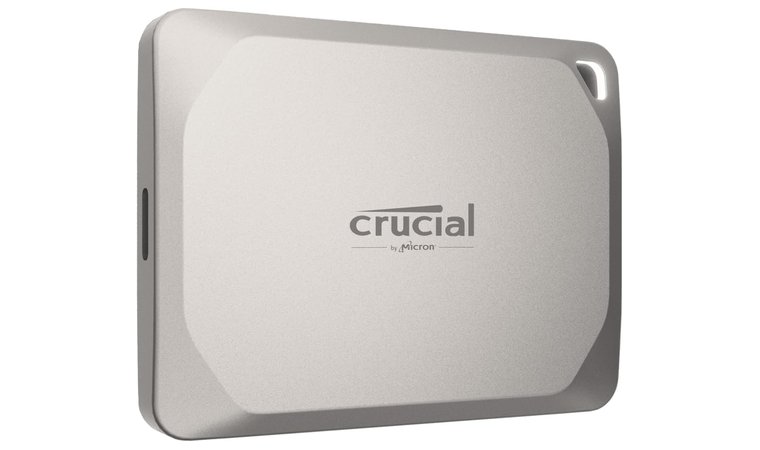
The Crucial X9 Pro is the best portable SSD, combining ample storage, excellent connectivity, lightning-fast transfers, and an inspiring design. For an external SSD, the Crucial X9 Pro is fast and delivers NVMe-level speed.
Compatibility-wise, Crucial X9 Pro works on all devices. Thanks to USB-C and USB-A connectivity options, both Windows and macOS users can enjoy it. Meanwhile, its consistent performance makes it ideal for transferring large files and having shorter load times in games.
Crucial X9 Pro simply ticks all the boxes and is the #1 pick for speed, capacity, build quality, and connectivity.
One of my favorite aspects is the build quality. Crucial X9 Pro’s chassis has drop-proof durability of up to 7.5 feet. Even if you’re clumsy and it hits the ground, your data remains unfazed. You can get Crucial X9 Pro in 1 TB, 2 TB, and 4 TB variants, ideal for casual and professional users.
| Pros | Cons |
|---|---|
| ✅ Fast read/write speeds ✅ Great connectivity (works on both Windows and macOS) ✅ Flexible storage sizes ✅ Durable body (drop-proof for up to 7.5 feet) ✅ Elegant design ✅ Fast loading for gamers | ❌ No USB-A adapter included (you may not need it, and it’s slower either way) |
Final Verdict: Crucial X9 Pro embodies the best external SSD perfectly, thanks to its versatile performance, impressive speed, multiple storage sizes, and broad compatibility.
2. Lexar ES3 [Best Budget External SSD]
| Specs | Details |
|---|---|
| Storage capacity | Up to 2 TB |
| Connectivity | USB-C (USB 3.2 Gen 2) |
| Read/Write speed | 1,050 MB/s/1,000 MB/s |
| Security | DataShieldTM 256-bit AES encryption |
| Special features | Heat dissipation with double-layer graphite sheets |
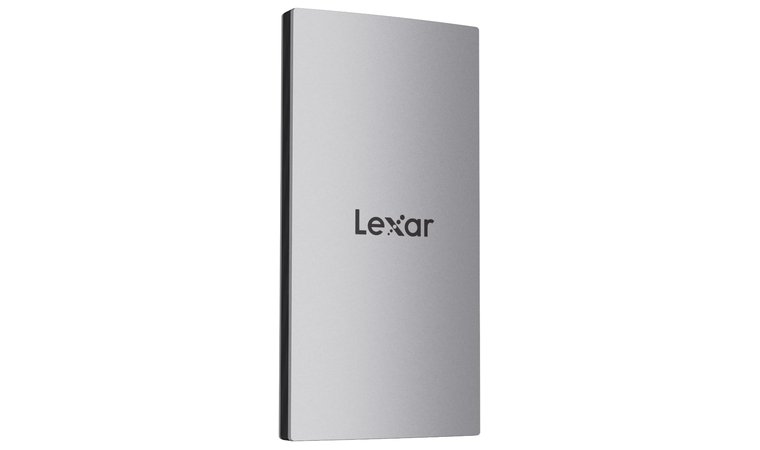
Lexar ES3 has a sleek design and small dimensions, highlighting its extreme portability. For an entry-level option, it’s reasonably fast, with up to 1,050 MB/s reading and 1,000 MB/s writing speeds. I find Lexar ES3 particularly great for upgrading from old and dusty HDDs.
It’s not the speediest, but the performance jump is immediately noticeable. Lexar ES3 offers 1 TB or 2 TB of storage, perfect for everyday users and some professional work. Thanks to its exceptional compatibility, Lexar ES3 reliably works on all platforms and even gaming consoles.
Lexar ES3 is a perfect choice on a budget, offering exemplary speeds for the price. and serving as a worthy upgrade from a snail-slow HDD.
Being the best external SSD at the price, Lexar ES3 also includes 256-bit AES encryption software to protect your files top to bottom. At under a hundred quid, you’re hard-pressed to find a more versatile, better-looking, and faster portable SSD.
| Pros | Cons |
|---|---|
| ✅ Competitive price (usually around $100) ✅ Noticeably faster than even the best HDD options ✅ 256-bit AES hardware encryption ✅ Sleek design makes it stand out ✅ Great for gaming consoles ✅ Very portable due to small dimensions | ❌ It could be sturdier, but the build quality is still great for the $100-or-so price |
Final Verdict: If you want to spend little, but still enjoy massive storage, encryption, solid speeds, and a show-off design, pick Lexar ES3. It’s the best external SSD for under $100.
3. Samsung T9 Portable [Best External SSD for Gaming]
| Specs | Details |
|---|---|
| Storage capacity | Up to 4 TB |
| Connectivity | USB-C (USB 3.0) |
| Read/Write speed | 2,000 MB/s |
| Security | 256-bit hardware encryption |
| Special features | Dynamic Thermal Guard |
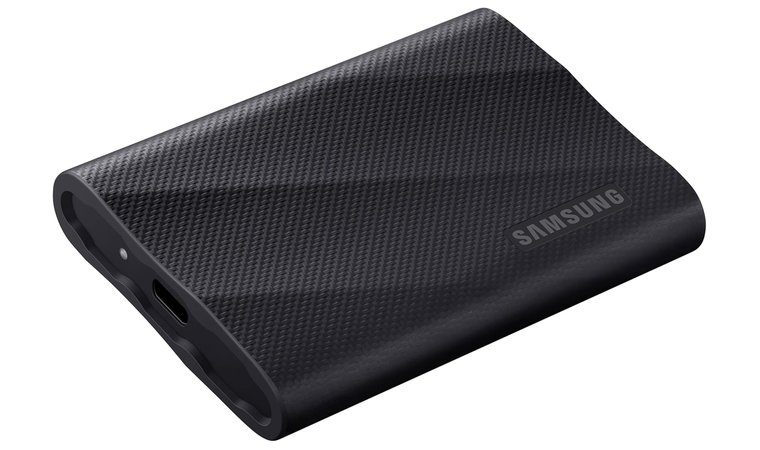
Samsung T9 Portable is the most reliable external SSD with gigantic storage, sufficient speed, and robust design. The version I like the most is the 4 TB one, and while it’s a bit costlier, Samsung’s unwavering performance and speed make it worth your money.
It’s a fantastic external SSD for gaming if you seek brief loading times and zero latency. Similarly, it handles frequent read/write cycles and works well with gaming consoles that apply timely updates and handle save game loads pretty much every day.
Samsung T9 Portable includes a few special features I always admire. The first is 256-bit hardware encryption, but the other, Dynamic Thermal Guard, prevents the hard drive from overheating and potentially damaging its content.
Samsung’s magnum opus, with speeds, build quality, and security worthy of a flagship title, at a slightly higher, but still fair price.
Plus, the T9 Portable can endure up to 9.8 feet drops, and no, that doesn’t mean you should play rugby with it.
| Pros | Cons |
|---|---|
| ✅ Outstanding read/write speeds ✅ Robust 256-bit hardware encryption ✅ Dynamic Thermal Guard protects the drive against overheating ✅ Extreme durability (up to a 9.8 feet drop) ✅ Works with gaming consoles ✅ It handles frequent read/write cycles with excellent reliability | ❌ Not the most budget-friendly, but well worth the price for its speed and reliability |
Final Verdict: Samsung T9 Portable is one of Samsung’s finest external SSDs with impeccable performance, rock-solid durability, and speed built for gamers, professional users, and content creators who want nothing but the best.
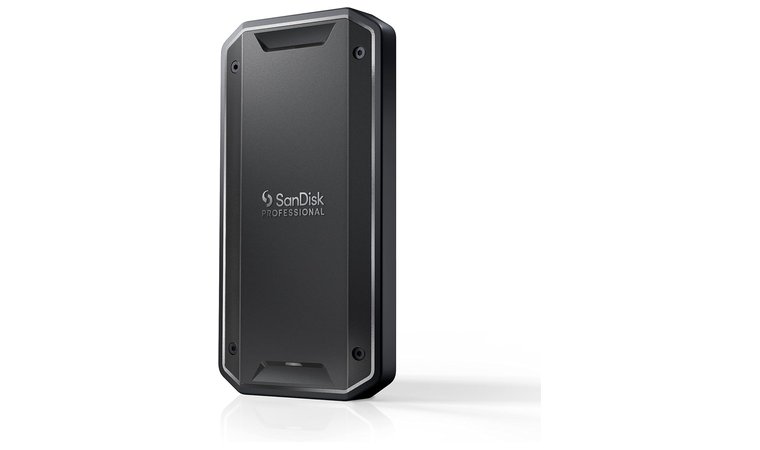
4. SanDisk Professional PRO-G40 [Fastest Thunderbolt SSD]
| Specs | Details |
|---|---|
| Storage capacity | Up to 4 TB |
| Connectivity | Thunderbolt 3, USB-C (USB 3.0) |
| Read/Write speed | 4,000 MB/s with Thunderbolt 3 |
| Security | 256-bit hardware encryption |
| Special features | 4,000 lb crush resistance |
SanDisk Professional PRO-G40 beats almost all the best external hard drives in speed, reliability, and ruggedness. This SSD features extremely fast read/write speeds via Thunderbolt interface, which makes it perfect for editors and professionals working with large datasets.
Due to its robust performance, SanDisk Professional PRO-G40 treats gamers like kings. No lag, no eternal loading times. This makes it good for Xbox and PlayStation, but also beefy PC configurations where a fast SSD is an essential cog for gaming.
We chose the PRO-G40 for its versatile connectivity, stable performance, and sturdiness that make it portable and ready for traveling with you anywhere.
SanDisk’s craftsmanship is reflected in its design. The SSD looks like it’s carved out of granite, and it’s IP68 dust/water resistant. SanDisk states it’s crush-resistant for up to 4,000 lb of pressure. SanDisk’s capacity goes up to 4 TB, providing ample space for everyone.
| Pros | Cons |
|---|---|
| ✅ Thunderbolt support ✅ Up to 30 Gbps speeds ✅ IP68 dust and water resistance ✅ Up to 4 TB of storage (great for content creators and business users) ✅ Low latency for gaming | ❌ Premium price tag that perfectly justifies its unbeatable speed and storage capacity |
Final Verdict: SanDisk’s main features are unrelenting speed (up to 4,000 MB/s), Thunderbolt compatibility, and outstanding durability, which make this the best external SSD for travelers and professionals with the highest quality demands.
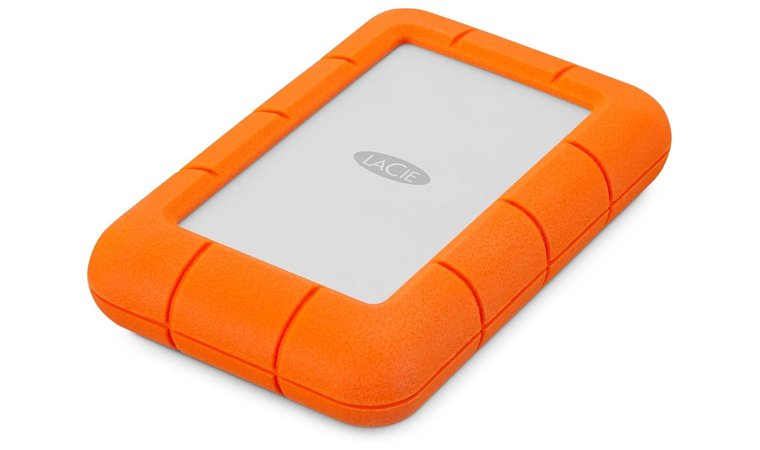
5. LaCie Rugged SSD Pro5 [Best Future-Proof Rugged SSD]
| Specs | Details |
|---|---|
| Storage capacity | Up to 5 TB |
| Connectivity | USB-C (USB 2.0/3.0) |
| Read/Write speed | 6,700 MB/s/5,300 MB/s |
| Security | 256-bit hardware encryption |
| Special features | 2 years of data recovery services |
LaCie Rugged SSD Pro5 is a unique-looking SSD with some unique specs. As the name implies, it’s a rugged, durable piece of hardware, resistant to shock, dust, and water. It’s an amazing option for work, travel, and environments where reliability matters.
Despite its build, LaCie Rugged SSD Pro5 isn’t too heavy, so it’s still portable. Speed-wise, it’s impressive. SSDs are faster than HDDs, but LaCie’s SSD even beats other similarly priced SSD alternatives, with read speeds of up to 6,700 MB/s.
This one was our choice for its firm and rugged body, higher-than-average speeds, and an inspiring design that sets it apart from cheaper, uninspiring SSDs.
LaCie offers up to 4 TB of storage, highly compatible with all major platforms, including macOS and Windows computers, iPads, iPhones, Android devices, and more. Finally, there’s the data recovery service, handy for pretty much impossible data losses in very rare scenarios.
| Pros | Cons |
|---|---|
| ✅ One of the most well-built SSDs for durability ✅ Up to 20 Gbps speeds ✅ It works with all platforms (including mobile devices) ✅ Data recovery service prevents data loss ✅ Attractive design | ❌ Requires Thunderbolt 5 for top speeds (it’s still fast enough with older versions) |
Final Verdict: LaCie Rugged SSD Pro5 is the best external SSD for durability, speed, and portability. It’s an all-arounder compatible with all devices, for both casual users and highly demanding professionals.
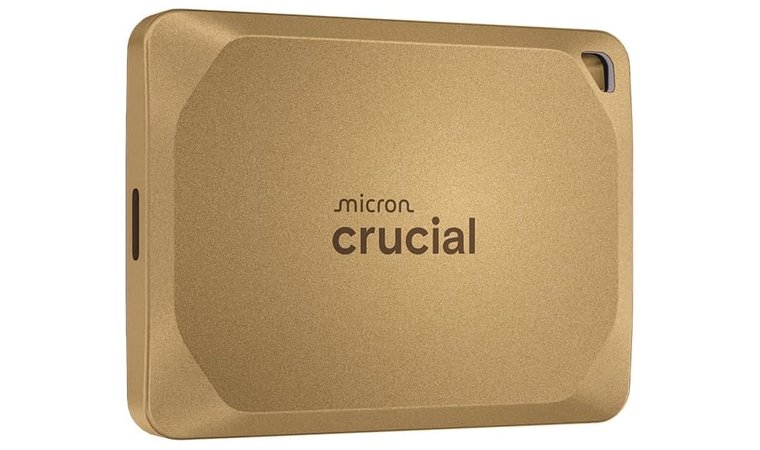
6. Crucial X10 Pro [Best High-Speed SSD]
| Specs | Details |
|---|---|
| Storage capacity | Up to 4 TB |
| Connectivity | USB-C (USB 3.2) |
| Read/Write speed | 2,100 MB/s/2,000 MB/s |
| Security | Password protection |
| Special features | Mylio Photos+, Acronis True Image, and Adobe Acrobat Pro software included |
Crucial X10 Pro looks like it means business, and it really does. The golden color accentuates its value and presents the X10 Pro like a durable, fast, and reliable portable SSD. It’s all about high throughput and low latency, enabling fast file transfers, backups, and editing.
Gamers love Crucial X10 Pro for shorter loading times and gaming without lag. In the same fashion, Crucial X10 Pro’s connectivity allows it to work on all devices. You can use it on some of the best laptops to access files on the fly, or on a computer, as an internal drive replacement.
A golden-colored SSD that performs just as it looks. Speed, compatibility, design, capacity, you have everything in this neat little package.
Crucial is known for flexibility and allows you to pick from 1 TB to 4 TB of storage, with notable price differences when that matters.
| Pros | Cons |
|---|---|
| ✅ Unique design, especially the golden version ✅ High throughput and low latency for fast reading/writing and gaming ✅ Flexible capacity options ✅ Great for swift backups ✅ Aluminum build guarantees rock-solid durability | ❌ It may get hotter during prolonged use, but it still preserves its performance |
Final Verdict: Crucial X10 Pro is the best portable SSD if you seek maximum speed, rugged design, and lag-free gaming and file transfers. Add outstanding compatibility and spacious storage, and you get one of the most impressive SSDs for the price.
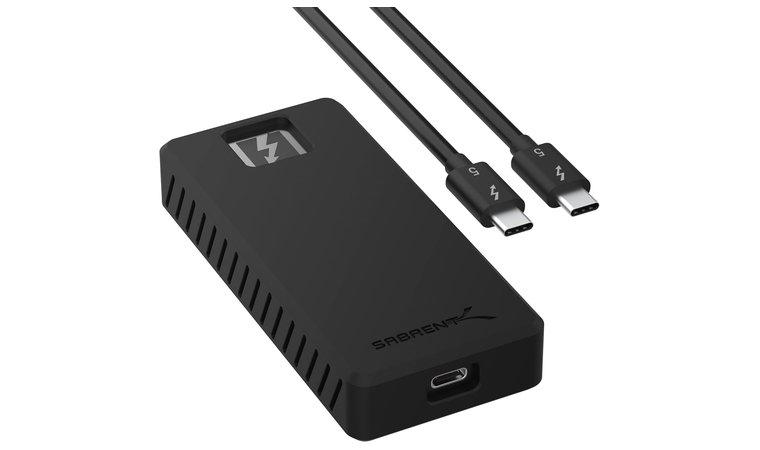
7. SABRENT Rocket XTRM 5 [Best Thunderbolt 5 Portable SSD]
| Specs | Details |
|---|---|
| Storage capacity | 4 TB |
| Connectivity | USB-C, USB4, Thunderbolt 3, 4, 5 |
| Read/Write speed | 6,000 MB/s/5,000 MB/s |
| Security | Silicone sleeve for additional drop protection |
| Special features | S.M.A.R.T. software monitoring of the drive’s temperature and health |
SABRENT Rocket XTRM 5 has an interesting, low-profile, not-in-your-face design. A tiny black rectangle like this can be extremely powerful, and is, thanks to Thunderbolt 5 connectivity that provides range-topping speeds and support for Mac users.
The Rocket XTRM 5 is ideal for professionals dealing with 4K/8K videos, large datasets, and demanding workflows where performance is quintessential. SABRENT made this SSD shock-resistant, and the aluminum + silicone build makes it feel premium in hand.
Superb speeds with TB5, ready to turn your slow transfers into mere teleportation, on all devices, including Mac, PC, gaming consoles, and others.
While a bit pricier overall, the Rocker XTRM 5 justifies the cost. You get 4 TB of storage, up to 80 Gbps read/write speeds via Thunderbolt 5, and top-tier performance for gaming and casual use, making it a masterclass in versatility.
| Pros | Cons |
|---|---|
| ✅ Thunderbolt 5 support ✅ Plug-and-play connectivity on Mac, PC, and gaming consoles ✅ Ideal performance for professional photographers and videographers ✅ One of the fastest SSDs for the price ✅ Shock-resistant body | ❌ Not the most inspiring design, but it’s well-built and durable |
Final Verdict: SABRENT Rocket XTRM 5 is best for read/write speed with Thunderbolt 5, with emphasis on portability, durability, and large storage for demanding users and gamers.
8. SanDisk 1TB Extreme [Best External SSD for Mac]
| Specs | Details |
|---|---|
| Storage capacity | Up to 8 TB |
| Connectivity | USB-C (USB 3.2 Gen 2) |
| Read/Write speed | 1,050 MB/s/1,000 MB/s |
| Security | 256-bit AES hardware encryption and password protection |
| Special features | SanDisk Memory Zone app for file management |
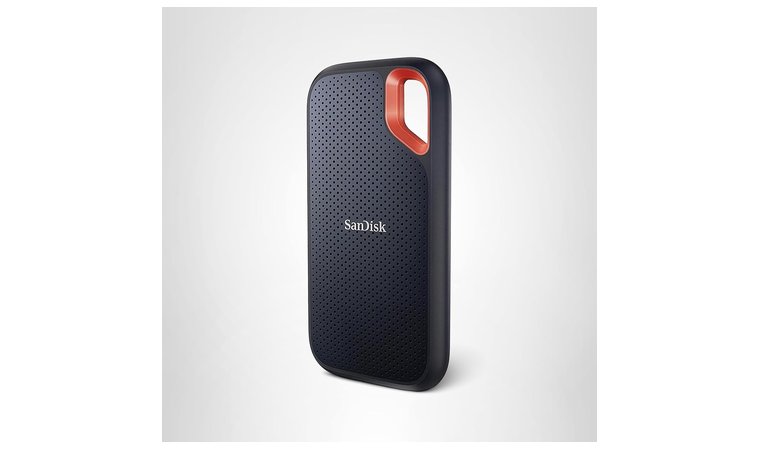
SanDisk 1TB Extreme is the best external SSD for Mac for a fairly low price. You’ll notice its flexible storage options, ranging from 500 GB to 8 TB, more than the previous options. I prefer the 1 TB variant for its low price and a balance of speed, reliability, and portability.
SanDisk 1 TB Extreme is extreme at nothing. However, it’s good for dependable backups, media libraries, and as travel storage for everyday file access. Its design encourages portability, with a handy finger-sized hole for attaching it to your keys.
A low-cost option with flexible storage size, decent performance, and a practical design that blends portability and unique visual aesthetics.
It also comes in a few different colors, blending beauty with a stellar build quality thanks to water and dust resistance. SanDisk 1 TB is primarily designed for tablets, computers, and laptops, and while gamers can also benefit, its read/write speeds aren’t the most suitable.
| Pros | Cons |
|---|---|
| ✅ Relatively inexpensive ✅ Reliable and fast file backups ✅ Finger-sized hole lets you attach the SSD to a backpack or other gadgets ✅ Good-looking SSD ✅ Highly flexible storage sizes that start at 500 GB | ❌ The build quality could be better, but it’s still water- and dust-resistant |
Final Verdict: SanDisk 1TB Extreme is a solid portable SSD for everyday use, emphasizing beautiful design, flexible storage, productivity, and everyday access for a fair price.
9. Corsair EX400U [Best USB4 SSD]
| Specs | Details |
|---|---|
| Storage capacity | Up to 4 TB |
| Connectivity | USB-C (USB 3.2 Gen 2), Thunderbolt 4, MagSafe |
| Read/Write speed | 4,000 MB/s/3,600 MB/s |
| Security | No security features |
| Special features | Corsair SSD Toolbox for firmware updates and drive monitoring |
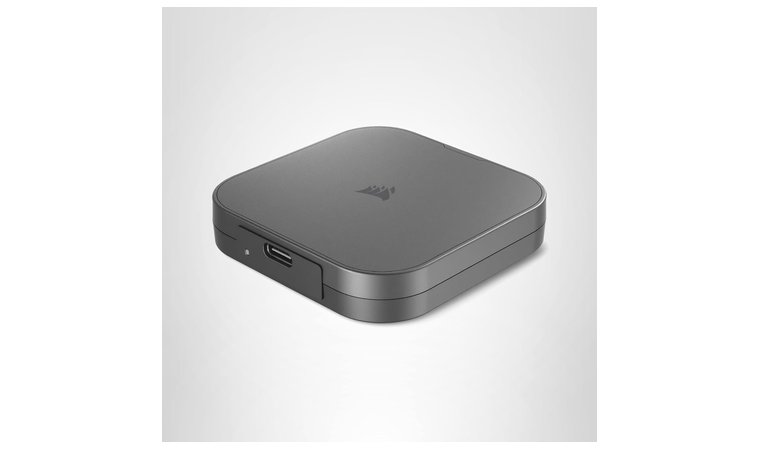
Corsair EX400U sits among the best external SSDs for gamers, thanks to support for USB4. USB4 is faster, allowing high speeds, which produce versatile storage for gaming, media consumption, and work. Above all, I really like its design.
Sleek and elegant, the Corsair EX400U will decorate your desk and make your workspace shine again. But it’s not all about looks. The EX400U is speedy, with up to 4,000 MB/s read speeds, Thunderbolt 4 support, and high bandwidth for transferring large files.
A Corsair SSD built for gamers, professionals, and everyone who wants gargantuan storage, with read/write speeds close to the most expensive internal SSDs.
Corsair EX400U offers standard sizes, ranging from 1 TB to 4 TB, so it’s good for a wide spectrum of users, including those with serious requirements.
| Pros | Cons |
|---|---|
| ✅ Good option for gamers who require low latency and high speeds ✅ Awe-inspiring design ✅ Thunderbolt 4 support for Mac users ✅ Great for professional use due to its reliability ✅ USB4 support for higher bandwidth | ❌ Slightly higher price, but worth the extra for record-breaking speed and compatibility |
Final Verdict: Corsair EX400U is a capable all-arounder, with superb speeds when using USB4, a beautiful design, and high bandwidth that promises swift transfers on the fly.
10. Samsung T7 Shield [Best External SSD for Creators and Content Makers]
| Specs | Details |
|---|---|
| Storage capacity | Up to 4 TB |
| Connectivity | USB-C (USB 3.2 Gen 2) |
| Read/Write speed | 1,050 MB/s/1,000 MB/s |
| Security | Password protection, 256-bit AES hardware encryption |
| Special features | Samsung Magician Software for SSD optimization and drive health monitoring |
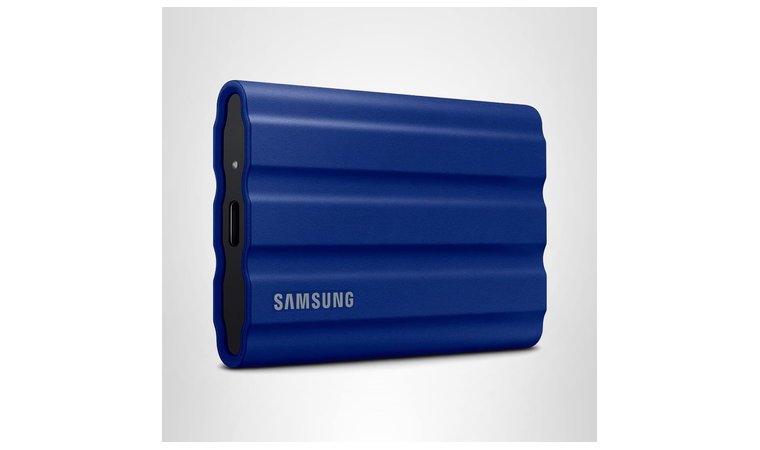
Samsung T7 Shield is one of the fastest external SSD options for content creators. Rugged, shock-resistant, and with top-notch performance, this NVMe SSD’s speeds are excellent for the price. Above all, it’s Samsung, so you know what quality to expect.
The T7 Shield is one of the most reliable external hard drives for photos and videos, and is great for on-the-fly editing and working with large RAW files. Content creators who need durable and compatible storage can use the T7 Shield on a variety of devices.
We chose this one for content creators, photographers, and videographers who require high bandwidth, limitless connectivity, and spacious storage for large files.
It’s compatible with a PC, Mac, Android devices, and gaming consoles, thanks to the included USB Type-C-to-C and Type-C-to-A cables that enable connectivity out of the box. Samsung offers three storage sizes, but the largest, 4 TB, is my #1 pick for the price of above $230.
| Pros | Cons |
|---|---|
| ✅ Fast SSD for content creators ✅ Durable, shock-resistant body ✅ Supported on all devices ✅ USB-C-to-C and USB-C-to-A cables are included ✅ Moderately priced for a Samsung SSD | ❌ Its rubberized exterior is harder to clean (but grippy and protective against drops) |
Final Verdict: Samsung T7 Shield is the best external SSD for content creators and professionals seeking a durable body, nice design, and high throughput that makes reading and writing files fuss-free.
Internal vs External SSD
SSD stands for Solid State Drive, and there are two main types: internal and external.
An internal SSD is installed in your computer or laptop and directly connected to the motherboard. On the other hand, an external SSD is connected externally, usually through the USB or Thunderbolt port on your device.
While external SSDs excel at portability, internal SSDs are faster but lack portability. Both have their advantages and disadvantages that I’d like to explore further.
- Performance & Speed. Internal SSDs are faster than external SSDs, especially NVMe types that connect directly to the M.2 slot on the motherboard. While the best external SSD options are by no means slow, they usually don’t perform as well.
- Installation & Portability. The best portable SSD will always be easier to install than the internal SSD alternative. For the latter, you need to open your computer or laptop, while an external SSD connects to the USB/Thunderbolt port.
- Storage Expansion & Flexibility. One of the key advantages of the best portable SSD options is storage expansion. Plug them in, and you have a terabyte (or a few) of additional storage. Upgrading your internal storage requires more work, and your motherboard has limited slots for NVMe or even SATA disks.
- Use Cases. Internal SSDs are widely used in laptops and computers as fast and reliable, but built-in solutions for everyday users and professionals. External SSDs have many use cases. They can work with some of the best MacBooks (or other devices) for quick storage expansion, data backup, editing media directly on the drive, and running portable apps on the go.
- Durability & Safety. While external SSDs are more durable because they’re designed to be portable and carried around, internal SSDs are safer from physical loss/theft. However, external SSDs have better security overall, due to password protection and hardware encryption to prevent data theft even if the SSD gets stolen.
My Overall Verdict
The best external SSD combines portability, durability, speed, and security for swift access to your files, storage expansion, and backups. It may be difficult to find the best one for you among my 10 favorites at first.
Let me finish it off with a few helpful suggestions if you’re unsure where to start your journey:
- Best for Speed & Compatibility → Crucial X9 Pro. My favorite pick overall, with flexible storage, ample speeds, and compatibility with all devices.
- Best for a Budget-Friendly Price → Lexar ES3. The best portable SSD with a low price, which still performs well and is reasonably sturdy.
- Best for Gamers → Samsung T9 Portable. Gamers who seek low latency, fast loading, and reliable backups should go with the powerful T9 Portable.
- Best Rugged & Durable External SSD → LaCie Rugged SSD Pro5. Great if you want a steel-strong SSD with reliable read/write speeds and larger-than-life storage.
Ready for your next big SSD upgrade? Pick one of the best external SSDs above and immediately feel the difference.
FAQs
The best external SSD is the Crucial X9 Pro, due to its balanced speed and compatibility, which make it reliable for all devices (PC, Mac, mobile phones, etc.) and needs, such as gaming, professional work, and everyday use.
Yes, it’s good to use an SSD as an external drive for many reasons. It’s portable, equally reliable as internal SSDs, and fast, often with NVMe-level speeds.
Yes, you can use a portable SSD as a boot drive, but you may need to change UEFI/BIOS settings to prioritize that SSD for booting, and always make sure that it’s plugged in to avoid system crashes.
They primarily use USB-C or Thunderbolt cables, but some options offer USB-C to USB-A cables for connection with older computers.
To install an external SSD, simply connect it to your computer or any other device via an appropriate cable. It should appear within a few seconds after automatic driver installation, and be ready to use right away.











