



Linear vs Tactile Switches: Which Should You Choose?


The linear vs tactile switches debate is one of the first decisions you’ll face when building or buying a mechanical keyboard. Linear switches offer a smooth, uninterrupted keystroke from top to bottom, while tactile switches provide a noticeable bump that signals actuation. I’ve tested quite a few mechanical keyboards over the past few years, and understanding these two switch types completely changed how I approached both gaming and productivity setups.
Each switch type brings distinct advantages depending on your use case. Linear switches excel at speed and consistency, making them popular among gamers who need rapid inputs. Tactile switches provide physical feedback that helps typists maintain accuracy without bottoming out every key. Neither option is objectively better – the right choice depends on your specific needs, preferences, and environment. This guide breaks down everything you need to confidently choose between them.
Jump to:
Linear vs Tactile Switches: What Are They?
Linear switches are mechanical key switches that move straight down without any bumps or clicks, providing a smooth, consistent keystroke throughout the entire press. Tactile switches feature a noticeable bump partway through the keystroke that provides physical feedback when the key actuates, though they don’t produce the loud click sound of clicky switches.
Both represent the two most popular mechanical switch categories, each offering fundamentally different typing and gaming experiences. The difference between linear and tactile switches comes down to whether you prefer smooth, uninterrupted keypresses or physical confirmation that you’ve registered an input.
1. What Are Linear Switches?
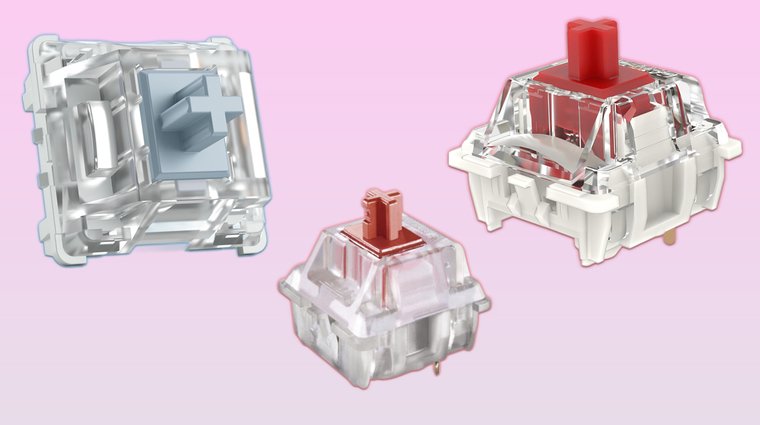
Linear switches provide a completely smooth keystroke without any tactile feedback or resistance bumps during the press. Popular examples include Cherry MX Red, Gateron Red, and Kailh Speed Silver switches, all known for their consistent, quiet operation. Competitive gamers particularly favor linear switches because the smooth travel allows for extremely fast actuation without any interruption that could slow down rapid inputs.
The main advantage of linear switches lies in their predictable feel – every keystroke feels identical, which helps build muscle memory for gaming. They’re also generally quieter than tactile or clicky switches, making them suitable for shared spaces. The smooth action requires minimal force, reducing finger fatigue during extended use. Understanding the linear switches’ pros and cons helps you decide if they’re the best switches for your gaming setup.
However, the lack of tactile feedback means you won’t feel confirmation when a key actuates, which can lead to accidental keypresses or mistypes. Some users find themselves bottoming out keys more frequently without that bump to signal actuation. For precision typing work where you need to feel each character registration, linears can feel less controlled. Many high-quality keyboards ship with linear switches pre-installed, which our best mechanical keyboards guide covers in detail across various price ranges.
2. What Are Tactile Switches?
Tactile switches feature a distinct bump at the actuation point that provides clear physical feedback when the keystroke registers. Common examples include Cherry MX Brown, Boba U4T, and Zealios switches, which offer varying degrees of tactile intensity. Typists and casual gamers often prefer tactile switches because the bump helps confirm each keystroke without requiring you to bottom out the key completely.
The tactile bump serves as a natural stopping point that can improve typing accuracy by signaling when you’ve actuated the key. This feedback reduces typing errors since you can feel exactly when each character registers. Tactile switches also tend to be quieter than clicky switches while still providing more feedback than smooth linears. The tactile switches’ pros and cons become clearer once you compare their performance across different tasks.
The downside is that tactile switches typically have slightly slower actuation than linears due to the bump creating brief resistance. For competitive gaming where every millisecond counts, this minor delay might matter. The bump also produces a soft sound that’s louder than silent linear switches. Some users find that pronounced tactile bumps cause finger fatigue during long typing sessions.
3. Key Differences Between Linear and Tactile Switches
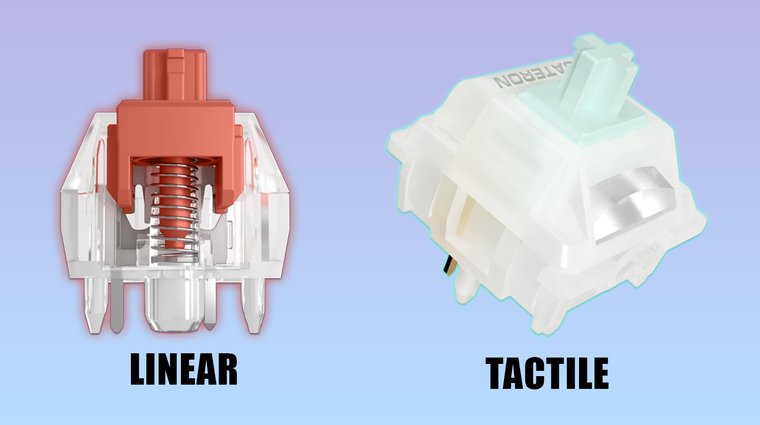
The fundamental difference between linear and tactile switches comes down to feedback – linears provide none, while tactiles give you a physical bump at actuation. The linear vs tactile feel becomes instantly clear when you press both switch types side by side. Here’s a comparison of their core characteristics:
| Characteristic | Linear Switches | Tactile Switches |
|---|---|---|
| Feel | Smooth, consistent | Bumpy, responsive feedback |
| Actuation | Fast, uninterrupted | Slightly slower with bump |
| Sound | Very quiet | Moderately quiet |
| Best For | Gaming, fast typing | Typing, precision work |
| Feedback | None (visual/auditory only) | Physical bump at actuation |
For gaming, linear switches excel because the smooth travel enables rapid double-taps and quick inputs without resistance. Tactile switches suit typing better since the bump helps you develop a rhythm and reduces mistypes. Deciding between linear or tactile for typing often comes down to whether you prioritize speed or accuracy. In daily productivity work, tactiles often feel more controlled and deliberate, while linears feel faster but less precise.
Neither switch type is objectively superior – the “best” choice depends entirely on your personal preference and intended use case.
4. Use Cases: Gaming vs Typing vs Productivity
For gaming, linear switches are generally preferred because the smooth keystroke allows for faster actuation without any bump slowing down your inputs. Competitive FPS and MOBA players benefit from the instant response and consistent feel during rapid keypresses. I switched to linear switches for my gaming setup last year and immediately noticed smoother movement in games like Valorant where quick strafing matters. If you’re building a gaming-focused setup, our best gaming keyboards guide highlights models optimized for competitive play with linear switch options.
For typing, tactile switches usually provide a better experience because the bump confirms each keystroke without requiring you to bottom out. Writers, programmers, and anyone typing thousands of words daily appreciate the feedback that helps maintain accuracy.
For office productivity, tactile switches often work best since they’re quieter than clicky switches while still providing feedback for accurate data entry. Hot-swappable keyboards let you test both types without committing to a full board. Some users even create hybrid setups – linears for WASD gaming keys and tactiles for everything else.
What to Consider When Choosing Between Linear and Tactile
Typing feel should be your primary consideration – do you want smooth, uninterrupted keypresses or physical feedback confirming each actuation? Test both if possible, since preference varies dramatically between users. Some people love the direct connection linears provide, while others find tactile feedback essential for accuracy.
Noise level matters especially in shared spaces or offices. Linear switches are generally quieter, though silent tactile switches exist that dampen both the bump and bottom-out sound. If you game late at night or work in open offices, factor noise into your decision. For noise-sensitive setups, our best wireless gaming keyboards roundup includes quieter switch options that won’t disturb others.
Your primary purpose shapes which switch works best – competitive gaming leans toward linears for speed, while long typing sessions benefit from tactile feedback. Consider what you’ll spend most time doing with the keyboard.
Finger fatigue can develop differently with each switch type. Some users find tactile bumps tiring during extended use, while others experience fatigue from bottoming out linear switches. Your typing style influences which feels more comfortable.
Switch brands offer variations within each category – Cherry, Gateron, Kailh, and boutique manufacturers all produce linears and tactiles with different characteristics.
Why Switch Type Matters
Choosing the right switch type significantly impacts your daily comfort, performance, and overall keyboard satisfaction. The mechanical switches comparison between linear and tactile isn’t just about personal preference – it directly affects how your hands feel after hours of use and how accurately you input commands.
Comfort improves when your switches match your natural typing style. Switches that feel right reduce the tendency to press too hard or bottom out aggressively, minimizing finger strain. Over months of daily use, this difference compounds into noticeably less hand fatigue.
Speed varies between switch types based on actuation characteristics. The linear switches pros include faster response times since there’s no bump interrupting the keystroke.
Productivity increases when switches provide the feedback level your brain expects. Typists using tactile switches often report fewer errors because the bump confirms registration. The tactile switches pros include improved accuracy without needing to look at the screen constantly.
Here’s how different needs align with switch types:
- Gaming-focused users → Linear switches → Swift actuation without resistance for rapid inputs
- Typing-heavy work → Tactile switches → Controlled, accurate keystrokes with clear feedback
- Hybrid usage → Cherry MX Browns or similar → Balanced feel works for both gaming and typing
- Noise-sensitive environments → Silent linears or quiet tactiles → Minimal sound without sacrificing performance
- Custom keyboard builds → Match switch type to hot-swap compatible boards like the Keychron Q series
For space-conscious builders, compact layouts with hot-swap sockets make experimentation easier. Our best 60 percent gaming keyboards guide covers models where you can easily test different switch types without occupying much desk space.
Best Ways to Try Both Switch Types
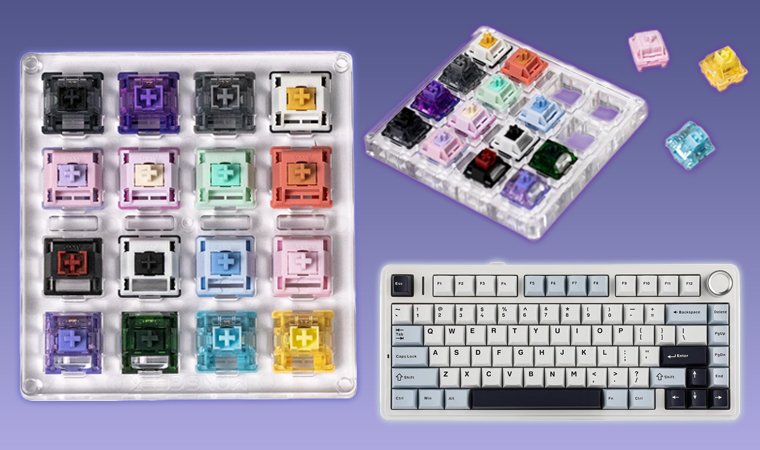
Switch testers are the most affordable way to experience multiple switch types before committing to a full keyboard. These small boards feature 4-12 different switches that let you feel the exact difference between linear and tactile switches without spending hundreds on a complete keyboard. Most mechanical keyboard retailers sell testers for $15-$30.
Hot-swappable keyboards offer ultimate flexibility by letting you change individual switches without soldering. Boards like the Keychron K series, GMMK 2, and Wooting keyboards support this feature. You can install linear switches on your primary gaming keys and tactile switches everywhere else, or swap entire switch sets when your needs change.
Order a hot-swap keyboard with a mix of linear and tactile switches to experience both without full commitment. Start with linears for WASD and tactiles for the rest, then adjust based on what feels better.
Visit local computer or gaming stores that stock mechanical keyboards on display. Many retailers now have testing stations where you can type on different switch types before purchasing. Feeling switches in person reveals nuances that specifications can’t capture.
Watch online sound and typing tests to get a sense of how switches sound in real use. YouTube channels dedicated to mechanical keyboards often provide detailed comparisons showing the linear vs tactile feel through typing demonstrations and sound tests.
Start with budget-friendly options if you’re new to mechanical keyboards. Testing switches doesn’t require expensive hardware – our best budget gaming keyboards guide includes models under $80 with decent linear or tactile switches that let you explore preferences without major investment.
Conclusion
Both linear and tactile switches deliver excellent performance – the right choice simply depends on what feels best for your hands and matches your primary use case. I’ve spent considerable time with both types across various keyboards, and the biggest lesson is that personal testing beats any recommendation. What works perfectly for competitive gaming might feel wrong for typing code, and vice versa.
Don’t stress about making the “perfect” choice on your first keyboard. Preferences evolve as you gain experience with mechanical switches. Many enthusiasts start with tactile Cherry MX Browns as a middle ground before discovering they prefer the extremes – either the smoothness of linears or the pronounced feedback of high-tactility switches.
Ready to upgrade your setup? Browse gaming peripherals on Eneba to find keyboards supporting both linear and tactile switches at competitive prices. No matter if you’re building your first mechanical keyboard or expanding your collection, the right switches make every keystroke more satisfying.
FAQs
Linear switches move smoothly without any bumps, while tactile switches have a noticeable bump at the actuation point that provides physical feedback. Linear switches are preferred for gaming due to their speed, whereas tactile switches are favored for typing because the bump confirms each keystroke.
Yes, linear switches are generally quieter than tactile switches because they lack the bump mechanism that creates additional sound. However, silent versions of both switch types exist with dampeners that significantly reduce noise for either option.
Tactile switches are typically better for typing because the physical bump confirms when each key actuates, improving accuracy and reducing typing errors. The feedback helps you develop a consistent typing rhythm without needing to bottom out every keystroke.
Linear switches are generally better for gaming because their smooth, uninterrupted travel allows for faster actuation and rapid double-taps without resistance. Competitive gamers particularly favor linears for FPS and MOBA games where milliseconds matter.
Yes, if your keyboard supports hot-swappable switches, you can easily change between linear and tactile switches without soldering. Many modern mechanical keyboards include this feature, allowing you to mix switch types or swap your entire board’s switches in minutes.