



9 Best Mesh Wi-Fi Systems in 2026: Slow Wi-Fi Begone

Eneba Hub contains affiliate links, which means we may earn a small commission if you make a purchase through them—at no extra cost to you. Learn more

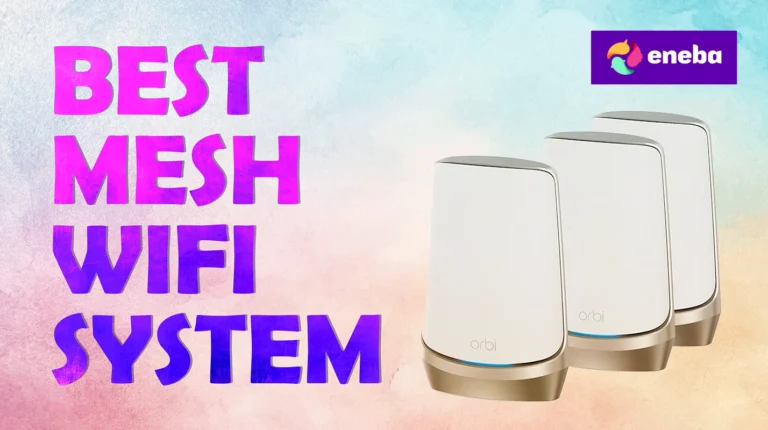
If you’ve ever had problems with your Wi-Fi (and let’s be honest: who hasn’t?), then you might have looked up the best mesh Wi-Fi systems. These meshes make all your Wi-Fi woes vanish by offering speedy and stable internet, wide coverage, support for multiple clients, and enhanced security.
Shopping for mesh systems is not as tricky as it may seem, but with so many choices on the market, as well as the many acronyms being thrown about, it might be tough to pick just one. In that case, you’re in the right place. In this list, I’ll walk you through some great picks for both homes and businesses.
Jump to:
Our Top Picks for Mesh Wi-Fi Systems
All of the meshes on this list are great picks, no doubt. However, three of them stand out:
- Asus ZenWi-Fi BQ16 Pro – The best mesh Wi-Fi system when you want a definitive end to all your Wi-Fi problems. This mesh system has it all: powerful specs, big coverage, AI-optimized routing, and more.
- TP-Link Deco X55 – Wi-Fi solutions don’t need to be expensive, as this mesh system shows. While it’s not too powerful, this one’s a fantastic pick for budget shoppers and will more than suffice for smaller setups.
- Netgear Orbi 970 Series – Big businesses require equally large solutions. This Wi-Fi mesh system offers strength, speed, stability, and security in a single, compact package.
If none of these grabs your attention, that’s okay. There are plenty more mesh Wi-Fi systems below, so do read on.
9 Best Mesh Wi-Fi Systems for Homes and Businesses
Now, there’s a lot of technical jargon when it comes to even the best mesh Wi-Fi systems. Luckily, there’s not too much to dissect here; you can do your own research, but I’ll also keep things simple.
With that out of the way, let’s get right to the list of some of the best mesh Wi-Fi systems you can get on the market.
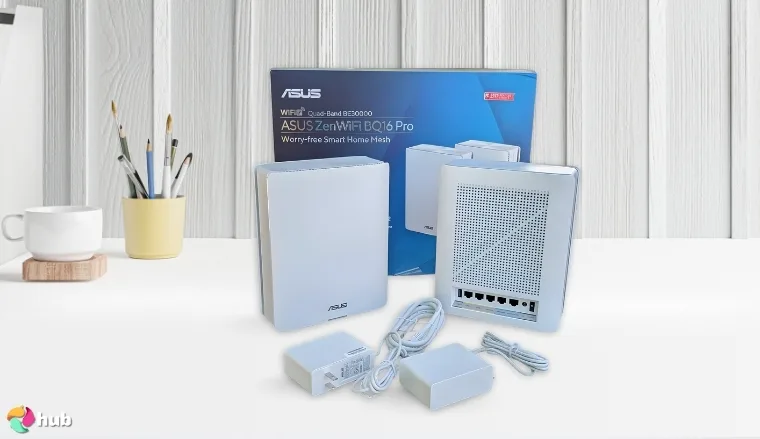
1. Asus ZenWi-Fi BQ16 Pro [Best Overall Mesh Wi-Fi System]
| Specs | Details |
|---|---|
| Wi-Fi Standard | Wi-Fi 7 |
| Maximum Speed | 30 Gbps |
| Coverage Area | 8,000 sq. ft. |
| Band | Quad |
| Number of Supported Devices | Unspecified |
| Ports | 2x 10 Gbps |
So, you’ve tried everything. You’ve called your ISP, you’ve reset your router, swapped out cables, antennas…and your Wi-Fi is still bad. If you’re at that point and you’d do anything to solve your Wi-Fi problems, then the Asus ZenWi-Fi BQ16 Pro offers a one-stop solution.
Let’s talk specs. This mesh system is one of the best you can get, with 12 internal antennas, Wi-Fi 7 speeds of up to 30 Gbps, and an utterly massive coverage area of 8,000 square feet. If MLO isn’t enough for you, the quad-band system means that connection interruptions are practically unheard of, and it comes with 2 10G ports for a more stable connection or backhaul.
With its astronomical specs, the Asus ZenWi-Fi BQ16 Pro is quite literally the final word when it comes to the best home Wi-Fi mesh systems.
It’s also worth pointing out that the Asus ZenWi-Fi BQ16 Pro is future-proof. This mesh Wi-Fi system uses Smart AIMesh tech to optimize the backhaul (meaning less fiddling), and security-wise, it comes with commercial-grade cloud protection via Trend Micro.
All this power makes it sound like it’d be clunky, but no, the Asus ZenWi-Fi BQ16 Pro is super easy to set up and customize. The simple yet powerful Asus Router App allows for quick, painless installation. The mesh itself also comes with some neat features, such as a VPN and fast SSID creation and management.
| Pros | Cons |
|---|---|
| ✅ Very meaty specs ✅ Massive coverage area ✅ 2 10g ports for Ethernet and/or backhaul ✅ Easy to set up and customize via app ✅ Comes in a 2-pack for even bigger coverage | ❌ Pricey, though you do get what you pay for |
My Verdict: The Asus ZenWi-Fi BQ16 Pro is the definitive answer to all your Wi-Fi troubles with its powerful specs and simple interface.
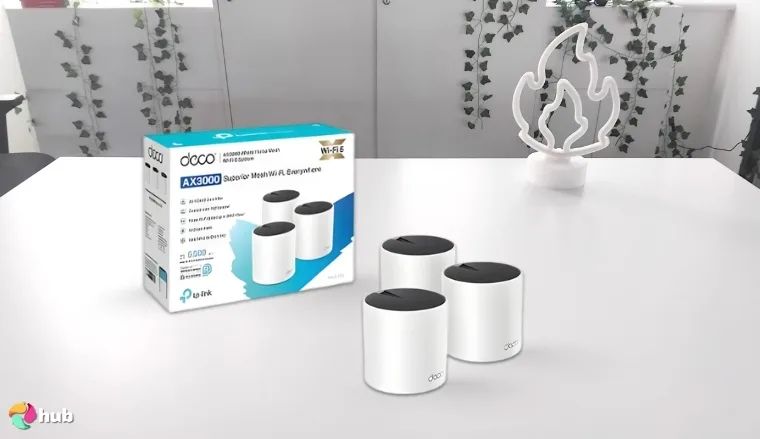
2. TP-Link Deco X55 [Best Budget Mesh Wi-Fi System]
| Specs | Details |
|---|---|
| Wi-Fi Standard | Wi-Fi 6 |
| Maximum Speed | 3 Gbps |
| Coverage Area | 6,500 sq. ft. |
| Band | Dual |
| Number of Supported Devices | 150 |
| Ports | 3x 3 Gbps |
You won’t always need a beast mesh to solve your bad Wi-Fi connection. Sometimes, you’re just looking for a little more stability and speed, and if you’re looking to step up from your usual router or extender for games, movies, and comms without spending too much, the TP-Link Deco X55 has you covered.
The TP-Link Deco X55 is an inexpensive, straightforward solution to spotty Wi-Fi. While it doesn’t have the best specs on this list, you can easily get by with this mesh system.
Specs-wise, the TP-Link Deco X55 is an adequate mesh Wi-Fi system. It runs on Wi-Fi 6, comes with a coverage area of 6,500 square feet, and can support up to 150 simultaneous devices, all of which means that it’s simple yet effective.
That said, this is still a budget product, so it does come with some caveats. First off, while it has 6.500 square feet of coverage, it’s good practice not to keep mesh units too far from each other, especially if there are a lot of walls in the way. However, keep in mind that the TP-Link Deco X55 comes in packs; if you need more units, it’s easy to get them.
Another thing you should be wary of is that this mesh runs on dual-band. If you’re working in a large office space with hundreds (if not thousands) of connections at once, it’s probably a good idea to look for something stronger. If, however, you’re using it in your home or in a small space, then the TP-Link Deco x55 is a perfectly viable choice.
| Pros | Cons |
|---|---|
| ✅ Decent performance for smaller locations ✅ Affordable ✅ Good coverage ✅ Easy to set up ✅ More can be bought and set up as needed | ❌ Dual band, so performance may suffer in areas with lots of interference/wireless devices |
My Verdict: The TP-Link Deco X55 is an excellent choice for homeowners and small businesses looking to fix their spotty Wi-Fi.
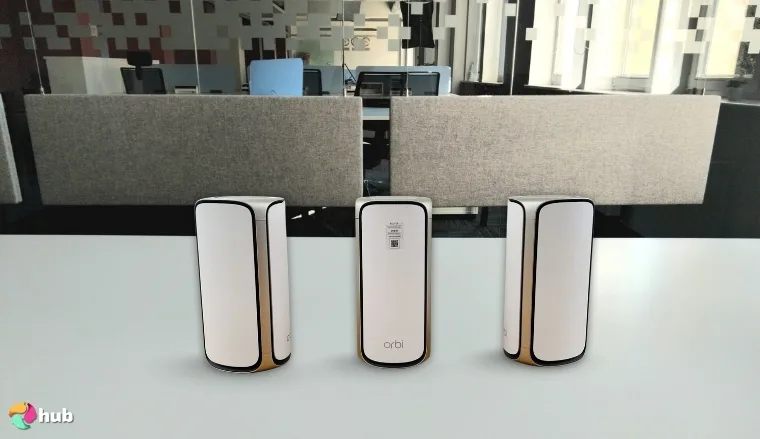
3. Netgear Orbi 970 Series [Best Mesh Wi-Fi System for Large Offices & Multi-Gig Networks]
| Specs | Details |
|---|---|
| Wi-Fi Standard | Wi-Fi 7 |
| Maximum Speed | 27 Gbps |
| Coverage Area | 10,000 sq. ft. |
| Band | Quad |
| Number of Supported Devices | 200 |
| Ports | 2x 10 Gbps, 4x 2.5 Gbps |
It’s not just homes that need Wi-Fi meshes. Big businesses require strong wireless solutions, after all, and if you’re looking for the best Wi-Fi mesh to complement your Wi-Fi setup, the Netgear Orbi 970 Series is a solid choice.
With its powerful specs, wide coverage, and Wi-Fi 7, the Netgear Orbi is a plug-and-play Wi-Fi solution for medium to large businesses.
The Netgear Orbi 970 Series comes with some formidable specs. It runs on Wi-Fi 7 (don’t worry, backwards compatibility is a thing), has a quad-band for high-density connectivity (which comes with Enhanced Dedicated Backhaul), and comes with 2 10 Gbps ports if you need a wired connection. Each unit also comes with 12 antennas that can support 200 devices.
Businesses need to protect their data, and you won’t catch the Netgear Orbi 970 Series lacking when it comes to safety. Not only does it come with a free one-year subscription to Netgear Armor (an all-in-one security package), but it also packs automatic firmware updates, Advanced Router Protection, and a VPN.
As with other premium offerings on this list, the Netgear Orbi 970 Series is surprisingly easy to both set up and adjust. The Orbi App offers quick and smooth installation, and you can even create separate subnetworks as needed.
| Pros | Cons |
|---|---|
| ✅ Powerful specs ✅ 12 antennas and 360-degree coverage offer unmatched connectivity ✅ Multiple ports for Ethernet-level speed or even stronger backhaul ✅ Comes with a 1-year subscription to Netgear Armor ✅ Orbi App makes the system easy to set up and adjust | ❌ Pricey, but powerful |
My Verdict: The Netgear Orbi 970 Series is a powerful piece of hardware that’s perfect for business owners who need a sturdy wireless backbone for their enterprise.
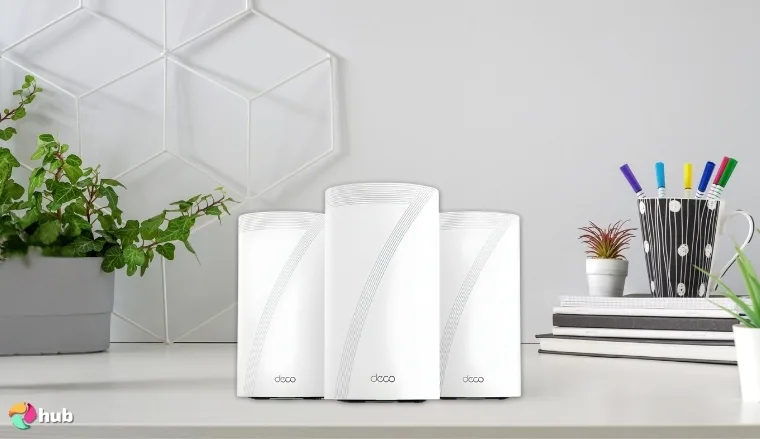
4. TP-Link Deco BE95 [Best Mesh Wi-Fi System for Large Teams & High Device Loads]
| Specs | Details |
|---|---|
| Wi-Fi Standard | Wi-Fi 7 |
| Maximum Speed | 33 Gbps |
| Coverage Area | ~9000 sq. ft. |
| Band | Quad |
| Number of Supported Devices | 200 |
| Ports | 2x 10 Gbps, 2x 2.5 Gbps |
One of Wi-Fi’s biggest problems is the sheer number of people communicating through it; the more people connect wirelessly, the slower and more jumbled the network gets. That particular pain point vanishes completely with TP-Link Deco BE95, a Wi-Fi mesh that offers exceptional throughput, making it perfect for any area with lots of wireless signals.
The TP-Link Deco BE95’s high speed and great coverage make it another fantastic choice for business owners.
As usual, let’s get to specs first. This Wi-Fi mesh system comes with a max speed of 33 Gbps and has a coverage area of roughly 9,000 square feet. It runs on a quad-band system, which will eliminate virtually all interference, making this one a great router for large houses or office spaces. Lastly, it supports BE95 supports over 200 devices.
No great mesh Wi-Fi system would be complete without add-ons. For the TP-Link Deco BE95, the biggest bonus is its built-in AI roaming technology, which essentially customizes your Wi-Fi network to fit your needs via algorithms. It also comes with built-in protection and quick VPN functionality; no need to dabble with a separate high-tech VPN router.
| Pros | Cons |
|---|---|
| ✅ Good coverage, great speed ✅ Wi-Fi 7 offers better top speed and a more stable connection ✅ Quad-band system with support for over 200 devices ✅ Easy to set up ✅ Nice QOL and convenience features | ❌ Firmware updates can make this mesh a little finicky, though customer support is there if you need it |
My Verdict: If you’re looking for something simple but strong to complete your wireless network, the TP-Link Deco BE95 is an easy pick.
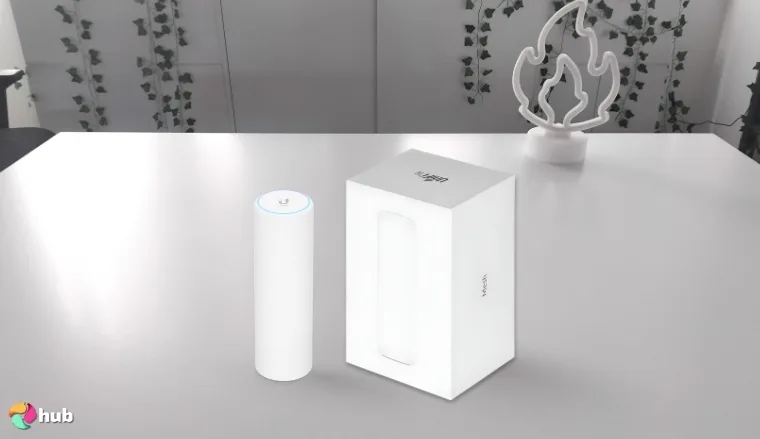
5. Ubiquiti Networks U6-Mesh Access Point [Best Outdoor Mesh Wi-Fi System]
| Specs | Details |
|---|---|
| Wi-Fi Standard | Wi-Fi 6 |
| Maximum Speed | ~5 Gbps |
| Coverage Area | 1,500 sq. ft. |
| Band | Dual |
| Number of Supported Devices | 250+ |
| Ports | 1x GbE PoE RJ45 |
Every other mesh Wi-Fi system in this list is designed for indoor use. This one, on the other hand, comes with a tough, weatherproof build that makes it suitable for outdoor environments and places it among the best outdoor Wi-Fi extenders (even if it’s not technically an extender but a mesh AP) that you can get.
Outdoor Wi-Fi is usually just slapped on as an afterthought (as in, “it’s within the range of the router, so it’s fine”), so having a mesh access point designed for outdoor use makes this a very clear winner.
When it comes to handling wireless communications, the U6-Mesh is decent. The speed is acceptable, with a max speed of ~5 Gbps split between 4.8 Gbps on the 5 GHz band and ~500Mbps on the 2.5. Due to its dual-band nature, the U6-Mesh might also struggle with providing good performance to all 250+ theoretical clients.
The real draw of the Ubiquiti U6-Mesh is that it’s explicitly made to be an outdoor Wi-Fi solution. While it’s small, it’s both feisty and sturdy, as evidenced by its IPX5 rating, making it the perfect companion for any exterior, whether that’s patios, gardens, cafés, or campuses.
| Pros | Cons |
|---|---|
| ✅ IPX5 certified ✅ Small form factor ✅ Decent coverage ✅ Also serves as a good general mesh for smaller areas ✅ Flexible mounting options | ❌ Can run a little hot, but can be mitigated with proper positioning |
My Verdict: While it’s got a pretty niche use, it’s hard to beat the Ubiquiti Networks U6-Mesh Access Point at what it does.
6. Netgear Orbi 370 Series [Best Mesh Wi-Fi System for Gaming & Streaming Stability]

| Specs | Details |
|---|---|
| Wi-Fi Standard | Wi-Fi 7 |
| Maximum Speed | 5 Gbps |
| Coverage Area | 6,000 sq. ft. |
| Band | Dual |
| Number of Supported Devices | 70 |
| Ports | 2x 2.5 Gbps |
I’ll be honest: I think that, for most homes, quad-band systems are major overkill. Yes, you do get more bandwidth, but unless you’re running a massive amount of wireless stuff, you won’t need a quad-band. In that case, I’d like to introduce you to the Netgear Orbi 370 Series, a humble yet powerful mesh Wi-Fi system for gaming and stability.
Yes, the Netgear Orbi 370 Series isn’t designed for gaming per se…but it’s a fantastic and most importantly, affordable option for houses that want Wi-Fi 7 without shelling out too much cash.
Specs-wise, the Orbi 370 is a lot more than meets the eye. The best part about this mesh Wi-Fi system is that it runs on the much more efficient Wi-Fi 7, leading to faster speeds, low latency, buffer-free, high-resolution streaming, and buttery smooth gaming, despite not being a high-end gaming router.
As with the Netgear Orbi 970 Series, the 370 also comes with some extra bells and whistles, such as automatic firmware updates, Advanced Router Protection, and Netgear Armor for extra safety. Not 100% necessary, but nice to have.
| Pros | Cons |
|---|---|
| ✅ Decent speed ✅ Good coverage ✅ Comes with Wi-Fi 7 ✅ Easy to set up ✅ Reasonable asking price | ❌ Geared more towards smaller setups with fewer devices; if you’re using a lot of wireless electronics, there are better choices |
My Verdict: The Netgear Orbi 370 Series offers a no muss, no fuss solution for your home’s spotty Wi-Fi while also letting you get Wi-Fi 7 at a modest price.
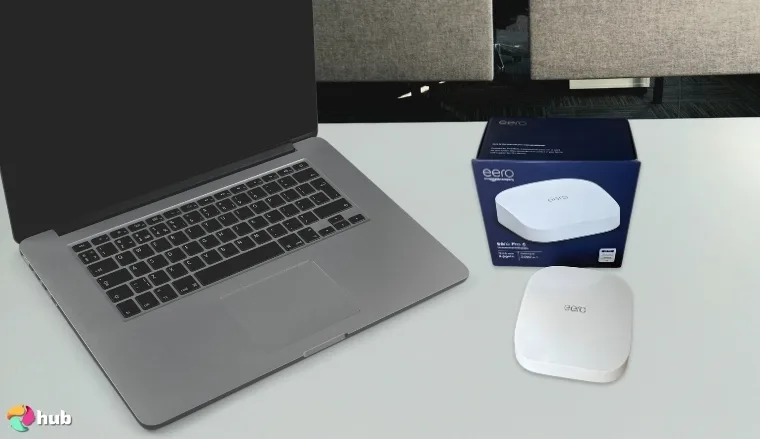
7. Amazon Eero Pro 6E [Best Mesh Wi-Fi System for Simplicity]
| Specs | Details |
|---|---|
| Wi-Fi Standard | Wi-Fi 6E |
| Maximum Speed | 2.3 Gbps |
| Coverage Area | 6,000 sq. ft. |
| Band | Tri |
| Number of Supported Devices | 100+ |
| Ports | 2x 1 Gbps |
Let’s get one thing straight: while there’s a lot of technical specs and acronyms surrounding the best mesh routers and systems, a plug-and-play system will work just as well. And when it comes to sheer ease of use, the Amazon Eero Pro 6E really shines.
I know I talk a lot about how easy most of these mesh systems are to set up, but the Amazon Eero Pro 6E takes that to the next level.
When it comes to installation, the Amazon Eero Pro 6E just requires you to plug it in and run the app. Yes, that’s it. There’s also minimal need for fiddling with the settings, as the TrueMesh, TrueRoam, and TrueChannel software not only “shape” the routes between the mesh nodes and your solid Wi-Fi router, but also ensure that you’re always on the most reliable connection.
This ease might lead you to think that the Amazon Eero Pro 6E lacks in the performance department, but no. With top speeds of up to 2.3 Gbps, a tri-band setup, a 6,000 square feet coverage area, and support for up to 100+ devices, the Amazon Eero Pro 6E is plenty powerful despite its small size.
| Pros | Cons |
|---|---|
| ✅ Exceptionally easy to set up and manage ✅ Good specs, especially for small locations ✅ Tri-band setup at this price range is very nice ✅ Comes with an optional subscription for added security features ✅ Nice design | ❌ Advanced features require extra payment, though again, they’re optional |
My Verdict: The Amazon Eero Pro 6E is perfect for shoppers who want the benefits of premium Wi-Fi without diving too much into technical complexities.
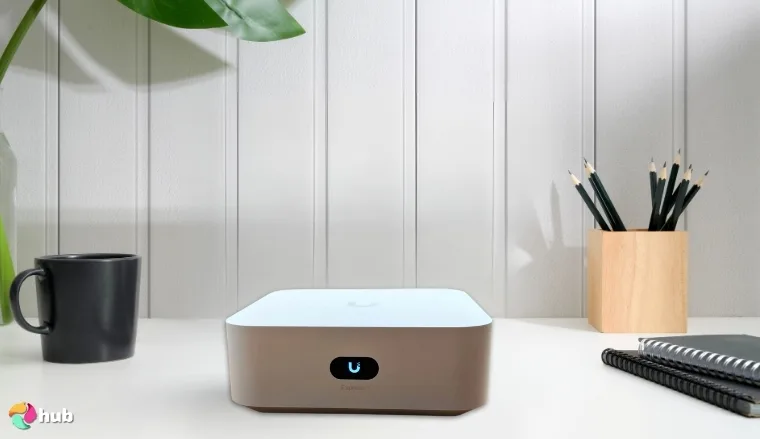
8. Ubiquiti UniFi Express 7 [Best Mesh Wi-Fi System for Small Offices & Managed Networks]
| Specs | Details |
|---|---|
| Wi-Fi Standard | Wi-Fi 7 |
| Maximum Speed | ~5.7 Gbps |
| Coverage Area | ~1500 sq. ft. |
| Band | Tri |
| Number of Supported Devices | 300+ |
| Ports | 1x 10 Gbps WAN, 1x 2.5 Gbps LAN |
You might have gone into this list looking for the best mesh router rather than access points, and if that’s the case, your best bet is the Ubiquiti UniFi Express 7, a mesh-scalable, super compact Cloud gateway with Wi-Fi 7. Or, in short, a router that is mesh-scalable with itself.
While its full name is quite a mouthful and has some obfuscation to it (for instance, “Cloud Gateway” is Ubiquiti’s name for their hybrid router/controller products), none can deny that the UniFi 7 is an efficient piece of tech.
Specs-wise, the UniFi Express 7 is pretty good. It has a theoretical max speed of 5.7 Gbps (again, very subject to the number of clients and interference), a decent coverage area of roughly 1,500 square feet, and tri-band lanes. This makes this device perfect for use in small offices and homes where even the best Wi-Fi extenders for gaming won’t cut it.
The main draw of the UniFi Express 7 is that it pulls double duty; it can be used as a standalone router on its own, and you can get more units to serve as mesh access points. This is done via the UniFi mobile app, and a lot simpler than it seems. Said app also has options for monitoring and adjusting the network, allowing for easy centralized network management.
| Pros | Cons |
|---|---|
| ✅ Double-duty device ✅ Mesh-scalable with itself ✅ Easy centralized management (and mesh adoption) via app ✅ Super compact design ✅ Easy UniFi ecosystem expandability | ❌ Some users report weaker backhaul when used as a mesh network, though this can be mitigated via wires |
My Verdict: The Ubiquiti UniFi Express 7 is a lightweight solution for both your router and your mesh needs.
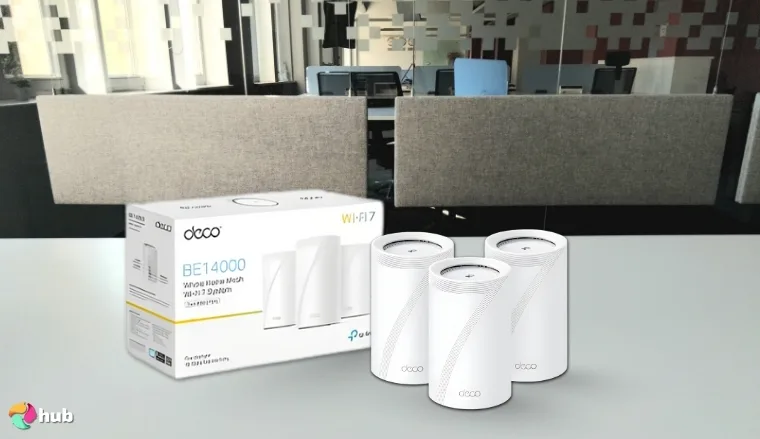
9. TP-Link Deco BE67 [Best Value Wi-Fi 7 Mesh System]
| Specs | Details |
|---|---|
| Wi-Fi Standard | Wi-Fi 7 |
| Maximum Speed | 14 Gbps |
| Coverage Area | 8,100 sq. ft. |
| Band | Tri |
| Number of Supported Devices | 200 |
| Ports | 1x 10 Gbps, 1x 2.5 Gbps, 1x 1 Gbps |
Last on this list is the TP-Link Deco BE67. If you’ve been scanning through the other TP-Link offerings here, you’ve probably guessed that this one is a fantastic value pick for home use, whether you plan to use it for gaming, work, or to boost your fast router for streaming.
The TP-Link Deco BE67 combines good performance and whole-home coverage with a mid-range price. Doesn’t sound exciting, sure, but all these factors will make it a “just right” mesh Wi-Fi system for a lot of people.
When it comes to specs, this mesh Wi-Fi system doesn’t disappoint. It comes with a max speed of 14 Gbps, a tri-band to reduce congestion, support for up to 200 devices, and a good coverage area of 8,100 square feet. All these make it perfect not just for home use, but also for small businesses where there won’t be too many people connected at once.
What sets the TP-Link Deco BE67 apart is its Wi-Fi 7. Unlike other budget or great value picks like the Deco X55, this system comes with next-gen speed and performance and will get along well with your strong Wi-Fi 7 router…all without premium system costs.
| Pros | Cons |
|---|---|
| ✅ Comes with Wi-Fi 7 ✅ Reasonable asking price ✅ Tri-band and good coverage area make it great for bigger homes and small businesses ✅ Deco App makes installation a breeze ✅ Has built-in security features | ❌ 6GHz frequency has a very limited range (which is true of any tri or quad-band setup), but can be mitigated with strategic positioning |
My Verdict: The TP-Link Deco BE67 hits the sweet spot between performance and value for money, making it a clear winner for many users.
Are Mesh Wi-Fi Systems Better Than Wi-Fi Extenders?
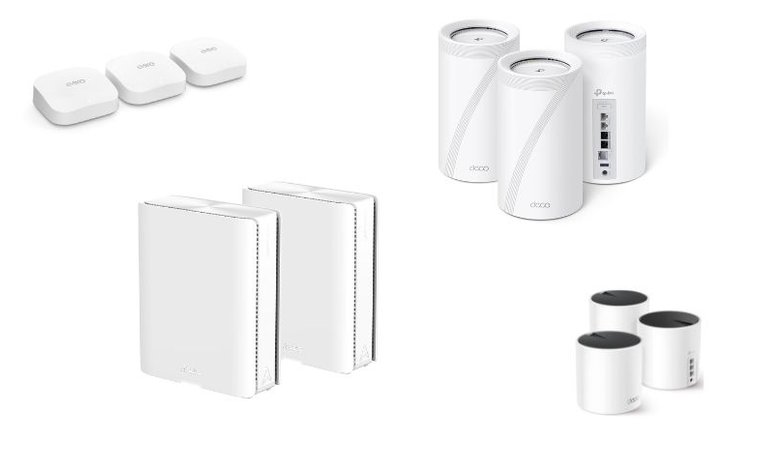
With all that said, you might be wondering if mesh Wi-Fi systems are better than Wi-Fi extenders. The answer to that is yes, they are, but let’s dive into exactly what makes each of them better.
Wi-Fi Extender Features
Wi-Fi extenders have the following characteristics:
- Extenders create fragmented networks. While they’re ostensibly just one network, the reality is that extenders create mini-networks that you need to connect to separately, with their own SSIDs and passwords.
- Extenders lose a lot of speed across zones. Without getting too technical, this has to do with how extenders communicate with the router.
- Extenders can eliminate dead zones with careful placement. Because they’re cheaper, an extender can serve as a quick band-aid for specific spots.
- Extenders struggle under load. Again, we won’t dive into the technicalities of this; suffice to say that each device that connects to an extender is a very heavy load.
- Extenders do not support seamless switching. To switch to an extender network, you’ll need to connect to its network; that means filling up a username and password form again.
- Finally, extenders don’t optimize your connections. All they do is “hop” the main signal from your router.
Wi-Fi Mesh Features
In contrast, Wi-Fi meshes offer the following:
- Meshes don’t create new networks, but extend the main network. You won’t need to reconnect to a new “instance” of your network with a mesh; anywhere you go that’s under the range of a mesh is a single, unified network.
- Meshes maintain speed across zones. This has to do with how mesh nodes communicate; the simple version is that they have a dedicated backhaul channel, unlike extenders, which throw all information into a single band.
- Meshes can also eliminate dead zones. Since they’re more expensive than extenders, a Wi-Fi mesh requires careful placement.
- Meshes handle multiple devices with ease. While they will still struggle when pushed to their utmost, meshes can handle a fair amount of wireless connections at once without losing speed or stability.
- Meshes are seamless. As mentioned earlier, a mesh network (plus the main router) is just a single network.
- Lastly, most meshes have optimization features. These features allow them to “mold” their network to where they are. These days, optimization is often carried out by AI, but can also be done by tweaks via an app.
With all that said, a Wi-Fi mesh is far superior to a Wi-Fi extender.
My Overall Verdict
Even with all these great options at your hand, you might be looking to just bottom-line it. In which case, here are some quick recommendations.
Best starting point for the best mesh Wi-Fi system today?
- For Office Setups, Large Homes, or Anywhere with Lots of Wireless Traffic → Asus Zen Wi-Fi BQ16 Pro
These are the best mesh Wi-Fi systems that combine high throughput, lots of bandwidth, and fantastic coverage areas. - For General Home Use and Small Businesses → TP-Link Deco X55
While they’re not as strong as premium offerings, these mesh Wi-Fi systems perform quite well and will very likely solve your spotty Wi-Fi. - For Outdoor Use → Ubiquiti Networks U6-Mesh Access Point
This mesh system combines Ubiquiti’s reliability with a tough, water-resistant exterior that’s perfect for outdoor use.
Remember: your ideal mesh Wi-Fi system is the one that addresses your problems directly, and only you can ultimately decide which one will fit you best.
FAQs
The best mesh Wi-Fi system depends on your needs. Business owners looking for something strong should look into models like the Asus ZenWi-Fi BQ16 Pro or Netgear Orbi 970, while those looking for better home Wi-Fi might be better off with budget models like the TP-Link Deco family.
A mesh Wi-Fi system is a series of nodes that broadcast a Wi-Fi network from a router. This means that they boost the range and scope of your network while eliminating dead spots. While this might sound like the same thing as having a bunch of Wi-Fi extenders, mesh nodes offer much greater stability and speed.
The choice between a Wi-Fi 6 or 7 mesh depends on your needs. Bear in mind that while Wi-Fi has backwards compatibility, only updated devices can make full use of later versions of Wi-Fi. A 5-year-old phone, for instance, might not be able to make use of Wi-Fi 7 even if it can connect to it.
People who find that a Wi-Fi 6 mesh is still too slow or unstable for their needs should consider upgrading to a Wi-Fi 7 mesh. This can be expensive, so be sure that you absolutely need the speed and stability that a Wi-Fi 7 mesh offers before committing to a purchase.
Yes, you can add mesh Wi-Fi to an existing router. This will require some work, however, and you might need to fiddle around with settings to get your router and mesh to play nice.