



7 Best Controllers for Rocket League Players in 2026

Eneba Hub contains affiliate links, which means we may earn a small commission if you make a purchase through them—at no extra cost to you. Learn more

Having an immersive gaming experience is impossible without using the best controllers for Rocket League. You can choose from the seven best Rocket League controllers that I’ve listed after considering every aspect – from the comfort you just don’t get with a mouse and keyboard, to the customization or cross-platform adaptability that many players look for.
Whether you are a professional player looking to win championships using the adaptive or full-featured gaming controller, or someone who’s about to start the journey, I have got you covered with several options that match your grind and your budget.
Jump to:
Our Top Picks for the Rocket League Controller
We have tested different PC controllers, cross-platform adaptable gamepads, and joysticks to share the best ones with you. If you are not an expert in picking the right gaming controllers, then rely on our top picks and enjoy an immersive experience without limiting your joy and grip using keyboards and a mouse as controllers. Here are the winners:
- PlayStation DualSense Edge Wireless Controller – Premium controller with customizable inputs, adaptive triggers, and ergonomic design for precision gameplay.
- EasySMX X15 PC Controller – Budget-friendly, plug-and-play wired option that delivers comfort and responsiveness without the need for recharging.
- Xbox Elite Series 2 Core Wireless Gaming Controller – Highly customizable, precision-focused controller with remappable buttons and adjustable tension for serious gamers.
You can also set custom profiles to manage multiple playstyles without resetting the profile. Save 20% on this console by purchasing through Amazon.
7 Best Controllers for Rocket League
To ramp up your gaming experience and command on the gamepad while playing soccer and car, we have brought the seven best-selling and high-performing gaming pads suitable for competitive gamers and cross-platform players.
In contrast, our list is comprehensive and mentions the top ones, with an honourable mention to the Razer Wolverine. Pick from these top controllers for Rocket League and happy gaming.
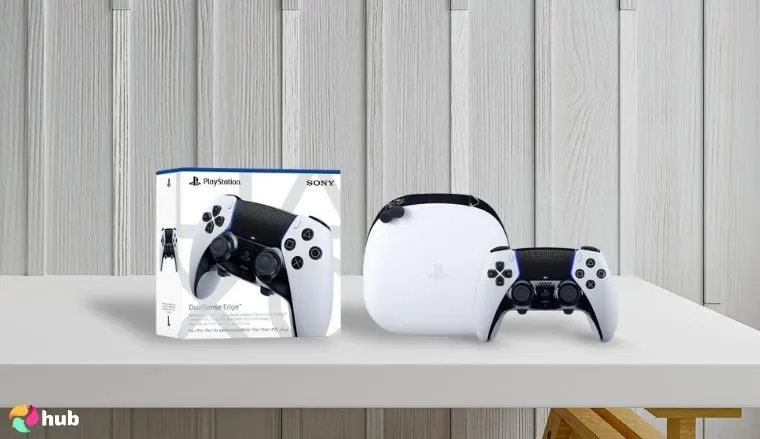
1. PlayStation DualSense Edge Wireless Controller [Best Overall Controller for Rocket League]
| Specs | Details |
|---|---|
| Haptic Feedback | Yes |
| Adaptive Triggers | Yes |
| Battery Life | Up to 10 hours |
| Connectivity | Bluetooth & USB-C |
| Customization | Remappable back buttons and interchangeable stick caps. |
| Built-in Audio | Built-In Mic & 3.5 mm Jack |
| Compatibility | PS5, PC |
| Weight | ~325g |
The best PS5 controller made by Sony, exclusively for the PlayStation, but it works fine even on PC. We have ranked it 1st because it comes with remappable back buttons, interchangeable stick caps, back paddles, and trigger stops.
Use its customisation features to fine-tune the controller for controlled air roll.
DualSense Edge has a dedicated button that allows you to juggle between different profiles or settings according to your playstyle. Moreover, its ergonomically friendly design fits best in your palm and never makes you feel the weight in your hand while playing. It is priced higher than other options available, but the experience says it all.
It can help you unleash your full potential in high-end racing games.with unparalleled customization, allowing you to fine-tune every input and master advanced mechanics with precision, all while enjoying the premium feel of a native PlayStation controller.
| Pros | Cons |
|---|---|
| ✅ Controls are fully customizable, allowing users to do button mapping and switch profiles. ✅ Lower chances of stick drift due to swappable analog sticks, causing less weariness. ✅ Allows you to make critical moves using two back buttons without moving your thumb. ✅ Adjustable buttons for quick reactions – ideal for boosting or shooting without full trigger pulls. ✅ Textured grip and solid build quality enhance the comfort during gaming. | ❌ Expensive, but still the top controller due to its high-end features. ❌ Battery is way less than other gaming consoles. |
Final Verdict: People are loving it because of its various customizability options, replaceable parts, and responsive controls. If you need a perfect blend of features and top-notch performance in one place, then it is for you.
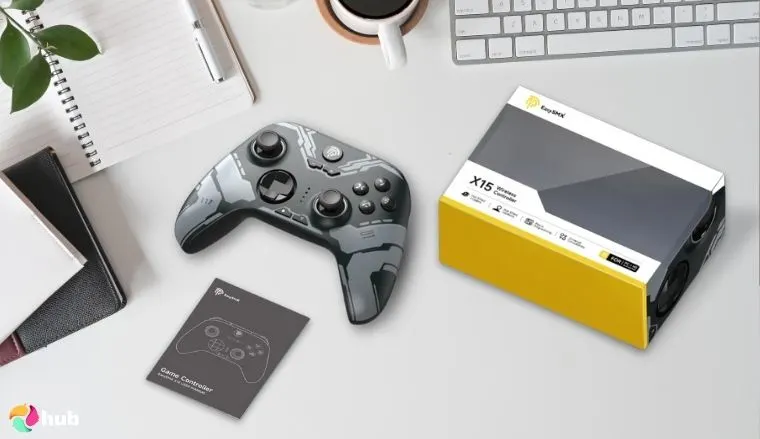
2. EasySMX X15 PC Controller [Best budget controller for Rocket League]
| Specs | Details |
|---|---|
| Haptic Feedback | Yes |
| Adaptive Triggers | No |
| Battery | Up to 20 hours |
| Connectivity | Bluetooth & USB-C |
| Customization | Programmable back buttons and adjustable vibration. |
| Built-in Audio | Not available |
| Compatibility | PC, Android, Nintendo Switch |
| Weight | ~228g |
Its affordable price point and the high-end gaming experience have made it the second-best one controller on our list for Rocket League. The EasySMX X15 has an inspired shape of the Xbox controller and comes with textured grip, responsive buttons, and plug-and-play wired connectivity.
Use the programmable rear buttons to map boost or jump without moving your thumb.
It offers lag-free play, which is quite impressive. However, it lacks some high-end features available in the PlayStation DualSense Edge gaming pad, like hair trigger mode. But EasySMX X15 outranks others in durability and performance, ideal for highly competitive matches.
By using this affordable gaming controller, you can enjoy better car control with no stick drift and aerial precision due to the responsive analog sticks. Honestly, the best thing about this console is that it is also compatible with Android devices and Steam, making it a perfect mobile controller.
| Pros | Cons |
|---|---|
| ✅ The hall effect sticks provide a smooth and immersive gaming experience. ✅ Its exceptional battery makes you play for hours without recharging it repeatedly. ✅ Customisable back buttons let you assign macros or shortcuts for smoother gameplay. ✅ Lightweight and ergonomically friendly design prevents slipping during intense gameplay. ✅ Switchable ABXY layout makes transition from gaming laptop buttons to pad easy. | ❌ Front buttons feel soft and not tactile, and the d-pad feels stiff or inconsistent. ❌ Some users have also reported connectivity issues, especially with Bluetooth pairing. |
Final Verdict: It can make you dominate the arena without going broke because EasySMX X15 delivers reliable performance and essential controls. It offers a surprisingly competitive edge for competitive players on a budget hunt.
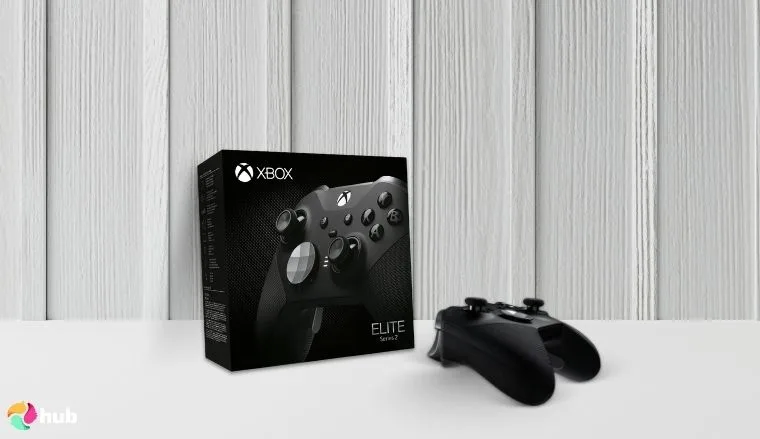
3. Xbox Elite Series 2 Core Wireless Gaming Controller [Best Rocket League controller for Xbox]
| Specs | Details |
|---|---|
| Haptic Feedback | Yes |
| Adaptive Triggers | No |
| Battery | Up to 40 hours |
| Connectivity | Wireless & wired |
| Customization | Remappable buttons and adjustable thumbsticks. |
| Built-in Audio | Not available, but supports a 3.5 mm headphone jack. |
| Compatibility | Xbox Series X or S, and One. |
| Weight | ~345g |
The Xbox Elite Series 2 Core Wireless Gaming Controller provides elite performance and a long-lasting battery. It comes with adjustable-tension thumbsticks, a rubberized grip, and shorter locks to activate hair trigger mode, which helps players gain better shot timing and faster aerial recoveries while playing Rocket League.
Set up short hair triggers for boost and jump to reduce input delay.
The Xbox One allows users to customize it according to their preferences. For example, you can swap thumbsticks and D-pads due to their modular design. Microsoft’s Xbox controller Accessories app offers more customization to fine-tune it for immediate response.
Though it doesn’t come with extra buttons, the Xbox controller is still highly responsive and provides lag-free performance. You can set up to three profiles to enjoy a customized playing experience. Xbox’s long-lasting battery and USB-C charging provide seamless gaming sessions.
| Pros | Cons |
|---|---|
| ✅ Adjustable tension thumbsticks allow fine-tuning for precise shooting and controlled car movements. ✅ Three levels of adjustable trigger stops reduce pull distance for faster input in PC games. ✅ Rubberized grip that is sweat-resistant provides extra comfort for extended sessions. ✅ Its cross-platform compatibility makes it the best choice for sports video games. ✅ Long-lasting battery extends sessions, even for days, to play consistently and win championships. | ❌ It’s more costly than a regular Xbox controller, making it not an ideal choice. ❌ Wear and tear issues are quite prevalent, causing stick drift while playing. |
Final Verdict: If you are looking to elevate your Rocket League experience, then it would be the perfect choice. Because of its customizable components and tunable tension that enables you to feel for every aerial, dribble, and save, giving you ultimate authority on the pitch.
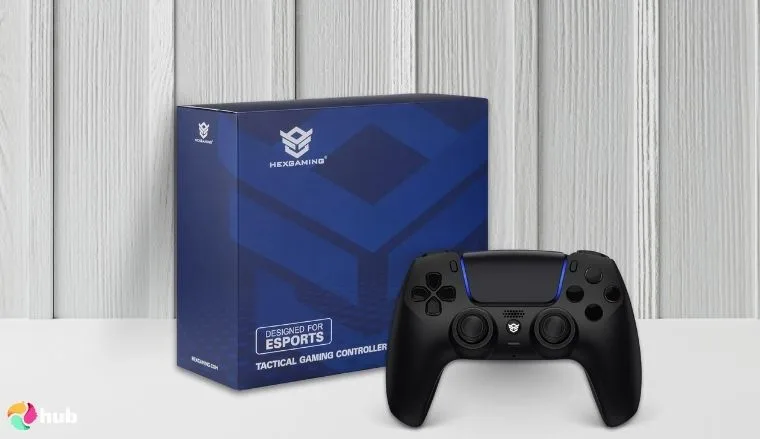
4. HEXGAMING RIVAL PRO Controller [Best hall-effect controller for Rocket League]
| Specs | Details |
|---|---|
| Haptic Feedback | Yes |
| Adaptive Triggers | Partially |
| Battery Life | Up to 12 hours |
| Connectivity | Wireless (USB cable optional) |
| Customization | Remappable back buttons, interchangeable thumbsticks, and changeable skins. |
| Built-in Audio | 3.5 mm built-in audio jack. |
| Compatibility | PS5, PC |
| Weight | ~330g |
HEXGAMING RIVAL PRO Controller is the best in the list, which works perfectly with PlayStation and personal computers. Its remappable buttons and interchangeable thumbsticks allow players to do quick speed boosts and jumps that you can experience on your excellent gaming monitor. It is built on the base of the DualSense controller, which offers several customization options.
Map the air roll left/right to the back paddles instead of a face button for better aerial adjustment.
For example, you can remap the back buttons, interchange thumbsticks, and use customized skins. All while enjoying swift maneuvers without stick drift or lagging into input.
| Pros | Cons |
|---|---|
| ✅ The hall-effect and mouse clicks trigger offers a precise and immersive gaming experience. ✅ Mappable extra buttons can perform 15 functions, allowing the thumb to remain in place. ✅ Interchangeable thumbsticks make swapping between heights easy, and grips are customizable for thumb movement. ✅ Short hair triggers make firing or boosting faster in-game. ✅ It allows adding up to six profiles for instant switching between games and playstyles. | ❌ Paddle sensitivity is high because the rear buttons even respond to light, mistaken presses. ❌ Some users have also reported connectivity issues with Bluetooth or firmware update inconveniences. |
Final Verdict: Its stick drift-free experience and pinpoint accuracy make it a perfect choice. The HEXGAMING RIVAL PRO’s Hall Effect joysticks ensure consistent, flawless car dominion, combined with rapid-fire triggers and ergonomic back buttons for competitive play.
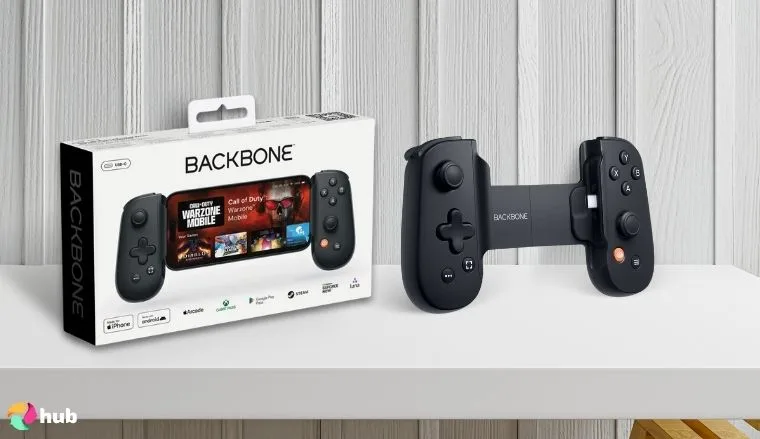
5. BACKBONE One Mobile Gaming Controller [Best for mobile]
| Specs | Details |
|---|---|
| Haptic Feedback | No |
| Adaptive Triggers | No |
| Battery Life | Draws power from the smartphone |
| Connectivity | Wired lightning or USB cable |
| Customization | Controller buttons and recording customisation are available through the Backbone app. |
| Built-in Audio | Headphone jack available |
| Compatibility | iOS, Android, Xbox Cloud, PS Remote |
| Weight | ~138g |
This is the best controller for Rocket League players who use smartphones to enjoy hitting soccer with a car. It easily gets connected to your iPhones or Androids, and gives you an immersive experience comparable to a gaming system.
It is one of the best Rocket League controllers, integrated with the Backbone app that allows you to customize its settings. For instance, you can start instant screen recording using the application to record and upload your gameplay on streaming platforms like YouTube.
| Pros | Cons |
|---|---|
| ✅ It is a wired controller and provides ultra-low latency, resulting in a quick response. ✅ No stress of draining battery during gameplay because it powers from your phone. ✅ Clicky buttons, a tangible D-pad, and smooth analog sticks provide a high-quality console-like feel. ✅ Works fine with all the new iPhones and updated Android versions. ✅ Easy to carry because of low weight and slim design. | ❌ Doesn’t include additional controls like back buttons or remappable triggers. ❌ Not suitable for large hands due to the smaller analog sticks and compact design. |
Final Verdict: It transforms your mobile device into a Rocket League powerhouse and provides console-grade precision and comfort, ensuring you never miss a touch or boost, even when playing away from your main setup.
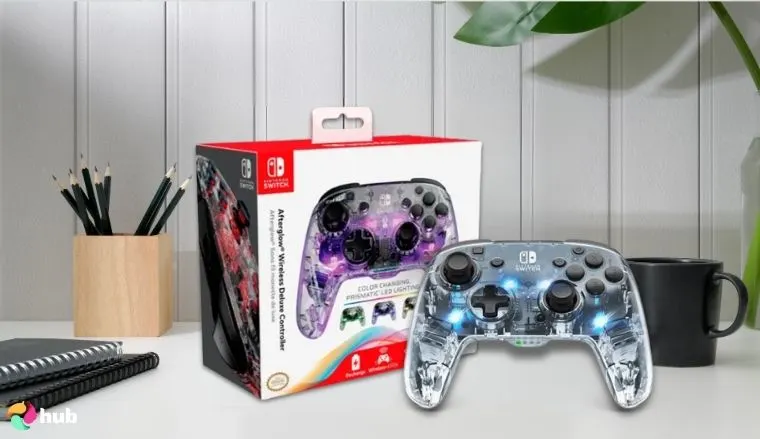
6. PDP Gaming Afterglow Wireless Pro Controller [Best Rocket League controller for Nintendo Switch]
| Specs | Details |
|---|---|
| Haptic Feedback | No |
| Adaptive Triggers | No |
| Battery Life | Up to 20 hours |
| Connectivity | Wireless |
| Customization | RGB lighting and remappable back buttons. |
| Built-in Audio | No |
| Compatibility | Nintendo Switch |
| Weight | ~300g |
PDP Gaming Afterglow Wireless Pro Controller honestly is the best find for the die-hard fans of Nintendo. They usually struggle to find the top controller for Rocket League that is compatible with their Switch.
Use the programmable back buttons to bind boost and air roll for smoother aerial plays.
Now, you can enjoy customized RGB lighting synchronized with the movement. You can use the back buttons to flip, maneuver, or the main buttons usually to jump the car on the soccer pitch. It gets connected to your device via Bluetooth and comes with a rechargeable battery. Enjoy using it for an immersive gaming experience without getting entangled with the wires.
It lacks adaptive triggers, but its layout is solid and capable enough for casual and immediate gameplay.
| Pros | Cons |
|---|---|
| ✅ Customizable RGB lighting to match your gameplay aesthetics. ✅ Ergonomically friendly buttons and a comfortable layout. ✅ Programmable rear buttons for quick actions during competitive gameplay. ✅ Easy compatibility due to being officially licensed by Nintendo. ✅ Long-lasting build to remain intact for years. | ❌ Lack of haptics makes the in-game reaction not experienceable for the users. ❌ Slightly shifted button placements made gaming a little difficult in the earlier days. |
Final Verdict: PDP Gaming Afterglow Wireless Pro can light up your experience on Nintendo. The switch controller offers solid performance and a comfortable grip, letting you perform aerials and flicks with confidence. Better than that, using a keyboard and mouse, all while adding a vibrant, customizable flair to your gameplay.
7. GameSir G7 SE Wired Controller [Best wired controller for Rocket League]

| Specs | Details |
|---|---|
| Haptic Feedback | Yes |
| Adaptive Triggers | Yes |
| Battery Life | Drive power from the device |
| Connectivity | Wired |
| Customization | Remapable buttons, adjustable triggers, and vibration tuning. |
| Built-in Audio | Audio jack available |
| Compatibility | Xbox Series X or S, Xbox One, Windows 10/11 PCs |
| Weight | ~221g |
It is the most reliable wired controller with a good polling rate and is known for its lag-free performance. It gets connected to your computer or Xbox with a USB, which means no battery low signs during the session.
Use the hall-effect analog sticks for precise dribbling and flicks without worrying about stick drift.
It offers rumble vibration upon shooting due to Hall-effect triggers for a better experience. This joystick also has anti-drift sticks, causing less wear and tear to the gaming pad. Additionally, it has full-fledged customization options possible using the GameSir Nexus app.
You can do extra button mapping, adjust game sensitivity settings, and save different profiles to switch between games and for using a changed style of play.
| Pros | Cons |
|---|---|
| ✅ Magnetic sensors provide Hall-effect and resist drift sticks for perfect aerial grip. ✅ Rear buttons mapping with lock switches provide thumb control to all functions. ✅ Ultra-fast polling rate up to 1000 HZ and provides a fast response rate. ✅ Integrated headphone jack provides quick music handling for chat and game sound. ✅ Deep customization using the Nexus software ramps up the gaming experience. | ❌ Entangled wires often discourage the idea of a comfortable gaming experience. ❌ The compact grips and D-pad may not suit people with bigger hands. |
Final Verdict: It is the premier controller on a budget for lag-free performance and a fast polling rate. You can pick this for an ultimate gaming experience.
What are the best controller settings for Rocket League?
Whatever ideal PC controller you purchase, you need to configure the right settings according to your preferences. Remember, picking the best Rocket League controller is necessary, as you are substituting your keyboard and mouse, but the perfect settings can be the real game-changer for you.
1. Controller bindings (Keybinds)
Rocket League allows users to remap almost every controller function that is available and supported by the console. Many professional players rebound air roll button for quicker access to the soccer, moving faster on the ground. For seamless gameplay, you can bind air roll to LB/L1 or a rear paddle if available on your controller.
You can additionally set a boost function for more acceleration to the rear buttons or bumper for instant use without losing throttle. Ensure to prefer keybindings that minimize hand strain, even while playing for long periods, and provide seamless transitions.
Some of the best Rocket League controllers, like PlayStation DualSense Edge or Xbox controller Elite Series 2, allow users to set different profiles with custom keybindings and switch between them for freestyle and competitive gameplay. Fine-tune your controller keybinds and enjoy increased car control or shooting rate.
2. Sensitivity settings
The sensitivity setting of your controller, like a touch keyboard, can give you a competitive edge over your opponents. It decides how quickly you can maneuver your car, drift, or slip before you lose control or miss the ball. Picking the ideal sensitivity control settings enables you to respond to the car’s stick movement quickly and win.
Players who’ve won the championships or ranked on the charts in tournaments. Suggest steering command sensitivity should be between 1.3 and 1.6, and aerial sensitivity between 1.3 and 1.8. To enjoy a fluid movement while keeping aerials tight.
Avoid maxing out unless you’re familiar with the high-speed reactions of the game. Stick to lower values to enjoy precision, especially if you are not familiar with it. Do some experiments with different settings, and you will find the perfect hack for flicks, drifts, and mid-air adjustments.
3. Deadzone settings
Deadzone settings are the best antidote to stick drifts during play because they help to avoid unintentional movements. Usually, players miss their target just due to the deadzone and stick drift, causing movements even when the analog sticks are not touched. It happens to controllers due to wear and tear over time.
Here are some of the ideal deadzone settings suggested by experienced players. Controller deadzone should be between 0.03-0.08, and dodge deadzone should be between 0.5-0.7. Try to set smaller deadzones as it helps in improving the responsiveness, but can increase stick drift if your gaming controller is older.
Remember to keep tweaking the settings gradually until your car starts responding smoothly without sudden inputs. It is the most suitable method followed by even professionals for fine-tuning the deadzone and tweaking the settings until they get full control.
4. Controller vibration
Getting in-game inputs from the haptics can be a good thing to feel enchanting while playing. But most skilled gamers often turned the controller vibration off or turned to the default setup because constant haptic physical reaction can be distracting or even fatiguing, especially during longer gaming sessions.
That’s why disabling them can lead you towards a steadier play or even a comfortable experience while taking part in highly competitive tournaments or championships. If you still need some response from the gaming controller, then turn to the “default” setup rather than the “intense”, so as not to get overwhelmed.
FAQs
According to the research of Eneba and the experiences of professional players, PlayStation DualSense Edge is currently the best controller due to its customizability, comfort, and pro-level features.
Yes, if you want to enhance your play and enjoy a smoother analog input and better car control, then you must purchase the best Rocket League controller.
Custom keybindings for air roll, boost, and powerslider, paired with low deadzone control and balanced sensitivity, are the optimal controls.
Most professional or championship-winning players prefer manufacturers like Sony and often use PlayStation DualSense Edge, EasySMX X15, or Xbox controller Elite Series 2 for Rocket League play, depending on the platform they are using.
Yes, it is much easier to play on a gaming controller than on a computer because the gaming console provides you with more control over the movement compared to a mouse and keyboard.











