9 Best Corsair Keyboards for Speed, Style, and Performance in 2025

Eneba Hub contains affiliate links, which means we may earn a small commission if you make a purchase through them—at no extra cost to you. Learn more


The best Corsair keyboard delivers a combination of precision, speed, and build quality that sets it apart in the gaming and enthusiast market.
Corsair keyboards are known for their lightning-fast response times that outpace many other brands, making them a top choice for competitive players in the gaming peripherals industry.
This guide highlights the top options in Corsair’s lineup, from flagship models packed with premium features to budget-friendly gaming keyboard choices at various price points that still deliver excellent performance. If you are ready to upgrade your setup, this list will help you choose the best Corsair keyboard to make every keystroke count.
Jump to:
Our Top Picks for Corsair Keyboards
I’ve tried a wide range of Corsair keyboards, and these three consistently stood out as the best across different categories when it comes to pricing, hardware, and customization. Each one combines premium build quality, responsive keys, and customization features that make a real difference in day-to-day use.
Here’s a quick overview of our top picks for Corsair keyboards:
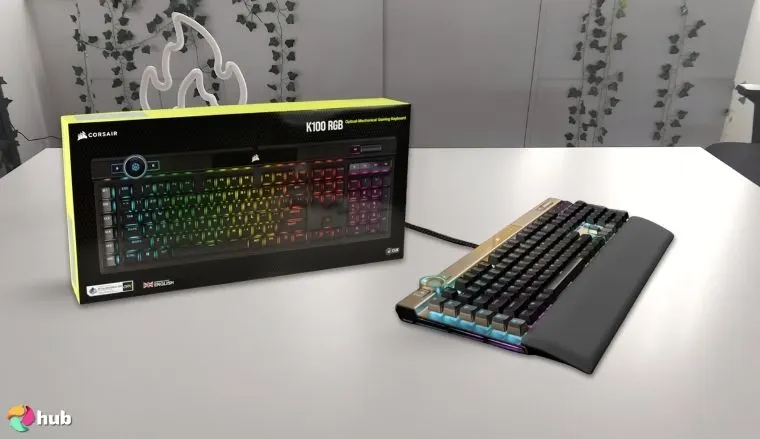
- Corsair K100 RGB Optical-Mechanical Keyboard – This is hands down the most advanced keyboard in the Corsair lineup. It combines blazing-fast optical-mechanical switches with an 8,000Hz polling rate for near-instant responsiveness, making it a dream for competitive gaming.
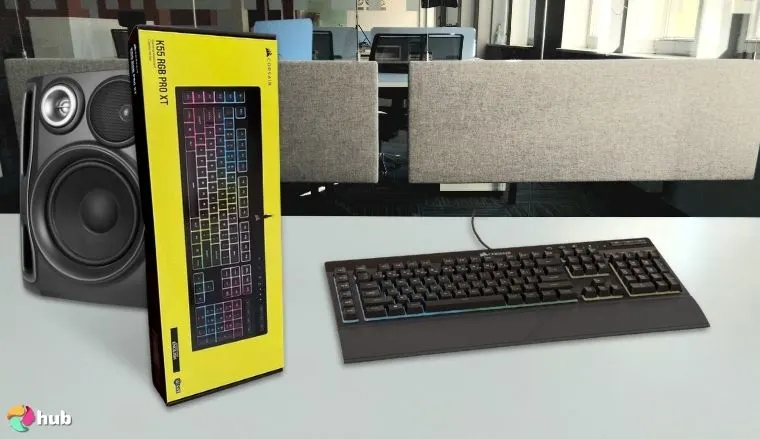
- Corsair K55 RGB PRO Membrane Keyboard – If you want value without sacrificing quality, this one delivers. The quiet, responsive keys make it perfect for shared spaces, while customizable RGB zones add a personal touch.
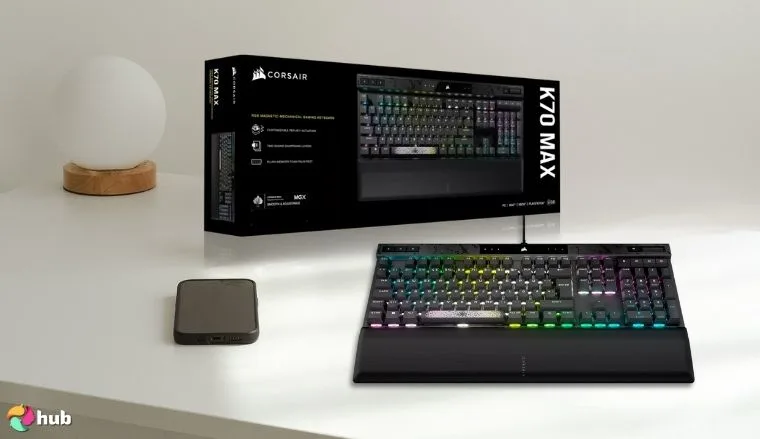
- Corsair K70 MAX RGB Magnetic Mechanical Keyboard – easily the most innovative Corsair keyboard I’ve used. Its magnetic-mechanical switches allow you to adjust the actuation point of each key, giving you complete control over how the keyboard responds.
To get a full-fledged understanding of these keyboards, their performance, and features, let’s head to the sections below with the nine best Corsair keyboards.
9 Best Corsair Keyboards
Corsair has built a strong reputation for creating keyboards that balance performance, durability, and style.
In the section below, you will find the 9 best Corsair keyboards available, making it easier for you to choose the one that fits your gaming or work setup.
1. Corsair K100 RGB Optical-Mechanical Keyboard [Best Overall Corsair Keyboard]
| Specs | Details |
|---|---|
| Switch Type | Corsair OPX Optical-Mechanical |
| Form Factor | Full-size |
| Actuation Range | 1.0mm actuation, 3.2mm total travel |
| Connectivity | Wired (USB 3.0 passthrough) |
| Key Caps | Double-shot PBT |
| Lighting | Per-key RGB with iCUE integration |
| Dimension | 470mm x 166mm x 38mm |
The Corsair K100 RGB is a powerhouse designed for gamers who demand top-tier performance and customization. It uses Corsair OPX optical-mechanical switches for lightning-fast actuation and comes with a dedicated multi-function iCUE control wheel, giving you unmatched command over media, macros, and in-game adjustments.
With a premium build quality that combines an aluminum frame with per-key RGB lighting, this keyboard is perfect for precision and aesthetics. It also boasts a polling rate of up to 8,000Hz powered by Corsair’s AXON Hyper-Processing Technology, ensuring inputs register faster than ever. If you want to elevate your gaming experience with us, I would suggest you combine it with one of the best gaming monitors.
For those who value advanced control, ultra-fast response times, and a feature set that goes beyond the basics, the K100 stands out as a top choice in the Corsair lineup.
| Pros | Cons |
|---|---|
| ✅ Ultra-fast OPX switches for rapid keypress response. ✅ Dedicated iCUE control wheel for enhanced functionality. ✅ Durable aluminum frame ensures long-term reliability. ✅ Per-key RGB lighting with deep customization. ✅ Comfortable key spacing for extended typing and gaming sessions. ✅ Onboard profile storage for macros and lighting settings. | ❌ The price is on the higher side, but the premium features justify it. |
Final Verdict: The K100 delivers cutting-edge speed and control with its optical switches and iCUE wheel, making it one of the most versatile keyboards on the market. If you’re serious about gaming or content creation, this is easily one of the best Corsair keyboards you can get.
2. Corsair K55 RGB PRO Membrane Keyboard [Best Budget Corsair Keyboard]
| Specs | Details |
|---|---|
| Switch Type | Membrane |
| Form Factor | Full-size |
| Actuation Range | Standard membrane actuation |
| Connectivity | Wired USB |
| Key Caps | Standard ABS |
| Lighting | Zone-based RGB backlighting |
| Dimension | 481mm x 167mm x 36mm |
The Corsair K55 RGB PRO is a great choice for gamers and casual users who want a reliable keyboard without breaking the bank. Its membrane switches provide a quieter, softer typing experience while still delivering fast response times for gaming. With dedicated macro keys, dynamic RGB backlighting, and spill resistance, it’s a practical yet stylish keyboard for everyday use. It’s also lightweight and highly portable, making it perfect for mobile or compact desk setups.
It offers dedicated media controls and macro keys, which are rare at this price point, making it one of the best gaming keyboards for everyday use.
The inclusion of dedicated media controls and customizable macro functionality enhances usability for both work and play, while the detachable palm rest adds comfort during long sessions.
Even as a budget option, it includes programmable media keys, letting you quickly control audio or macros on the fly.
| Pros | Cons |
|---|---|
| ✅ Quiet membrane keys ideal for shared spaces. ✅ Dedicated macro keys for quick custom commands. ✅ Durable and spill-resistant design for added safety. ✅ Lightweight and portable, great for small setups. ✅ Zone-based RGB lighting for a touch of style. ✅Easy plug-and-play setup with Corsair iCUE support. | ❌ Lacks the fast actuation and tactile feedback of mechanical switches, but still performs well for casual gaming. |
Final Verdict: If you’re looking for a budget-friendly keyboard that balances performance and features, the K55 RGB PRO is a great entry point into the Corsair lineup. It’s especially appealing if you want a quiet, comfortable typing experience with just enough customization for gaming and work.
3. CORSAIR K70 MAX RGB Magnetic Mechanical Keyboard [Best for Cutting-Edge Switch Technology]
| Specs | Details |
|---|---|
| Switch Type | Magnetic-mechanical (adjustable) |
| Form Factor | Full-size |
| Actuation Range | 0.4mm to 3.6mm (adjustable) |
| Connectivity | Wired USB-C |
| Key Caps | Durable PBT double-shot |
| Lighting | Per-key RGB with iCUE integration |
| Dimension | 444mm x 166mm x 40mm |
The Corsair K70 MAX RGB pushes the boundaries of what a gaming keyboard can do with its magnetic-mechanical switches. These switches allow adjustable actuation, letting you fine-tune key responsiveness to your liking, whether you need ultra-fast inputs for gaming or a more deliberate feel for typing. Combined with per-key RGB lighting, premium aluminum build quality, and onboard memory for profiles, it offers unmatched personalization for top PC games.
I especially love how the Rapid Trigger technology changes the way fast-paced games feel, it’s almost like the keyboard anticipates my next move. The iCUE integration is another highlight for me, as I can tweak everything from lighting to performance settings without hassle. I also appreciate the double-shot PBT keycaps, which keep their texture and appearance even after long gaming sessions. It feels like Corsair built this keyboard with players like me in mind, those who want speed, control, and long-lasting quality all in one.
| Pros | Cons |
|---|---|
| ✅ Magnetic-mechanical switches with customizable actuation for ultimate control. ✅ Per-key RGB with extensive iCUE customization. ✅ Durable aluminum frame ensures long-lasting performance. ✅ Onboard memory to store multiple profiles for gaming and work. ✅ Comfortable wrist rest for extended use. ✅ Smooth, fast response perfect for competitive play. | ❌ Priced higher than most gaming keyboards, but the innovation and build quality make it worthwhile. |
Final Verdict: If you’re a gamer or PC enthusiast who loves to personalize every aspect of your keyboard, the K70 MAX RGB delivers. Its cutting-edge magnetic switches provide a level of control and customization you won’t find in standard keyboards, making it one of the most advanced options Corsair offers.
4. Corsair K70 PRO TKL RGB Tenkeyless Mechanical Keyboard [Best for Tournament-Level Play]
| Specs | Details |
|---|---|
| Switch Type | MGX magnetic Hall effect |
| Form Factor | Tenkeyless (TKL) |
| Actuation Range | 0.4mm to 3.6mm (adjustable) |
| Connectivity | Wired USB-C |
| Key Caps | ABS double-shot |
| Lighting | Per-key RGB with iCUE integration |
| Dimension | 360mm x 164mm x 40mm |
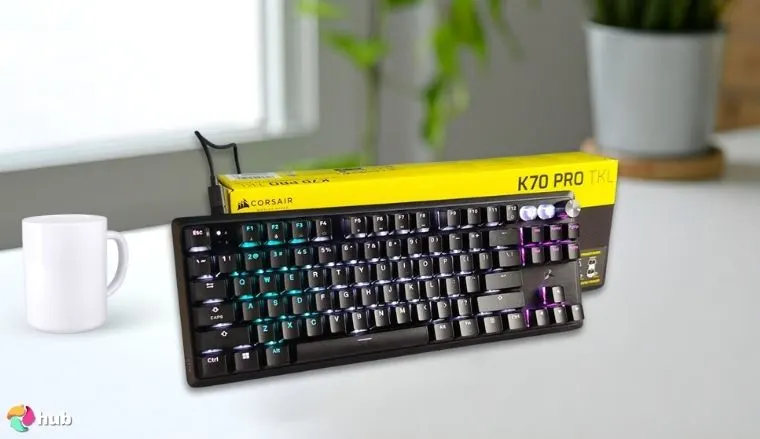
The Corsair K70 PRO TKL is designed for serious competitive gamers who demand precision and speed. It features pre-lubed MGX magnetic Hall effect switches on the main cluster, giving players precise control over key sensitivity for different games, while the function keys and non-primary keys use MLX mechanical switches that are non-adjustable. Its tenkeyless (TKL) design frees up desk space and makes it easier to carry to tournaments, while Rapid Trigger and SOCD ensure lightning-fast, reliable inputs during high-stakes gameplay.
I’ve used TKL keyboards before, but this one feels different. The responsiveness and customizability really make a noticeable impact in competitive matches. The detachable USB-C cable adds portability, and the build feels rock-solid, which gives me confidence when I’m traveling for events.
I also like how the per-key RGB lighting can be quickly customized through iCUE, allowing me to set profiles depending on the games I play. The comfort and performance balance is spot on, making long sessions feel effortless.
For those who are inclined to buy Corsair K70 must work on this tip: Pair your keyboard with the best Corsair headset for a fully synchronized setup. It’s perfect for players who want a high-performance, compact keyboard ready for tournament use.
| Pros | Cons |
|---|---|
| ✅ Pre-lubed MGX magnetic switches with customizable actuation for ultra-precise gameplay. ✅ Rapid Trigger and SOCD for competitive-level responsiveness. ✅ TKL design makes it travel-friendly and creates more mouse room. ✅ Durable, tournament-ready build quality. ✅ Per-key RGB lighting with deep iCUE customization. ✅ Consistent performance for both gaming and everyday use. | ❌ Lacks a numpad, but that’s intentional for portability and desk space. |
Final Verdict: This keyboard is built for eSports and competitive play, giving you speed, precision, and portability without sacrificing build quality or aesthetics.
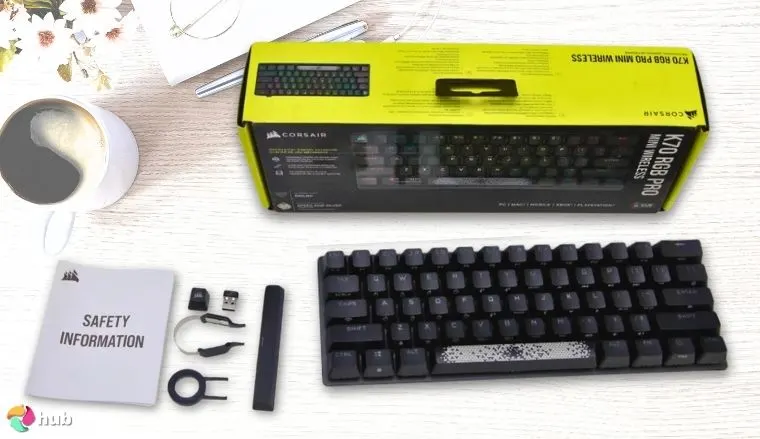
5. Corsair K70 RGB PRO Wired Mechanical Gaming Keyboard [Best for Full-Size Performance]
| Specs | Details |
|---|---|
| Switch Type | Cherry MX RGB Red |
| Form Factor | Full-size |
| Actuation Range | 2.0mm |
| Connectivity | Wired USB-C |
| Key Caps | PBT double-shot PRO |
| Lighting | Per-key RGB with iCUE integration |
| Dimension | 444mm x 166mm x 40mm |
The Corsair K70 RGB PRO is a full-sized powerhouse for gamers who want maximum features and comfort in one keyboard. It comes equipped with Cherry MX RGB Red linear switches, known for their lightning-fast and smooth actuation, and an 8,000Hz hyper-polling rate for ultra-low latency input.
The durable PBT double-shot PRO keycaps resist wear, and the soft-touch detachable palm rest provides all-day comfort, making this keyboard ideal for long gaming sessions and productivity use.
With its soft-touch wrist rest and convenient media keys, this keyboard balances competitive gaming features with everyday usability.
| Pros | Cons |
|---|---|
| ✅ Cherry MX Red switches deliver smooth, responsive keystrokes perfect for gaming. ✅ 8,000Hz hyper-polling ensures incredibly low latency for competitive play. ✅ PBT double-shot keycaps resist wear and maintain texture over time. ✅ Detachable soft-touch palm rest adds ergonomic comfort for long use. ✅ Durable aluminum frame for a premium feel and long lifespan. ✅ Per-key RGB lighting with iCUE software for complete customization. | ❌ It’s larger than TKL models, but that means you get full-size functionality and a numpad. |
Final Verdict: The K70 RGB PRO delivers top-tier performance for those who want a full-sized keyboard that doesn’t compromise on comfort, speed, or durability. It’s perfect for gamers and PC users who value responsive switches, long-term reliability, and a premium build.
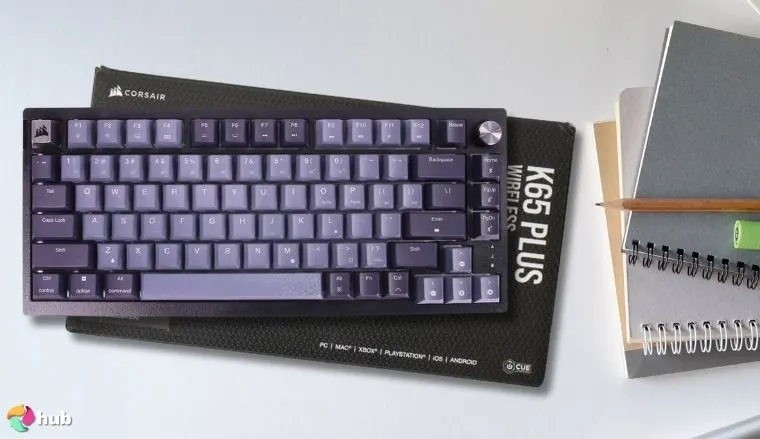
6. Corsair K65 Plus Wireless 75% RGB Mechanical Keyboard [Best for Wireless Versatility]
| Specs | Details |
|---|---|
| Switch Type | MLX Red (pre-lubed) |
| Form Factor | 75% (Compact) |
| Actuation Range | 2.0mm |
| Connectivity | Bluetooth, 2.4GHz Wireless, USB-C |
| Key Caps | PBT dye-sub |
| Lighting | Per-key RGB with iCUE integration |
| Dimension | 320mm x 135mm x 40mm |
The Corsair K65 Plus Wireless offers an impressive mix of compact design and flexible connectivity that I found incredibly practical. Its 75% layout feels just right, saving desk space while still giving easy access to essential keys like arrows and navigation. For me, this balance makes it ideal for both gaming and everyday work without feeling cramped.
Switching between devices was seamless thanks to its triple-mode connectivity. Whether using Bluetooth for my tablet, 2.4GHz wireless for gaming, or USB-C for wired tasks, the experience felt smooth and effortless.
Unlike rubber dome keyboards, the pre-lubed MLX Red linear switches provide a soft, responsive feel, while the PBT dye-sub keycaps hold up well over time, resisting shine and wear.
| Pros | Cons |
|---|---|
| ✅ 75% layout saves space while retaining arrow and navigation keys. ✅ Multiple connectivity options (Bluetooth, 2.4GHz, wired USB-C). ✅ Pre-lubed MLX Red switches provide smooth, responsive typing. ✅ Hot-swappable design lets you customize switches with ease. ✅ PBT dye-sub keycaps resist fading and maintain texture. ✅ Excellent wireless battery life with fast charging support. | ❌ Slightly heavier than ultra-compact keyboards, but the extra features make it worth it. |
Final Verdict: This is one of the most versatile wireless keyboards in Corsair’s lineup, giving you the freedom to switch between devices without losing performance. Its compact design, smooth switches, and long-lasting keycaps make it perfect for gamers and professionals needing flexibility.
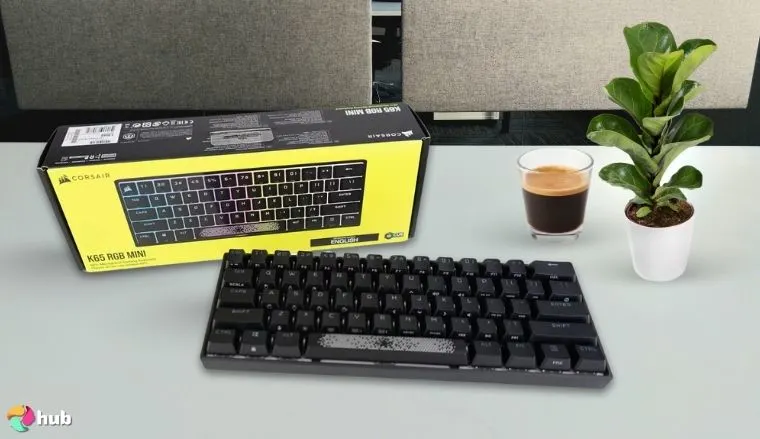
7. Corsair K65 PRO Mini RGB 65% Optical-Mechanical Keyboard [Best for Ultra Compact]
| Specs | Details |
|---|---|
| Switch Type | Corsair OPX Optical-Mechanical |
| Form Factor | 65% (Ultra-Compact) |
| Actuation Range | 1.0mm |
| Connectivity | Wired USB-C |
| Key Caps | PBT double-shot |
| Lighting | Per-key RGB with iCUE integration |
| Dimension | 294mm x 105mm x 40mm |
The Corsair K65 PRO Mini delivers big performance despite its tiny form factor, and I was genuinely impressed by how practical it feels for both gaming and everyday use. Its 65% layout frees up plenty of desk space, which is great if you like a cleaner setup or need extra room for wide mouse movements. Even in its compact design, it manages to keep crucial keys like arrows and shortcuts within reach, so you don’t feel limited when switching between work and play.
What I really appreciate about this keyboard is the way it combines speed and durability. The OPX optical-mechanical switches provide an ultra-fast actuation that feels perfect for competitive gaming, while the per-key RGB lighting powered by Corsair’s iCUE software adds plenty of personalization. On top of that, the PBT double-shot keycaps give it a solid, premium feel that’s built to last through countless sessions.
| Pros | Cons |
|---|---|
| ✅ 65% design maximizes desk space while retaining arrow keys. ✅ OPX optical switches deliver lightning-fast response for competitive play. ✅ Highly portable and lightweight for on-the-go use. ✅ Durable PBT double-shot keycaps resist fading and wear. ✅ Customizable RGB lighting with deep iCUE integration. ✅ Detachable USB-C cable for convenience and travel. | ❌ No dedicated function row, though macros help offset this. |
Final Verdict: If you need a portable yet high-performance keyboard, the K65 PRO Mini hits the sweet spot. Its compact design, premium switches, and customizable features make it a powerhouse for gamers who demand speed and efficiency.
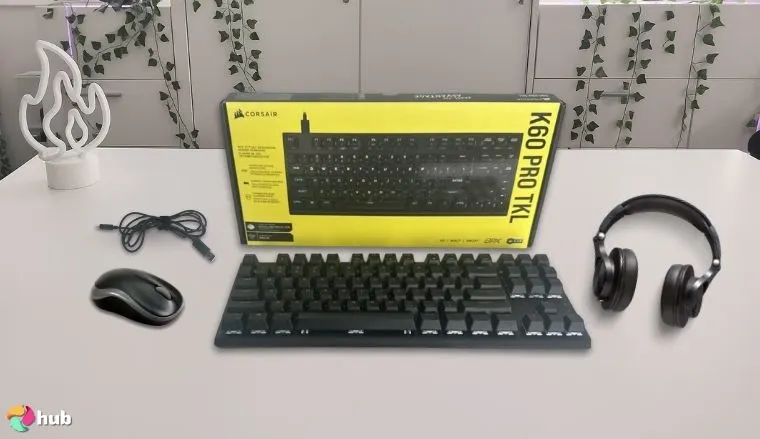
8. Corsair K60 RGB Tenkeyless Keyboard [Best Value TKL Optical-Mechanical]
| Specs | Details |
|---|---|
| Switch Type | Corsair MLX Red (Pre-lubed) |
| Form Factor | Tenkeyless (TKL) |
| Actuation Range | 1.9mm |
| Connectivity | Wired USB-C |
| Key Caps | ABS |
| Lighting | Per-key RGB with iCUE integration |
| Dimension | 360mm x 164mm x 40mm |
The Corsair K60 RGB Tenkeyless strikes a perfect balance between performance and affordability, and I think it’s an excellent option if you want a solid gaming keyboard without overspending. Its pre-lubricated Corsair MLX red switches feel smooth for my fingers and responsive, making both gaming and long typing sessions comfortable.
I also appreciate the integrated sound-dampening layer, which noticeably reduces keystroke noise (a real bonus if you’re working or gaming in a shared space). The compact TKL design frees up extra desk space, while the dedicated media control dial adds convenient functionality for adjusting volume and playback without leaving your game.
| Pros | Cons |
|---|---|
| ✅Pre-lubricated MLX red switches deliver smooth and quiet keypresses. ✅Compact TKL design saves desk space while keeping key functions accessible. ✅Sound-dampening layer reduces typing noise for shared environments. ✅Dedicated media control dial adds convenience for volume adjustments. ✅Full iCUE integration for lighting and macro customization. ✅Affordable entry point for optical-mechanical gaming keyboards. | ❌ABS keycaps feel less premium than PBT but still durable for the price. |
Final Verdict: The K60 RGB Tenkeyless is a great entry-level mechanical keyboard for gamers and everyday users who want smooth switches, quieter operation, and RGB customization without paying a premium.
9. Corsair K65 Plus Wireless 75% RGB Hot-Swappable Mechanical Keyboard [Best for Wireless Customization]
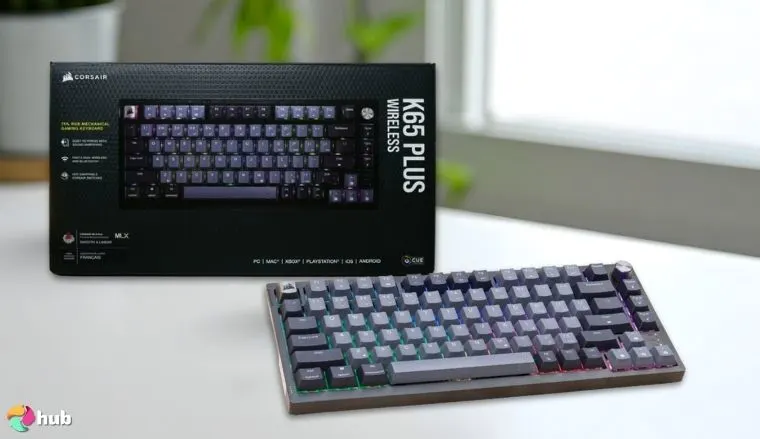
| Specs | Details |
|---|---|
| Switch Type | MLX Fusion Tactile (Hot-swappable) |
| Form Factor | 75% Compact Layout |
| Actuation Range | 1.8mm |
| Connectivity | 2.4GHz Wireless, Bluetooth, USB-C |
| Key Caps | PBT Double-shot |
| Lighting | Per-key RGB with iCUE |
| Dimension | 12.3 x 5.2 x 1.6 inches |
The Corsair K65 Plus Wireless brings together freedom of wireless use, customization, and premium comfort in a compact keyboard. I especially appreciate how the hot-swappable MLX Fusion tactile switches make it easy to change the feel of the keys without needing any technical skills, letting you create a typing experience that suits you perfectly.
Compared to the normal keyboard, the dual-layer sound dampening makes every press feel smoother on the fingers and much quieter, which is great if you often work or play in shared spaces.
Its triple-mode connectivity lets you easily switch between 2.4GHz wireless, Bluetooth, and USB-C, making it convenient for both gaming and daily use.
| Pros | Cons |
|---|---|
| ✅Hot-swappable switches for custom feel ✅Triple-mode connectivity for versatile use ✅Dual-layer sound dampening for quieter typing ✅Compact 75% layout with arrow keys ✅High-quality PBT double-shot keycaps ✅Full RGB lighting with iCUE integration | ❌Slightly higher price for its class |
Final Verdict: If you want a versatile, comfortable, and highly customizable keyboard that feels premium without being bulky, the K65 Plus Wireless is one of the best options you can get.
Prominent Features of Corsair Keyboards
Corsair keyboards are known for their practical features that improve how they perform. These key technologies are part of what makes them a popular choice for gamers and PC users who want reliable and well-designed keyboards.
1. CORSAIR iCUE Software
Corsair’s iCUE software is the control hub that takes their keyboards beyond basic functionality. It allows you to fine-tune everything, from lighting and macros to key remapping, making your setup truly your own. With a clean interface and powerful tools, it’s accessible for beginners yet deep enough for advanced users.
If you’re coming from Logitech keyboards, you’ll notice Corsair offers deeper customization through iCUE and more switch variety. Also, with iCUE, you can remap functions and set macros for individual keys, making your keyboard fully tailored to your playstyle
By centralizing control for all your Corsair peripherals, iCUE provides seamless synchronization between devices, ensuring that your keyboard, mouse, and even cooling solutions work in perfect harmony. You can also perform updates through the software. When updating your keyboard firmware through iCUE, you might come across messages like ‘verification successful, waiting’ or see a Ray ID displayed. These indicate that the process is working correctly and help maintain a stable connection between your keyboard and the software, making troubleshooting easier if needed.
Key highlights:
- Full RGB lighting control with layered effects
- Macro programming for custom commands and shortcuts
- Key remapping to personalize your keyboard layout
- Centralized management for all Corsair peripherals
- User-friendly yet powerful enough for advanced customization
2. Corsair Switch Options: CHERRY MX, OPX, and MGX
Corsair offers a range of switch types to suit different preferences, whether you need the reliable feel of mechanical switches, the speed of optical actuation, or the advanced customization of magnetic-mechanical technology.
Each switch type brings something unique, making Corsair keyboards versatile for gamers, typists, and enthusiasts. Below is a comparison of the main switch types you’ll find in our listed keyboards:
| Switch Type | Actuation Type | Actuation Point | Key Feel | Best For | Special Features | Examples from Our List |
|---|---|---|---|---|---|---|
| CHERRY MX SWITCHES | Mechanical | ~2.0mm (varies by type) | Linear, Tactile, Speed options | Balanced gaming & typing | Industry-standard durability (100M keystrokes) | K70 RGB PRO, K60 RGB TKL |
| OPX | Optical-Mechanical | 1.0mm | Smooth & Linear | Competitive, high-speed gaming | Near-instant actuation, no debounce, 150M keystroke lifespan | K100 RGB, K65 PRO Mini |
| MGX | Magnetic-Mechanical | Adjustable (0.4–3.6mm) | Customizable feel | Competitive & adaptive playstyles | Rapid Trigger, per-key sensitivity adjustment | K70 MAX RGB, K70 PRO TKL |
3. CORSAIR AXON Hyper-Processing Technology
AXON is Corsair’s cutting-edge processing technology that maximizes keyboard performance. It enables hyper-polling rates of up to 8,000Hz, meaning your inputs are sent to your PC up to 8x faster than standard keyboards. For competitive gamers, this translates into significantly reduced input lag and an overall smoother, more responsive experience.
You’ll find AXON powering some of Corsair’s most advanced models, including the K100 RGB, K70 RGB PRO, and K70 MAX RGB. By pairing this technology with their high-end switches, these keyboards make every keystroke feel instant.
Key highlights:
- Up to 8,000Hz hyper-polling rate for ultra-fast input speed
- Dramatically reduces input lag for competitive gaming
- Enhances responsiveness across all supported keys
- Designed for high-performance esports and pro-level play
- Works seamlessly with Corsair’s advanced switch technologies
4. PBT Double-Shot Keycaps
Corsair uses PBT double-shot keycaps on many of their premium keyboards, offering a significant upgrade over standard ABS caps. PBT is a durable, high-quality plastic that resists wear, shine, and fading even after years of use. The double-shot molding process means the legends are part of the keycap itself, ensuring they never fade or chip.
You’ll find these premium keycaps on models like the K100 RGB, K70 MAX RGB, K70 RGB PRO, and K65 Plus Wireless from our list. They not only provide a textured, premium feel for improved grip and comfort but also maintain their look and performance through countless gaming sessions which is why users prefer it for all the right reasons.
Key highlights:
- Made from durable PBT plastic for longevity
- Double-shot construction prevents fading or chipping
- Resistant to shine from long-term use
- Textured surface for improved grip and comfort
- Maintains a premium look and feel over time
FAQs
What is the best Corsair keyboard?
The Corsair K100 RGB is widely considered the best Corsair keyboard, offering optical-mechanical switches, ultra-fast 4,000Hz polling, advanced iCUE customization, and premium build quality.
Is the CORSAIR K65 a good keyboard?
Yes, the Corsair K65 is a compact, high-performance keyboard ideal for gamers who want portability without losing key functionality, offering wireless options and hot-swappable switches in newer models.
Is the Corsair K70 good?
The Corsair K70 series is a favorite for competitive gamers, delivering fast response times, a durable build, and customizable RGB lighting, making it one of the most reliable full-size gaming keyboards.
Is the Corsair K63 good?
Yes, the Corsair K63 is a solid budget-friendly mechanical keyboard, offering a compact design, responsive keys, and wireless functionality, making it a great choice for casual and on-the-go gaming.