Best Regions for Cheap Steam Games: How to Save Big on Your Purchases

Eneba Hub contains affiliate links, which means we may earn a small commission if you make a purchase through them—at no extra cost to you. Learn more


Recent update
This list is regularly updated to match what’s trending and in-demand among gamers.
Choosing the best regions for cheap Steam games helps you save dozens, if not hundreds, of dollars on your favorite titles. The platform’s pricing is region-based, so to get Steam games cheaper, you have to change your Steam region.
If you’ve ever wondered which country has the cheapest Steam games or how to buy Steam games from another country, you’re in the right place.
Using a straightforward method, you can change your Steam region in just a few minutes. This guide will explain all you need to know about the best regions for cheap Steam games, how to change your Steam region, and how to get Steam games cheaper by taking advantage of regional pricing.
Jump to:
How Steam Regional Pricing Works

Understanding how Steam regional pricing works is key to getting cheap Steam games. Simply put, if you compare Steam prices by country, you’ll notice huge differences. Good examples are new AAA games. Assassin’s Creed Shadows goes for $70 in the USA or £70 in the UK. In Indonesia, one of the best regions for cheap Steam games, the same game is roughly $48.
If you search for Steam prices by country, you’ll notice huge differences. Then, you might wonder what actually influences them. Some of the factors are:
- Local taxes
- Currency exchange rates
- Market conditions
- Average income
- Purchasing power parity, and more.
You’ll notice that Steam users in countries with lower purchasing power and average income can get Steam games cheaper. Similarly, users in countries with higher average incomes (the US, the UK, etc.) will notice that some versions of the games can cost up to $100 or more.
This is Steam’s way of avoiding discrimination and allowing people with lower incomes to enjoy their favorite titles.
Cheapest Steam Regions in 2026: Which Country Has the Cheapest Steam Games?

You can get Steam games cheaper in these regions:
- Vietnam – The cheapest Steam region with excellent deals and low prices on all games.
- China – A great option for buying Steam games cheaper and with frequent discounts.
- Brazil – A popular library for inexpensive games due to local market conditions.
- India – It offers cheap Steam games due to the Indian Rupee exchange rate.
- Mexico – All-time low prices for AAA titles.
- Philippines – Extremely low game prices due to lower income.
- Indonesia – Steam games for a fraction of the price due to the exchange rate.
- South Africa – Exchange-rate-based cheap prices for Steam games.
- Ukraine – Favorable Steam game prices influenced by the local economic situation.
- Kazakhstan – Some of the lowest game prices due to regional pricing policies.
So, what is the cheapest Steam region? Vietnam consistently takes the top spot, followed closely by Kazakhstan and Indonesia. They consistently offer the best prices and deals for gamers, so it’s worth checking price comparison sites like SteamDB before purchasing. Let me discuss each option more in depth and explain how to take advantage of them.
Vietnam: Best Deals for Steam Games
Among the cheapest Steam regions is Vietnam. It’s a highly popular region for its impressive deals and unbelievably low prices. Local economic factors, such as low wages and exchange rates, play a huge role, making games considerably more affordable.
Both big titles and smaller indie or niche games are very affordable. You’re looking at massive savings, frequent sales, and not paying the full price for already expensive AAA entries.
China: Affordable Steam Games and How to Access Them
China is among the best regions for cheap Steam games. Searching for Steam prices by country will reveal its shockingly low prices for big-budget titles, cult classics, and indie titles. The newest $70 AAA games (in the USA) go for up to 50% less in China, or about $35, and the situation is even better for older titles.
You can access the Chinese library by changing your Steam region with a VPN. By connecting to a server in this country, you’ll take advantage of Chinese Steam pricing and be able to purchase games at a notably lower price using Chinese Yuan.
Brazil: Steam Games on a Budget
Among the best regions for cheap Steam games is Brazil, a country with some of the consistently lowest prices. It’s up to 50% less expensive than the US library as a result of exchange rates and local market conditions.
This country is a textbook example of Steam regional pricing, with even the most expensive games not reaching their full price in the USA, the UK, and other Western regions. Accessing Brazilian Steam prices is easy with a VPN.
The advantage is buying Steam games for cheaper, but you’ll have to verify that you have a Brazilian credit card or use a Brazilian Steam gift card (after verification). Once verified, you can load funds directly into your Steam Wallet using Brazilian Reais and purchase games without needing the card for every transaction.
India: An Underrated Region for Cheap Steam Games
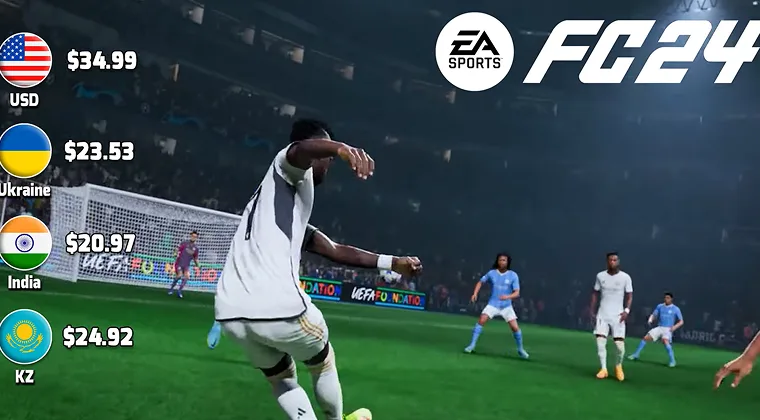
India isn’t often talked about, and I believe it’s underrated. It’s a good option for buying cheap Steam games due to the Indian Rupee exchange rate, which makes even usually pricier titles way less expensive.
If you’re in India, you’ll also notice a large number of discounts and sales, making legal gaming more affordable overall. Lower prices apply across the board, from lesser-known to famous games.
Users abroad can use reputable VPN services for Steam to obtain an Indian IP address and access this library. This way, they can get Steam games cheaper using Indian Rupees.
Mexico: Steam Deals You Can’t Miss
Mexico houses some of the least expensive Steam games due to its local currency and regional pricing benefits. You’re looking at about 40% savings, more or less, on both new and old AAA games, making Mexico ideal for getting Steam games cheaper.
How to buy Steam games in other currencies? The easiest way is to take advantage of a VPN. Connect to a Mexican server, provide a valid payment method, and buy games with Mexican Pesos. You can also do this with a Mexican Steam gift card after you verify your credit card.
Philippines: Steep Discounts on Steam Games
The Philippines is famous (or notorious) for its low wages, which naturally produce lower costs of nearly everything. For this reason, it’s one of the best regions for cheap Steam games. Using a VPN, you can gain access to Filipino Steam deals and access some geo-blocked titles.
I noticed that the Filipino library’s affordability applies to almost all game types. Newer flagship games are marginally less expensive (about US$10 less), while other games, particularly older titles, can cost way less.
Indonesia: Steam Games for Less
Indonesia has tons of affordable Steam games thanks to the Indonesian Rupiah’s exchange rate. I explored this library and noticed that AAA titles, particularly recently released, can cost up to $20 less than in the US library.
Indonesian regional Steam pricing often comes with additional sales and discounts for better deals. You can get Steam games cheaper by using a VPN server in Indonesia and making purchases in local currency via an adequate Indonesian payment method (credit card or PayPal).
South Africa: A Surprising Region for Steam Game Discounts
Gamers looking to get Steam games cheaper should know about South Africa. Due to the favorable exchange rates of the South African Rand, games are pretty affordable in this country. Their affordability ranges from smaller titles to large, big-budget games that have just come out.
If you’re abroad, using a VPN is beneficial, as it allows you to get a South African IP address. In return, you can access the South African version of Steam and purchase games at a significantly lower price. Not to mention, you can also enjoy frequent sales and deals for additional savings.
Ukraine: Low-Cost Steam Games for Budget Gamers
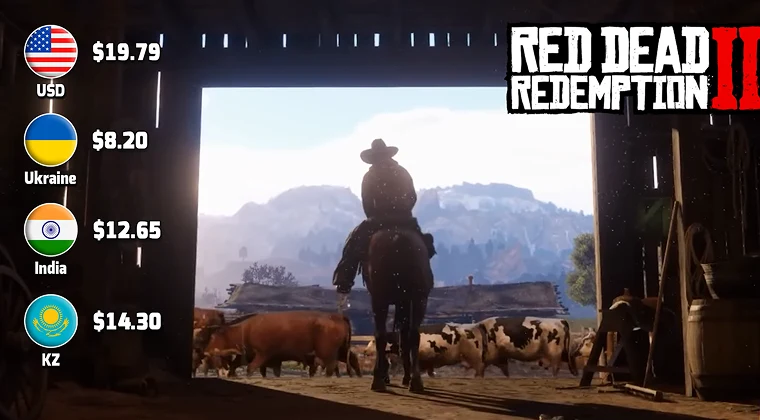
Ukraine’s economic situation is far from great due to the ongoing conflict. With lowered living standards come lower prices, making Ukraine one of the best regions for cheap Steam games.
Living in Ukraine means you can play games and not spend a fortune. Similarly, if you use a VPN service with a server in Ukraine, you can do the same. However, you must have a Ukrainian credit card to purchase games at lower prices.
Kazakhstan: Steam Games at a Fraction of the Price
Kazakhstan’s Steam game prices have hit bottom in the past few years. Some of the lowest Steam prices are due to favorable exchange rates and regional pricing policies. This means you can snatch a AAA title at 40-60% less compared to the US or the UK.
In the same fashion, you can get older or less popular titles for just a few dollars. Like the rest of the best regions for cheap Steam games, Kazakhstan can be accessed with a VPN. Not every VPN has servers in this country, so be mindful of which one you choose.
In the following section, I’ll provide a few great VPNs for gamers with servers in all of the best regions for cheap Steam games.
Why Are Steam Games Cheaper in Some Countries?
Why are Steam games cheaper in some countries? It comes down to purchasing power parity. Steam adjusts prices so that games remain accessible to players regardless of their country’s economic conditions. A $70 game in the US would be unaffordable for someone earning average wages in Vietnam or Indonesia, so Steam lowers prices accordingly.
Conversely, why are Steam games more expensive in Europe? European prices often include VAT (value-added tax) of 20-25%, which gets baked into the displayed price. Additionally, the euro-to-dollar exchange rate and higher average incomes in Western Europe contribute to pricier games.
How to Change Your Steam Region to Save Money
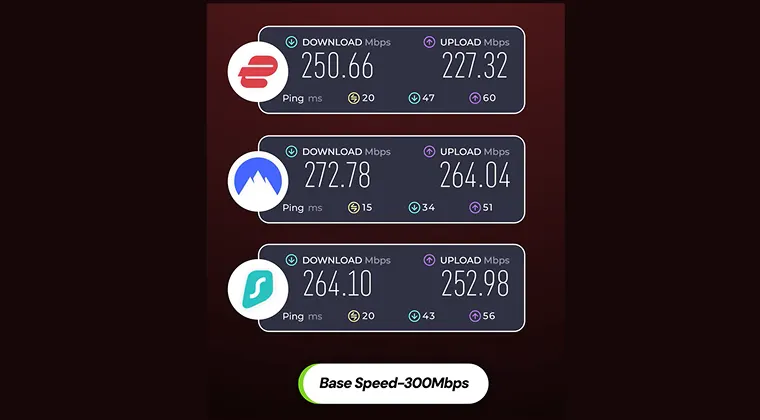
To access foreign Steam libraries, you must know how to change your Steam region. The most effective way is to use a VPN service. A VPN replaces your original IP address with a new one, making you appear elsewhere. Here’s how that works:
- Subscribe to a VPN service. I advise NordVPN for the widest server coverage in the cheapest Steam regions.
- Install the chosen VPN and launch the app.
- Sign in with your credentials (email and password).
- Connect to a corresponding VPN server.
- Go to Steam and update your store country.
- Purchase games for less money with a valid payment method or use a gift card.
Be aware that changing your Steam region may require a valid payment method from the new country. Similarly, Steam’s region-swapping policy implies that you can change your country once every three months.
Also note that you may face potential account issues due to modifying your region with a VPN, as it violates its terms of service. Of course, a new store region may impose geo-restrictions on specific games or apps, as every Steam region differs in content, prices, deals, and so on.
Below is a detailed guide on changing your Steam region, so let me tell you more about it.
Step 1: Choose the Best VPN for Changing Your Steam Region
VPNs are commonly used to change Steam regions due to their ability to swap a user’s IP address. The best VPNs for streaming can unblock Netflix libraries, but altering your Steam region works the same way. When you change your IP, Steam displays a curated library for your new location.
Steam doesn’t officially support this. Its terms of service explicitly say that VPNs for region-switching are forbidden and may result in account termination. Despite the warning, gamers still use VPNs to access cheaper regions.
These 3 VPN services are proven to be particularly great for the purpose:
NordVPN
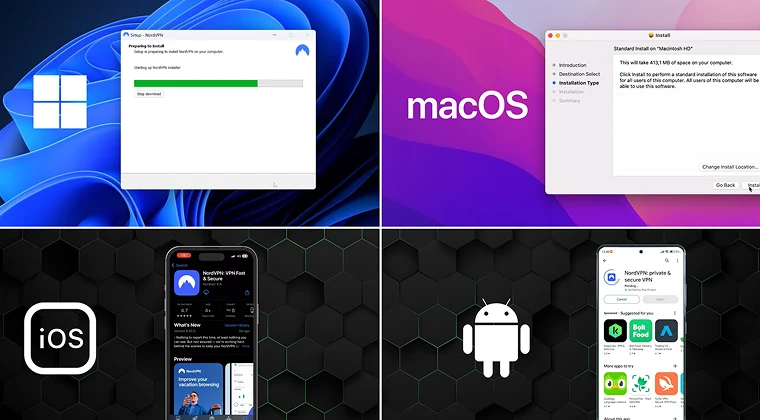
NordVPN is among the top VPNs for Steam region switching. It’s a reliable service with fast speeds thanks to the NordLynx protocol and 10 Gbps server ports. NordVPN has a vast server network of more than 8,500 servers in 165+ locations.
The server network spans all the best regions for cheap Steam games, letting you access them in a few seconds. Additionally, NordVPN has robust security, as it uses 256-bit GCM encryption, an automatic kill switch, and powerful, RAM-based servers.
We picked NordVPN for its all-around impressive performance on all fronts. It excels at security, privacy, ease of use, speed, server network size, support, and compatibility, while costing very little.
It’s also beginner-friendly, with 24/7 customer support to help you set up the VPN if you’ve never used it. NordVPN allows unlimited server switching, making it easy to switch between Steam regions and catch all the juiciest deals.
Surfshark
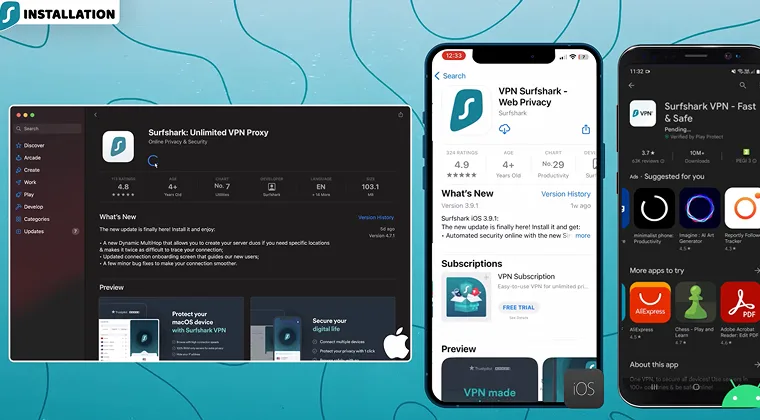
Surfshark is a budget-friendly option with great value for money. Its servers in 100 countries make Steam region changes quick and efficient. Above all, the VPN allows unlimited simultaneous connections, offers exemplary performance, and has a no-logging policy.
Surfshark was our go-to choice for those on a budget looking for unlimited simultaneous connections, advanced security features, and reliable speeds for gaming with no lag.
Budget-conscious users looking to change their Steam region will love the extras. Surfshark includes MultiHop servers and an ad-blocker, and, depending on the plan, virus protection for all devices. Gamers will mostly appreciate its reliable connections and speeds, with a wide country spread for effortless Steam region change.
Console gamers also use Surfshark, and it’s one of the best VPNs for gaming on Xbox for its speed, the ability to sidestep geo-blocks, and impeccable DDoS protection.
ExpressVPN
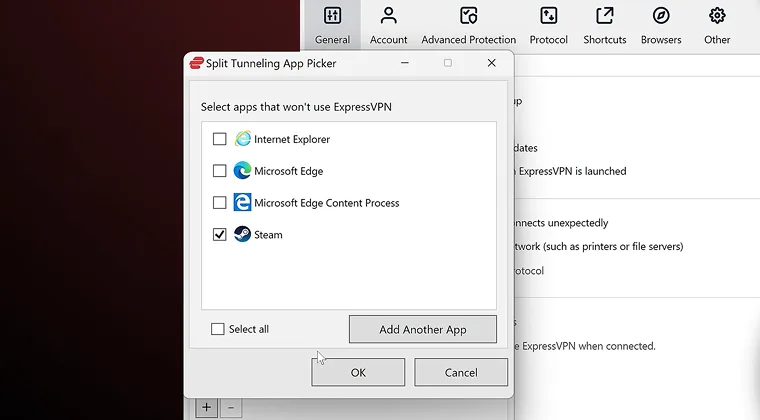
ExpressVPN is among the most popular and trusted VPN services. It’s very reliable for streamers and gamers, emphasizing fast connection speeds and bulletproof encryption.
ExpressVPN’s Lightway Turbo protocol is a multi-tunneling protocol, allowing for unrestricted bandwidth and neck-breaking speeds. Simultaneously, ExpressVPN has over 3,000 servers in 105 countries, all suited for bypassing geo-restrictions, ideal for taking advantage of Steam regional pricing.
This VPN consistently tops our speed test charts but also offers straightforward apps, rock-solid security, responsive support, and a no-log policy with multiple independent audits.
ExpressVPN works for users who need to access multiple regions regularly. It may be one of the most straightforward apps, with impeccable ability to sidestep geo-blocks.
Step 2: Change Your Steam Region
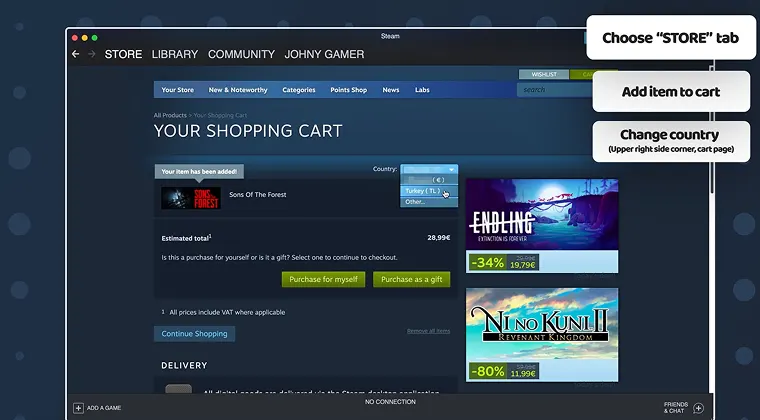
Now that you’ve settled on a VPN, it’s time to actually change your Steam region.
Don’t forget to pick the VPN server from the desired Steam region, whether it’s Kazakhstan, Mexico, Indonesia, or any other. From there:
- Launch Steam and log in to your account.
- Go to Account Details.
- Select Update Store Country.
- Provide a valid payment method linked to the new region.
- Verify the payment method when prompted, and your store region will change.
Bear in mind that you’ll be locked to the new region for 90 days, according to Steam’s terms of service. For this reason, it’s vital to think well about the region you want to use during this period.
Step 3: Risks and Limitations of Changing Steam Regions
A Steam region change isn’t without risks.
Steam’s regional lock policy may temporarily lock you out of your account. It also limits your ability to switch regions freely to prevent abuse. While you can change your store region once in three months, Steam may notice your frequent changes and impose a restriction.
On that note, using a VPN for this purpose may lead to serious consequences, including a temporary or permanent account ban. While using VPNs for buying Steam games cheaper is common, users should be aware of Steam’s terms of service and potential risks of region swapping.
How To Buy Steam Games in Other Currencies?
Learning how to buy Steam games in other currencies can save you significant money. Steam game prices vary based on many factors, including economic situation, purchasing power, currency conversion rates, and more. If you’re trying to shop in a different currency, the easiest option is to change your store region.
If you’re in Europe, Steam will display prices in euros. Conversely, users in the USA will see prices in dollars. Favorable exchange rates are what make games cheaper in most cases. Steam usually equates euros to dollars, so if a game is 70 euros in Europe, it’s pretty much always 70 dollars in the USA.
This isn’t the case with the best regions for cheap Steam games, where conversion rates dwindle the prices by up to 60%. By using a VPN, you can take advantage of Steam regional pricing and make purchases in other currencies. However, you may need a payment method connected to that region.
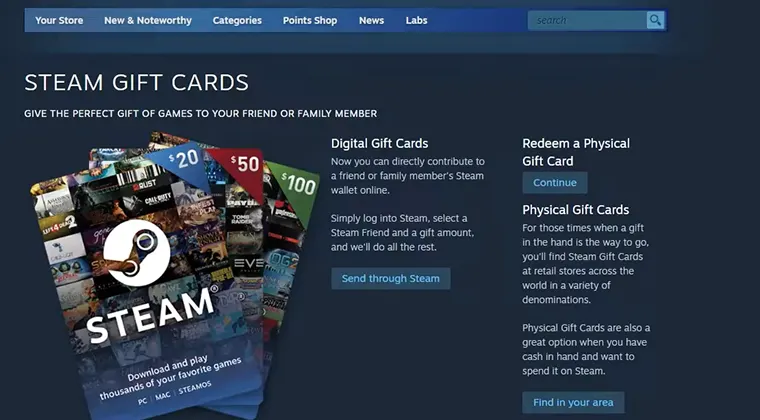
One popular workaround is adding funds to your Steam Wallet using region-specific gift cards. This lets you bypass the need for a local credit card entirely.
Transaction fees and potential currency fluctuations are just part of the picture. For this reason, some of the cheapest Steam regions in the past aren’t affordable anymore and often have fully-priced games.
Who Has the Best Currency Conversion Options in Game Stores?
Steam handles currency conversion automatically based on your store region, but rates aren’t always favorable. For the best deals, purchasing directly in the local currency of cheap regions (Vietnamese Dong, Indonesian Rupiah, etc.) typically beats relying on Steam‘s conversion from USD or EUR.
My Final Thoughts on the Best Regions for Cheap Steam Games
Gaming, as a form of entertainment, doesn’t need to be expensive. By taking advantage of Steam regional pricing and identifying the cheapest Steam region for your favorite game, you can buy games in other currencies and save a ton of money.
You can also use foreign Steam gift cards to load your Steam Wallet with local currency, but only after providing a region-specific credit card or PayPal. I encourage you to experiment with the tips I shared in this guide.
Keep an eye out for regional pricing for the best deals and get your favorite games for a bottom-shelf price. Being smart about Steam’s pricing can lead to generous savings. However, also remember the potential pitfalls and risks that Steam location swapping carries with it.
FAQs
The best region for cheap Steam games is Vietnam, with Ukraine and Indonesia also being frequent choices. Their favorable exchange rates and regional pricing policies make sure that even the newest, most ambitious games cost up to 60% less.
It is safe, but not entirely, as it carries the risk of account termination due to Steam’s terms of service, which are opposed to VPN services.
The best VPNs for changing Steam regions are NordVPN, Surfshark, and ExpressVPN for their wide location spreads, range-topping speeds, and robust security features.
Steam can ban you for using a VPN to change your region according to its terms of service. While it’s not guaranteed, you’re always at risk of getting your account terminated if Steam spots this abuse.
You can change your Steam region once every three months. Steam implemented this rule to prevent abuse and also requires a valid payment method with a local billing address to make the change.
No, you can’t. You can only use a gift card tied to your country on Steam. The trick is that gift cards are currency-locked and not region-locked, so you can redeem the gift card in the given currency only if it matches your account’s default currency.
Yes, there are, as this practice directly confronts Steam’s terms of service. Simply put, you risk account suspension or permanent ban due to the VPN’s ability to circumvent geo-restrictions and regional pricing
Changing Steam regions affects your account and library. Apart from different prices, you’ll also get different content, game availability, and even game versions. Some games may also be released earlier or later, based on the region.
There are no limits on Steam’s regional purchases during sales if you’re buying for yourself. However, sales are region-specific, so different markets have different offers. As for gifts, Steam doesn’t let you send them if the price difference between your and the receiver’s region is greater than 10%.
You can compare Steam prices by country using websites like SteamDB, IsThereAnyDeal, and SteamPriceHistory. These tools display current and historical prices across all Steam regions, making it easy to identify where games are cheapest before changing your store region.