9 Best 1440p GPU – 2025 Performance Picks for Gamers

Eneba Hub contains affiliate links, which means we may earn a small commission if you make a purchase through them—at no extra cost to you. Learn more

Most buyers still look at VRAM, boost clocks, and memory bandwidth, but that only tells part of the story. I tried multiple of the best 1440p GPU cards in my own setup over the past year, using a 144Hz 1440p IPS monitor paired with a mid-range Ryzen system, and the difference between GPU tiers became obvious.
This guide highlights the top-performing, best-value GPUs for 1440p, with a focus on smooth frame rates, strong ray tracing, and features that feel genuinely important. Keep reading to see which cards actually performed well at 1440p, and which ones just looked good on paper.
Jump to:
Our Top Picks for 1440p GPU
Choosing the right graphics card for 1440p can be overwhelming, so here are the three models that consistently delivered the best results during testing. These are the GPUs that impressed me the most in real gameplay, performance stability, and long-term value.
- ASUS ROG Strix GeForce RTX 5070 Ti OC Edition (2025) – This card stood out as the strongest all-around performer thanks to its exceptional 1440p frame rates, quiet cooling system, and reliable DLSS support that keeps demanding titles smooth.
- ASRock Challenger Radeon RX 7700 XT (2023) – The RX 7700 XT earned its place by offering impressive raster performance at a competitive price and providing the best value for players who prioritize raw frames over premium extras.
- GIGABYTE AORUS GeForce RTX (2025) – This model impressed me with strong ray tracing performance, efficient power usage, and a well-balanced design that fits a wide range of 1440p builds.
These three options represent the best combination of speed, value, and modern features. Each one excels in its own category, and the full list below breaks down all nine GPUs in detail. Keep scrolling to find the best match for your setup.
9 Best 1440p GPU – Top Picks for Smooth, High-FPS Gaming
This section covers the nine graphics cards that delivered the strongest mix of performance, value, and stability during 1440p testing. Each model brings different strengths for competitive players, AAA gamers, and feature-focused buyers.
Below is the full breakdown of what makes each one stand out as the best 1440p GPU.
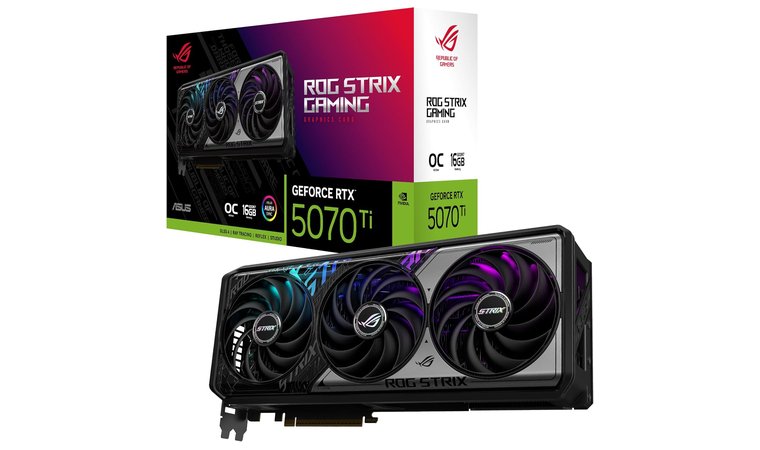
1. ASUS ROG Strix GeForce RTX 5070 Ti OC Edition [Best Overall 1440P GPU]
| Specs | Details |
|---|---|
| GPU Architecture | NVIDIA GeForce RTX 5070 Ti |
| VRAM Capacity | 16GB GDDR7 |
| Memory Bus | 256-bit |
| Boost Clock Speed | 2625 MHz OC mode, 2602 MHz default |
| Upscaling/Frame Gen | DLSS 3, Frame Generation |
| Card Length/Slots | 3.2-slot ROG Strix shroud |
The ASUS ROG Strix GeForce RTX 5070 Ti OC Edition earns its position as the best overall 1440p option due to its premium cooling hardware and extremely stable overclocked performance.
This model uses a massive 3.2-slot cooler designed with three Axial-tech fans that push high airflow across a dense fin array. ASUS includes MaxContact technology with a vapor chamber to improve heat transfer, while a phase-change thermal pad ensures consistent GPU temperatures under sustained load.
With this thermal headroom, the GPU can maintain its 2625 MHz OC boost clock across long gaming sessions with no signs of instability. When paired with a capable processor from our best CPU list, this card shows exceptional consistency in demanding titles.
| Pros | Cons |
|---|---|
| ✅ Vapor chamber ensures fast heat transfer and stable temperatures ✅ Axial-tech fans scaled for high airflow and quiet operation ✅ Robust 3.2-slot cooling solution supports sustained high clocks ✅ 0 dB technology allows silent operation during light workloads ✅ Premium power delivery with digital power control and 15K caps | ❌ Higher price than simpler 5070 Ti models, although the premium cooling helps the card deliver more reliable long-term performance |
The combination of strong factory overclocks, advanced thermal engineering, and reliable build quality makes this card ideal for players who want high-refresh 1440p gaming without performance dips or thermal issues. It handles ray tracing workloads confidently and performs exceptionally well with DLSS 3 in supported games.
Final Verdict: The ASUS ROG Strix RTX 5070 Ti OC Edition is a top choice for buyers who want the best GPU for 1440p, offering unmatched cooling strength, excellent sustained performance, and a premium build that supports years of reliable gaming.
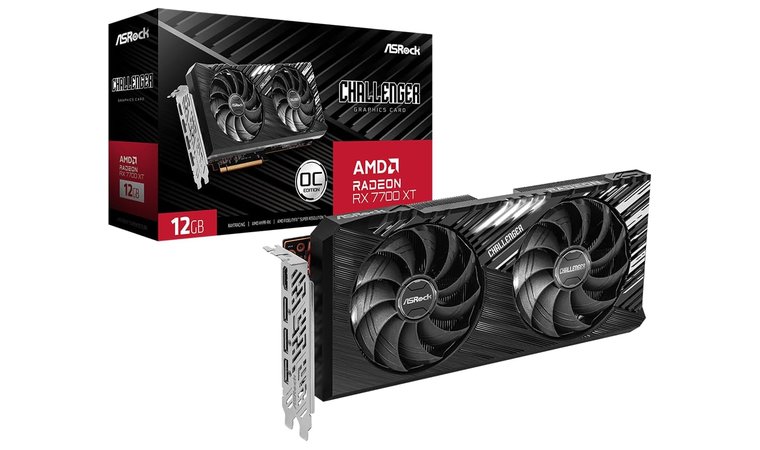
2. ASRock Challenger Radeon RX 7700 XT [Best Budget 1440P GPU]
| Specs | Details |
|---|---|
| GPU Architecture | AMD Radeon RX 7700 XT |
| VRAM Capacity | 12GB GDDR6 |
| Memory Bus | 192-bit |
| Boost Clock Speed | Varies by model, strong stock boost |
| Upscaling/Frame Gen | FSR, Radeon Super Resolution |
| Card Length/Slots | Compact dual-fan design |
The ASRock Challenger Radeon RX 7700 XT earns its position as the best budget 1440p GPU thanks to its excellent raw raster performance and a competitive price that undercuts most NVIDIA alternatives.
This model focuses heavily on delivering high frame rates in modern titles without unnecessary extras, making it a great pick for players who want reliable speed for less money. The compact dual-fan cooling system fits easily into standard cases, which is helpful for budget builders who may not have room for larger triple-slot designs.
When paired with a monitor from our best gaming monitor recommendations, the 7700 XT provides a fast and smooth experience for most 1440p games.
| Pros | Cons |
|---|---|
| ✅ Strong 1440p raster performance at a lower price point ✅ Compact dual-fan design fits easily into standard builds ✅ 12GB VRAM provides enough memory for modern texture demands ✅ FSR support boosts performance in compatible games ✅ Lower power draw suits budget-friendly power supplies | ❌ Ray tracing performance is weaker than NVIDIA options, although most players who choose this card prioritize raster FPS over ray tracing features |
The RX 7700 XT performs exceptionally well in traditional rendering and handles fast-paced games with ease. Budget gamers who want smooth 1440p performance without stretching their build cost will find the Challenger model dependable and consistent. Its compact cooler also helps it fit into a wide range of PC cases, which is ideal for smaller or older setups.
Final Verdict: The ASRock Challenger RX 7700 XT is the best option for buyers who want high 1440p frame rates at the lowest price, with dependable cooling, solid VRAM capacity, and excellent value for budget-focused builds.
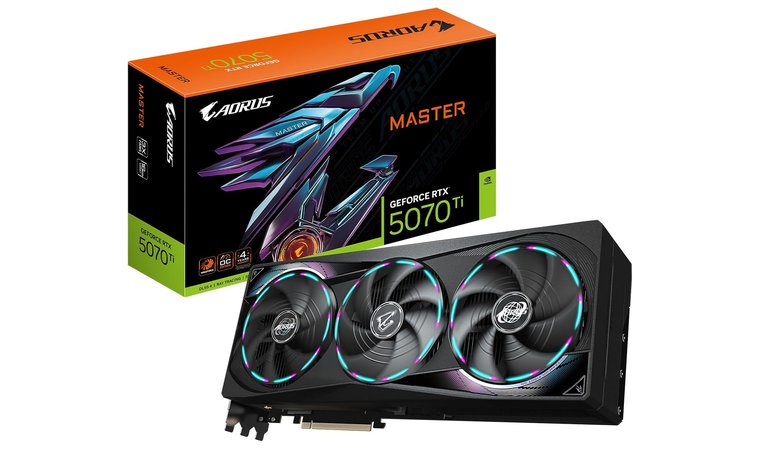
3. GIGABYTE AORUS GeForce RTX [Best Aesthetic 1440P GPU]
| Specs | Details |
|---|---|
| GPU Architecture | NVIDIA Blackwell, RTX 5070 Ti |
| VRAM Capacity | 16GB GDDR7 |
| Memory Bus | 256-bit |
| Boost Clock Speed | Factory-tuned AORUS boost (varies by mode) |
| Upscaling/Frame Gen | DLSS 4 |
| Card Length/Slots | Premium triple-slot WINDFORCE cooler |
The GIGABYTE AORUS GeForce RTX 5070 Ti Master stands out for buyers who want strong 1440p performance and a visually impressive design that becomes the centerpiece of any gaming setup.
Its most distinctive feature is the LCD Edge View panel, which allows users to display live GPU temperatures, fan speeds, power draw, text, animations, or even custom GIFs. This adds a personalized touch that no standard GPU offers.
The card is powered by the NVIDIA Blackwell architecture and supports DLSS 4, which boosts frame rates in modern titles while maintaining crisp visual quality. When paired with one of the best GPU, it fits into high-end builds that focus on both performance and aesthetics.
| Pros | Cons |
|---|---|
| ✅ LCD Edge View screen displays real-time system stats or custom animations ✅ WINDFORCE cooling system improves airflow and temperature consistency ✅ 16GB GDDR7 memory supports modern, high-resolution texture demands ✅ DLSS 4 enhances performance in compatible titles ✅ Premium shroud and RGB lighting elevate visual appeal | ❌ Higher cost due to premium features, although the added display and cooler quality provide meaningful value for showcase builds |
The 5070 Ti Master delivers a strong balance of performance and customization. It maintains smooth frame rates at 1440p, handles thermal loads effectively, and offers features that appeal to builders who want more than raw numbers.
The LCD screen adds functionality while creating a visually striking look for open-case or glass-panel setups.
Final Verdict: The GIGABYTE AORUS GeForce RTX 5070 Ti Master is perfect for gamers who want top-tier performance paired with outstanding customization, making it one of the most impressive choices for the best GPU for 1440p gaming 2025.
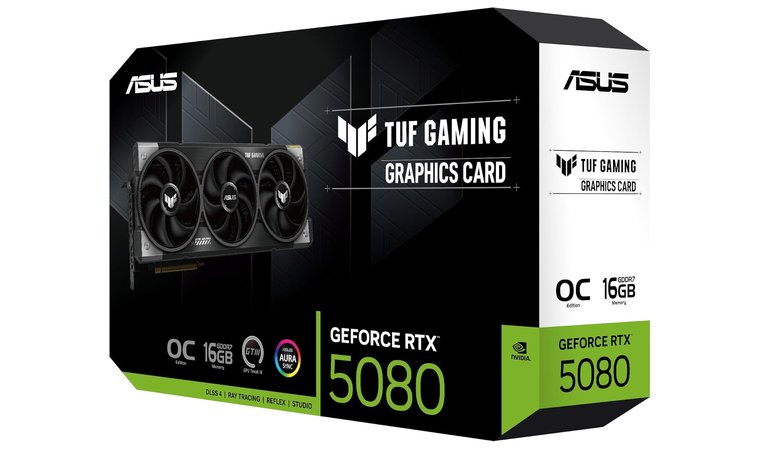
4. ASUS TUF Gaming GeForce RTX 5080 [Best Durable 1440P GPU]
| Specs | Details |
|---|---|
| GPU Architecture | NVIDIA Blackwell, RTX 5080 |
| VRAM Capacity | 16GB GDDR7 |
| Memory Bus | 256-bit |
| Boost Clock Speed | 2730 MHz |
| Upscaling/Frame Gen | DLSS 4 |
| Card Length/Slots | 3.6-slot TUF cooling design |
The ASUS TUF Gaming GeForce RTX 5080 OC Edition is engineered for players who want next-generation performance supported by extreme durability. The card uses military-grade components, a reinforced metal shroud, and a protective PCB coating that shields against moisture or dust.
This design gives the GPU a long lifespan and stable behavior during continuous, high-refresh 1440p gameplay. Its cooling system combines a large fin array, a vapor chamber, and three axial-tech fans to maintain low temperatures under heavy load.
When paired with one of the best RAMs, the 5080 performs with consistent smoothness across modern AAA titles.
| Pros | Cons |
|---|---|
| ✅ Military-grade components improve long-term reliability ✅ Vapor chamber enhances thermal transfer ✅ Axial-tech fans maintain strong airflow ✅ Protective PCB coating increases durability ✅ DLSS 4 boosts performance in supported games | ❌ Large size limits case compatibility, although the superior cooling makes it an excellent fit for spacious mid-tower builds |
The TUF 5080 focuses on stability rather than flashy extras. It holds boost clocks well during extended sessions, which makes it ideal for players who need consistent performance during long gaming hours.
Final Verdict: The ASUS TUF Gaming RTX 5080 OC Edition is a top choice for buyers who want long-lasting 1440p power supported by excellent cooling, durable construction, and dependable performance across demanding games.
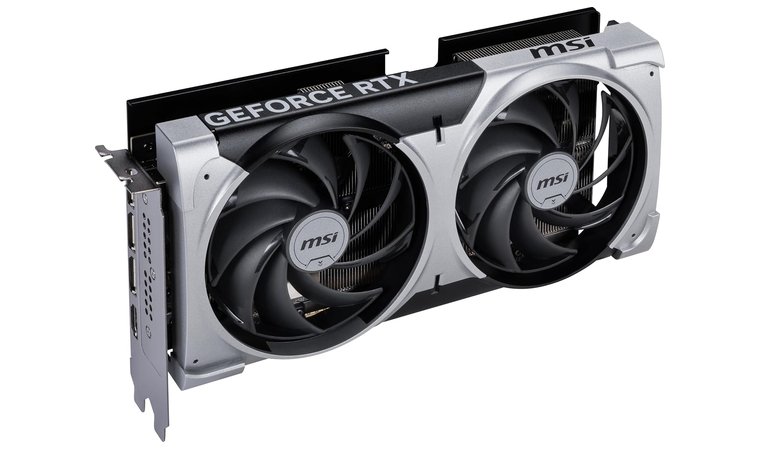
5. MSI Gaming RTX 5070 [Best Quiet 1440P GPU]
| Specs | Details |
|---|---|
| GPU Architecture | NVIDIA Blackwell, RTX 5070 |
| VRAM Capacity | 12GB GDDR7 |
| Memory Bus | 192-bit |
| Boost Clock Speed | 2557 MHz |
| Upscaling/Frame Gen | DLSS 4 |
| Card Length/Slots | Compact dual-fan design |
The MSI Gaming RTX 5070 Ventus 2X OC strikes a strong balance between price and performance for 1440p players who want quiet operation and dependable cooling.
Its compact dual-fan layout pairs well with mid-sized cases, and the TORX Fan 5.0 design stabilizes airflow with ring-linked fan blades for higher pressure and reduced turbulence. The nickel-plated copper baseplate captures heat quickly, and the Core Pipe layout maximizes contact with the GPU surface to improve thermal transfer.
When combined with the airflow advantages that usually appear in builds from one of the best low-profile GPU, the card performs consistently under heavy gaming loads.
| Pros | Cons |
|---|---|
| ✅ TORX Fan 5.0 provides high-pressure, quiet airflow ✅ Compact dual-fan design fits smaller or mid-tower builds ✅ 12GB GDDR7 supports modern textures at 1440p ✅ DLSS 4 boosts frame rates significantly ✅ Metal backplate improves rigidity and cooling efficiency | ❌ Slimmer cooler offers less thermal headroom than larger triple-fan cards, although overall temperatures remain stable for typical 1440p use |
The RTX 5070 Ventus 2X OC delivers strong performance in the 60 to 100+ FPS range at 1440p and remains whisper-quiet during long sessions. DLSS 4 further enhances smoothness, especially in demanding titles that push frame times harder.
Final Verdict: The MSI Gaming RTX 5070 Ventus 2X OC is an excellent choice for players seeking the best GPU for 1440p 240Hz, offering quiet performance, reliable cooling, and strong efficiency in a compact design.
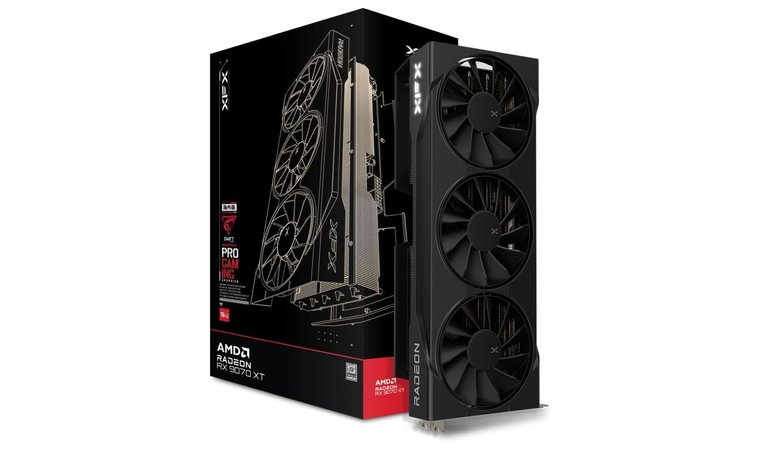
6. XFX Swift AMD Radeon RX 9070 XT [Best Airflow 1440P GPU]
| Specs | Details |
|---|---|
| GPU Architecture | AMD RDNA 4, RX 9070 XT |
| VRAM Capacity | 16GB GDDR6 |
| Memory Bus | 256-bit |
| Boost Clock Speed | Up to 2970 MHz |
| Upscaling/Frame Gen | FSR |
| Card Length/Slots | Triple-fan SWFT cooling design |
The XFX Swift AMD Radeon RX 9070 XT is built around XFX’s signature open-air SWFT cooling design, which focuses on high airflow and efficient heat dissipation.
This layout helps the GPU reach and maintain its higher boost clocks, making it ideal for 1440p raster-focused gamers who want dependable performance across long sessions. With 16GB of GDDR6 VRAM and RDNA 4 efficiency, the card excels in texture-heavy games where large memory buffers matter.
When paired with a strong AMD system from our best AMD GPU recommendations, this model performs smoothly in demanding, modern titles without relying on ray tracing features.
| Pros | Cons |
|---|---|
| ✅ SWFT open-air cooling maximizes airflow ✅ High boost clock potential for stable raster FPS ✅ 16GB VRAM handles large textures with ease ✅ FSR improves performance when needed ✅ Triple-fan design remains relatively quiet | ❌ Ray tracing performance trails NVIDIA cards, although most buyers choose this GPU for its exceptional raster speed and VRAM advantage |
The RX 9070 XT performs extremely well in modern AAA titles that rely heavily on textures and raw shading power. Its cooling system keeps the card consistent even when pushed hard, which makes it dependable for players who game for hours at a time.
Final Verdict: The XFX Swift RX 9070 XT is a strong pick for players who prioritize airflow, high boost clocks, and excellent 1440p raster performance supported by a generous 16GB VRAM buffer.
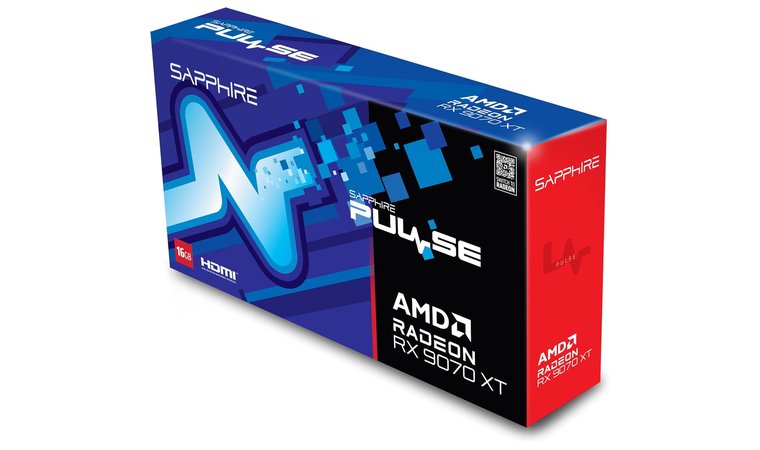
7. Sapphire 11348-03-20G Pulse AMD Radeon RX 9070 XT [Best Value AMD 1440P GPU]
| Specs | Details |
|---|---|
| GPU Architecture | AMD RDNA 4, RX 9070 XT |
| VRAM Capacity | 16GB GDDR6 |
| Memory Bus | 256-bit |
| Boost Clock Speed | Up to 2970 MHz |
| Upscaling/Frame Gen | FSR |
| Card Length/Slots | Dual-fan Pulse design |
The Sapphire Pulse AMD Radeon RX 9070 XT delivers the raw 1440p strength of AMD’s RDNA 4 architecture inside a practical and highly reliable package.
Sapphire’s Pulse series focuses on stable performance and dependable build quality rather than premium extras, which makes this card one of the most sensible choices for buyers who want strong numbers without paying for aesthetic features.
With 16GB of GDDR6 VRAM and a 256-bit memory interface, the card handles texture-dense games and open-world titles with ease, maintaining steady frame rates even at high settings. The Pulse cooling design uses a clean and efficient dual-fan system that keeps temperatures manageable while staying quieter than many triple-fan alternatives.
| Pros | Cons |
|---|---|
| ✅ Reliable Pulse cooling with efficient dual-fan airflow ✅ 16GB VRAM ideal for modern 1440p titles ✅ Strong boost clock up to 2970 MHz ✅ Excellent value for AMD-focused builders ✅ FSR support improves performance in demanding games | ❌ Lacks premium visual features found on larger models, although the simpler design helps lower cost and improve overall value |
The RX 9070 XT Pulse excels in pure raster performance and maintains consistent clocks during long gaming sessions. It delivers the power of the RX 9070 XT in a straightforward, dependable design that fits perfectly into budget-conscious AMD builds.
Final Verdict: The Sapphire Pulse RX 9070 XT is the ideal choice for AMD-focused players who want maximum 1440p performance and long-term reliability at a fair price.
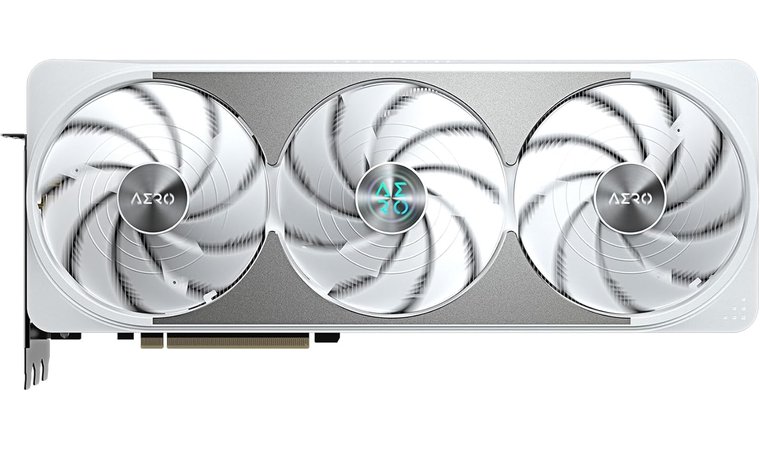
8. GIGABYTE GeForce RTX 5070 Ti AERO OC [Best White 1440P GPU]
| Specs | Details |
|---|---|
| GPU Architecture | NVIDIA Blackwell, RTX 5070 Ti |
| VRAM Capacity | 16GB GDDR7 |
| Memory Bus | 256-bit |
| Boost Clock Speed | 2600 MHz |
| Upscaling/Frame Gen | DLSS 4 |
| Card Length/Slots | WINDFORCE triple-fan cooler |
The GIGABYTE GeForce RTX 5070 Ti AERO OC combines strong 1440p performance with one of the cleanest white and silver aesthetics available. The AERO design is built for players who want a high-performance system that also matches a coordinated white or silver theme.
Its WINDFORCE cooling system uses triple fans, a large heatsink, and carefully managed airflow to maintain consistent clock speeds during long gaming sessions. The 16GB GDDR7 memory and Blackwell architecture help the card deliver high frame rates in modern titles at demanding settings, while DLSS 4 boosts smoothness even further.
| Pros | Cons |
|---|---|
| ✅ Clean white AERO aesthetic ideal for themed builds ✅ WINDFORCE cooling keeps temperatures controlled ✅ 16GB GDDR7 supports high-resolution textures ✅ DLSS 4 significantly improves performance ✅ Strong 1440p and creator workload performance | ❌ White finish costs more than standard models, although the unique aesthetic makes it a preferred choice for themed PC builds |
The RTX 5070 Ti AERO OC fits perfectly into white or silver gaming rigs where visual coordination matters as much as raw numbers. Its cooling system performs reliably, clock speeds remain steady, and the card offers excellent performance for 1440p gaming at high refresh rates.
Final Verdict: The GIGABYTE RTX 5070 Ti AERO OC is ideal for players who want the best GPU for 1440p 165Hz while keeping their setup visually unified, clean, and high-end.
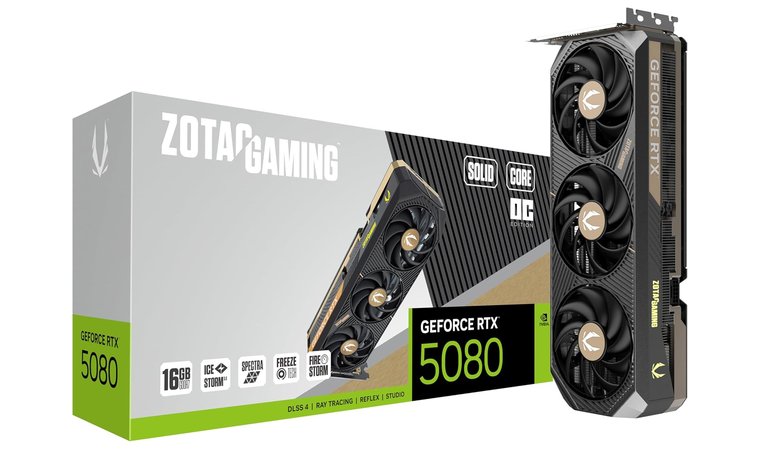
9. ZOTAC GAMING GeForce RTX 5080 [Best Compact 1440P Performer]
| Specs | Details |
|---|---|
| GPU Architecture | NVIDIA Blackwell, RTX 5080 |
| VRAM Capacity | 16GB GDDR7 |
| Memory Bus | 256-bit, 30 Gbps |
| Boost Clock Speed | 2640 MHz |
| Upscaling/Frame Gen | DLSS 4 |
| Card Length/Slots | Solid Core OC, compact triple-fan cooler |
The ZOTAC GAMING GeForce RTX 5080 Solid CORE OC brings near-flagship performance to builds that cannot support oversized GPU coolers. This model delivers the raw power of the RTX 5080 while maintaining a more compact footprint than the bulkier, showcase-oriented variants.
Powered by the NVIDIA Blackwell architecture with DLSS 4 support, it can handle both 4K workloads and extremely fast 1440p refresh rates. The IceStorm 3.0 cooling system uses BladeLine fans, a vapor chamber, composite heatpipes, and pass-through airflow to stabilize temperatures inside mid-sized cases.
When paired with a strong GPU for 4K gaming, the card performs smoothly even under sustained gaming loads.
| Pros | Cons |
|---|---|
| ✅ Strong near-flagship performance for 1440p and 4K ✅ IceStorm 3.0 cooling provides stable thermal control ✅ Vapor chamber and heatpipes improve heat transfer ✅ Compact Solid Core design fits mid-sized cases ✅ DLSS 4 boosts frame rates and visual clarity | ❌ Requires a higher-capacity PSU, although efficiency improvements help maintain more predictable power behavior |
The compact design makes this model ideal for high-end systems that do not have room for oversized coolers. Its thermal hardware performs well enough to support consistent boost clocks, even during multi-hour sessions. Users dealing with extremely tight clearances often find that a top-tier low profile GPU delivers the perfect combination of size and power for specialized compact setups.
Final Verdict: The ZOTAC GAMING RTX 5080 Solid CORE OC is perfect for gamers who want top-tier performance in a tighter form factor, offering impressive stability and speed for anyone seeking the best graphics card for 1440p without needing a massive chassis.
Key Considerations While Purchasing 1440p GPU
Choosing the right 1440p graphics card requires more than comparing model names. A GPU that looks powerful on paper can perform very differently depending on the system around it, the types of games you play, and the monitor you pair it with. These core considerations will help you avoid performance issues and ensure your build feels smooth, fast, and properly balanced.
A strong GPU only reaches its full potential when paired with an equally capable CPU. If the processor cannot keep up with the number of frames the GPU can generate, you will experience a bottleneck that limits performance. Fast-paced shooters, open-world games, and simulation-heavy titles depend on strong single-core and multi-core performance.
When choosing a 1440p GPU, make sure your CPU can sustain the frame rates you want without becoming a limiting factor. This prevents inconsistent frame pacing and keeps your system stable.
- Monitor Match: Your monitor plays a major role in the final experience. A 144Hz display requires a GPU that can deliver 144 FPS or more in the games you play, otherwise, you lose the benefit of the high refresh rate. Players using 165Hz or 240Hz monitors need even more GPU headroom to maintain smooth motion. Always match your GPU to your target refresh rate to ensure your monitor and graphics card work together effectively.
- Cooling: Strong cooling is essential for long gaming sessions. Modern GPUs use 2-fan or 3-fan designs to push airflow efficiently through the heatsink and keep temperatures stable. Better cooling allows the GPU to hold its boost clocks longer, which directly improves performance. If you plan to overclock or play for extended hours, choose a model with a robust thermal solution that stays cool without producing excessive noise.
- Budget: Before selecting a GPU, decide on your desired frame rate. A player targeting 60–100 FPS does not need the same hardware as someone aiming for 165+ FPS in competitive titles. By identifying your performance goals early, you can select a card that meets your needs without overspending. This ensures you get the best value and a smoother overall experience.
My Overall Verdict
Choosing the right 1440p GPU comes down to knowing your playstyle and the performance target you want to hit. Each category of gamer benefits differently, and the strongest choice depends on how you balance frame rate, visual quality, and long-term reliability.
- For competitive players who want the fastest response times, start with the ASUS ROG Strix GeForce RTX 5070 Ti OC Edition for games like Apex Legends, since it provides high-refresh stability and excellent DLSS support that keeps frame pacing smooth.
- For single-player AAA fans who prefer cinematic detail, go with the RTX 5080 for titles like Cyberpunk 2077, because its raw power and advanced upscaling give you headroom for both ray tracing and higher settings.
- For budget-focused AMD gamers who want maximum raster performance, choose the RX 9070 XT for games like Starfield, since its VRAM advantage and strong shading performance allow it to hold steady frame rates at high settings.
- For builders who care about visuals and aesthetics, the AERO RTX 5070 Ti is ideal for games like Horizon Zero Dawn, because it offers excellent 1440p performance packaged in a clean white design that fits themed setups.
Each of these options delivers strong 1440p performance, and selecting the right one ensures you get a GPU that matches your goals, your monitor, and your preferred style of gaming.
FAQs
The best 1440p GPU today is the ASUS ROG Strix GeForce RTX 5070 Ti OC Edition, which offers the strongest balance of high-refresh performance, efficient cooling, and long-term value for modern titles.
Yes. A 1440p GPU is good for gaming because it delivers far sharper visuals than 1080p while still maintaining high frame rates. Most current mid-range and high-end GPUs run popular titles at smooth, responsive performance levels without needing the power required for 4K.
Yes. The 4090 is overkill for 1440p because it is designed for 4K and heavy ray tracing workloads. At 1440p, most of its power goes unused unless you push extremely high refresh rates or play simulation titles that demand extreme GPU headroom.
No. The RTX 4060 struggles at 1440p in many modern games due to its limited memory bandwidth and VRAM capacity. It works for lighter esports titles but cannot maintain high settings or high refresh rates in demanding AAA games without significant compromises.
Yes, you can get more than 300fps at 14400p, but only in select esports titles and with a powerful GPU and CPU combination. Games like Valorant or CS2 can exceed 300 FPS at 1440p, but most AAA titles will not reach those levels due to heavier graphics loads. High-refresh monitors help maximize the benefit.