



ASUS TUF Gaming B650-Plus review 2026

Eneba Hub contains affiliate links, which means we may earn a small commission if you make a purchase through them—at no extra cost to you. Learn more


My ASUS TUF Gaming B650-Plus review starts with a pricing problem every AM5 builder runs into: the $150-$200 B650 tier is crowded, and spec sheets look identical until you dig into what matters. This board caught my attention because of an unusual combination – a 14-stage VRM, a PCIe 5.0 M.2 slot, and WiFi 6 – all at $160. That’s the ASUS TUF B650-Plus price review question that keeps coming up: can a mid-range board really include flagship-tier power delivery at this price? At #15 in Computer Motherboards, the market has a clear answer.
At $160, the ASUS TUF Gaming B650-Plus WiFi pairs a 14-stage VRM and PCIe 5.0 M.2 slot with WiFi 6 and 2.5 Gb Ethernet – a feature combination that typically pushes into $200 or more on competing AM5 boards. This is also the right B650 tier entry point for most builders: it covers everything a mid-range gaming build needs without the extra PCIe lanes that X670E charges a $100 premium for. This ASUS TUF B650-Plus WiFi review covers the full picture.
For a mid-range AM5 build, the trade-offs that matter most are VRM headroom, the PCIe generation of the primary M.2 slot, and BIOS depth for memory tuning. This board answers all three convincingly.
Jump to:
TUF Gaming B650-Plus WiFi at a Glance
Here is what you are working with before I get into the full breakdown.
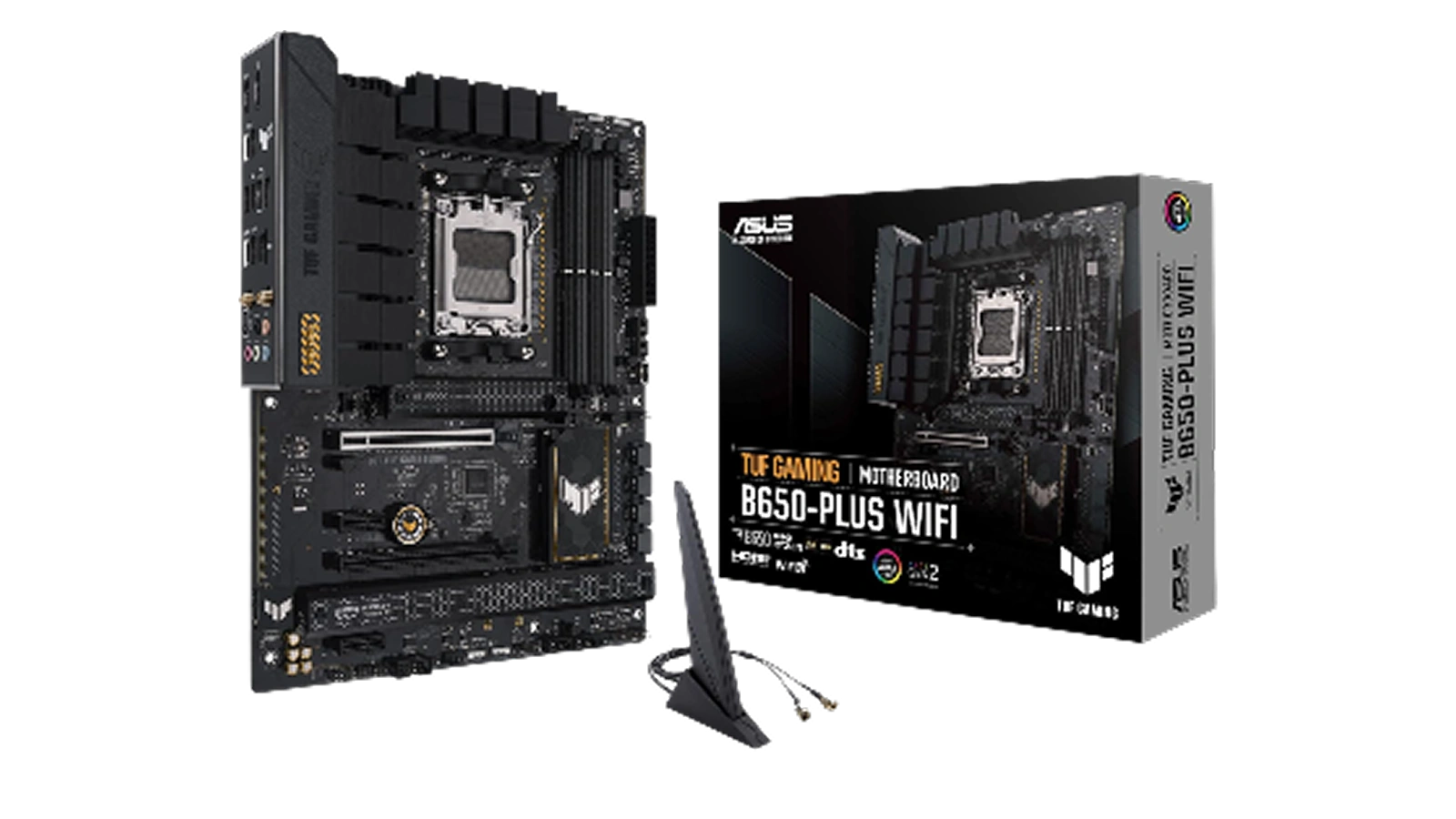
| Specs | Details |
|---|---|
| Socket | AM5 |
| Chipset | AMD B650 |
| Form Factor | ATX |
| Compatible CPUs | AMD Ryzen 7000, 8000, 9000 Series |
| Memory Type | DDR5 |
| Memory Slots | 4 |
| Max Memory | 128 GB |
| Max Memory Speed | 6400 MHz |
| M.2 Slots | 3 (1x PCIe 5.0, 2x PCIe 4.0) |
| SATA Ports | 4 |
| USB Ports | 8 total (incl. USB4 and USB 3.2 Gen2x2 Type-C) |
| Networking | WiFi 6 and 2.5 Gb Ethernet |
| Power Stages | 14 (12+2 teamed) |
| Warranty | 3 years |
| Price | ~$160 |
Key Features and Benefits
The B650-Plus is built for mid-range AM5 builders who want PCIe 5.0 storage access and solid power delivery without stepping into X670E pricing. Here is what those specs mean for a real build.
- 14-Stage VRM (12+2 Teamed Power Stages) – The 14-stage design with 8+4 ProCool sockets keeps voltage clean under sustained loads with a flagship Ryzen 9 7950X. This TUF B650-Plus Ryzen 7000 headroom is the difference between a board that handles CPU upgrades gracefully and one that throttles – most B650 boards at this price cap at 10-12 stages.
- PCIe 5.0 M.2 Slot and USB4 Support – The primary M.2 slot runs at PCIe 5.0 speeds – the defining TUF Gaming B650-Plus PCIe 5.0 talking point at $160. Next-gen NVMe drives now hit sequential read speeds twice that of PCIe 4.0, and USB4 adds 40 Gbps for external SSDs and Thunderbolt-class accessories.
- DDR5 Support up to 6400 MHz – DDR5 is the AM5 standard, and this ASUS TUF B650 DDR5 6400 MHz ceiling provides real headroom over stock kits – most relevant on Ryzen 9000 builds where Zen 5 extracts more from higher memory bandwidth.
- WiFi 6 and 2.5 Gb Ethernet Both Included – Most boards at this price offer one or the other. This TUF B650-Plus WiFi 6 standout means low-latency wireless gaming and TUF LANGuard 2.5 Gb Ethernet for wired setups – both on one board at $160.
- Two-Way AI Noise Cancelation – The onboard audio chip handles AI-driven noise cancellation for both microphone input and speaker output, reducing the need for third-party software during gaming or streaming.
- Comprehensive Cooling Infrastructure – Enlarged VRM and PCH heatsinks cover the power components fully, with multiple hybrid fan headers and ASUS Fan Xpert 2+ in Armoury Crate for per-header curve configuration.
Performance and Real-World Experience
The B650-Plus competes with the MSI MAG B650 TOMAHAWK and Gigabyte B650 AORUS Elite AX in the $150-$180 AM5 tier. Here is how it holds up for gaming and productivity.
In my TUF Gaming B650-Plus WiFi AM5 assessment, day-to-day behavior is this board’s strongest argument. Boot times from the NVMe slot are fast, memory setup runs without stability issues, and the platform holds steady across extended sessions. The one thing worth flagging is 4-DIMM kit behavior – older firmware had gaps with 6000+ MHz kits not posting at rated speeds, but recent BIOS updates resolve this. Most production units now ship with Zen 5 firmware pre-flashed, so the majority of builds skip the intermediate flash step entirely.
VRM thermal behavior is a genuine strong point. Under sustained gaming loads with a Ryzen 7 7700X, the heatsink stays manageable, and even running a Ryzen 9 7950X with power limits removed the 14-stage design doesn’t throttle. The alloy chokes and solid-state capacitors are the same component tier as ASUS ROG boards – just produced at TUF-tier pricing. One practical note: the April 2026 WiFi driver listed Maitek attribution incorrectly; use the previous Realtek driver if WiFi fails after that update.
| Pros | Cons |
|---|---|
| ✅ 14-stage VRM handles flagship AM5 CPUs without voltage instability ✅ PCIe 5.0 M.2 slot supports current and next-gen NVMe drives at full speed ✅ WiFi 6 and 2.5 Gb Ethernet both included – rare at this price point ✅ BIOS depth rivals boards $50 more expensive, with per-core and memory timing controls ✅ Supports Ryzen 7000, 8000, and 9000 Series – broad CPU future-proofing on AM5 ✅ Builder-friendly ATX layout with clearance for large air coolers ✅ 3-year ASUS warranty covers the full platform | ❌ The BIOS update process has a required sequence – jumping straight to the latest firmware without an intermediate step can cause boot issues. Update incrementally and check the ASUS support page before flashing. |
The TUF Gaming B650-Plus WiFi pairs PCIe 5.0 M.2 access and a 14-stage VRM at $160 – specs that typically cost $200 or more on competing AM5 boards. It’s the board I’d recommend to any builder who wants room to run a mid-to-high-end Ryzen CPU without worrying about power delivery headroom, and its 9.0/10 Enebameter score reflects that combination of value and capability.
For a Ryzen 7 7800X3D build or anyone planning to upgrade to Zen 5 later, the 14-stage VRM and PCIe 5.0 combination means this board doesn’t become a bottleneck as the build evolves. The #15 Best Seller rank in Computer Motherboards reflects sustained market validation, not a launch-week spike.
“The BIOS on this board has memory timing controls and per-domain adjustments I haven’t found on other boards at this price – there’s even a memory optimization mode that improves performance without actually overclocking. WiFi worked right out of the box on Linux, which I genuinely didn’t expect at this tier.” – Joshua
What Joshua describes aligns with the board’s most underrated advantage. The AI Tweaker “OC Mode” doesn’t push clocks above spec – it optimizes secondary timing structure for more consistent frame delivery. In memory-sensitive titles like CS2 and Fortnite, that translates to tighter frame-rate floors without the instability risk of a true overclock. The BIOS depth is consistent across verified owner feedback and reflects the engineering investment ASUS puts in at every price tier.
“Installing this board was straightforward from the start – great clearance for a large air cooler, clean spots for cable routing, and a layout that made the whole build feel organized. It’s been completely stable since I put it together with no crashes and no quirks.” – Luke McKinnon
The stability Luke describes comes from the ProCool socket design with alloy chokes and durable capacitors – the same specification used on ASUS ROG boards at TUF-tier pricing. Owner ratings cluster heavily around 4 and 5 stars, with most criticism focused on the BIOS update procedure rather than hardware failure. That distribution signals a platform with genuine build quality. A board that runs without crashes over months of heavy use is the baseline expectation – this one consistently meets it.
VRM and Power Delivery
The VRM is what separates a motherboard that can run any Ryzen CPU indefinitely from one that thermal-throttles under load. Here is how the B650-Plus handles this critical spec.
Any honest TUF Gaming B650-Plus VRM review starts with the configuration: 12+2 teamed power stages. “Teamed” means two physical MOSFETs operate per stage, effectively doubling thermal headroom over a single-stage design at the same count. The practical difference shows under sustained workloads – extended gaming at high CPU utilization is where teamed configurations stay stable while single-stage designs lose ground. At $160, this is an unusually capable VRM for the B650 tier.
Most B650 boards in this price range use 10-12 stages. The extra headroom matters most for non-X CPUs like the Ryzen 9 7900 running power-unrestricted, or for anyone planning a higher-TDP upgrade later. Alloy chokes and solid-state capacitors are rated for longer thermal cycling life than polymer capacitors on budget boards. For a Ryzen 9 7950X at 170W TDP, this board handles full sustained load without manual power limit overrides.
If you’re building around a specific high-performance AMD CPU, our highly rated 7800X3D motherboard guide covers boards optimized for that CPU’s cache-focused workload profile.
BIOS and Overclocking Support
ASUS BIOS has a reputation for depth at every price tier, and the B650-Plus makes good on it with a feature set that outpaces most boards $50 more expensive.
The AI Tweaker section houses per-core frequency control, voltage offsets, and the “Uncore/Memory OC Mode” toggle. That OC Mode label is misleading – it doesn’t push clocks above spec, but it relaxes primary timings and optimizes secondary timing structure for more consistent frame delivery. The result is measurable improvement in memory-sensitive games without stability risk. Most units ship with Zen 5 support pre-flashed, so the intermediate flash step is no longer required for most builds – though updating incrementally is still the safer approach.
For value context: the ROG Strix B650-F offers a 16-stage VRM and more refined AI Overclocking interface but costs $80-100 more. An ASUS TUF B650-Plus vs ROG Strix B650-F comparison lands consistently in the TUF’s favor for builders who don’t need extreme all-core headroom.
If you are building an Intel platform, our top-rated i9-14900K motherboard picks cover the LGA 1700 socket alternatives.
My Overall Verdict on ASUS TUF Gaming B650-Plus WiFi
This ASUS TUF Gaming B650-Plus review points to a clear answer: at $160, this board earns its 9.0/10 Enebameter score through a combination no comparable B650 board matches at this price – a 14-stage VRM, PCIe 5.0 M.2, both WiFi 6 and 2.5 Gb Ethernet, and a BIOS that gives builders real control. That’s the combination that justifies the #15 Best Seller rank in Computer Motherboards.
Who it’s for: Ryzen 7000, 8000, or 9000 Series builders putting together a mid-range gaming or productivity build. The layout suits first-time builders; the BIOS depth rewards experienced ones. Extreme overclockers needing a 16-stage VRM should look at the ROG Strix B650-F instead. For a full AMD platform comparison, our reliable AMD motherboard guide covers B650 and X670 lineup options.
For anyone building a mid-range AM5 gaming PC in 2026, this ASUS TUF Gaming B650-Plus review makes one thing clear: at $160, this is the board to beat.
Complete Your Setup
The right peripherals make the difference between a functional build and a great one. Here are two picks that pair well with a new AM5 gaming PC.
CHERRY XTRFY K5 Pro TMR Compact Keyboard
The K5 Pro TMR is a compact magnetic-switch keyboard built for precision gaming. Magnetic linear switches register at 0.1mm actuation – faster than most traditional mechanical switches – with a lighter feel that suits fast-paced play. For a new B650-Plus build, it’s the keyboard worth adding to the shopping list.
FFJ 24K DPI Tri-Mode Wireless Gaming Mouse
The FFJ wireless gaming mouse runs at 24,000 DPI with tri-mode connectivity – 2.4 GHz wireless, Bluetooth, and USB-C wired. A low-latency wireless mouse removes cable clutter from the desk without adding input lag, and the 24K DPI ceiling covers both high-resolution and low-sensitivity precision aiming styles.
FAQs
Yes, the B650-Plus includes PCIe 5.0 M.2 storage, a 14-stage VRM, WiFi 6, and 2.5 Gb Ethernet at $160, a combination that typically costs $200 or more on competing AM5 boards. For a Ryzen 7000, 8000, or 9000 build, it is the strongest value motherboard at this price tier.
Yes, the B650-Plus supports AMD Ryzen 9000 Series processors on the AM5 socket. Most units in current production ship with firmware pre-flashed for Zen 5 compatibility, so the majority of builders can install a Ryzen 9000 CPU without running a separate BIOS update step first.
The board includes three M.2 slots total. The first slot runs at PCIe 5.0 for maximum NVMe bandwidth, while the remaining two operate at PCIe 4.0 speeds – still fast enough for current-gen drives like the Samsung 990 Pro or WD Black SN850X.
Yes, the BIOS includes per-core frequency controls, voltage offsets, and a memory optimization mode that improves timing performance without pushing clocks beyond spec. For extreme all-core overclocking, the ROG Strix B650-F offers a 16-stage VRM at $80-100 more, but for most builds the TUF BIOS is the deepest available at the B650 price tier.
Every ASUS TUF Gaming B650-Plus review lands on the same verdict: this board punches above its $160 price point with a 14-stage VRM, PCIe 5.0 M.2, and WiFi 6 that most mid-range B650 boards skip entirely. For a balanced AM5 gaming build in 2026, it is the most complete package at this price.












