Is Ready or Not Crossplay? Tactical Co‑Op Across PC, PlayStation, and Xbox

Tactical shooters live or die on teamwork. If you’re leading a SWAT squad through hostage situations and active terrorism, you need to know who’s got your back. The question many players ask right now is Is Ready or Not crossplay and how it affects the way we team up. I play a lot of first‑person shooters on PC and console, and I’ve been following Ready or Not since it launched. In this guide, I’ll explain what cross‑play means for Void Interactive’s intense shooter, how to turn it on, how it differs between platforms, and why it’s such an important feature for modern multiplayer games.
Jump to:
Is Ready or Not Crossplay? Full Answer
Ready or Not supports full cross‑play across all current‑generation systems. Since the console launch on July 1, 2025, players on Steam or Epic Games Store for PC, PlayStation 5, and Xbox Series X/S can join the same lobbies, clear rooms together, and watch each other’s backs. Up to five players can team up, so a PC squad can work with console players without barriers.
Cross‑play is turned off by default on consoles, so you have control over who you match with. If a host enables cross‑play, everyone who joins that lobby follows the host’s setting. That means Xbox Series players can squad up with friends on PS5 or PC as long as the host has cross‑play enabled. Mods only work on PC, so if you install mods on Steam, console players cannot join your session. There’s also no cross‑save or cross‑progression, which means that your data stays on the platform where you play. That was confirmed by the developer and reiterated in our console launch news post, which details the July 15 release date and features.
If you want to manage your friends list across different platforms, you can connect an Epic Games account using Epic Online Services. This isn’t required for cross‑play itself, but it lets you add friends from other platforms in one overlay. Without an Epic account, you can still invite players by sharing lobby codes. Cross‑play works with both physical and digital editions on console, so everyone can join regardless of how they bought the game. I appreciate this flexibility because it means I can squad up with friends who prefer to buy physical copies, and we all experience the same gameplay.
Cross‑play may be unavailable on consoles if parental control settings restrict online interactions. If you notice the option grayed out, check your console’s family settings. On PC, cross‑play is always available unless you join a modded server, which will block console players. Keep in mind that cross‑play works only with the latest update; both PC and console players must update the game to the same patch. When the Los Sueños Stories update dropped alongside the console release, everyone had to download it before teaming up.
One of the best parts of the console launch was seeing Ready or Not join other cross‑platform shooters. If you love connecting with friends across devices, our roundup of the best cross‑platform games shows just how far the industry has come, from battle royales to MMOs. Ready or Not now stands alongside them and gives tactical shooter fans a chance to unite.
How to Enable Crossplay in Ready or Not
To enable cross‑play in Ready or Not, go through the main menu rather than jumping straight into missions. Here’s what I do when playing on PC and PS5:
- Start the game and wait for the main menu to load. Don’t jump into a mission yet.
- Select Settings (or Options on console) and navigate to the Gameplay tab.
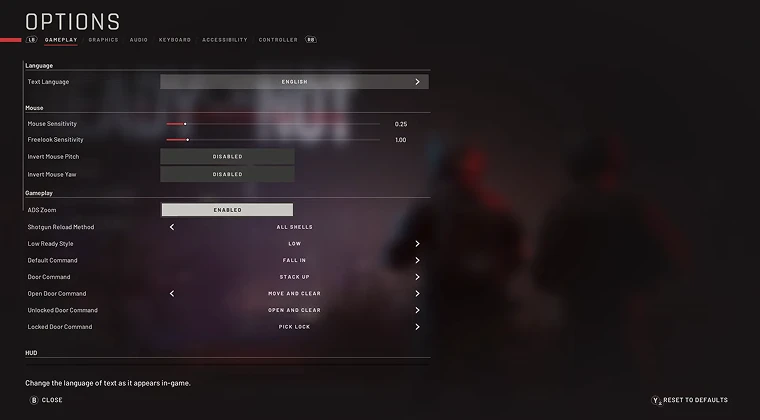
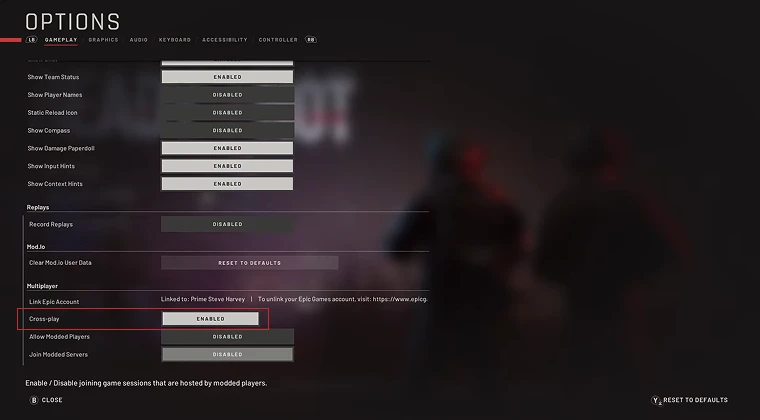
3.Scroll down to the Cross‑Play setting. On PC, it’s labeled Crossplay, and on consoles, it might read Cross‑Play with an “Enabled/Disabled” button.
4.Toggle the setting to Enabled. When cross‑play is on, you’ll see a green indicator showing it’s active.
5.Return to the main menu and invite friends or search for a match.
You can’t change this setting while you’re already in a mission, so plan ahead. Hosts control cross‑play for the entire session, so if you’re joining someone else’s lobby and want to play with friends on different platforms, ask the host to turn it on first. If you’re playing privately with a friends‑only lobby, you can toggle cross‑play without affecting your global setting.
To add friends on other platforms, open the Friends or Party tab and enter their lobby code. If you link your Epic account, you can use the Epic overlay to search for their Epic username and send an invite. Epic Games’ services handle cross‑platform voice chat, too, so you can communicate with Xbox and PlayStation friends without a third‑party app. It’s a smooth system once you set it up, though there are occasional hiccups where invites don’t appear until you restart the game.
Our best multiplayer Xbox games guide highlights that cross‑play and cross‑progression are now standard features in top Xbox titles. Ready or Not fits right in by making the process simple. I still remember older shooters where you needed to open network ports or rely on workarounds. This system is far easier.
Differences Between PC and Console Versions
When Ready or Not hit consoles, the developer made a few changes to meet platform policies. Console versions removed some of the most graphic content found in the original PC release. For example, the ability to dismember bodies is gone, and certain levels were adjusted to remove nudity and sensitive references. These edits created a smoother path to certification and earned the game an M rating instead of a ban. The core experience remains intact – you still plan missions, breach room, and rescue civilians, but console players won’t encounter the extreme gore that some PC mods enable.
Another difference is mod support. On Steam and the Epic Games Store, mods let you tweak maps, add rainbow‑colored gear, or create custom missions. I’ve experimented with mods that change enemy AI and add new weapons, and it’s fun to mix things up. However, modded lobbies block console players because PlayStation and Xbox don’t allow unofficial content. If you want to play with friends on PS5 or Xbox Series X, stick to vanilla Ready or Not.
Frame rate targets also differ. On PC, with the right hardware, you can push beyond 60 frames per second, which makes every movement feel crisp. On Xbox Series X and PS5, the game aims for a stable 60 fps with some graphical adjustments. I’ve played on both, and the difference is noticeable, but not game‑breaking. The controller layout is also tuned for console – aim assist helps pad players compete with mouse users, but cross‑play still feels fair because SWAT missions rely more on planning than twitch reflexes.
Post‑Launch Updates and Community Reaction
Ready or Not’s console debut came with the Los Sueños Stories update and added new maps and missions. The update included two new urban levels focused on intense hostage rescues, plus a handful of weapons and customization options. On PC, the update arrived on the same day as the console release, so all players had the same content. Community reactions were mixed: console players loved having instant access to an expansive tactical shooter, while some long‑time PC fans weren’t happy with the toned‑down violence. The developer explained that these changes were necessary to bring the game to consoles without losing its core identity. From my experience, the atmosphere remains gritty, and the stakes feel just as high when your squad stacks up on a door and waits for the breaching charge to explode.
As with any multiplayer game, cross‑play expanded the player base and reduced matchmaking times. Before the console launch, I sometimes waited a few minutes for a full squad. Now matches fill faster, and I routinely encounter players on PlayStation and Xbox. Cross‑play also helps keep older content alive. When new maps arrive, players across all systems can jump in simultaneously, making it easy to learn routes and practice room‑clearing tactics together. If you’re looking for more intense co‑op games with horror vibes, our best PC horror games list showcases titles that push teamwork and atmosphere.
Community feedback has prompted some welcome updates. After launch, Void Interactive improved controller sensitivity options and added better cross‑play filters. The studio also promised to explore cross‑progression, though there are no plans to implement it yet. Regular patches have addressed bugs, balanced enemy AI, and added quality‑of‑life improvements like quick‑access buttons on the main menu.
Why Crossplay Matters in Tactical Shooters
Cross‑play changes the way tactical shooters like Ready or Not function. In a game built around methodical clearing, communication, and teamwork, having a larger pool of players makes every mission smoother. When you can queue with friends on different platforms, you don’t need to convince them to buy a specific console. I’ve played with groups where half the team is on PC and the other half on Xbox; we plan our approach, assign roles, and execute without worrying about platform boundaries. That freedom encourages more people to try the game, which in turn improves matchmaking times.
Cross‑play also brings different playstyles together. Console players might rely more on aim assist and slower movement, while PC players may be quicker with mouse aiming. Mixing these approaches can actually improve your squad’s performance: controller users often hold angles more steadily, while mouse users can quickly pick off targets. After a few rounds, teams learn to coordinate and adapt.
Games like Fortnite, Call of Duty, and Destiny have shown that cross‑play promotes healthy communities. In our article on the best cross‑platform games, we explain how cross‑play has become a key feature for competitive and co‑op titles. Ready or Not joins that conversation by proving that even a gritty, realistic shooter benefits from connecting players across devices. More players mean more feedback for the developer, which leads to better updates, more maps, and improved balance over time. As a player, I feel the difference when cross‑play is enabled: matches start faster, and I get paired with people of similar skill levels because the matchmaking system has a wider pool.

Cross‑play does have trade‑offs. Without cross‑progression, your rank, unlocks, and purchased skins stay on the platform where you earned them. Still, the ability to team up across systems outweighs this drawback. When cross‑progression eventually arrives, and many players hope it will, Ready or Not will be even easier to enjoy across devices.
Final Thoughts and Where to Get the Game
Is Ready or Not crossplay? Yes, it is. Since July 15, 2025, PC, PS,5 and Xbox Series players can breach and clear together. You can toggle cross‑play from the main menu, invite friends through lobby codes or the Epic overlay, and enjoy full co‑op missions across platforms. There’s no cross‑progression yet, and mods remain PC‑only, but the core gameplay is shared by everyone. Console editions make minor concessions by trimming some graphic elements, but they retain the tense hostage rescues and methodical room‑clearing that define Ready or Not.
If you’re itching to lead a squad through urban maps, gather intel, and neutralize threats, Ready or Not offers one of the best tactical experiences available today. The Los Sueños Stories update adds fresh missions, and regular patches keep the game responsive to player feedback. If you’re new to the genre or a veteran shooter fan, cross‑play ensures you’ll always find a squad to join.
You can jump into the action right now by grabbingthe Ready or Not Steam key (PC) GLOBAL from our store. This digital edition works worldwide and delivers the full experience, with instant access to the latest updates and cross‑play support. Assemble your squad, plan your approach, and step into one of the most immersive SWAT simulations on any platform.
FAQs
Does Ready or Not support crossplay between PC and console?
Yes, Ready or Not supports crossplay between PC and console players. Since July 15, 2025, PC gamers on Steam or Epic Games Store can join PlayStation 5 and Xbox Series X/S players in the same lobbies, enabling full tactical cooperation.
How do you enable crossplay in Ready or Not?
To enable crossplay in Ready or Not, go to the main menu, open Settings or Options, select the Gameplay ta, and toggle the Cross‑Play option to Enabled. You must do this before starting a mission, and the host’s setting applies to everyone in the lobby.
Does Ready or Not have cross‑progression or cross‑save?
No, Ready or Not does not have cross‑progression or cross‑save. Progression, unlock, and stats remain tied to the platform you’re playing on, so switching between PC and console requires starting fresh.
Do you need an Epic Games account to play Ready or Not cross‑platform?
You do not need an Epic Games account to play Ready or Not cross‑platform. Cross‑play works without linking accounts, but connecting an Epic account provides a unified friends list and easier invites through Epic Online Services.
Is Ready or Not on Xbox Game Pass?
No, Ready or Not is not on Xbox Game Pass as of September 2025. The game is available for purchase on PC and consoles, and cross‑play is supported whether you own the digital or physical edition.