



ASUS ROG Strix X870E-E review 2026

Eneba Hub contains affiliate links, which means we may earn a small commission if you make a purchase through them—at no extra cost to you. Learn more


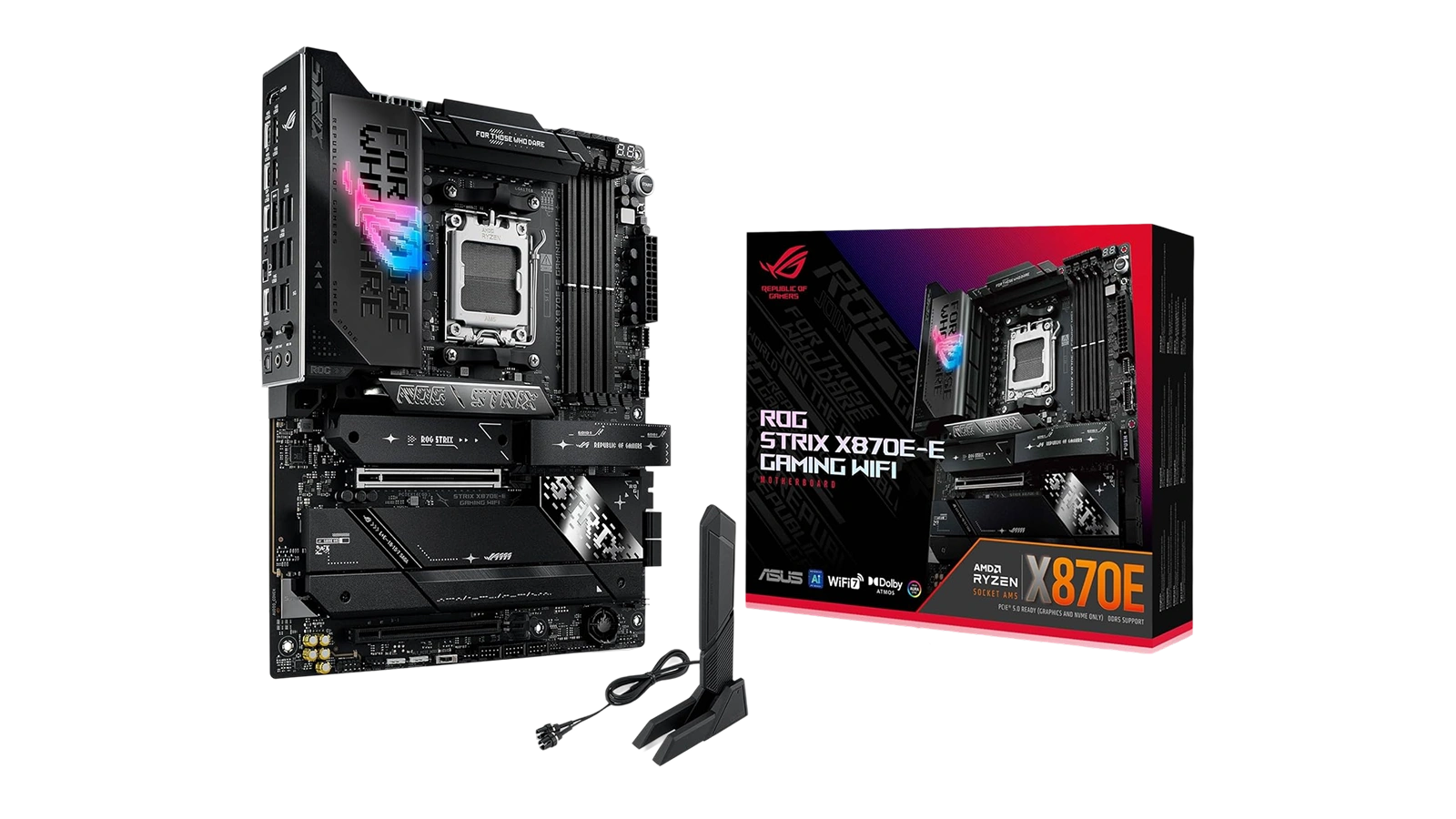
My ASUS ROG Strix X870E-E review starts where most X870 comparisons break down: there are a dozen boards at this price tier, and the differences between them are subtle enough to matter over a multi-year build but easy to miss in a spec table. This ROG Strix X870E-E AM5 review focuses on whether the five M.2 slots and AI overclocking toolset justify the $405 ask against what competing boards offer.
This ASUS ROG Strix X870E-E Gaming WiFi review puts the headline specs first: 18+2+2 VRM at 110A per stage, three PCIe 5.0 M.2 slots, dual USB4, WiFi 7, and 5 GbE Ethernet, all at $405. The ROG Strix X870E-E isn’t a board for budget builders; it’s for builders who want to install a motherboard once, upgrade CPUs twice across three Ryzen generations, and never feel constrained by the platform. Few competing X870 boards match this package without requiring add-in cards.
My evaluation of this ASUS ROG Strix X870E-E motherboard review covers VRM quality under sustained loads, connectivity depth relative to the price, AI tooling accessibility, and long-term platform value. This board is for high-end AM5 builders who want a foundation that stays relevant through at least two more Ryzen launches.
Jump to:
ROG Strix X870E-E at a Glance
Before going deeper, here are the ROG Strix X870E-E specs that tell you immediately whether this board belongs in your build.
| Specs | Details |
|---|---|
| Socket | AM5 |
| Chipset | AMD X870 |
| Compatible CPUs | AMD Ryzen 9000, 8000, and 7000 Series |
| Form Factor | ATX (14.4″ x 11.1″) |
| Memory | DDR5, 4 slots, up to 192GB |
| M.2 Slots | 5 (3x PCIe 5.0, 2x PCIe 4.0) |
| SATA Ports | 6 |
| PCIe x16 Slot | 1x PCIe 5.0 SafeSlot |
| VRM | 18+2+2 stages at 110A per stage |
| WiFi | WiFi 7 (802.11be) |
| Ethernet | 5 GbE (Realtek) |
| USB | Dual USB4 Type-C + 9x USB 10Gbps |
| HDMI | 1 |
| Warranty | 3 years |
| Price | $405 |
Key Features and Benefits
The spec list above is impressive on paper, but what each feature means for your build is where the ROG Strix X870E-E separates itself from competing X870 options at this price tier.
- 18+2+2 VRM at 110A Per Stage – Each of the 18 CPU power stages is rated for 110 amps, sustaining clean power to Ryzen 9000 and 7000 CPUs under full multi-core load without thermal throttling or voltage droop. Builders running rendering or Cinebench workloads will notice this difference over lower-grade boards.
- Triple PCIe 5.0 M.2 Slots Plus Two PCIe 4.0 Slots – The ROG Strix X870E-E PCIe 5.0 M.2 support means a boot drive, a scratch drive, and three remaining slots for games or storage, all running at native PCIe 5.0 speeds without bandwidth sharing. No daisy-chaining through a hub.
- Dual USB4 Type-C Ports – USB4 runs at up to 40 Gbps and supports Thunderbolt-class accessories and DisplayPort Alt Mode simultaneously. The ROG Strix X870E-E USB ports count extends to nine USB 10Gbps ports for peripherals, covering every current connectivity scenario.
- AI Overclocking, AI Cooling, and AI Networking – ASUS‘s three AI tools automate hours of manual BIOS work: AI OC applies stable CPU voltage curves, AI Cooling II adjusts fan curves from live sensor readings, and AI Networking prioritizes gaming traffic. Real performance gains with a few clicks.
- PCIe 5.0 SafeSlot and Builder-Friendly DIY Tools – The reinforced GPU slot withstands repeated removal without PCB damage, Q-Release Slim makes GPU swaps one-finger simple, and BIOS FlashBack lets you update firmware without a CPU installed – critical for forward compatibility with future AM5 processors.
Performance and Real-World Experience
At $405, the ROG Strix X870E-E targets builders who want a board they install once and don’t revisit for years. Here’s how the platform holds up where it matters.
The VRM’s capacity shows in sustained workloads. Running Ryzen 9000 CPUs at rated boost under extended multi-core loads is consistent – the L-shaped heat-pipe keeps VRM temperatures manageable even during long Cinebench runs without throttling.
The ROG Strix X870E-E DDR5 AEMP support activates high-speed DDR5 kits (6000-7200 MT/s) automatically on first boot. There’s no manual timing entry needed, and the AI overclocking profile for a Ryzen 9950X or 9700X takes a few BIOS clicks rather than hours of voltage testing.
The on-board audio is a known weak point: it works for casual gaming but falls short of what $405 implies. A $50-80 external DAC resolves this entirely, and it’s the standard fix that multiple owners have independently landed on.
| Pros | Cons |
|---|---|
| ✅ 18+2+2 VRM at 110A per stage keeps Ryzen 9000 CPUs at peak boost under sustained loads ✅ Five M.2 slots (three PCIe 5.0) eliminate storage bottlenecks for multi-drive builds ✅ Dual USB4 ports and nine USB 10Gbps ports cover every peripheral and external storage scenario ✅ WiFi 7 and 5 GbE Ethernet deliver modern networking speeds without add-in cards ✅ AI Overclocking automates CPU tuning to a few clicks with real performance gains ✅ PCIe 5.0 SafeSlot and Q-Release tools make GPU swaps and initial builds stress-free | ❌ On-board audio is average for this price tier – a $50 DAC brings it up to standard |
The ROG Strix X870E-E packs five M.2 slots, dual USB4, WiFi 7, and an 18+2+2 VRM into one board at a price that’s competitive with other X870 flagships, without needing add-in cards to complete the connectivity picture. For Ryzen 7 7800X3D and Ryzen 9000 builders who want a board that covers this CPU generation and the next, this is the clear pick at this price tier.
At $405, the ROG Strix X870E-E functions as a single-purchase solution for a complete high-end PC. There’s no chasing after a WiFi card or wondering whether the M.2 slots will fill up in two years. For builders who calculate cost over a three-CPU-generation lifecycle, the math works in this board’s favor.
“I’ve relied on ASUS motherboards for over 30 years and this X870E-E keeps that record intact. Everything worked straight out of the box, the AI tuning handled my setup without a single hiccup, and the board’s been running flawlessly since day one.” – JDub
Long-term ASUS BIOS support is a real factor at this price tier. ASUS has a track record of continuing driver and firmware updates across CPU generations, and the 3-year warranty provides formal coverage for the investment. That combination of reliability and institutional backing matters when you’re building a system you expect to last.
“ASUS stands out for actually supporting their boards long-term with consistent BIOS updates. My previous ROG board still gets driver updates years later, and that track record made the X870E-E an easy decision over alternatives at the same price point.” – Bryan KB9YEN McWhirt
For a $405 motherboard, the value calculation extends beyond launch-day specs. A board that supports Ryzen 7000, 8000, and 9000 series chips, likely including the next AM5 generation, doesn’t need to be replaced when you upgrade the CPU. That longevity makes the price easier to justify than a cheaper board requiring a platform swap in 18 months.
VRM and Power Delivery
For any high-end AM5 build, the VRM determines how well the board holds up under pressure. The ROG Strix X870E-E‘s power delivery is its clearest advantage over competing X870 boards.
The 18+2+2 configuration means 18 CPU power stages plus separate SoC and I/O stages, each rated at 110 amps. For the Ryzen 7 7800X3D specifically, the TDP headroom is substantial; the 7800X3D’s 120W TDP target leaves plenty of VRM capacity for extended gaming without thermal stress on the power components. The L-shaped heat-pipe connecting the VRM and integrated I/O cover heatsink keeps temperatures steady under multi-core rendering workloads.
The OC Switcher and Core Flex adjust power limits by workload type; single-threaded tasks get different voltage handling than multi-threaded loads, improving efficiency without sacrificing peak performance. AI OC handles tuning automatically for a set-it-and-forget-it setup; PBO Enhancement goes deeper for enthusiasts.
In my assessment, the VRM is appropriate for overclocked scenarios and sustained compute workloads. For builders who don’t need those headroom reserves, our top-rated AMD motherboard guide covers the full range from entry-level to flagship options.
BIOS and Overclocking Support
A high-end board’s BIOS determines how much of the hardware you can actually use. The ROG Strix X870E-E overclocking support covers newcomers who want automation and enthusiasts who want full manual control.
The ASUS UEFI BIOS gives quick access to AI OC, boot priority, and memory profiles on the main screen. Enthusiast mode unlocks full voltage, frequency, and timing controls. AEMP activates DDR5 memory profiles automatically on first boot, so high-speed kits run at rated speeds without manual entry – the AMD counterpart to Intel XMP.
BIOS FlashBack lets you update firmware without a CPU installed, just a USB drive and the 24-pin connector powered. This enables forward compatibility with future AM5 CPUs at launch. The ROG Strix X870E-E vs X870E Taichi comparison comes down to BIOS preference more than hardware: both are X870 flagships, the ROG Strix favoring AI-assisted shortcuts while the Taichi suits manual overclockers. For the full range of gaming motherboard options, our popular gaming motherboard guide covers every price point.
My Overall Verdict on ASUS ROG Strix X870E-E
The ASUS ROG Strix X870E-E review comes down to one question: does the feature density justify the $405 price tag, and for high-end AM5 builders, the answer is yes. The combination of an 18+2+2 VRM, five M.2 slots (three PCIe 5.0), dual USB4, WiFi 7, and 5 GbE Ethernet in a single board is genuinely difficult to match at this price tier without meaningful trade-offs.
This board is for builders pairing it with a Ryzen 7 7800X3D, Ryzen 9 9950X, or similar AM5 CPU who want to build once and skip platform swaps for multiple CPU generations. This ASUS ROG Strix X870E-E motherboard review confirms the pattern: the Enebameter 8.6/10 reflects consistent delivery on core promises, and the 4.3-star Amazon rating across 531 owners backs it up.
In my assessment, the ASUS ROG Strix X870E-E review verdict is a clear recommendation for anyone who wants the best AM5 foundation at this price, a platform with the VRM, connectivity, and BIOS depth to remain relevant through at least two more Ryzen generations.
Complete Your Setup
A new high-end PC build is only as good as what comes out of the speakers. These two headsets pair well with an AM5 gaming rig and are available now.
Logitech G New Headset
Logitech‘s newest G headset brings PC-optimized audio and mic clarity to any AM5 build. The Logitech G lineup is designed for PC gaming specifically, not ported console audio, making it a natural pairing with a high-end ASUS board.
OXS Storm A2 Wireless ANC Gaming Headset
The OXS Storm A2 brings ANC and wireless audio at a practical price, cutting fan noise and coil whine during competitive sessions. It connects to the ROG Strix X870E-E‘s rear USB ports without additional software, which is especially relevant given the board’s average on-board audio.
FAQs
Yes, for Ryzen 7 7800X3D and Ryzen 9000 builders who want a full-featured flagship board. The five M.2 slots, dual USB4, WiFi 7, and 18+2+2 VRM at $405 represent strong value compared to competing X870 boards that charge similar prices for fewer features.
The ASUS ROG Strix X870E-E supports all AM5 desktop processors, including AMD Ryzen 9000, 8000, and 7000 series chips. This covers the Ryzen 7 7800X3D, Ryzen 9 9950X, Ryzen 7 9700X, and every other current AM5 desktop CPU available today.
Yes, the ROG Strix X870E-E supports DDR5 overclocking through AEMP, AMD‘s counterpart to Intel XMP for activating high-speed memory profiles. High-speed DDR5 kits up to 7200 MT/s and beyond work reliably, with AI-assisted memory tuning reducing the manual effort required to reach stable timings.
The ROG Strix X870E-E vs X870E Taichi comparison comes down to ecosystem preference rather than raw hardware differences; both are X870 flagships with comparable VRM specs and power delivery. The ROG Strix favors AI-assisted tuning and DIY-friendly tools, while the Taichi suits manual overclockers who prefer ASRock‘s more granular BIOS controls.
The ASUS ROG Strix X870E-E review verdict for future-proofing is strongly positive. AM5‘s multi-generation support, five M.2 slots, dual USB4, and ASUS‘s track record of consistent BIOS updates make this a platform worth building on for multiple CPU upgrade cycles.












