



Is Fortnite Cross Platform? A Complete Guide to Playing Everywhere

Fortnite changed gaming by blurring the lines between devices. From its colorful battle royale islands to its Lego Fortnite and Festival modes, players jump in from PCs, consoles, or phones. It’s natural to ask “Is Fortnite cross-platform?” and whether you can keep playing with friends on other hardware without losing progress. I’ll answer that question and dive into platform availability, crossplay support, account linking, and future plans so you know exactly how and where to squad up.
Jump to:
Platform Availability
Fortnite is available on a wide range of systems, but there are a few caveats. Here’s where you can play:
- PC and Mac: Windows PC is the main platform and runs through the Epic Games Launcher. Mac support is limited because Epic hasn’t updated the macOS version since 2020 due to legal disputes, so Mac players must use cloud gaming services or Boot Camp.
- PlayStation: Both PlayStation 4 and PlayStation 5 support Fortnite through the PlayStation Store.
- Xbox: Fortnite runs on Xbox One and Xbox Series X/S via the Microsoft Store.
- Nintendo Switch: The Switch version is available through the Nintendo eShop and includes all game modes.
- Mobile: Android devices can install the game via the Epic Games app or the Samsung Galaxy Store. iOS devices regained access in the United States and Europe in early 2025 after Fortnite returned to the App Store; players in other regions must use cloud gaming services like Xbox Cloud Gaming.
- Cloud Services: Xbox Cloud Gaming and Nvidia GeForce NOW let you stream Fortnite to many devices, including Mac and iOS, without local installations.
Is Fortnite Cross Platform? Cross‑Platform Play Explained

Cross‑platform play, often shortened to crossplay, lets people on different systems join the same match. Fortnite was a pioneer in this space, and the answer to “Is Fortnite cross-platform?” is a resounding yes. Epic Games designed Fortnite to support crossplay by default, which means you’re matched with players across PC, PlayStation, Xbox, Switch, and mobile. This helps reduce queue times and maintains a healthy player base.
Crossplay is controlled through your Epic Games account, not your console account. When you sign in, the game automatically enables cross‑platform play. If you play on PlayStation or Xbox and prefer to restrict matchmaking to your own platform, you can disable crossplay through the settings menu:
- Open the gear icon in the lobby to access Settings.
- Go to Account And Privacy.
- Under Gameplay Privacy, look for Allow Cross Platform Play and set it to No to turn it off.
Nintendo Switch, PC, and Android do not have a native option to disable crossplay. That means matches will always include players from other devices, which helps keep games populated.
Epic’s shared infrastructure also allows cross‑platform voice chat and friend invitations. You can search for your friends using their Epic Games username and send them a friend request. Once they accept, they appear in your Friends tab, and you can select Join Party to squad up regardless of the hardware they use. If you want to deepen your knowledge about crossplay games more broadly, our article on the best cross‑platform games highlights titles that make crossplay seamless.
Crossplay Support by Platform
Fortnite’s crossplay uses a single matchmaking pool across compatible systems. However, some combinations work better than others, and a few limitations exist. Here’s how the major platforms interact:
| Platform | Crossplay Partners | Notes |
| Windows PC | PlayStation 4/5, Xbox One/Series X | S, Nintendo Switch, Android, cloud users |
| PlayStation 4/5 | PC, Xbox consoles, Nintendo Switch, Android | Crossplay on by default; you can disable it in the settings menu. |
| Xbox One/Series X | S Series | PC, PlayStation consoles, Nintendo Switch, Android |
| Nintendo Switch | PC, Xbox consoles, PlayStation consoles, Android | Crossplay always on; lower performance can be a drawback, but you can still team up with everyone. |
| Android | PC, PlayStation 4/5, Xbox One/Series X | S, Nintendo Switch |
| iOS (cloud) | All other platforms via cloud services | Requires a stable internet connection to stream the game; crossplay supported through Xbox Cloud Gaming or GeForce NOW. |
Fortnite doesn’t support crossplay between its older Mac client and other platforms because that client has not been updated since 2020. If you use cloud services on Mac, you’ll join the regular matchmaking pool.
Platform‑Specific Limitations and Partial Compatibility

Although Fortnite features full crossplay across most systems, there are some platform‑specific quirks to be aware of:
- Account Linking Limit: You can only link one of each type of platform account to your Epic Games account. For example, you can connect one PlayStation Network account, one Xbox Live account, and one Nintendo account at a time. If you have multiple console accounts, you’ll need to choose which one will share progress.
- V‑Bucks Wallet Restrictions: Fortnite uses a shared wallet for V‑Bucks on PlayStation, Xbox, PC, Android, and cloud services, but not on Nintendo Switch. V‑Bucks purchased on Switch remain on that system, while V‑Bucks bought elsewhere show up everywhere except Switch. Items purchased with V‑Bucks are available on all devices.
- iOS Availability: As of October 2025, Fortnite is officially available on iOS only in North America and Europe. Players elsewhere need to stream the game through cloud services. Even where it’s available, Apple’s payment restrictions mean you can’t buy V‑Bucks directly in the App Store; you must buy them via the Epic Web Store or through gift cards.
- Older Mac Client: Epic halted updates to the native macOS client after a dispute with Apple. Playing on Mac requires using cloud streaming or Boot Camp with Windows.
- Performance Differences: Mobile and Switch players may experience lower frame rates and touch controls, which can put them at a disadvantage against PC players. Some competitive players prefer to disable crossplay to avoid mismatched hardware.
If you want to see how Fortnite stacks up against other battle royales in terms of cross‑platform support and accessibility, our comparison of PUBG vs Fortnite dives into these differences.
Cross‑Save and Cross‑Progression

Cross‑save refers to the ability to pick up your game on one device right where you left off on another. Cross‑progression goes a step further, ensuring your purchases, cosmetic items, and progression carry across platforms. Fortnite offers both, provided you link your accounts properly.
Cross‑Save Support
Fortnite runs on Epic’s servers, so your match history, Battle Pass level, and cosmetic unlocks stay tied to your Epic Games account. When you switch from PC to a console or from console to mobile, the game pulls your latest data from Epic’s servers. This happens automatically – you don’t need to upload or download saves manually. Because of this server‑side approach, there’s no way to play offline and transfer data later; an internet connection is always required.
A cross‑save system benefits players who alternate between home setups and portable devices. For instance, you can start a match on your console, pause, and later finish an event on your phone via cloud streaming. Your account will recognize your progress instantly.
Cross‑Progression Support
Cross‑progression in Fortnite means that cosmetic items, unlocked characters, and Battle Pass levels persist across devices. Epic confirms that as long as your Xbox, PlayStation, PC, Switch, or mobile account is linked to the same Epic Games account, any content you purchase is accessible everywhere. There are two exceptions:
- V‑Bucks: As mentioned above, your V‑Bucks balance does not fully transfer to Nintendo Switch. Purchased V‑Bucks remain on the platform where you bought them, but any items you buy with them become available across all platforms.
- Regional Store Limits: Some regions might restrict in‑game purchases on certain platforms due to local rules. For example, iOS users in some countries can’t buy V‑Bucks directly and must purchase through the web.
Account Linking
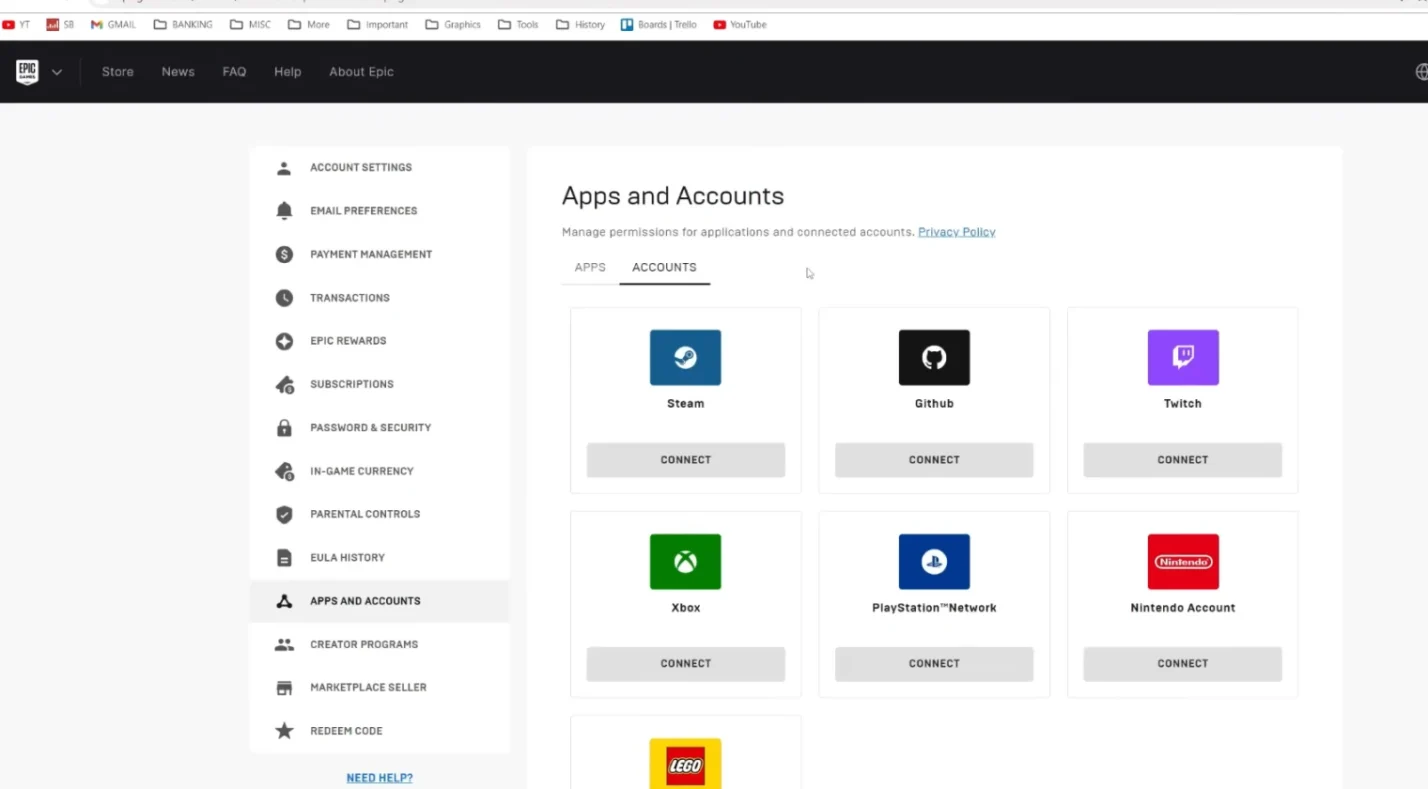
To enjoy cross‑save and cross‑progression, you need to link your platform accounts to your Epic Games account. Here’s how:
- Choose your primary account: Decide which account holds the progress you want to keep. You can only link one account per platform type.
- Visit Epic’s website: Log in to your Epic Games account on a web browser. If you don’t have an account, create one.
- Connect your platform accounts: Go to Connected Accounts and select the platform you want to link – PlayStation Network, Xbox Live, Nintendo, or Steam. Follow the prompts to sign in and authorize the connection.
- Repeat for other platforms: Link each platform you use. Once linked, your Battle Pass progress and cosmetic items sync automatically.
You can view or unlink platforms in the same menu. If you experience a loss of progress, it may indicate your account has been compromised, and you should contact Epic support.
Fortnite is one of the rare games that supports cross‑progression across almost all devices. Many players appreciate being able to switch from console to mobile without grinding again. To find other titles with similar features, our guide to the best multiplayer games includes cross‑progression highlights.
Developer/Publisher Comments and Future Plans
Epic Games has been clear about its commitment to making Fortnite a truly cross‑platform experience. In the early days of crossplay, the developers worked with console manufacturers to establish a platform hierarchy that respects each ecosystem while letting players join forces. Their efforts led Sony, Microsoft, and Nintendo to relax cross‑network restrictions, paving the way for today’s unified matchmaking.
After legal battles with Apple, Fortnite returned to the iOS App Store in 2025. Epic celebrated this milestone by ensuring that cross‑platform play, cross‑progression, and the shared wallet system work seamlessly on iPhone and iPad. However, the company still encourages players to use the Epic Web Store for purchases because it avoids platform fees and provides more flexibility.
Looking ahead, Epic plans to expand Fortnite’s content through modes like Fortnite Festival and collaborations with popular franchises. The developer has also hinted that future updates will improve queue times by optimizing matchmaking and regional servers. There’s growing interest in bringing the game to more cloud platforms, which would make cross‑platform play even more accessible.
Epic’s history shows that they listen to player feedback regarding crossplay and matchmaking fairness. They’ve provided options to toggle crossplay on some consoles and continue to explore better ways to balance input methods so that console players don’t feel overwhelmed by mouse‑and‑keyboard users. Though no major changes are confirmed beyond 2025, the company’s commitment suggests that the cross‑platform experience will remain a central focus.
Summary

Fortnite proves that cross‑platform gaming can work smoothly when it’s part of a game’s core design. Is Fortnite cross-platform? Yes – it’s available on PC, PlayStation, Xbox, Nintendo Switch, Android, and, through cloud streaming, on iOS and Mac. Crossplay is enabled by default, letting you team up with friends no matter where they play. You can turn it off on PlayStation or Xbox if you prefer a console‑only pool, though this will increase matchmaking wait times.
Cross‑save and cross‑progression mean that your Battle Pass level and cosmetics follow you to every device. Link your platform accounts to your Epic Games account once, and you’re set. The only major limitation is that V‑Bucks purchased on Nintendo Switch stay on the Switch, and iOS purchases are restricted by regional rules.
Epic continues to refine Fortnite’s cross‑platform systems, adding new game modes, optimizing matchmaking, and expanding to more devices. If you enjoy building, battling, or trying out the game’s evolving modes, now is a great time to jump in. To enhance your experience, consider topping up through our marketplace – our Fortnite V‑Bucks gift cards let you add in‑game currency safely and often for less than buying direct.
FAQs
Is Fortnite cross-platform on PlayStation and Xbox?
Fortnite is cross platform on PlayStation and Xbox, meaning players on PS4 and PS5 can match with those on Xbox One and Series X/S. The crossplay feature is on by default, and you can disable it in the console settings if you only want to play with the same console family.
Can Nintendo Switch players use crossplay in Fortnite?
Nintendo Switch players can use crossplay in Fortnite because the Switch version connects to the same servers as PC and consoles. The game doesn’t offer a toggle to disable crossplay on Switch, so matches may include players using any supported device.
How do I enable cross-platform play in Fortnite?
To enable cross-platform play in Fortnite, you need to sign in with an Epic Games account. Crossplay is automatically enabled, but if you disabled it on PlayStation or Xbox, return to Account & Privacy settings and set Allow Cross Platform Play to Yes.
Does Fortnite support cross progression?
Fortnite supports cross progression, so your Battle Pass level, cosmetic items, and other progress carry across devices when you link each platform account to the same Epic Games account. Only V‑Bucks remain tied to the platform where they were purchased.
Do I need an Epic Games account to play Fortnite cross-platform?
You need an Epic Games account to play Fortnite cross-platform, because crossplay and cross‑progression rely on Epic’s unified account system. Without linking your console or mobile account to Epic, your progress won’t sync, and you can’t add friends across platforms.