How to Open Shards Menu in Cyberpunk 2077: Step‑by‑Step Guide


If you’ve been searching for how to open shards menu in Cyberpunk, I’m here to show you. Cyberpunk 2077 is overflowing with lore, and some of its best stories are tucked away on digital shards. Shards offer backstory, mission hints, and world‑building details that enrich your journey through Night City.
Finding them is easy once you know where to look, so I’ll walk you through the process on both PC and console. Along the way, I’ll share why shards matter and how I use them to stay immersed.
Jump to:
How to Open Shards Menu Cyberpunk on PC and Console
Opening the shards menu is straightforward, but the steps are hidden behind Cyberpunk’s main interface. Here’s how to access it on different platforms:
- Open the main menu. On PC, press Tab or I to bring up the pause menu. On an Xbox controller, tap the View button, and on PlayStation use the Touchpad. This opens the radial menu across the top of your screen.
- Hover over the Journal tab. Don’t click it straight away. Move your mouse (or controller stick) over Journal until a drop‑down appears. The Journal is where your quests and shard entries live.
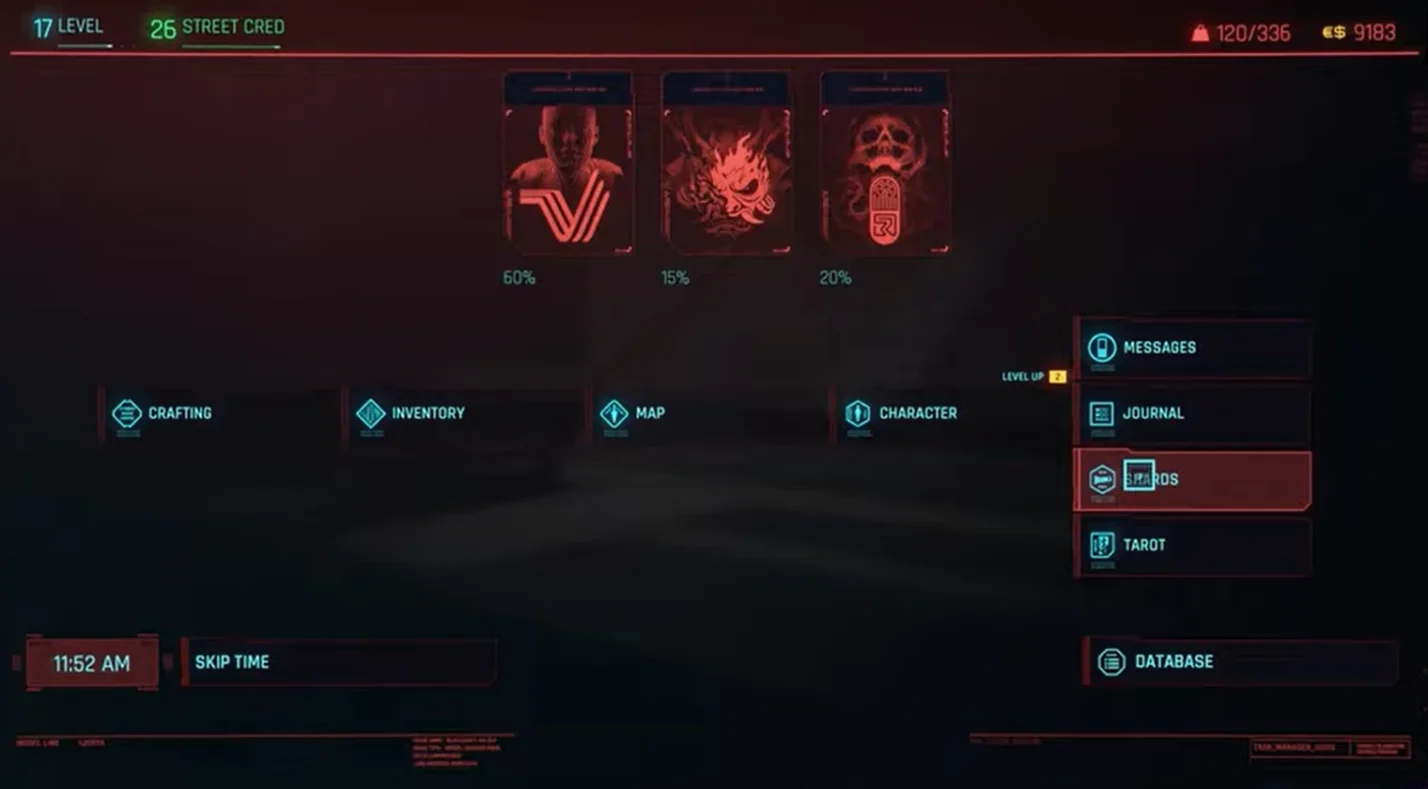
- Select Shards. From the drop‑down, choose Shards. The game lists everything you’ve collected, organized into categories like Technology, Notes, Literature, World, and People of Night City.
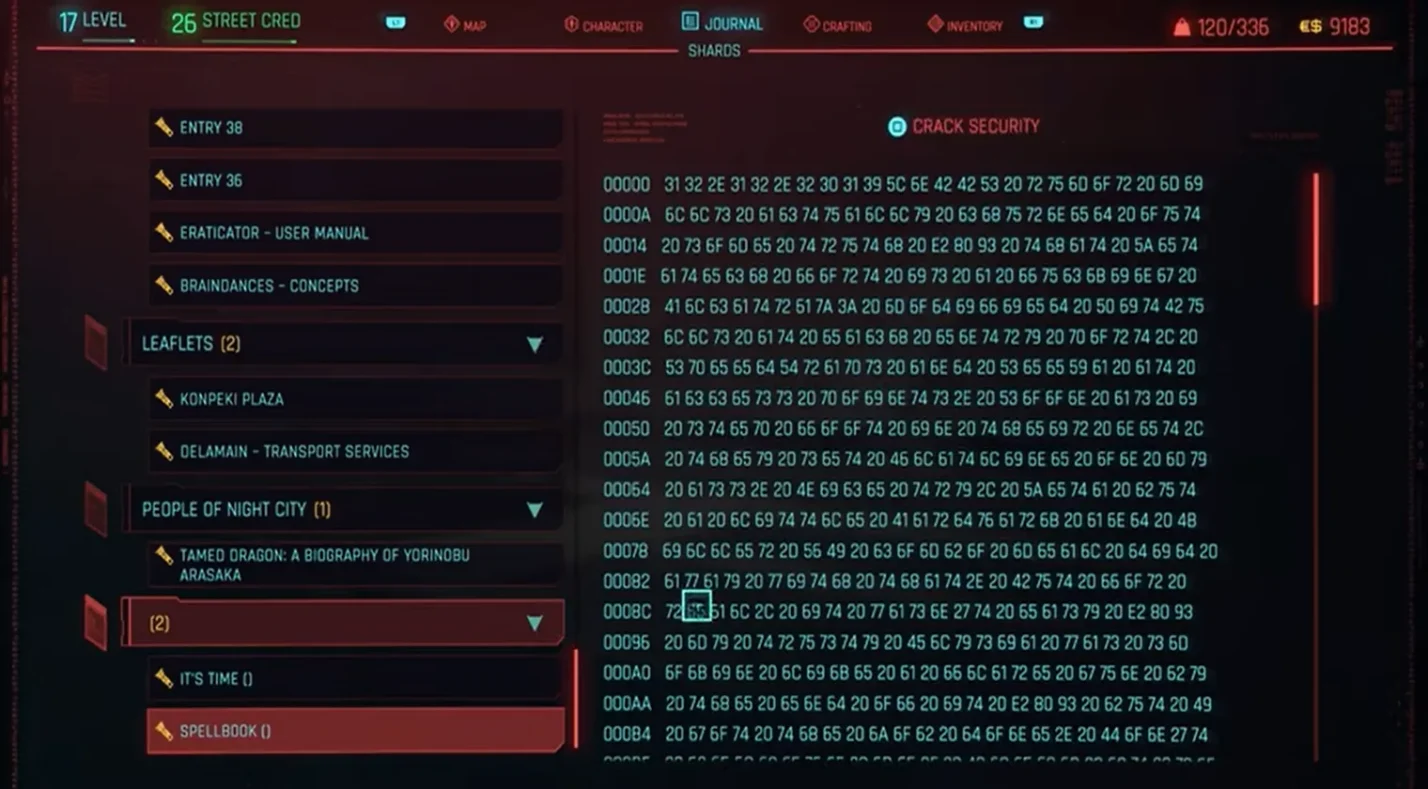
- Choose the shard you want to read. Each entry contains text or audio. Select it to immerse yourself in a slice of Night City’s lore. There’s no hotkey for accessing shards directly, so you’ll need to go through this menu every time.
I usually open the shards menu whenever a new notification pops up. You can also read shards later; they don’t disappear. Remember that the process is the same across platforms, so once you’ve learned it you won’t be searching around again.
What Are Shards and Why Should You Care?
Shards are digital documents scattered across Night City. They might contain emails, magazine articles, personal notes, corporate memos or even classified files. Most are optional, but some are tied to missions; reading them can unlock clues or new objectives. While exploring, I love finding a shard because it feels like I’m piecing together someone’s story.
This simple mechanic adds depth to Night City’s history. Our Best Cyberpunk Games article notes that the genre mixes tech and rebellion in neon‑lit cities. Shards embody that vibe by letting you peek behind the curtain of megacorps and street gangs. Even when a shard isn’t mission‑critical, it often hints at hidden locations or characters.
From a gameplay perspective, shards are categorized to make navigation easy. If you want to read news articles, head to the Articles section. If you’re researching a character, look under People of Night City. This organization helps me avoid information overload and keeps the experience manageable.
Managing Shards: Tips to Avoid Clutter
As your shard collection grows, it can feel overwhelming. Here’s how I keep things organized:
- Read new shards as soon as possible. Whenever a notification pops up, I open the menu and read it. This prevents a long backlog from building up.
- Use categories to your advantage. If I’m hunting for technology manuals, I stick to the Technology category. For lore, World and Literature are rich sources.
- Mark important shards. Some mission shards contain passcodes or clues. I jot these notes down in a separate doc or phone so I don’t forget.
- Ignore duplicates. Occasionally the game will hand you shards with similar content. Feel free to skim and move on.
Cyberpunk 2077’s open world is already packed with choices. Our article on best single‑player Xbox games highlights how Cyberpunk 2077 lets you “shape your own destiny in Night City.” Shards support that freedom by providing context; you decide whether to dive into them or stay focused on the action.
Diving Deeper into Night City With Shards
Shards are more than collectibles; they are windows into Night City’s culture. In my first playthrough, I discovered a shard about a local band. Later, I overheard an NPC mention the same band, creating a connection I wouldn’t have noticed otherwise. That synergy between environment and text makes the city feel alive.
Exploring shards also enhances side missions. Some contracts ask you to find information on a target. Reading shards at the scene can reveal motives or hidden routes. One memorable gig had me infiltrate a warehouse. A shard I found inside listed a schedule, letting me time my approach perfectly. Without reading it, I’d have walked straight into an ambush.
Our games like Cyberpunk 2077 roundup explains that the cyberpunk genre thrives on rebellion, technology and survival. Shards capture those themes on a micro level. Articles discuss corporate malpractice, diary entries chronicle life in the slums, and technical manuals give insight into cyberware. When I’m tired of high‑octane combat, I dip into my shard list and learn something new about the world.
Shards After Update 2.0 and Beyond
If you’re returning to Cyberpunk 2077 after the 2.0 update or the Phantom Liberty expansion, you might wonder if shards changed. The answer is mostly no; the interface remains the same. Update 2.0 revamped the perk system and police AI but left the Journal structure intact. Phantom Liberty adds new shards tied to Dogtown’s story, especially about Solomon Reed and the politics of the New United States. Reading them helps you grasp the stakes and characters.
For players on Nintendo’s Switch 2, the Ultimate Edition introduced touch controls and gyro aiming. Opening shards with the touchscreen feels natural: tap the Journal icon and select Shards with your finger. It’s a small quality‑of‑life improvement that makes reading on the go easier.
Personal Takeaways From Using Shards
As a gamer who loves exploring every corner, shards hit a sweet spot for me. They reward curiosity without forcing you to stop the action. Here are a few personal observations:
- Immersion boost: Reading shards while wandering Night City makes the world feel cohesive. I remember finding an email from a dissatisfied Night Corp employee. Later, I saw the same corporation’s billboard and laughed at the contrast between propaganda and reality.
- Useful hints: Some shards include access codes or safe combinations. Keeping notes on these saved me time during heists.
- Character insight: Shards sometimes reveal motivations for NPCs you meet. Understanding why a fixer acts a certain way adds emotional weight to your decisions.
- Break from combat: When the firefights got intense, sitting down in V’s apartment and scrolling through shards felt like reading a sci‑fi novel.
If you haven’t paid attention to shards before, give them a try. They might change how you see Night City.
Conclusion: Unlock the Lore and Level Up Your Playthrough
Opening the shards menu is as easy as accessing Cyberpunk 2077’s Journal and selecting Shards. On PC and console, press the menu button, hover over Journal and choose Shards to read everything you’ve collected. These digital documents flesh out Night City’s history, provide mission clues, and offer a welcome break from firefights. I’ve found that consistently checking my shards enhances my understanding of the world and often makes the difference between success and failure during gigs.
If Cyberpunk 2077 sounds like the kind of immersive RPG you’d enjoy, consider grabbing our Cyberpunk 2077: Ultimate Edition GOG key on Eneba. It’s an easy way to jump into Night City or gift the experience to a friend. With the Phantom Liberty expansion and future sequels on the horizon, there’s never been a better time to get familiar with shards and the stories they unlock.
FAQs
How do I open the shards menu in Cyberpunk 2077?
To open the shards menu in Cyberpunk 2077, you need to enter the main menu and hover over the Journal tab until a drop‑down appears, then select Shards. This method works on PC, Xbox and PlayStation, and it’s the only way to read the lore items you collect.
Why can’t I find my shards in Cyberpunk 2077?
The reason why you can’t find your shards in Cyberpunk 2077 is because they’re hidden under the Journal’s drop‑down menu, not in the inventory. Open the main menu, hover over Journal, choose Shards, and you’ll see categories like Notes and Technology that store every shard you’ve picked up.
Is there a quick hotkey to access shards in Cyberpunk 2077?
No, there’s no quick hotkey to access shards in Cyberpunk 2077; you must open the main menu and navigate through the Journal to reach them. While some players hoped for a dedicated button, the 2.0 update didn’t add one, so the drop‑down remains the only method.
Do shards affect gameplay or are they just lore?
Shards primarily provide lore, but they can affect gameplay when they contain mission clues or passcodes. Reading shards may reveal hidden objectives, safe combinations or character motivations that influence how you approach certain gigs.
Can I read shards later if I ignore the notification?
Yes, you can read shards later if you ignore the notification; they stay in your Shards menu until you open them. I often finish a firefight before checking new shards, and they’re always waiting under the appropriate category for when I’m ready to dive into the details.