



How To Learn C++: A Beginner’s Roadmap for 2026

Eneba Hub contains affiliate links, which means we may earn a small commission if you make a purchase through them—at no extra cost to you. Learn more


START WITH THE BASICS
Explore Udemy for structured C++ lessons, and choose a beginner course before moving into algorithms or advanced object-oriented programming.
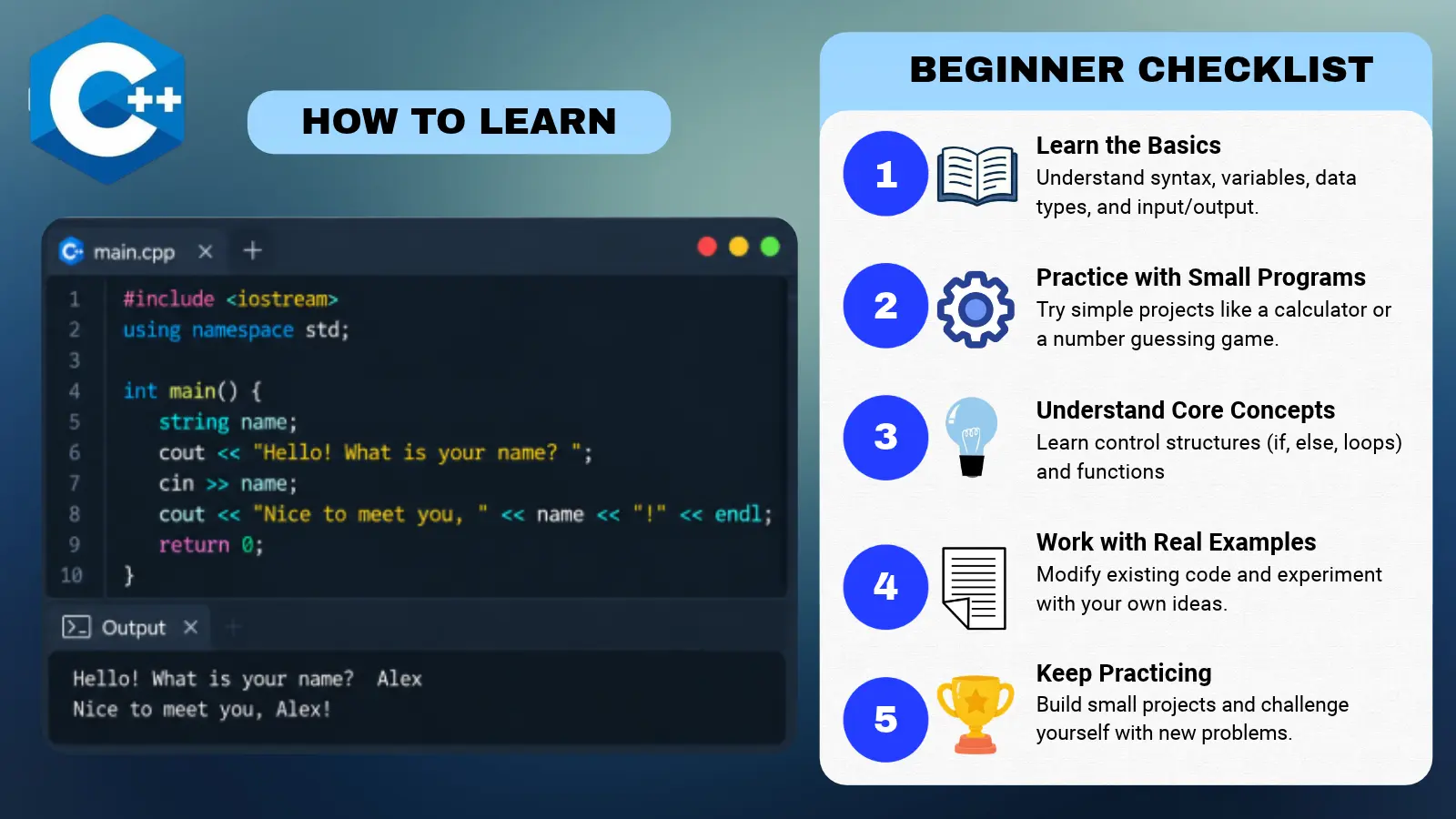
The short answer to “how to learn C++” is to set up a compiler, take structured beginner lessons, and finish a small console program. In the US, software developers have a median salary starting around $135,980 (BLS, May 2025), depending on specialization.
Approaching it step-by-step prevents the frustration that usually comes with its steep learning curve, ensuring you build a solid foundation rather than just memorizing syntax.
This path suits complete beginners and programmers adding another language. Choose C++ because those applications interest you, not because a short tutorial promises mastery.
Jump to:
What Is C++?
C++ is a high-performance, compiled programming language that gives developers deep control over system memory and hardware.
- Compiled: Translates human-readable source code directly into a binary program your computer can run.
- Object-Oriented: Organizes code and data into reusable objects while still supporting simple functions.
- Core Uses: Powers game engines, embedded systems, and resource-heavy software where speed matters most.
Understanding these core traits helps explain why the language has a steeper learning curve.
How To Learn C++: Key Facts at a Glance
Learning C++ is manageable when you separate basic programming skills from advanced language features. These facts outline the starting commitment.
|
Cost to start |
Free text lessons available; paid courses optional |
|---|---|
|
Time to learn the basics |
About 2–3 months of consistent study |
|
What you need |
A computer, a compiler, an editor, and willingness to debug |
|
Main hurdles |
Pointers, memory management, and uninitialized variables |
|
Beginner suitability |
Medium – a demanding start, with structured learning resources available |
Your intended use should guide how deeply you study each topic.
Roles in C++
C++ splits into several distinct career tracks that tech companies and studios hire for separately rather than one generic developer role. Clarifying these roles is a helpful early step when figuring out how to learn C++ for a specific career path rather than trying to master everything at once.
|
Track |
What it owns |
Good starting point for beginners? |
|---|---|---|
|
Game Developer |
High-performance game engines, physics systems, and real-time rendering |
Yes – start with simple console games before graphics |
|
Systems and Embedded Software Engineer |
Operating systems, device drivers, and firmware running directly on hardware |
Less common – requires deep memory management skills |
|
High-Performance Computing (HPC) Engineer |
Performance-sensitive simulation engines, scientific tools, and financial models |
Less common – usually a mid-career specialization |
|
Quantitative Developer |
Low-latency execution code and high-frequency trading platforms |
Less common – expects C++ mastery and advanced math |
Understanding these tracks upfront helps direct your practice toward a specific goal rather than trying to learn every advanced feature of the language all at once.
What You Need To Start Learning C++
Before diving into the tools, understanding the core steps of how to learn C++ guarantees you pick the right environment from day one. You need a compiler, which translates your code into a runnable program, and an editor or integrated development environment (IDE), which combines editing and debugging tools. Some IDEs include a compiler out of the box, while lightweight editors like Visual Studio Code require a compiler installed separately. Pick one setup and stick with it for your initial projects to avoid unnecessary environment troubleshooting.
|
Tool |
Best for |
Free trial |
Price |
|---|---|---|---|
 |
Full Windows IDE with a C++ compiler built-in |
No trial needed |
Free for individual developers |
 |
Lightweight, customizable code editor for any operating system |
No trial needed |
Free |
 |
Advanced cross-platform IDE for C and C++ development |
30-day trial available |
Free for non-commercial use; paid subscriptions for commercial use |
Whichever setup you choose, confirm you can successfully compile and run a small program before diving into your first core lessons.
How To Learn C++: A Step-by-Step Path
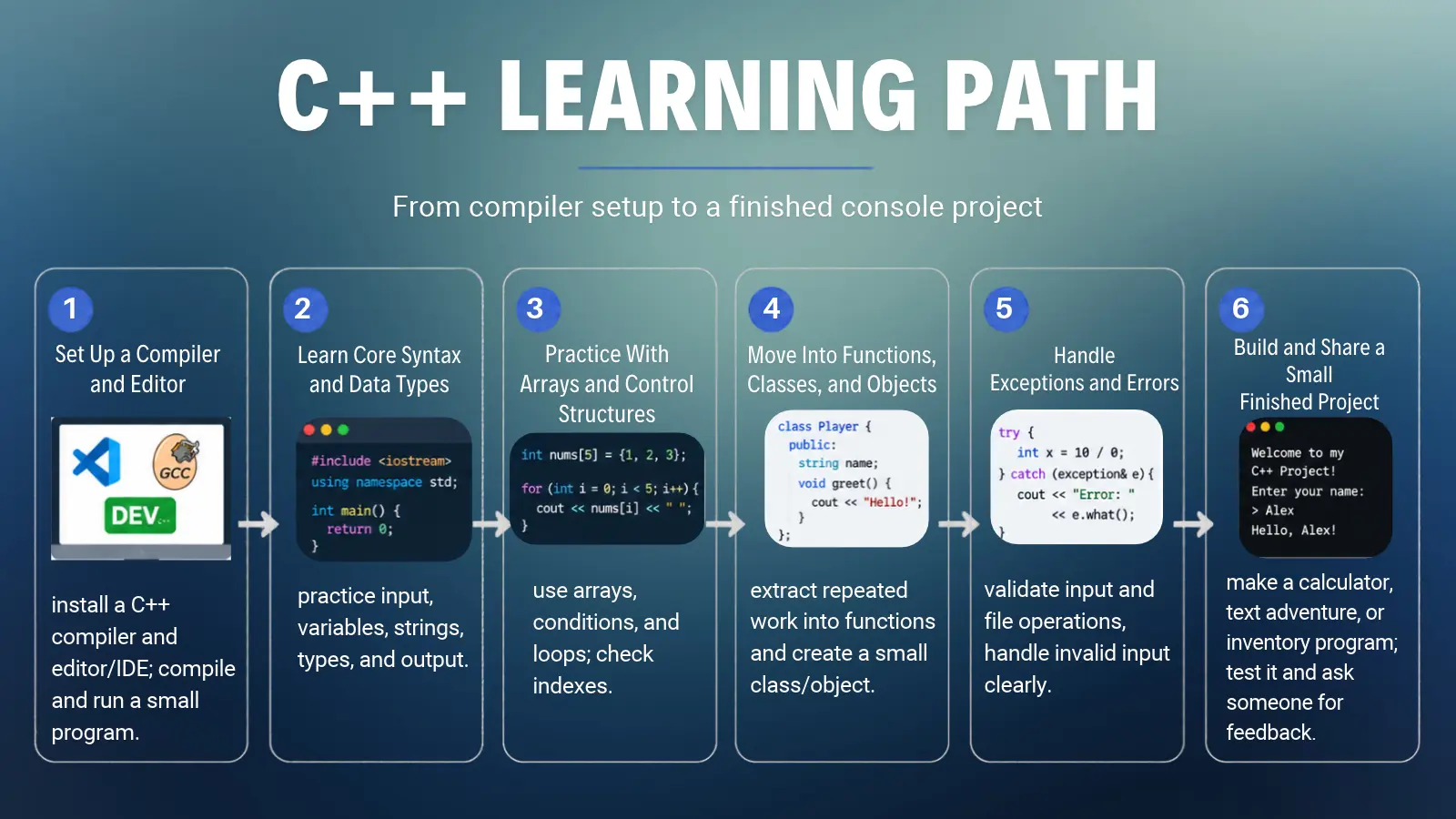
Start with small console programs, then add functions, objects, and error handling. Move forward when you can apply each concept without copying a tutorial. Completing the roadmap is a study milestone, not a job-readiness guarantee.
This is how to learn C++ without making an advanced course your starting point. Follow the steps in order, and use working code as your progress check.
Step 1: Set Up a Compiler and Editor
Install a C++ compiler and an editor or IDE compatible with your operating system. Follow your chosen lesson’s setup instructions so the examples match your environment. Compile a small program that prints a message, then change the message and rebuild it.
Learn the difference between a compiler error and a runtime error: the former prevents a successful build, while the latter occurs during execution. Keep the setup simple until you can edit, compile, and run your own source file reliably. Mastering this setup phase is a critical milestone in figuring out how to learn C++ effectively.
Step 2: Learn Core Syntax and Data Types
Write programs that accept input, store values, and print results. Study variables, constants, strings, and built-in types before creating user-defined types. Initialize variables when you define them, and choose types that match the information you need to represent.
A score calculator is a useful exercise for learning C++ because its output is easy to check. Change the input and predict the result before running it. When a result differs from your prediction, trace the calculation instead of replacing code at random.
Step 3: Practice With Arrays and Control Structures
Use conditions and loops to control what your program does. Work through an array, which stores a sequence of elements, and calculate its largest value or average. Draw a grid on paper before attempting a multidimensional array.
Check the position you access against the container’s size. An index is an element’s position, and accessing an invalid position can cause undefined behavior: the language places no requirements on what happens next. Learning C++ includes recognizing these hazards even when the program appears to run.
Step 4: Move Into Functions, Classes, and Objects
Extract repeated work into functions with clear inputs and outputs. Next, define a small class, perhaps an inventory item with a name and quantity. Create objects from that class and use its functions to change or inspect their state.
Study constructors, which initialize objects, and destructors, which run when objects are destroyed. Keep inheritance for later, after you can explain why information belongs inside a class. A short program with understandable responsibilities is a better learning exercise than a large class hierarchy copied from a tutorial.
Step 5: Handle Exceptions and Errors
Check that input and file operations succeeded before using their results. Give invalid input a clear response, and keep the program’s state consistent after an error. Test missing files and unexpected text alongside ordinary input.
Study exceptions as a mechanism for reporting certain failures to code that can handle them. They do not replace ordinary validation or make invalid memory access safe. When you learn C++, distinguish an error your program detects from a language rule your program has violated.
Step 6: Build and Share a Small Finished Project
Combine the concepts in a calculator, text adventure, or inventory program. Define a modest finish line before adding features: the program should accept input, perform its main task, and handle invalid input clearly. Remove unfinished features that distract from that goal.
Ask someone to run the program and describe confusing behavior. Share the relevant code with any request for help, along with the input and result. Rebuild parts without the tutorial open to check your understanding.
A finished, explainable program is the point to move forward.
| GENERAL CARD WITH ICON9uhij5t cr | |
| Icon Filename (leave empty for default) | preply-logo |
| Ribbon Text | GET HELP WITH YOUR CODE |
| Title | Preply |
| Rating (0.0 to 5.0) | 4.5 |
| Subtext | Consider a C++ tutor when you need help understanding an error or reviewing a small project. Bring your code and a specific question to the session. |
| Tooltip Text (leave empty for default) | |
| Purple Button Text | Explore C++ Tutors |
| Purple Button Link | https://preply.sjv.io/k4ENmV |
Best C++ Courses To Learn Faster
Choosing the right course when evaluating how to learn C++ depends on your prerequisites and practice, not by a promise of speed. A useful course on how to learn C++ should match your current knowledge.
After variables, loops, and functions, Udemy‘s C++ Data Structures & Algorithms + LEETCODE Exercises is a suitable next step into algorithm practice.
Udemy lists the video lengths below; Coursera gives an estimated workload for its intermediate course. That course is free to enroll in, but certificate and assessment access depend on the enrollment option. Its workload estimate describes study time, not which features enrollment includes.
|
Course |
Provider |
What it covers |
Study Time |
|---|---|---|---|
|
Advanced Object-Oriented & Generic Programming in C++ |
 |
Intermediate object-oriented and generic programming |
Estimated 1 week at 10 hours a week |
|
Beginning C++ Programming – From Beginner to Beyond |
 |
Beginner foundations through object-oriented concepts |
46 hours of video |
|
Learn C++ Programming -Beginner to Advance- Deep Dive in C++ |
|
Beginner through advanced language concepts |
30.5 hours of video |
|
C++ Data Structures & Algorithms + LEETCODE Exercises |
|
Data structures and algorithm exercises |
10.5 hours of video |
Pick one beginner course and make sure you finish it before getting started with a new one. The hours above refer to watching only, so plan some extra time for exercises and debugging.
Practice Projects To Reinforce What You Learn
You learn C++ by building and checking programs, not by reading alone. Work through these projects in increasing difficulty, and write down what successful behavior looks like before coding.
- Array utilities: Find the largest value and calculate an average. Test empty input before performing calculations. This reinforces iteration and the assumptions your code makes about its data.
- A console guessing game: Accept guesses, give feedback, and stop when the player succeeds. Separate input handling from game rules so you can test each part.
- A class-based game inventory: Store item names and quantities in objects. Practice constructors and functions that prevent invalid changes, like removing more items than the inventory contains.
- A shape hierarchy: Give related shapes a shared interface, then calculate their areas through it. This introduces polymorphism, where different types respond through a common interface.
- A file-based score reader: Load saved scores and handle a missing or malformed file. Keep parsing separate from display so failures are easier to locate.
- A linked-list or stack implementation: Add and remove elements, then test edge cases. A linked list connects elements through references to other elements; a stack processes the most recently added element first.
Keep these as learning exercises. Standard-library containers are generally the better starting point for everyday application code than a homemade replacement.
Where Most C++ Beginners Get Stuck
A successful compilation does not prove correctness. C++ allows mistakes that may remain hidden until different input or circumstances expose them, so testing belongs in the learning process from the beginning.
Learn Modern C++ discusses common hazards behind this difficult reputation. Any practical guide on how to learn C++ needs to address those hazards alongside syntax.
Use these fixes while learning C++:
- Leaving variables uninitialized: Initialize variables at their definition. Do not assume a local variable contains a useful default value. Trace the first assignment before every use.
- Pairing allocation and deletion manually: Prefer automatic storage and standard containers. When dynamic ownership is necessary, study std::unique_ptr before shared ownership. Smart pointers manage resource ownership; they do not remove every possible lifetime mistake.
- Trusting input or file operations: Check the stream’s state before using the result. A failed read should lead to a controlled response, not calculations based on missing information.
- Accessing elements without bounds checks: Validate the index or use a container’s bounds-checked .at() access where appropriate. Learn how that operation reports failure, then handle it deliberately.
Test ordinary input and failure cases as you add each feature. When a program fails, reduce it to the smallest example that still shows the problem. That makes feedback more useful and gives you a repeatable way to investigate the next bug.
Final Verdict on How To Learn C++
C++ is a strong choice for learners interested in game engines, systems programming, or algorithms. Its complexity has a purpose in those areas. A beginner should start with fundamentals and a console project before selecting an advanced specialization.
Choose another language first if your immediate goal is a quick script or a website. Python or JavaScript may put you closer to that goal with less language machinery to manage. Interest in the work C++ supports is a better reason to commit than its reputation for difficulty.
The practical answer to how to learn C++ is to pair structured lessons with programs you can explain and debug. Continue with Coursera‘s intermediate material only after functions, classes, and basic error handling are familiar. A course completion certificate records study, not an exam-based vendor certification or proof of professional readiness.
FAQs
Start with LearnCpp.com or a beginner course on Udemy. Set up a compiler, practice variables and loops, and then add functions and classes. Finish a small console program before studying advanced algorithms.a
Plan for months of consistent practice rather than a short video course. Progress depends on prior experience and time spent writing code. Use independent projects, debugging, and your ability to explain decisions as progress checks.
Yes, free text lessons and video tutorials can support a complete beginner. Use LearnCpp.com for a structured path, and write your own exercises alongside the lessons. Paid instruction is optional.
No, you can begin without another programming language. Basic logic helps, but you can learn conditions, loops, and functions as you go. Start with small console programs before adding graphics or complex frameworks.
Yes, if your goals involve game engines, systems software, or algorithm-heavy programming. Its memory and resource concepts are useful in those fields. A different language may be a better first choice for quick scripts or web development.
You need a computer, a C++ compiler, and an editor or IDE. Add structured lessons and a place to save your exercises. A paid course or tutor can provide guidance, but neither is required to begin.
LearnCpp.com is a strong starting point for learners comfortable with text lessons. Udemy offers video-based alternatives. Choose a format you will practice with consistently as you work out how to learn C++.