


How To Learn Blender: A Beginner’s Roadmap for 2026

Eneba Hub contains affiliate links, which means we may earn a small commission if you make a purchase through them—at no extra cost to you. Learn more


START WITH STRUCTURE
Try Udemy for project-based lessons that connect modeling with animation. Keep the software free and choose a course that matches what you want to make.
The practical answer to how to learn Blender is to follow a beginner course, repeat its exercises, and finish a small project on your own. This roadmap takes you from setup through modeling, materials, and animation, with courses and practice projects matched to each stage. Since Blender is completely free and open source, you can focus on building your skills without spending money on additional tools.
Learning Blender suits gamers who want to make assets, aspiring animators, and creative hobbyists interested in printable models. Course fees are optional. How quickly you progress depends on your goals and how often you practice, so don’t worry about mastering everything within a course’s estimated duration.
You’ll explore what Blender can do, learn how to get started, and discover useful courses and projects to develop your skills.
Jump to:
Blender at a Glance
You can start learning Blender for free with a simple project to work toward. Here’s a quick overview of what you’ll need and what to expect as a beginner:
|
Cost to start |
Free software, paid courses are optional |
|---|---|
|
Time to learn the basics |
Varies based on your practice time and learning goals |
|
What you need |
A compatible computer and a beginner-friendly tutorial |
|
Main hurdles |
Unfamiliar navigation, shortcuts, and editing modes |
|
Beginner suitability |
High – plenty of beginner tutorials cover the basics |
Knowing what you want to create can help you decide how to learn Blender and which skills to focus on first.
What Blender Is Used For
Learning Blender gives you access to modeling, animation, and visual-effects tools in the same application. Start with a simple object or scene that you can finish as you build your skills.
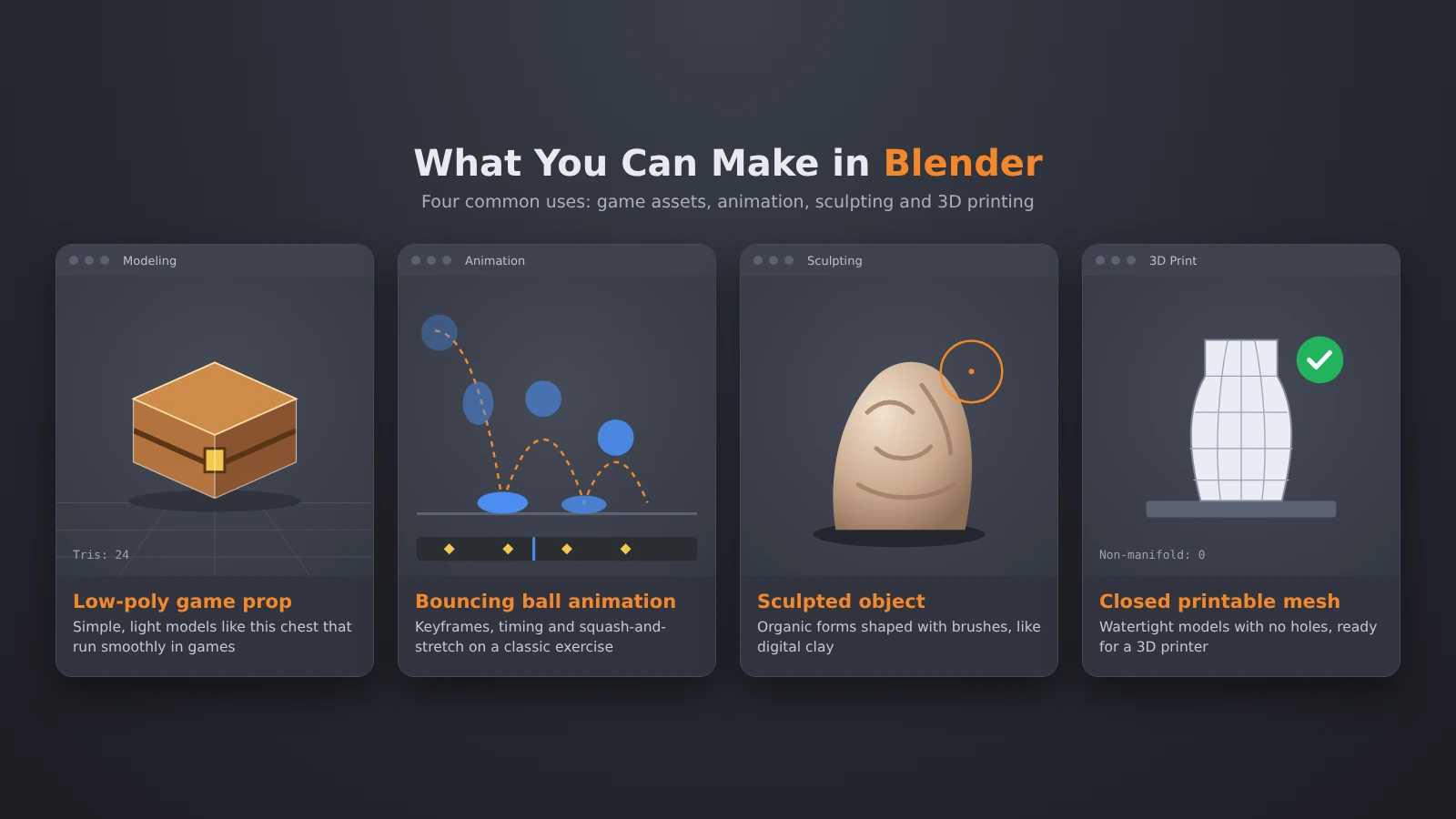
Here are some ways you can use Blender:
- Game assets and 3D modeling: Create 3D objects for games, such as props or environmental assets. Start with something simple, like a stylized crate, to practice basic modeling techniques.
- 2D and 3D animation: Create movement by changing an object’s properties over time. Blender animation can begin with a bouncing ball before progressing to characters.
- Visual effects: Add computer-generated elements to footage and combine visual layers to create effects for videos or cinematic scenes.
- Sculpting: Shape detailed 3D models with digital sculpting tools that work similarly to clay. This is especially useful for creating characters or organic objects.
- Simulations: Explore calculated motion and interactions after you understand the basic workspace.
Pick something you’re interested in creating before choosing which tutorials to follow. You’ll learn Blender more purposefully when each exercise contributes to something you want to make.
Blender Animation
Blender animation starts with keyframes, which record a property at a chosen point in time. Animation curves let you adjust how smoothly an object moves between keyframes. A bouncing-ball exercise makes timing visible: you can adjust the movement and immediately see how the result changes.
Starting with simple animations lets you focus on movement before tackling more complicated 3D models.
Blender for 3D Printing
Using Blender for 3D printing applies the same modeling tools to objects intended for physical production. For 3D printing, you’ll need to create solid models with properly connected surfaces so they can be printed successfully.
Some Blender tutorials focus on visual appearance and may skip the technical requirements for 3D printing.
What You Need To Start Learning Blender
All you need to start learning Blender is a compatible computer and a beginner-friendly learning resource. Start with simple scenes so you can concentrate on the controls.
Here are a few essentials to help you get started:
- Software: Download Blender and keep your project files in an organized folder.
- Course platform: Use Udemy for project-based courses or Coursera for a module-based introduction.
- Reference sheet: Keep notes on navigation and the shortcuts you actually use. A short personal reference is easier to apply than a long command list.
These basic resources are enough to learn Blender, so there’s no need to invest in additional tools right away.
Each platform can support your learning process in a slightly different way.. Udemy lists its Personal Plan from $13.00/month, while Coursera offers free enrollment for its named beginner course. Enrollment terms can affect access to assessments and certificates.

Look for courses with practical exercises that match what you want to create in Blender. Learning Blender becomes easier to organize when the resource matches your immediate project.
How Much Does It Cost To Learn Blender?
You can learn Blender using free software and free learning material. Paid courses can provide a more structured learning experience, but regular practice is still essential for improving your skills.
Here’s a breakdown of the learning options worth considering:
- Individual course: Udemy lists Learn 3D Animation – The Ultimate Blender A-Z Guide at $18.99. Promotional prices can change.
- Subscription: The Udemy Personal Plan is an alternative to an individual purchase. Check that your chosen course is included before subscribing.
- Free enrollment: Coursera offers enrollment for Introduction to Blender 3D: Beginner’s guide to 3D modeling. Review access terms before choosing any paid option.
Begin with a free Blender tutorial to explore the basics, then consider a paid course if you want more structured lessons.
One thing beginners often underestimate is how much time it takes to get comfortable with Blender. Learning Blender includes repeating exercises, fixing mistakes, and rebuilding work without instructions. Leave room for that practice when planning your study.
How To Learn Blender: A Step-by-Step Path
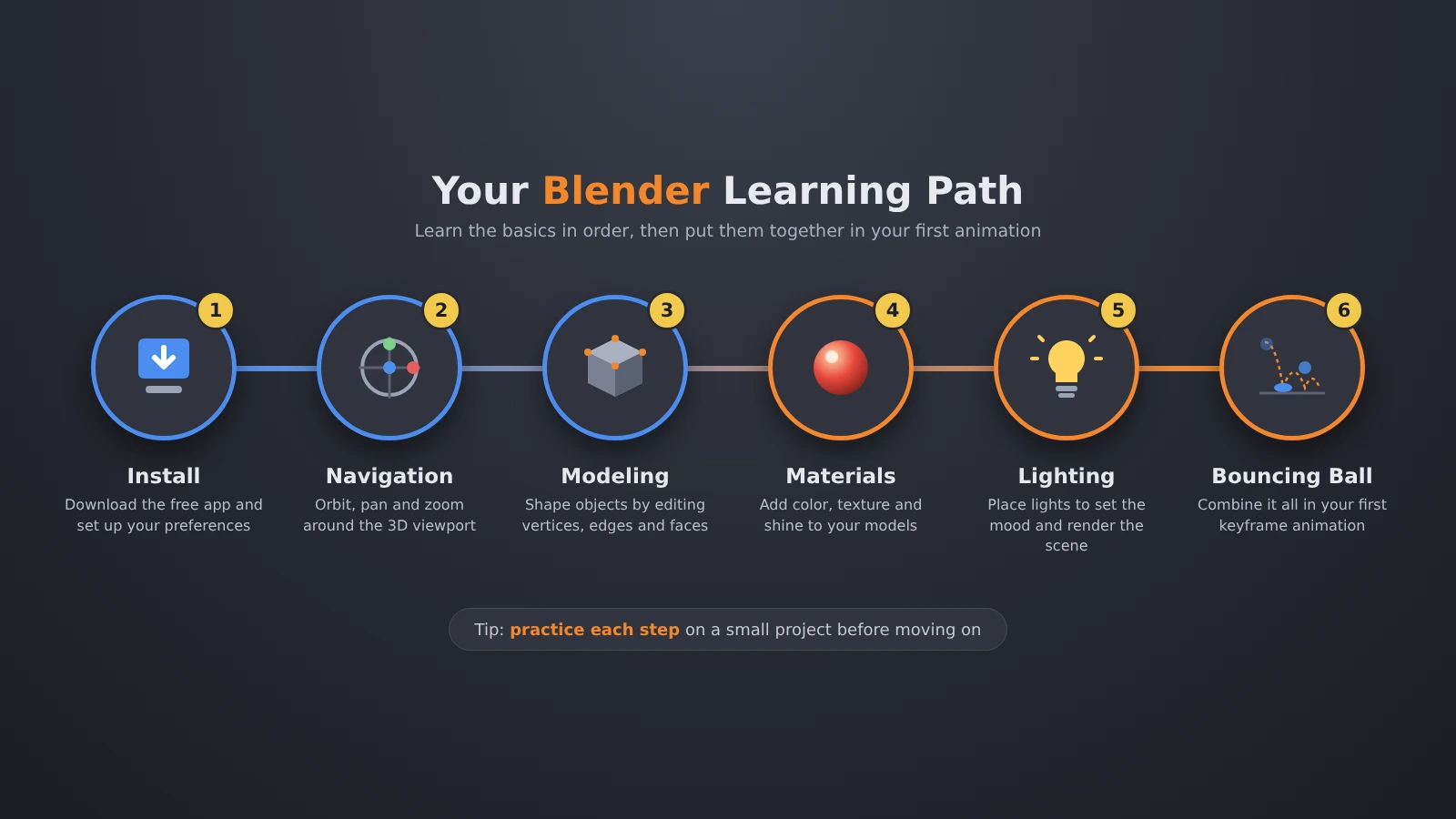
Learn Blender in this order: navigation, modeling, materials, and simple motion. Use course durations to plan your lessons, but move forward once you feel comfortable completing the exercises on your own.
Follow these five steps to create your first 3D scene and explore the basics of Blender animation.
Step 1: Download and Install Blender
Download Blender from its official website and open a new project. Save it in a dedicated folder before experimenting, then practice saving another version after a meaningful change. Give each version a clear filename so you can easily revisit your earlier work.
Choose a small target, like a stylized game prop on a simple ground plane. Having a clear project goal can make learning Blender feel more manageable.. Keep the target modest enough that you can finish its shape, appearance, and presentation before adding more objects.
Step 2: Learn Navigation and the Interface
Practice orbiting, panning, and zooming until you can inspect an object from different sides. Find the Outliner, which lists scene objects, and the side panel often called the N panel. Spend some time exploring the different views so you can move around your scene comfortably.
Follow a Blender tutorial for the controls, then close it and repeat the actions. Select an object through the Outliner and find it in the workspace. Repeating these actions without a tutorial will help you remember the controls more naturally.
Step 3: Master Basic Modeling Tools
Build an object from primitive shapes like a cube, plane, or sphere. Practice moving, rotating, and scaling them, then enter Edit Mode to change the geometry inside an object. Experiment with extrusion to extend parts of your model, then use loop cuts to add more detail.
Learn Blender shortcuts gradually as you become familiar with different modeling tools. E handles extrusion, while Ctrl+R introduces a loop cut. Keep the first model simple. If you intend to use Blender for 3D printing, pay attention to closed surfaces as you edit.
Step 4: Add Materials, Lighting, and a Camera
Assign simple materials, inspect them in material preview, and place a light and camera. A material defines how a surface appears, while rendering produces an image from the scene. Experiment with the lighting and camera position until your model looks clear in the final image.
Compare perspective and orthographic camera views. Perspective changes apparent size with distance, while orthographic views keep parallel lines parallel. Learning Blender includes presentation, so finish a readable image before adding surface detail. Save your first finished render so you can look back and see how your skills improve.
Step 5: Try Your First Blender Animation
Keyframe a simple object’s position to create a bouncing-ball exercise. Preview the movement, adjust its timing, and inspect the animation curves. Focus on getting the movement right before attempting more complex character animations.
Simple Blender animation exercises help you understand how small adjustments affect movement. Change a keyframe, preview the result, and describe what improved. To learn Blender actively, rebuild the motion in a fresh file after the lesson. Finish with a saved project and a result you can review.
Blender Tutorials and Courses Worth Paying For
A good Blender tutorial helps you practice a specific skill, while a structured course guides you through more advanced techniques as you improve. Choose by your next project and the clarity of the curriculum.
Learn 3D Animation – The Ultimate Blender A-Z Guide on Udemy is a suitable broad course for learning Blender across modeling and animation.
The durations below come from Coursera and Udemy. These durations reflect lesson time, so remember to leave room for hands-on practice as you learn Blender.
|
Course |
Provider |
What it covers |
Duration |
|---|---|---|---|
|
Introduction to Blender 3D: Beginner’s guide to 3D modeling |
 |
Interface, objects, materials, and lighting |
8 hours |
|
Learn 3D Animation – The Ultimate Blender A-Z Guide |
 |
Modeling and Blender animation projects |
28.5 hours |
|
Blender Character Creation Megacourse: Beginner to Expert |
|
Character creation |
80 hours |
|
Blender Essentials: 3D Modeling and Animation for Beginner |
|
Modeling and animation basics |
15 hours |
|
The Ultimate Guide to Blender 3D Rigging & Animation |
|
Rigging and character animation |
8 hours |
Begin with a beginner-friendly course to build your foundation before exploring more specialized topics. A focused Blender tutorial can fill a specific gap later, while learning Blender from a consistent sequence keeps the fundamentals connected.
Practice Projects To Build Blender Skills
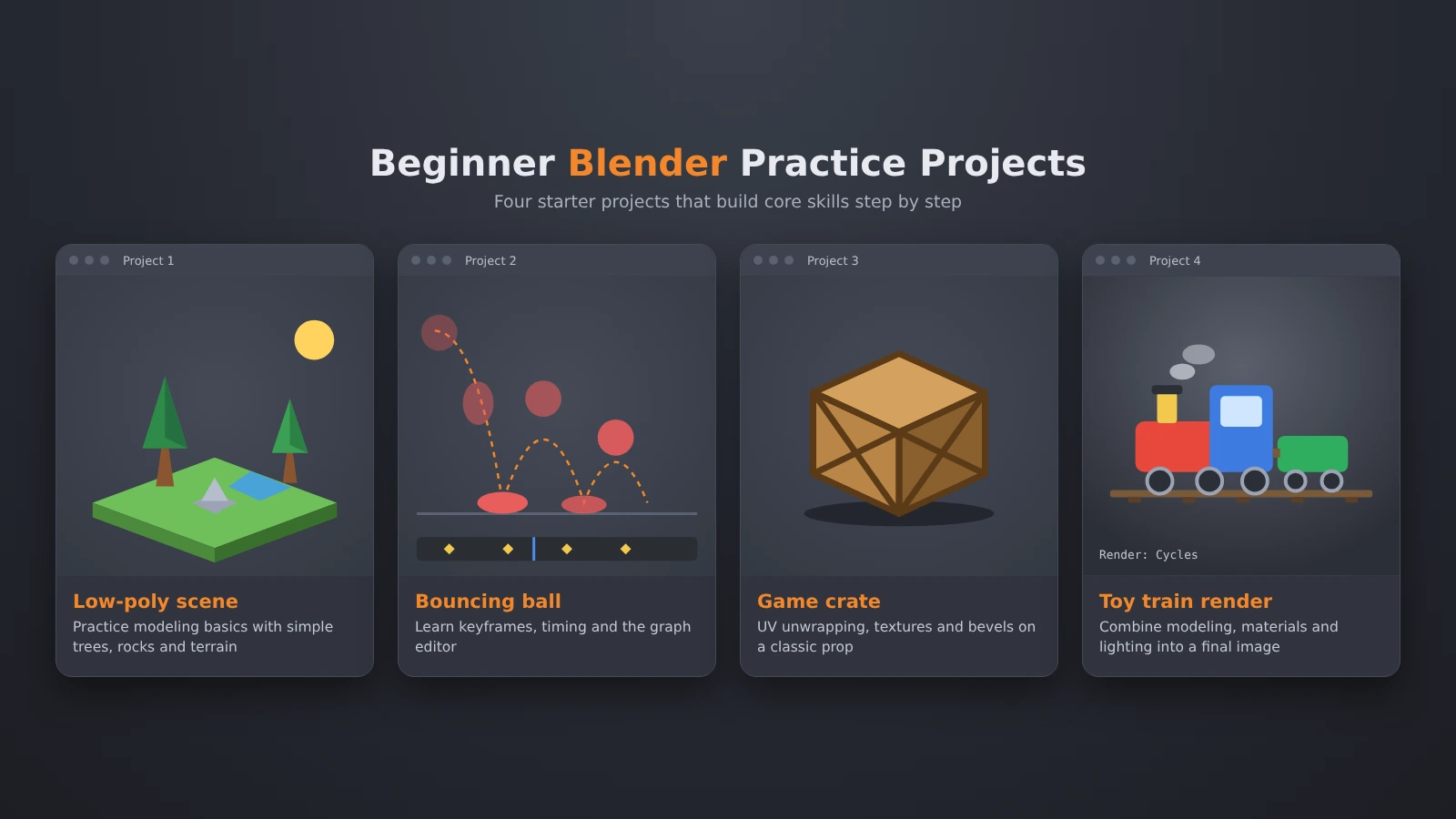
One of the best ways to learn Blender is to complete small projects and see how your skills improve. Work through these in order, with each project adding a different demand.
- A simple low-poly scene: Build a tree and flower from basic shapes. Practice navigation, duplication, and object placement, then arrange a readable composition. Follow a Blender tutorial for your first attempt, then recreate the scene with your own creative touches.
- A bouncing ball: Practice keyframes and timing with an uncomplicated object. Keep the scene plain so you can judge the motion. This simple Blender animation project lets you experiment with movement and see how small changes affect the result.
- A low-poly game asset: Make a crate or simple piece of scenery. Study topology, the arrangement of vertices, edges, and faces. Learn Blender with a particular asset in mind and inspect its geometry from every side.
- A toy train: Combine multiple objects, add materials, and produce a rendered image. This brings modeling and presentation together. Take note of the techniques you’ve mastered before moving on to your next project.
- A simple printable object: Try a basic token or block-like shape. Using Blender for 3D printing means checking the mesh as a physical volume. Inspect closed surfaces and dimensions before moving toward production.
Save your project files and finished previews so you can track your progress over time. Learning Blender through finished work gives you something concrete to revisit when a technique remains confusing.
A model that looks great in a rendered image may still need adjustments before it’s ready for 3D printing. Blender for 3D printing requires attention to geometry even when the object already looks correct on screen.
Where Beginners Get Stuck Learning Blender
Learning Blender can feel overwhelming when you jump into complicated projects before mastering the basics. Reduce the task until you can explain each action and repeat it with a different object.
Here are some common beginner mistakes and how to overcome them:
- Skipping navigation: Practice orbiting, panning, and selecting before detailed modeling. If an object seems lost, find it through the Outliner and inspect the view. Once you’re comfortable with navigation, you’ll spend less time searching for objects and more time actually creating them.
- Attempting a full animation too early: Complete a simple static scene before adding motion. A small Blender animation exercise gives you a manageable place to study keyframes. Add complexity after you understand the result of changing a value.
- Making every edit permanent: Explore modifiers, which change an object’s appearance or geometry through adjustable operations. Keep a saved version before applying unfamiliar changes. Learning Blender includes understanding which decisions remain editable.
- Copying without recall: Pause the Blender tutorial and repeat a task without looking. Change the shape or arrangement so you have to make a decision. If you get stuck, return to the relevant operation and try again.
- Judging a printable model by appearance: Inspect the geometry separately from its materials and lighting. Models intended for 3D printing need properly connected surfaces and a solid, printable structure.
Focus on completing a simple version of your project before adding more detail. You’ll learn Blender with fewer distractions when each revision addresses a visible problem, like an awkward silhouette, unclear lighting, or uneven motion.
Final Verdict on How To Learn Blender
Learning Blender is worth your time if you want a powerful, free tool for creating 3D models and animations. Start with an introductory sequence and a modest finished project. The software’s breadth makes it a useful long-term choice for someone willing to practice beyond the lessons.
If you only need to make quick adjustments to existing 3D models, Blender‘s extensive features might feel overwhelming at first. A purpose-built alternative may suit that narrow task better. Blender for 3D printing becomes more appealing when you also want to create and reshape your own models.
The best approach to how to learn Blender is to combine structured lessons with hands-on projects you complete independently. Choose Udemy if you want a longer project-based course, or begin with Coursera for a compact introduction. Let your next finished object determine what you study afterward.
FAQs
You can learn Blender for free by downloading the software and following beginner-friendly tutorials online. Start with basic navigation and simple modeling exercises, then challenge yourself to complete a small project without following every step of a video.
The time it takes to learn Blender basics depends on how often you practice and what you want to create. Learn Blender navigation, object editing, and simple materials first. Move ahead when you can repeat those tasks without copying each action.
Yes, you can make significant progress with Blender in one year if you practice consistently. Set goals around finished work, review your mistakes, and add specialist skills as you need them.
No, you don’t need previous experience to learn Blender. Beginners can start with basic navigation and simple 3D objects before exploring animation or more advanced modeling techniques.
You need a compatible computer and the free Blender software to get started. Beginner tutorials can help you learn the basics, while paid courses are optional if you prefer structured lessons.
Yes, learning Blender is worthwhile if you want to create game assets, animation, or printable models with free software. Your goals should guide how to learn Blender.