Is BG3 Cross-Platform?

As fans of Baldur’s Gate 3 began exploring the depths of the Astral Plane, one question kept popping up: Is BG3 cross-platform? The answer has evolved over time, and I’ve followed the changes closely.
As someone who loves playing with friends on different systems, I’ve experimented with cross‑play since the final patch and have helped many players troubleshoot issues. This article shares everything I’ve learned, from platform availability to cross‑play and cross‑save support, so you can enjoy this epic role‑playing adventure with your friends, no matter where they play.
Jump to:
Platform Availability
Before diving into connectivity, it’s important to know where you can play Baldur’s Gate 3. The game is available on PC, both through Steam and GOG, and it also runs on Mac via the same services. If you prefer consoles, BG3 launched on PlayStation 5 and later arrived on Xbox Series X/S.
Thanks to streaming services, the game is also accessible through GeForce NOW, meaning you can play on devices that might not otherwise meet the game’s hardware requirements. While older systems like PlayStation 4 or Xbox One are not supported, most modern players can find a platform that suits them.
Cross‑Platform Play (Crossplay)
Cross‑play allows players on different platforms to join the same session. When Larian Studios released Patch 8, they introduced true cross‑play across PC, Mac, Xbox Series X/S, and PlayStation 5. This means you can form a party with friends regardless of whether they’re on console or computer. During the first week of the patch, I hosted a multiplayer session from my PC while a friend joined from their PS5; we explored the game without noticing any additional lag or desync.
To enable cross‑play, you must first create or sign into a Larian account. This account acts as a bridge between platforms. Then, from the main menu:
- Select Multiplayer and choose Cross‑play at the top of the menu.
- When prompted, enable cross‑play. This setting allows players on other systems to join your lobby.
- Add your friends through their Larian usernames and invite them to your session. You can also join their lobbies by entering their username.
Once cross‑play is enabled, you’ll see a cross‑play lobby where players from different platforms are listed together. For an existing save file, you can enable cross‑play when loading it by selecting Allow Cross‑Play on the right side of the screen. Some players forget to turn on this option for older saves, which can cause confusion. I’ve helped a few of my friends resolve this by showing them where to find the setting in the load menu.
Cross‑play works seamlessly in the base game, but there are a few things to keep in mind. Mods are supported only if all players have the same mods installed. On consoles, there’s a limit of 100 mods, and third‑party mods outside the official in‑game mod manager are not supported. If one player has an extra mod that others lack, everyone might be booted from the lobby. When my group decided to install graphical tweaks on PC, we learned quickly that leaving the mods synced across platforms is essential for stability.
Cross‑play is one of the standout features of Patch 8, and it helps BG3 stand alongside other titles that embrace cross‑platform gaming. If you’re interested in exploring other cross‑platform experiences, we have a helpful list of the best cross‑platform games to play with friends that might inspire your next adventure.
Crossplay Support by Platform
Cross‑play works across all supported platforms, but it’s worth looking at how each system interacts with others.
- PC (Steam and GOG). Players on Windows and Mac versions purchased through Steam or GOG can join lobbies with console players. Cross‑play across PC storefronts (Steam and GOG) has been available since launch, but the console integration is what truly makes cross‑play universal.
- Mac. Mac users enjoy full parity with Windows players. Because both versions run via Larian’s servers, Mac gamers can group up with friends on PlayStation or Xbox without needing extra settings beyond enabling cross‑play.
- PlayStation 5. PS5 owners can connect to friends on PC, Mac, or Xbox Series X/S. When I joined a cross‑play session from my PS5, the game automatically detected my Larian account and pulled in my friends list. The process was quick and didn’t require PlayStation Plus for online play.
- Xbox Series X/S. On Xbox, cross‑play functions just like on other systems. Xbox players can host or join cross‑play lobbies with PC, Mac, and PS5 friends. There’s no need for extra subscriptions beyond the base game, and you can download and join cross‑play sessions directly through the multiplayer menu.
One detail to note is that split‑screen co‑op on consoles is separate from cross‑play. You can play split‑screen locally on PS5 or Xbox, but when inviting players over the internet via cross‑play, split‑screen and cross‑play cannot be used simultaneously. If you want to play with more than two players and have a friend on another system, use a single screen per player instead of combining split‑screen with cross‑play.
Platform‑Specific Limitations and Partial Compatibility
While cross‑play is robust, there are a few platform‑specific limitations and partial compatibility issues to consider. Understanding these will help you avoid frustration:
- Mod support is restricted. As mentioned earlier, all players in a cross‑play session must have the same mods enabled. If you are on PC and enjoy extensive mods, your console friends might be limited by the console’s 100‑mod cap and the absence of third‑party mod support. When I attempted to host a modded session with my friends on Xbox, we couldn’t join until we all trimmed our mod list to fit the console’s limit.
- Older consoles are unsupported. The game doesn’t run on PS4 or Xbox One. Some players continue to search for cross‑play between last‑gen consoles and PC, but it isn’t available because BG3 isn’t released on those systems. The game is demanding and was designed for newer hardware.
- Save file compatibility. Cross‑play lobbies read the current save file you load from your system. However, if a save file is heavily modded on PC, it may not load on consoles. Keeping your saves relatively clean and enabling cross‑save (see next section) helps avoid these conflicts.
- Network differences. Cross‑play uses Larian’s servers to connect players. If you encounter connection issues, check both your internet stability and your Larian account login. An unstable connection can drop you from the cross‑play lobby. I’ve had this happen when my ISP experienced interruptions; reconnecting usually fixed the problem.
Other games also impose their own limits. For example, Phasmophobia allows cross‑play but doesn’t support cross‑progression, so you can join friends but can’t carry progress across platforms. Understanding the differences between games helps set expectations when switching between titles.
Cross‑Save and Cross‑Progression
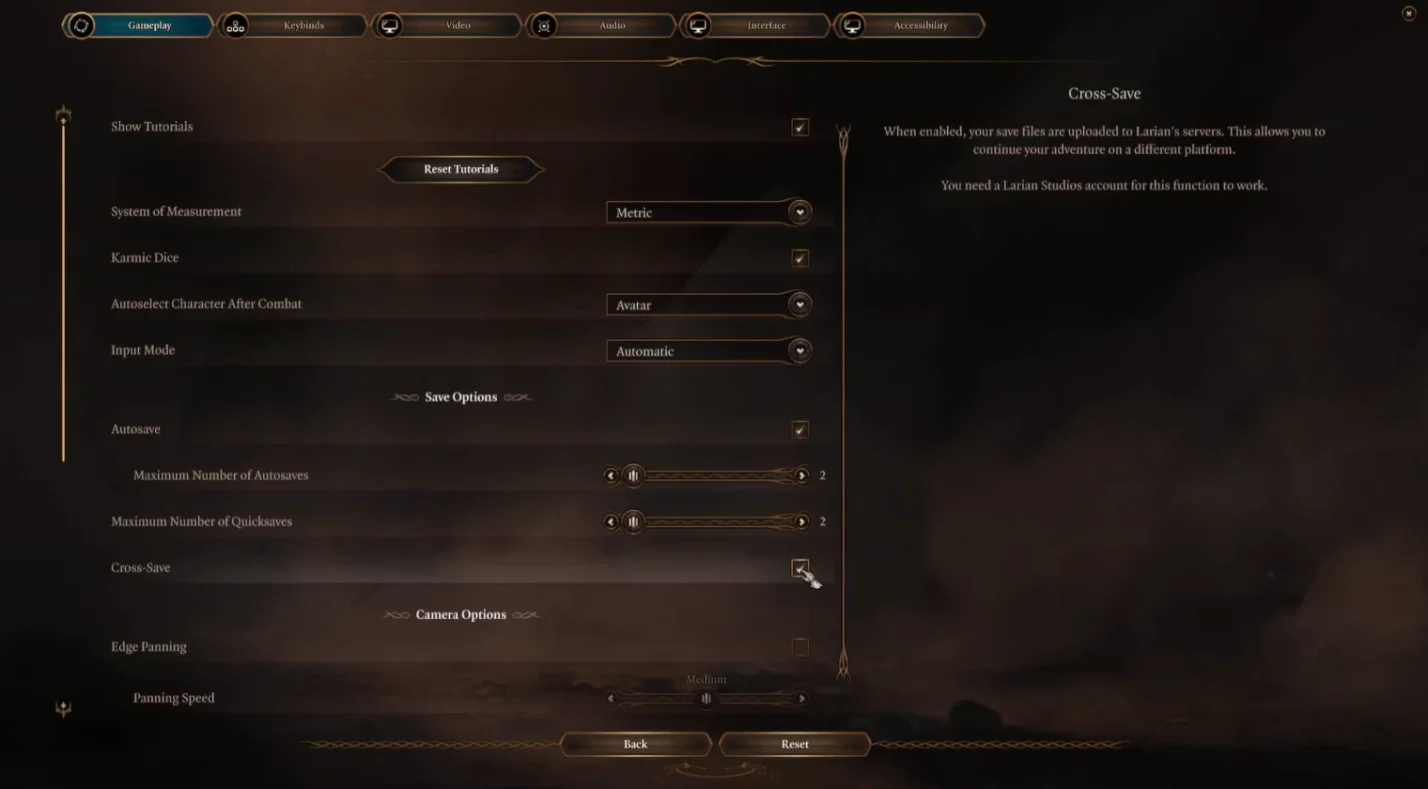
Having your progress follow you from one device to another is just as important as playing together. Baldur’s Gate 3 includes both cross‑save and cross‑progression. I’ve used these features extensively, starting a campaign on PC, continuing it on my PS5 during a weekend away, and then returning to PC. The system works smoothly once you set it up.
Cross‑Save Support
Cross‑save allows you to upload your save files to Larian’s servers and download them on another platform. To enable it:
- Go to Options in the main menu and open the Gameplay tab.
- Under Save Options, enable Cross‑Save. A box will appear indicating that your last five saves will sync to the Larian cloud.
- Link your platform account (Steam, PlayStation Network, or Xbox Live) to your Larian account. This can be done via the Larian website or through a prompt when you first enable cross‑save.
- On another platform, make sure you’re logged into the same Larian account and enable cross‑save. Your last five saves will be available to load.
There are a few things to remember:
- Only the last five save files sync. If you want a particular save to carry over, make sure to keep it in the most recent five slots.
- Cross‑save works both ways. You can start on console and move to PC or vice versa.
- No subscription required. Cross‑save doesn’t require PlayStation Plus or Xbox Game Pass. It’s tied to your Larian account, so as long as you own the game, you can use the feature.
- Modded saves may not transfer. If your PC save relies on mods not available on consoles, the save file won’t load. When I attempted to transfer a heavily modded save to PS5, the game displayed an error. To avoid this, use mod‑free saves or ensure that the mods in use are supported on the destination platform.
Cross‑save is a game-changer, especially when you share devices or travel often. I can pick up my adventure exactly where I left off on any supported device, which wasn’t possible in earlier versions of the game.
Cross‑Progression Support
Cross‑progression goes a step further by allowing your character progression, story choices, and unlocked items to follow you across platforms. In BG3, cross‑progression functions automatically once cross‑save is enabled. Because the game loads your save data via Larian’s servers, all your decisions and progress – including inventory, quests, and relationships – persist across devices.
However, there are a few nuances:
- Achievements and trophies are platform‑specific. While your character’s progress carries over, you’ll need to unlock achievements or trophies separately on each platform. I noticed that some achievements popped again when I repeated actions on PS5 even though I already earned them on PC.
- Controller configuration and settings do not transfer. Your preferences, such as camera sensitivity or button layout, must be set on each platform.
- Mods can affect progression. If your save file uses mods, you may not see all your progress on another platform because the mod features are missing. Keeping your playthrough mostly vanilla ensures a smoother cross‑progression experience.
I recommend enabling cross‑save and cross‑progression early in your playthrough. That way, if you ever switch devices, your progress is already synchronized. Players curious about cross‑progression in other games might find our article about Valorant interesting; that game offers robust cross‑progression for cosmetics but limits cross‑play between PC and console – highlighting how different studios handle these systems.
Account Linking
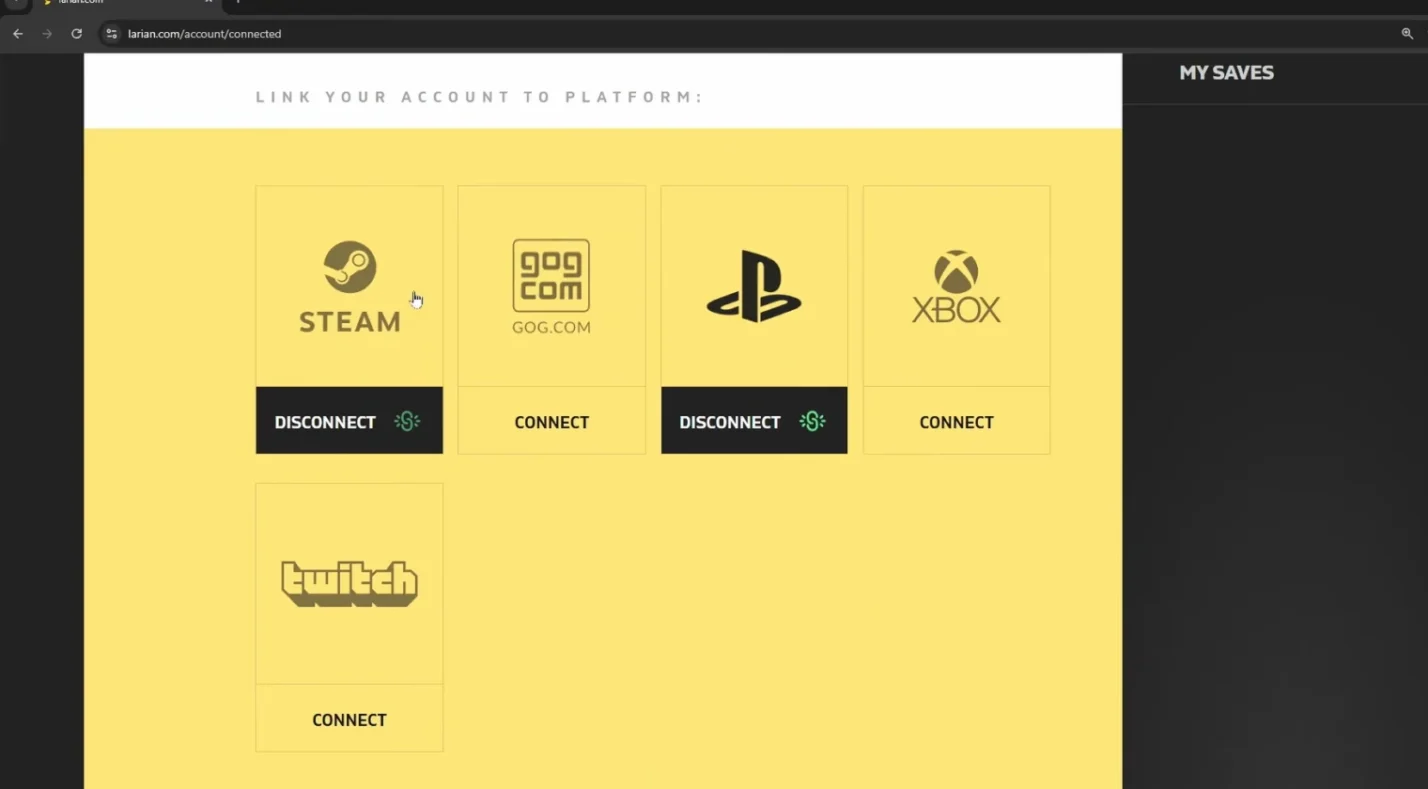
To take advantage of cross‑play and cross‑save, linking your accounts is essential. Here’s how to do it:
- Create a Larian account. Visit the Larian website and sign up using an email address. This account will be used for both cross‑play and cross‑save.
- Link your game platform accounts. From your Larian account dashboard, link your Steam, PlayStation Network, or Xbox Live account. This authorizes Larian’s servers to access your game data. The process is straightforward: you log in with your platform credentials and confirm the link.
- Log in within the game. When you launch Baldur’s Gate 3, the launcher will prompt you to log in with your Larian account. Once logged in, the game will recognize your linked platforms and enable cloud syncing.
I remember helping a friend who thought cross‑play wasn’t working. They had forgotten to link their PlayStation account to their Larian account. After we fixed that, cross‑play and cross‑save worked instantly.
Account linking also helps protect your saves. Because your progress is stored on Larian’s servers, a hard drive failure doesn’t erase your progress. Think of it as a built‑in backup system. While you must stay connected to the internet to synchronize data, you can still play offline; your saves will upload the next time you connect.
Developer/Publisher Comments and Future Plans
Larian Studios announced cross‑play and cross‑progression in their Patch 8 release notes, calling the update their final major patch. They explained that cross‑play took longer to implement because they wanted parity across platforms, and they introduced the Larian Network to handle cross‑play lobbies and save synchronization. The update also added a photo mode and twelve new subclasses. Developers noted that cross‑play would continue to evolve through smaller patches if required.
In earlier community updates, Larian teased cross‑play and full cross‑progression, stating that the feature would allow players on PC, Mac, Xbox Series X/S, and PS5 to join sessions seamlessly. Their commitment to cross‑play shows that they recognize how important it is for the community. With cross‑play now live, the focus has shifted to quality‑of‑life improvements and potential future content.
As of now, there are no plans to release BG3 on last‑generation consoles or add cross‑play with older hardware. Larian has emphasized that supporting four modern platforms simultaneously is already demanding. They have also been clear that mod support will remain limited on consoles due to technical restrictions. Any major expansions would likely maintain cross‑play and cross‑progression features from day one.
If you enjoy tactical co‑op games, you might also want to learn about how other titles handle cross‑play and progression. Our article on Ready or Not highlights a game that features full cross‑play but no cross‑progression, offering an interesting comparison.
Summary
Baldur’s Gate 3 now supports full cross‑platform play across PC, Mac, PlayStation 5, and Xbox Series X/S. Cross‑play was introduced with Patch 8 and requires players to sign into a Larian account, enable cross‑play in the Multiplayer menu, and ensure all players have the same mods installed. Cross‑play lobbies allow friends on different platforms to join the same adventure, and split‑screen co‑op is still available locally on consoles.
The game also offers cross‑save and cross‑progression. By enabling cross‑save in the Gameplay options and linking your platform accounts to your Larian account, your last five save files sync to the cloud and can be accessed on any supported device. Cross‑progression ensures your story choices, characters, and items carry over, though achievements and settings remain platform‑specific. Modded saves may not transfer, so keep your playthroughs similar across platforms if you plan to switch devices.
Larian Studios has signaled that cross‑play will remain a core feature moving forward. While there are limits – such as mod caps on consoles and the absence of last‑gen support – the ability to connect with friends across platforms makes BG3 one of the most accessible RPG experiences available. If you’re ready to embark on your own adventure, consider picking up a digital key for Baldur’s Gate 3 from our marketplace to get started.
FAQs
Is Baldur’s Gate 3 cross-platform?
Yes, Baldur’s Gate 3 is cross-platform. Players on PC, Mac, PlayStation 5, and Xbox Series X/S can join the same multiplayer session by enabling cross‑play and using a Larian account. Mods must match across platforms for cross‑play to work smoothly.
How do I enable cross‑play in BG3?
To enable cross‑play in BG3, open the Multiplayer menu, select the Cross‑play tab, and toggle the “enable cross‑play” option. Then invite friends through their Larian usernames. Remember to enable cross‑play when loading an existing save if you started playing before Patch 8.
Can PC players play with PS5 or Xbox players in BG3?
Yes, PC players can play with PS5 or Xbox players in BG3 by hosting or joining a cross‑play lobby. Once cross‑play is enabled and everyone has a Larian account, the game automatically merges players from each platform into a single party.
Does BG3 have cross‑save functionality?
Yes, BG3 has cross‑save functionality. When you turn on cross‑save in the Gameplay settings and link your platform accounts to your Larian account, your last five save files sync to the cloud so you can continue your adventure on another device.
What is cross‑progression in BG3?
Cross‑progression in BG3 means your character progression and story choices carry across platforms. By using cross‑save, your inventory, levels, and decisions persist when you move between PC, Mac, PS5, and Xbox Series X/S. Achievements must be earned separately on each system.
Can I use mods during cross‑play in BG3?
Yes, you can use mods during cross‑play in BG3, but everyone in the party must have the same mods installed. Consoles support up to 100 mods, and third‑party mods are not allowed. Mismatched mods can cause connection errors or prevent the session from loading.
Do I need a subscription service for cross‑play or cross‑save?
No, you don’t need a subscription service for cross‑play or cross‑save in BG3. Once you own the game and set up a Larian account, cross‑play and cross‑save features are free to use on all supported platforms.