Is Sea of Thieves cross-platform? Exploring Cross‑Play, Progression, and More

Ahoy, pirate! If you’ve been wondering: “Is Sea of Thieves cross-platform?”, you’re not alone. This shared‑world action‑adventure from Rare has grown into a phenomenon thanks to its blend of cooperation, unscripted encounters, and endless maritime mischief.
I’ve spent countless hours sailing with friends on different devices, so I’ll cut straight to the chase: Sea of Thieves supports cross‑play across Xbox, PC, Steam, and PlayStation 5, and it offers cross‑save and cross‑progression when you link your accounts. In this article, I’ll break down how it works, what limitations exist, how to link your accounts, and what Rare has planned for the future.
Jump to:
Platform Availability
Before talking about cross‑play, let’s cover where you can play Sea of Thieves. The game first launched on Xbox One and Windows 10/11 (via the Microsoft Store) in 2018. Rare later released versions for Steam and Xbox Series X|S, and in April 2024, it finally made its debut on PlayStation 5. There is no PlayStation 4 version, and cross‑buy doesn’t apply between platforms – you must own the game separately on each system.
You can also access it through Xbox Game Pass on both console and PC, although PlayStation users need to purchase the game outright. Regardless of where you buy it, the game’s servers are shared, so you’ll be sailing the same seas as everyone else.
Device List at a Glance
- Xbox One / Series X/S: Available through the Microsoft Store or as part of Xbox Game Pass.
- Windows 10/11 (Microsoft Store): Included with Xbox Play Anywhere; buying it once lets you play on both Xbox and Windows using the same digital license.
- Steam (PC): Requires a separate purchase. Runs on Windows and connects via Xbox Live for authentication.
- PlayStation 5: Launched April 30, 2024. Requires linking to a Microsoft account. No PS4 version exists.
- Xbox Game Pass: Offers the latest version of the game on console and PC while your subscription is active.
Cross‑Platform Play (Crossplay)
Cross‑platform play – often referred to as crossplay – lets players on different devices crew up seamlessly. In Sea of Thieves, this feature is enabled by default. Whether you’re on Xbox, PC, or PlayStation, you can sail together in the same world, join lobbies, and take part in world events without any barriers.
When you launch the game, it automatically places you into a cross‑play lobby. There is no need to configure special settings for the default experience. You can invite friends across platforms via in‑game menus (press X on Xbox, Triangle on PlayStation, or 1 on PC to access the Friends tab), and your Friend List will show both Xbox Live and PlayStation Network names when applicable. This integration means that even if half your crew plays on PC via Steam and the other half on console, you’ll still spawn on the same galleon or sloop.
Cross‑play is critical to Sea of Thieves’ design because many tasks – steering, trimming sails, navigating, and managing repairs – are split among crewmates. Having access to a larger pool of players reduces matchmaking times and keeps the seas lively. During my own sessions, I’ve noticed how mixing controller and mouse‑and‑keyboard users adds unpredictability to naval battles and boardings. It truly feels like a unified pirate world.
Crossplay Support by Platform
While cross‑play works across all supported devices, there are small differences depending on where you play:
- Xbox Consoles: Cross‑play is on by default. Xbox players can adjust matchmaking preferences to limit sessions to console players who use controllers. To do this, head to the Settings menu on the title screen and scroll down to Matchmaking; here, you can enable a preference for Xbox Players with Controllers. Xbox Game Pass subscribers play alongside digital owners without restrictions.
- Windows (Microsoft Store): Cross‑play is identical to Xbox. The game uses Xbox Live for authentication and invites, so you’ll see your Xbox Friends list in-game. Matchmaking preferences are available, but work the same as on console – there’s no way to exclude PC players entirely.
- Steam: When you launch Sea of Thieves on Steam, you must sign in with an Xbox Live account. Once signed in, you can join crews with players on any platform. Ranks, cosmetics, and currency carry over when you use the same Microsoft account, and achievements you’ve earned on Xbox will unlock on Steam. However, owning the Microsoft Store version doesn’t grant you the Steam version; they are separate purchases.
- PlayStation 5: Cross‑play works out of the box. When you first boot the PS5 version, it prompts you to sign in with a Microsoft account or create one. After linking, your in‑game friends list will display both your PlayStation Network friends and Xbox Live friends, making cross‑platform invites seamless. PS5 players can disable cross‑play entirely or restrict lobbies to controller users (console players) through the Options menu. Note that cross‑play is required to access the regular Adventure mode’s full player base; disabling cross‑play limits you to PlayStation‑only sessions and may increase queue times.
Platform‑Specific Limitations and Partial Compatibility
While cross‑play works smoothly, there are some platform‑specific caveats you should know about:
- Subscription Requirements: To play online on Xbox, you need an Xbox Game Pass Core (formerly Xbox Live Gold) or an active Xbox Game Pass subscription. On PlayStation 5, you need PlayStation Plus to join multiplayer sessions in Adventure mode. However, PlayStation players can access Safer Seas – a lower‑stakes solo mode – without PlayStation Plus. Safer Seas still connects to online servers for progress tracking, but doesn’t allow crew formation, meaning you can’t invite friends or participate in PvP events. On PC, no paid subscription is required beyond owning the game.
- No Cross‑Buy: Buying the game on one platform doesn’t grant access on another. PlayStation owners must purchase the PS5 version separately, even if they already own it on Xbox or Windows through Play Anywhere. Steam users must also buy their copy separately, despite owning the Microsoft Store version.
- Input Preferences and Balancing: While Xbox and PS5 players can choose to match with controller users only, PC players cannot opt out of cross‑play or filter by input. Rare has balanced combat and ship controls around both mouse‑and‑keyboard and controller inputs, but some players still perceive differences in aim precision.
- Cosmetic Exclusivity: Most cosmetics – such as ship liveries, outfits, and emotes – carry over across platforms after you link your accounts. However, items obtained through platform‑exclusive promotions remain locked to their original platform. For example, the Duke ship cosmetics given to Xbox Series X|S owners aren’t usable on PlayStation, and the Ruby Viper or Dauntless Adventurer rewards from PlayStation preorder bonuses cannot be equipped on Xbox or PC. Rare has stated that this list is limited and may change as cosmetics become available through other means.
Cross‑Save and Cross‑Progression
One of the best features of Sea of Thieves is that your pirate’s journey doesn’t reset when you switch devices. Cross‑save and cross‑progression mean you can start a voyage on Xbox, continue it on PC, and finish it on PS5 without losing anything. This continuity covers your character level, Commendations, Reputation, Seasonal Renown, and currencies like Gold, Doubloons, and Ancient Coins.
Cross‑Save Support
Cross‑save refers to your in‑game progress and story data. Because Sea of Thieves is an online‑only game, your progress is always stored on Rare’s servers, not locally. When you log in with the same Microsoft account on any platform, you access the same pirate. This applies to story progress in Tall Tales, unlocked Trading Company ranks, and your Seasonal Pass progress. It also means achievements and Trophies can auto‑unlock across platforms – Xbox achievements convert to PlayStation Trophies when you meet the criteria on PS5.
Cross‑Progression Support
Cross‑progression expands on cross‑save by including your inventory and cosmetic items. As long as you link your accounts, you retain all cosmetics you’ve earned or purchased on other platforms. Your Gold, Doubloons, Ancient Coins, and even Twitch Drops remain intact. Cosmetic items purchased through the Pirate Emporium using real money also persist across platforms. This makes it possible to buy a costume on Steam and wear it on your Xbox Series X without any extra steps.
Keep in mind that platform‑exclusive cosmetics remain restricted, as mentioned earlier. Additionally, cross‑progression does not provide cross‑buy rights; you’ll need to own the game separately on each platform to access your progress there.
Account Linking
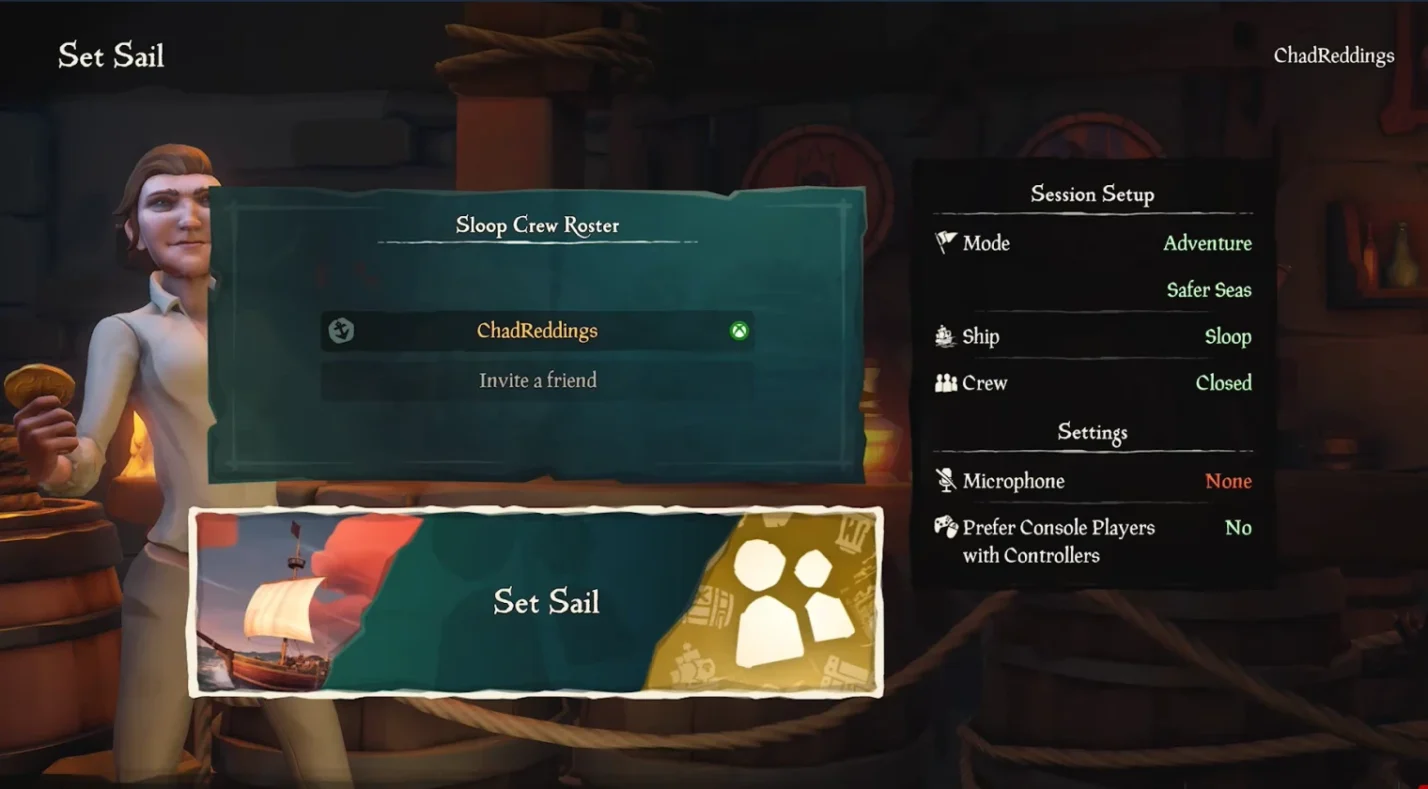
Linking your Microsoft account is the key that makes cross‑play and cross‑progression possible. Here’s how to set it up:
- Launch the Game on a New Platform: When you first boot Sea of Thieves on PlayStation 5 or Steam, the game prompts you to sign in with an existing Microsoft account or create one.
- Sign In or Create an Account: Use the same Microsoft account you use on Xbox or Windows. If you’re new to the game, create a Microsoft account during this process.
- Link to Your Console Account (PS5 only): After signing in on PS5, you’ll link your PlayStation Network profile with your Microsoft account. This process syncs your pirate’s data across platforms.
- Verify Cross‑Progression: After linking, your existing pirate should appear with all previously earned progress. Check your cosmetics, currencies, and Commendations to ensure they’ve transferred.
- Invite Friends Across Platforms: With your account linked, your friends list will pull from both Xbox Live and PlayStation Network (on PS5) or your Steam friends (on PC). Use the Friends tab to invite them or join their sessions.
- Adjust Matchmaking Preferences: If you’re on Xbox or PS5 and want to limit cross‑play to controller users, navigate to Settings > Matchmaking and toggle the appropriate option.
If you accidentally link the wrong Microsoft account on PS5, Rare’s support site provides instructions on how to unlink and relink accounts. It’s best to double‑check the email address you’re using before completing the linking process.
Developer/Publisher Comments and Future Plans
Rare and Microsoft have been vocal about their commitment to cross‑play and cross‑progression. When announcing the PlayStation 5 version, Executive Producer Joe Neate highlighted that expanding to PS5 is part of a broader initiative to welcome more players and “allow everyone on the seas to keep on sailing together now and well into the future.” Rare has emphasized that cross‑play is here to stay and is central to ensuring busy servers and dynamic encounters.
For the PS5 launch, Rare introduced a few platform‑specific features:
- DualSense Integration: The PS5 version uses the DualSense controller’s haptics, adaptive triggers, and built‑in microphone. You’ll feel the tension of firing cannons, the resistance when raising anchor, and the tactile feedback when taking damage.
- Performance and Graphics: On PS5, the game runs at 4K/60 fps by default with an optional 120 fps mode at 1080p on supported displays, matching the Xbox Series X experience.
- Six‑Ship Servers: Rare has reintroduced six‑ship servers to accommodate the growing player base. This increases the number of ships you can encounter in a session, making the world feel livelier.
- Safer Seas Improvements: The solo‑friendly Safer Seas mode launched in late 2023, and Rare continues to refine it. They’ve clarified that it isn’t an offline mode – servers still track progress – but it’s designed for players who want a relaxed experience without the threat of PvP.
Looking ahead, Rare has stated that they have no current plans to develop a PSVR2 version or a PS4 release. They are also exploring additional cross‑platform features, such as improved social tools and quality‑of‑life updates. Regular free seasonal updates continue to add new voyages, enemies, and world events, keeping the experience fresh for veterans and newcomers alike.
Summary

Sea of Thieves has grown into one of the most inclusive multiplayer games on the market. Is Sea of Thieves cross-platform? Absolutely. You can play with friends across Xbox, PC, Steam, and PlayStation 5 without missing a beat. Here are the key takeaways:
- The game is available on Xbox One, Xbox Series X|S, Windows 10/11 (Microsoft Store), Steam, and PS5. There is no PS4 version and no cross‑buy between platforms.
- Cross‑play is enabled by default and unites players across all platforms. You can invite friends via the in‑game Friends tab, and PS5 users can disable cross‑play or limit sessions to controller players.
- Cross‑save and cross‑progression ensure your pirate’s progress, currency, and cosmetics follow you when you switch devices. Platform‑exclusive cosmetics remain locked to their original platform.
- You must link your Microsoft account to your PS5 or Steam profile to activate cross‑progression. This process is straightforward and only needs to be done once.
- Rare continues to support the game with regular updates, DualSense features on PS5, and plans for expanded servers and new content. They have no plans to release on PS4 or integrate PSVR2 at this time.
Now, put together spontaneous mixed-device sessions playing some of the best cross platform games.
If you’re ready to set sail, get a Sea of Thieves digital key on Eneba. It’s an affordable way to start your pirate adventure, and cross‑play ensures you won’t be limited by your friends’ hardware choices.
FAQs
Can PS5 and Xbox players play Sea of Thieves together?
Yes, PS5 and Xbox players can play Sea of Thieves together. Cross‑play is enabled by default across PlayStation, Xbox, Windows, and Steam, so you can crew up regardless of your device.
Does Sea of Thieves have cross progression?
Yes, Sea of Thieves has cross progression. Linking your Microsoft account lets your character’s progress, currency, and most cosmetics carry across Xbox, PC (both Microsoft Store and Steam), and PS5.
Do you need Xbox Game Pass or PlayStation Plus to play online?
You need Xbox Game Pass Core or Xbox Game Pass to play online on Xbox, and you need PlayStation Plus to access multiplayer on PS5. PC players don’t need a subscription, and PS5 users can play solo in Safer Seas without PS Plus.
Can I disable cross‑play in Sea of Thieves?
Yes, you can disable cross‑play in Sea of Thieves on PlayStation 5 by toggling the cross‑play setting in the Options menu. Xbox players can restrict matchmaking to controller users, but there’s no complete opt‑out on PC.
Will Sea of Thieves come to PS4 or PSVR2?
No, there are no plans to release Sea of Thieves on PS4 or PSVR2. Rare confirmed that the PS5 version is the only PlayStation release, and they’re focusing their efforts on delivering updates across existing platforms.