



Getscreen.me Review 2026: Is It Safe to Use?

Eneba Hub contains affiliate links, which means we may earn a small commission if you make a purchase through them—at no extra cost to you. Learn more


Yes, Getscreen.me is safe to use. In this Getscreen.me review, we found that it’s a legitimate remote desktop and remote-support tool that lets you access and control another computer remotely. The service works through a web browser, making it useful for IT support, troubleshooting, remote work, and helping someone with a technical issue.
Getscreen.me is different from traditional remote desktop software because the person controlling the remote computer doesn’t need to install an app. Instead, the remote device runs a small connector app that establishes the connection, while the controlling device can access it through a browser. The Free plan supports up to two devices and doesn’t require a credit card.
Is Getscreen.me safe? The short answer is yes. This Getscreen.me review examines its security, pricing, country availability, and signup process to help you decide if it’s the right remote-access tool for you.

Is Getscreen.me safe? Yes. Operating since 2018 out of Limassol, Cyprus, the platform holds a high Trustpilot rating. Sessions are encrypted with AES-128 inside WebRTC and SSL, and the Free plan covers 2 devices with no credit card required.
- Free plan with no credit card required
- No installation needed on the controlling side
- AES-128 encryption over WebRTC and SSL
- Business pricing takes some math to estimate at scale
- Much smaller review base than category leaders like TeamViewer
- Not built for deep AD/SSO integration out of the box
Getscreen.me is best for IT admins, freelance tech support, and small teams needing occasional remote access, not enterprises needing deep AD/SSO integration out of the box. Realistic pricing at scale runs a few dollars per technician plus a small per-device fee, and a Getscreen.me review of the live pricing page shows this stays predictable even for larger teams.
Jump to:
Is Getscreen.me Safe?
Yes, Getscreen.me is safe, and this Getscreen.me review found several factors supporting that conclusion. It’s a real company based in Limassol, Cyprus, operating since 2018 and composed of a small but established team, not an anonymous operator.
Its Trustpilot rating sits at 4.5 from over 80 reviews, as of this writing. It’s a smaller review base than category leaders like TeamViewer, so treat sentiment as directionally positive rather than statistically exhaustive.
Signup only needs an email. As tested for this Getscreen.me review, a session shares screen content, along with keyboard/mouse control and file transfer, depending on permissions granted. Sessions are encrypted with AES-128 inside WebRTC and SSL protocols, and the operator’s own computer connects via a sandboxed browser session, not raw inbound access.
Is Getscreen.me a scam? No, it’s a real company with a documented security architecture and transparent pricing. Like every remote-access tool, including TeamViewer and AnyDesk, it can be misused if a scammer talks a victim into installing it and sharing a session code.
That’s a category-wide risk, not an issue specific to Getscreen.me, as this Getscreen.me review found. The safe rule is to never grant remote access to someone who contacted you first.
Signing Up to Getscreen.me
Is Getscreen.me safe? Yes, and signing up takes under a minute, and the Free plan requires no credit card, making it one of the simpler setups covered in this Getscreen.me review.
- Create a free account with an email address.
- Download and run the small connector app once on the device you want to access remotely.
- Generate a secure access link or one-time invite code.
- Open that link from any browser on the controlling device to start the session.
- Optionally upgrade to Personal Lifetime or a Business plan once you need more than two devices.
No formal ID verification is required to create an account.

My Experience With Getscreen.me
I went into this Getscreen.me review expecting the usual remote-desktop setup issues, but generating a link and connecting took under a minute, with no complex configuration. This simplicity can be useful for freelancers who need to switch between client support and other tasks, especially when following practical freelancing tips for staying organized.
Running the small connector app on the remote device needed no firewall configuration or port-forwarding, which made the setup straightforward in this Getscreen.me review. The moment that mattered most was walking a less technical person through installing the app remotely, then taking full control to fix the actual issue.
Connection quality felt fast and stable, comparable to established tools like TeamViewer for everyday use. Is Getscreen.me safe? Yes, but there are some drawbacks: the business pricing structure takes a bit of math to estimate at scale, and the smaller review base makes troubleshooting via forums harder to find.
Getscreen.me Overview
Here’s the Getscreen.me essential info at a glance, including pricing and availability.
| 📱 App name | Getscreen.me |
| ⭐ Our rating | 4.5/5 |
| 🛍️ Category | Browser-based remote desktop, remote support software |
| 🎯 Platforms | Windows, Mac, Linux, Android; browser-based on the controlling side |
| 💰 Price | Free (2 devices); Personal Lifetime ($149 one-time, 50 devices; Business (per-technician + per-device) |
| 🚀 Speed | Instant session start once a link is generated |
| 🌍 Availability | Generally available worldwide (browser-based SaaS) |
| 👍 Best for | IT admins, freelance tech support, and small teams needing occasional remote access |
Common Scam Signs: Is Getscreen.me Legit or Should You Avoid It?
Yes, Getscreen.me is a legitimate platform, and the evidence examined in this Getscreen.me review supports that conclusion. It’s a real, verifiable operator running since 2018, and its security architecture is publicly documented.
The most common reason people mistake any remote-access tool for a scam is that the underlying technology itself gets misused by scammers who trick victims into installing it. Virtual/remote-access tools carry that stigma by association, so some skepticism is reasonable.
Between the verifiable Cyprus-based operator, the documented encryption architecture, and transparent pricing, Getscreen.me checks out as a legitimate, working tool, just like other software and platforms that allow you to earn money from your phone.
Why Do People Ask, “Is Getscreen.me Safe?”
People search “is Getscreen.me safe” mostly because any remote-access tool can, in principle, be misused by a scammer, which is why this Getscreen.me review looks closely at its security. Here are the factors that actually prove Getscreen.me itself is legit: a registered company since 2018, documented AES-128/WebRTC/SSL encryption, and a live Trustpilot profile where you can view real positive feedback from other customers.
Getscreen.me Safety Concerns: What Users Should Know
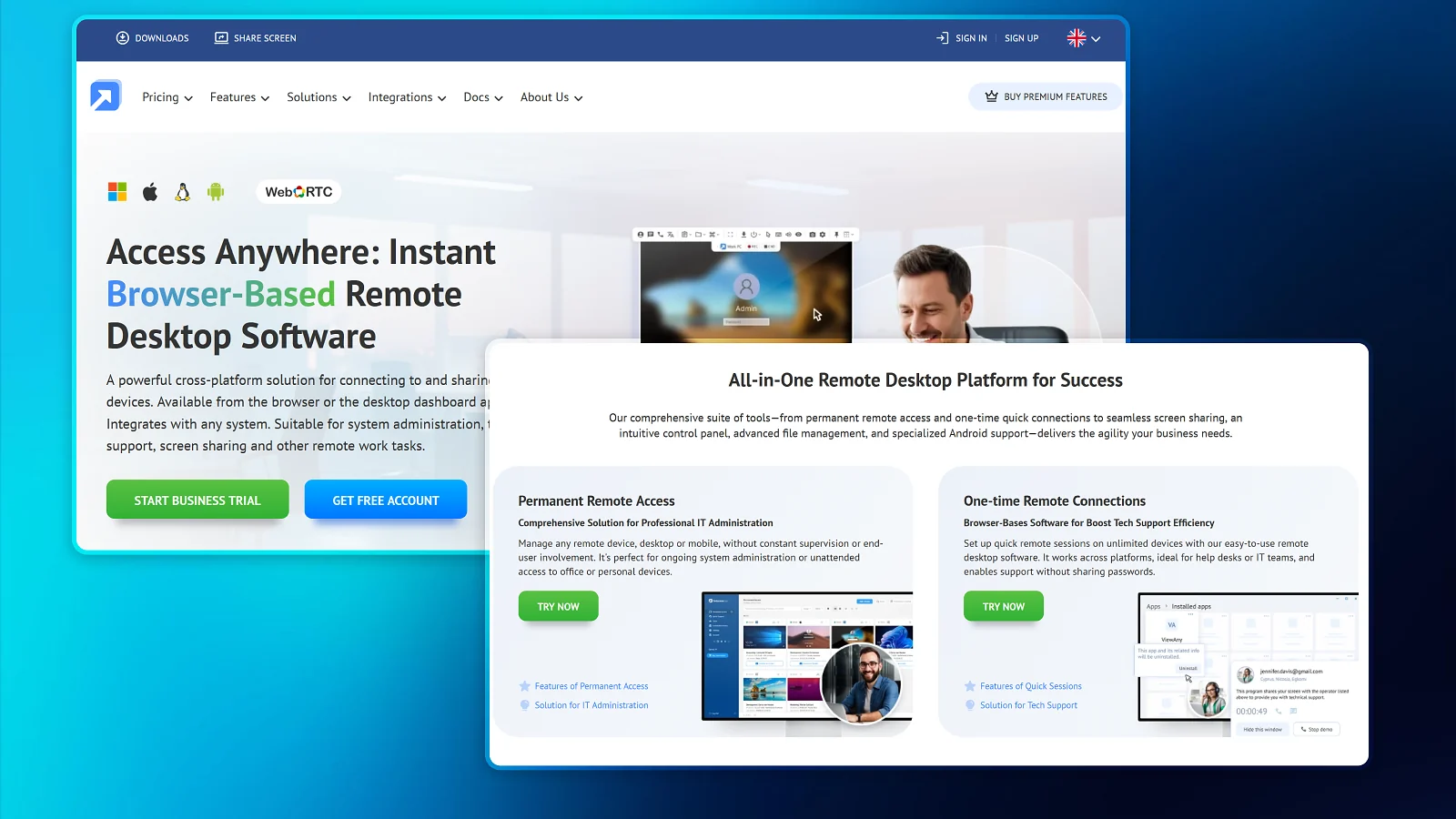
Being safe from a scam is different from having zero concerns. Is Getscreen.me safe? Yes, but here’s what to understand about data access, permissions, and misuse risk before starting a session.
Personal Information Requirements
Signup only requires an email address. No credit card, bank account, or ID for the Free plan. Payment details are only collected if you upgrade to Personal Lifetime or a Business plan, as confirmed in this Getscreen.me review. This makes it easy to try, much like free reward apps, where you can start without committing to a paid subscription.
Remote Access Permissions and Device Control
A session can include screen viewing, full keyboard/mouse control, file transfer, and, for paid tiers, session recording, all of which are relevant when assessing Getscreen.me in a Getscreen.me review. The person on the remote device generates the access link or code and controls when a session starts.
Account Security Best Practices
Use a unique password, enable two-factor authentication where available, never share a one-time access code with someone who contacted you first, and review connection history periodically. These are key security practices highlighted in this Getscreen.me review.
Guarding Against Remote-Access Scams
Is Getscreen.me safe? Yes, but be suspicious when someone calls claiming your device has a problem, then talks you into installing remote-access software and generating an access code for them. Only start a Getscreen.me session with someone you contacted first for the support you actually asked for, a key safety point in this Getscreen.me review.
Fine Print at a Glance
The Free plan is capped at two devices. More devices requires Personal Lifetime or a Business plan. Business pricing is per technician plus per device, not a flat per-seat price.
Customer Support
The Getscreen.me customer support includes live chat, email, a help center, and a separate docs center. Public reviews describe responsive support when contacted, though the review base is small compared to category leaders, something worth noting in this Getscreen.me review.
How the Getscreen.me Pricing Works
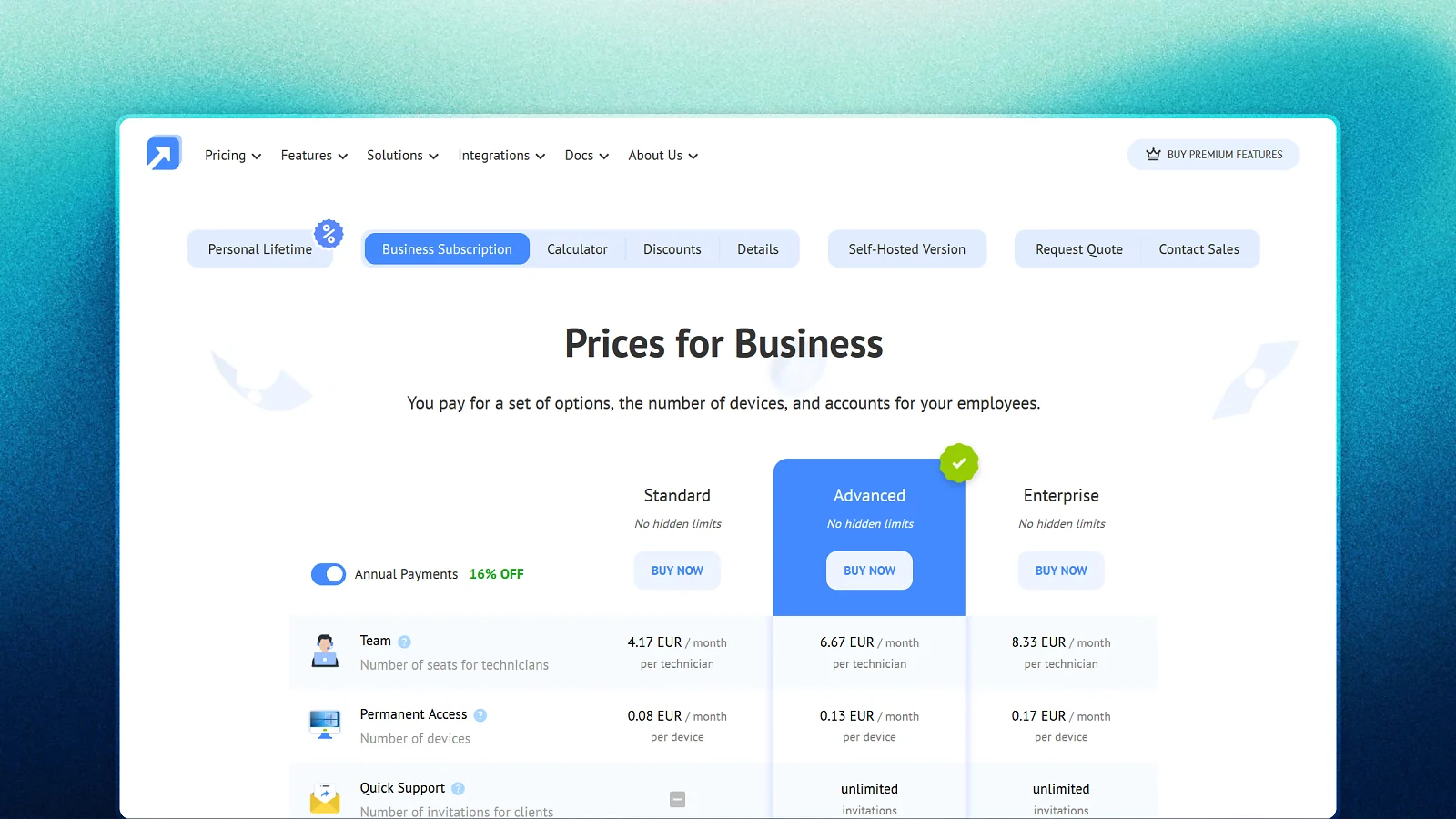
Is Getscreen.me safe? Yes, and it’s free to start, with two devices and no card required. Paid tiers scale by how many technicians need access and how many devices you manage. Business Standard runs $4.17/month per technician plus $0.08/month per device, with a 16% discount on annual billing. Personal Lifetime is a one-time $149 payment for 50 devices (more info below).
Personal Lifetime Plan
The Personal Lifetime Plan costs $149 as a one-time payment for permanent access to Getscreen.me, with no recurring monthly or annual fees. It’s a practical upgrade for users who have tested the Free plan and need more capacity without committing to a subscription.
The Free plan works well as a test, but its limitations may make a paid plan more suitable for regular users. The Lifetime Plan also stands out by offering long-term access for a single payment, making it an attractive alternative to recurring subscription costs.
Features and Supported Platforms
This Getscreen.me review found that the platform supports Windows, Mac, Linux, and Android, with a solid core feature set even on the Free plan, including file transfer (4 GB), in-session chat and voice calls, session recording, multi-monitor support, and clipboard sync. This is enough for some small service operations, particularly among entrepreneurs exploring small-business ideas that can be handled remotely.
For this Getscreen.me review, we verified that two-factor authentication, IP whitelisting, SSO, and Active Directory integration are Business Advanced/Enterprise features only.
Tips for Getting the Most Out of Getscreen.me
Is Getscreen.me safe? Yes, and the single most useful tactic is to start on the Free plan to confirm connection quality for your core devices before paying for Personal Lifetime or a Business plan.
Starting with the Free plan also lets you avoid unnecessary costs while you test the service. This same approach can apply to other online software, including apps that let you make money without paying in advance.
- Use the Pricing Calculator on Getscreen.me‘s own site to estimate the real monthly cost before committing to a Business tier.
- Use Quick Support invite links instead of paying for permanent device slots if you only need occasional sessions.
- Enable two-factor authentication and IP whitelisting if managing sensitive business devices.
- Bill annually when you’re confident in the plan for a 16% discount.
Does Getscreen.me Actually Work as Promised?
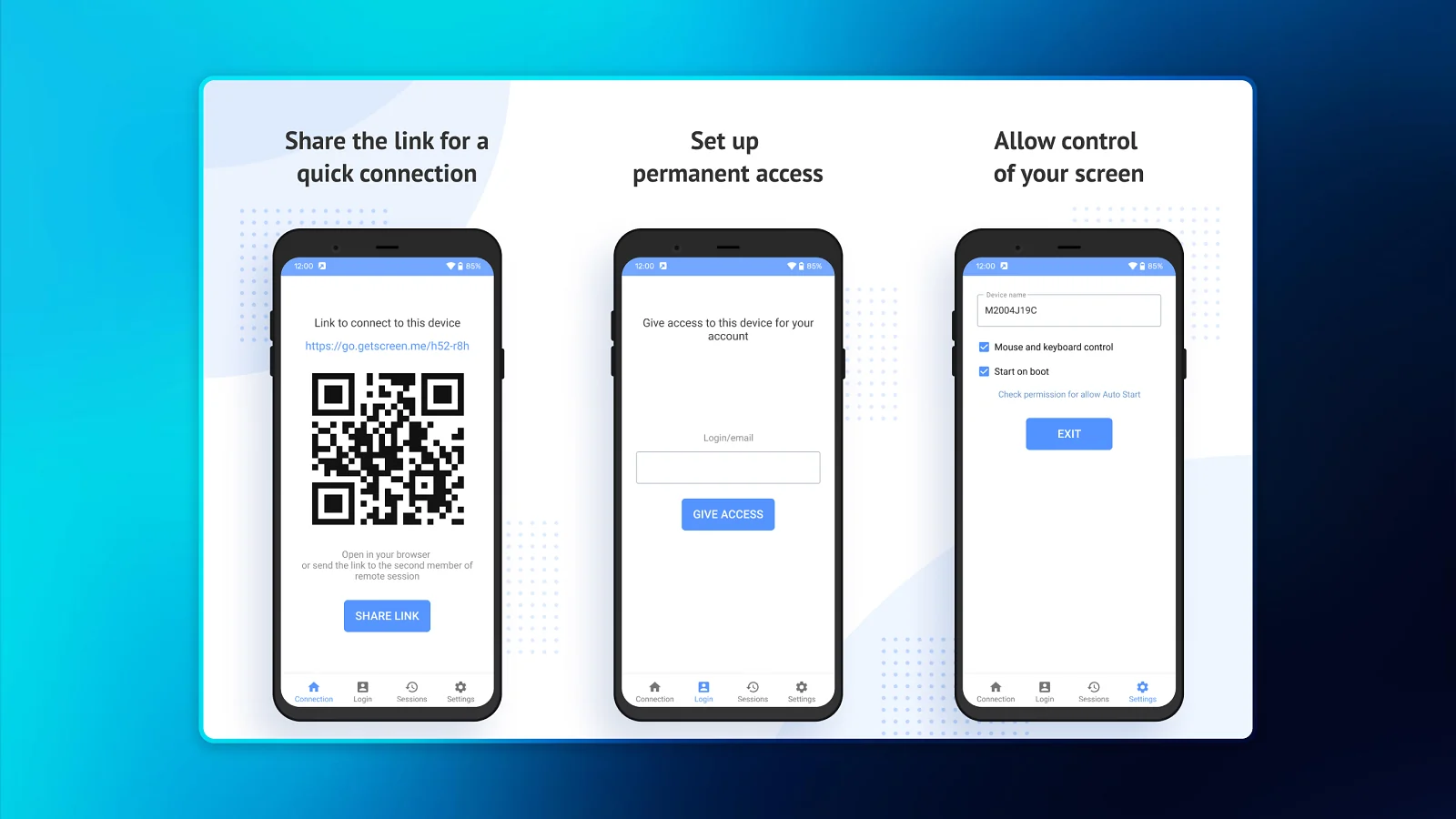
Yes, Getscreen.me actually works as promised, as confirmed in this Getscreen.me review. It’s a real, operating company that has provided remote-access service since 2018, with a documented security architecture and real customer reviews describing working remote sessions.
The Free plan requires no credit card and supports two devices with unlimited session time. As of this writing, the Trustpilot score sits at 4.5 from 80+ reviews, with no major complaints about the tool not working as intended.
How Much Does It Cost To Run Getscreen.me at Scale?
Based on the Standard tier, a team of three technicians and 20 devices is $14.11/month before the 16% annual discount. Is Getscreen.me safe? Yes, but treat those numbers as an illustrative example in this Getscreen.me review, not a fixed number, as Advanced and Enterprise tiers cost more per seat.
Is Getscreen.me Legit in the US? Where Can You Use Getscreen.me?
Yes, Getscreen.me is legit and works in the US. It’s a browser-based SaaS generally usable from anywhere with internet access, with no explicit country restriction found in this Getscreen.me review.
| Country | Available? | Notes |
|---|---|---|
| US | 🟩 | No compatibility issues found |
| UK | 🟩 | No compatibility issues found |
| AU | 🟩 | No compatibility issues found |
| CA | 🟩 | No compatibility issues found |
| DE | 🟩 | No compatibility issues found |
| FR | 🟩 | No compatibility issues found |
Is Getscreen.me Worth It?
Yes, Getscreen.me is worth it if you’re looking for a real browser-based, quick-setup model. That’s what makes the free-to-start pitch legitimate, not a trick. Is Getscreen.me safe? Yes, and for IT admins, freelancers, and small teams needing occasional remote access, it holds up as a legitimate working tool, not just a TeamViewer clone gimmick. For freelancers building their income around remote services, it can be one tool within a broader mix of online side hustles.
User Reviews: What Real Getscreen.me Users Say
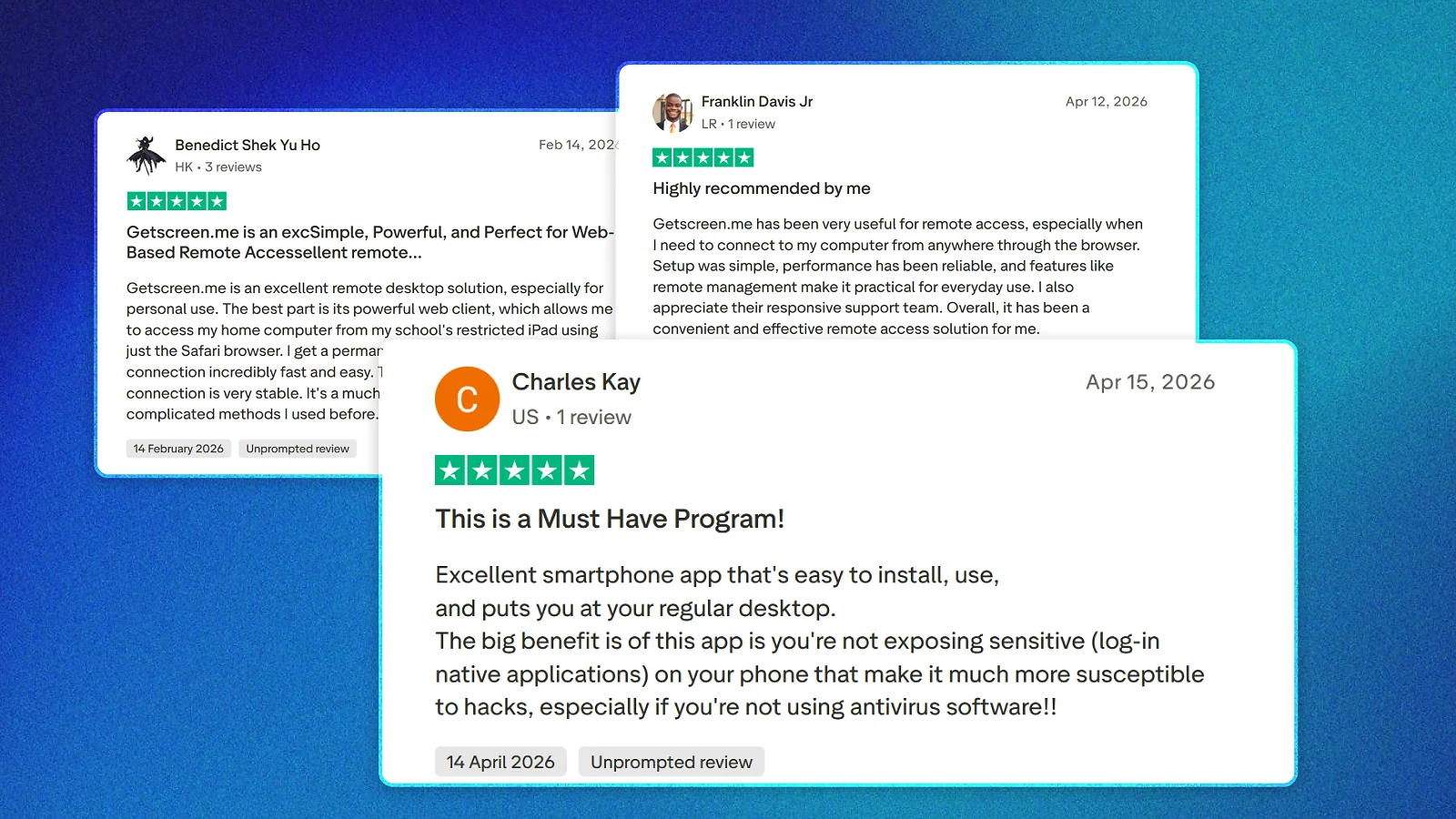
Overall sentiment sits at 4.5 on Trustpilot from 80+ reviews, and our Getscreen.me review is just as positive. Public reviews commonly describe useful remote-access capabilities, simple setup, and reliable performance.
Reviewers also describe the mobile app as easy to install and useful for remote access on the go, and several highlight the price compared to other remote desktop services as a standout value.
Is Getscreen.me safe? Yes, but since there’s a low number of total reviews, a handful of critical reviews can swing sentiment noticeably. When researching other ways to earn online, the same approach applies: compare legit survey sites carefully rather than relying on a single rating or review.
Alternatives to Getscreen.me
 TeamViewerThe largest, most established remote-support platform. Trusted by IT teams worldwide, though pricier for business tiers than Getscreen.me.
- AnyDeskA fast, lightweight remote connection, though its Trustpilot score is notably low, so it’s worth reading recent reviews before choosing it.
- SplashtopA business- and MSP-focused remote-support platform with strong unattended-access tooling.



No single remote-access tool fits every use case. TeamViewer suits teams wanting the most established platform; AnyDesk offers speed at a lower price but a notably weaker Trustpilot score; and Splashtop fits MSPs wanting strong unattended-access tooling. It’s worth comparing more than one after reading a Getscreen.me review before committing.
Is Getscreen.me Legit and Safe? Our Final Verdict
Yes, Getscreen.me is legit. It’s a real company operating since 2018 out of Limassol, Cyprus, with a documented AES-128/WebRTC/SSL security architecture and a high Trustpilot score from 80+ reviews.
On the other hand, it’s a small company with a much smaller review base than category leaders like TeamViewer, so there’s less public data to judge support consistency. That gap is exactly why some people are understandably hesitant despite the real track record and reading a Getscreen.me review. But the short answer to “Is Getscreen.me safe?” is yes.
FAQs
Yes, Getscreen.me is safe. As covered in our Getscreen.me review, it’s a real company operating since 2018 with a documented AES-128/WebRTC/SSL security architecture and a high Trustpilot rating. It’s easy to try it since no payment is required for the Free plan.
Getscreen.me is a browser-based remote desktop tool, where the remote device runs a small connector app once, then you control it instantly from any browser via a secure link. No installation is needed on the controlling side.
The Free plan covers two devices at no cost. Personal Lifetime is a one-time $149 payment for 50 devices. Business plans are per technician and per device, starting at $4.17/month per technician, as detailed in this Getscreen.me review.
It depends on your needs. TeamViewer offers the deepest enterprise feature set, AnyDesk is fast but has a much lower Trustpilot score, and Getscreen.me, as mentioned in this Getscreen.me review, fits smaller teams wanting an affordable, browser-based option.
The controlling side needs no installation at all, just a browser. The remote/target device needs a small connector app run once to generate a secure access link.
Yes, Getscreen.me is available worldwide. It’s a browser-based SaaS generally usable from anywhere with internet access, with no explicit country restriction found for this Getscreen.me review.