


How To Learn JavaScript: A Beginner’s Roadmap for 2026

Eneba Hub contains affiliate links, which means we may earn a small commission if you make a purchase through them—at no extra cost to you. Learn more


Recent update
Try Preply for personalized JavaScript lessons when you need help understanding errors or planning your next project.
Here’s how to learn JavaScript: pick one structured resource, write code in short daily sessions, and build small projects instead of only watching videos. Learning JavaScript gets easier once you write code every day, because reading alone doesn’t build the skill. Many resources are free, and guided platforms cost up to roughly $25 a month on annual plans. The basics take several weeks of daily practice.
Free resources take longer than a structured course or a tutor because you plan the order yourself. A JavaScript tutorial gives you direction, but learning JavaScript requires active practice between lessons. A tutor helps when an error or unfamiliar concept stops your progress.
This guide covers the tools, a step-by-step path, courses, and practice projects.
Jump to:
JavaScript at a Glance
This table gives the fast answer to what starting out costs and how long it takes. When deciding how to learn JavaScript, free tools and resources are plenty; the main commitment is practicing until you can fix errors without copying a solution.
|
Cost to start |
Free to about $24.50/month for a paid platform |
|---|---|
|
Time to learn the basics |
Several weeks of daily practice for the fundamentals, and longer for advanced skills |
|
What you need |
A computer, a browser, and a free code editor |
|
Main hurdles |
Variable scope, equality checks, and staying consistent |
|
Beginner suitability |
High: it runs in any browser with no install, so first results come quickly |
These basics support interactive websites and small browser games before you tackle larger applications.
Where JavaScript Shows Up in Real Projects
JavaScript adds behavior to web pages: it responds to input, changes displayed content, and processes data. With Node.js, it can also run outside the browser, including on servers. It also tops the 2026 Stack Overflow Developer Survey as the most-used programming language, for the 12th year in a row.
Figuring out how to learn JavaScript becomes much easier when you connect each concept to a visible result. These practical uses show where the fundamentals lead:
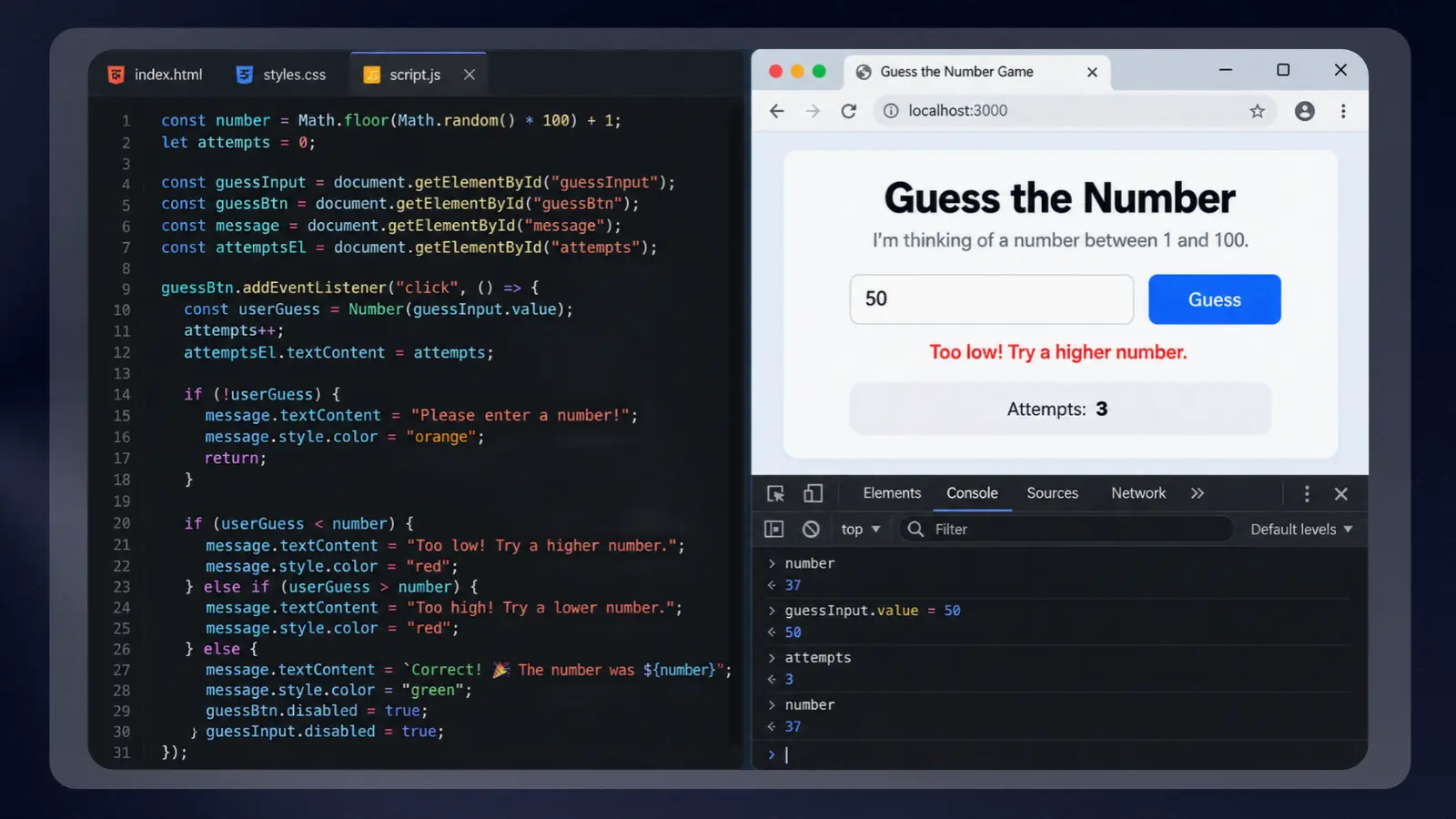
- Browser games: Build a guessing game or memory-match board. Your JavaScript code handles player input, tracks game state, and decides when a round ends.
- Interactive websites: Make menus open, validate a form, or update a shopping cart without rebuilding the entire page.
- Front-end applications: Libraries and frameworks like React, Vue, and Angular help organize larger interfaces after you understand the language.
- Server-side applications: Use Node.js to process requests and work with application data outside the browser.
The best strategy for how to learn JavaScript is to start with a small browser interaction and add a framework later. A working button teaches far more at this stage than a large project whose structure you cannot explain.
A JavaScript book can provide background while you experiment, but keep the browser open beside it. Reading a definition becomes useful when you can change an example of JavaScript code and predict the result.
The Tools and Setup You Need Before You Start
JavaScript needs almost no setup. You need a browser and somewhere to write code, and no complicated development environment. Your browser runs JavaScript directly, and its developer console lets you test short snippets without installing a JavaScript compiler.
Use these categories to organize your setup:
- Code editor: Use a plain-text editor to save HTML, CSS, and JavaScript files for a project.
- Execution environment: Open your browser’s developer console to test short expressions. An online JavaScript compiler can serve a similar practice role, though the underlying execution environment differs.
- Guided resource: Choose a JavaScript tutorial or learning platform that includes exercises alongside any video lessons.
Keep the first setup simple so technical configuration does not replace practice. The tools below support different approaches for how to learn JavaScript.
|
Tool |
Best for |
Price |
|---|---|---|
 |
Personalized 1-on-1 JavaScript tutoring |
4–40+/hr |
 |
Affordable, on-demand video courses |
Paid, with prices that vary by course and sale |
 |
Structured, interactive lessons |
Free plan, with paid plans from $14.99/mo billed annually |
 |
Learning through interactive screencasts |
Free courses, with Pro at about $24.50/mo billed annually |
 |
Community-driven practice with a built-in editor |
Free plan, Pro $12.99/mo |
For budgeting context, Preply lists tutoring at 4–40+ per hour, depending on tutor experience and credentials. Tutoring works best when you have specific questions about a JavaScript tutorial or your own code, and no subscription is required.
Keep a JavaScript book optional. Your editor, browser, and chosen resource are enough to begin the learning path, and no JavaScript compiler install is needed. The next section turns these tools into a step-by-step path.
How To Learn JavaScript: A Step-by-Step Path
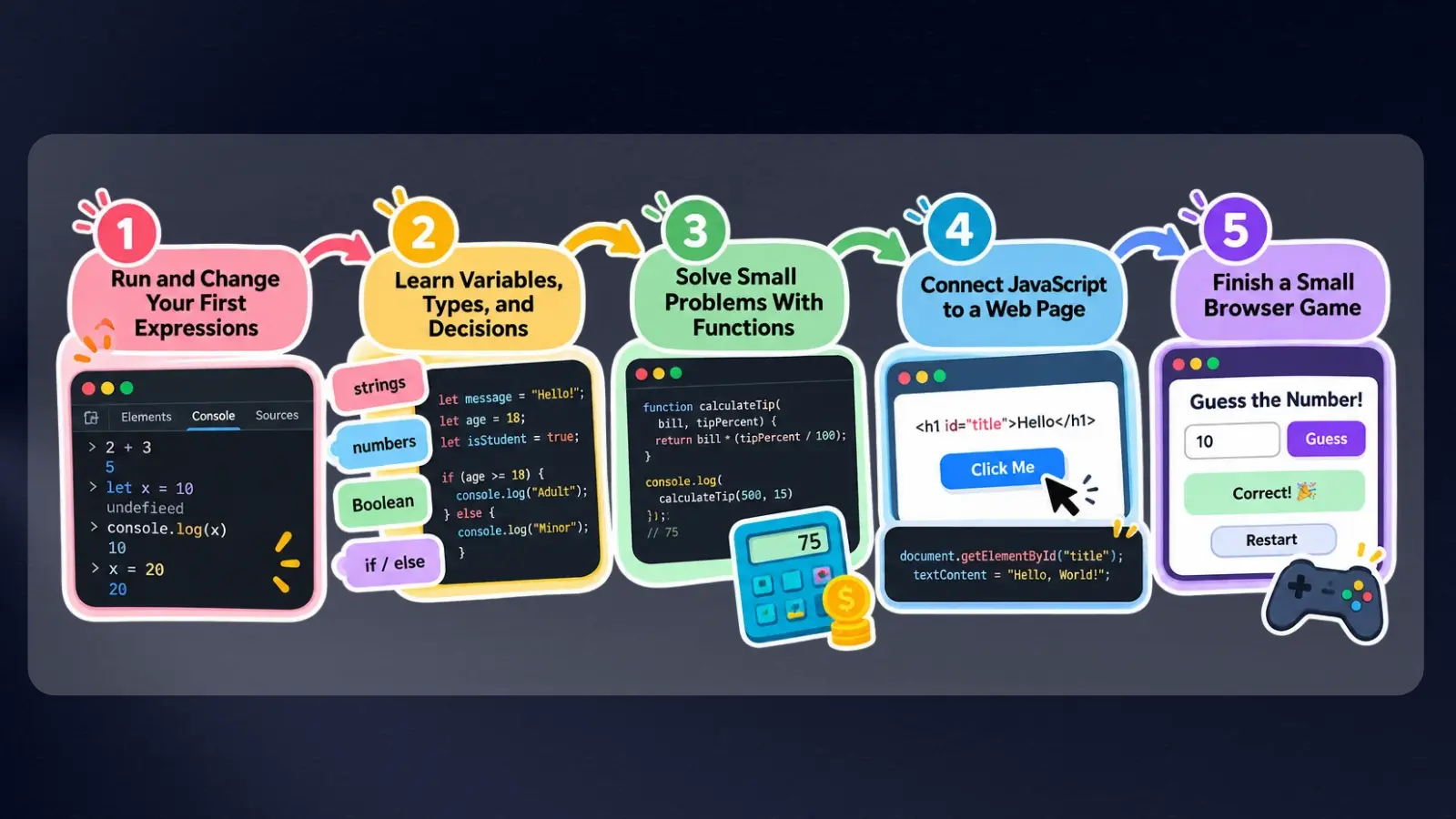
Learn JavaScript in this order: run code, understand the fundamentals, solve small problems, connect an interface, and finish a project. Setup takes the same day, and a first visible result usually arrives within a week of daily practice. Advance when you can explain the current task independently, whatever the lesson count.
Step 1: Run and Change Your First Expressions
Set up a free code editor, then open your browser’s developer tools and find the console. Enter basic arithmetic, create a variable with let, and print its value with console.log(). Change the value and run the expression again. Keep these first experiments in one file so you can rerun them whenever a later lesson builds on the same idea.
Treat the console as a scratchpad and save useful examples in your editor. A JavaScript compiler website is optional at this stage because your browser already provides an execution environment. Explain what each line does before you move on.
Step 2: Learn Variables, Types, and Decisions
Practice variables, strings, numbers, Boolean values, and conditional statements before building an interface. Boolean values represent true or false, while conditionals let a program choose an action based on a test.
Follow a JavaScript tutorial with exercises you can repeat without its solution. After each example, change the input and predict the output. Learning JavaScript requires this prediction-and-check habit: it exposes gaps that watching another explanation can leave hidden. Use a JavaScript book to revisit concepts that remain unclear.
Step 3: Solve Small Problems With Functions
Write functions that accept input, perform a task, and return a result. Start with a tip calculator that takes a bill amount and a tip percentage, and write the logic yourself without copying a complete interface.
Separate the calculation from the page so you can test it independently. Your JavaScript code should produce sensible results for valid inputs and handle missing input deliberately. If a JavaScript compiler playground helps you isolate the function, use it, but keep a saved copy in your editor.
Step 4: Connect JavaScript to a Web Page
Create a simple HTML page, then connect a script file. Use JavaScript code to select a page element, listen for a button click, and change the displayed text.
This introduces the Document Object Model, or DOM: the browser’s representation of a page that scripts can inspect and change. Learn JavaScript alongside enough HTML and CSS to understand the elements you are manipulating. Rebuild a small interaction after closing the JavaScript tutorial, then add a change of your own. Keep the developer tools open to confirm the script ran.
Step 5: Finish a Small Browser Game
Build a guessing game with input, feedback, and a restart control. Define the rules before coding, then separate the game logic from the functions that update the page.
Test invalid input and the restart behavior as carefully as the winning condition. Consult a JavaScript book for a specific concept, and skip searching for a finished copy of the project. Keep a short explanation of how the program works beside your saved files, and share the code once the game works end to end.
A finished, understandable project is a stronger milestone than an unfinished collection of lessons.
Courses That Speed Up Learning JavaScript
This roadmap gives the overview, and a structured course shortens the trial and error with an ordered curriculum. Choose a resource that shows how to learn JavaScript through exercises and projects, with video in a supporting role.
The Complete JavaScript Course 2025: From Zero to Expert! on Udemy suits readers who want an extended self-paced path. It holds a 4.7 out of 5 rating from more than 234,000 ratings and includes 71 hours of on-demand video. That is the playback length only, and exercises, debugging, and independent projects add time that varies by learner.
Compare the options by format and price before choosing another JavaScript tutorial:
|
Provider |
Course |
What it covers |
Price or duration |
|---|---|---|---|
|
|
The Complete JavaScript Course 2025: From Zero to Expert! |
Fundamentals, DOM manipulation, and asynchronous JavaScript |
71 hours of video |
|
|
1-on-1 JavaScript Tutoring |
Live, personalized lessons at any level |
40+/hr |
|
|
Learn JavaScript |
Interactive screencasts in a free 9-hour course |
Free, with Pro at about $24.50/mo |
 |
JavaScript Curriculum |
Front-end and back-end JavaScript, free |
Free |
|
|
Learn JavaScript |
Beginner-to-advanced structured lessons |
Free course, with paid plans from $14.99/mo |
|
|
Introduction to JavaScript |
Community practice with a built-in code editor |
Free plan, Pro $12.99/mo |
You can also learn JavaScript through freeCodeCamp or the interactive resources above. Pair your chosen curriculum with a JavaScript book for reference, and avoid collecting overlapping courses.
Beginner Projects To Practice Your JavaScript Code
Projects make the process of how to learn JavaScript stick because they require decisions without a supplied solution. Build these in order, and add complexity only after the current version works.
- Tip calculator: Accept a bill and a user-selected tip, then display the result. This practices functions, arithmetic, and input conversion. Keep the calculation separate from the interface so you can test it in a browser console or JavaScript compiler playground.
- To-do list: Add and remove tasks from a page. This introduces DOM changes and event handling. Write down what should happen when someone submits an empty task before you implement that behavior.
- Sign-up form checker: Build a game account sign-up form that checks the username length, the email format, and that both passwords match as the player types. This practices string methods, input events, and conditional feedback. Show each message next to its field so the player knows exactly what to fix.
- Browser game: Create Rock-Paper-Scissors or a memory-match game. Your JavaScript code must track state and connect player actions to visible feedback. Use a JavaScript book to clarify unfamiliar concepts without copying a complete game.
- Mini product page: Display a small collection of gaming accessories and let visitors filter it. This practices arrays, loops, and reusable rendering functions. Start with local sample data so the interface remains manageable.
- Weather lookup: Request weather data from an application programming interface, or API, which lets software exchange information. Practice fetch, promises, and async/await, then show useful feedback when a request fails.
After following a JavaScript tutorial, rebuild a related feature from memory. Finishing the weather lookup should leave you with a clearer distinction between language problems, interface problems, and failed network requests.
Short sessions on most days keep syntax fresh, and one longer session a week moves a project forward. Save each finished project to a public repository on GitHub so you can share working code when you ask for help. Even with a steady rhythm, the same mistakes tend to appear, so the next section covers them.
Where New JavaScript Coders Get Stuck
Beginners often stall when JavaScript’s loose rules behave differently from the languages they know, or from what they expect. The fix is small, isolated tests that make the underlying rule visible.
If you want to master how to learn JavaScript, debugging is half the battle. Reference these mistake-and-fix pairs when your code doesn’t produce the expected result:”
- Using var without understanding scope: Use let for values you reassign and const for values that stay the same. A var declaration is scoped to its whole enclosing function, which can cause surprising bugs. Scope means the part of a program where a variable is accessible, so practice it with small functions first.
- Confusing assignment with comparison: Remember that = assigns a value, while === compares values without automatic type conversion. Prefer strict equality (===), and test both successful and unsuccessful cases.
- Adding text instead of numbers: Form inputs commonly provide strings, so the + operator joins the text and no addition happens. Convert numeric input deliberately before arithmetic, and handle failed conversion. A JavaScript compiler playground can help isolate the expression, but inspect the input type too.
- Treating decimal calculations as exact: JavaScript numbers are 64-bit floating-point values, so some decimal results, like 0.1 + 0.2, carry tiny rounding errors. Round or format results for display, and avoid comparing decimals directly.
- Skipping strict mode and ignoring asynchronous errors: Add ‘use strict’; at the top of a script so some silent errors throw visible errors instead. Wrap risky code in try/catch, handle rejected promises, and show a useful message when a network request fails.
Learning JavaScript gets less frustrating when you reduce a failure to the smallest example that still reproduces it. Revisit the relevant JavaScript tutorial section or JavaScript book chapter, then apply the explanation to your own program.
When mastering how to learn JavaScript, make debugging deliberate. Always document the failing input, the console error, and the fix you applied so you can easily repeat the test after adjusting your scripts.
Final Verdict on How To Learn JavaScript
This path suits beginners who want to build interactive browser projects and will practice daily for a few weeks.
Readers who finish the fundamentals and want structured depth are well served by The Complete JavaScript Course 2025: From Zero to Expert! on Udemy, rated 4.7 out of 5 from more than 234,000 ratings. If you prefer live feedback, consider Preply tutoring alongside your own practice.
A 71-hour course is a poor match if you have only a few hours in total or need to change one feature on an existing website. Start with the single topic you need and its prerequisites. A JavaScript book can help you look up a rule, but the practical test is applying that rule without a finished solution beside you.
The strongest answer to how to learn JavaScript is to keep the scope small enough to finish and the practice active enough to reveal gaps. Choose a JavaScript tutorial or course, write your own variations, and ask for help when you cannot explain an error. Independent understanding is the goal.
FAQs
Not much. Despite the similar names, they are separate languages with different syntax, semantics, and execution models, meaning how to learn JavaScript remains the same: start with browser examples and work through the hands-on steps in this guide. Prior Java experience isn’t required.
Learn JavaScript first. If you are figuring out how to learn JavaScript efficiently, trying to juggle type annotations at the same time only adds unnecessary friction. Master the basic syntax and runtime behavior first, then adopt TypeScript once you have built a few complete projects.
No. A browser and a code editor cover the basics, with no JavaScript compiler to install. Node.js is a JavaScript runtime for building servers, web apps, and command-line tools, so it matters once you move beyond browser projects.
Yes, if you want to build interactive websites or browser games. Its browser support makes it useful for visible projects, while Node.js extends its use to server-side applications. Learning alone does not guarantee employment.
Yes, for lessons. SoloLearn offers an Introduction to JavaScript course with iOS and Android apps. Build projects on a computer, where you can use a code editor and your browser’s developer tools.
Yes, its basics are approachable because you can run examples in a browser. Scope, type conversion, and asynchronous behavior take more practice. Small projects are central to how to learn JavaScript.