


Is Overcooked 2 Cross-Platform? Understanding Cross‑Platform Play

Many players ask: “Is Overcooked 2 cross-platform?”, especially when they’re eager to cook up chaos with friends on different devices. When I first bought Overcooked 2 on PC, I thought teaming up with friends on PlayStation or Xbox would be simple. However, I quickly learned that the answer isn’t straightforward. Some editions of the game allow limited cross-play, while others don’t support it at all. Understanding these differences is essential to avoiding confusion and making sure everyone can join the same kitchen without frustration.
Jump to:
Is Overcooked 2 Cross-Platform? Cross‑Platform vs. Crossplay Explained

Cross‑platform gaming means players on different devices – PCs, consoles, or handhelds – can share the same online lobbies. Crossplay is often used interchangeably, but it technically refers to the feature that enables cross‑platform multiplayer. Cross‑progression is yet another term; it lets you carry your save data from one platform to another. Knowing these distinctions helps answer the big question: Is Overcooked 2 cross-platform?
When Overcooked 2 launched in 2018, it offered local and online co‑op but no true cross‑platform play. The original release locks players into their own ecosystems: Switch players cook only with other Switch owners, PlayStation players team up only within their PlayStation network, and so on.
A PC crossplay patch later allowed Steam and Epic Games Store users to join each other, but that’s the limit of cross‑platform compatibility in the base game. Cross‑progression doesn’t exist, so your progress stays on the device where you started. Cross‑gen (PS4 to PS5 or Xbox One to Series X/S) works within console families, but not across them.
If full cross‑platform support is a priority, the remastered Overcooked! All You Can Eat collection is the answer. This definitive edition bundles both Overcooked games and every piece of downloadable content, and allows crossplay across all supported platforms. I’ll explore that option more later, but for now, it’s important to recognise that the classic Overcooked 2 only has limited cross‑platform functionality.
How Overcooked 2 Handles Crossplay on PC
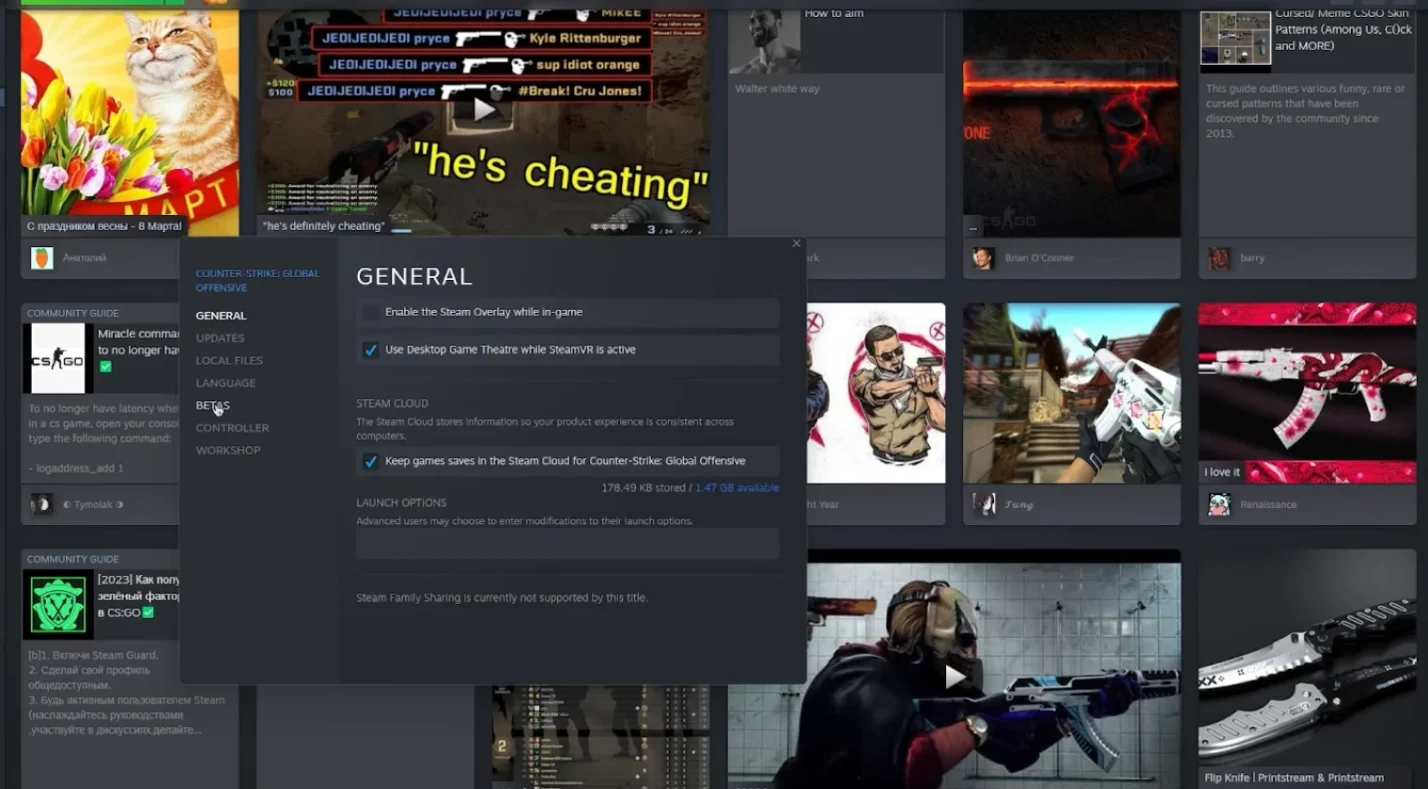
After a wave of feedback from PC players, Team17 introduced a PC crossplay branch for Overcooked 2. To join friends on a different PC storefront, you need the same game version and the latest patch. On Steam, you can right‑click the game in your library, choose Properties, and select the “crossplay” branch under the Betas tab.
Epic Games Store and GOG users simply update to the latest version. When everyone’s running the crossplay branch, the Team17 friends overlay appears in the main menu. Add your friends via their Team17 account names, and then you can host or join a game.
This PC crossplay does not extend to console players. I once tried to invite an Xbox buddy from my Steam copy and quickly discovered there’s no way to connect our kitchens. The crossplay overlay recognises Steam and Epic players only.
Also note that the Mac and Linux versions lack crossplay; only Windows users can join across storefronts. If you’re a Mac chef like me, your cross‑platform dreams require using Windows or upgrading to the All You Can Eat edition.
Cross‑Gen and Console Compatibility
While the base Overcooked 2 doesn’t connect consoles to PCs, there is limited cross‑gen functionality. PlayStation 4 and PlayStation 5 users can jump into the same kitchen, and Xbox One players can cook with friends on Xbox Series X/S. These cross‑generation connections work seamlessly because both consoles share the same network infrastructure within their families. It’s the closest console players can get to cross‑platform play without purchasing a different version of the game.
Don’t confuse cross‑gen with full cross‑platform support, though. A PlayStation 5 owner still can’t invite someone on Nintendo Switch or Xbox. That gap disappointed my friend group when we tried to set up a multi‑console game night. To keep expectations realistic, remember that the only way to mix consoles in Overcooked 2 is through cross‑gen within the same brand or by upgrading to Overcooked! All You Can Eat.
If you prefer staying on one system but want fresh cooperative experiences, check out our roundup of the best couch co‑op games on Switch. It covers a variety of titles that scratch the same chaotic teamwork itch, and it’s a great resource for Switch owners who can’t crossplay in Overcooked 2.
Overcooked! All You Can Eat: The Full Cross‑Platform Option

For gamers who care most about cross‑platform play, Overcooked! All You Can Eat is the real solution. This 2020 collection bundles the first two games, all previously released expansions, and several exclusive levels into one package. More importantly, it enables full crossplay across Steam, Nintendo Switch, PlayStation 4, PlayStation 5, Xbox One, Xbox Series X/S, and even Stadia. I jumped into an All You Can Eat session last year with friends on Switch and Xbox Series X, and we were cooking together within minutes.
The remastered engine brings smoother performance, an assist mode for less experienced chefs, and accessibility features like dyslexia‑friendly text and colour‑blind options. The only major caveat is that your save data still doesn’t carry across platforms. You’ll need to progress separately if you switch devices, but at least you can join friends on any system for a match without worrying about network partitions.
Cross‑platform support in All You Can Eat requires an active internet connection and the latest game version. Once updated, simply open the “Crossplay” option from the main menu and ensure it’s enabled. Then you can send invites through the built‑in lobby system. Because this edition sits on its own servers, it won’t match you with players running the standalone Overcooked 2. Everyone in the lobby must own the All You Can Eat collection.
If you love the idea of seamless cross‑platform multiplayer across all major systems, our list of best cross‑platform games includes more titles like Minecraft, Fortnite, and Rocket League. Those games share progress across devices and keep friend groups united, making them perfect alternatives when cross‑platform matters more than a specific genre.
Setting Up Crossplay in Overcooked 2: Step‑By‑Step
Even with its limitations, the PC crossplay branch offers a practical way for Windows users to join each other. Here are the steps I follow whenever I want to cook with friends on different PC storefronts:
- Update the game: Make sure you and your friends have the latest version of Overcooked 2. On Steam, check for updates in your library. On Epic, the launcher updates automatically.
- Opt into the crossplay branch (Steam only): Right‑click Overcooked 2 in your Steam library, choose Properties, go to the Betas tab, and select “crossplay” from the dropdown menu. Wait for the update to finish.
- Create a Team17 account: Launch the game and create or log into your Team17 account when prompted. This account connects friends across storefronts.
- Open the friends overlay: From the main menu, press the key or button indicated to open the Team17 overlay. On PC, this is often the Shift+F2 combination. From here, you can search for friends by their Team17 username.
- Invite or join friends: Once your friends accept, you’ll see them in your overlay. Send an invite or join their lobby. If the invite doesn’t appear, double‑check that everyone is on the crossplay branch and running the Windows version.
- Select a mode and play: Choose Arcade, Story, or Versus mode and start cooking. Communication is key – use voice chat to coordinate who chops, cooks, or washes dishes.
For console players using the All You Can Eat edition, setup is even simpler. Make sure crossplay is enabled in the settings menu, then invite friends directly from the in‑game lobby. Whether your friends are on PS5, Xbox Series X, or Switch, the interface handles the matchmaking for you.
Troubleshooting and Common Issues
Cross‑platform play often works smoothly, but I’ve run into several hiccups that are worth addressing:
- Version mismatches: The most common issue comes from running different game versions. If you can’t see each other online, make sure everyone has updated to the latest patch and selected the same branch.
- Platform restrictions: Remember that the PC crossplay branch is Windows‑only. Mac and Linux users need the default branch, which doesn’t crossplay, or must emulate Windows through a virtual machine.
- Network connectivity: High latency or strict NAT types can prevent invites from going through. Restart your router, or use a wired connection if possible. In some cases, switching the host may help.
- Console cross‑play confusion: Many players think consoles can crossplay simply by enabling the crossplay setting, only to discover that the base game still restricts them. If you’re on PS4 or Xbox One and want to play with someone on PC, you need the All You Can Eat collection.
- Cross‑progression expectations: Don’t assume your progress will follow you. Each platform stores saves locally, so unlocking recipes, chefs, and stars will reset if you switch devices. I learned this the hard way after grinding three‑star runs on PC only to start fresh on Switch.
By checking these factors first, you can usually fix cross‑play problems without diving into deeper technical issues. If problems persist, our support team at Eneba can help you verify your game version and troubleshoot connectivity.
Alternatives: Games Like Overcooked with Full Cross‑Platform Support

If you’re frustrated by the limited cross‑platform options in Overcooked 2, consider other co‑op games that deliver similar frenetic teamwork and support cross‑play across systems. Our list of games like Overcooked features titles that blend teamwork and chaos. Here are a few standouts:
- It Takes Two – A story‑driven platformer where cooperation is mandatory. Its Friend Pass lets one partner play for free, and it supports cross‑gen play. On some platforms, cross‑platform invites are available, making it a strong alternative for couples or friends.
- Moving Out – This physics‑based moving simulator captures the same chaotic energy as Overcooked by challenging players to haul furniture through increasingly absurd environments. While cross‑platform support varies by edition, the upcoming sequel promises better crossplay.
- Deep Rock Galactic – Team up as space dwarves to mine asteroids and fend off alien swarms. The game offers cross‑play between Xbox and PC, and its procedural missions keep every session fresh.
Exploring other cross‑platform co‑op games can keep your friend group entertained while waiting for a fully crossplay‑enabled version of Overcooked.
Beyond Cross‑Play: The Joy of Local and Online Co‑Op
Even without full cross‑platform support, Overcooked 2 remains one of the best party games around. Local co‑op is still my favorite way to play because there’s nothing like shouting orders across the couch as the kitchen catches fire. Online multiplayer with friends on the same platform also holds up well, especially if you prefer cooperative rather than competitive games.
If you’re strictly looking for quality co‑op titles on your console, our guide to the best co‑op games on Xbox covers dozens of options, from story‑driven adventures to survival sandboxes. Many of them offer crossplay across multiple systems, so you can keep the party going even when hardware differs.
Wrapping Up and Where to Find the Best Deals
So, is Overcooked 2 cross-platform? The short answer is that the base game offers crossplay only between PC storefronts and cross‑gen support within console families. If you want to cook with friends on entirely different hardware – say, a Switch and a PS5 – you’ll need the remastered Overcooked! All You Can Eat edition. That version enables full cross‑platform play across all supported systems and includes every piece of content from the series.
Local and online co‑op remain the heart of Overcooked 2, and investing in the right version guarantees you get the experience you want. For players sticking with the standalone game, opt into the PC crossplay branch and invite friends through the Team17 overlay. Console owners who crave broader connectivity should upgrade to All You Can Eat.
If this guide has clarified your cross‑platform options, consider picking up our Overcooked! All You Can Eat key from the Eneba marketplace. With full crossplay and hundreds of levels, you’ll have everything you need to master the chaos with friends on any system.
FAQs
Is Overcooked 2 cross-platform between PC and Xbox?
To answer whether Overcooked 2 is cross platform between PC and Xbox, no, it isn’t. The base game only allows PC players on Steam, Epic, and similar storefronts to play together; console cross‑play requires the All You Can Eat edition.
Is Overcooked 2 crossplay on Steam and Epic?
Yes, Overcooked 2 is crossplay on Steam and Epic via the PC crossplay branch. You need to opt into the crossplay beta on Steam and ensure both players have updated versions to invite each other through the Team17 overlay.
Does Overcooked 2 support cross progression?
No, Overcooked 2 does not support cross progression. Your saves, unlocked chefs, and star ratings stay on the platform where you earned them, so progress cannot be transferred between consoles or PC.
Can PS4 and PS5 play Overcooked 2 together?
Yes, PS4 and PS5 can play Overcooked 2 together because the game supports cross‑gen play. The same applies to Xbox One and Xbox Series X/S, but neither connects to different console families.
Is Overcooked! All You Can Eat cross-platform?
Yes, Overcooked! All You Can Eat is cross-platform across all supported devices. This remastered collection lets players on Switch, PlayStation, Xbox, and PC cook together, but it doesn’t share progress across systems.