




Is Dead by Daylight Cross-Platform?


When a game keeps you up at night because of both its scares and its matchmaking wait times, it’s natural to ask: Is Dead by Daylight cross-platform? I’ve been playing Dead by Daylight since its early days, and like many horror fans, I wanted to team up with friends regardless of hardware.
Over the years, I’ve coached gamers through tough matches and seen crossplay transform the way groups stay together. In this guide, I’ll explain which platforms are compatible, how crossplay functions, what limitations exist, and how to set up cross‑save and cross‑progression so your bloodcurdling hours aren’t wasted.
Jump to:
Platform Availability
Dead by Daylight launched in 2016 and has grown into a multi‑platform phenomenon. Today, the core game is available on:
- PC: The Windows version is sold through Steam, the Microsoft Store, and the Epic Games Store. Each storefront runs the same build, so PC players match together seamlessly.
- PlayStation: Both PlayStation 4 and PlayStation 5 support the game. When I upgraded to PS5, I simply downloaded the next‑gen version and continued playing with PS4 friends thanks to backwards compatibility.
- Xbox: Xbox One and Xbox Series X/S both run the game. Series X/S owners benefit from improved performance yet still play with Xbox One users because the game maintains parity across generations.
- Nintendo Switch: The portable version delivers the full experience but at a lower frame rate and resolution. It still matches with other consoles and PC.
- Mobile: A separate version, Dead by Daylight Mobile, exists for iOS and Android. It uses different content and progression systems developed by NetEase, so it doesn’t interconnect with the console/PC game.
Having the game on so many platforms opens the door to cross‑platform play, cross‑save, and cross‑progression. The next sections dive into how each feature works.
Cross‑Platform Play (Crossplay)

Crossplay refers to the ability to join a match with players on other systems. Behaviour Interactive added crossplay in August 2020 and enabled it by default. That means when you queue up on Steam, you can be matched with players on PlayStation, Xbox, or Nintendo Switch. I remember when crossplay first arrived; our weekly survivor squad suddenly included friends on PS4 and PC, and the lobby filled in seconds instead of minutes.
Crossplay is still active in 2025 with the following points in mind:
- Supported platforms: PC (Steam, Windows Store, Epic), PlayStation 4/5, Xbox One/Series X/S, and Nintendo Switch. These systems all share the same matchmaking pool.
- Mobile excluded: Dead by Daylight Mobile is a separate product. Mobile players can’t match with PC or console players. However, iOS and Android users can play together because the mobile app has its own crossplay pool.
- Cross‑friends: A cross‑platform friends list lets you add players on other systems by using their Behaviour account ID. My own list is a mix of PS5, Xbox Series S, and PC survivors, and the cross‑friends feature makes it easy to invite them.
- Opting out: You can disable crossplay through the in‑game settings. Doing so restricts matchmaking to your own platform, but expect longer queue times. This option is useful if you prefer to avoid control scheme disparities.
Crossplay Support by Platform

Crossplay behaves slightly differently depending on where you play. Here’s a breakdown of how each platform handles crossplay and what to expect:
PC (Steam, Microsoft Store, Epic)
- Crossplay is enabled by default and cannot be disabled on an individual storefront basis. Steam players, for example, will match with those on Epic or Windows Store as long as crossplay is enabled in the game settings.
- Because PC is the only platform with built‑in chat, PC players can use pre‑ and post‑game text chat. Console players will not see chat messages.
PlayStation 4 & PlayStation 5
- PS4 and PS5 players can match with each other and with every other supported platform.
- Crossplay uses a universal matchmaking pool, so whether you own the PS4 or upgraded to PS5, you won’t notice a difference in matchmaking.
- Console players cannot see the PC text chat, but voice chat works if you use party chat through PlayStation Network.
Xbox One & Xbox Series X/S
- Similar to PlayStation, the Xbox family enjoys full crossplay with other consoles and PC.
- Xbox Series X/S improves frame rates and load times but doesn’t impact matchmaking.
- Like other consoles, text chat is hidden; you’ll need to use Xbox Live party chat for voice communication.
Nintendo Switch
- The Switch version supports crossplay, letting handheld players face off against those on PC and other consoles.
- Performance is lower than on other platforms, and there’s no text or voice chat in the game. Many players use external voice apps or the Switch’s built‑in chat through the Nintendo Switch Online mobile app.
- Because patch updates sometimes arrive later on Switch, crossplay requires all systems to be on the same version. If the Switch lags behind after a major update, crossplay temporarily deactivates until the patch is live.
Mobile (iOS & Android)
- Mobile players only crossplay with each other. The mobile version uses different mechanics, characters, and monetization, so the developer keeps its player base separate from the console/PC player base.
Platform‑Specific Limitations and Partial Compatibility

While crossplay works well across PC and consoles, several limitations exist:
- Control schemes: PC players use keyboard and mouse or controllers, while consoles use controllers exclusively. This difference can influence gameplay. Behaviour Interactive has confirmed that there are no plans to add mouse and keyboard support on consoles.
- Update parity: Crossplay requires all platforms to run the same game version. If one platform’s patch is delayed, that system will match only within itself until the update rolls out.
- Chat restrictions: Consoles cannot access the text chat that PC players use. Voice chat is handled through each platform’s party system, so cross‑platform teams must use third‑party voice apps.
- Content availability: Some DLC characters and skins are tied to licensing deals unique to a platform. When you face a player from another system with content you can’t buy on yours, you can see it in the match but can’t access it yourself.
- No crossplay for mobile: The mobile version remains separate. iOS and Android players can play together, but cannot join PC or console lobbies.
Understanding these limitations helps you set expectations when teaming up with friends on different systems. Despite the restrictions, crossplay dramatically improves matchmaking and keeps the player base healthy.
Cross‑Save and Cross‑Progression

People often use “cross‑save” and “cross‑progression” interchangeably, but there’s a subtle difference:
- Cross‑save refers to the ability to transfer your save data between platforms. You can pick up where you left off without starting over on a new system.
- Cross‑progression goes further by synchronizing all your in‑game unlocks, currencies, character levels, and DLC purchases across platforms.
Behaviour Interactive launched full cross‑progression on July 22, 2024, addressing a long‑standing community request. To benefit from cross‑save and cross‑progression, you must create a Behaviour account and link your platform accounts. I walked several friends through this process last year, and once set up, they were delighted to see their hours of progress carry over seamlessly.
Cross‑Save Support
Cross‑save support in Dead by Daylight is robust, but there are a few key details you should know:
- Participating platforms: Cross‑save is available on Steam, Epic Games Store, Microsoft Store (PC), PlayStation 4, PlayStation 5, Xbox One, Xbox Series X/S, and Nintendo Switch. The mobile version does not support cross‑save with the console/PC version.
- One account per platform: You can link one account from each platform. For example, you may link one Steam account, one PS5 account, and one Xbox account. You cannot link multiple accounts from the same platform.
- Highest values carry over: When syncing, the system keeps the highest character levels, perks, items, and offerings from each platform. If your Dwight is level 50 on PlayStation and level 20 on PC, he becomes level 50 everywhere. Having coached players across different platforms, I’ve seen cross‑save prevent countless hours of grind from going to waste.
- Shared wallet: Most in‑game currencies – Bloodpoints, Iridescent Shards, and Rift Fragments – combine into a single wallet accessible on any synced platform. Auric Cells are the exception on Nintendo Switch; they remain isolated on the Switch account.
- Platform‑exclusive items: Some cosmetics and items remain exclusive to the platform where they were earned and won’t transfer.
- Irreversible sync: Once you sync your accounts, you cannot undo the cross‑save. Behaviour’s support team cannot unsync accounts, so double‑check your choices before proceeding.
These rules ensure fairness and consistency across players while preventing duplication exploits. I’ve seen some confusion from players trying to link multiple PC accounts; remember that each platform accepts only one account.
Cross‑Progression Support
Cross‑progression extends cross‑save by sharing your paid content and progression across platforms. Key points include:
- Shared DLC and progress: When you purchase a chapter, character, or cosmetic on one platform, it becomes available on all synced platforms. For example, if you bought the Silent Hill DLC on Steam, it appears on your PlayStation and Xbox versions after syncing. This applies to most DLC and characters.
- Nintendo Switch restrictions: The Switch is unique. DLC purchased on Switch cannot be shared to other platforms, and Auric Cells bought on Switch stay on the Switch. However, DLC and premium currency acquired on PC, PlayStation, or Xbox will appear on your Switch after syncing. If you plan to play on multiple systems, buy your DLC on a different platform so you can access it everywhere.
- DLC compensation: For players who previously bought the same DLC on multiple platforms, Behaviour issued 4,500 Iridescent Shards as a thank‑you. This compensation was available during the first three months of cross‑progression’s release in 2024.
- Cross‑progression doesn’t include settings: Video, audio, and control settings do not transfer between platforms. You’ll need to reconfigure your preferences after syncing.
- Sync duration: The time it takes to sync depends on how much data your account holds and how many people are syncing simultaneously. When cross‑progression first went live, I helped a friend with hundreds of hours on multiple platforms; their sync took about 20 minutes.
Overall, cross‑progression lets you maintain one persistent identity across systems, saving you from grinding the Bloodweb repeatedly. The only major caveat is the Switch’s limitations, so plan your purchases accordingly.
Account Linking
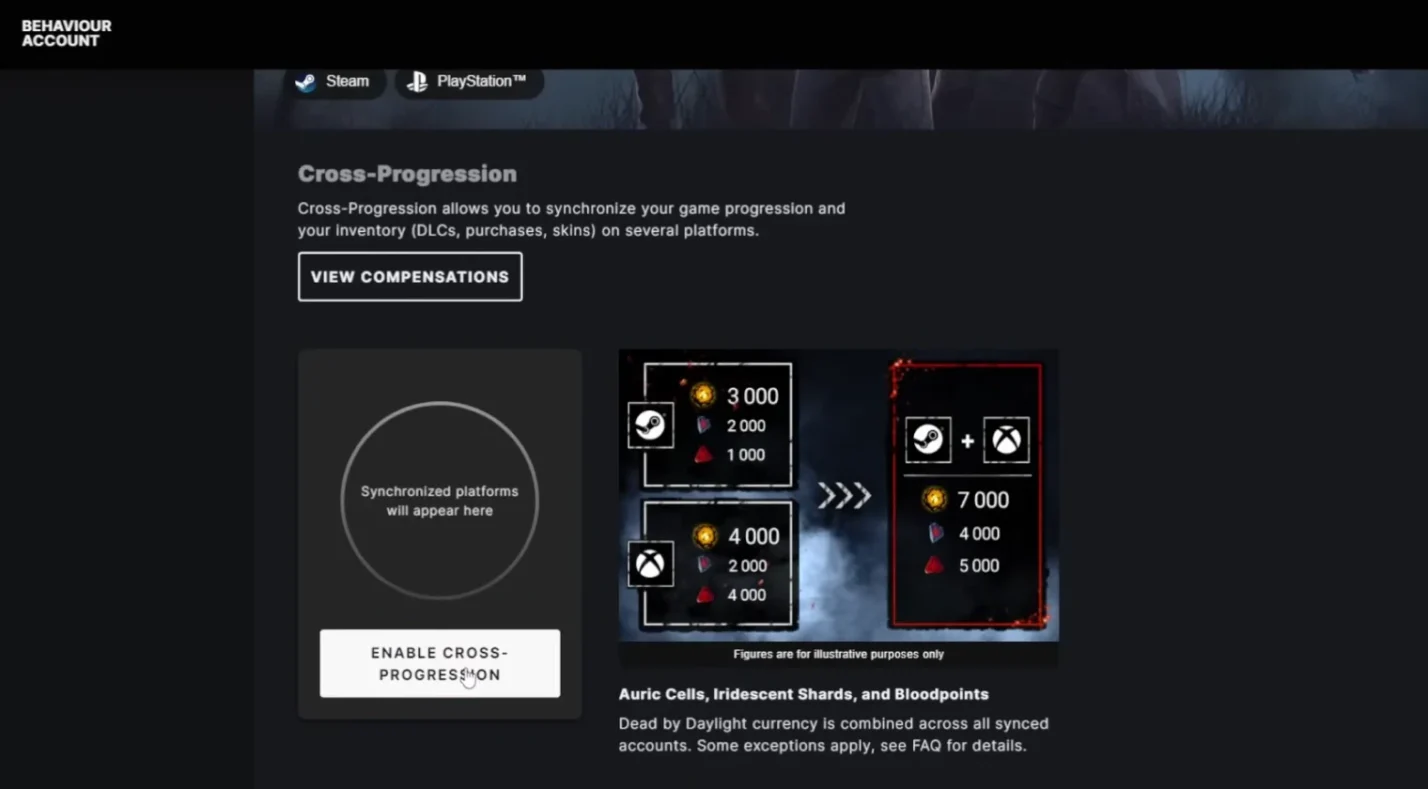
To enable cross‑save and cross‑progression, follow these steps. I’ve guided several players through this process, and it’s straightforward as long as you pay attention to the order.
- Create a Behaviour account: Visit the official Behaviour account page and sign up with your email. If you already have an account for other Behaviour games, you can use the same one.
- Enable cross‑progression: After logging in, locate the Dead by Daylight section and click “Enable cross‑progression.” This option activates the sync function on your account.
- Link your platform accounts: You’ll see options for Steam, Epic, Xbox, PlayStation, and Nintendo Switch. Click each platform you own the game on and authorize the link. Remember, you can only link one account per platform.
- Sync your data: Once linked, click “Sync.” The system will fetch your progress from each platform and merge it. This is where the highest character levels and currencies are chosen.
- Repeat as necessary: If you play the game on multiple devices, repeat the sync step on each device. It doesn’t matter which order you sync your accounts; the system will combine everything into your unified account.
After finishing these steps, your in‑game progress should appear across all linked platforms. Note that if you later buy the game on another platform, you can return to your Behaviour account and link that new platform as long as it’s the only account of its type.
Developer/Publisher Comments and Future Plans

Behaviour Interactive has been transparent about cross‑platform efforts. When crossplay launched in 2020, the developer highlighted its goal of uniting players across consoles and PC while maintaining balance. They introduced the cross‑friends system to help players invite friends regardless of platform and acknowledged that disabling crossplay would lengthen matchmaking.
In July 2024, Behaviour announced full cross‑progression, fulfilling a years‑long community request. They noted that the technical challenge lay in merging inventories and currencies fairly across systems while respecting platform agreements, especially with Nintendo. The studio has indicated that there are no current plans to include mobile in cross‑progression or to support mouse and keyboard on consoles. They also mentioned that cross‑progression restrictions on Nintendo Switch might change if the platform’s infrastructure evolves, but as of now, Switch players still face the same limitations.
Looking ahead, Behaviour continues to refine the game with frequent updates, new killers, and collaborations such as last year’s Assassin’s Creed Shadows event. With the upcoming release of more powerful consoles like the rumored Switch successor, there is speculation that cross‑progression limitations could ease. For now, PC and console players can enjoy unified progress, while mobile remains its own experience.
Summary

Cross‑platform features have reshaped Dead by Daylight and made the game more accessible for players with friends across different systems. Today, the answer to the question “Is Dead by Daylight cross-platform?” is a resounding yes for PC, PlayStation, Xbox, and Nintendo Switch. Crossplay is on by default, letting you queue with friends regardless of their hardware. It can be disabled if you prefer to play only with your platform’s community, though this results in longer matchmaking times.
Cross‑save and cross‑progression, introduced in 2024, let you carry your progress between platforms. By linking and syncing your accounts, you ensure that your character levels, Bloodpoints, and most DLC carry over. The main caveat is that DLC and premium currency purchased on Nintendo Switch do not transfer to other systems, though purchases on other platforms will appear on Switch. The mobile version remains separate, meaning crossplay and cross‑progression do not apply to iOS and Android.
In my own experience, enabling cross‑progression breathed new life into the game. I used to bounce between PC and PS5, dreading the thought of leveling the same characters twice. After syncing my accounts, I took a break from the 4v1 grind and came back months later on Xbox, only to find everything exactly as I left it. That continuity makes investing time and money into the game feel worthwhile.
If you’re looking for more games that bridge the gap between platforms, check out our guide to the best cross‑platform games to play with friends in 2025. It highlights titles that make teaming up easy, no matter what you play on, and helps you discover your next favorite co‑op adventure.
Ready to face the killers? Grab a Dead by Daylight Steam key from our marketplace. You’ll get instant delivery, and with cross‑progression now available, you can take your progress wherever you play.
FAQs
Is Dead by Daylight cross-platform PC and PS5?
To answer whether Dead by Daylight is cross-platform PC and PS5, yes, it is. Steam and Epic players match seamlessly with PS5 owners, so you can queue together or invite each other through the cross‑friends list.
Is Dead by Daylight mobile cross-platform?
Dead by Daylight mobile cross-platform is limited. The mobile version only supports crossplay between iOS and Android, so you cannot join matches with players on PC, PlayStation, Xbox, or Switch.
Is Dead by Daylight cross‑platform on Nintendo Switch?
Yes, Dead by Daylight cross‑platform on Nintendo Switch works with PC, PlayStation, and Xbox. You may experience lower performance, and DLC or paid currency bought on Switch does not transfer to other platforms.
Does Dead by Daylight support cross‑save between Xbox and PlayStation?
Yes, Dead by Daylight supports cross‑save between Xbox and PlayStation. Once you link your accounts to your Behaviour account and sync them, your progress, currencies, and most DLC are shared across both consoles.
Does Dead by Daylight have cross‑progression on PS4 and PC?
Dead by Daylight does have cross‑progression on PS4 and PC. After enabling cross‑progression through your Behaviour account, your character levels, items, and DLC synchronize between PlayStation 4 and your PC version.
Is Dead by Daylight on mobile the same as console?
No, Dead by Daylight on mobile is not the same as console. The mobile game is a separate product with different content and progression, and it does not interact with the console/PC version.
Can you disable crossplay in Dead by Daylight?
You can disable crossplay in Dead by Daylight through the settings menu. When you turn it off, matchmaking is restricted to your platform, which may result in longer queue times but ensures you only play with players using similar hardware.