How to Withdraw Money from Swagbucks: Complete Guide

Eneba Hub contains affiliate links, which means we may earn a small commission if you make a purchase through them—at no extra cost to you. Learn more
If you’ve been grinding on Swagbucks, you’ve probably wondered how to withdraw money from Swagbucks. I’ve been using this rewards platform for a while now, earning points through surveys, shopping, watching videos, and even playing games.
The real question most of us have is: does Swagbucks pay real money, and how do you actually get it out? The answer is yes, but you need to know the right steps. There are several withdrawal methods available, including PayPal and bank transfers, each with different processing times and requirements.
In this guide, I’ll walk you through everything you need to know about cashing out your Swagbucks earnings, breaking down the entire process in plain language. If you’re just getting started with Swagbucks, understanding the withdrawal process helps you plan your earning strategy from day one.
Jump to:
How to Withdraw Money From Swagbucks
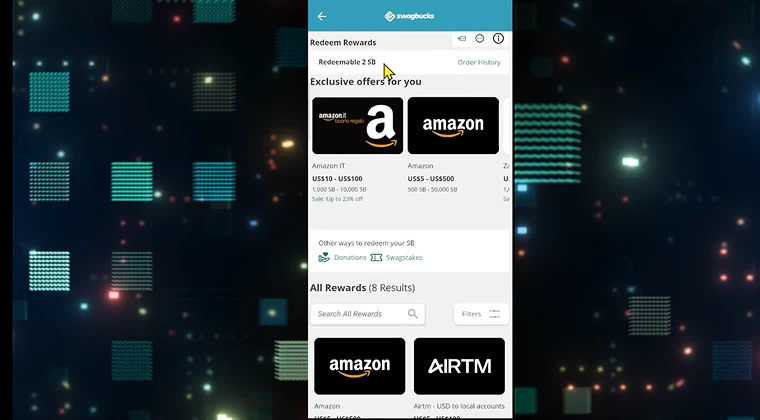
Understanding how to earn money on Swagbucks comes first since you need points before withdrawing anything. The platform requires you to reach certain point thresholds before you can cash out, and the process starts by accessing your account’s rewards section.
Before you can withdraw anything, you need to make sure your account is verified and your balance meets the minimum requirements. Most withdrawal options require at least 300 SB (equivalent to $3), though this varies depending on which method you choose.
The basic process involves logging in, checking your balance, selecting a withdrawal method, and confirming your transaction. Each method has its own specific steps and timing, but the overall flow remains consistent.
Logging Into Swagbucks and Accessing the Rewards Section
Start by heading to the Swagbucks website or opening the mobile app and entering your login credentials. Once you’re in, look for the Rewards button in the top navigation bar or check under your profile icon for the rewards section.
Make sure you’re logged into the correct account, especially if you manage multiple profiles. The rewards section is where all the magic happens, displaying your current balance and available redemption options.
Checking Available Swagbucks Balance and Withdrawal Threshold
Your SB balance appears on your homepage, usually in the top right corner. Click on it to see a detailed breakdown of your points and any pending earnings that haven’t been credited yet.
Swagbucks sets different minimum thresholds for each withdrawal method. PayPal withdrawals typically require 300 SB, while some gift cards start at 140 SB for discounted options. Bank transfers usually need a higher minimum.
Always check the specific threshold for your chosen method before attempting to cash out. If you’re close but not quite there, consider completing a few quick tasks to reach the minimum.
Initiating a Withdrawal
Once your balance meets the threshold, click the Redeem button next to your chosen withdrawal option. The platform will prompt you to confirm the amount and select your preferred payment method.
Double-check all details before hitting that final confirm button. This includes verifying your PayPal email address or bank account information to avoid sending your hard-earned cash to the wrong place. Once confirmed, Swagbucks will process your request according to the method’s specific timeline.
All Ways to Withdraw Money From Swagbucks
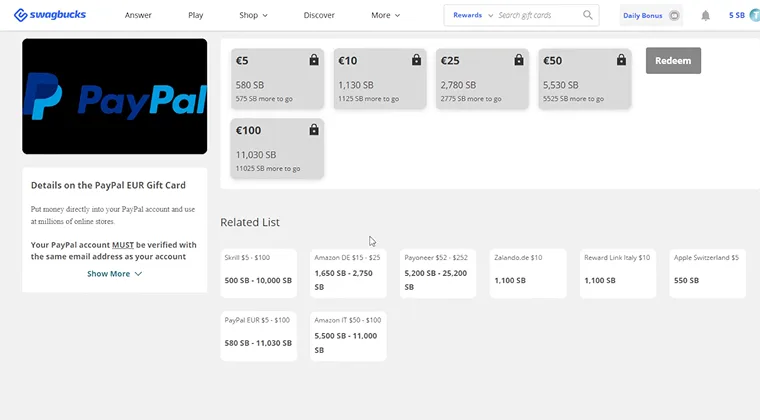
Swagbucks provides multiple redemption options to suit different user preferences. Some people want instant PayPal transfers, while others prefer to withdraw through gift cards that offer better value.

The key is understanding which method works best for your situation. PayPal tends to be fastest for actual cash, bank transfers take longer but go straight to your account, and gift cards sometimes provide bonus value.
Each option has its own minimum threshold and processing time, which makes them one of the best way to make money at home. I’ll break down the specifics of each method so you can make an informed choice about how to cash out on Swagbucks.
PayPal Withdrawals
To link your PayPal account, go to the Rewards section and select PayPal as your redemption option. You’ll need to enter your PayPal email address exactly as it appears on your account.
The minimum redemption is 300 SB for $3, with options going up from there. If you’re wondering how long does Swagbucks take to deliver PayPal payments, expect that 2-3 day window in most cases.
New PayPal accounts might require additional verification before your first transfer goes through. Always verify your PayPal email matches exactly what you entered in Swagbucks to avoid delays or rejected transactions.
Bank Account Withdrawals
For those who’ve been asking how to withdraw money from Swagbucks to bank account, the process starts by selecting the bank transfer option. You’ll need to provide your routing number, account number, and account type (checking or savings).
Bank transfers take longer, usually 5-7 business days to appear in your account. The minimum threshold tends to be higher than PayPal, often requiring 2,500 SB or more depending on your region.
Make sure all banking details are accurate before submitting. Wrong account numbers can result in lost payments and lengthy recovery processes. Some regions have limited access to bank transfers, so check if this option is available in your area.
Gift Cards
Gift cards remain one of the most popular redemption options on Swagbucks. You can exchange your points for cards to retailers like Amazon, Walmart, or Target, often at discounted rates. Many users who explore the best game apps to win real money also use gift card redemptions to maximize their overall earnings strategy.
The process is straightforward: select your desired gift card, confirm the SB amount required, and complete the redemption. Some cards offer special promotions where you get bonus value, like a $25 card for only 2,200 SB instead of 2,500 SB.
Gift cards typically process within 1-3 days and arrive via email. Regional availability varies, and some cards have redemption limits. Maximizing your rewards means watching for these limited-time bonus offers.
How Long Does Swagbucks Take to Pay?
The payment timeline depends entirely on your chosen method. PayPal transfers are quickest, usually arriving within 2-3 business days after redemption. Bank transfers lag behind at 5-7 business days.
Gift cards fall somewhere in between, with most arriving via email within 1-3 days. However, some high-value gift cards or first-time redemptions might take up to 10 business days for verification purposes.
Several factors can delay payments beyond standard timelines. Account verification issues, holidays, system maintenance, or suspicious activity flags can all push back your payout. If your payment seems stuck, check your email for verification requests from Swagbucks.
I recommend keeping tabs on your payment history in the account section. This shows pending transactions and lets you track when payments should arrive. Most delays resolve themselves within the standard timeframe, but if something takes longer than 14 days, contact support.
How to Redeem Swagbucks
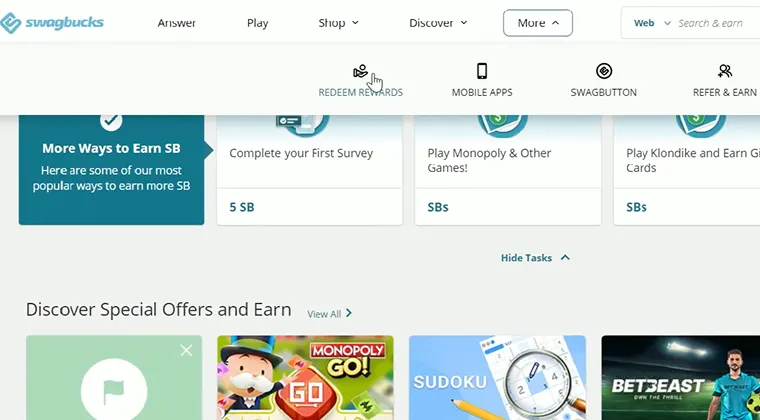
Understanding how to redeem Swagbucks goes beyond just withdrawing cash. The platform functions as a rewards ecosystem where your SB points convert into various forms of value depending on your goals.
The redemption process for how to redeem Swagbucks to PayPal involves accessing your rewards section, selecting PayPal as your option, entering your email, and confirming the transaction. This remains the most direct path to real money.
Gift cards work similarly but often provide better value per point. A $10 Amazon card might cost 1,000 SB, giving you a straight 1:1 ratio, but promotional offers can boost this to $10 for only 875 SB. If you’re interested in other earning opportunities, check out ways to earn money online playing simple games.
The key to maximizing redemptions is timing. Wait for promotional periods when certain gift cards offer bonus value, and always compare the SB cost versus actual dollar value before redeeming.
Swagbucks Alternatives: Other Ways to Earn Rewards
While Swagbucks is a top choice for earning rewards, there are other apps that guarantee similar opportunities. Here are a few alternatives worth considering:
- Snakzy – If you enjoy gaming, Snakzy offers a platform where you can earn points by completing in-game challenges, which can be redeemed for gift cards. Unlike Swagbucks, Snakzy is tailored specifically for gamers.
Play games and get paid with Snakzy.

- InboxDollars – Similar to Swagbucks, InboxDollars pays users in cash rather than points, with earning opportunities through surveys, shopping, and videos. The minimum payout is $15, making it ideal for users who prefer cash over gift cards.
- Scrambly – For gamers seeking faster rewards, Scrambly stands out with its $1 minimum cash out and instant withdrawals. The platform rewards you for reaching small in-app milestones across 150+ games and apps, which makes it easy to earn without long play sessions, plus you’ll get a welcome bonus just for signing up.

While Swagbucks remains a favorite, these alternatives give unique ways to earn rewards based on your preferences. No matter if you’re into gaming, surveys, or cash, these platforms provide options to maximize your earning potential.
Start Cashing Out Your Rewards
Getting paid through Swagbucks becomes routine once you understand how to withdraw money from Swagbucks. Whether you prefer PayPal for quick cash, bank transfers for direct deposits, or gift cards for better value, each method has its place in your earning strategy.
The most important takeaway: verify your account details, meet the minimum thresholds, and choose the withdrawal method that fits your timeline and needs. PayPal works great when you need money fast, while gift cards can stretch your earnings further during promotional periods.
I’ve covered the main ways how to withdraw money from Swagbucks works, from start to finish. The platform genuinely pays, processing millions of dollars in rewards annually to users who consistently complete tasks and meet their goals.
If you’re looking for more ways to make money while enjoying something fun, consider platforms where you can earn money by playing video games.
If you’re ready to start earning, sign up for Swagbucks and begin building your point balance today. The sooner you start, the sooner you can cash out those rewards.
FAQs
Log into your account, go to Rewards, select your withdrawal method (PayPal, bank, or gift cards), and confirm. PayPal takes 2-3 business days, bank transfers need 5-7 days, and gift cards arrive within 1-3 days.
Select the bank transfer option in Rewards, enter your routing number, account number, and account type. Confirm the transaction and wait 5-7 business days for the funds to appear in your account.
Withdrawal times vary by method. PayPal processes in 2-3 business days, bank transfers take 5-7 business days, and gift cards typically arrive within 1-3 days. Some redemptions may take up to 10 business days for verification.
Yes, Swagbucks pays real money through PayPal transfers, direct bank deposits, and gift cards. You earn SB points by completing tasks, then redeem those points for actual cash or rewards. Millions of users have been paid since the platform launched.
Go to Rewards, select PayPal as your redemption option, enter your PayPal email address, choose the SB amount to redeem (minimum 300 SB), and confirm. Your payment arrives in 2-3 business days.