MSI Codex A14 review 2026

Eneba Hub contains affiliate links, which means we may earn a small commission if you make a purchase through them—at no extra cost to you. Learn more


This MSI Codex A14 review starts from a specific buying question: you need a pre-built gaming desktop under $1,300 that handles modern titles without obvious bottlenecks, and you’re deciding whether the Codex R2 A14NUC5-232US is the right call. What caught my attention is that this is one of the few systems in this price range pairing a 14th-gen Intel Core i5-14400F with a full NVIDIA GeForce RTX 4060 – not a cut-down variant, not a mobile chip in a desktop chassis, but the full card. That distinction matters at $1,299.
The MSI Codex R2 brings together RTX 4060 1080p performance, DDR5 5600MHz memory across four expandable slots, a compact mid-tower footprint, and a bundled gaming keyboard and mouse. In this MSI Codex gaming desktop review, you’ll see why it sits at the top of the best gaming PC under $1,000 page – it nails the sweet spot for anyone who wants capable hardware without the complexity of sourcing individual components.
This system is built for first-time PC owners, console-to-PC switchers, and anyone who wants a pre-configured gaming rig backed by a manufacturer warranty. The main trade-offs are the $1,299 entry price against a comparable self-build, the 1TB storage ceiling that fills fast with modern AAA installs, and a one-year warranty where you cover return shipping if repairs are needed. Those factors shaped the verdict.
Jump to:
Codex R2 at a Glance
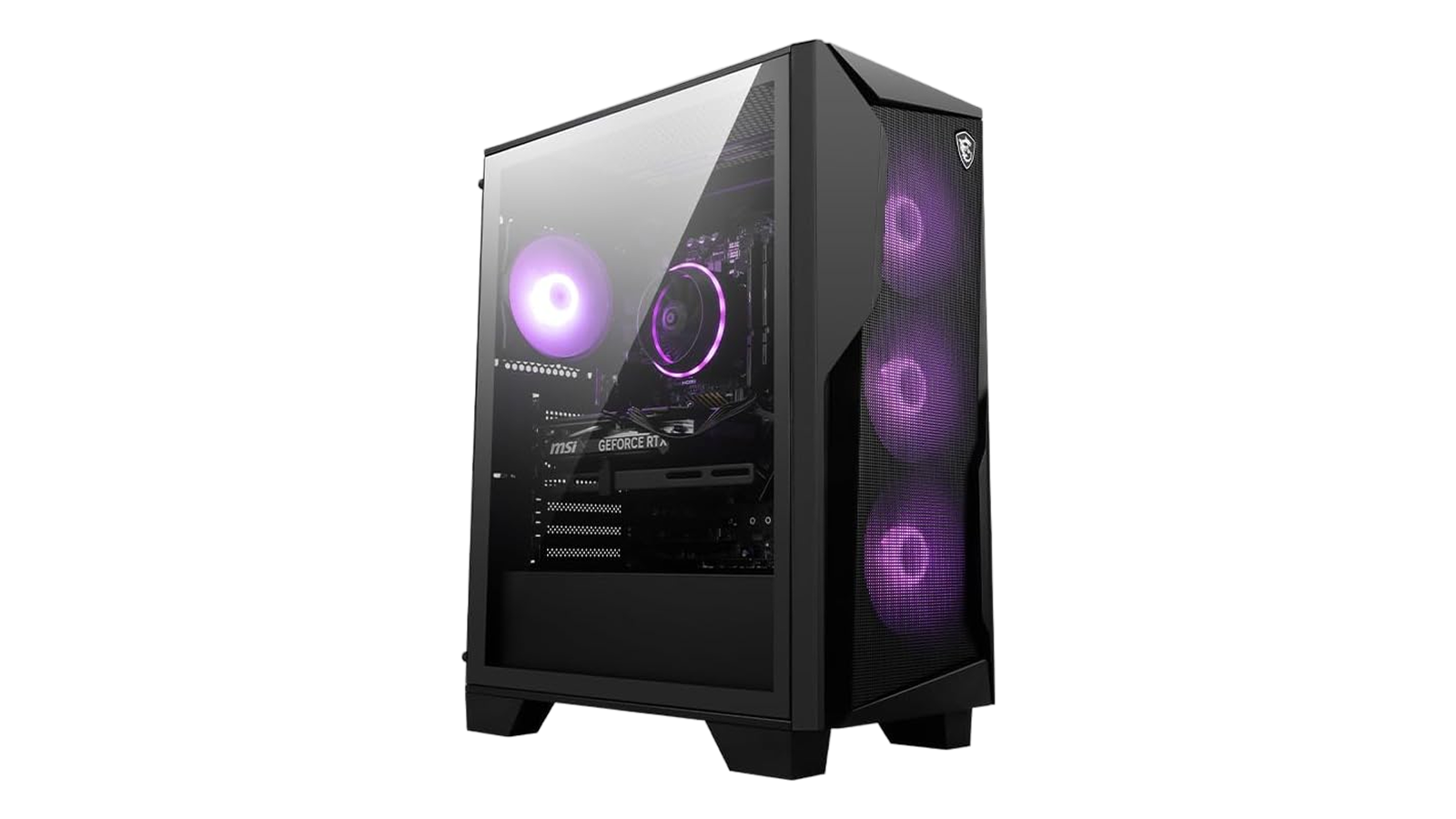
Here’s a snapshot of the full MSI Codex R2 specs before we get into how they perform in practice.
| Specs | Details |
|---|---|
| Processor | Intel Core i5-14400F (up to 4.7 GHz, 14th Gen) |
| GPU | NVIDIA GeForce RTX 4060, 8GB GDDR6 |
| RAM | 16GB DDR5 5600MHz (4 slots, max 192GB) |
| Storage | 1TB NVMe SSD |
| Operating System | Windows 11 Home |
| Wireless | WiFi 802.11ax, Bluetooth |
| Ports | DisplayPort, HDMI, 10x USB (USB 3.2 Gen 1), Ethernet |
| Cooling | 4 system fans + RGB CPU Air Cooler |
| Dimensions | 16 x 8.38 x 19 inches |
| Weight | 21.3 lbs |
| Included Peripherals | Gaming keyboard and mouse |
| Warranty | 1-year manufacturer limited |
Key Features and Benefits
The specs look clean on paper – here’s what they actually mean for day-to-day gaming and the ownership experience.
- Intel Core i5-14400F (14th Gen, up to 4.7 GHz) – The 6P+4E hybrid core layout balances gaming performance and background multitasking effectively. You can run Discord, Chrome, and a streaming tab at the same time as a demanding game without the CPU pulling frame time away from the GPU. Note: the F suffix means no integrated graphics – the RTX 4060 handles all visual output.
- NVIDIA GeForce RTX 4060 8GB GDDR6 – The Ada Lovelace architecture supports DLSS 3.0 and hardware ray tracing, which means you can enable ray-traced lighting in supported titles without gutting your frame rate. At 1080p with high or ultra settings, the RTX 4060 keeps most modern titles well above the 60 FPS floor.
- 16GB DDR5 5600MHz with 4 memory slots – DDR5 at 5600MHz is faster in memory-bound workloads than DDR4 equivalents. The bigger practical point: four slots with a 192GB ceiling means upgrading from 16GB to 32GB later is a 10-minute job and costs around $50-80 at current prices.
- 1TB NVMe SSD – The NVMe interface keeps Windows boot times under 15 seconds on a clean install and cuts game load screens significantly compared to HDD-based systems. The 1TB capacity fills up faster than you’d expect – three or four AAA installs and you’re watching storage closely.
- Included gaming keyboard and mouse – MSI ships a functional gaming keyboard and mouse with the system, not a throwaway office bundle. For anyone setting up their first gaming desk, this removes $50-100 from the day-one cost.
Performance and Real-World Experience
The i5-14400F and RTX 4060 combination is built for 1080p gaming – here’s how it actually plays out across real workloads.
At 1080p with high settings, the RTX 4060 delivers the kind of consistent frame rates that make competitive and cinematic gaming genuinely comfortable. Fortnite pushes past 150 FPS, Diablo IV and WoW run at 80-120 FPS on high settings, and Elden Ring stays comfortably above 60 FPS. Cyberpunk 2077 sits at 60-80 FPS at high settings without ray tracing, dropping to 40-50 FPS with RT enabled and DLSS set to balanced. That’s the MSI Codex R2 1080p gaming envelope – a purpose-built 1080p performer. Anyone already running a 1440p monitor should factor that into the decision.
The i5-14400F handles gaming workloads without bottlenecking the GPU at 1080p. In my assessment, this is the right CPU pairing for a system at this price – it keeps Discord, browser tabs, and a game running simultaneously without pulling frame time away from the card. Push it toward video rendering or heavy content creation and it shows its limits, but for gaming it does the job cleanly. Boot and load times are one of the system’s quiet strengths – cold start to Windows desktop in under 15 seconds, and game launches in Steam feel noticeably faster than anything running off a spinning drive. This MSI Codex R2 RTX 4060 review thermal picture is similarly solid: CPU temperatures stay in the 60-70C range during extended sessions, and the RTX 4060 runs at 70-80C under full load – well within NVIDIA’s specified envelope, nowhere near throttling territory.
| Pros | Cons |
|---|---|
| ✅ RTX 4060 runs 1080p games at high settings at 80-150+ FPS across modern titles ✅ DDR5 5600MHz with 4 slots and a 192GB ceiling makes RAM upgrades an easy future add ✅ Includes a gaming keyboard and mouse – no extra spend on peripherals day one ✅ 4-fan cooling system keeps thermals and noise manageable across extended sessions ✅ NVMe SSD delivers sub-15-second boot times and noticeably faster game load screens ✅ Built-in WiFi 802.11ax and Bluetooth eliminate the need for separate adapter purchases ✅ MSI Center lets you monitor temps, control RGB, and apply performance profiles in one place | ❌ 1TB SSD fills up quickly with AAA installs – plan to add a SATA drive ($40-60), though the Codex R2 has open bays ready for it |
The MSI Codex R2 earns an Enebameter 8.3/10 for combining RTX 4060 performance, DDR5 memory, and genuine upgrade headroom in a compact tower under $1,300. Four RAM slots, open drive bays, and standard PCIe components mean this system grows with you rather than boxing you into a dead end.
Buying a pre-configured system means factory-tested component compatibility, a manufacturer warranty, and no sourcing guesswork – advantages that matter considerably when you’re setting up your first gaming desk. At $1,299, a self-build with identical RTX 4060, i5-14400F, case, PSU, and Windows 11 Home license lands within $50-150 of the MSI price. The Codex R2 closes that gap further by including a gaming keyboard and mouse from day one.
“The i5-14400F and RTX 4060 push Fortnite past 150 FPS with barely a whisper from the fans. It’s fast and quiet, and I haven’t hit a single stability issue since day one. The SSD makes game loads feel nearly instant.” – Justin
Justin’s 150 FPS Fortnite figure is specific and the hardware backs it up at 1080p. At a 144Hz refresh rate, the Codex R2 runs at full refresh with overhead to spare – which means your frame rate doesn’t tank when the action gets chaotic, input lag stays minimal, and you’re not leaving performance on the table because the system is struggling to keep pace. The quiet fan operation Justin describes is consistent with the Codex R2’s 4-fan airflow design: at 1080p gaming loads, the fans don’t need to spin hard to maintain good thermals, so they stay in the background rather than competing with your audio.
“After nearly a year with this machine, it hasn’t missed a beat. I run VR on it regularly and the RTX 4060 keeps up without any complaints. Upgrading the RAM early was the smartest move I made.” – Saedus1991
The VR use case Saedus1991 describes is realistic but worth framing correctly. The RTX 4060 meets entry spec for most current headsets – casual VR at medium settings works without complaint, which is more than most people expect from a system at this price point. That said, it’s not a VR powerhouse at maximum fidelity. The RAM upgrade advice is the most practically useful takeaway from a year of genuine use – DDR5 prices have stabilized significantly, and moving from 16GB to 32GB is cheap insurance against future titles with higher memory requirements. The four-slot layout means you’re adding sticks, not replacing them.
Upgrade Path and Expandability
One of the strongest arguments for the Codex R2 over competing pre-builts at this price is what you can do with it after you buy it.
RAM is the first and easiest upgrade – and the most commonly recommended first step from owners. The stock 16GB DDR5 5600MHz is sufficient for 2026 gaming, but the jump to 32GB costs $50-80 and takes roughly 10 minutes with the side panel off. That’s the practical advantage of the MSI Codex R2 specs layout: four slots with a 192GB ceiling means adding memory, not replacing it.
Storage is the next natural bottleneck. The 1TB NVMe SSD fills fast once you install multiple AAA titles. The Codex R2 has open SATA bays that accept standard 2.5″ or 3.5″ drives – a 2TB SATA SSD runs $40-60 at current prices and is a plug-and-play expansion. An M.2 slot is also available for a second NVMe drive.
The RTX 4060 covers 1080p gaming for two to three years without feeling pressured. When the time comes, the PCIe slot is standard and the 80+ Gold PSU supports mid-range GPU upgrades. For anyone considering a capable gaming PC under $500 as an entry point, the Codex R2’s headroom makes a strong case for spending the extra money up front.
Cooling and Noise Levels
Good thermal management separates a gaming PC that lasts from one that throttles – and the Codex R2 handles this better than most pre-builts at this price point.
The airflow layout gives the Codex R2 a real advantage over cheaper single-fan designs. Three front intake fans pull cool air across the GPU and CPU heat sink while a rear exhaust fan pushes hot air out – a positive-pressure configuration that reduces hot air recirculation inside the case. Because the load is split across four fans, each can spin at a lower speed to maintain good airflow, which keeps noise in the moderate range.
CPU thermals are well within safe operating limits: the i5-14400F runs at 60-70C during extended gaming loads with the stock air cooler, and the 14th-gen i5’s lower TDP means air cooling at this price tier is genuinely sufficient. The RTX 4060 holds boost clocks consistently through extended sessions – running at 70-80C under full GPU load, which is within NVIDIA’s specified thermal envelope and nowhere near throttle territory. MSI Center gives you manual fan curve control, and the general rule of thumb: keep the side panel on if your room runs warm. The Codex R2’s cooling design works best as a closed system.
My Overall Verdict on MSI Codex R2
The MSI Codex A14 review verdict is clear for anyone shopping the $1,000-1,300 pre-built range: this is a well-executed system that delivers what it promises. The RTX 4060 handles 1080p gaming at high settings without strain, DDR5 memory comes with four expandable slots, and the thermal management holds up through extended sessions – a combination that’s more meaningful than it sounds in a pre-built at this price.
This MSI Codex R2 is best suited for first-time PC owners, console-to-PC switchers, and anyone who wants a pre-configured rig backed by a manufacturer warranty rather than sourcing individual parts. The Enebameter score of 8.3/10 reflects strong hardware value for the price, with a small deduction for the limited review count and the 1TB storage ceiling that fills faster than it should at $1,299.
Who should look elsewhere: if you’re targeting 1440p or 4K gaming, the RTX 4060 will feel the pressure in demanding titles at those resolutions. Self-builders can get close to identical specs at a similar cost, though the factory-tested compatibility and included peripherals narrow that gap. Anyone on a tight storage budget should plan on a $40-60 SATA drive on day one. With those caveats stated, the MSI Codex A14 review points in one clear direction for anyone prioritizing 1080p gaming performance and upgrade headroom in a single purchase.
Complete Your Setup
The Codex R2 is a solid foundation – the right peripherals pull significantly more out of the experience, especially since the included keyboard and mouse are a starting point rather than an endgame.
CHERRY XTRFY K5 Pro TMR Compact Keyboard
The MSI Codex R2 ships with a functional gaming keyboard, but if you want to upgrade, the CHERRY XTRFY K5 Pro TMR is a meaningful step up. The TMR magnetic switch technology gives you actuation customization and zero-debounce response times that make a real difference in fast-paced competitive games. The compact form factor keeps desk space open without sacrificing key count, and CHERRY’s build quality is a noticeable upgrade from any bundled keyboard.
Logitech G Gaming Headset
A solid gaming headset rounds out the Codex R2 setup. Logitech G’s PC gaming headsets are tuned for long sessions – the driver software pairs well with Windows 11, and the audio balance works across game genres without needing heavy EQ adjustments. If you’re spending hours at the desk, comfort and audio quality matter more than peak volume numbers.
FAQs
Yes, the MSI Codex R2 is worth it for anyone wanting a ready-to-game 1080p desktop without the complexity of building from scratch. The RTX 4060 and DDR5 combination at $1,299 holds up well against a comparable self-build cost once you factor in components, a Windows 11 license, and bundled peripherals.
Yes, 1080p gaming is the MSI Codex R2’s clear strength. The RTX 4060 handles modern titles at high settings with frame rates consistently above 60 FPS, and competitive games like Fortnite push well past 150 FPS without straining the system.
The Codex R2 A14NUC5 uses a proprietary MSI board with an LGA1700 socket for 14th Gen Intel processors. RAM and storage follow standard spec so those upgrades are straightforward, but CPU swap options may be limited by MSI’s pre-built BIOS – research compatibility before any processor swap.
In the MSI Codex R2 vs Aegis comparison, the Aegis sits higher in MSI’s lineup with more compact chassis options and higher-end GPU configurations at a premium price. The Codex R2 trades the Aegis form factor for a traditional mid-tower, improving airflow and upgradeability – a worthwhile exchange at the $1,000-1,300 price point.
The MSI Codex A14 review holds up well for 2026: the RTX 4060 still covers 1080p gaming without compromise, and DDR5 is now the standard memory spec rather than a premium add-on. The upgrade headroom built into the Codex R2 – four RAM slots, open drive bays, and a standard PCIe GPU slot – gives this system several years of practical use ahead of it.