How to Unlock Competitive in Overwatch 2: Step-by-Step Guide to Ranked Play


Unlocking Competitive Mode in Overwatch 2 is the moment every player looks forward to. It’s where casual play gives way to true test matches of skill, communication, and strategy. In this comprehensive guide, I’ll explain exactly how to unlock Competitive in Overwatch 2, what happens once you do, and how to thrive in ranked matches once you step into the fray.
As someone who has gone through the competitive play qualification challenge several times, I can tell you it’s not only about ticking off matches – it’s about preparing mentally and mechanically for the leap into competitive play. Let’s break it all down.
Jump to:
How to Unlock Competitive in Overwatch 2: Qualification Requirements
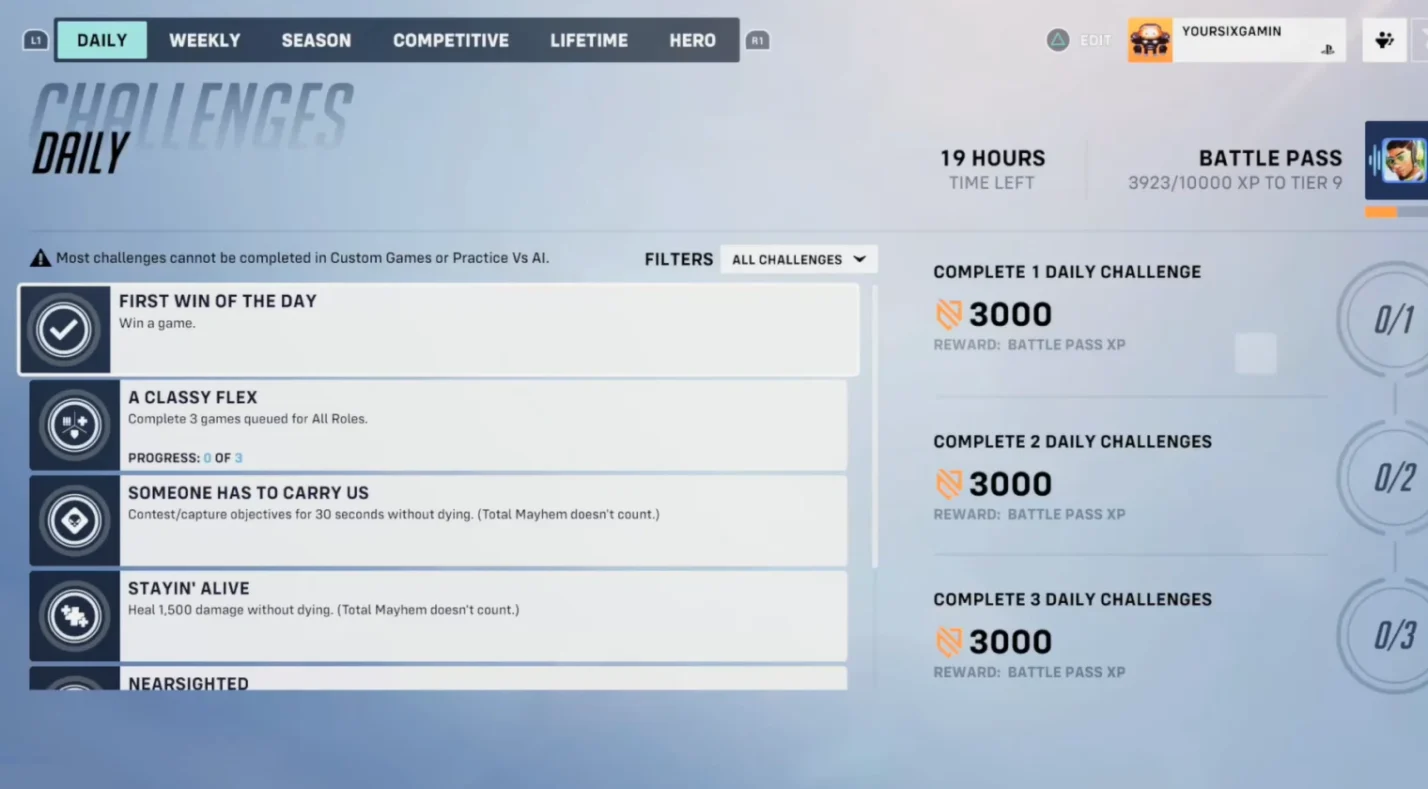
If you’re wondering how to unlock Competitive in Overwatch 2, the first step is completing 50 Quick Play matches. Blizzard Entertainment designed this requirement to make sure new players have enough experience with the game’s mechanics and heroes before diving into ranked play.
Here’s what this process looks like:
- Play and complete 50 quick play matches. Wins and losses both count toward the total, so you don’t need to win all of them.
- These matches introduce you to role queue, open queue, and the basic flow of team combat.
- Once the challenge is done, you unlock the competitive tab in the main menu, granting access to competitive mode and ranked matches.
- If you owned the original Overwatch account and are returning, your previous stats may transfer, giving you immediate access to competitive mode in Overwatch 2.
This system guarantees that competitive play in Overwatch 2 remains fair and balanced, protecting both newcomers and veterans. The goal is to enter the competitive playlist prepared, not overwhelmed.
When I first made my way through the 50 matches, I used that time to experiment with different support heroes and learn map callouts. It made the later climb far smoother.
What Happens After Unlocking Competitive Mode
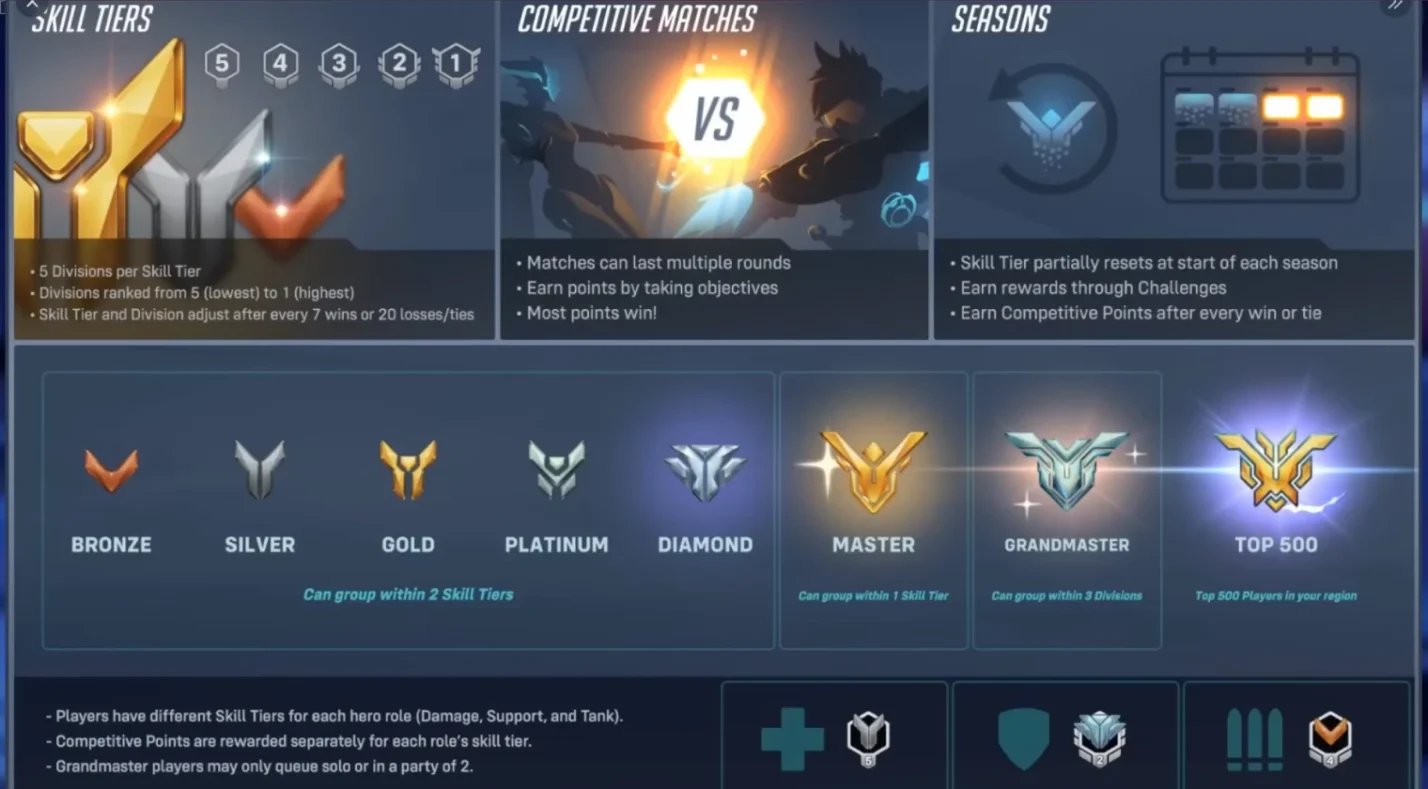
Once your 50-match qualification is complete, you can access the competitive mode directly from the main menu. Here’s what happens next:
- Placement Matches Begin
You’ll start with five placement matches that determine your starting rank. These matches are crucial – your early win rate and performance metrics heavily influence your initial division. - Division and Tier System
Ranks are divided into five divisions per tier (Bronze 5 through Top 500). Winning matches pushes you upward, while consistent losses lower your division. - Earning Competitive Points
Each win grants competitive points, a special currency used to unlock golden weapon skins for heroes. - Seasonal Resets and Updates
Each competitive update may tweak how matchmaking and progression work. Keep an eye on patch notes for adjustments to the matchmaking system or rank resets. - Role and Open Queue Options
You can choose role queue, locking into tank, damage, or support roles, or open queue, where you can switch roles freely.
This structured system balances skill and dedication, ensuring that each victory feels earned. It’s the foundation of the competitive journey in Overwatch 2.
Preparing for Competitive Matches: The Right Way to Start
Jumping into competitive games without preparation can lead to frustration. Using the best VPN for Overwatch can help with connection stability, but before starting your first placement matches, take time to get comfortable with these elements.
Learn the Maps and Objectives
Each map in Overwatch 2 has specific choke points, flanking routes, and objectives. Spend time exploring the game’s maps in quick play or custom lobbies. Understanding layouts helps you react faster and coordinate team pushes.
Master a Core Hero Pool
Avoid switching heroes constantly. Instead, pick two per role that you can confidently play. For example, mastering Reinhardt for tanking and Lucio for support ensures you’re ready when the team composition demands them.
Play with Purpose in Quick Play
Even while grinding the initial 50 quick play matches, focus on improving rather than just completing games. Practice aim consistency, positioning, and ult management.
Keep a Stable Internet Connection
Nothing is worse than lag during ranked play. Stable internet isn’t just a convenience; it’s essential to maintain your skill level performance across matches.
Manage Your Emotions
Loss streaks are inevitable in Competitive mode in Overwatch 2. Staying calm and reviewing mistakes after each match helps more than venting frustration.
During my first season, I made a routine of reviewing my replays. Watching my own positioning errors taught me far more than any YouTube tutorial could.
Differences Between Quick Play and Competitive Mode
Understanding how competitive mode differs from quick play will help you adjust your mindset before queuing for ranked.
| Feature | Quick Play | Competitive Mode |
| Objective | Casual matches for practice | Ranked progression & skill test |
| Matchmaking | Looser, faster queues | Based on player skill rating |
| Rewards | XP only | Competitive Points, titles, golden weapons |
| Atmosphere | Relaxed | Strategic, team-focused |
| Duration | Shorter, flexible | Longer, best-of format in some maps |
In competitive play, communication and teamwork are critical. You’ll face opposing teams that coordinate ultimates, counter-pick heroes, and punish small mistakes. That’s what makes playing competitively so rewarding – and intense.
Understanding Placement Matches and Ranks
Your first five placement matches are about more than just winning. They help the system estimate your skill level and place you in an appropriate division.
- Wins boost your initial ranking.
- Performance matters – eliminations, objective time, and healing output all influence results.
- Consistency is key. Even if you lose, consistent impact across matches can soften the drop.
After placements, the real climb begins. The game tracks progress in sets of wins or losses, updating your visible rank after every competitive update (e.g., 5 wins or 15 losses).
Challenges New Players Commonly Face
Newcomers to competitive play in Overwatch 2 often face steep learning curves. Here are the most common challenges and how to handle them:
- Smurfs and unbalanced matches: Sometimes, higher-ranked players create new accounts. Focus on your own improvement rather than match variance.
- Limited hero familiarity: New players often struggle because they haven’t found a hero they truly click with. Try the quest-based tutorial and hero mechanics challenges in the training range.
- Team communication breakdowns: Use simple, direct callouts – “Reaper behind,” “push payload,” or “fall back.”
- Loss streaks and frustration: Take short breaks. Emotional control improves performance.
To better prepare, explore our best FPS games list for titles that train reflexes and accuracy transferable to Overwatch 2.
Advanced Tips for Playing Competitive Matches
Once you’re settled into competitive play, these strategies help you climb:
- Study Meta Updates – Each balance patch reshapes viable heroes. Adapting quickly is key to staying relevant.
- Watch Replays and Streams – Observing high-ranked players reveals movement patterns and decision-making habits.
- Use Voice Chat Wisely – Don’t overwhelm the channel; share only useful info.
- Focus on Win Conditions – Think beyond eliminations. Control space, time ultimates, and play objectives.
- Stay Versatile – Even in role queue, flexibility wins matches. Know backup heroes.
For example, switching from Ana to Kiriko when facing heavy dive compositions can turn a losing match around. Little adaptations like that define success in competitive games.
Maintaining Progress in the Competitive Journey
Climbing ranks in Overwatch 2 isn’t just about skill — it’s about consistency. Here’s how to maintain momentum through your competitive journey:
- Queue during stable hours to avoid server lag.
- Warm up in the practice range for at least ten minutes before your session.
- Track your hero stats to understand weak points.
- Celebrate small improvements, like better ultimate economy or fewer deaths per match.
When burnout hits, I like switching briefly to Mystery Heroes or unranked matches for fun before diving back into ranked play. Balance keeps the grind enjoyable.
For gear enthusiasts, our best gaming accessories article lists tools that enhance comfort and precision – especially useful for PC players climbing competitive ladders.
Power Up Your Play with Eneba Deals
Learning how to unlock competitive in Overwatch 2 transforms your gameplay. From understanding the competitive play qualification to mastering placement matches and map strategies, each step builds your confidence and skill.
If you’re ready to test your abilities, grab your Overwatch 2 key from our Eneba store. We offer secure, affordable access to Overwatch 2: Invasion and Overwatch 2: Ultimate Battle Pass editions. Owning the game through our platform ensures quick delivery and reliable updates for new seasons.
No matter if you’re chasing higher ranks or just exploring team-based strategy, competitive play in Overwatch 2 offers one of the most rewarding experiences in modern gaming.
FAQs
How many quick play matches do I need to play to unlock competitive?
To unlock competitive play in Overwatch 2, you must complete 50 quick play matches in unranked mode before accessing the competitive tab.
When can I play my placement matches in competitive mode?
You can play placement matches right after completing your 50 quick play matches and unlocking the competitive tab from the main menu.
How is my starting rank determined in Overwatch 2?
Your starting rank is determined by your performance in placement matches, factoring in wins, personal stats, and contribution to team fights.
Can I play ranked matches with friends?
Yes, you can play ranked matches with friends, but matchmaking limits apply if your ranks differ too much to ensure fair team balance.
What happens if I make a new account in Overwatch 2?
If you’re a new player, your account must still complete 50 quick play matches to unlock competitive mode. Returning players with linked original Overwatch accounts may get immediate access.