Can You Play Valorant on Mac? Everything You Need to Know in 2026

As a dedicated tactical shooter fan, I’ve lost countless hours to Valorant since its release. Friends often ask me the same thing – can you play Valorant on Mac? The short answer is no if you expect a native macOS version, and yes if you’re willing to install Windows on an Intel-based Mac.
In this guide, I explain why Valorant hasn’t come to macOS, outline the only reliable method to run it on a Mac, and share my personal tips for getting the smoothest experience.
I also highlight hardware considerations, performance tweaks, alternatives for Apple Silicon users, and when – or if – we might see official Mac support. By the end, you’ll know exactly where Mac gamers stand and how to join the action in [currentyear].
Jump to:
Can You Play Valorant on Mac? Quick Answer and Why It’s Complicated
Can you play Valorant on Mac? In [currentyear], there still isn’t a native macOS client for Valorant. Riot Games designed its free‑to‑play shooter for Windows, and the studio hasn’t announced plans to port the game to macOS.
The barrier isn’t the graphics or controls but the Vanguard anti‑cheat engine. Vanguard runs at the kernel level on Windows and integrates deeply with the operating system to detect cheats. It doesn’t support macOS security models, which is why Valorant refuses to launch through compatibility layers, virtualization software, or cloud‑streamed machines.
Your only reliable option right now is to install Windows on an Intel-based Mac using Apple’s Boot Camp Assistant. When you restart your Mac into the Windows partition, you effectively have a Windows PC with all the drivers required to run Vanguard.
This method works for older MacBook Pro, MacBook Air, Mac mini, iMac, and Mac Pro models that use Intel processors. I’ve used Boot Camp on a 2018 MacBook Pro to play Valorant with mid‑range settings and found it stable, though it requires patience during setup and careful storage planning.
It’s important to stress that Apple’s newer M1, M2, and M3 chips can’t use Boot Camp. They rely on a different architecture (ARM), and Apple no longer supports dual‑booting Windows via Boot Camp on Apple Silicon. Virtualization apps like Parallels Desktop and VMware Fusion emulate Windows on these chips, but Vanguard detects the virtual environment and blocks the game.
Cloud gaming services such as GeForce Now and Xbox Cloud Gaming are also off the table because they run games on virtualized servers. As of October 6, 2025, Mac gamers with Apple Silicon have no official way to play Valorant.
Riot’s Vanguard Anti‑Cheat and Mac Security

Understanding why Vanguard is so restrictive helps explain why the question “Can you play Valorant on Mac?” has become such a popular query. Vanguard operates at the lowest level of the Windows operating system. It scans memory and hardware drivers to prevent players from injecting cheat code or running unauthorized processes.
MacOS doesn’t allow third‑party software to install kernel extensions with comparable access, so porting Vanguard would require major changes to Apple’s security framework. The few Mac games that implement kernel‑level anti‑cheat tools often require special entitlements from Apple.
Riot has acknowledged that developing a separate macOS client would be resource‑intensive, and the studio hasn’t indicated any movement toward a port. In 2024, a Riot engineer responded to community questions by confirming that there were no immediate plans to support Mac.
That stance hasn’t changed in 2025. Without Vanguard, players would quickly run into cheaters, undermining the integrity of competitive play. For now, Riot prioritizes cheat prevention over cross‑platform support.
Boot Camp: The Only Viable Method for Intel Macs
If you own an Intel‑based Mac and still wonder if you can play Valorant on Mac, the answer is: YES, if you install Windows through Boot Camp. Boot Camp Assistant is a built‑in macOS utility that creates a separate Windows partition on your drive, installs Microsoft’s operating system, and supplies drivers so Windows can access your hardware. When you boot into Windows, your Mac essentially acts like a PC.
Here are the key points to know before you dive in:
- Hardware requirements: You need an Intel Mac made from 2012 onward, at least 64 GB of free disk space, and a Windows 10 or Windows 11 ISO file. Valorant itself requires around 28 GB of space, so plan for at least 100 GB for the Windows partition to accommodate updates and drivers.
- Preparation: Update your Mac to the latest macOS version, back up important data, and check that Secure Boot is set to its default (Full Security). Have a USB stick with at least 16 GB capacity ready if you’re installing on macOS versions earlier than El Capitan.
- Boot Camp installation: Open Boot Camp Assistant from the Utilities folder, follow the prompts to select the Windows ISO and allocate partition size, and let the tool handle the process. When it finishes, your Mac will reboot into Windows, where you’ll complete the installation.
- Game installation: After Windows is set up, download the Valorant installer from Riot’s official site, create a Riot account if necessary, and install the game. Vanguard will install automatically. Ensure Windows updates and Boot Camp drivers are current before launching the game.
Boot Camp is straightforward, but time‑consuming. On my Intel MacBook Pro, the entire process took about two hours, including Windows updates. Once in Windows, Valorant ran at 1080p on medium settings with frame rates between 60 and 90 FPS. Keep your Mac plugged into power to avoid throttling and allocate enough disk space from the start so you don’t have to resize the partition later.
Setting Up Valorant on Mac: Step‑by‑Step Guide for Intel Users
Setting up Valorant via Boot Camp requires patience and attention to detail. Below is a streamlined guide based on my own experience.
1 – Prepare Your Mac and Download Windows
Make sure your macOS is up to date and back up important files. Download a Windows 10 or Windows 11 ISO from Microsoft’s website. Apple recommends Windows 10 (Build 19041 or newer) for compatibility. Check that you have at least 64 GB of free space; 128 GB is safer.
If your Mac runs a version older than El Capitan, create a bootable USB stick containing the Windows ISO. Newer macOS versions can install directly from the ISO without a USB drive. Keep your power adapter connected and any unnecessary peripherals unplugged.
2 – Run Boot Camp Assistant and Create a Partition

Launch Boot Camp Assistant from Applications > Utilities. Choose the Windows ISO and set your partition size. I recommend allocating at least 100 GB to Windows so there’s room for system updates and future games. Boot Camp will download Windows support software and partition your drive automatically. When it prompts, click Install.
During the process, your Mac may restart several times. Follow on‑screen instructions to select the BOOTCAMP partition when asked where to install Windows. Let Windows installer format the partition if necessary. The installer will copy files and reboot into the initial Windows setup.
3 – Complete Windows Installation and Install Drivers
After the Windows installer finishes, you’ll see a “Welcome to Boot Camp” message. Follow prompts to install Boot Camp drivers and other support software. These drivers enable Wi‑Fi, trackpad gestures, graphics acceleration, and sound in Windows. Let the installer finish and restart the system.
Once Windows is fully installed, open Windows Update to install the latest patches. I also use Device Manager to verify that all devices are functioning. With drivers and updates completed, open a browser and head to the Valorant download page. Create or sign in to your Riot account and click Play Free to download the installer.
4 – Install Valorant and Adjust Settings
Run the Valorant installer in Windows. It will install both the game and the Vanguard anti‑cheat. After installation, restart if prompted. When you launch the game, log in with your Riot credentials, adjust your resolution to match your Mac’s display, and tweak in‑game settings for performance.
On my Intel MacBook Pro with a discrete GPU, I set graphics to medium and turned off motion blur. Lowering texture quality and disabling anti‑aliasing can help maintain frame rates above 60 FPS.
Boot Camp isn’t perfect. Mac keyboards lack a dedicated Windows key, and you may need to remap some controls. Cooling can be a challenge because Mac chassis are thin; using a laptop stand or cooling pad helps. Still, with proper setup, Boot Camp offers a smooth way to run Valorant on Intel hardware.
Can You Run Valorant on Apple Silicon Macs?
Apple Silicon chips (M1, M2, and M3) represent a leap forward for Mac performance and battery life, but they have a major limitation for playing Valorant on Mac. Boot Camp doesn’t work on these machines because Windows on ARM isn’t officially supported by Apple.
Even if you use a virtualization tool like Parallels, VMware Fusion, or UTM to run Windows 11 ARM, Vanguard will detect the virtual environment and refuse to launch Valorant.
Riot’s anti‑cheat is designed to interact with hardware at a low level, which virtualization layers can’t mimic. Some players have tried to pass Vanguard through with advanced configurations, but Riot actively bans accounts that circumvent the anti‑cheat restrictions.
As of late 2025, there’s no safe or sanctioned method to play Valorant on Apple Silicon Macs. The only path is to use an Intel Mac with Boot Camp or switch to a Windows PC or supported console.
Hardware and Performance Considerations
Even if you find a way to run the game, hardware plays a big role in how Valorant performs. The official minimum requirements call for an Intel Core 2 Duo E8400 or AMD Athlon 200GE CPU, 4 GB of RAM, and an integrated Intel HD 4000 GPU.
For a smooth 60 FPS experience, Riot recommends at least an Intel i3‑3215 or AMD Ryzen 35 2000, 8 GB of RAM, and a GTX 1050 Ti or better. Many Intel Macs meet or exceed these specifications, especially mid–2020s MacBook Pros with discrete AMD or Nvidia graphics.
Here are some tips to get the most out of your Intel Mac when playing Valorant through Boot Camp:
- Choose the right model: Older Intel MacBook Airs with integrated graphics struggle to maintain stable frame rates. MacBook Pro models with discrete GPUs (Radeon Pro 560X or higher) provide a significantly better experience. iMacs with discrete graphics also handle the game well. If you’re shopping for a new Mac with gaming in mind, our MacBook gaming guide discusses seven models that balance performance, battery life, and price.
- Monitor temperatures: Running Windows and Valorant generates more heat than typical macOS workloads. Keep your Mac plugged in, use a cooling pad, and consider undervolting the CPU and GPU if you’re comfortable with advanced tweaks. Apple’s thin designs can throttle under sustained loads.
- Adjust game settings: Lowering render resolution to 1080p, reducing texture quality, and capping frame rates at 60 FPS can stabilize performance. Disabling ambient occlusion and bloom also improves responsiveness. I found that turning off full-screen anti‑aliasing gave a noticeable FPS boost without harming visual clarity.
- Free up resources: Close unnecessary Windows programs and disable startup apps. Valorant benefits from unallocated memory and CPU cycles. Running Boot Camp on an external monitor can help keep the laptop cooler by letting you close the MacBook lid and use a dedicated display.
If performance is still lackluster, consider exploring dedicated gaming PCs or cross‑platform shooters available on macOS. Apple’s Game Mode (introduced in macOS Sonoma) prioritizes gaming workloads, but it only activates in native Mac games, so it doesn’t apply to Boot Camp sessions.
Alternatives for Mac Gamers Who Can’t Play Valorant
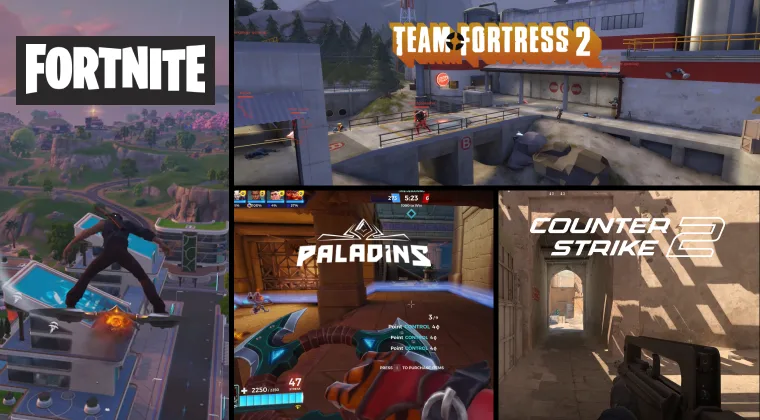
If you have an Apple Silicon Mac or prefer to stay within macOS, there are plenty of other games that deliver tactical thrills without requiring Windows. Here are a few standout alternatives:
- Counter‑Strike 2: Valve’s competitive shooter runs natively on macOS and offers a skill-based 5v5 experience similar to Valorant. It remains one of the most popular esports titles in 2025. Check our roundup of tactical shooter games to discover more options.
- Team Fortress 2: While more casual than Valorant, this class-based shooter works on macOS and has a vibrant community. Each class has unique weapons and abilities, providing variety and strategic depth.
- Fortnite: Epic Games’ battle royale includes creative modes and constant updates. It runs on macOS through the Epic Games Launcher. With cross‑platform play, you can squad up with friends on consoles and PCs.
- Paladins: Hi‑Rez Studios’ hero shooter offers colorful champions and objective‑based gameplay. It runs on macOS via Steam and offers cross‑play with Windows and console players.
For players who love the high stakes and team coordination of Valorant, our list of the best tactical shooters highlights games with precision gunplay and strategic mechanics. You’ll find options ranging from SWAT 4 to modern titles like Ready or Not, many of which support macOS or consoles.
If you enjoy watching the competitive scene, you might also want to explore the most popular esports games of 2025. The list examines top esports titles and their player bases, giving a sense of how Valorant fits into the broader competitive landscape. Watching professional tournaments can inspire strategies and keep you connected to the shooter community while you wait for Mac support.
Will Riot Games Ever Bring Valorant to Mac?
Given the strength of Apple hardware and the growing Mac gaming market, many players wonder whether Riot will eventually port Valorant to macOS. So far, there has been no official announcement. Riot continues to focus on the PC ecosystem and has recently expanded to consoles with PlayStation 5 and Xbox Series X/S versions. These ports required tailored anti‑cheat solutions for each console environment, but those efforts haven’t translated to macOS.
In 2023, Apple introduced a Game Porting Toolkit to help developers bring Windows games to Mac. The toolkit translates DirectX 12 calls to Apple’s Metal API, simplifying the porting process. However, anti‑cheat engines remain a challenge. Vanguard depends on kernel‑level access, and Apple’s security policies still restrict third‑party kernel extensions. Until Apple provides a secure, sanctioned pathway for anti‑cheat software, Riot is unlikely to invest in a port.
Rumors occasionally surface about unofficial clients or upcoming support, but none have materialized. If you’re eager to play Valorant on Mac, the safest plan is to use Boot Camp on an Intel machine or to explore the growing library of native Mac shooters. You can also follow Riot’s announcements for any hints about future macOS development.
Final Thoughts: Where Mac Gamers Stand
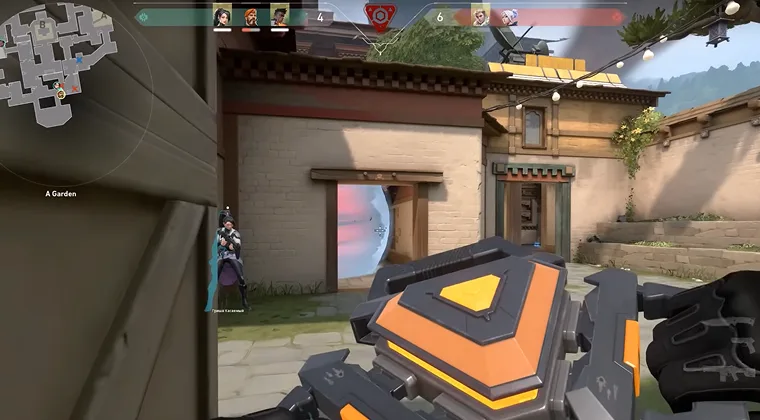
Can you play Valorant on Mac? At the close of 2025, the answer remains a qualified “YES” for Intel Mac owners willing to install Windows via Boot Camp and a resounding “NO” for Apple Silicon users. Vanguard’s kernel‑level anti‑cheat is the primary roadblock, and Riot Games has not signaled plans to release a native macOS client. Intel Mac owners can jump through some hoops and enjoy the same precise gunplay, hero abilities, and competitive modes that have made Valorant a powerhouse. Apple Silicon users must either wait for a port, switch to a Windows PC, or explore other tactical shooters that run on macOS.
As you consider your options, pay attention to your hardware. High‑end Intel MacBook Pros with discrete GPUs handle Valorant smoothly, while older MacBook Airs struggle. Keep your system cool, adjust graphics settings, and free up resources for the best experience.
Before diving into Valorant, you’ll need a Riot account and a way to unlock agents and skins. Our marketplace offers Valorant Points Gift Cards that let you purchase cosmetics and characters without linking a credit card. With a Valorant Points 1000 VP Key, you can load your account with in‑game currency, customize your arsenal, and support your favorite agents once you’ve set up your Mac for battle. Whether you choose to install Windows or explore other shooters, there’s a vibrant world of tactical gameplay waiting for you.
FAQs
Can you play Valorant on MacBook Air M1?
No, you can’t play Valorant on a MacBook Air M1 because Apple Silicon doesn’t support Boot Camp. Virtualization apps and cloud services won’t work because Vanguard blocks them, so there’s currently no way to run the game.
How do you download Valorant on Mac?
To download Valorant on Mac, you must create a Windows partition using Boot Camp on an Intel Mac and then install the game in Windows. Once Windows is running, download the installer from Riot Games and follow the prompts to complete the setup.
Will Riot release Valorant for Mac?
Riot hasn’t announced plans to release Valorant for Mac. Vanguard anti‑cheat conflicts with macOS security, and the developer has prioritized Windows and console versions. While Apple’s porting tools might help in the future, there’s no confirmed timeline.
Is Boot Camp safe for playing Valorant on a Mac?
Yes, Boot Camp is safe for playing Valorant on a Mac because it provides a native Windows environment. You should back up your files and allocate enough storage for Windows and game updates to avoid issues with space or data loss.
Can you play Valorant on Mac without Boot Camp?
No, you can’t play Valorant on Mac without Boot Camp because there is no macOS version. Virtual machines, compatibility layers, and cloud gaming services are incompatible with Vanguard, so installing Windows via Boot Camp on Intel hardware is the only option.